Run a trained model on the microcontroller itself: an answer in milliseconds, with no network, and the readings stay on site. Nine lessons, from a sine wave to a vibration detector that asks a server only when it is unsure.
A sensor that sends every reading to a server gets its answer late, pays for the link in data and power, and stops deciding when the network stops. A gesture written as if statements on raw readings fails, because no two shakes are the same. A model that works on the PC refuses to start on the board, or gives the same answer to every input. A bearing shakes differently for weeks before it fails, and nobody notices until the line stops.
In this course you train small models on your PC or in Edge Impulse, store their numbers in 8 bits, and run them with TensorFlow Lite for Microcontrollers on an ESP32, an STM32 and an RPi Pico. You build a motion classifier, a wake word detector, a gesture classifier, a vibration anomaly detector and a person detector. The last lesson lets the device decide the clear cases itself and send only the unclear ones to a larger model on a server.
From recordings to a model on the chip
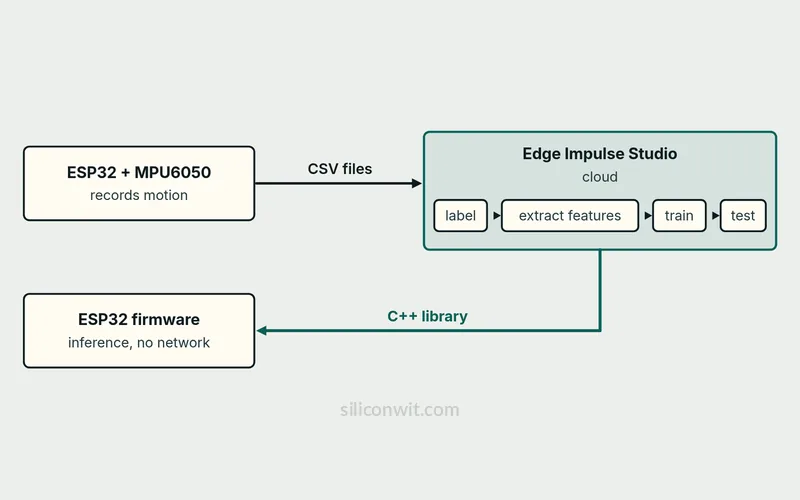
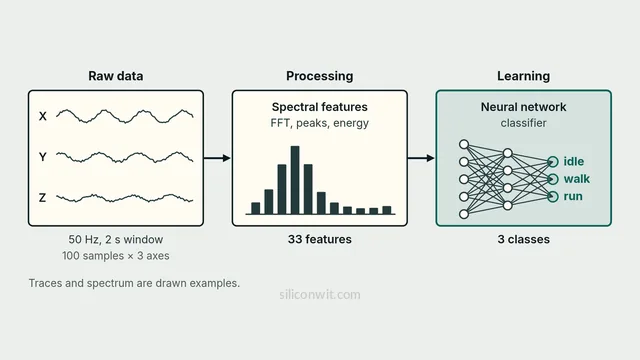
1Record and labelAn MPU6050 on an ESP32 records motion; Edge Impulse labels it, extracts features and trains.
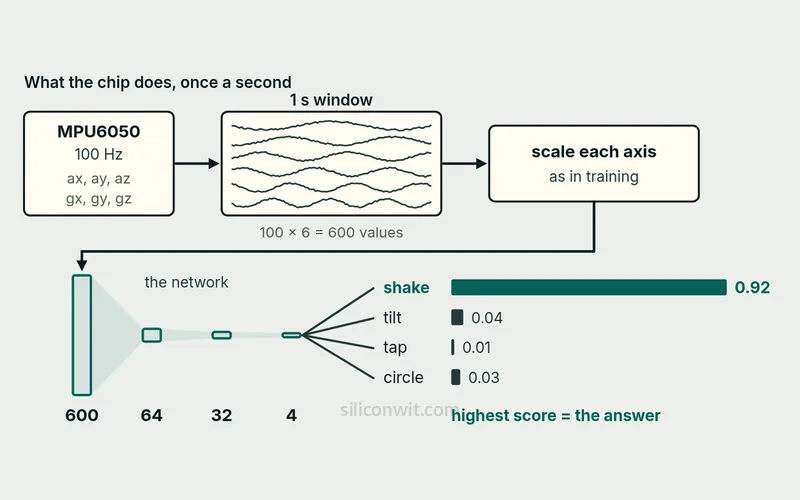
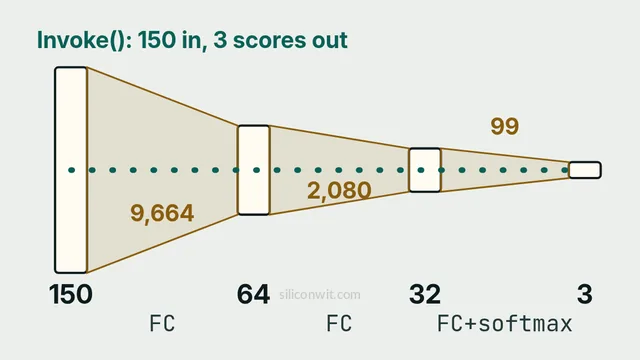
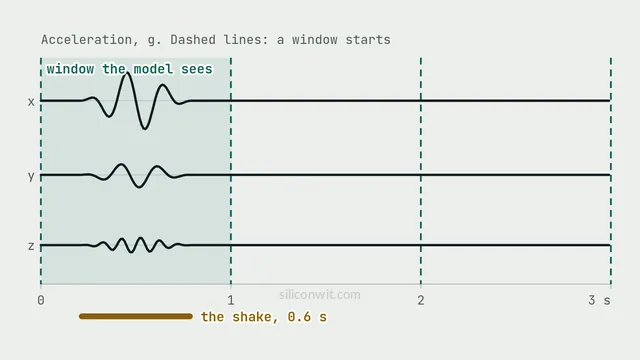
2Train smallA network small enough for the chip: one second of six axes in, four gesture scores out.
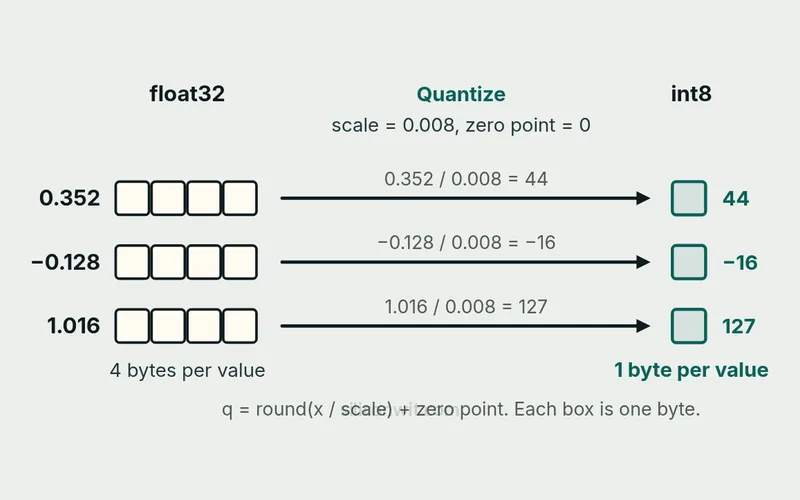
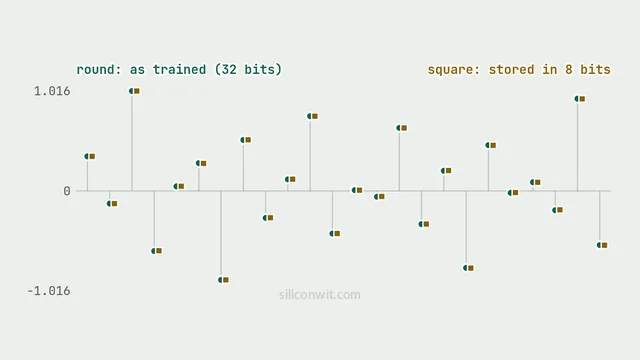
3Store it in 8 bitsEach number becomes one byte: the file 2.7 times smaller, the model 3 to 4 times faster.
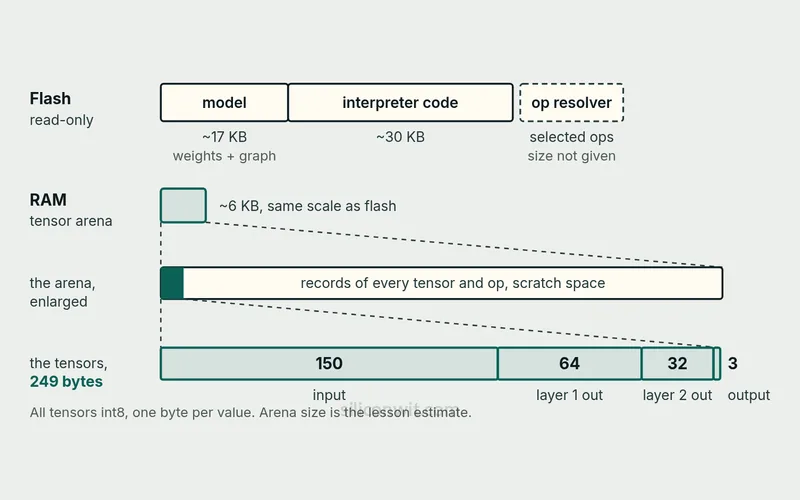
4Run it on the chipThe model and the interpreter in flash, a tensor arena of about 6 KB in RAM.
You will be able to
Record and label sensor data, and train a model small enough for a microcontroller
Quantize a model to 8 bits and run it with TensorFlow Lite Micro, knowing what each part does
Decide what the device decides alone and what it sends to a server
New to this? New to TinyML? Start with lesson 1: the whole path once, with a sine wave model on an ESP32.
You need An ESP32 board and a computer with Python and TensorFlow. Later lessons add an MPU6050, an INMP441 microphone and an ESP32-CAM.
The engineering behind it
Deciding on the device that something is unusual, when sending every sample is too costly.
A model for a microcontroller is not a smaller copy of a server model. Each size and each time comes from the chip it must fit.
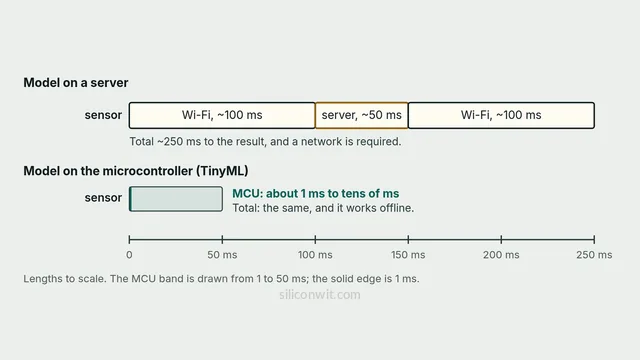
About 250 msfor an answer from a server: about 100 ms of Wi-Fi each way and 50 ms on the server; on the chip, about 1 ms to tens of ms, and no networkLatency
19,656 bytesthe int8 file of the gesture model, against 53,480 bytes in float32: the weights shrink four times, the description of the layers does notQuantization
0.5 pointshow close training with quantization comes to the float32 accuracy; quantizing after training loses about 2 pointsAccuracy
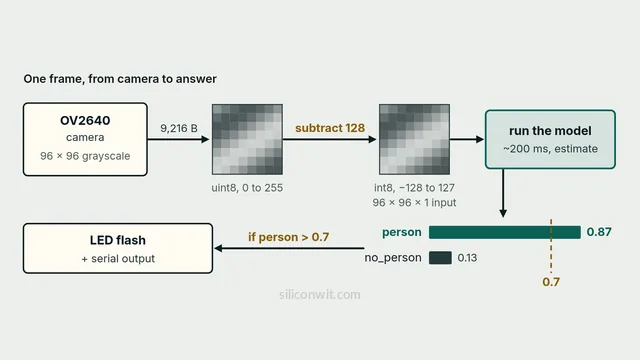
9,216 bytesone 96 x 96 grayscale image; the results of the first layer, not the weights, set the size of the tensor arenaMemory
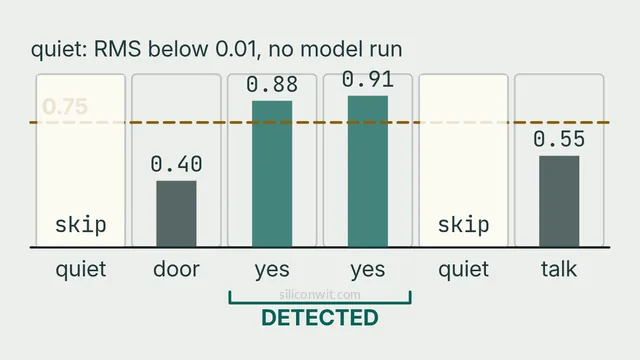
Two in a rowdetections of the wake word before the LED lights or a message is sent, so one false score does not actFalse alarms
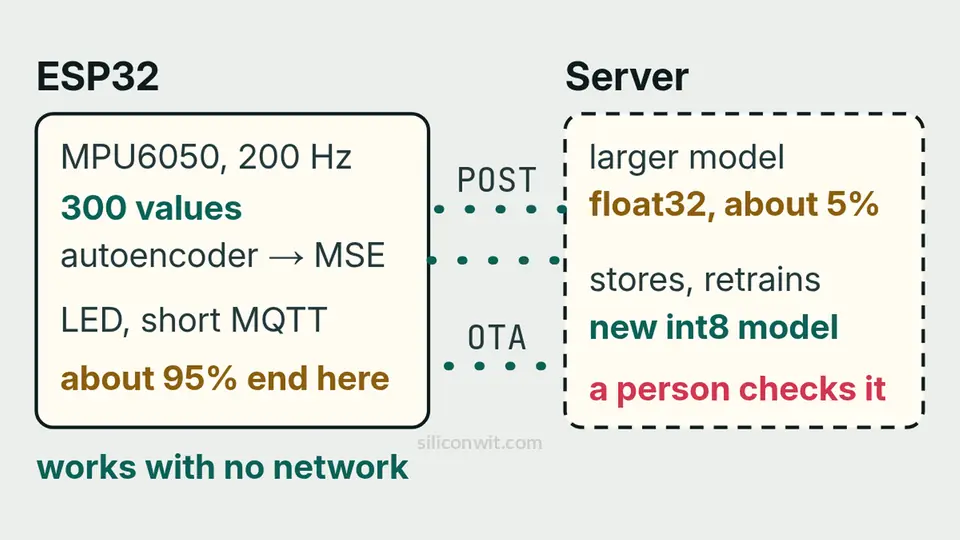
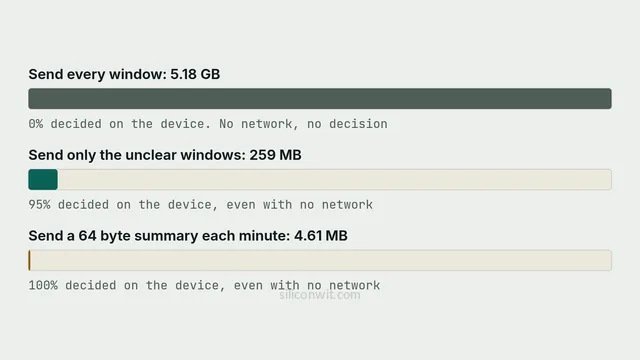
The device decides the clear cases. The server gives a second opinion.
On the device
Fast and offline
An answer in milliseconds, with or without a network
The raw vibration stays on site
A small model that is sometimes unsure
The test: must it answer when the network is down?
On the server
Larger and slower
A larger model for the unclear windows only
Retrains and sends new models back
A sent message is not a received one
The test: can the answer wait for the network?
The tools
TensorFlow and Edge ImpulseTrain on your PC, or let Edge Impulse manage the steps for you.
TensorFlow Lite MicroThe same model file runs on two processor families.
Three boardsESP32, STM32 and RPi Pico, most of them reused from the embedded courses.
About 15 USD of new partsAn MPU6050 accelerometer, an INMP441 microphone and an ESP32-CAM.
No GPUThe models are kilobytes, so every one trains on a CPU in minutes.
Honest numbersFile sizes measured; times and accuracies on chips marked as estimates to check on your own build.
Honest limits. A model estimates: its flag is advice for a person, and fast protection of a machine stays a plain rule. With the model on the device, only the result needs to leave it, and the raw signal stays where it was measured.
Before you start
C on one microcontroller: ESP32, STM32 or RPi Pico
Basic Python
I2C sensors, from the embedded courses
No machine learning needed: the course starts from the basics
Not every application can tolerate the latency, bandwidth cost, or privacy exposure of cloud round-trips for every inference. Edge AI puts intelligence directly on the microcontroller. A sensor node that classifies vibration patterns locally, detects a wake word in milliseconds, or spots an anomaly before uploading anything is a fundamentally different kind of embedded device. In practice, the best production systems combine edge inference with cloud intelligence: fast local decisions, cloud escalation for uncertain cases, and over-the-air model updates. This course teaches you to build both the edge and the hybrid. #TinyML #EdgeAI #EmbeddedML
Why Edge AI on Microcontrollers?
Cloud ML is powerful, but it requires connectivity, introduces latency, consumes bandwidth, and raises privacy concerns. TinyML addresses these problems by running inference directly on the MCU, while hybrid architectures (Lesson 9) combine the best of both.
Real-Time Response
Inference on-device takes milliseconds, not the hundreds of milliseconds (or seconds) required for a cloud round-trip. Wake word detection, gesture recognition, and anomaly alerts happen instantly. Lesson 5 builds a keyword spotter that responds in under 200 ms on an ESP32.
Works With Limited Connectivity
An MCU running a TinyML model can make decisions locally in basements, remote fields, aircraft, and anywhere else with unreliable internet. The model is baked into the firmware, so core inference works offline. For production systems, periodic connectivity enables model updates, cloud escalation of uncertain cases, and fleet-wide analytics (covered in Lesson 9).
Privacy by Design
Audio, images, and motion data never leave the device. The raw signal is processed on-chip and only the classification result (a label, a score, a flag) is transmitted. This is a hard requirement in medical, industrial, and consumer applications.
Microwatt Power Budgets
A Cortex-M4 running inference at 1 Hz draws single-digit milliamps. Compare that to a Wi-Fi radio transmitting raw sensor data continuously. TinyML enables battery-powered deployments lasting months or years.
Course Structure
Each lesson follows a consistent cycle:
The ML Problem
A concrete classification, detection, or anomaly task that benefits from on-device inference rather than cloud processing.
Data Collection and Labeling
How to gather training data from real sensors, label it correctly, and split it into train/validation/test sets.
Model Training
Train a neural network using TensorFlow, Edge Impulse, or scikit-learn. Understand the architecture choices that make a model small enough for an MCU.
Optimization and Deployment
Quantize the model, convert it to TensorFlow Lite Micro format, embed it in firmware, and run inference on the target MCU.
Evaluation and Integration
Measure accuracy, latency, and memory usage on real hardware. Integrate the inference result into application logic (alerts, actuators, display, MQTT publish).
Lessons
Lesson 1: TinyML and Machine Learning on Microcontrollers
TinyML and Machine Learning on Microcontrollers. Understand the TinyML landscape, toolchains, and hardware constraints. Deploy a pre-trained sine wave model on an ESP32 to see the full workflow from TensorFlow to on-device inference.
Build: Sine wave predictor on ESP32. Parts: ESP32 (reuse).
Lesson 2: Edge Impulse Data Collection and Training
Edge Impulse Data Collection and Training. Collect accelerometer data from an MPU6050, upload it to Edge Impulse, train a motion classifier, and deploy the quantized model back to the ESP32 for real-time inference.
Build: Motion classifier via Edge Impulse. Parts: ESP32, MPU6050 (reuse or new).
Lesson 3: TensorFlow Lite Micro Model Deployment
TensorFlow Lite Micro Model Deployment. Train a gesture classifier in TensorFlow on your PC, convert it to TFLite Micro, and deploy it on ESP32 and STM32. Compare the TFLM interpreter API across platforms and measure inference time.
Build: Cross-platform gesture classifier. Parts: ESP32, STM32 (reuse).
Lesson 4: Model Quantization and Optimization for MCUs
Model Quantization and Optimization for MCUs. Take a float32 model and quantize it to int8. Compare accuracy, inference speed, and flash/RAM usage before and after quantization. Learn post-training quantization and quantization-aware training.
Build: Quantization comparison bench. Parts: ESP32 (reuse).
Lesson 5: Keyword Spotting and Voice Wake Word
Keyword Spotting and Voice Wake Word. Build a “Hey Device” wake word detector using an I2S MEMS microphone and an ESP32. Train on the Speech Commands dataset, deploy the model, and trigger actions on keyword detection.
Build: Wake word detector with I2S mic. Parts: ESP32, INMP441 I2S mic.
Lesson 6: Accelerometer Gesture Recognition
Accelerometer Gesture Recognition. Collect labeled gesture data (shake, tilt, tap, circle) from an accelerometer, train a classifier, and deploy it on RPi Pico and STM32. Integrate gesture output with LED feedback and MQTT publishing.
Build: Gesture classifier on Pico/STM32. Parts: RPi Pico W, STM32, MPU6050 (reuse).
Lesson 7: Anomaly Detection for Predictive Maintenance
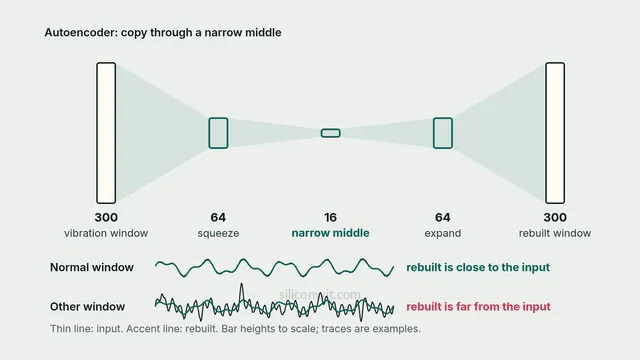
Anomaly Detection for Predictive Maintenance. Train an autoencoder on normal vibration data, deploy it on an ESP32, and detect mechanical anomalies in real time. Compare edge-only detection with cloud-based anomaly scoring.
Build: Vibration anomaly detector. Parts: ESP32, MPU6050 (reuse).
Lesson 8: Camera Image Classification on ESP32
Camera Image Classification on ESP32. Deploy a MobileNet-based image classifier on an ESP32-CAM. Capture images, run inference, and classify objects or detect people. Optimize the model to fit within ESP32’s memory constraints.
Build: Person/object detector on ESP32-CAM. Parts: ESP32-CAM module.
Lesson 9: Edge-Cloud Hybrid Architectures
Edge-Cloud Hybrid Architectures. Combine on-device inference with cloud intelligence. Build a system where the ESP32 handles clear cases locally, escalates uncertain classifications to a cloud server, and receives retrained models via OTA. Covers tiered inference, cloud retraining pipelines, and federated learning concepts.
Build: Hybrid inference system with OTA model updates. Parts: ESP32 (reuse), cloud server.
Parts Kit
Most components are reused from the embedded courses. A few new parts are needed.
C programming and at least one MCU platform (ESP32, STM32, or RPi Pico)
Basic Python (for TensorFlow and data processing scripts)
I2C sensor interfacing (covered in the embedded courses)
Linux command line
Helpful but not required:
Machine learning concepts (we start from the basics)
The IoT Systems course (for cloud integration context)
TensorFlow or PyTorch experience
Getting Started
Install Python 3.9+ and TensorFlow. TensorFlow is used for model training on your PC. The TFLite Micro runtime is compiled into the MCU firmware separately.
Create a free Edge Impulse account. Go to edgeimpulse.com and register. Edge Impulse provides a web-based pipeline for data collection, training, and deployment. The free tier supports everything in this course.
Ensure you have an ESP32 dev board. Lesson 1 starts with the ESP32. If you completed the ESP32 course, you already have one.
Get an MPU6050 accelerometer module. Lessons 2, 6, and 7 use this sensor for motion and vibration data. Available for under 3 USD from most electronics suppliers.
Start with Lesson 1. The sine wave model walkthrough gives you the complete mental model of the TinyML deployment pipeline.
Made by
Engineers and researchers who build what they teach.