Designing with an AI assistant: prompt, check, keep
Made with CadQuery 2.x, pytest 9.2checked November 2026Newer version?
- A part as a short program
- Workplanes, sketches and features
- Parameters at the top, geometry below
- Function names and their arguments in a new major version
- How it is installed
A step looks different? The CadQuery docs list each function with an example; search the name used in the lesson.
- A check is a function with an assert
- One command runs every check
- A fixture builds the part once for many checks
- A failing check names what is wrong
- Command-line options and the look of the report
- Plugin names
A step looks different? pytest --help lists every option; the pytest docs show each with an example.
The ideas in this lesson do not depend on the version. Where a click moved, the lesson still names the command.


On this page
You ask an assistant for a motor bracket. Ten seconds later you have forty lines of CadQuery that run, and a part on the screen that looks right. But the four screw holes are 3 mm too low. Nobody sees it until the motor will not bolt on, after the workshop has cut fifty of them. This lesson gives you a habit that stops that: write your checks first, then ask for the code, run the checks, and keep only what passes.
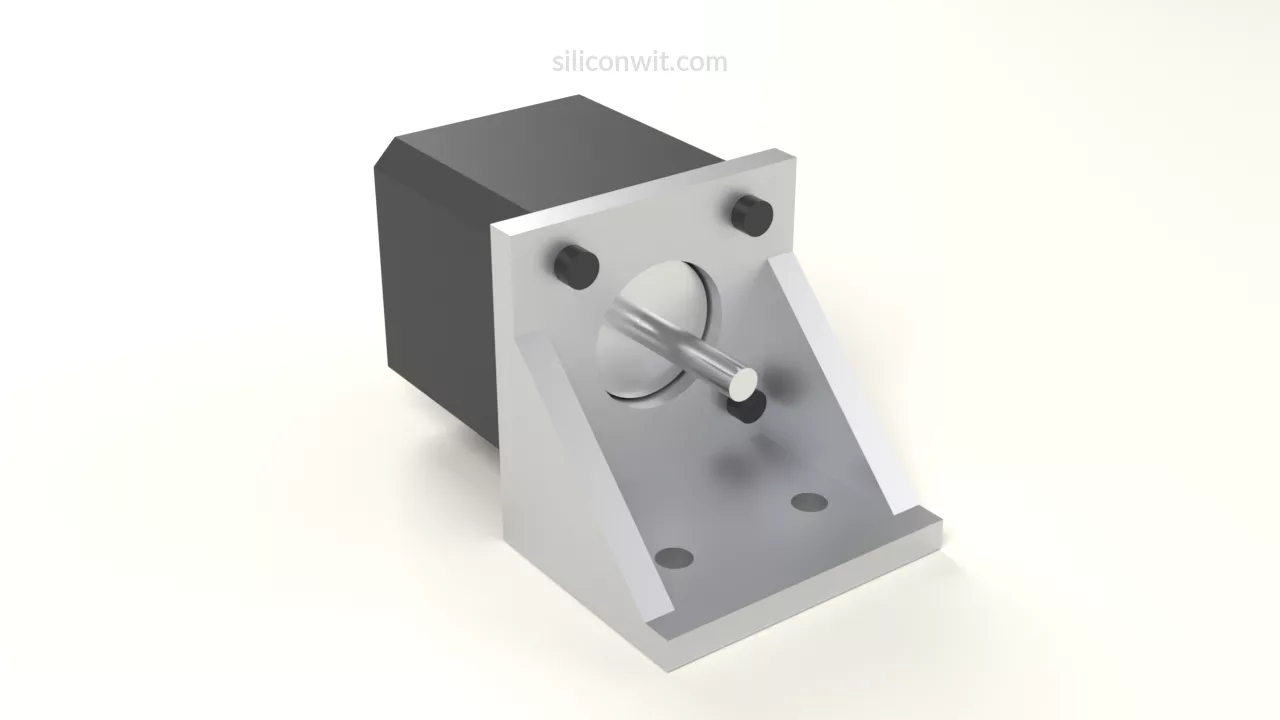
What you will make
Two files that belong together: a test file you write from the requirement, and a model that passes it. The tests are yours. The model may come from an assistant, from a colleague or from you.
Coming here first?
You can do this lesson alone. It assumes three things:
- CadQuery works on your computer: Environment setup in lesson 0.
- You have made a plate with holes in CadQuery: the perforated plate in lesson 0 is enough.
- You can write a Python function and run a script from a terminal.
The FreeCAD course ends with a short part on the same idea: Scripts and AI. It gives the six habits in one list. This lesson builds the tool for the fourth habit, "add checks you write yourself", and uses it on a real part.
What you need
- CadQuery 2.7 in a Python 3.10 or newer virtual environment, and pytest:
pip install pytest. Every listing on this page was run with CadQuery 2.7.0, Python 3.10 and pytest 9.2 (November 2026). - Any chat assistant that writes Python, if you want to try your own prompts. You can do the whole lesson without one: the seven answers below are in the downloads.
The whole way, once
Six steps. The first two happen before you ask anyone for code.
- Before1 The requirement2 The tests
- Prompt3 Ask for code
- Check4 Run the tests5 Fix
- Keep6 Keep, then change
Step 1: write the requirement as numbers
A prompt such as "make a bracket for a NEMA 17 motor" leaves a hundred choices to someone else. Each choice is a place for a mistake. So decide first. Write every size with its unit, and the rule behind it. This table is your drawing.
| What | Requirement | Checked by |
|---|---|---|
| Outside size | 50 × 40 × 50 mm (x, y, z) | test_size |
| Base and upright | 5 mm thick; never under 4 mm | test_wall_thickness |
| Motor axis | along y, at x = 0, 28 mm above the table | test_hole_positions |
| Motor screws | NEMA 17 square of 31 mm, four M3 clearance holes 3.4 mm | test_hole_positions, test_hole_diameters |
| Pilot hole | 23 mm, for the motor’s 22 mm pilot | test_hole_diameters, test_motor_fits |
| Base holes | two M5 clearance holes 5.5 mm, at x = ±12.5, 25 mm back | test_hole_positions, test_hole_diameters |
| Gussets | two, legs 30 mm, 5 mm thick, flush with the sides | test_volume, test_wall_thickness |
| Metal around holes | at least 3 mm to an edge or to the next hole | test_metal_around_holes |
| Fit | the motor body clears the table by 1 mm or more; M3 cap heads (5.5 × 3 mm) hit nothing | test_motor_fits |
| Material | aluminium 6061, 2.70 g/cm³: 62.8 g | test_mass |
| Files | one valid solid; a STEP file that opens with the same volume and size | test_one_valid_solid, test_step_export |
Where the numbers come from: the motor's data sheet (42.3 mm body, 22 mm pilot, M3 screws on a 31 mm square), ISO 273 for clearance holes (medium series: 3.4 mm for M3, 5.5 mm for M5), and ISO 4762 for the cap screw head (5.5 mm across, 3 mm high). Fix the coordinates too: base on z = 0, front face of the upright on y = 0, motor in front of it.
The motor axis is 28 mm above the table, and the motor body is 42.3 mm square. How much space is under the motor?
Check: every row has a number and a unit, and every row names at least one test. A row with no test is a wish, not a requirement.
Step 2: turn each row into a test, before any model
A test is a Python function whose name starts with test_ and which uses assert to state a fact. pytest finds every such function and runs it. The rule that makes the whole method work:
P["axis_z"] from the model agrees with every mistake in it. So the top of the test file copies the requirement again, by hand.# test_bracket.py: the requirement, mm
WIDTH, DEPTH, HEIGHT = 50.0, 40.0, 50.0
T = 5.0 # base and upright thickness
MIN_WALL = 4.0 # no plate thinner than this
MIN_WEB = 3.0 # metal left around every hole, at least
AXIS_Z = 28.0 # motor axis above the table
HALF = 31.0 / 2 # NEMA 17 screw pattern, 31 mm square
M3, PILOT, M5 = 3.4, 23.0, 5.5 # clearance holes
M5_AT = [(-12.5, 25.0), (12.5, 25.0)] # base holes (x, y)
GUSSET, GUSSET_T = 30.0, 5.0 # two gussets: legs, thickness
DENSITY = 2.70e-3 # aluminium 6061, g/mm3
TOL = 0.01 # mm, for sizes and placesThe volume, worked out by hand
The volume test needs a number that did not come from CadQuery. With flat plates and straight holes it is a short sum:
- Base: 50 × 40 × 5 = 10 000 mm³ ✅
- Upright above the base: 50 × 5 × (50 − 5) = 11 250 mm³ ✅
- Two gussets: 2 × ½ × 30 × 30 × 5 = 4 500 mm³ ✅
- Holes, each through 5 mm: π × 5 × (11.5² + 4 × 1.7² + 2 × 2.75²) = 2 496.5 mm³ ✅
- Volume: 10 000 + 11 250 + 4 500 − 2 496.5 = 23 253.5 mm³. Mass: 23 253.5 × 0.00270 = 62.8 g ✅
Ten kinds of check, fourteen tests
Four small helpers measure the part the way you would with a calliper, then each test compares one measurement with the table. The idea of each:
| Test | How it measures |
|---|---|
| one valid solid | counts the solids; asks the kernel if the shape is valid |
| size | the bounding box, and that the base sits on z = 0 |
| volume, mass | against the hand sum above, to 0.1 % and 1 % |
| hole positions, diameters | reads the centre and radius of every circular edge |
| wall thickness | a thin probe through the plate at five points: how much metal it meets |
| metal around holes | on the front face and the base underside: hole to edge, hole to hole |
| motor fits | places a 42.3 mm motor, its pilot and four screws, and asks for no overlap and some clearance |
| STEP export | writes the file, reads it back, compares solids, volume and size |
Three of them, as they are in the file:
def hole_at(part, x, y, z):
    """The diameter of the hole whose edge is centred at (x, y, z), or None."""
    for c, dia in circles(part):
        if (c - cq.Vector(x, y, z)).Length < TOL:
            return dia
    return None

def test_hole_positions(part):
    wanted = [(0, AXIS_Z)] + MOTOR_HOLES
    missing = [(x, z) for x, z in wanted if hole_at(part, x, 0, z) is None]
    found = sorted({round(c.z, 2) for c, _ in circles(part) if abs(c.y) < TOL})
    assert not missing, f"{len(missing)} of 5 holes not in place: holes at z = {found}, wanted z = 12.5, 28, 43.5"
    ...

def test_metal_around_holes(part):
    for name, face in [("front face", part.faces("<Y").val()), ("base underside", part.faces("<Z").val())]:
        holes, edge = face.innerWires(), face.outerWire()
        webs = [h.distance(edge) for h in holes]
        webs += [a.distance(b) for i, a in enumerate(holes) for b in holes[i + 1:]]
        assert min(webs) >= MIN_WEB, f"{name}: only {min(webs):.2f} mm of metal at a hole"

def test_motor_fits(part):
    body = cq.Workplane("XZ").center(0, AXIS_Z).rect(42.3, 42.3).extrude(40)
    pilot = cq.Workplane("XZ").center(0, AXIS_Z).circle(11.0).extrude(-2)
    assert overlap(part, body) < 1e-6, "the motor body runs into the bracket"
    assert body.val().BoundingBox().zmin >= 1.0, "the motor touches the table"
    assert part.val().distance(pilot.val()) >= 0.2, "the pilot has no clearance in its hole"
    ...
Each assert carries a message that says what is wrong in the words of the table. A failure should tell you what to fix without opening a debugger. A small conftest.py loads the model file, bracket.py unless you name another with --model, and builds the part once for all fourteen tests.
Now run the tests, with no model yet:
$ pytest -q --tb=no -rE
EEEEEEEEEEEEEE                                                           [100%]
=========================== short test summary info ============================
ERROR test_bracket.py::test_one_valid_solid - Failed: no model yet: bracket.py
ERROR test_bracket.py::test_size - Failed: no model yet: bracket.py
# 11 more lines, one for each test, all the same
ERROR test_bracket.py::test_motor_fits - Failed: no model yet: bracket.py
ERROR test_bracket.py::test_step_export - Failed: no model yet: bracket.py
14 errors in 1.56s
Check: 14 errors, all "no model yet". The tests are collected and ready. Nothing passes yet, and that is right: a test that passes before the part exists checks nothing.
Step 3: ask for code, with the table in the prompt
Now ask. Put the whole table in the prompt, and say exactly what shape the answer must have, so that your tests can load it. An example you could type:
Write bracket.py for CadQuery 2.7, Python 3.10. It must define make_bracket(p=P), which returns a cq.Workplane holding one solid, and mass_g(part), which returns the mass in grams. Put every size in a dict P at the top. Units: mm.
Coordinates: the base lies on z = 0, the front face of the upright is on y = 0, the base runs back to y = 40. The motor sits in front of the upright, its axis along y at x = 0, z = 28.
The part: [paste the requirement table here]. Use exactly these numbers. Do not round them and do not choose others.
No GUI, no viewer, no file export inside make_bracket.
The habits for a good prompt (every size with its unit, a function with named parameters, read the code before you run it) are in Scripts and AI. Two more matter when tests come first:
- Name the contract. The function names, what they return, the units and the coordinates. Your tests depend on these, so the prompt must fix them.
- You may show the tests, but they stay yours. If a new answer changes a test, a tolerance or a number in the table to make it pass, reject it.
Step 4: run the tests on the answer
Save the answer as bracket.py and run pytest -q. To keep the lesson honest and the same for every reader, we wrote six answers ourselves. Each runs, makes a part that looks right on screen, and holds one mistake that people and assistants often make. They are not output from any product. Download them and run the same command:
pytest -q --tb=no -rf --model flawed/answer_1.py--tb=no -rf keeps the report short: one line for each failed test, with its message.
Answer 1: the holes in the wrong place
# the motor holes, centred on the front face of the upright
front = body.faces("<Y").workplane(centerOption="CenterOfBoundBox")
body = front.hole(p["pilot_hole"])
front = body.faces("<Y").workplane(centerOption="CenterOfBoundBox")
body = front.rect(p["pattern"], p["pattern"], forConstruction=True).vertices().hole(p["m3_hole"])
FAILED test_bracket.py::test_hole_positions - AssertionError: 5 of 5 holes not in place: holes at z = [9.5, 25.0, 40.5], wanted z = 12.5, 28, 43.5
FAILED test_bracket.py::test_motor_fits - AssertionError: the pilot has no clearance in its hole
2 failed, 12 passed in 2.66sThe mistake. CenterOfBoundBox puts the holes at the centre of the face, 25 mm up. The motor axis is at 28 mm. The face centre and the motor axis are two different points, and only the table knows which one matters. Note that the volume test passed: the right amount of metal, in the wrong place. Only a check on positions sees it.
Answer 2: the holes the size of the screw
m3_hole=3.0,        # for M3 screws
pilot_hole=22.0,    # the motor's 22 mm pilot
FAILED test_bracket.py::test_volume - AssertionError: 23470.4 mm3, expected 23253.5
FAILED test_bracket.py::test_hole_diameters - AssertionError: M3 3 mm, not 3.4; pilot 22 mm, not 23
FAILED test_bracket.py::test_motor_fits - AssertionError: the pilot has no clearance in its hole
FAILED test_bracket.py::test_step_export - AssertionError: STEP volume 23470.4 mm3, expected 23253.5
4 failed, 10 passed in 2.36sThe mistake. A hole the size of the screw is not a hole the screw goes through. An M3 screw needs a 3.4 mm clearance hole, and a 22 mm pilot needs room in its hole. On screen 3.0 and 3.4 look the same.
Answer 3: a wall too thin above the screws
height=46.0, # Z, top edge 2.5 mm above the top screws (28 + 15.5 + 2.5)FAILED test_bracket.py::test_size - AssertionError: size (50.0, 40.0, 46.0)
FAILED test_bracket.py::test_volume - AssertionError: 22253.5 mm3, expected 23253.5
FAILED test_bracket.py::test_mass - AssertionError: 60.1 g, expected 62.8 g
FAILED test_bracket.py::test_metal_around_holes - AssertionError: front face: only 0.80 mm of metal at a hole
FAILED test_bracket.py::test_step_export - AssertionError: STEP volume 22253.5 mm3, expected 23253.5
5 failed, 9 passed in 2.30sThe mistake. The comment sounds careful, and the sum is right: 2.5 mm from the screw centre. But a hole has a radius. From the edge of a 3.4 mm hole only 2.5 − 1.7 = 0.8 mm of metal is left, and it will tear when the screw is tightened. The table said 3 mm at least.
Answer 4: units
This answer sets density=2.70, in g/cm³, and mass_g() multiplies it by the volume in mm³. Which tests fail?
density=2.70, # aluminium EN AW-6061, 2.70 g/cm3FAILED test_bracket.py::test_mass - AssertionError: 62784.3 g, expected 62.8 g
1 failed, 13 passed in 2.41sThe mistake. 2.70 g/cm³ is right for aluminium, and the comment says so. But Volume() is in mm³. The bracket weighs 62.8 kg on paper, and a shipping quote or a motor torque sum built on it is wrong by 1000. Every shape check passed. Only a number you worked out by hand sees units.
Answer 5: three solids that only touch
body = body.add(gusset)FAILED test_bracket.py::test_one_valid_solid - AssertionError: 3 solids, expected 1
FAILED test_bracket.py::test_step_export - AssertionError: STEP holds 3 solids
2 failed, 12 passed in 2.22sThe mistake. add puts a shape next to another; union joins them. On screen the gussets sit in place and the volume is even right. But the STEP file holds three bodies that touch. A machinist's software may cut them as three parts, and a slicer may print the joint weak or not at all.
Answer 6: no room for the screw heads
for x0 in (-w / 2 + 4, w / 2 - 4 - gt): # gussets 4 mm in from the sidesFAILED test_bracket.py::test_hole_diameters - AssertionError: 18 round edges: 7 holes make 14, so something else is cut
FAILED test_bracket.py::test_wall_thickness[gusset] - AssertionError: 0.00 mm of metal, at least 4 needed
FAILED test_bracket.py::test_motor_fits - AssertionError: M3 head at x=-15.5 z=12.5 hits the bracket
3 failed, 11 passed in 2.15sThe mistake. Moving the gussets in looks stronger. But the lower M3 screws sit at x = ±15.5 and their heads are 5.5 mm across, so they reach x = ±18.25, inside a gusset that now starts at ±16. Nobody could tighten those screws. The extra round edges are the screw holes cutting notches into the gussets: a quiet sign that something is in the way.
What each check caught
| Answer | The mistake | Caught by |
|---|---|---|
| 1 | holes on the face centre, not the motor axis | positions, motor fit |
| 2 | holes the size of the screw | diameters, motor fit, volume, STEP |
| 3 | 0.8 mm of metal over the screws | metal around holes, size, volume, mass, STEP |
| 4 | g/cm³ used with mm³ | mass only |
| 5 | add in place of union | one solid, STEP |
| 6 | gussets in the way of the screw heads | motor fit, wall, diameters |
Check: six answers, six different mistakes, and each was caught by at least one test that names it. Two of them (answers 1 and 4) passed the volume test. No single check is enough; the set is.
Step 5: fix, then run again
Fix the cause, never the test. You have two ways, and both end with the same command.
- Ask again, with the failure. Paste the failed line and the rule behind it. For answer 1: "test_hole_positions fails: holes at z = 9.5, 25, 40.5, wanted 12.5, 28, 43.5. The motor axis is 28 mm above the table, not at the centre of the face. Cut every hole at its position in bracket coordinates."
- Fix it yourself. Often one line. The answers above each need one.
The kept model places every hole where the table puts it, in the bracket's own coordinates, so no hole depends on which face a workplane happens to find:
def through_y(x, z, dia):   # a hole through the upright, along Y
    return cq.Workplane("XZ", origin=(x, t + 1, z)).circle(dia / 2).extrude(t + 2)

body = body.cut(through_y(0, p["axis_z"], p["pilot_hole"]))
for x, z in motor_holes(p):
    body = body.cut(through_y(x, z, p["m3_hole"]))
$ pytest -q
.............. [100%]
14 passed in 2.43s
$ python bracket.py
volume 23253.5 mm3, mass 62.8 g
size 50.0 x 40.0 x 50.0 mm
wrote motor_bracket.stepCheck: 14 passed, the volume is the hand sum to the decimal, and the STEP file opens in any CAD program as one solid of 50 × 40 × 50 mm.
Step 6: keep it, then change it the same way
Keep the model and its tests in one folder, under version control (git), and change them together. The tests are now the part's memory: in a year, anyone who changes the bracket finds out in two seconds if they broke the motor fit.
A change starts at the table. Say the bracket must be lighter. Asked only for "lighter", an answer might thin the plates to 3 mm. That is answer 7:
FAILED test_bracket.py::test_volume - AssertionError: 16052.1 mm3, expected 23253.5
FAILED test_bracket.py::test_mass - AssertionError: 43.3 g, expected 62.8 g
FAILED test_bracket.py::test_wall_thickness[upright top] - AssertionError: 3.00 mm of metal, at least 4 needed
FAILED test_bracket.py::test_wall_thickness[upright low] - AssertionError: 3.00 mm of metal, at least 4 needed
FAILED test_bracket.py::test_wall_thickness[base back] - AssertionError: 3.00 mm of metal, at least 4 needed
FAILED test_bracket.py::test_wall_thickness[base middle] - AssertionError: 3.00 mm of metal, at least 4 needed
FAILED test_bracket.py::test_step_export - AssertionError: STEP volume 16052.1 mm3, expected 23253.5
7 failed, 7 passed in 2.13s
The tests did their job: 3 mm breaks the 4 mm rule. If you decide 4 mm plates are enough, that is a new requirement. Change the table, then the tests (T = 4.0), then the model (t=4.0), and run again:
$ pytest -q
..............                                                           [100%]
14 passed in 2.42s
$ python bracket.py
volume 19702.8 mm3, mass 53.2 g
size 50.0 x 40.0 x 50.0 mm
wrote motor_bracket.step
Check: 9.6 g lighter, and every other rule still holds: the holes, the web, the fit and the file. The order was table, tests, model, every time.
What the tests cannot tell you
- That the table is right. The tests prove the model matches the table. A wrong number from a data sheet passes every test. Check the table against the real motor.
- That the part is strong enough. 4 mm passes the wall rule; whether it holds the motor's torque and the belt pull is a stress question. The FEA lesson answers it for a bracket like this one.
- That it can be made. Can a hex key reach every screw? Is a sharp inside corner fine on your machine? A check can be written for some of these; the rest is a drawing review with the person who makes it.
Try the hex key question on the kept bracket. Turn it, hide the Motor in Parts, and use Measure from a screw head to the gusset.
Check yourself
Three questions. Each wrong choice is a mistake people really make, so read the note after you answer.
1. A new answer fails test_mass by a factor of 1000. It also changes the expected mass in the test file to match. What do you do?
2. Why does test_bracket.py copy the numbers of the table instead of importing P from bracket.py?
3. All 14 tests pass. The parts arrive, and the motor's pilot will not go into its hole. What is the most likely cause?
The files
--model option motor_bracket.step the kept part, one solid The seven flawed answers, each with one mistake on purpose:
Put bracket.py, test_bracket.py and conftest.py in one folder with a flawed folder beside them, then run pytest -q there. The flawed answers were written by hand for this lesson; every output on this page is the real output of those files, run with CadQuery 2.7.0, Python 3.10 and pytest 9.2. The motor sizes follow the common NEMA 17 data sheet; check your own motor's before you make the part.
Discussion
No comments yet. Questions, results from your own build, a better way to explain it: all welcome.
My notes on this page
Kept on this device only. Nothing is sent anywhere.
Tip: select words in the lesson, or tap a figure or an equation, to put a note right there.
Notes on earlier wording
The lesson has changed and these words are no longer in it. Your notes are kept, with the words you chose.