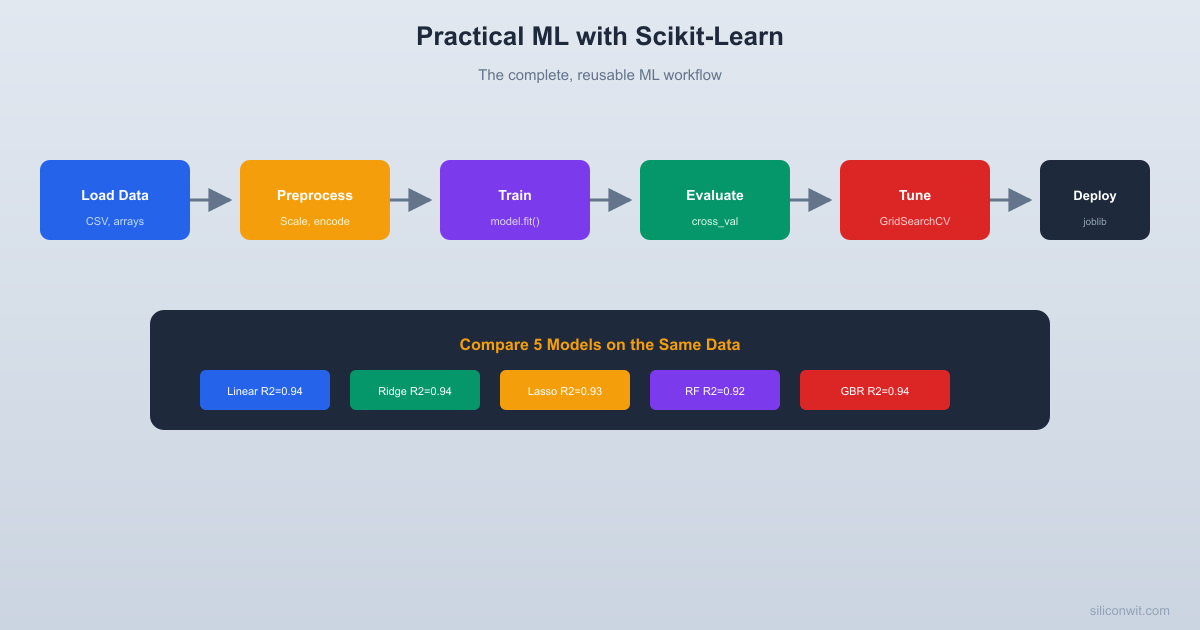
Every ML project follows the same workflow: load data, explore, preprocess, train, evaluate, tune, deploy. Scikit-Learn provides a clean API that standardizes each step. In this lesson you will build a complete, reusable pipeline and compare five algorithms on the same dataset, giving you a template you can apply to any regression or classification problem. #ScikitLearn #MLPipeline #CrossValidation
The ML Workflow
Every project follows these steps, regardless of the problem domain.
Why Pipelines?
Without pipelines, preprocessing and model training are separate steps. This creates a subtle bug: if you fit the scaler on the full dataset before splitting, information from the test set leaks into training. Scikit-Learn Pipelines chain preprocessing and modeling into a single object, ensuring that scaling is fit only on training data during each cross-validation fold.
Generate a Realistic Dataset
We will predict power consumption in a building from sensor readings. This simulates the kind of tabular regression problem you encounter in building automation, industrial IoT, and energy management.
Occupancy has the strongest correlation with power consumption, which matches our synthetic formula. But correlations only capture linear relationships. The HVAC effort term (absolute difference between temperature and setpoint) is nonlinear and will not show up well in simple correlation.
Data Preprocessing with Pipelines
import numpy as np
import pandas as pd
from sklearn.model_selection import train_test_split
from sklearn.preprocessing import StandardScaler, PolynomialFeatures
from sklearn.pipeline import Pipeline
np.random.seed(42)
# (Regenerate the dataset from above, or assume 'data' is already loaded)
The pipeline ensures that StandardScaler is fit on training data only. When we call transform on the test set, it uses the training mean and standard deviation. Polynomial features create interaction terms (temperature * humidity, hour * occupancy, etc.) that can capture nonlinear relationships.
PolynomialFeatures expands the feature count fast: 8 original features become 44 at degree=2 and would balloon to 165 at degree=3. More features mean more parameters and more overfitting risk, which is exactly why regularized models like Ridge and Lasso (below) pair well with polynomial expansion.
Cross-Validation and Model Comparison
A single train/test split can give misleading results. Cross-validation runs k different splits and averages the scores, giving a more reliable estimate.
Pick the Right Splitter for Your Data
cross_val_score(..., cv=5) uses a plain k-fold by default for regression. That is fine here because the samples are independent. Two common cases need different splitters:
Imbalanced classification. Plain k-fold can accidentally put most of the rare class into one fold. Use StratifiedKFold(n_splits=5) (scikit-learn does this automatically when cv=5 is passed to a classifier, but not when you wrap in a custom splitter). It preserves the class ratio in every fold.
Time-series data. Random folds let the model see the future during training, which is cheating. Use TimeSeriesSplit(n_splits=5), which always trains on the past and validates on the future. This matters the moment you touch sensor data with a timestamp, covered in the Working with Real Sensor Data lesson.
Picking the wrong splitter is one of the most common hidden bugs in ML pipelines: the reported CV score looks good, and the model fails on real data.
import numpy as np
import pandas as pd
from sklearn.model_selection import train_test_split, cross_val_score
from sklearn.preprocessing import StandardScaler
from sklearn.pipeline import Pipeline
from sklearn.linear_model import LinearRegression, Ridge, Lasso
from sklearn.ensemble import RandomForestRegressor, GradientBoostingRegressor
Iteration 1: TEST Train Train Train Train -> score1
Iteration 2: Train TEST Train Train Train -> score2
Iteration 3: Train Train TEST Train Train -> score3
Iteration 4: Train Train Train TEST Train -> score4
Iteration 5: Train Train Train Train TEST -> score5
Final score = mean(score1..score5)
Each sample appears in the test set exactly once.
Gradient Boosting wins because it can model nonlinear relationships (like the HVAC effort term) that linear models miss.
Hyperparameter Tuning with GridSearchCV
GridSearch vs RandomizedSearch
GridSearchCV fits every combination of every hyperparameter value: 3 x 3 x 3 options with 5-fold CV means 135 model fits. That explodes quickly. When the search space grows past a few hundred combinations, use RandomizedSearchCV instead. It samples a fixed number of random combinations from the same grid (or from a parameter distribution). In practice, random search finds nearly optimal hyperparameters in a small fraction of the compute, because a few parameters usually dominate the score. Same API, just swap the class name and pass n_iter=50.
import numpy as np
import pandas as pd
from sklearn.model_selection import train_test_split, GridSearchCV
from sklearn.preprocessing import StandardScaler
from sklearn.pipeline import Pipeline
from sklearn.ensemble import GradientBoostingRegressor
print(f"\nPredicted power consumption: {prediction[0]:.1f} kWh")
print("(Wednesday afternoon, 45 occupants, 28.5C with 22C setpoint)")
Expected output:
Model saved to power_model.joblib
Predicted power consumption: 193.4 kWh
(Wednesday afternoon, 45 occupants, 28.5C with 22C setpoint)
The saved .joblib file contains both the scaler and the model. When you load it, preprocessing and prediction happen in one predict() call. No separate scaling step, no chance of using the wrong scaler.
The Reusable ML Template
Every project you build from now on can follow this pattern.
Load and explore your data with pandas. Check shapes, types, distributions, and correlations.
Build a Pipeline that chains preprocessing (scaling, encoding, feature engineering) with a model. This prevents data leakage.
Cross-validate with cross_val_score to get reliable performance estimates across multiple splits.
Compare models by running several algorithms through the same pipeline and comparing cross-validation scores.
Tune the best model’s hyperparameters with GridSearchCV (exhaustive) or RandomizedSearchCV (faster for large search spaces).
Evaluate on a held-out test set that was never used during training or tuning.
Save with joblib.dump() and load with joblib.load() for deployment.
This workflow applies whether you are predicting power consumption, classifying sensor anomalies, or estimating remaining useful life of equipment.



Comments