A mechanism with too few degrees of freedom locks up. A mechanism with too many flops around unpredictably. The difference between a useful machine and an expensive pile of parts is whether the designer counted constraints correctly before cutting metal. The Kutzbach-Grübler equation gives you that count from the number of links and joints, and it is the first check every mechanism designer performs. In this lesson you will classify kinematic joints, calculate degrees of freedom, confront the case where the equation lies to you, and verify every answer on the same four mechanisms you can drive in our interactive simulators. #Kinematics #DOF #GrublersEquation
Learning Objectives
By the end of this lesson, you will be able to:
Identify different types of kinematic joints and their constraint properties
Calculate degrees of freedom using the Kutzbach-Grübler equation for planar mechanisms
Diagnose redundant constraints when the equation disagrees with physical mobility
Verify mechanism mobility against interactive simulators for four-bar, slider-crank, scissor-lift, and toggle-clamp mechanisms
Real-World System Problem: Modular Robotic Arm Assembly System
Consider a manufacturing facility that needs flexible automation: one day assembling electronic components, the next day handling automotive parts, and later packaging consumer goods. Traditional fixed robotic systems cannot adapt to this variety of tasks.
The solution? Modular robotic arms with interchangeable joint modules that can be reconfigured for different applications. But reconfiguring blindly is dangerous: add the wrong joint and the arm either jams solid or wobbles with motions no motor controls.
System Challenge: Joint Selection for Reconfigurable Robots
Critical Engineering Questions:
How many joints do we need for a specific task?
Which joint types provide the required motion?
How do we guarantee the mechanism has exactly the mobility we intend, no more and no less?
What constraints do different joints impose on the system?
Modular Robot Design Challenge
Design Goal: Create a joint library where engineers can select and combine different joint types to build task-specific robotic arms and machines.
Key Requirements:
Flexibility: Support various motion requirements
Analyzability: Predict system behavior before assembly
Optimization: Minimize complexity while maximizing capability
Standardization: Compatible joint interfaces for easy reconfiguration
Engineering Question: Given any arrangement of links and joints, how do we predict whether it will move, how many motors it needs, and whether our prediction can be trusted?
Why Constraint Analysis Matters
Consequences of getting the count wrong:
Lock-up when too many constraints leave zero mobility (a structure where you wanted a mechanism)
Uncontrolled motion when too few constraints leave degrees of freedom no actuator commands
Binding and broken parts in over-constrained assemblies that only fit because of manufacturing slop
Wasted cost from motors and controllers driving freedoms the task never needed
Benefits of systematic analysis:
Predictable mobility before any hardware is built
Correct actuator count (one independent input per degree of freedom)
Early detection of over-constraint and singular configurations
A shared language that scales from a door hinge to a six-axis robot
Fundamental Theory: Kinematic Joints and Constraints
To solve our modular robot challenge, we need to understand how joints work and how they constrain motion.
What are Kinematic Joints?
Joint Definition
A kinematic joint (or kinematic pair) is a mechanical connection that:
Connects two rigid bodies (links)
Allows specific types of relative motion
Constrains unwanted motions
Transmits forces and moments between bodies
Key Concept: Every joint both enables desired motion and removes undesired motion. The motions it permits are its degrees of freedom; the motions it blocks are its constraints. In a plane, permitted + constrained = 3 for every joint.
In a plane, a single free body has exactly three degrees of freedom: it can translate in X, translate in Y, and rotate about the axis perpendicular to the plane. Every planar joint we attach removes some of these three freedoms. A joint that removes two freedoms (leaving one) is called a lower pair; a joint that removes only one (leaving two) is a higher pair. This single accounting rule, three freedoms minus the constraints, is the entire foundation of mobility analysis.
Motion Allowed: Rotation about the axis perpendicular to the plane
Motion Constrained: Translation in both in-plane directions
Degrees of Freedom: 1 | Constraints: 2
Planar motion
Permitted?
X-translation
❌
Y-translation
❌
Z-rotation
✅
This is a lower pair (surface contact, 2 constraints).
Applications: Robot shoulder and elbow joints, door hinges, motor shaft connections, every pin in a four-bar linkage.
Prismatic (Slider) Joint
Motion Allowed: Translation along one in-plane axis
Motion Constrained: Translation perpendicular to that axis, and rotation
Degrees of Freedom: 1 | Constraints: 2
Planar motion
Permitted?
X-translation (along slide)
✅
Y-translation
❌
Z-rotation
❌
This is a lower pair (surface contact, 2 constraints).
Applications: Linear actuators, hydraulic cylinders, the piston of an engine, telescoping mechanisms, sliding doors.
Higher Pair: Cam or Gear Contact
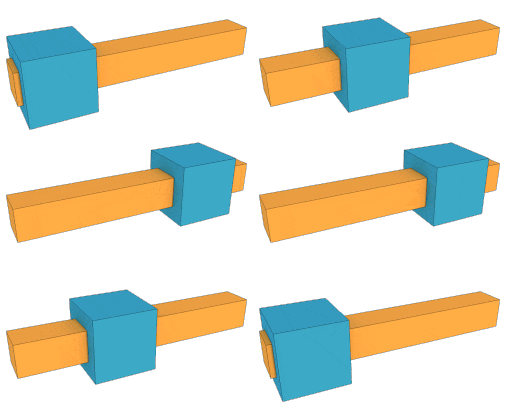
A higher pair makes contact along a line or at a point rather than over a surface. A cam touching a follower (above), or two gear teeth meshing, can simultaneously roll and slip at the contact while staying in contact, so it removes only one freedom (the normal direction) instead of two.
Motion Allowed: Rolling (rotation) + slipping (tangential translation)
Motion Constrained: Translation normal to the contact (must stay in contact)
Degrees of Freedom: 2 | Constraints: 1
Planar motion
Permitted?
Tangential translation (slip)
✅
Normal translation
❌
Z-rotation (roll)
✅
This is a higher pair (line/point contact, only 1 constraint). In the Kutzbach-Grübler equation it is counted as .
Applications:Cam-follower systems, gear-tooth contact, wheel rolling on a surface, ball bearings.
Degrees of Freedom Fundamentals
Degrees of Freedom in the Plane
A free rigid body in a plane has 3 DOF:
X-translation
Y-translation
Z-rotation (about the axis perpendicular to the plane)
For a mechanism of links, one link is the fixed ground, so the moving bodies contribute unconstrained freedoms before any joint is added. Joints then subtract constraints.
The Kutzbach-Grübler Equation
Kutzbach-Grübler Equation for Planar Mechanisms
Where:
= total number of links, including the ground/frame
= number of lower pairs (revolute or prismatic, each removing 2 constraints)
= number of higher pairs (cam or gear contact, each removing 1 constraint)
Reading the equation: is the total freedom of all moving links; is the total constraint imposed by all joints. Mobility is what is left over.
Mobility is written as often as DOF, and both appear in this course and in most textbooks. They are the same quantity.
A counting discipline that avoids most errors. Set the count out as an inventory before substituting anything:
Count
Rule
every rigid body, plus the frame as one link, however many places it is bolted down
every revolute and every prismatic joint, since both remove 2 constraints
every rolling or sliding contact: cam on follower, gear tooth on gear tooth
Two traps account for most lost marks. Forgetting the frame gives an answer exactly too low. Counting a joint where three links meet at one pin as a single joint is wrong: links sharing one pin make joints.
Counting a Higher Pair: Three Worked Cases
Every mechanism analysed later in this lesson happens to have , so the higher-pair term never does any work. These three short counts exercise it, because a cam or gear contact changes the arithmetic and is easy to miscount.
Case 1: Cam with a knife-edge translating follower
Links (): frame, cam, follower.
Lower pairs (): cam-to-frame revolute, follower-in-guide prismatic.
Higher pairs (): the knife edge touching the cam surface. It is a contact, not a pin, so it removes only 1 constraint: the follower cannot penetrate the cam, but it is free to slide along the profile.
One degree of freedom, one actuator: turn the cam and everything else follows. This is what a cam is for.
Case 2: The same cam with a roller follower
Adding a roller adds a link and a pin:
Links (): frame, cam, roller, follower. Lower pairs (): cam-to-frame revolute, roller-to-follower revolute, follower-in-guide prismatic. Higher pairs (): roller rolling on the cam surface.
Two, not one. The equation is not wrong: the roller really can spin about its own pin without moving the follower at all. That is a passive degree of freedom, the second trap listed below. The mechanism still needs only one actuator, because the extra freedom drives no output. Report it as with one passive freedom, so the useful mobility is 1.
Case 3: A simple gear pair
Links (): frame, gear 1, gear 2. Lower pairs (): each gear pinned to the frame. Higher pairs (): the meshing teeth.
One input turns both gears at a fixed ratio. Had the teeth been welded rather than meshed, that contact would be a lower pair and would drop to , a structure. The single constraint difference between a contact and a pin is the whole distinction between and .
Systematic Joint Analysis Process
Identify all links, and include the ground/frame as one link.
Classify every joint as a lower pair () or higher pair (), and confirm the constraint count.
Apply the Kutzbach-Grübler equation to compute the mobility.
Verify physically: does the predicted mobility match how the real mechanism moves? One actuator should be needed per degree of freedom.
Check for special cases: redundant constraints, passive joints, and singular configurations can all make the raw equation disagree with reality.
Application 1: Four-Bar Linkage (The Workhorse of Planar Mechanisms)
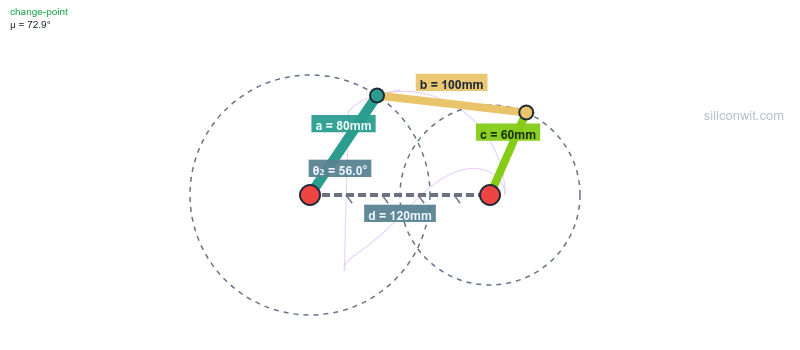
The four-bar linkage is the most widely used closed-chain mechanism in engineering, from windshield wipers to suspension systems to robotic grippers. We will analyze its mobility, then drive it in the simulator to confirm a single input controls the entire chain.
Hands-on lab: Practice with this mechanism in the Four-Bar Linkage Experiments lab. Experiment 1 (the Grashof condition) is a natural starting point for confirming that a single crank input drives the whole linkage.
Equivalent System Model
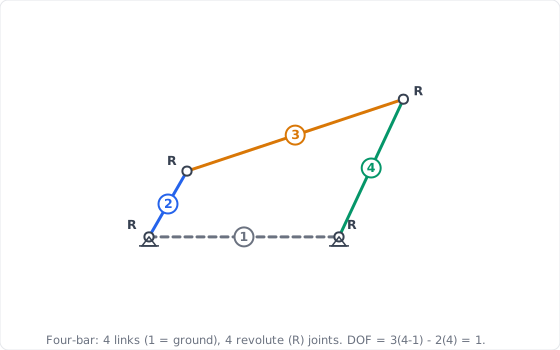
Given the four links:
Link 1: ground/frame (the fixed bar of length )
Link 2: crank (input link of length )
Link 3: coupler (floating link of length )
Link 4: follower/rocker (output link of length )
The four joints are all pin (revolute) connections: ground-crank (), crank-coupler (), coupler-follower (), follower-ground ().
Step 1: Count Links and Joints
Click to reveal the link and joint inventory
Count links (include ground):
✅
Classify the joints:
All four connections are pin joints, so they are revolute lower pairs:
✅
Step 2: Apply the Kutzbach-Grübler Equation
Click to reveal the mobility calculation
Substitute into the equation:
✅
✅
Interpret the result:
The linkage has mobility 1: a single input fully determines every link’s position.
Motors required: 1, applied at the crank ().
With one input fixed, the coupler and follower angles are completely determined by the geometry (you solve for them explicitly in the position analysis). ✅
Observe the single input: the simulator exposes exactly one driving variable, the crank angle. Sweep it from 0 to 360 degrees. ✅
Confirm mobility = 1: every other quantity the simulator plots (, , , , the coupler-point path) is fully determined by that one crank angle. There is no second freedom to set. ✅
Connect to the equation: the fact that one slider controls the whole figure is the physical meaning of . If the linkage had 2 DOF, the simulator would need two independent inputs to pin down the configuration. ✅
Application 2: Slider-Crank Mechanism (Replacing a Pin with a Slider)
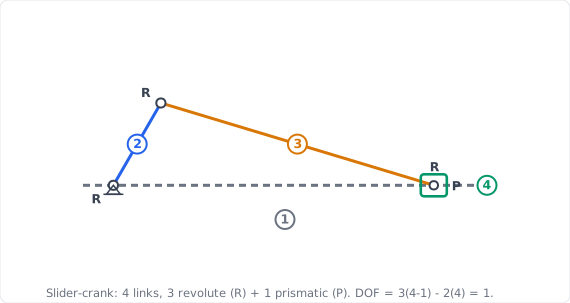
The slider-crank converts rotation into straight-line motion and is the heart of every piston engine, pump, and compressor. It looks different from the four-bar, but its mobility is identical, and seeing why deepens the joint-counting intuition.
Hands-on lab: Practice with this mechanism in the Crank-Slider Experiments lab. Experiment 1 (the baseline kinematic profile) lets you drive the single crank input and watch the piston motion it fully determines.
1 prismatic joint: piston sliding in the cylinder bore
Step 1: Count Links and Joints
Click to reveal the link and joint inventory
Count links (include ground):
✅
Classify the joints:
Three pin joints plus one sliding joint, all lower pairs:
✅
Note: a prismatic joint is a lower pair just like a revolute joint. Both remove 2 planar constraints, so both count toward .
Step 2: Apply the Kutzbach-Grübler Equation
Click to reveal the mobility calculation
Substitute:
✅
Compare to the four-bar: identical mobility. The only change from Application 1 is that one revolute joint was replaced by a prismatic joint, and since both are lower pairs with 2 constraints each, the count is unchanged. ✅
Step 3: The “Revolute at Infinity” Insight and Simulator Check
Click to reveal the geometric interpretation and verification
A slider is a pin on an infinitely long link. Imagine the rocker of the four-bar growing longer and longer. Its tip traces an ever-flatter arc until, in the limit, the arc becomes a straight line and the pin becomes a slider. The slider-crank is the four-bar with its follower stretched to infinity, which is why the mobility is preserved. ✅
Confirm mobility = 1: the only driving input is the crank angle. The piston displacement, velocity, and acceleration the simulator plots are all consequences of that single input. ✅
Try the offset: set . The motion becomes asymmetric (the quick-return effect), but the mobility is still 1: changing geometry never changes the joint count, only the path traced. ✅
Application 3: Scissor Lift (When the Equation Lies: Grübler’s Paradox)
So far the equation has matched reality perfectly. Now we meet the case every engineer must recognize: a mechanism that moves with one degree of freedom, yet whose raw Kutzbach-Grübler count comes out negative. The scissor lift is the classic example, and resolving the contradiction is one of the most important skills in this lesson.
Hands-on lab: Practice with this mechanism in the Scissor Lift Experiments lab. Experiment 1 (the baseline height and force profile) lets you raise the platform on a single actuator input and observe that it stays horizontal throughout.
Equivalent System Model
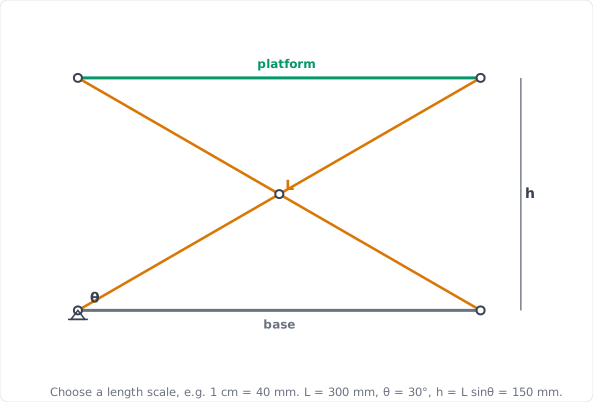
The four links:
Link 1: base (ground)
Link 2: arm A
Link 3: arm B
Link 4: platform
The five joints:
Center pivot: revolute joint where arms A and B cross
Arm A to base: revolute (pinned)
Arm B to base: prismatic (rolls/slides along the base)
Arm A to platform: prismatic (rolls/slides along the platform)
Arm B to platform: revolute (pinned)
So: 3 revolute + 2 prismatic = 5 lower pairs.
Step 1: Apply the Equation Naively
Click to reveal the raw mobility calculation
Inventory:
✅
Substitute:
⚠️ ✅
Read the result literally: predicts an over-constrained structure that should not move at all, and might even bind. ✅
Step 2: Compare with Physical Reality
Click to reveal the contradiction
A real scissor lift clearly moves. A single hydraulic cylinder raises and lowers the platform, and the platform stays horizontal throughout. That is the behavior of a 1-DOF mechanism, not a -DOF structure. ✅
The contradiction:
The equation is off by 2. This discrepancy is Grübler’s paradox. ✅
Step 3: Reconcile with Redundant Constraints
Click to reveal the resolution
The fix: redundant constraints. The Kutzbach-Grübler equation assumes every joint imposes independent constraints. The scissor lift’s special symmetry violates that assumption: equal-length arms pivoting at their shared midpoint force the platform to stay parallel to the base. That “stay parallel” condition is enforced more than once by the symmetric geometry, so some constraints overlap and do no new work. ✅
Account for the overlap. Let be the number of redundant constraints. The corrected mobility is:
✅
Solving with the observed mobility:
✅
Physical source of the 2 redundancies: both prismatic joints have parallel axes and the arms are symmetric, so the orientation of the platform is pinned down by several joints that all say the same thing. Two of those constraint equations are linearly dependent on the others, so they remove no additional freedom. ✅
Confirm a single input: the simulator drives the lift with exactly one variable (the actuator length, or equivalently the scissor angle ). One input, one degree of freedom. ✅
Confirm the platform stays horizontal at every height. That preserved horizontal orientation is the visible signature of the redundant constraints: the symmetry enforces it automatically, which is why the raw equation over-counted the constraints. ✅
Conclusion: observed mobility = 1, matching the corrected calculation, not the raw . ✅
Application 4: Toggle Clamp (Mobility vs. the Singular Configuration)
A toggle clamp holds a workpiece with enormous force from a light hand effort, and stays clamped even when you let go. It is a 1-DOF four-bar, yet at one special position it behaves dramatically differently. Distinguishing the mechanism’s overall mobility from its instantaneous behavior at a singularity is the final concept of this lesson.
Hands-on lab: Practice with this mechanism in the Toggle Clamp Experiments lab. Experiment 1 (top-dead-centre and self-locking) maps directly onto the singular configuration discussed here.
Equivalent System Model
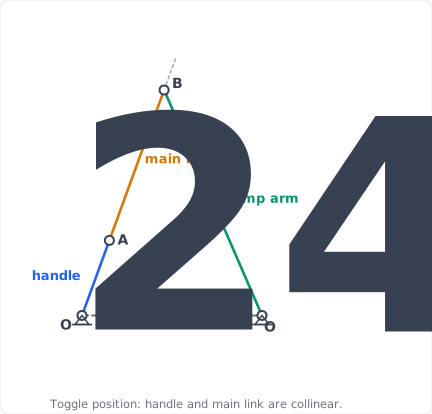
The four links:
Link 1: clamp base (ground)
Link 2: handle (input)
Link 3: main link (coupler)
Link 4: clamp arm carrying the pad (output)
The four joints: all revolute pins: handle-base (), handle-main link (), main link-clamp arm (), clamp arm-base ().
This is the same topology as the four-bar in Application 1.
Step 1: Confirm Mobility
Click to reveal the mobility calculation
Inventory:
✅
Substitute:
✅
Interpretation: the toggle clamp is a four-bar linkage. One input (the handle) determines the whole configuration, exactly as in Application 1. ✅
Step 2: What Happens at Top-Dead-Center
Click to reveal the singular-configuration analysis
The toggle (over-center) position: the clamp reaches a configuration where the handle link and main link become collinear (top-dead-center). At that instant the input crank can move while the output pad barely moves at all. ✅
What changes, and what does not:
The mobility stays 1. The mechanism still has exactly one degree of freedom; you have not added or removed any joint.
The instantaneous velocity ratio between input and output goes to zero (the output is momentarily stationary with respect to the input). This makes the mechanical advantage spike toward infinity: a small handle force produces a very large clamping force. ✅
Self-locking: because the geometry sits slightly past top-dead-center at rest, any reaction force from the clamped part tries to push the linkage back through the collinear position, where the mechanical advantage works against it. The clamp holds with no continued handle effort. This is a geometric (singular) property of one configuration, not a property of the degree-of-freedom count. ✅
Confirm a single input: the handle angle is the only driver. One input, one degree of freedom, just as the equation says. ✅
Drive the handle toward top-dead-center and watch the mechanical-advantage and transmission-angle plots: mechanical advantage rises sharply as the links approach collinear, even though the mechanism never gained a degree of freedom. ✅
Conclusion: mobility is constant at 1 across the entire motion; the dramatic force amplification is an instantaneous singular effect of geometry. ✅
Design Application: Modular Serial Robot Arm
The four mechanisms above are closed chains (their links form loops). The modular robot arm from our opening challenge is an open chain (a series of links ending in a free end-effector), and open chains follow a simpler rule: degrees of freedom add up. Let us size the modular arm.
Open-Chain Rule: Series Joints Add
Why Serial Joints Add Their DOF
In an open serial chain with only single-DOF joints, the Kutzbach-Grübler equation reduces to a simple sum. For single-DOF joints in series:
(since an -joint open chain has links). Each serial joint adds exactly one degree of freedom, which is why robot arms are described by their joint count: a “6-axis” robot has 6 DOF.
Configuration: ground + upper arm + forearm, joined by 2 revolute joints (shoulder, elbow).
✅
Capability: positions the end-effector anywhere in its planar workspace. Needs 2 motors.
Configuration: ground + 3 moving links, joined by 3 revolute joints (shoulder, elbow, wrist).
✅
Capability: positions and orients the end-effector in the plane. Needs 3 motors.
Configuration: ground + 2 rotating links + 1 sliding link, joined by 2 revolute + 1 prismatic joint.
✅
Capability: mixes rotation with linear extension for a different workspace shape. Same DOF as the 3R arm because the prismatic joint is also a single-DOF lower pair.
Configuration: ground + 6 moving links, 6 revolute joints in series (the standard anthropomorphic industrial robot).
✅
Capability: full position + orientation control. Needs 6 servo motors, one per joint.
(In 3D this becomes the spatial Grübler equation ; see the Spatial Mechanics course.)
Design Guidelines for Joint Selection
Revolute Joints (R)
Best for: rotational positioning, compact designs, high-precision applications.
Considerations: limited workspace per joint; needs rotary actuators; ideal for dexterous manipulation.
Prismatic Joints (P)
Best for: linear positioning, extended reach, high force transmission.
Considerations: larger footprint; needs linear actuators; excellent for pick-and-place and lifting.
Higher Pairs (cam, gear)
Best for: programmed motion profiles and timed motion (cam design), speed/torque conversion.
Considerations: line/point contact means higher stress; needs careful lubrication and surface hardening.
Closed vs Open Chains
Closed (1-DOF): rigid, repeatable, force-amplifying. Open (serial): large workspace, easy control. Match the architecture to the task.
DOF Optimization Strategy
Analyze the task first. Identify the required end-effector motions and the minimum DOF that achieves them.
Right-size the mobility. Avoid over-constraint (DOF , binding) and avoid unnecessary freedoms (each one costs a motor and a controller). Target DOF = task requirement, adding redundancy only when fault tolerance or obstacle avoidance justifies it.
Plan one actuator per degree of freedom. Input count must equal DOF for full control.
Verify before building. Compute mobility with Kutzbach-Grübler, then confirm against a simulation, especially for any symmetric or parallel-motion mechanism where redundant constraints may hide.
Summary and Next Steps
Key Concepts Mastered
Joint types: revolute and prismatic are lower pairs (1 DOF, 2 constraints); cam/gear contacts are higher pairs (2 DOF, 1 constraint).
Kutzbach-Grübler equation: for any planar mechanism.
Grübler’s paradox: redundant constraints from special geometry can make the raw count too low; the scissor lift moves with 1 DOF despite a raw count of .
Mobility vs. singularity: a mechanism’s DOF is global; self-locking and force spikes (the toggle clamp) are instantaneous geometric effects that do not change the DOF.
Open vs. closed chains: serial joints add DOF; closed loops constrain it.
Service and mobile platforms: lifts, grippers, inspection arms
Next, Position Analysis of Planar Linkages takes the four-bar linkage whose mobility we just confirmed and solves for the exact position of every link using vector loop equations, the foundation for the velocity, acceleration, and force analysis that follows.






Comments