Master parametric CAD design by creating a Geneva mechanism: the precision indexing system that powers film projectors, machine tool changers, and precise rotary positioning. Learn FreeCAD through intermittent motion engineering. #FreeCAD #GenevaDrive #IntermittentMotion #IndexingMechanism
Learning Objectives
By the end of this lesson, you will be able to:
Design polar geometry with angular patterns and radial features
Create parameter-driven angular features with precise indexing
Apply circular patterns for repeated slot features
Build intermittent motion mechanisms with locking geometry
Generate indexed position documentation and timing diagrams
Engineering Context: Why This Mechanism Matters
The Geneva mechanism (also called Maltese cross mechanism) provides precise, intermittent rotary motion. The driven wheel indexes to exact positions while the driver rotates continuously, with self-locking dwell periods between each precise angular step.
Real-World Applications
The Geneva mechanism appears everywhere precise indexing is needed:
The Engineering Problem
Design Challenge: Given continuous rotational input, how do we create intermittent, precise angular output with exact dwell periods and self-locking to prevent drift between indexes?
Mechanism Fundamentals
Components and Motion
A Geneva mechanism consists of three key elements working together:
Part Design - Creating individual parametric parts
Sketcher - Polar geometry and circular patterns
Spreadsheet - Parameter tables with calculated values
Assembly - Combining driver and driven wheels
TechDraw - Creating indexed position drawings
What’s Unique about Geneva Design:
🔄 Polar Geometry Focus
Geneva mechanisms are fundamentally about polar geometry:
Angular patterns - Slots arranged in circular arrays
Radial symmetry - Features distributed around a center
Circular constraints - Angular spacing and positioning
This introduces powerful rotational CAD techniques!
Part 2: Parametric Design Strategy
Geneva mechanisms are parameter-driven by nature. Change the number of slots, and everything else must recalculate geometrically. This makes them perfect for practicing intelligent parametric design where formulas and relationships drive the entire model.
Our Design Approach
🎯 Multi-Parameter Control Philosophy
We’ll control the entire Geneva mechanism with key parameters:
NumSlots = 6 (number of slots)
DriverCenterDistance = 80 mm (between wheel centers)
PinDiameter = 10 mm
This radius was automatically calculated from the Geneva formula!
Add the center shaft hole:
Circle tool
Click at origin
Draw smaller circle inside
Press Escape
Parametric radius:
Radius constraint
Click inner circle
Click ƒx button
Type: Spreadsheet.ShaftRadius
Press Enter
Shaft hole complete!
Draw one radial slot (we’ll pattern it later):
This is the tricky part! We need a radial slot.
Rectangle tool (or draw with lines)
Draw a rectangle extending radially outward from near the center
Position it roughly on the horizontal axis to the right
Press Escape
Make slot symmetric about horizontal axis:
Select Symmetric constraint tool
Click rectangle top edge
Click rectangle bottom edge
Click horizontal axis (X-axis)
This centers the slot!
Slot width (perpendicular to radius):
Distance constraint
Click top edge
Click bottom edge
Click ƒx button
Type: Spreadsheet.SlotWidth
Press Enter
Slot position - inner end:
The slot should start close to the shaft hole
Distance constraint from origin to slot inner end
Type: 25 mm (or just inside the wheel radius)
Slot position - outer end:
The slot should extend to or beyond the wheel periphery
Distance constraint from origin to slot outer end
Type: equal to or slightly beyond Spreadsheet.DrivenRadius
Or simply extend past the circle (will be trimmed by wheel boundary)
🔄 Creating the Polar Pattern
This is where polar geometry shines! We’ll copy the slot around the circle automatically.
Pattern the slot around the wheel:
Select all slot geometry
Click and drag to select the rectangle (or all 4 lines if drawn manually)
All slot elements should be highlighted
Apply Polar Pattern:
In Sketcher menu: Sketch → Sketcher tools → Polar pattern
Or look for Polar Pattern button in toolbar
Configure pattern:
Center point: Click the origin
Number of copies: Can’t use formula directly in pattern dialog
Type: 6 (we’ll make this fully parametric in advanced version)
Angle:360° (full circle)
Equal spacing: Checked
Click OK
Six perfectly spaced slots appear!
Check the sketch:
You should now see:
Outer circle (Geneva wheel periphery)
Inner circle (shaft hole)
6 radial slots spaced 60° apart
Each slot extends from near center to beyond periphery
Verify constraints:
All dimensions linked to spreadsheet where possible
Slots evenly distributed (60° spacing)
Solver shows “Fully constrained” (or close - some redundancy is OK for patterns)
The locking periphery:
The circular area between slots provides the locking surface
Driver’s locking arc will ride on this during dwell!
Creating 3D: Pad Operation
Close the sketch
Click Close button
Pad the profile
Select sketch
Click Pad tool
Length: Click ƒx button
Type: Spreadsheet.WheelThickness
Click OK
The Geneva wheel is complete!
Rotate the view to see the 6 radial slots cutting through the wheel!
Part 6: Creating the Base Frame
Design Intent
The frame provides the fixed reference for both rotating wheels:
📐 Frame Requirements
Fixed mounting - Stationary base for entire mechanism
Two shaft bearings - For driver and Geneva wheel pivots
Precise center distance - Controlled by DriverCenterDistance parameter
Mounting provisions - Bolt holes for securing to machine
Creating the Frame
Create new Body
Part Design workbench
Create Body
Rename: Frame
Create Sketch
Select Frame body
Create Sketch → XY_Plane
Draw base plate
Rectangle tool
Draw centered rectangle
Width: 200 mm
Height: 120 mm
Use Symmetric constraints to center about origin
Add driver shaft hole
Circle at origin
Radius: 12 mm (shaft radius + clearance)
Add Geneva wheel shaft hole
Circle to the right of origin
Horizontal constraint with origin
Distance constraint from origin: Click ƒx → Spreadsheet.DriverCenterDistance
Radius: 12 mm
Add mounting holes (optional)
Four circles at corners
Radius: 6 mm (for M10 bolts)
Position symmetrically
Close and Pad
Close sketch
Pad: 20 mm
Frame complete!
All three parts are now ready for assembly!
Part 7: Assembly
Assembly is where the Geneva mechanism comes alive! You’ll see discrete indexing: the Geneva wheel jumps from position to position while dwelling perfectly still between indexes. This is precision intermittent motion in action.
Assembly Strategy
🎯 Assembly Constraints Plan
Frame: Fixed (ground reference)
Driver: Rotates continuously about left shaft
Geneva Wheel: Rotates intermittently about right shaft
Pin engagement: Driver pin enters Geneva slots to create indexing
This aligns the axes and allows rotation! Driver can now spin continuously.
Allow Geneva wheel to rotate about its shaft:
Select Geneva wheel shaft hole axis
Select frame Geneva shaft hole axis (the right hole)
Click Axial Align constraint
Geneva wheel can now rotate about its axis!
Position for first index:
Manually drag parts so that:
Driver pin is entering one of the Geneva wheel slots
This is the starting position for indexing motion
Test the intermittent motion:
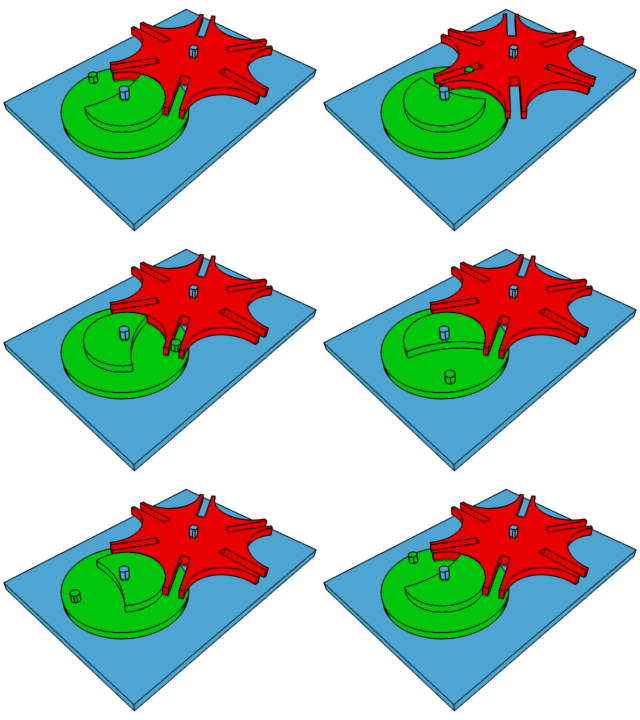
Try manually rotating the driver in the assembly view:
Phase 1: Dwell
Driver rotates
Pin not in slot
Geneva wheel stationary (locked by driver periphery)
Phase 2: Index
Pin enters slot
Geneva wheel rotates 60°
Precise angular step!
Phase 3: Return to Dwell
Pin exits slot
Geneva wheel stops again
Locked in new position
Repeat for all 6 positions!
Part 8: Technical Drawing
Creating Geneva Mechanism Drawing
TechDraw Workbench
Switch to TechDraw workbench from the dropdown
Create Page
Insert → New Page and select A3_Landscape template
Add Top View
Insert view showing both wheels in plan view with clearly visible pin, slots, and center distance
Add Multiple Position Views
Create 3 additional views showing different phases:
View 1: Driver at 0° (pin entering slot 1)
View 2: Driver at 60° (mid-index, Geneva rotating)
View 3: Driver at 120° (pin exited, dwell begins)
Dimension Key Features
Add dimensions for center distance, slot angle (60°), pin diameter, and number of slots
Add Timing Diagram
Sketch a diagram showing X-axis as driver rotation (0° to 360°), Y-axis as Geneva wheel position (discrete steps at 0°, 60°, 120°, 180°, 240°, 300°), and mark dwell periods (horizontal lines) and index periods (vertical jumps)
Export to PDF
File → Export → Select PDF format
Part 9: Testing Parametric Control
Change Number of Slots
Open Spreadsheet
Change NumSlots from 6 to 4
Recompute
All geometry updates:
Slots now 90° apart
Index angle = 90°
Driven radius recalculated
4 slots appear on Geneva wheel
Test different values:
NumSlots = 8 (45° indexing)
NumSlots = 5 (72° indexing)
Change Center Distance
Increase DriverCenterDistance to 100mm
Larger mechanism
All ratios maintain
Learning Outcomes
By completing this lesson, you have:
✅ Designed with polar geometry and angular patterns
✅ Created parameter-driven angular features
✅ Applied circular patterns for repeated features
✅ Designed intermittent motion mechanism
✅ Used angular constraints precisely
✅ Generated indexed position documentation
✅ Understood locking geometry principles
Design Verification
Do all slots align radially from center?
Are slots evenly spaced (60° apart for 6-slot)?
Does driving pin fit into slots with clearance?
When NumSlots changes, does geometry update correctly?
Is the center distance appropriate for smooth pin engagement?
Mathematical Background
Geneva Wheel Radius Calculation
For an external Geneva mechanism:
Where:
= Geneva wheel radius (center to slot entry)
= Driver radius (center to pin)
= Number of slots
For n = 6:
If , then .
Dwell vs. Index Time
Dwell angle:
Index angle:
For 6-slot Geneva:
Dwell: of driver rotation
Index: of driver rotation
Challenges for Further Practice
Design an internal Geneva mechanism (pin inside driven wheel)
Add a safety guard covering moving parts
Create a double-Geneva (two Geneva wheels on same driver)
Design a spherical Geneva (3D version for spatial indexing)
Add position sensors (mounting for optical sensors to detect index positions)
Model wear analysis (contact stress at pin/slot interface)
Common Issues and Solutions
“Slots not evenly spaced”
Cause: Polar pattern not set to correct angle or count




Comments