


HLK-LD2420 Presence Detection
Status: ✅ Operational
mmWave radar sensor integration via UART for detecting human presence, measuring distance, and tracking movement with high accuracy.
Learn to build, flash, and test the Room Activity Scanner firmware featuring HLK-LD2420 mmWave radar integration, MQTT communication, and relay control for ESP32-S3. Includes complete setup guide, hardware wiring, testing procedures, and troubleshooting for IoT health monitoring applications. #ESP-IDF #HLK-LD2420 #MQTT
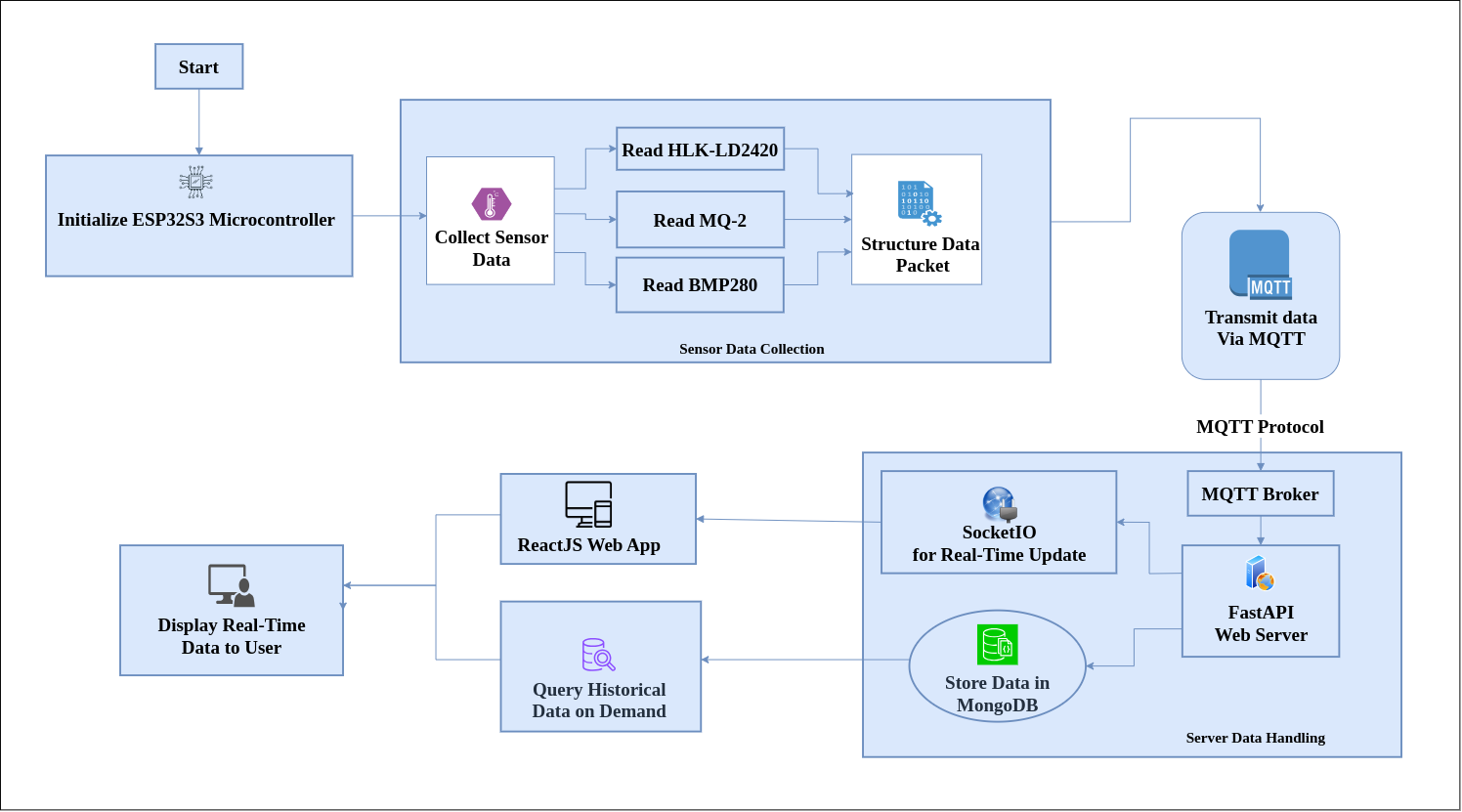
The Activity Monitor firmware is the current implementation of the Room Activity Scanner project, focusing on presence detection using the HLK-LD2420 mmWave radar sensor. This firmware provides a foundation for room activity monitoring with real-time MQTT communication and relay control capabilities.
This guide walks you through setting up, building, flashing, and testing the Activity Monitor firmware on your ESP32-S3 device.
HLK-LD2420 Presence Detection
Status: ✅ Operational
mmWave radar sensor integration via UART for detecting human presence, measuring distance, and tracking movement with high accuracy.
Relay Control System
Status: ✅ Completed
GPIO-based relay control with manual and automatic modes for controlling fans, lights, and other appliances based on sensor input.
ADC Reading (MQ-2 Gas Sensor)
Status: ✅ Completed
Analog-to-digital conversion for MQ-2 gas sensor with baseline calibration logic currently in progress for accurate air quality measurements.
MQTT Communication
Status: 🛠 In Progress
Basic MQTT publishing to broker working. Refinements ongoing for QoS levels, retained messages, and robust reconnection handling.
| Feature | Status | Implementation Notes |
|---|---|---|
| HLK-LD2420 UART Communication | ✅ Completed | Protocol parser implemented, distance and presence detection operational |
| Relay GPIO Control | ✅ Completed | Manual on/off control and automated triggering based on presence |
| MQ-2 ADC Reading | ✅ Completed | Raw ADC values captured, calibration algorithm in development |
| WiFi Connectivity | ✅ Completed | Station mode with automatic reconnection |
| MQTT Publishing | 🛠 In Progress | Basic publish working, enhancing reliability and features |
| MQTT Subscriptions | 🛠 In Progress | Command reception for relay control being tested |
| Sensor Calibration Logic | 🛠 In Progress | Baseline establishment and drift compensation algorithms |
| BMP280 I2C Integration | 🔲 Not Started | Planned for environmental monitoring |
| RCWL-0516 Motion Detection | 🔲 Not Started | GPIO interrupt-based implementation planned |
| INMP441 I2S Audio | 🔲 Not Started | Sound level monitoring planned |
| OTA Firmware Updates | 🔲 Planned | Future enhancement for remote updates |
Before you begin, ensure you have the following tools and hardware:
Ensure ESP-IDF is properly installed:
. $HOME/esp/esp-idf/export.shidf.py --versionYou should see output like ESP-IDF v5.x.x.
Connect the sensors and modules to your ESP32-S3 according to this wiring diagram:
| HLK-LD2420 Pin | ESP32-S3 Pin | Description |
|---|---|---|
| VCC | 5V | Power supply |
| GND | GND | Ground |
| TX | GPIO 44 (RX1) | UART transmit to ESP32 receive |
| RX | GPIO 43 (TX1) | UART receive from ESP32 transmit |
| MQ-2 Pin | ESP32-S3 Pin | Description |
|---|---|---|
| VCC | 5V | Power supply |
| GND | GND | Ground |
| AOUT | GPIO 1 (ADC1_CH0) | Analog output to ADC |
| Relay Pin | ESP32-S3 Pin | Description |
|---|---|---|
| VCC | 5V | Power supply |
| GND | GND | Ground |
| IN | GPIO 21 | Control signal |
Note: Pin assignments may be configured via menuconfig. Check your specific configuration before wiring.
Clone the Repository
Clone the Room Activity Scanner repository from GitHub:
cd room-activity-scan/embedded_programming/activity_monitorSet ESP32-S3 Target
Configure the build system for the ESP32-S3 architecture:
idf.py set-target esp32s3This downloads necessary toolchain components and configures the build environment.
Configure Project Settings
Launch the interactive configuration menu:
idf.py menuconfigCritical Configuration Items:
Navigate to: Example Connection Configuration or Application Configuration → WiFi
Navigate to: Application Configuration → MQTT Settings
mqtt://localhost:1883 (local) or cloud broker URLroom/scanner (default)Navigate to: Application Configuration → GPIO Configuration
Note: Verify these match your hardware wiring.
Press S to save, then Q to quit menuconfig.
Build the Firmware
Compile the project:
idf.py buildBuild output is saved to build/ directory. Look for activity_monitor.bin.
Flash to ESP32-S3
Connect your ESP32-S3 via USB and flash the firmware:
idf.py -p /dev/ttyUSB0 flashNote: Replace /dev/ttyUSB0 with your actual port (check with ls /dev/ttyUSB* or dmesg | grep tty).
Monitor Serial Output
View real-time logs and debug output:
idf.py -p /dev/ttyUSB0 monitorPress Ctrl+] to exit monitor mode.
Combined Flash & Monitor (recommended):
idf.py -p /dev/ttyUSB0 flash monitorAfter flashing, monitor the serial output. You should see:
I (328) boot: ESP-IDF v5.x.xI (342) boot: Chip Revision: v0.1I (356) boot_comm: chip revision: v0.1, min. bootloader chip revision: v0.0I (894) wifi:WiFi connectedI (1024) MQTT: MQTT_EVENT_CONNECTEDI (1156) HLK_LD2420: Radar initialized successfullyI (1200) APP: System readyObjective: Verify the radar detects human presence
Steps:
Expected Output:
I (5234) HLK_LD2420: Target detected at 2.3mI (5456) HLK_LD2420: Presence: YES, Distance: 2.3mTroubleshooting:
Objective: Test distance accuracy
Steps:
Expected Accuracy: ±0.3m at distances up to 5m
Serial Output Example:
I (7823) HLK_LD2420: Distance: 1.2m (actual: 1.0m)I (8234) HLK_LD2420: Distance: 2.1m (actual: 2.0m)I (8645) HLK_LD2420: Distance: 3.3m (actual: 3.0m)Objective: Verify sensor detects when no one is present
Steps:
Expected Output:
I (12456) HLK_LD2420: No target detectedI (12789) HLK_LD2420: Presence: NOVia MQTT Command (requires MQTT broker setup):
Publish command to turn relay ON:
mosquitto_pub -h localhost -t "room/scanner/relay/set" -m "ON"Turn relay OFF:
mosquitto_pub -h localhost -t "room/scanner/relay/set" -m "OFF"Expected Behavior:
Serial Output:
I (45678) RELAY: Command received: ONI (45680) RELAY: Relay state changed to ONPresence-Based Automation (if enabled in firmware):
Test Scenario:
Configuration (in code or menuconfig):
#define AUTO_RELAY_ENABLED 1#define RELAY_TIMEOUT_SEC 30 // Turn off after 30s absenceSerial Output:
I (56789) AUTO: Presence detected - Relay ONI (87654) AUTO: Absence timeout - Relay OFFTest Safety Interlocks:
Rapid Toggle Test:
# Send rapid ON/OFF commandsfor i in {1..10}; domosquitto_pub -h localhost -t "room/scanner/relay/set" -m "ON"sleep 0.1mosquitto_pub -h localhost -t "room/scanner/relay/set" -m "OFF"sleep 0.1doneExpected Behavior:
Objective: Capture clean air baseline
Steps:
Serial Output:
I (12000) MQ2: ADC Raw: 1245I (13000) MQ2: ADC Raw: 1238I (14000) MQ2: ADC Raw: 1251I (15000) MQ2: Baseline established: 1244Note: Initial readings may fluctuate. Baseline stabilizes after warm-up period.
Objective: Verify sensor response to gas
Steps:
Expected Behavior:
I (20000) MQ2: ADC Raw: 1244 (baseline)I (25000) MQ2: ADC Raw: 2156 (gas detected - increase)I (26000) MQ2: ADC Raw: 2489 (peak response)I (30000) MQ2: ADC Raw: 1567 (recovery)I (35000) MQ2: ADC Raw: 1252 (back to baseline)Safety Warning:
Objective: Verify calibration algorithm
Current Implementation: Baseline drift compensation
Test Procedure:
Expected: Baseline should slowly adjust to compensate for temperature/humidity changes
Serial Output:
I (00:00) MQ2: Initial baseline: 1244I (01:00) MQ2: Baseline adjusted: 1247I (02:00) MQ2: Baseline adjusted: 1243Install Mosquitto (if not already installed):
sudo apt updatesudo apt install mosquitto mosquitto-clientssudo systemctl start mosquittosudo systemctl enable mosquittoVerify Broker Running:
sudo systemctl status mosquittoTest Broker:
# Terminal 1: Subscribemosquitto_sub -h localhost -t "test" -v
# Terminal 2: Publishmosquitto_pub -h localhost -t "test" -m "Hello MQTT"Subscribe to All Topics:
mosquitto_sub -h localhost -t "room/scanner/#" -vExpected Output (example):
room/scanner/presence {"detected":true,"distance":2.3,"timestamp":1678901234}room/scanner/air_quality {"gas_level":1244,"status":"normal","timestamp":1678901234}room/scanner/relay {"state":"on","auto_mode":true,"timestamp":1678901234}room/scanner/status {"uptime":3600,"wifi_rssi":-45,"free_heap":123456}Check Publishing Rate:
Send Relay Commands:
# Turn relay ONmosquitto_pub -h localhost -t "room/scanner/relay/set" -m '{"state":"on"}'
# Turn relay OFFmosquitto_pub -h localhost -t "room/scanner/relay/set" -m '{"state":"off"}'
# Toggle relaymosquitto_pub -h localhost -t "room/scanner/relay/set" -m '{"action":"toggle"}'
Monitor ESP32 Response:
I (45678) MQTT: Message received on topic: room/scanner/relay/setI (45680) MQTT: Payload: {"state":"on"}I (45682) RELAY: Command processed: ONTest Configuration Updates (if implemented):
# Update sampling intervalmosquitto_pub -h localhost -t "room/scanner/config/set" -m '{"sample_interval":2000}'Test Reconnection:
sudo systemctl stop mosquittosudo systemctl start mosquittoExpected Serial Output:
I (12000) MQTT: Connection lost - attempting reconnectI (13000) MQTT: Reconnection attempt 1/5I (14000) MQTT: Reconnection attempt 2/5I (20000) MQTT: Reconnected successfullyI (20100) MQTT: Resuming data publishing| Topic | Payload Format | Frequency | Description |
|---|---|---|---|
room/scanner/presence | {"detected":bool,"distance":float,"confidence":int} | 1-2s | Presence detection data |
room/scanner/air_quality | {"gas_level":int,"status":string} | 5-10s | Air quality readings |
room/scanner/relay | {"state":string,"auto_mode":bool} | On change | Relay state updates |
room/scanner/status | {"uptime":int,"wifi_rssi":int,"free_heap":int} | 30s | System health status |
| Topic | Payload Format | Action |
|---|---|---|
room/scanner/relay/set | {"state":"on"} or {"state":"off"} | Control relay |
room/scanner/config/set | {"parameter":"value"} | Update configuration |
room/scanner/command | {"cmd":"reset"} or {"cmd":"calibrate"} | System commands |
Presence Detection:
{ "detected": true, "distance": 2.34, "confidence": 87, "timestamp": "2025-04-10T14:32:15Z"}Air Quality:
{ "gas_level": 1244, "status": "normal", "baseline": 1240, "timestamp": "2025-04-10T14:32:15Z"}System Status:
{ "uptime": 3600, "wifi_rssi": -45, "free_heap": 156789, "firmware_version": "1.0.0", "timestamp": "2025-04-10T14:32:15Z"}Problem: A fatal error occurred: Failed to connect to ESP32-S3
Solutions:
ls /dev/ttyUSB* or ls /dev/ttyACM*sudo usermod -a -G dialout $USER (logout/login required)Problem: Flash size mismatch
Solution: Set flash size to 16MB in menuconfig → Serial flasher config
Problem: WiFi not connecting
Solutions:
Check logs:
E (5000) wifi:Failed to connect to SSID:YourNetworkDebug command:
idf.py menuconfig# Enable: Component config → ESP32-specific → WiFi debug logProblem: MQTT not connecting
Solutions:
sudo systemctl status mosquittomosquitto_sub -h localhost -t "test"Problem: Data not publishing
Solutions:
mosquitto_sub -h localhost -t "#" -vHLK-LD2420 Not Detecting:
MQ-2 Incorrect Readings:
Relay Not Responding:
gpio_set_level(GPIO_NUM_21, 1);Enable verbose logging for troubleshooting:
idf.py menuconfig# Navigate to: Component config → Log output# Set default log level to: Debug or VerboseComponent-Specific Logging:
// In your code, set individual component log levels:esp_log_level_set("HLK_LD2420", ESP_LOG_DEBUG);esp_log_level_set("MQTT", ESP_LOG_VERBOSE);esp_log_level_set("wifi", ESP_LOG_DEBUG);Based on the project roadmap, the following enhancements are planned for future firmware versions:
BMP280 Environmental Sensor
Priority: High
I2C integration for temperature and atmospheric pressure monitoring. Enables comfort optimization and weather correlation.
Implementation Plan:
RCWL-0516 Motion Detection
Priority: Medium
GPIO interrupt-based Doppler motion sensor for complementary motion detection alongside mmWave radar.
Implementation Plan:
INMP441 Sound Monitoring
Priority: Medium
I2S digital audio interface for ambient sound level measurement and noise analysis.
Implementation Plan:
Enhanced MQTT Features
Priority: High
Robust MQTT implementation with advanced features for production deployment.
Features:
Technology Stack:
Features:
Current Status: 🔲 Planned
Capabilities:
Implementation Approach:
Use Cases:
Current Status: 🔲 Research phase
Features:
Technology:
Current Status: 🔲 Planned
Over-The-Air (OTA) Updates
Bluetooth Low Energy (BLE)
Multi-Room System
Power Optimization
This project is under active development and welcomes contributions!
git checkout -b feature/your-feature-nameOnce you have the Activity Monitor firmware running successfully:
Comments