
Python-Native CAD
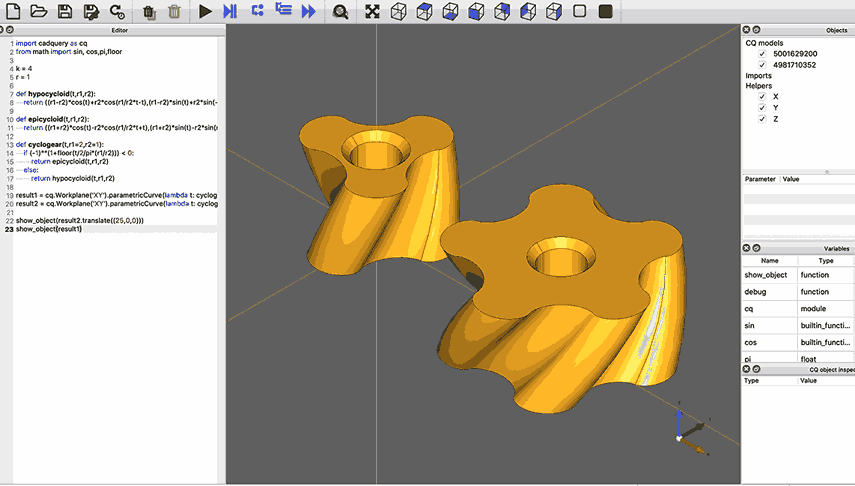
CadQuery is a Python library, not a GUI application with a scripting layer bolted on. Your CAD models are Python programs: testable, diffable, and automatable.
Design production-quality mechanical parts entirely from Python code using CadQuery. This self-contained course covers fastener libraries, involute gears, thermal optimization, lattice structures, spring verification, and FEA-driven design, with every lesson producing manufacturable STEP and STL output. #CadQuery #CodeBasedCAD #MechanicalDesign
Python-Native CAD
CadQuery is a Python library, not a GUI application with a scripting layer bolted on. Your CAD models are Python programs: testable, diffable, and automatable.
Parametric by Default
Every dimension is a variable. Change one parameter and the entire model regenerates correctly. No manual constraint repair, no broken sketches.
Engineering Ecosystem
Direct access to NumPy, SciPy, matplotlib, pandas. Run thermal calculations, parse data files, optimize parameters, and generate geometry, all in one script.
Production Output
Export STEP files for CNC machining, STL for 3D printing, DXF for laser cutting. Industry-standard formats, no vendor lock-in.
Each lesson follows a consistent approach:
Engineering Problem Start with a real design challenge (a hardware library, a gear system, a thermal problem), not abstract exercises.
Theory & Standards Cover the engineering fundamentals: ISO standards, involute mathematics, thermal resistance models, stress equations.
CadQuery Implementation Write Python code that translates engineering knowledge into 3D geometry. Every function is parametric and reusable.
Verification & Output Validate designs against engineering criteria and export production-ready files.
Lesson 0: Code-Based CAD in Action
Start here. Set up your Python environment and run 8 complete CadQuery scripts that produce colorful 3D models, from parametric Lego bricks to planetary gear sets. Each example highlights what becomes possible when your CAD model is a Python script, and by the end you will have a working CadQuery setup ready for the rest of the course.
Lesson 1: Parametric Hardware Library
Parametric Hardware Library from Engineering Standards. Build a reusable library of ISO-standard fasteners (hex bolts, socket cap screws, nuts, and washers) generated from standards tables. Set up CadQuery, Jupyter, and OCP CAD Viewer. Output: 50+ standard parts as STEP/STL files.
Lesson 2: Involute Gear Systems
Involute Gear Systems. Generate mathematically-perfect involute gears from parametric equations. Build single gears, meshing pairs, and a complete gear train with housing. Cover Lewis bending stress, contact ratio, and backlash. Output: 3D-printable gear train assembly.
Lesson 3: Custom Enclosure from PCB
Custom Enclosure from PCB Data. Parse KiCad PCB files to auto-generate enclosures with standoffs, port cutouts, ventilation, snap-fits, and lids. Output: print-ready enclosure for a real board (e.g., Raspberry Pi).
Lesson 4: Heat Sink Optimization
Heat Sink Design & Thermal Optimization. Model thermal resistance from junction to ambient. Compare straight, pin-fin, and radial fin geometries. Sweep parameters and visualize thermal performance maps with matplotlib. Output: optimized heat sink with thermal justification.
Lesson 5: Lattice Structures & TPMS
Lattice Structures & TPMS for Additive Manufacturing. Generate strut-based lattices (cubic, BCC, octet-truss) and TPMS surfaces (gyroid, Schwarz-P, diamond). Implement graded density and conformal lattices. Address printability constraints. Output: lightweight structural parts for SLA/SLS/FDM.
Lesson 6: Spring Design
Spring Design with Engineering Stress Verification. Design compression, extension, and torsion springs from load requirements. Generate helical geometry with CadQuery wire sweeps. Apply Wahl correction factor and Goodman fatigue analysis. Output: springs designed to specific load and life requirements.
Lesson 7: FEA-Driven Optimization
FEA-Driven Structural Optimization. Close the loop between CadQuery and FreeCAD FEM. Generate parametric brackets, mesh and solve with CalculiX, record results, sweep parameters, and plot Pareto fronts (mass vs. stress). Output: optimized bracket with full FEA justification.
You should be comfortable with:
Helpful but not required:
Set up a virtual environment (requires Python 3.10+)
python3 -m venv cadquery-envsource cadquery-env/bin/activate # Windows: cadquery-env\Scripts\activatepip install cadquery trimesh numpy scipyThis gives you everything needed to run every example in the course, starting from Lesson 0.
Start with Lesson 0: Code-Based CAD in Action. It walks you through 8 short scripts that produce colorful 3D models you can view in SiliconWit’s GLB Viewer. By the end you will have a working environment and a feel for what code-based CAD can do.
Move to Lesson 1, which adds Jupyter and OCP CAD Viewer for interactive development, then builds a reusable parts library from ISO standards.
Work through lessons sequentially, as each builds on patterns from earlier lessons.
Modify parameters and experiment: the whole point of code-based design is easy iteration.
Export and manufacture: every lesson produces STEP/STL files ready for production.