Skip to content

Capstone: Async Sensor Hub

Capstone: Async Sensor Hub hero image
Modified:
Published:

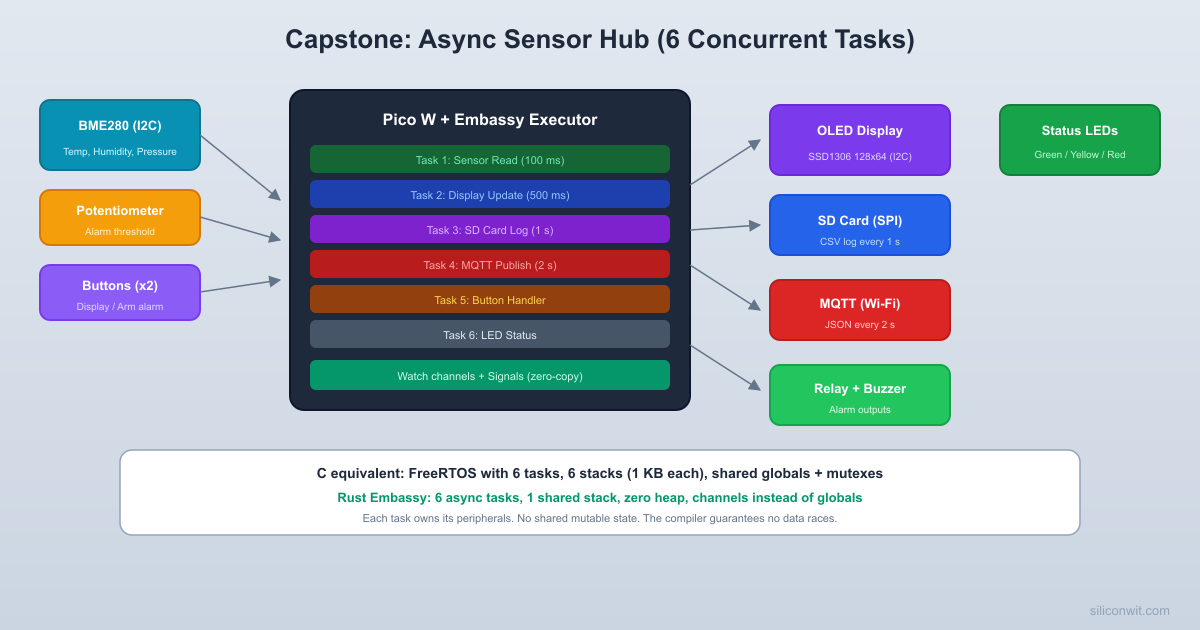
Every lesson so far focused on one capability at a time. Now you will combine them into a single system that runs six async tasks concurrently on the Pico W. A BME280 sensor feeds temperature, humidity, and pressure data into a shared channel. One task updates an SSD1306 OLED display, another logs readings to a microSD card, another publishes JSON to an MQTT broker over Wi-Fi, and two more handle button input and LED status feedback. The entire system runs on a single stack with zero-copy channels, no RTOS, and no shared mutable globals. This is the payoff of everything you have learned in this course. #AsyncEmbedded #SensorHub #Capstone

What We Are Building

Async Sensor Hub

A Pico W running six concurrent Embassy tasks: sensor reading (BME280 over I2C at 100 ms), display update (SSD1306 OLED over I2C at 500 ms), SD card logging (SPI at 1 s), MQTT publishing (Wi-Fi at 2 s), button handling (two buttons for mode switching and manual publish), and status LED feedback. Data flows between tasks through Embassy channels and signals with no shared mutable state.

System specifications:

ParameterValue
BoardRaspberry Pi Pico W
SensorBME280 (I2C, temperature, humidity, pressure)
DisplaySSD1306 OLED 128x64 (I2C)
StorageMicroSD card module (SPI)
NetworkingWi-Fi MQTT (cyw43 + embassy-net)
Input2 push buttons (mode select, manual publish)
Output2 LEDs (Wi-Fi status, SD card activity)
Tasks6 concurrent async tasks
Data FlowEmbassy channels (zero-copy, bounded)

Bill of Materials

RefComponentQuantityNotes
1Raspberry Pi Pico W1Must be Pico W for Wi-Fi
2BME280 breakout board1I2C interface, 3.3V
3SSD1306 OLED 128x641I2C interface (address 0x3C)
4MicroSD card module1SPI interface, 3.3V compatible
5MicroSD card1FAT32 formatted, any size
6Push buttons2Momentary tactile switches
7LEDs2Different colors (e.g., green, yellow)
8330 ohm resistors2LED current limiters
9Breadboard + jumper wires1 set
10Micro USB cable1For power and flashing

System Architecture


The sensor hub is organized as a set of independent async tasks that communicate through Embassy channels. Each task owns its peripherals exclusively. No task shares a mutable reference with any other task. This eliminates data races at compile time.

Task Overview

TaskIntervalPeripherals OwnedRole
Sensor Read100 msI2C0 (BME280)Reads BME280, sends data to channel
Display Update500 msI2C1 (SSD1306)Receives data, renders to OLED
SD Card Log1 sSPI0 (SD card)Receives data, writes CSV to file
MQTT Publish2 sTCP socket (Wi-Fi)Receives data, publishes JSON
Button HandlerEdge-triggeredGP18, GP19 (buttons)Sends commands via signal
LED Status100 msGP16, GP17 (LEDs)Reads system state, drives LEDs

Data Flow

The BME280 sensor task produces readings at 100 ms intervals and writes them into a bounded channel with capacity 4. The display, SD card, and MQTT tasks each read from this channel at their own pace. Since the channel has a capacity of 4, the sensor task never blocks unless all three consumers are stalled. If the channel is full, the oldest reading is overwritten (using a “watch” channel pattern) so the consumers always see the latest data.

The button handler task sends commands through a separate signal channel. When button A is pressed, it cycles through display modes (temperature, humidity, pressure, all). When button B is pressed, it triggers an immediate MQTT publish regardless of the 2-second timer.

┌──────────────┐
│ BME280 Read │
│ (100 ms) │
└──────┬───────┘
│ SensorData
┌─────────────────────┐
│ Watch Channel │
│ (latest reading) │
└───┬────┬────┬───────┘
│ │ │
┌───────┘ │ └───────┐
▼ ▼ ▼
┌──────────┐ ┌──────────┐ ┌──────────┐
│ Display │ │ SD Card │ │ MQTT │
│ (500 ms) │ │ (1 s) │ │ (2 s) │
└──────────┘ └──────────┘ └──────────┘
┌──────────┐ ┌──────────┐
│ Buttons │──Signal──────│ LED Task │
└──────────┘ └──────────┘

Circuit Connections


Complete Wiring Table

Pico W PinComponentFunction
GP4 (I2C0 SDA)BME280 SDASensor I2C data
GP5 (I2C0 SCL)BME280 SCLSensor I2C clock
GP6 (I2C1 SDA)SSD1306 SDADisplay I2C data
GP7 (I2C1 SCL)SSD1306 SCLDisplay I2C clock
GP10 (SPI1 SCK)SD module CLKSD card SPI clock
GP11 (SPI1 TX)SD module MOSISD card SPI data out
GP12 (SPI1 RX)SD module MISOSD card SPI data in
GP13SD module CSSD card chip select
GP16Green LED (through 330R)Wi-Fi/MQTT status
GP17Yellow LED (through 330R)SD card activity
GP18Button A (to GND)Display mode cycle
GP19Button B (to GND)Manual MQTT publish
3V3BME280 VIN, SSD1306 VCC, SD VCCPower
GNDAll groundsCommon ground

Both buttons connect between the GPIO pin and GND. Internal pull-up resistors are enabled in software. The BME280 and SSD1306 share the same 3.3V rail but use separate I2C buses (I2C0 and I2C1) to avoid address conflicts and allow independent access from different tasks.

Why Two I2C Buses?

The BME280 (address 0x76) and SSD1306 (address 0x3C) have different I2C addresses, so they could technically share one bus. However, putting them on separate buses lets us give each task exclusive ownership of its I2C peripheral. The sensor task owns I2C0 and the display task owns I2C1. Neither task needs to coordinate access. If they shared one bus, we would need a mutex, which adds complexity and potential deadlocks. The RP2040 has two I2C peripherals, so we use both.

Project Setup


Cargo.toml

Cargo.toml
[package]
name = "sensor-hub"
version = "0.1.0"
edition = "2021"
[dependencies]
embassy-executor = { version = "0.7", features = ["arch-cortex-m", "executor-thread"] }
embassy-rp = { version = "0.3", features = ["time-driver", "rp2040"] }
embassy-net = { version = "0.6", features = ["tcp", "dhcpv4", "medium-ethernet"] }
embassy-time = { version = "0.4" }
embassy-futures = { version = "0.1" }
embassy-sync = { version = "0.6" }
cyw43 = { version = "0.4" }
cyw43-pio = { version = "0.4", features = ["overclock"] }
cyw43-firmware = { version = "0.4" }
embedded-sdmmc = { version = "0.8" }
ssd1306 = { version = "0.9" }
embedded-graphics = { version = "0.8" }
embedded-hal-async = { version = "1" }
defmt = "0.3"
defmt-rtt = "0.4"
panic-probe = { version = "0.3", features = ["print-defmt"] }
cortex-m = "0.7"
cortex-m-rt = "0.7"
static_cell = "2"
portable-atomic = { version = "1", features = ["critical-section"] }
[profile.release]
debug = 2
lto = true
opt-level = "s"

Project Structure

  • Directorysensor-hub/
    • Cargo.toml
    • build.rs
    • memory.x
    • Directory.cargo/
      • config.toml
    • Directorysrc/
      • main.rs

build.rs

build.rs
fn main() {
println!("cargo:rustc-link-arg-bins=--nmagic");
println!("cargo:rustc-link-arg-bins=-Tlink.x");
println!("cargo:rustc-link-arg-bins=-Tdefmt.x");
}

memory.x

memory.x
MEMORY {
BOOT2 : ORIGIN = 0x10000000, LENGTH = 0x100
FLASH : ORIGIN = 0x10000100, LENGTH = 2048K - 0x100
RAM : ORIGIN = 0x20000000, LENGTH = 256K
}

.cargo/config.toml

.cargo/config.toml
[target.thumbv6m-none-eabi]
runner = "probe-rs run --chip RP2040 --protocol swd"
[build]
target = "thumbv6m-none-eabi"
[env]
DEFMT_LOG = "debug"

Shared Data Types


Before writing the tasks, we define the data structures that flow between them. These types are the contract between producers and consumers.

Data types (in main.rs)
/// Sensor reading from the BME280.
#[derive(Clone, Copy, Debug, defmt::Format)]
struct SensorData {
/// Temperature in centidegrees (2345 = 23.45 C)
temperature_c: i32,
/// Humidity in centi-percent (5678 = 56.78%)
humidity_pct: u32,
/// Pressure in Pascals
pressure_pa: u32,
/// Monotonic reading number (wraps at u32::MAX)
sequence: u32,
}
/// Display mode, cycled by button A.
#[derive(Clone, Copy, Debug, defmt::Format, PartialEq)]
enum DisplayMode {
Temperature,
Humidity,
Pressure,
All,
}
impl DisplayMode {
fn next(self) -> Self {
match self {
Self::Temperature => Self::Humidity,
Self::Humidity => Self::Pressure,
Self::Pressure => Self::All,
Self::All => Self::Temperature,
}
}
fn label(self) -> &'static str {
match self {
Self::Temperature => "Temperature",
Self::Humidity => "Humidity",
Self::Pressure => "Pressure",
Self::All => "All Sensors",
}
}
}
/// System status flags for the LED task.
#[derive(Clone, Copy)]
struct SystemStatus {
wifi_connected: bool,
mqtt_connected: bool,
sd_card_ok: bool,
sensor_ok: bool,
}

Embassy Channels and Signals

Embassy provides two main inter-task communication primitives:

  • Watch: A single-value channel where the writer overwrites the current value and all readers see the latest value. Perfect for sensor data where only the most recent reading matters.
  • Signal: A one-shot notification that wakes a waiting task. Perfect for button events and status updates.
use embassy_sync::watch::Watch;
use embassy_sync::signal::Signal;
use embassy_sync::blocking_mutex::raw::CriticalSectionRawMutex;
// Watch channel for sensor data: writer overwrites, readers get latest
static SENSOR_DATA: Watch<CriticalSectionRawMutex, SensorData, 2> = Watch::new();
// Signal for button commands
static BUTTON_A_SIGNAL: Signal<CriticalSectionRawMutex, ()> = Signal::new();
static BUTTON_B_SIGNAL: Signal<CriticalSectionRawMutex, ()> = Signal::new();
// Watch channel for system status
static SYSTEM_STATUS: Watch<CriticalSectionRawMutex, SystemStatus, 2> = Watch::new();

The Watch channel with capacity 2 means two receivers can independently track the latest value. Each receiver has its own “seen” flag, so they do not interfere with each other. The Signal is a one-shot notification: calling signal(()) wakes any task waiting on wait(). If no task is waiting, the signal is stored and delivered on the next wait() call.

Complete Firmware


Here is the complete main.rs with all six tasks. Each section is annotated with its purpose and how it interacts with the other tasks.

src/main.rs
#![no_std]
#![no_main]
use defmt::*;
use defmt_rtt as _;
use panic_probe as _;
use embassy_executor::Spawner;
use embassy_rp::bind_interrupts;
use embassy_rp::gpio::{Input, Level, Output, Pull};
use embassy_rp::i2c::{Async, I2c, Config as I2cConfig, InterruptHandler as I2cIrq};
use embassy_rp::peripherals::{DMA_CH0, DMA_CH1, I2C0, I2C1, PIO0, SPI1};
use embassy_rp::pio::{InterruptHandler as PioIrq, Pio};
use embassy_rp::spi::{Config as SpiConfig, Phase, Polarity, Spi};
use embassy_net::tcp::TcpSocket;
use embassy_net::{Config as NetConfig, StackResources};
use embassy_sync::blocking_mutex::raw::CriticalSectionRawMutex;
use embassy_sync::signal::Signal;
use embassy_sync::watch::Watch;
use embassy_time::{Duration, Timer};
use cyw43_pio::PioSpi;
use static_cell::StaticCell;
bind_interrupts!(struct Irqs {
PIO0_IRQ_0 => PioIrq<PIO0>;
I2C0_IRQ => I2cIrq<I2C0>;
I2C1_IRQ => I2cIrq<I2C1>;
});
// ── Configuration ──────────────────────────────────────────────────
const WIFI_SSID: &str = "YourNetworkName";
const WIFI_PASS: &str = "YourNetworkPassword";
const MQTT_BROKER_IP: [u8; 4] = [192, 168, 1, 100];
const MQTT_PORT: u16 = 1883;
const MQTT_CLIENT_ID: &str = "pico-w-sensor-hub";
const MQTT_TOPIC: &str = "sensors/hub/bme280";
// ── Shared Data Types ──────────────────────────────────────────────
#[derive(Clone, Copy, Debug, defmt::Format)]
struct SensorData {
temperature_c: i32,
humidity_pct: u32,
pressure_pa: u32,
sequence: u32,
}
impl Default for SensorData {
fn default() -> Self {
Self {
temperature_c: 0,
humidity_pct: 0,
pressure_pa: 0,
sequence: 0,
}
}
}
#[derive(Clone, Copy, Debug, defmt::Format, PartialEq)]
enum DisplayMode {
Temperature,
Humidity,
Pressure,
All,
}
impl DisplayMode {
fn next(self) -> Self {
match self {
Self::Temperature => Self::Humidity,
Self::Humidity => Self::Pressure,
Self::Pressure => Self::All,
Self::All => Self::Temperature,
}
}
}
#[derive(Clone, Copy)]
struct SystemStatus {
wifi_connected: bool,
mqtt_connected: bool,
sd_card_ok: bool,
sensor_ok: bool,
}
impl Default for SystemStatus {
fn default() -> Self {
Self {
wifi_connected: false,
mqtt_connected: false,
sd_card_ok: false,
sensor_ok: false,
}
}
}
// ── Inter-Task Communication ───────────────────────────────────────
static SENSOR_DATA: Watch<CriticalSectionRawMutex, SensorData, 2> = Watch::new();
static SYSTEM_STATUS: Watch<CriticalSectionRawMutex, SystemStatus, 2> = Watch::new();
static BUTTON_A_SIGNAL: Signal<CriticalSectionRawMutex, ()> = Signal::new();
static BUTTON_B_SIGNAL: Signal<CriticalSectionRawMutex, ()> = Signal::new();
// ── BME280 Constants and Types ─────────────────────────────────────
const BME280_ADDR: u8 = 0x76;
struct Bme280Calibration {
dig_t1: u16, dig_t2: i16, dig_t3: i16,
dig_p1: u16, dig_p2: i16, dig_p3: i16, dig_p4: i16,
dig_p5: i16, dig_p6: i16, dig_p7: i16, dig_p8: i16, dig_p9: i16,
dig_h1: u8, dig_h2: i16, dig_h3: u8, dig_h4: i16, dig_h5: i16, dig_h6: i8,
}
// ── Task 1: Sensor Read (100 ms) ──────────────────────────────────
#[embassy_executor::task]
async fn sensor_task(mut i2c: I2c<'static, I2C0, Async>) {
info!("Sensor task started");
// Initialize BME280
let cal = match bme280_init(&mut i2c).await {
Ok(c) => {
info!("BME280 initialized successfully");
let sender = SYSTEM_STATUS.sender();
sender.send(SystemStatus {
sensor_ok: true,
..SystemStatus::default()
});
c
}
Err(_) => {
error!("BME280 initialization failed");
// Signal sensor failure and halt this task
loop { Timer::after(Duration::from_secs(60)).await; }
}
};
let sender = SENSOR_DATA.sender();
let mut sequence: u32 = 0;
loop {
match bme280_read(&mut i2c, &cal).await {
Ok(reading) => {
let data = SensorData {
temperature_c: reading.0,
humidity_pct: reading.1,
pressure_pa: reading.2,
sequence,
};
sender.send(data);
sequence = sequence.wrapping_add(1);
}
Err(_) => {
warn!("BME280 read error at sequence {}", sequence);
}
}
Timer::after(Duration::from_millis(100)).await;
}
}
// ── Task 2: Display Update (500 ms) ───────────────────────────────
#[embassy_executor::task]
async fn display_task(i2c: I2c<'static, I2C1, Async>) {
info!("Display task started");
// Initialize SSD1306 OLED
use ssd1306::prelude::*;
use ssd1306::mode::BufferedGraphicsMode;
use ssd1306::I2CDisplayInterface;
use ssd1306::Ssd1306;
use ssd1306::size::DisplaySize128x64;
use ssd1306::rotation::DisplayRotation;
use embedded_graphics::prelude::*;
use embedded_graphics::mono_font::{ascii::FONT_6X10, MonoTextStyleBuilder};
use embedded_graphics::text::Text;
use embedded_graphics::pixelcolor::BinaryColor;
let interface = I2CDisplayInterface::new(i2c);
let mut display = Ssd1306::new(interface, DisplaySize128x64, DisplayRotation::Rotate0)
.into_buffered_graphics_mode();
if display.init().is_err() {
error!("SSD1306 initialization failed");
loop { Timer::after(Duration::from_secs(60)).await; }
}
let text_style = MonoTextStyleBuilder::new()
.font(&FONT_6X10)
.text_color(BinaryColor::On)
.build();
let mut receiver = SENSOR_DATA.receiver().unwrap();
let mut mode = DisplayMode::All;
let mut text_buf = [0u8; 32];
loop {
// Check for mode change from button A
if BUTTON_A_SIGNAL.signaled() {
BUTTON_A_SIGNAL.reset();
mode = mode.next();
info!("Display mode: {:?}", mode);
}
// Get latest sensor data
let data = receiver.get().await;
// Clear display
display.clear_buffer();
// Draw header
let _ = Text::new("Sensor Hub", Point::new(0, 10), text_style)
.draw(&mut display);
match mode {
DisplayMode::Temperature => {
let len = format_display_line(
&mut text_buf, b"Temp: ",
data.temperature_c, b" C", true,
);
let _ = Text::new(
unsafe { core::str::from_utf8_unchecked(&text_buf[..len]) },
Point::new(0, 30),
text_style,
).draw(&mut display);
}
DisplayMode::Humidity => {
let len = format_display_line(
&mut text_buf, b"Hum: ",
data.humidity_pct as i32, b" %", true,
);
let _ = Text::new(
unsafe { core::str::from_utf8_unchecked(&text_buf[..len]) },
Point::new(0, 30),
text_style,
).draw(&mut display);
}
DisplayMode::Pressure => {
let len = format_display_line(
&mut text_buf, b"Press: ",
data.pressure_pa as i32, b" Pa", false,
);
let _ = Text::new(
unsafe { core::str::from_utf8_unchecked(&text_buf[..len]) },
Point::new(0, 30),
text_style,
).draw(&mut display);
}
DisplayMode::All => {
let len1 = format_display_line(
&mut text_buf, b"T: ",
data.temperature_c, b" C", true,
);
let _ = Text::new(
unsafe { core::str::from_utf8_unchecked(&text_buf[..len1]) },
Point::new(0, 25),
text_style,
).draw(&mut display);
let len2 = format_display_line(
&mut text_buf, b"H: ",
data.humidity_pct as i32, b" %", true,
);
let _ = Text::new(
unsafe { core::str::from_utf8_unchecked(&text_buf[..len2]) },
Point::new(0, 38),
text_style,
).draw(&mut display);
let len3 = format_display_line(
&mut text_buf, b"P: ",
data.pressure_pa as i32, b" Pa", false,
);
let _ = Text::new(
unsafe { core::str::from_utf8_unchecked(&text_buf[..len3]) },
Point::new(0, 51),
text_style,
).draw(&mut display);
}
}
// Draw sequence number at bottom
let seq_len = format_seq_line(&mut text_buf, data.sequence);
let _ = Text::new(
unsafe { core::str::from_utf8_unchecked(&text_buf[..seq_len]) },
Point::new(0, 62),
text_style,
).draw(&mut display);
let _ = display.flush();
Timer::after(Duration::from_millis(500)).await;
}
}
// ── Task 3: SD Card Logging (1 s) ─────────────────────────────────
#[embassy_executor::task]
async fn sd_card_task(
spi: Spi<'static, SPI1, Async>,
cs: Output<'static>,
mut activity_led: Output<'static>,
) {
info!("SD card task started");
use embedded_sdmmc::{SdCard, VolumeManager, Mode, VolumeIdx};
let sd_card = SdCard::new(spi, cs, embassy_time::Delay);
// Wait for card to be ready
Timer::after(Duration::from_millis(500)).await;
let mut volume_mgr = match sd_card.num_bytes() {
Ok(size) => {
info!("SD card detected: {} bytes", size);
VolumeManager::new(sd_card, DummyTimesource)
}
Err(_) => {
warn!("SD card not detected, logging disabled");
loop { Timer::after(Duration::from_secs(60)).await; }
}
};
// Open volume and root directory
let volume = match volume_mgr.open_volume(VolumeIdx(0)) {
Ok(v) => v,
Err(_) => {
warn!("Failed to open SD card volume");
loop { Timer::after(Duration::from_secs(60)).await; }
}
};
let root_dir = match volume_mgr.open_root_dir(volume) {
Ok(d) => d,
Err(_) => {
warn!("Failed to open root directory");
loop { Timer::after(Duration::from_secs(60)).await; }
}
};
// Open or create the log file
let file = match volume_mgr.open_file_in_dir(
root_dir, "SENSOR.CSV", Mode::ReadWriteCreateOrAppend,
) {
Ok(f) => {
info!("Opened SENSOR.CSV for logging");
f
}
Err(_) => {
warn!("Failed to open log file");
loop { Timer::after(Duration::from_secs(60)).await; }
}
};
// Write CSV header if file is empty
let file_length = volume_mgr.file_length(file).unwrap_or(0);
if file_length == 0 {
let header = b"sequence,temperature_c,humidity_pct,pressure_pa\n";
let _ = volume_mgr.write(file, header);
}
let mut receiver = SENSOR_DATA.receiver().unwrap();
let mut csv_buf = [0u8; 64];
loop {
let data = receiver.get().await;
// Format CSV line
let len = format_csv_line(&mut csv_buf, &data);
// Blink activity LED
activity_led.set_high();
match volume_mgr.write(file, &csv_buf[..len]) {
Ok(_) => {
// Flush periodically (every write for reliability)
let _ = volume_mgr.flush_file(file);
}
Err(_) => {
warn!("SD card write failed at sequence {}", data.sequence);
}
}
activity_led.set_low();
Timer::after(Duration::from_secs(1)).await;
}
}
// ── Task 4: MQTT Publish (2 s) ────────────────────────────────────
#[embassy_executor::task]
async fn mqtt_task(stack: embassy_net::Stack<'static>) {
info!("MQTT task started, waiting for network...");
// Wait for the network stack to be ready
loop {
if stack.config_v4().is_some() {
break;
}
Timer::after(Duration::from_millis(500)).await;
}
let broker_addr = embassy_net::Ipv4Address::new(
MQTT_BROKER_IP[0], MQTT_BROKER_IP[1],
MQTT_BROKER_IP[2], MQTT_BROKER_IP[3],
);
let mut receiver = SENSOR_DATA.receiver().unwrap();
let mut json_buf = [0u8; 256];
let mut backoff_secs: u64 = 1;
loop {
// Create TCP socket
let mut rx_buf = [0u8; 1024];
let mut tx_buf = [0u8; 1024];
let mut socket = TcpSocket::new(stack, &mut rx_buf, &mut tx_buf);
socket.set_timeout(Some(Duration::from_secs(10)));
// Connect to MQTT broker
info!("MQTT: connecting to broker...");
if let Err(e) = socket.connect((broker_addr, MQTT_PORT)).await {
warn!("MQTT: TCP connect failed: {:?}", e);
update_mqtt_status(false);
Timer::after(Duration::from_secs(backoff_secs)).await;
backoff_secs = (backoff_secs * 2).min(30);
continue;
}
// Send MQTT CONNECT packet
if let Err(_) = mqtt_connect(&mut socket, MQTT_CLIENT_ID).await {
warn!("MQTT: CONNECT failed");
update_mqtt_status(false);
Timer::after(Duration::from_secs(backoff_secs)).await;
backoff_secs = (backoff_secs * 2).min(30);
continue;
}
info!("MQTT: connected to broker");
update_mqtt_status(true);
backoff_secs = 1;
let mut ping_counter: u32 = 0;
// Publish loop
loop {
// Check for manual publish trigger from button B
let manual_trigger = BUTTON_B_SIGNAL.signaled();
if manual_trigger {
BUTTON_B_SIGNAL.reset();
info!("MQTT: manual publish triggered");
}
let data = receiver.get().await;
let json_len = format_json(
&mut json_buf,
data.temperature_c,
data.humidity_pct,
data.pressure_pa,
data.sequence,
);
if let Err(_) = mqtt_publish(&mut socket, MQTT_TOPIC, &json_buf[..json_len]).await {
warn!("MQTT: publish failed, reconnecting...");
update_mqtt_status(false);
break;
}
info!(
"MQTT: published seq={} T={}.{} H={}.{} P={}",
data.sequence,
data.temperature_c / 100,
(data.temperature_c % 100).unsigned_abs(),
data.humidity_pct / 100,
data.humidity_pct % 100,
data.pressure_pa,
);
// MQTT keep-alive every 5 publishes
ping_counter += 1;
if ping_counter >= 5 {
ping_counter = 0;
if let Err(_) = mqtt_ping(&mut socket).await {
warn!("MQTT: ping failed, reconnecting...");
update_mqtt_status(false);
break;
}
}
if !manual_trigger {
Timer::after(Duration::from_secs(2)).await;
}
}
Timer::after(Duration::from_secs(backoff_secs)).await;
backoff_secs = (backoff_secs * 2).min(30);
}
}
fn update_mqtt_status(connected: bool) {
let sender = SYSTEM_STATUS.sender();
sender.send(SystemStatus {
wifi_connected: true,
mqtt_connected: connected,
sd_card_ok: true,
sensor_ok: true,
});
}
// ── Task 5: Button Handler ─────────────────────────────────────────
#[embassy_executor::task]
async fn button_task(mut btn_a: Input<'static>, mut btn_b: Input<'static>) {
info!("Button task started");
loop {
// Wait for either button to be pressed (falling edge)
let press = embassy_futures::select::select(
btn_a.wait_for_falling_edge(),
btn_b.wait_for_falling_edge(),
).await;
match press {
embassy_futures::select::Either::First(_) => {
info!("Button A pressed: cycling display mode");
BUTTON_A_SIGNAL.signal(());
// Debounce
Timer::after(Duration::from_millis(200)).await;
}
embassy_futures::select::Either::Second(_) => {
info!("Button B pressed: manual MQTT publish");
BUTTON_B_SIGNAL.signal(());
// Debounce
Timer::after(Duration::from_millis(200)).await;
}
}
}
}
// ── Task 6: LED Status ─────────────────────────────────────────────
#[embassy_executor::task]
async fn led_task(mut wifi_led: Output<'static>) {
info!("LED task started");
let mut receiver = SYSTEM_STATUS.receiver().unwrap();
let mut blink_state = false;
loop {
// Default: check if we have a status update
if let Some(status) = receiver.try_get() {
if status.mqtt_connected {
// Solid on: everything connected
wifi_led.set_high();
} else if status.wifi_connected {
// Slow blink: Wi-Fi OK but MQTT disconnected
blink_state = !blink_state;
if blink_state { wifi_led.set_high(); } else { wifi_led.set_low(); }
} else {
// Fast blink: no Wi-Fi
blink_state = !blink_state;
if blink_state { wifi_led.set_high(); } else { wifi_led.set_low(); }
}
}
Timer::after(Duration::from_millis(250)).await;
}
}
// ── CYW43 and Network Background Tasks ─────────────────────────────
#[embassy_executor::task]
async fn cyw43_task(
runner: cyw43::Runner<'static, Output<'static>, PioSpi<'static, PIO0, 0, DMA_CH0>>,
) -> ! {
runner.run().await
}
#[embassy_executor::task]
async fn net_task(mut runner: embassy_net::Runner<'static, cyw43::NetDriver<'static>>) -> ! {
runner.run().await
}
// ── Main Entry Point ───────────────────────────────────────────────
#[embassy_executor::main]
async fn main(spawner: Spawner) {
let p = embassy_rp::init(Default::default());
// ── CYW43 Wi-Fi Initialization ─────────────────────────────────
let fw = cyw43_firmware::firmware();
let clm = cyw43_firmware::clm();
let pwr = Output::new(p.PIN_23, Level::Low);
let cs = Output::new(p.PIN_25, Level::High);
let mut pio = Pio::new(p.PIO0, Irqs);
let spi_wifi = PioSpi::new(
&mut pio.common,
pio.sm0,
pio.irq0,
cs,
p.PIN_24,
p.PIN_29,
p.DMA_CH0,
);
static CYW43_STATE: StaticCell<cyw43::State> = StaticCell::new();
let cyw43_state = CYW43_STATE.init(cyw43::State::new());
let (net_device, mut control, cyw43_runner) =
cyw43::new(cyw43_state, pwr, spi_wifi, fw).await;
spawner.spawn(cyw43_task(cyw43_runner)).unwrap();
control.init(clm).await;
control.set_power_management(cyw43::PowerManagement::PowerSave).await;
// ── Network Stack ──────────────────────────────────────────────
let net_config = NetConfig::dhcpv4(Default::default());
static RESOURCES: StaticCell<StackResources<5>> = StaticCell::new();
let resources = RESOURCES.init(StackResources::new());
let (stack, net_runner) = embassy_net::new(
net_device, net_config, resources, embassy_rp::clocks::RoscRng,
);
spawner.spawn(net_task(net_runner)).unwrap();
// ── Connect to Wi-Fi ───────────────────────────────────────────
info!("Connecting to Wi-Fi: {}", WIFI_SSID);
loop {
match control.join_wpa2(WIFI_SSID, WIFI_PASS).await {
Ok(_) => {
info!("Wi-Fi connected");
break;
}
Err(e) => {
warn!("Wi-Fi join failed: status={}", e.status);
Timer::after(Duration::from_secs(2)).await;
}
}
}
// Wait for DHCP
info!("Waiting for DHCP...");
loop {
if let Some(config) = stack.config_v4() {
info!("IP address: {}", config.address);
break;
}
Timer::after(Duration::from_millis(500)).await;
}
// Update system status: Wi-Fi connected
SYSTEM_STATUS.sender().send(SystemStatus {
wifi_connected: true,
mqtt_connected: false,
sd_card_ok: false,
sensor_ok: false,
});
// Blink onboard LED to confirm Wi-Fi
for _ in 0..3 {
control.gpio_set(0, true).await;
Timer::after(Duration::from_millis(200)).await;
control.gpio_set(0, false).await;
Timer::after(Duration::from_millis(200)).await;
}
// ── Initialize Peripherals ─────────────────────────────────────
// I2C0 for BME280 sensor
let i2c0 = I2c::new_async(p.I2C0, p.PIN_5, p.PIN_4, Irqs, I2cConfig::default());
// I2C1 for SSD1306 display
let i2c1 = I2c::new_async(p.I2C1, p.PIN_7, p.PIN_6, Irqs, I2cConfig::default());
// SPI1 for SD card
let mut spi_config = SpiConfig::default();
spi_config.frequency = 400_000; // Start slow for SD init
spi_config.phase = Phase::CaptureOnFirstTransition;
spi_config.polarity = Polarity::IdleLow;
let spi_sd = Spi::new(
p.SPI1, p.PIN_10, p.PIN_11, p.PIN_12,
p.DMA_CH1, p.DMA_CH2, spi_config,
);
let sd_cs = Output::new(p.PIN_13, Level::High);
// GPIOs
let wifi_led = Output::new(p.PIN_16, Level::Low);
let sd_led = Output::new(p.PIN_17, Level::Low);
let btn_a = Input::new(p.PIN_18, Pull::Up);
let btn_b = Input::new(p.PIN_19, Pull::Up);
// ── Spawn All Tasks ────────────────────────────────────────────
spawner.spawn(sensor_task(i2c0)).unwrap();
spawner.spawn(display_task(i2c1)).unwrap();
spawner.spawn(sd_card_task(spi_sd, sd_cs, sd_led)).unwrap();
spawner.spawn(mqtt_task(stack)).unwrap();
spawner.spawn(button_task(btn_a, btn_b)).unwrap();
spawner.spawn(led_task(wifi_led)).unwrap();
info!("All tasks spawned. Sensor hub is running.");
// Main task idles; all work happens in spawned tasks
loop {
Timer::after(Duration::from_secs(3600)).await;
}
}
// ── MQTT Protocol Functions ────────────────────────────────────────
async fn mqtt_connect(socket: &mut TcpSocket<'_>, client_id: &str) -> Result<(), ()> {
let id = client_id.as_bytes();
let remaining = 10 + 2 + id.len();
let mut pkt = [0u8; 128];
let mut pos = 0;
pkt[pos] = 0x10; pos += 1; // CONNECT
pkt[pos] = remaining as u8; pos += 1;
// Protocol name "MQTT"
pkt[pos] = 0x00; pos += 1;
pkt[pos] = 0x04; pos += 1;
pkt[pos..pos + 4].copy_from_slice(b"MQTT"); pos += 4;
pkt[pos] = 0x04; pos += 1; // Protocol level 4 (MQTT 3.1.1)
pkt[pos] = 0x02; pos += 1; // Clean session
pkt[pos] = 0x00; pos += 1; // Keep alive MSB
pkt[pos] = 0x3C; pos += 1; // Keep alive LSB (60s)
// Client ID
pkt[pos] = (id.len() >> 8) as u8; pos += 1;
pkt[pos] = (id.len() & 0xFF) as u8; pos += 1;
pkt[pos..pos + id.len()].copy_from_slice(id); pos += id.len();
socket.write_all(&pkt[..pos]).await.map_err(|_| ())?;
let mut connack = [0u8; 4];
socket.read_exact(&mut connack).await.map_err(|_| ())?;
if connack[0] != 0x20 || connack[3] != 0x00 {
return Err(());
}
Ok(())
}
async fn mqtt_publish(socket: &mut TcpSocket<'_>, topic: &str, payload: &[u8]) -> Result<(), ()> {
let topic_bytes = topic.as_bytes();
let remaining = 2 + topic_bytes.len() + payload.len();
let mut pkt = [0u8; 512];
let mut pos = 0;
pkt[pos] = 0x30; pos += 1; // PUBLISH QoS 0
// Variable-length remaining length
let mut rem = remaining;
loop {
let mut byte = (rem % 128) as u8;
rem /= 128;
if rem > 0 { byte |= 0x80; }
pkt[pos] = byte; pos += 1;
if rem == 0 { break; }
}
// Topic
pkt[pos] = (topic_bytes.len() >> 8) as u8; pos += 1;
pkt[pos] = (topic_bytes.len() & 0xFF) as u8; pos += 1;
pkt[pos..pos + topic_bytes.len()].copy_from_slice(topic_bytes);
pos += topic_bytes.len();
// Payload
pkt[pos..pos + payload.len()].copy_from_slice(payload);
pos += payload.len();
socket.write_all(&pkt[..pos]).await.map_err(|_| ())
}
async fn mqtt_ping(socket: &mut TcpSocket<'_>) -> Result<(), ()> {
socket.write_all(&[0xC0, 0x00]).await.map_err(|_| ())?;
let mut resp = [0u8; 2];
socket.read_exact(&mut resp).await.map_err(|_| ())?;
if resp[0] != 0xD0 { return Err(()); }
Ok(())
}
// ── BME280 Driver ──────────────────────────────────────────────────
async fn bme280_init(i2c: &mut I2c<'_, I2C0, Async>) -> Result<Bme280Calibration, ()> {
let mut id = [0u8; 1];
i2c.write_read(BME280_ADDR, &[0xD0], &mut id).await.map_err(|_| ())?;
if id[0] != 0x60 { return Err(()); }
// Soft reset
i2c.write(BME280_ADDR, &[0xE0, 0xB6]).await.map_err(|_| ())?;
Timer::after(Duration::from_millis(10)).await;
// Read temperature and pressure calibration
let mut cal_buf = [0u8; 26];
i2c.write_read(BME280_ADDR, &[0x88], &mut cal_buf).await.map_err(|_| ())?;
// Read humidity calibration
let mut cal_h = [0u8; 7];
i2c.write_read(BME280_ADDR, &[0xE1], &mut cal_h).await.map_err(|_| ())?;
let mut dig_h1 = [0u8; 1];
i2c.write_read(BME280_ADDR, &[0xA1], &mut dig_h1).await.map_err(|_| ())?;
let cal = Bme280Calibration {
dig_t1: u16::from_le_bytes([cal_buf[0], cal_buf[1]]),
dig_t2: i16::from_le_bytes([cal_buf[2], cal_buf[3]]),
dig_t3: i16::from_le_bytes([cal_buf[4], cal_buf[5]]),
dig_p1: u16::from_le_bytes([cal_buf[6], cal_buf[7]]),
dig_p2: i16::from_le_bytes([cal_buf[8], cal_buf[9]]),
dig_p3: i16::from_le_bytes([cal_buf[10], cal_buf[11]]),
dig_p4: i16::from_le_bytes([cal_buf[12], cal_buf[13]]),
dig_p5: i16::from_le_bytes([cal_buf[14], cal_buf[15]]),
dig_p6: i16::from_le_bytes([cal_buf[16], cal_buf[17]]),
dig_p7: i16::from_le_bytes([cal_buf[18], cal_buf[19]]),
dig_p8: i16::from_le_bytes([cal_buf[20], cal_buf[21]]),
dig_p9: i16::from_le_bytes([cal_buf[22], cal_buf[23]]),
dig_h1: dig_h1[0],
dig_h2: i16::from_le_bytes([cal_h[0], cal_h[1]]),
dig_h3: cal_h[2],
dig_h4: ((cal_h[3] as i16) << 4) | ((cal_h[4] as i16) & 0x0F),
dig_h5: ((cal_h[5] as i16) << 4) | (((cal_h[4] as i16) >> 4) & 0x0F),
dig_h6: cal_h[6] as i8,
};
// Configure sensor: humidity x1, temp x1, pressure x1, normal mode
i2c.write(BME280_ADDR, &[0xF2, 0x01]).await.map_err(|_| ())?;
i2c.write(BME280_ADDR, &[0xF4, 0x27]).await.map_err(|_| ())?;
i2c.write(BME280_ADDR, &[0xF5, 0xA0]).await.map_err(|_| ())?;
Ok(cal)
}
/// Returns (temperature_c, humidity_pct, pressure_pa)
async fn bme280_read(
i2c: &mut I2c<'_, I2C0, Async>,
cal: &Bme280Calibration,
) -> Result<(i32, u32, u32), ()> {
let mut raw = [0u8; 8];
i2c.write_read(BME280_ADDR, &[0xF7], &mut raw).await.map_err(|_| ())?;
let adc_p = ((raw[0] as i32) << 12) | ((raw[1] as i32) << 4) | ((raw[2] as i32) >> 4);
let adc_t = ((raw[3] as i32) << 12) | ((raw[4] as i32) << 4) | ((raw[5] as i32) >> 4);
let adc_h = ((raw[6] as i32) << 8) | (raw[7] as i32);
// Temperature compensation
let var1 = ((((adc_t >> 3) - ((cal.dig_t1 as i32) << 1))) * (cal.dig_t2 as i32)) >> 11;
let var2 = (((((adc_t >> 4) - (cal.dig_t1 as i32))
* ((adc_t >> 4) - (cal.dig_t1 as i32))) >> 12)
* (cal.dig_t3 as i32)) >> 14;
let t_fine = var1 + var2;
let temperature = (t_fine * 5 + 128) >> 8;
// Pressure compensation
let mut var1_p = (t_fine as i64) - 128000;
let mut var2_p = var1_p * var1_p * (cal.dig_p6 as i64);
var2_p = var2_p + ((var1_p * (cal.dig_p5 as i64)) << 17);
var2_p = var2_p + ((cal.dig_p4 as i64) << 35);
var1_p = ((var1_p * var1_p * (cal.dig_p3 as i64)) >> 8)
+ ((var1_p * (cal.dig_p2 as i64)) << 12);
var1_p = (((1i64 << 47) + var1_p) * (cal.dig_p1 as i64)) >> 33;
let pressure = if var1_p == 0 {
0u32
} else {
let mut p: i64 = 1048576 - adc_p as i64;
p = (((p << 31) - var2_p) * 3125) / var1_p;
let v1 = ((cal.dig_p9 as i64) * (p >> 13) * (p >> 13)) >> 25;
let v2 = ((cal.dig_p8 as i64) * p) >> 19;
((p + v1 + v2) >> 8) as u32 + (((cal.dig_p7 as i64) << 4) as u32)
};
// Humidity compensation
let mut v_x1 = t_fine - 76800i32;
v_x1 = (((((adc_h << 14) - ((cal.dig_h4 as i32) << 20)
- ((cal.dig_h5 as i32) * v_x1)) + 16384) >> 15)
* (((((((v_x1 * (cal.dig_h6 as i32)) >> 10)
* (((v_x1 * (cal.dig_h3 as i32)) >> 11) + 32768)) >> 10)
+ 2097152) * (cal.dig_h2 as i32) + 8192) >> 14));
v_x1 = v_x1 - (((((v_x1 >> 15) * (v_x1 >> 15)) >> 7) * (cal.dig_h1 as i32)) >> 4);
let v_x1 = if v_x1 < 0 { 0 } else if v_x1 > 419430400 { 419430400 } else { v_x1 };
let humidity = (v_x1 >> 12) as u32;
Ok((
temperature, // centidegrees
(humidity * 100) / 1024, // centi-percent
pressure / 256, // Pascals
))
}
// ── Formatting Helpers ─────────────────────────────────────────────
fn format_json(buf: &mut [u8], temp: i32, hum: u32, press: u32, seq: u32) -> usize {
let mut pos = 0;
let h = b"{\"seq\":";
buf[pos..pos + h.len()].copy_from_slice(h); pos += h.len();
pos += write_u32_str(&mut buf[pos..], seq);
let h2 = b",\"temperature\":";
buf[pos..pos + h2.len()].copy_from_slice(h2); pos += h2.len();
pos += write_fixed(&mut buf[pos..], temp);
let h3 = b",\"humidity\":";
buf[pos..pos + h3.len()].copy_from_slice(h3); pos += h3.len();
pos += write_fixed(&mut buf[pos..], hum as i32);
let h4 = b",\"pressure\":";
buf[pos..pos + h4.len()].copy_from_slice(h4); pos += h4.len();
pos += write_u32_str(&mut buf[pos..], press);
buf[pos] = b'}'; pos += 1;
pos
}
fn format_csv_line(buf: &mut [u8], data: &SensorData) -> usize {
let mut pos = 0;
pos += write_u32_str(&mut buf[pos..], data.sequence);
buf[pos] = b','; pos += 1;
pos += write_fixed(&mut buf[pos..], data.temperature_c);
buf[pos] = b','; pos += 1;
pos += write_fixed(&mut buf[pos..], data.humidity_pct as i32);
buf[pos] = b','; pos += 1;
pos += write_u32_str(&mut buf[pos..], data.pressure_pa);
buf[pos] = b'\n'; pos += 1;
pos
}
fn format_display_line(buf: &mut [u8], prefix: &[u8], val: i32, suffix: &[u8], fixed: bool) -> usize {
let mut pos = 0;
buf[pos..pos + prefix.len()].copy_from_slice(prefix);
pos += prefix.len();
if fixed {
pos += write_fixed(&mut buf[pos..], val);
} else {
pos += write_u32_str(&mut buf[pos..], val as u32);
}
buf[pos..pos + suffix.len()].copy_from_slice(suffix);
pos += suffix.len();
pos
}
fn format_seq_line(buf: &mut [u8], seq: u32) -> usize {
let mut pos = 0;
let prefix = b"#";
buf[pos..pos + prefix.len()].copy_from_slice(prefix);
pos += prefix.len();
pos += write_u32_str(&mut buf[pos..], seq);
pos
}
fn write_fixed(buf: &mut [u8], val: i32) -> usize {
let mut pos = 0;
if val < 0 { buf[pos] = b'-'; pos += 1; }
let abs = val.unsigned_abs();
pos += write_u32_str(&mut buf[pos..], abs / 100);
buf[pos] = b'.'; pos += 1;
let frac = abs % 100;
if frac < 10 { buf[pos] = b'0'; pos += 1; }
pos += write_u32_str(&mut buf[pos..], frac);
pos
}
fn write_u32_str(buf: &mut [u8], val: u32) -> usize {
if val == 0 { buf[0] = b'0'; return 1; }
let mut tmp = [0u8; 10];
let mut n = val;
let mut i = 0;
while n > 0 { tmp[i] = b'0' + (n % 10) as u8; n /= 10; i += 1; }
for j in 0..i { buf[j] = tmp[i - 1 - j]; }
i
}
// ── SD Card Time Source ────────────────────────────────────────────
struct DummyTimesource;
impl embedded_sdmmc::TimeSource for DummyTimesource {
fn get_timestamp(&self) -> embedded_sdmmc::Timestamp {
embedded_sdmmc::Timestamp {
year_since_1970: 56, // 2026
zero_indexed_month: 2, // March
zero_indexed_day: 11, // 12th

hours: 0,
minutes: 0,
seconds: 0,
}
}
}

How the Tasks Interact


Data Ownership Model

Each task owns its peripherals exclusively. The sensor task owns I2C0 (BME280). The display task owns I2C1 (SSD1306). The SD card task owns SPI1 and the SD chip select pin. The button task owns the two GPIO input pins. The LED task owns the two GPIO output pins. No peripheral is shared between tasks.

Data flows between tasks through Embassy’s Watch channel. The sensor task calls sender.send(data) to publish the latest reading. The display, SD card, and MQTT tasks each create their own receiver and call receiver.get().await to get the latest data. The Watch channel guarantees that each receiver always sees the most recent value. If the sensor publishes 5 readings while the MQTT task is sleeping for 2 seconds, the MQTT task gets the 5th reading when it wakes up, skipping the intermediate ones.

This is fundamentally different from a shared global variable. With a global, you would need a mutex to prevent torn reads (reading half of one update and half of the next). With the Watch channel, all reads are atomic and consistent. The Rust compiler enforces this: you cannot accidentally access the sensor data without going through the channel.

Error Isolation

Each task handles its own errors independently. If the SD card is removed, the SD card task logs a warning and retries, but all other tasks continue running. If the MQTT broker goes down, the MQTT task enters its reconnection loop with exponential backoff, while the display and SD card tasks keep working normally. If the BME280 sensor fails, the sensor task logs an error and halts, but it sent a default SensorData to the channel, so the consumers do not crash.

This error isolation is a natural consequence of the task-per-peripheral architecture. In a traditional global-state C program, an SD card error might corrupt a shared buffer, or an MQTT timeout might block the main loop and freeze the display. With isolated tasks and channels, errors are contained.

C vs Rust: Multi-Task Architecture


The equivalent system in C would typically use FreeRTOS with 6 tasks. Here is what that looks like:

C with FreeRTOS (6 tasks, shared globals, mutexes)
// Shared global state: requires mutex protection
static SemaphoreHandle_t data_mutex;
static sensor_data_t latest_data; // Shared mutable global
static bool mqtt_connected; // Shared mutable global
static bool sd_ok; // Shared mutable global
// Each task needs its own stack (typically 1-4 KB each)
// Total: 6 tasks * 2 KB = 12 KB just for task stacks
void sensor_task(void *params) {
while (1) {
sensor_data_t data;
bme280_read(&data);
// Must lock mutex before writing shared data
xSemaphoreTake(data_mutex, portMAX_DELAY);
latest_data = data;
xSemaphoreGive(data_mutex);
vTaskDelay(pdMS_TO_TICKS(100));
}
}
void display_task(void *params) {
while (1) {
sensor_data_t local;
// Must lock mutex before reading shared data
xSemaphoreTake(data_mutex, portMAX_DELAY);
local = latest_data; // Copy while locked
xSemaphoreGive(data_mutex);
ssd1306_update(&local);
vTaskDelay(pdMS_TO_TICKS(500));
}
}
// Similar pattern for mqtt_task, sd_task, etc.
// Every access to shared data needs mutex lock/unlock.
// Forgetting a lock: data race (undefined behavior).
// Holding a lock too long: blocks other tasks.
// Wrong lock order: deadlock.
Rust with Embassy (6 tasks, channels, no shared state)
// No shared mutable globals. No mutexes. No lock ordering.
// Each task owns its peripherals exclusively.
static SENSOR_DATA: Watch<CriticalSectionRawMutex, SensorData, 2> = Watch::new();
#[embassy_executor::task]
async fn sensor_task(mut i2c: I2c<'static, I2C0, Async>) {
let sender = SENSOR_DATA.sender();
loop {
let data = bme280_read(&mut i2c).await;
sender.send(data); // No mutex, no lock
Timer::after(Duration::from_millis(100)).await;
}
}
#[embassy_executor::task]
async fn display_task(i2c: I2c<'static, I2C1, Async>) {
let mut receiver = SENSOR_DATA.receiver().unwrap();
loop {
let data = receiver.get().await; // No mutex, no lock
ssd1306_update(&data);
Timer::after(Duration::from_millis(500)).await;
}
}

Key differences:

AspectC + FreeRTOSRust + Embassy
Task stacks6 separate stacks (~12 KB total)Single stack (async tasks share it)
Data sharingGlobal variables + mutexesWatch channels (zero-copy, lock-free)
Data racesPossible if you forget a mutexImpossible (compiler rejects it)
DeadlocksPossible with wrong lock orderImpossible (no locks)
Peripheral accessAny task can touch any peripheralEach task owns its peripherals
Error isolationCorruption can spread through globalsErrors stay within the failing task
Memory safetyManual (buffer overflows possible)Compile-time guaranteed

The Rust version uses less RAM (single stack vs. 6 stacks), has zero risk of data races or deadlocks, and enforces peripheral ownership at compile time. The trade-off is the learning curve: Rust’s ownership system takes time to internalize. But once you understand it, the compiler prevents the most common bugs in multi-task embedded systems.

Building and Flashing


  1. Build the firmware:

    Terminal window
    cargo build --release
  2. Flash via probe-rs:

    Terminal window
    cargo run --release
  3. Or flash via UF2 (hold BOOTSEL while plugging in):

    Terminal window
    cargo install elf2uf2-rs
    elf2uf2-rs target/thumbv6m-none-eabi/release/sensor-hub
  4. The Pico W connects to Wi-Fi, initializes all peripherals, and starts all six tasks.

Testing


Step-by-Step Verification

  1. Power on and Wi-Fi. After flashing, the onboard LED blinks 3 times to confirm Wi-Fi connection. The green LED (GP16) starts blinking slowly (Wi-Fi connected, MQTT not yet connected).

  2. MQTT connection. Start a Mosquitto broker on your computer and subscribe to the topic:

    Terminal window
    mosquitto_sub -h localhost -t "sensors/hub/bme280" -v

    Within a few seconds, the green LED should turn solid (MQTT connected) and JSON messages appear in the terminal every 2 seconds:

    sensors/hub/bme280 {"seq":42,"temperature":23.45,"humidity":56.78,"pressure":101325}
  3. OLED display. The SSD1306 should show “Sensor Hub” at the top and all three sensor readings below. Press button A (GP18) to cycle through display modes: temperature only, humidity only, pressure only, then back to all.

  4. SD card logging. Insert a FAT32-formatted microSD card before powering on. The yellow LED (GP17) blinks briefly on each write. After running for a minute, power off, remove the SD card, and check SENSOR.CSV on a computer:

    sequence,temperature_c,humidity_pct,pressure_pa
    0,23.45,56.78,101325
    1,23.46,56.75,101324
    ...
  5. Manual publish. Press button B (GP19). The MQTT task publishes immediately without waiting for the 2-second timer.

  6. Disconnection recovery. Stop the Mosquitto broker. The green LED starts blinking (MQTT disconnected). The display and SD card continue working normally. Restart Mosquitto. Within 30 seconds, the green LED turns solid again and publishes resume.

Troubleshooting

SymptomLikely CauseFix
No Wi-Fi connectionWrong SSID/password or 5 GHz networkVerify credentials; Pico W only supports 2.4 GHz
OLED blankWrong I2C address or wiringSome SSD1306 boards use 0x3D; check SDA/SCL on I2C1 pins
BME280 init failsWrong I2C addressSome boards use 0x77; check SDO pin connection
SD card not detectedCard not FAT32 or module wiringFormat card as FAT32; check SPI pin connections
MQTT never connectsBroker not running or wrong IPVerify broker IP; check firewall rules
Button does nothingWiring issueVerify buttons connect to GND; check pull-up is enabled
System panic on bootStack overflowIncrease RAM allocation or reduce buffer sizes

Production Notes


Watchdog timer: For unattended deployment, add a watchdog timer that resets the device if no sensor reading is published for 60 seconds. Embassy-rp provides embassy_rp::watchdog::Watchdog for this purpose. Feed the watchdog from the sensor task on each successful read.

Power consumption: The Pico W draws approximately 45 mA idle and up to 300 mA during Wi-Fi transmission. With the OLED display active, add about 20 mA. The SD card draws 50 to 100 mA during writes. Total peak: around 470 mA. Use a USB power supply rated for at least 1 A. For battery operation, consider putting the display to sleep between updates and using Wi-Fi power management mode.

SD card reliability: The FAT filesystem is not power-fail safe. If power is lost during a write, the filesystem can become corrupted. For critical logging applications, consider writing to a raw partition instead of FAT, or implement a write-ahead log pattern. The flush_file call after each write reduces the risk but does not eliminate it.

Flash wear: The microSD card has a limited write endurance (typically 100,000 erase cycles per block). Writing every second produces 86,400 writes per day. At this rate, a typical microSD card will last several years, but for decade-long deployments, consider reducing the write frequency or using wear-leveling-aware storage.

Over-the-air updates: For deployed devices, implement OTA firmware updates. The RP2040 has 2 MB of flash, which is enough to store two firmware images (A/B partitioning). On each boot, check a flag to determine which partition to run. An MQTT command can trigger a firmware download over TCP, written to the inactive partition, with the flag flipped on successful verification.

Course Summary and Next Steps


Over the course of nine lessons, you progressed from blinking an LED to building a complete networked sensor hub, all in Rust on the RP2040.

What You Learned

LessonSkill
1. Getting StartedRust toolchain, no_std, Embassy project setup, LED blink
2. GPIO and InterruptsDigital I/O, pull-ups, debouncing, async edge detection
3. Timers and PWMHardware timers, PWM duty cycle, LED dimming, servo control
4. ADC and Analog12-bit ADC, voltage scaling, sensor reading, DMA transfers
5. I2C and SPIBus protocols, BME280 driver, SSD1306 display, register maps
6. DMA and PIODirect memory access, programmable I/O, WS2812B LED protocol
7. USB DeviceCDC serial, HID keyboard, composite devices, embassy-usb builder
8. Wi-Fi NetworkingCYW43 driver, TCP sockets, MQTT protocol, reconnection logic
9. CapstoneMulti-task architecture, channels, error isolation, system integration

Key Rust Advantages for Embedded

Throughout this course, you saw how Rust’s type system and ownership model solve real embedded programming problems:

  • No null pointer dereferences. Option<T> forces you to handle the “no value” case.
  • No buffer overflows. Array bounds are checked at compile time when possible, and at runtime otherwise.
  • No data races. The borrow checker prevents two tasks from holding mutable references to the same data.
  • No use-after-free. Ownership transfer means resources are always valid when accessed.
  • No forgotten mutex locks. There are no mutexes; channels and signals handle inter-task communication.
  • Peripheral ownership. Each task owns its hardware peripherals; the compiler rejects code that tries to use a peripheral from the wrong task.

Where to Go Next

IoT Systems Course

Take the networking skills from Lessons 8 and 9 further. Build complete IoT deployments with cloud integration, dashboards, and device management. The SiliconWit IoT Systems course covers MQTT brokers, REST APIs, time-series databases, and production deployment patterns.

Edge AI / TinyML Course

Put machine learning on the RP2040. The Edge AI course covers TensorFlow Lite Micro inference, keyword spotting, anomaly detection, and sensor fusion. Use the BME280 driver and async patterns from this course as the data pipeline feeding ML models.

Contribute to Embassy

The Embassy ecosystem is actively developed and welcomes contributions. You now understand the architecture well enough to write new peripheral drivers, improve documentation, or port Embassy to other microcontrollers. Check the Embassy GitHub repository for open issues.

Build Your Own Product

You have all the building blocks: sensors, displays, storage, networking, and USB. Design a custom PCB around the RP2040 (or use the Pico W as a module), write production firmware in Rust, and ship something real. The KiCad PCB Design course on SiliconWit can help with the hardware side.

Summary


You built a complete async sensor hub that runs six concurrent tasks on the Pico W using Embassy. A BME280 sensor feeds temperature, humidity, and pressure data through a Watch channel to three consumers: an SSD1306 OLED display, a microSD card logger, and an MQTT publisher. Two buttons cycle the display mode and trigger manual publishes. A status LED indicates Wi-Fi and MQTT connection state. Each task owns its peripherals exclusively, with no shared mutable state, no mutexes, and no risk of data races. The entire system runs on a single stack using cooperative async scheduling, compared to the six separate task stacks and mutex-protected globals required by the equivalent FreeRTOS implementation in C. This capstone demonstrates that Rust’s ownership model is not just a safety feature; it is an architectural advantage that produces simpler, more reliable embedded systems.

Comments

Loading comments...


© 2021-2026 SiliconWit®. All rights reserved.