


P (Proportional)
Reacts to the present error. Larger error means stronger response. Creates the basic corrective action.
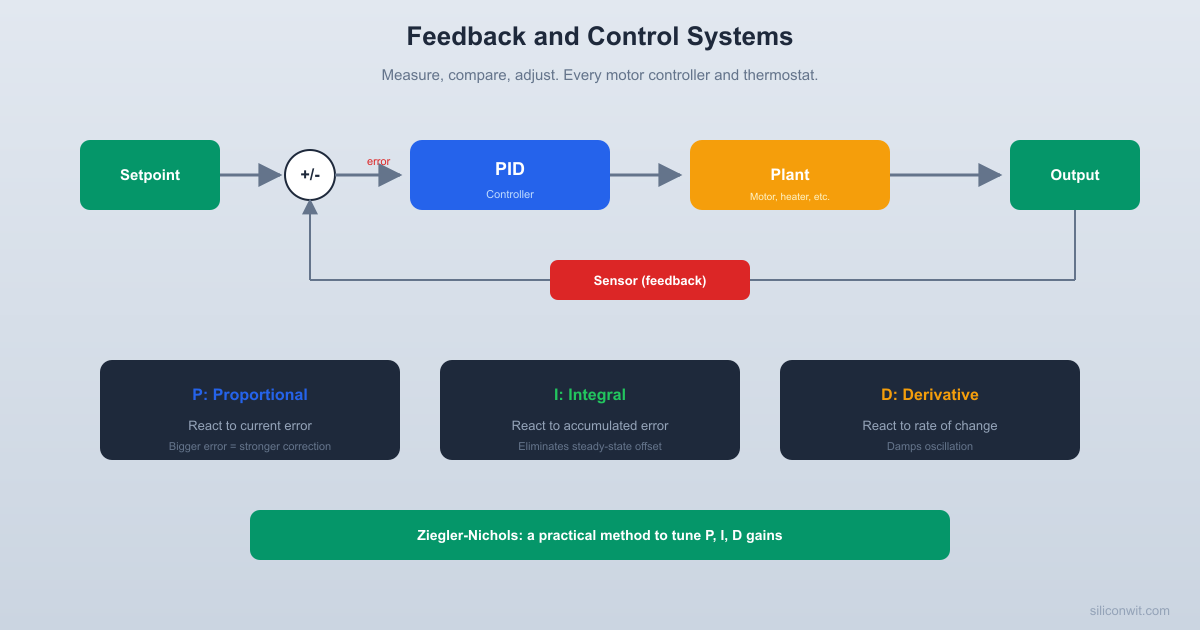
You want your room at 22 degrees. The heater runs, the temperature rises, and when it reaches 22 you turn the heater off. But by the time the room responds, it has overshot to 24. So you wait, it drops, undershoots to 20, and you turn the heater on again. This oscillation is what happens when feedback is done badly. Done well, feedback is the single most powerful idea in engineering: it lets imprecise components produce precise results, and it lets simple systems handle complex, unpredictable environments. #ControlSystems #PID #FeedbackControl
Open-loop control sets the input and hopes for the best. You set the heater to 50% power because you calculated that should maintain 22 degrees. If the window is open, if the sun comes out, if someone leaves the door ajar, the temperature drifts and the controller does nothing about it.
Closed-loop control measures the output and adjusts the input to correct errors. It does not need to know about the window or the sun. It sees that the temperature is too low and increases the heater power. It sees the temperature is too high and decreases it. The feedback loop makes the system self-correcting.
Open-loop:  Desired temp --> [Controller] --> [Heater] --> Room temp  (no feedback, no correction)
Closed-loop:  Desired temp -->(+)-->[Controller]-->[Heater]-->[Room]--+-- Room temp                   ^                                       |                   |          error = desired - actual      |                   +----------[Sensor]<--------------------+
The closed-loop diagram is the most important diagram in control engineering. Every feedback system, from a thermostat to a self-driving car, follows this structure.
Cruise control in your car is a textbook example: it measures your speed (sensor), compares it to the speed you set (setpoint), and adjusts the throttle (output) to minimize the difference. Your body works the same way: the hypothalamus measures your core temperature, and if it deviates from 37 degrees C, it triggers sweating (too hot) or shivering (too cold) to bring it back.
The error is the difference between what you want (the setpoint or reference) and what you have (the measured output):
where
The most obvious controller: make the control effort proportional to the error.
If the temperature is 2 degrees below the setpoint, apply twice as much heat as when it is 1 degree below. The constant
Proportional control has a fundamental limitation. The controller output is
Increasing
import numpy as npimport matplotlib.pyplot as plt
def simulate_p_control(Kp, setpoint, t_end=100, dt=0.1):    """Simulate P control of a first-order thermal system.    Plant: dT/dt = -0.1*(T - T_ambient) + 0.05*u    """    T_ambient = 15.0    N = int(t_end / dt)    t = np.zeros(N)    T = np.zeros(N)    u = np.zeros(N)    T[0] = T_ambient  # start at ambient
    for i in range(N - 1):        error = setpoint - T[i]        u[i] = np.clip(Kp * error, 0, 100)  # 0-100% heater        dTdt = -0.1 * (T[i] - T_ambient) + 0.05 * u[i]        T[i+1] = T[i] + dTdt * dt        t[i+1] = t[i] + dt
    u[-1] = u[-2]    return t, T, u
setpoint = 25.0fig, (ax1, ax2) = plt.subplots(2, 1, figsize=(10, 6), sharex=True)
for Kp in [5, 15, 50]:    t, T, u = simulate_p_control(Kp, setpoint)    ax1.plot(t, T, linewidth=1.5, label=f'Kp={Kp}')    ax2.plot(t, u, linewidth=1, label=f'Kp={Kp}')
ax1.axhline(setpoint, color='k', linestyle='--', alpha=0.5, label='Setpoint')ax1.set_ylabel('Temperature (C)')ax1.set_title('Proportional Control: Effect of Gain')ax1.legend()ax1.grid(True, alpha=0.3)
ax2.set_ylabel('Heater Power (%)')ax2.set_xlabel('Time (s)')ax2.grid(True, alpha=0.3)ax2.legend()
plt.tight_layout()plt.show()
Notice: none of the P-only responses reach the setpoint exactly. The gap is the steady-state error.
The fix for steady-state error: add an integral term that accumulates the error over time.
Even a tiny, persistent error will eventually build up a large integral, generating enough control effort to eliminate the offset completely. The integral “remembers” past errors and keeps pushing until the error reaches zero.
The integral term introduces a new problem: overshoot. The integral accumulates while the error is positive (approaching the setpoint). By the time the temperature reaches the setpoint, the integral is large and positive, so the controller keeps pushing. The temperature overshoots, and the integral must wind down before the system settles.
This is called integral windup: the integral builds up to a large value during a sustained error and takes time to unwind. In practice, you clamp (limit) the integral term to prevent excessive windup.
import numpy as npimport matplotlib.pyplot as plt
def simulate_pi_control(Kp, Ki, setpoint, t_end=200, dt=0.1):    """Simulate PI control of a first-order thermal system."""    T_ambient = 15.0    N = int(t_end / dt)    t = np.zeros(N)    T = np.zeros(N)    u = np.zeros(N)    T[0] = T_ambient    integral = 0.0
    for i in range(N - 1):        error = setpoint - T[i]        integral += error * dt        integral = np.clip(integral, -500, 500)  # anti-windup
        u[i] = np.clip(Kp * error + Ki * integral, 0, 100)        dTdt = -0.1 * (T[i] - T_ambient) + 0.05 * u[i]        T[i+1] = T[i] + dTdt * dt        t[i+1] = t[i] + dt
    u[-1] = u[-2]    return t, T, u
setpoint = 25.0fig, ax = plt.subplots(figsize=(10, 5))
# P-only for referencet, T, _ = simulate_p_control(15, setpoint, t_end=200)ax.plot(t, T, 'b--', linewidth=1, label='P only (Kp=15)')
# PI with different Kifor Ki in [0.05, 0.2, 0.8]:    t, T, _ = simulate_pi_control(15, Ki, setpoint, t_end=200)    ax.plot(t, T, linewidth=1.5, label=f'PI (Kp=15, Ki={Ki})')
ax.axhline(setpoint, color='k', linestyle='--', alpha=0.5, label='Setpoint')ax.set_xlabel('Time (s)')ax.set_ylabel('Temperature (C)')ax.set_title('PI Control: Integral Action Removes Steady-State Error')ax.legend()ax.grid(True, alpha=0.3)plt.tight_layout()plt.show()The derivative term looks at the rate of change of the error. If the temperature is approaching the setpoint rapidly, the derivative is large and negative. The derivative term reduces the control effort before the system reaches the setpoint, damping the overshoot.
P (Proportional)
Reacts to the present error. Larger error means stronger response. Creates the basic corrective action.
I (Integral)
Reacts to the past (accumulated error). Eliminates steady-state error. Can cause overshoot and windup.
D (Derivative)
Reacts to the future (rate of change). Damps oscillation and reduces overshoot. Sensitive to noise.
The derivative term computes the rate of change of the error. If the sensor signal is noisy, the derivative amplifies that noise dramatically. A noisy temperature reading bouncing by 0.1 degrees produces huge spikes in the derivative.
Two practical solutions:
import numpy as npimport matplotlib.pyplot as plt
def simulate_pid(Kp, Ki, Kd, setpoint, t_end=200, dt=0.1,                 disturbance_time=None, disturbance_value=0):    """Simulate PID control of a first-order thermal system."""    T_ambient = 15.0    N = int(t_end / dt)    t = np.zeros(N)    T = np.zeros(N)    u = np.zeros(N)    T[0] = T_ambient    integral = 0.0    prev_error = setpoint - T[0]
    for i in range(N - 1):        error = setpoint - T[i]
        # PID terms        integral += error * dt        integral = np.clip(integral, -500, 500)  # anti-windup
        derivative = (error - prev_error) / dt        prev_error = error
        u[i] = np.clip(Kp * error + Ki * integral + Kd * derivative,                       0, 100)
        # Plant dynamics with optional disturbance        dist = 0        if disturbance_time and t[i] > disturbance_time:            dist = disturbance_value
        dTdt = -0.1 * (T[i] - T_ambient) + 0.05 * u[i] + dist        T[i+1] = T[i] + dTdt * dt        t[i+1] = t[i] + dt
    u[-1] = u[-2]    return t, T, u
setpoint = 25.0
# Compare P, PI, PIDconfigs = [    ('P only',   15, 0,    0),    ('PI',       15, 0.2,  0),    ('PID',      15, 0.2,  5),]
fig, (ax1, ax2) = plt.subplots(2, 1, figsize=(10, 7), sharex=True)
for label, Kp, Ki, Kd in configs:    t, T, u = simulate_pid(Kp, Ki, Kd, setpoint, t_end=150)    ax1.plot(t, T, linewidth=1.5, label=label)    ax2.plot(t, u, linewidth=1, label=label)
ax1.axhline(setpoint, color='k', linestyle='--', alpha=0.5, label='Setpoint')ax1.set_ylabel('Temperature (C)')ax1.set_title('P vs PI vs PID Control')ax1.legend()ax1.grid(True, alpha=0.3)
ax2.set_ylabel('Heater Power (%)')ax2.set_xlabel('Time (s)')ax2.legend()ax2.grid(True, alpha=0.3)
plt.tight_layout()plt.show()Choosing
Set
Increase
Measure the ultimate period
Set the PID gains according to the table below
| Controller | |||
|---|---|---|---|
| P | 0 | 0 | |
| PI | 0 | ||
| PID |
These values are a starting point, not the final answer. They typically produce a response with about 25% overshoot. From there, you tune by hand: reduce
import numpy as npimport matplotlib.pyplot as plt
def simulate_for_tuning(Kp, t_end=100, dt=0.05):    """Simulate P control to find ultimate gain and period."""    T_ambient = 15.0    setpoint = 25.0    N = int(t_end / dt)    t = np.zeros(N)    T = np.zeros(N)    T[0] = T_ambient
    for i in range(N - 1):        error = setpoint - T[i]        u = np.clip(Kp * error, 0, 100)        dTdt = -0.1 * (T[i] - T_ambient) + 0.05 * u        T[i+1] = T[i] + dTdt * dt        t[i+1] = t[i] + dt
    return t, T
# Try increasing Kp valuesfig, axes = plt.subplots(2, 2, figsize=(10, 6))gains = [10, 30, 55, 80]
for ax, Kp in zip(axes.flat, gains):    t, T = simulate_for_tuning(Kp)    ax.plot(t, T, 'b-', linewidth=1)    ax.axhline(25, color='k', linestyle='--', alpha=0.5)    ax.set_title(f'Kp = {Kp}')    ax.set_ylim(10, 40)    ax.grid(True, alpha=0.3)    ax.set_xlabel('Time (s)')    ax.set_ylabel('Temp (C)')
plt.suptitle('Finding Ultimate Gain: Increasing Kp', fontsize=12)plt.tight_layout()plt.show()Feedback can make a system better or worse. If the gain is too high, the controller overreacts to every small disturbance. Each correction causes a larger error in the opposite direction. The oscillations grow until the system saturates or something breaks.
The boundary between stable and unstable is not gradual. A system can be perfectly stable at
Two measures of “how close to instability”:
These are advanced topics from frequency-domain control theory, but the intuition is straightforward: both measure how much room for error you have before the feedback loop starts amplifying errors instead of correcting them.
The classic PID application. A heater element (actuator) and a temperature sensor (thermistor, thermocouple, or RTD). The plant is approximately first-order with a time constant determined by the thermal mass and heat transfer coefficient.
Practical considerations:
A DC motor’s speed is roughly proportional to applied voltage (in steady state). The PID controller adjusts the PWM duty cycle to maintain the desired RPM despite varying load torque.
The motor is approximately first-order (electrical time constant is fast; mechanical time constant dominates). The back-EMF provides natural negative feedback, but PID tightens the control.
Key challenge: the motor cannot reverse instantly. When the PID output goes negative (asking for braking), you need regenerative braking or a mechanical brake.
Servo motors, robotic joints, CNC machines. The controller drives the motor to reach and maintain a specific position. This is typically a second-order system (the motor has inertia), which makes tuning more challenging.
A common architecture uses cascaded PID loops: an inner loop controls velocity (fast), and an outer loop controls position (slow). Each loop is tuned separately, starting with the inner loop.
A controller that reaches the setpoint in calm conditions is not finished. The real test is how it handles disturbances: someone opens the oven door, the motor load changes, a gust of wind hits the drone.
import numpy as npimport matplotlib.pyplot as plt
setpoint = 25.0
# Simulate with a disturbance at t=100 (like opening a window)fig, ax = plt.subplots(figsize=(10, 5))
configs = [    ('P only',   15, 0,    0),    ('PI',       15, 0.2,  0),    ('PID',      15, 0.2,  5),]
for label, Kp, Ki, Kd in configs:    t, T, u = simulate_pid(Kp, Ki, Kd, setpoint, t_end=300,                           disturbance_time=100, disturbance_value=-0.3)    ax.plot(t, T, linewidth=1.5, label=label)
ax.axhline(setpoint, color='k', linestyle='--', alpha=0.3)ax.axvline(100, color='gray', linestyle=':', alpha=0.5)ax.annotate('Disturbance\n(window opens)', xy=(100, 23),            fontsize=9, ha='center')ax.set_xlabel('Time (s)')ax.set_ylabel('Temperature (C)')ax.set_title('Disturbance Rejection: P vs PI vs PID')ax.legend()ax.grid(True, alpha=0.3)plt.tight_layout()plt.show()
The P-only controller reaches a new (wrong) steady state after the disturbance. The PI and PID controllers eventually return to the setpoint, but PID returns faster with less overshoot. This is where the derivative term earns its keep.
When implementing a PID controller on a real system:
Saturate the output. The actuator has physical limits (0 to 100% power, for example). Clamp the PID output to these limits.
Implement anti-windup. When the output saturates, stop accumulating the integral. Otherwise, the integral grows unbounded and causes large overshoot when the system exits saturation.
Filter the derivative. Apply a low-pass filter to the derivative term (or to the measurement) to suppress noise amplification. A simple first-order filter with time constant
Use a fixed sample rate. The PID algorithm assumes uniform time steps. Use a timer interrupt to ensure consistent sample intervals.
Start conservative. Begin with low gains and increase gradually. A system that oscillates can break things. A system that responds slowly is merely annoying.
P-only steady-state error. Analytically, for the thermal system used in this lesson (
Ziegler-Nichols tuning. For the thermal system, find the ultimate gain
Setpoint tracking. Modify the PID simulation to follow a setpoint that changes over time: hold at 25 C for 50 seconds, ramp to 35 C over 20 seconds, hold at 35 C. How does the controller handle the ramp?
Noise sensitivity. Add Gaussian noise (standard deviation 0.2 C) to the temperature measurement in the PID simulation. Compare the control signal
Cascaded control. Implement a position controller for a DC motor (second-order system:
Comments