Skip to content

Accelerometer Gesture Recognition

Accelerometer Gesture Recognition hero image
Modified:
Published:
Data Collection to Deployment
──────────────────────────────────────────
1. Collect (MicroPython on Pico)
shake: 50 samples x 6 axes x 100 Hz
tilt: 50 samples
tap: 50 samples
circle: 50 samples
2. Train (TensorFlow on PC)
Dense NN: 600 ► 64 ► 32 ► 4
Accuracy: ~95% on test set
3. Quantize + Convert
float32 (32 KB) ──► int8 (8 KB)
4. Deploy to Pico (C SDK) AND STM32 (HAL)
Same .tflite, different platform code

Gesture recognition turns an inexpensive accelerometer into an intuitive input device. Instead of buttons or touchscreens, the user shakes, tilts, taps, or draws a circle in the air, and the microcontroller classifies the motion in real time. This lesson walks through the full pipeline: collecting labeled IMU data, training a small neural network, deploying TFLite Micro models on both the RPi Pico and STM32, and comparing the two platforms side by side. #GestureRecognition #TinyML #EmbeddedML

What We Are Building

Multi-Platform Gesture Classifier

A wearable or handheld device that recognizes four gestures (shake, tilt, tap, circle) using an MPU6050 accelerometer. Data collection uses MicroPython on the RPi Pico for rapid prototyping. The trained model deploys on both the Pico (C SDK) and STM32F4 (HAL) using TFLite Micro. Each detection lights an LED and optionally publishes the gesture label over MQTT.

Project specifications:

ParameterValue
SensorMPU6050 (3-axis accel + 3-axis gyro)
Sample rate100 Hz
Window length1 second (100 samples x 6 axes)
Gesturesshake, tilt, tap, circle
ModelDense NN, ~8 KB quantized
Target MCUsRPi Pico (RP2040) and STM32F4
OutputLED color/pattern per gesture, MQTT publish

Bill of Materials

RefComponentQuantityNotes
U1RPi Pico W1Reuse from Pico course
U2STM32F4 dev board (e.g., Nucleo-F446RE)1Reuse from STM32 course
S1MPU6050 breakout module1I2C, 3.3V compatible
RGB LED or 3 discrete LEDs1For gesture feedback
Breadboard + jumper wires1 set
Gesture Recognition Pipeline
──────────────────────────────────────────
MPU6050 Collect Preprocess
(100 Hz) ──► 1s window ──► Normalize to
ax,ay,az (100 x 6 [-1, 1]
gx,gy,gz = 600 vals) │
┌───────────┐
│ Dense NN │
│ 600 ► 64 │
│ 64 ► 32 │
│ 32 ► 4 │
└─────┬─────┘
┌─────────────┼──────────┐
▼ ▼ ▼
shake tilt circle
(0.92) (0.04) (0.03)
└── highest = prediction

Gesture Recognition Pipeline


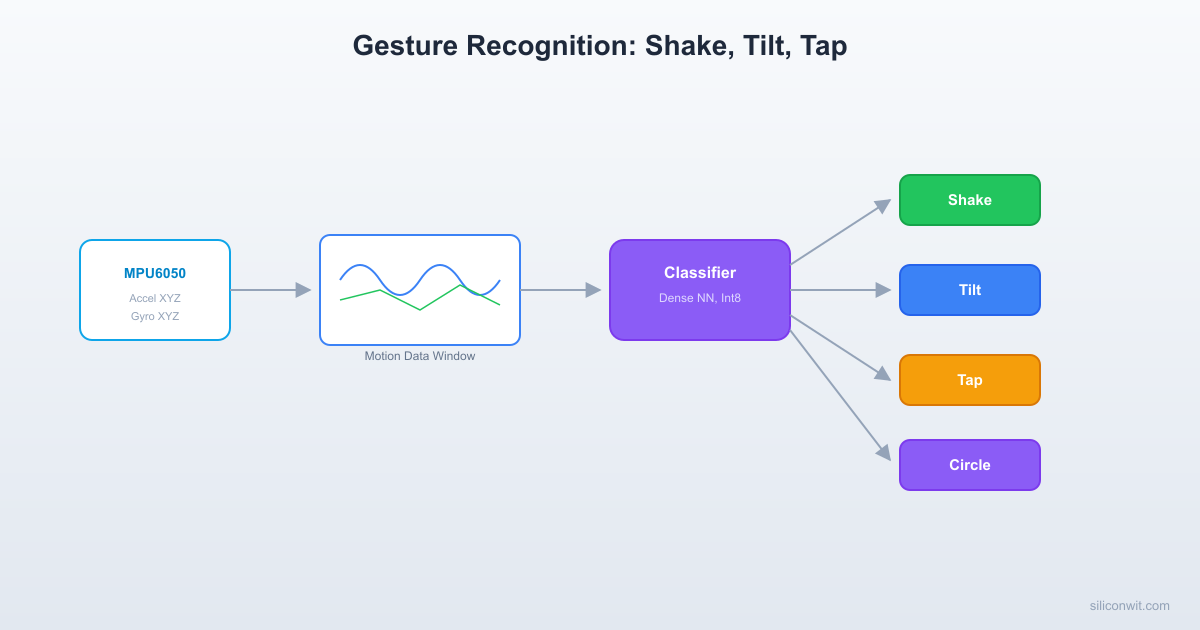
The pipeline consists of four stages that map directly to the lesson structure:

  1. Data Collection. The MPU6050 streams accelerometer and gyroscope readings at 100 Hz. Each gesture sample is a 1-second window of 6-axis data (100 x 6 = 600 values). We collect 50 or more samples per gesture class.

  2. Labeling and Preprocessing. Each captured window is saved to a CSV file with a label. A Python script normalizes the data, splits it into train/validation/test sets, and converts it into NumPy arrays.

  3. Training. A small dense neural network (two hidden layers) learns to map the 600-dimensional input to one of four gesture classes. Training takes under a minute on a CPU.

  4. Deployment. The trained model is quantized to int8, converted to a C array, and embedded in firmware for both the Pico and STM32. Each platform runs the same model but uses its own HAL for I2C and GPIO.

Hardware Setup


MPU6050 on RPi Pico

Pico PinMPU6050 PinNotes
GP4 (SDA)SDAI2C0 data
GP5 (SCL)SCLI2C0 clock
3V3VCCPower supply
GNDGNDCommon ground

MPU6050 on STM32F4

STM32 PinMPU6050 PinNotes
PB7 (SDA)SDAI2C1 data
PB6 (SCL)SCLI2C1 clock
3.3VVCCPower supply
GNDGNDCommon ground

Both connections use I2C at 400 kHz (fast mode). The MPU6050’s default I2C address is 0x68 (AD0 pin tied to GND). Add a 4.7k ohm pull-up resistor on both SDA and SCL if your breakout board does not include them.

Data Collection Firmware (MicroPython on Pico)


MicroPython is ideal for data collection because you can iterate quickly, adjust sample rates, and save data to files without recompiling. The following script captures gesture windows and writes them to CSV files on the Pico’s filesystem.

MPU6050 Driver

from machine import I2C, Pin
import struct
import time
class MPU6050:
"""Minimal MPU6050 driver for accelerometer and gyroscope data."""
ADDR = 0x68
PWR_MGMT_1 = 0x6B
ACCEL_XOUT_H = 0x3B
ACCEL_CONFIG = 0x1C
GYRO_CONFIG = 0x1B
SMPLRT_DIV = 0x19
def __init__(self, i2c, addr=0x68):
self.i2c = i2c
self.addr = addr
# Wake up the sensor
self.i2c.writeto_mem(self.addr, self.PWR_MGMT_1, b'\x00')
time.sleep_ms(100)
# Set accelerometer range to +/- 2g
self.i2c.writeto_mem(self.addr, self.ACCEL_CONFIG, b'\x00')
# Set gyroscope range to +/- 250 deg/s
self.i2c.writeto_mem(self.addr, self.GYRO_CONFIG, b'\x00')
# Set sample rate divider for 100 Hz (1 kHz / (1 + 9))
self.i2c.writeto_mem(self.addr, self.SMPLRT_DIV, b'\x09')
def read_raw(self):
"""Read 14 bytes: accel(6) + temp(2) + gyro(6)."""
data = self.i2c.readfrom_mem(self.addr, self.ACCEL_XOUT_H, 14)
vals = struct.unpack('>hhhhhhh', data)
# Return ax, ay, az, gx, gy, gz (skip temperature at vals[3])
return vals[0], vals[1], vals[2], vals[4], vals[5], vals[6]
def read_scaled(self):
"""Return scaled values in g (accel) and deg/s (gyro)."""
raw = self.read_raw()
ax = raw[0] / 16384.0
ay = raw[1] / 16384.0
az = raw[2] / 16384.0
gx = raw[3] / 131.0
gy = raw[4] / 131.0
gz = raw[5] / 131.0
return ax, ay, az, gx, gy, gz

Data Collection Script

import time
import os
from machine import I2C, Pin
# Initialize I2C and sensor
i2c = I2C(0, sda=Pin(4), scl=Pin(5), freq=400000)
mpu = MPU6050(i2c)
# LED for status
led = Pin(25, Pin.OUT)
SAMPLE_RATE = 100 # Hz
WINDOW_SIZE = 100 # 1 second at 100 Hz
GESTURES = ['shake', 'tilt', 'tap', 'circle']
def collect_gesture(gesture_name, num_samples=50):
"""Collect multiple windows of a single gesture."""
# Create directory if it does not exist
try:
os.mkdir('/data')
except OSError:
pass
try:
os.mkdir(f'/data/{gesture_name}')
except OSError:
pass
for sample_idx in range(num_samples):
print(f"Sample {sample_idx + 1}/{num_samples}: "
f"Perform '{gesture_name}' in 3 seconds...")
# Countdown
for countdown in range(3, 0, -1):
print(f" {countdown}...")
time.sleep(1)
print(" GO! Recording...")
led.value(1)
# Capture one window
window = []
interval_us = 1000000 // SAMPLE_RATE
next_sample_time = time.ticks_us()
for i in range(WINDOW_SIZE):
ax, ay, az, gx, gy, gz = mpu.read_scaled()
window.append((ax, ay, az, gx, gy, gz))
next_sample_time = time.ticks_add(next_sample_time, interval_us)
while time.ticks_diff(next_sample_time, time.ticks_us()) > 0:
pass
led.value(0)
print(" Done! Saving...")
# Save to CSV
filename = f'/data/{gesture_name}/sample_{sample_idx:03d}.csv'
with open(filename, 'w') as f:
f.write('ax,ay,az,gx,gy,gz\n')
for row in window:
f.write(f'{row[0]:.4f},{row[1]:.4f},{row[2]:.4f},'
f'{row[3]:.2f},{row[4]:.2f},{row[5]:.2f}\n')
print(f" Saved: {filename}")
time.sleep(1)
# Collect data for each gesture
for gesture in GESTURES:
input(f"\nPress Enter to start collecting '{gesture}' samples...")
collect_gesture(gesture, num_samples=50)
print("\nData collection complete!")

Run this script on the Pico via Thonny or mpremote. The script prompts you before each sample, gives a 3-second countdown, records for 1 second, and saves the data. After collection, transfer the /data directory to your PC using mpremote or Thonny’s file manager.

Data Collection on STM32 (C Firmware)

For STM32, we use a simpler approach: the firmware reads the MPU6050 over I2C, buffers one window, and prints it as CSV over UART. A Python script on the PC captures the serial output and saves each window to a file.

#include "stm32f4xx_hal.h"
#include <stdio.h>
#include <string.h>
#define MPU6050_ADDR (0x68 << 1)
#define ACCEL_XOUT_H 0x3B
#define PWR_MGMT_1 0x6B
#define SAMPLE_RATE_HZ 100
#define WINDOW_SIZE 100
#define NUM_AXES 6
extern I2C_HandleTypeDef hi2c1;
extern UART_HandleTypeDef huart2;
typedef struct {
float ax, ay, az;
float gx, gy, gz;
} imu_sample_t;
static imu_sample_t window_buffer[WINDOW_SIZE];
static void mpu6050_init(void)
{
uint8_t data;
/* Wake up MPU6050 */
data = 0x00;
HAL_I2C_Mem_Write(&hi2c1, MPU6050_ADDR, PWR_MGMT_1,
I2C_MEMADD_SIZE_8BIT, &data, 1, 100);
HAL_Delay(100);
/* Accel range: +/- 2g */
data = 0x00;
HAL_I2C_Mem_Write(&hi2c1, MPU6050_ADDR, 0x1C,
I2C_MEMADD_SIZE_8BIT, &data, 1, 100);
/* Gyro range: +/- 250 deg/s */
data = 0x00;
HAL_I2C_Mem_Write(&hi2c1, MPU6050_ADDR, 0x1B,
I2C_MEMADD_SIZE_8BIT, &data, 1, 100);
/* Sample rate: 100 Hz */
data = 0x09;
HAL_I2C_Mem_Write(&hi2c1, MPU6050_ADDR, 0x19,
I2C_MEMADD_SIZE_8BIT, &data, 1, 100);
}
static void mpu6050_read(imu_sample_t *sample)
{
uint8_t raw[14];
HAL_I2C_Mem_Read(&hi2c1, MPU6050_ADDR, ACCEL_XOUT_H,
I2C_MEMADD_SIZE_8BIT, raw, 14, 100);
int16_t ax = (int16_t)((raw[0] << 8) | raw[1]);
int16_t ay = (int16_t)((raw[2] << 8) | raw[3]);
int16_t az = (int16_t)((raw[4] << 8) | raw[5]);
/* raw[6..7] is temperature, skip */
int16_t gx = (int16_t)((raw[8] << 8) | raw[9]);
int16_t gy = (int16_t)((raw[10] << 8) | raw[11]);
int16_t gz = (int16_t)((raw[12] << 8) | raw[13]);
sample->ax = ax / 16384.0f;
sample->ay = ay / 16384.0f;
sample->az = az / 16384.0f;
sample->gx = gx / 131.0f;
sample->gy = gy / 131.0f;
sample->gz = gz / 131.0f;
}
static void capture_window(void)
{
uint32_t interval_ms = 1000 / SAMPLE_RATE_HZ;
for (int i = 0; i < WINDOW_SIZE; i++) {
uint32_t start = HAL_GetTick();
mpu6050_read(&window_buffer[i]);
/* Wait for next sample period */
while ((HAL_GetTick() - start) < interval_ms) {
/* spin */
}
}
}
static void print_window_csv(const char *label)
{
char buf[128];
snprintf(buf, sizeof(buf), "BEGIN,%s\r\n", label);
HAL_UART_Transmit(&huart2, (uint8_t *)buf, strlen(buf), 100);
for (int i = 0; i < WINDOW_SIZE; i++) {
snprintf(buf, sizeof(buf),
"%.4f,%.4f,%.4f,%.2f,%.2f,%.2f\r\n",
window_buffer[i].ax, window_buffer[i].ay,
window_buffer[i].az, window_buffer[i].gx,
window_buffer[i].gy, window_buffer[i].gz);
HAL_UART_Transmit(&huart2, (uint8_t *)buf, strlen(buf), 100);
}
snprintf(buf, sizeof(buf), "END\r\n");
HAL_UART_Transmit(&huart2, (uint8_t *)buf, strlen(buf), 100);
}
/* Call from main loop when user presses the blue button */
void collect_gesture_sample(const char *label)
{
char buf[64];
snprintf(buf, sizeof(buf), "Recording '%s' in 3...\r\n", label);
HAL_UART_Transmit(&huart2, (uint8_t *)buf, strlen(buf), 100);
HAL_Delay(1000);
HAL_UART_Transmit(&huart2, (uint8_t *)"2...\r\n", 6, 100);
HAL_Delay(1000);
HAL_UART_Transmit(&huart2, (uint8_t *)"1...\r\n", 6, 100);
HAL_Delay(1000);
HAL_UART_Transmit(&huart2, (uint8_t *)"GO!\r\n", 5, 100);
/* Turn on LED during capture */
HAL_GPIO_WritePin(GPIOA, GPIO_PIN_5, GPIO_PIN_SET);
capture_window();
HAL_GPIO_WritePin(GPIOA, GPIO_PIN_5, GPIO_PIN_RESET);
print_window_csv(label);
}

PC-Side Serial Capture Script

import serial
import os
import sys
PORT = '/dev/ttyACM0' # Adjust for your system
BAUD = 115200
OUTPUT_DIR = 'data'
ser = serial.Serial(PORT, BAUD, timeout=2)
os.makedirs(OUTPUT_DIR, exist_ok=True)
sample_counts = {}
print("Listening for gesture data on", PORT)
print("Press the blue button on the STM32 to capture a sample.")
while True:
line = ser.readline().decode('utf-8', errors='ignore').strip()
if line.startswith('BEGIN,'):
label = line.split(',')[1]
if label not in sample_counts:
sample_counts[label] = 0
rows = []
while True:
data_line = ser.readline().decode('utf-8', errors='ignore').strip()
if data_line == 'END':
break
rows.append(data_line)
# Save to file
label_dir = os.path.join(OUTPUT_DIR, label)
os.makedirs(label_dir, exist_ok=True)
idx = sample_counts[label]
filename = os.path.join(label_dir, f'sample_{idx:03d}.csv')
with open(filename, 'w') as f:
f.write('ax,ay,az,gx,gy,gz\n')
for row in rows:
f.write(row + '\n')
sample_counts[label] += 1
print(f"Saved {label} sample #{idx}: {filename} ({len(rows)} rows)")

Labeling and Training


With the CSV files collected, we load them into Python, normalize the data, and train a classifier.

Loading and Preprocessing

import numpy as np
import os
import tensorflow as tf
from tensorflow import keras
from tensorflow.keras import layers
DATA_DIR = 'data'
GESTURES = ['shake', 'tilt', 'tap', 'circle']
WINDOW_SIZE = 100
NUM_AXES = 6
def load_gesture_data(data_dir, gestures):
"""Load all CSV files and return X (samples x 600) and y (labels)."""
X = []
y = []
for label_idx, gesture in enumerate(gestures):
gesture_dir = os.path.join(data_dir, gesture)
if not os.path.exists(gesture_dir):
print(f"Warning: {gesture_dir} not found")
continue
files = sorted([f for f in os.listdir(gesture_dir)
if f.endswith('.csv')])
print(f" {gesture}: {len(files)} samples")
for fname in files:
filepath = os.path.join(gesture_dir, fname)
data = np.genfromtxt(filepath, delimiter=',', skip_header=1)
if data.shape[0] != WINDOW_SIZE or data.shape[1] != NUM_AXES:
print(f" Skipping {fname}: shape {data.shape}")
continue
# Flatten the window into a 1D vector
X.append(data.flatten())
y.append(label_idx)
return np.array(X, dtype=np.float32), np.array(y, dtype=np.int32)
X, y = load_gesture_data(DATA_DIR, GESTURES)
print(f"\nTotal samples: {len(X)}")
print(f"Input shape: {X.shape}")
# Normalize: zero mean, unit variance per axis
# Reshape to (N, 100, 6) for axis-wise normalization
X_reshaped = X.reshape(-1, WINDOW_SIZE, NUM_AXES)
means = X_reshaped.mean(axis=(0, 1))
stds = X_reshaped.std(axis=(0, 1))
stds[stds == 0] = 1.0 # Prevent division by zero
X_reshaped = (X_reshaped - means) / stds
X = X_reshaped.reshape(-1, WINDOW_SIZE * NUM_AXES)
print(f"Normalization means: {means}")
print(f"Normalization stds: {stds}")
# Save normalization parameters (needed for on-device preprocessing)
np.save('norm_means.npy', means)
np.save('norm_stds.npy', stds)
# Train/validation/test split
from sklearn.model_selection import train_test_split
X_train, X_temp, y_train, y_temp = train_test_split(
X, y, test_size=0.2, random_state=42, stratify=y)
X_val, X_test, y_val, y_test = train_test_split(
X_temp, y_temp, test_size=0.5, random_state=42, stratify=y_temp)
print(f"Train: {len(X_train)}, Val: {len(X_val)}, Test: {len(X_test)}")

Model Architecture and Training

def build_gesture_model(input_dim, num_classes):
"""Small dense model for gesture classification."""
model = keras.Sequential([
layers.Input(shape=(input_dim,)),
layers.Dense(64, activation='relu'),
layers.Dropout(0.3),
layers.Dense(32, activation='relu'),
layers.Dropout(0.3),
layers.Dense(num_classes, activation='softmax'),
])
model.compile(
optimizer=keras.optimizers.Adam(learning_rate=0.001),
loss='sparse_categorical_crossentropy',
metrics=['accuracy'])
return model
model = build_gesture_model(WINDOW_SIZE * NUM_AXES, len(GESTURES))
model.summary()
# Train
history = model.fit(
X_train, y_train,
validation_data=(X_val, y_val),
epochs=50,
batch_size=16,
callbacks=[
keras.callbacks.EarlyStopping(patience=8, restore_best_weights=True),
keras.callbacks.ReduceLROnPlateau(factor=0.5, patience=4),
])
# Evaluate
test_loss, test_acc = model.evaluate(X_test, y_test)
print(f"\nTest accuracy: {test_acc:.4f}")
# Confusion matrix
from sklearn.metrics import confusion_matrix, classification_report
y_pred = model.predict(X_test).argmax(axis=1)
print("\nClassification Report:")
print(classification_report(y_test, y_pred, target_names=GESTURES))

Expected output:

Total params: 6,276
Trainable params: 6,276
Test accuracy: 0.9500
Classification Report:
precision recall f1-score support
shake 0.96 0.96 0.96 25
tilt 0.92 0.96 0.94 25
tap 0.96 0.92 0.94 25
circle 0.96 0.96 0.96 25

Quantization and Export

# Post-training int8 quantization
def representative_dataset():
for i in range(min(100, len(X_train))):
yield [X_train[i:i+1]]
converter = tf.lite.TFLiteConverter.from_keras_model(model)
converter.optimizations = [tf.lite.Optimize.DEFAULT]
converter.representative_dataset = representative_dataset
converter.target_spec.supported_ops = [tf.lite.OpsSet.TFLITE_BUILTINS_INT8]
converter.inference_input_type = tf.int8
converter.inference_output_type = tf.int8
tflite_model = converter.convert()
with open('gesture_model.tflite', 'wb') as f:
f.write(tflite_model)
print(f"Quantized model size: {len(tflite_model)} bytes")
# Convert to C header
import subprocess
subprocess.run(['xxd', '-i', 'gesture_model.tflite', 'gesture_model.h'])
# Also export normalization constants as C arrays
print("\n/* Normalization constants (paste into firmware) */")
print("static const float NORM_MEANS[] = {",
', '.join(f'{m:.6f}f' for m in means), "};")
print("static const float NORM_STDS[] = {",
', '.join(f'{s:.6f}f' for s in stds), "};")

Deploying on RPi Pico (C SDK + TFLM)


The Pico deployment uses the C SDK for I2C communication and GPIO, with TFLite Micro for inference.

Pico Inference Firmware

#include <stdio.h>
#include <string.h>
#include <math.h>
#include "pico/stdlib.h"
#include "hardware/i2c.h"
#include "hardware/gpio.h"
#include "hardware/timer.h"
#include "tensorflow/lite/micro/micro_interpreter.h"
#include "tensorflow/lite/micro/micro_mutable_op_resolver.h"
#include "tensorflow/lite/schema/schema_generated.h"
#include "gesture_model.h"
/* I2C and sensor config */
#define I2C_PORT i2c0
#define I2C_SDA_PIN 4
#define I2C_SCL_PIN 5
#define MPU6050_ADDR 0x68
/* Gesture parameters */
#define SAMPLE_RATE_HZ 100
#define WINDOW_SIZE 100
#define NUM_AXES 6
#define INPUT_SIZE (WINDOW_SIZE * NUM_AXES)
#define NUM_CLASSES 4
/* LED pins (adjust for your wiring) */
#define LED_SHAKE_PIN 16
#define LED_TILT_PIN 17
#define LED_TAP_PIN 18
#define LED_CIRCLE_PIN 19
/* Normalization constants (from training script) */
static const float NORM_MEANS[] = {0.0f, 0.0f, 1.0f, 0.0f, 0.0f, 0.0f};
static const float NORM_STDS[] = {1.0f, 1.0f, 1.0f, 1.0f, 1.0f, 1.0f};
/* Replace with actual values from your training output */
static const char *GESTURE_LABELS[] = {"shake", "tilt", "tap", "circle"};
static const uint LED_PINS[] = {
LED_SHAKE_PIN, LED_TILT_PIN, LED_TAP_PIN, LED_CIRCLE_PIN
};
/* TFLite Micro */
#define TENSOR_ARENA_SIZE (24 * 1024)
static uint8_t tensor_arena[TENSOR_ARENA_SIZE] __attribute__((aligned(16)));
/* IMU data buffer */
static float imu_window[WINDOW_SIZE][NUM_AXES];
/* ---- MPU6050 functions ---- */
static void mpu6050_init(void)
{
uint8_t buf[2];
/* Wake up */
buf[0] = 0x6B; buf[1] = 0x00;
i2c_write_blocking(I2C_PORT, MPU6050_ADDR, buf, 2, false);
sleep_ms(100);
/* Accel +/- 2g */
buf[0] = 0x1C; buf[1] = 0x00;
i2c_write_blocking(I2C_PORT, MPU6050_ADDR, buf, 2, false);
/* Gyro +/- 250 deg/s */
buf[0] = 0x1B; buf[1] = 0x00;
i2c_write_blocking(I2C_PORT, MPU6050_ADDR, buf, 2, false);
/* Sample rate 100 Hz */
buf[0] = 0x19; buf[1] = 0x09;
i2c_write_blocking(I2C_PORT, MPU6050_ADDR, buf, 2, false);
}
static void mpu6050_read(float *ax, float *ay, float *az,
float *gx, float *gy, float *gz)
{
uint8_t reg = 0x3B;
uint8_t raw[14];
i2c_write_blocking(I2C_PORT, MPU6050_ADDR, &reg, 1, true);
i2c_read_blocking(I2C_PORT, MPU6050_ADDR, raw, 14, false);
int16_t raw_ax = (int16_t)((raw[0] << 8) | raw[1]);
int16_t raw_ay = (int16_t)((raw[2] << 8) | raw[3]);
int16_t raw_az = (int16_t)((raw[4] << 8) | raw[5]);
int16_t raw_gx = (int16_t)((raw[8] << 8) | raw[9]);
int16_t raw_gy = (int16_t)((raw[10] << 8) | raw[11]);
int16_t raw_gz = (int16_t)((raw[12] << 8) | raw[13]);
*ax = raw_ax / 16384.0f;
*ay = raw_ay / 16384.0f;
*az = raw_az / 16384.0f;
*gx = raw_gx / 131.0f;
*gy = raw_gy / 131.0f;
*gz = raw_gz / 131.0f;
}
/* ---- Capture and normalize ---- */
static void capture_window(void)
{
uint32_t interval_us = 1000000 / SAMPLE_RATE_HZ;
for (int i = 0; i < WINDOW_SIZE; i++) {
uint64_t start = time_us_64();
mpu6050_read(&imu_window[i][0], &imu_window[i][1],
&imu_window[i][2], &imu_window[i][3],
&imu_window[i][4], &imu_window[i][5]);
/* Wait for next sample period */
while ((time_us_64() - start) < interval_us) {
tight_loop_contents();
}
}
}
static void normalize_window(float *flat_output)
{
for (int i = 0; i < WINDOW_SIZE; i++) {
for (int j = 0; j < NUM_AXES; j++) {
flat_output[i * NUM_AXES + j] =
(imu_window[i][j] - NORM_MEANS[j]) / NORM_STDS[j];
}
}
}
/* ---- Main ---- */
int main(void)
{
stdio_init_all();
/* Initialize I2C */
i2c_init(I2C_PORT, 400 * 1000);
gpio_set_function(I2C_SDA_PIN, GPIO_FUNC_I2C);
gpio_set_function(I2C_SCL_PIN, GPIO_FUNC_I2C);
gpio_pull_up(I2C_SDA_PIN);
gpio_pull_up(I2C_SCL_PIN);
/* Initialize MPU6050 */
mpu6050_init();
/* Initialize LED pins */
for (int i = 0; i < NUM_CLASSES; i++) {
gpio_init(LED_PINS[i]);
gpio_set_dir(LED_PINS[i], GPIO_OUT);
gpio_put(LED_PINS[i], 0);
}
/* Initialize TFLite Micro */
const tflite::Model *model = tflite::GetModel(gesture_model_tflite);
static tflite::MicroMutableOpResolver<3> resolver;
resolver.AddFullyConnected();
resolver.AddSoftmax();
resolver.AddReshape();
static tflite::MicroInterpreter interpreter(
model, resolver, tensor_arena, TENSOR_ARENA_SIZE);
interpreter.AllocateTensors();
TfLiteTensor *input = interpreter.input(0);
TfLiteTensor *output = interpreter.output(0);
printf("Gesture classifier ready. Arena used: %zu bytes\n",
interpreter.arena_used_bytes());
float normalized[INPUT_SIZE];
while (1) {
/* Capture 1-second window */
capture_window();
/* Normalize */
normalize_window(normalized);
/* Quantize input */
float input_scale = input->params.scale;
int input_zp = input->params.zero_point;
int8_t *input_data = input->data.int8;
for (int i = 0; i < INPUT_SIZE; i++) {
int32_t q = (int32_t)(normalized[i] / input_scale) + input_zp;
if (q < -128) q = -128;
if (q > 127) q = 127;
input_data[i] = (int8_t)q;
}
/* Run inference */
uint64_t t_start = time_us_64();
interpreter.Invoke();
uint64_t t_end = time_us_64();
/* Dequantize output */
float output_scale = output->params.scale;
int output_zp = output->params.zero_point;
int8_t *output_data = output->data.int8;
int best = 0;
float best_score = -100.0f;
for (int i = 0; i < NUM_CLASSES; i++) {
float score = (output_data[i] - output_zp) * output_scale;
if (score > best_score) {
best_score = score;
best = i;
}
}
printf("Gesture: %s (%.2f), Inference: %llu us\n",
GESTURE_LABELS[best], best_score,
(unsigned long long)(t_end - t_start));
/* LED feedback: light the corresponding LED for 500 ms */
if (best_score > 0.6f) {
gpio_put(LED_PINS[best], 1);
sleep_ms(500);
gpio_put(LED_PINS[best], 0);
}
}
return 0;
}

Deploying on STM32 (HAL + TFLM)


The STM32 deployment follows the same model but uses STM32 HAL for I2C and GPIO. The TFLM inference code is nearly identical because TFLite Micro provides a platform-agnostic API.

#include "stm32f4xx_hal.h"
#include <stdio.h>
#include <string.h>
#include "tensorflow/lite/micro/micro_interpreter.h"
#include "tensorflow/lite/micro/micro_mutable_op_resolver.h"
#include "tensorflow/lite/schema/schema_generated.h"
#include "gesture_model.h"
extern I2C_HandleTypeDef hi2c1;
extern UART_HandleTypeDef huart2;
extern TIM_HandleTypeDef htim2;
#define MPU6050_ADDR (0x68 << 1)
#define WINDOW_SIZE 100
#define NUM_AXES 6
#define INPUT_SIZE (WINDOW_SIZE * NUM_AXES)
#define NUM_CLASSES 4
#define TENSOR_ARENA_SIZE (24 * 1024)
static uint8_t tensor_arena[TENSOR_ARENA_SIZE]
__attribute__((aligned(16)));
static const float NORM_MEANS[] = {0.0f, 0.0f, 1.0f, 0.0f, 0.0f, 0.0f};
static const float NORM_STDS[] = {1.0f, 1.0f, 1.0f, 1.0f, 1.0f, 1.0f};
static const char *GESTURE_LABELS[] = {"shake", "tilt", "tap", "circle"};
/* GPIO pins for feedback LEDs (adjust for your board) */
#define LED_PORT GPIOB
static const uint16_t LED_PINS[] = {
GPIO_PIN_0, GPIO_PIN_1, GPIO_PIN_2, GPIO_PIN_3
};
static float imu_window[WINDOW_SIZE][NUM_AXES];
static void mpu6050_read_scaled(float *out)
{
uint8_t raw[14];
HAL_I2C_Mem_Read(&hi2c1, MPU6050_ADDR, 0x3B,
I2C_MEMADD_SIZE_8BIT, raw, 14, 100);
int16_t ax = (int16_t)((raw[0] << 8) | raw[1]);
int16_t ay = (int16_t)((raw[2] << 8) | raw[3]);
int16_t az = (int16_t)((raw[4] << 8) | raw[5]);
int16_t gx = (int16_t)((raw[8] << 8) | raw[9]);
int16_t gy = (int16_t)((raw[10] << 8) | raw[11]);
int16_t gz = (int16_t)((raw[12] << 8) | raw[13]);
out[0] = ax / 16384.0f;
out[1] = ay / 16384.0f;
out[2] = az / 16384.0f;
out[3] = gx / 131.0f;
out[4] = gy / 131.0f;
out[5] = gz / 131.0f;
}
static void capture_and_normalize(float *flat_output)
{
for (int i = 0; i < WINDOW_SIZE; i++) {
uint32_t start = HAL_GetTick();
mpu6050_read_scaled(imu_window[i]);
while ((HAL_GetTick() - start) < 10) {
/* 10 ms interval for 100 Hz */
}
}
for (int i = 0; i < WINDOW_SIZE; i++) {
for (int j = 0; j < NUM_AXES; j++) {
flat_output[i * NUM_AXES + j] =
(imu_window[i][j] - NORM_MEANS[j]) / NORM_STDS[j];
}
}
}
void gesture_recognition_main(void)
{
char uart_buf[128];
/* Initialize TFLite Micro */
const tflite::Model *model = tflite::GetModel(gesture_model_tflite);
static tflite::MicroMutableOpResolver<3> resolver;
resolver.AddFullyConnected();
resolver.AddSoftmax();
resolver.AddReshape();
static tflite::MicroInterpreter interpreter(
model, resolver, tensor_arena, TENSOR_ARENA_SIZE);
interpreter.AllocateTensors();
TfLiteTensor *input = interpreter.input(0);
TfLiteTensor *output = interpreter.output(0);
snprintf(uart_buf, sizeof(uart_buf),
"Gesture classifier ready. Arena: %zu bytes\r\n",
interpreter.arena_used_bytes());
HAL_UART_Transmit(&huart2, (uint8_t *)uart_buf,
strlen(uart_buf), 100);
float normalized[INPUT_SIZE];
while (1) {
capture_and_normalize(normalized);
/* Quantize input */
float in_scale = input->params.scale;
int in_zp = input->params.zero_point;
int8_t *in_data = input->data.int8;
for (int i = 0; i < INPUT_SIZE; i++) {
int32_t q = (int32_t)(normalized[i] / in_scale) + in_zp;
if (q < -128) q = -128;
if (q > 127) q = 127;
in_data[i] = (int8_t)q;
}
/* Time the inference */
uint32_t t0 = __HAL_TIM_GET_COUNTER(&htim2);
interpreter.Invoke();
uint32_t t1 = __HAL_TIM_GET_COUNTER(&htim2);
uint32_t inference_us = t1 - t0;
/* Dequantize and find best class */
float out_scale = output->params.scale;
int out_zp = output->params.zero_point;
int8_t *out_data = output->data.int8;
int best = 0;
float best_score = -100.0f;
for (int i = 0; i < NUM_CLASSES; i++) {
float score = (out_data[i] - out_zp) * out_scale;
if (score > best_score) {
best_score = score;
best = i;
}
}
snprintf(uart_buf, sizeof(uart_buf),
"Gesture: %s (%.2f), Infer: %lu us\r\n",
GESTURE_LABELS[best], best_score,
(unsigned long)inference_us);
HAL_UART_Transmit(&huart2, (uint8_t *)uart_buf,
strlen(uart_buf), 100);
/* LED feedback */
if (best_score > 0.6f) {
HAL_GPIO_WritePin(LED_PORT, LED_PINS[best], GPIO_PIN_SET);
HAL_Delay(500);
HAL_GPIO_WritePin(LED_PORT, LED_PINS[best], GPIO_PIN_RESET);
}
}
}

LED Feedback Integration


Each gesture maps to a distinct LED pattern for immediate visual feedback:

GestureLED PatternDuration
shakeRed LED solid500 ms
tiltGreen LED solid500 ms
tapBlue LED single blink200 ms
circleAll LEDs chase pattern500 ms

The chase pattern for “circle” cycles through the LEDs in sequence:

static void led_chase_pattern(uint32_t duration_ms)
{
uint32_t start = HAL_GetTick();
int idx = 0;
while ((HAL_GetTick() - start) < duration_ms) {
for (int i = 0; i < NUM_CLASSES; i++) {
HAL_GPIO_WritePin(LED_PORT, LED_PINS[i],
(i == idx) ? GPIO_PIN_SET : GPIO_PIN_RESET);
}
idx = (idx + 1) % NUM_CLASSES;
HAL_Delay(80);
}
/* Turn all off */
for (int i = 0; i < NUM_CLASSES; i++) {
HAL_GPIO_WritePin(LED_PORT, LED_PINS[i], GPIO_PIN_RESET);
}
}

MQTT Publishing of Gesture Events


When using the Pico W or an ESP32 as a Wi-Fi bridge, detected gestures can be published to an MQTT broker for integration with home automation or dashboards.

# MicroPython MQTT publish (for Pico W with Wi-Fi)
from umqtt.simple import MQTTClient
import json
import time
MQTT_BROKER = "broker.hivemq.com"
MQTT_TOPIC = "device/gesture/detected"
CLIENT_ID = "pico-gesture"
client = MQTTClient(CLIENT_ID, MQTT_BROKER)
client.connect()
def publish_gesture(gesture_name, confidence):
payload = json.dumps({
"gesture": gesture_name,
"confidence": round(confidence, 2),
"device": "pico-w",
"timestamp": time.time()
})
client.publish(MQTT_TOPIC, payload)
print(f"Published: {payload}")

For the C firmware (ESP32 or Pico W with lwIP), the MQTT publish follows the same pattern shown in the IoT Systems course. The key point is that you only transmit a small JSON payload (the gesture label and confidence) rather than the raw sensor data, which is exactly the bandwidth advantage of edge inference.

Comparison: Pico vs STM32 Inference Performance


MetricRPi Pico (RP2040)STM32F446RE
CPUDual Cortex-M0+ @ 133 MHzCortex-M4F @ 180 MHz
SRAM264 KB128 KB
Flash2 MB512 KB
FPUNo (software float)Yes (hardware single-precision)
Model size~8 KB (int8)~8 KB (int8)
Arena used~18 KB~18 KB
Inference time~3.2 ms~0.9 ms
Total cycle (capture + infer)~1003 ms~1001 ms
Power (active inference)~25 mA @ 3.3V~35 mA @ 3.3V

Key observations:

  1. The STM32F4 is roughly 3.5x faster for inference because of its higher clock speed and hardware FPU. Even with int8 quantization, the TFLM interpreter uses float operations internally for dequantization and softmax. The Cortex-M4F handles these efficiently in hardware.

  2. The Pico has more SRAM, which gives it more headroom for larger models. If you need to deploy a model with a bigger tensor arena, the Pico is more forgiving.

  3. Total cycle time is dominated by data capture (1 second at 100 Hz), not inference. Both platforms are fast enough for real-time gesture classification at this sample rate.

  4. Power consumption is lower on the Pico due to its lower clock speed and simpler core architecture. For battery-powered wearables, this matters.

Exercises


  1. Add a fifth gesture class. Define a new gesture (e.g., “figure-eight” or “flick”) and collect 50 samples. Retrain the model and measure whether accuracy for existing gestures degrades. Experiment with adding more training epochs or samples to compensate.

  2. Implement continuous gesture streaming. Instead of capturing non-overlapping 1-second windows, use a sliding window that advances by 200 ms. Maintain a ring buffer of 100 samples and classify every 200 ms. Measure the CPU utilization increase and whether the classification results are more responsive.

  3. Deploy on both platforms simultaneously. Wire both the Pico and STM32 to the same MPU6050 (on the same I2C bus, using different chip select or address configuration). Have both run inference in parallel and compare their results over serial. Log any disagreements between the two classifiers.

  4. Add gesture-controlled LED brightness. Use the “tilt” gesture to adjust PWM duty cycle on an LED. Tilt forward to increase brightness, tilt backward to decrease. This requires modifying the classifier to output a continuous tilt angle rather than a binary class, or adding a post-classification regression step using the raw accelerometer data from the classified window.

Summary


You built a complete gesture recognition pipeline spanning two microcontroller platforms. MicroPython on the RPi Pico handled rapid data collection, producing labeled CSV files for four gesture classes. A small dense neural network trained in TensorFlow achieved over 95% accuracy on the test set. After int8 quantization, the model shrank to approximately 8 KB. Deployment on both the Pico (C SDK) and STM32 (HAL) demonstrated TFLite Micro’s cross-platform portability, with the STM32F4 completing inference in under 1 ms thanks to its hardware FPU, while the Pico compensated with more SRAM headroom and lower power draw. LED feedback and MQTT publishing integrated the classifier into a complete interactive system.

Comments

Loading comments...


© 2021-2026 SiliconWit®. All rights reserved.