PID Motor Controller Simulator
Models a DC motor with PID speed control.
Includes auto-tuning via grid search.
from scipy.integrate import solve_ivp
import matplotlib.pyplot as plt
# -------------------------------------------------------
# DC Motor parameters (small brushed motor, e.g., 12V hobby motor)
# -------------------------------------------------------
"R": 0.5, # Armature resistance (ohm)
"L": 0.001, # Armature inductance (H)
"Kt": 0.02, # Torque constant (N*m/A)
"Ke": 0.02, # Back-EMF constant (V*s/rad) = Kt in SI
"J": 0.0005, # Rotor inertia (kg*m^2)
"b": 0.001, # Viscous friction (N*m*s/rad)
"V_max": 12.0, # Maximum voltage (V)
SETPOINT_RAD_S = SETPOINT_RPM * 2 * np.pi / 60.0
return rpm * 2 * np.pi / 60.0
return rads * 60.0 / (2 * np.pi)
# -------------------------------------------------------
# -------------------------------------------------------
"""PID controller with anti-windup."""
def __init__(self, Kp, Ki, Kd, output_min=0.0, output_max=12.0,
self.output_min = output_min
self.output_max = output_max
self.integral_limit = integral_limit
def compute(self, error, t):
if self.prev_time is None:
# Integral with anti-windup
self.integral += error * dt
self.integral = np.clip(self.integral,
I = self.Ki * self.integral
derivative = (error - self.prev_error) / dt
output = np.clip(output, self.output_min, self.output_max)
# -------------------------------------------------------
# -------------------------------------------------------
def simulate_motor_pid(Kp, Ki, Kd, setpoint_rpm=1000.0, t_end=0.5,
n_points=2000, disturbance_time=None,
Simulate a DC motor with PID speed control.
Returns time, speed (RPM), current (A), voltage (V), error (RPM).
setpoint_rads = rpm_to_rads(setpoint_rpm)
pid = PIDController(Kp, Ki, Kd, output_min=0.0,
# We cannot use solve_ivp directly with the PID controller
# because the PID has internal state (integral, derivative).
# Instead, we use a simple fixed-step Euler integration,
# which also matches how PID runs on a microcontroller.
t_arr = np.linspace(0, t_end, n_points)
i_arr = np.zeros(n_points) # Current
w_arr = np.zeros(n_points) # Angular velocity (rad/s)
v_arr = np.zeros(n_points) # Applied voltage
e_arr = np.zeros(n_points) # Error (rad/s)
i = 0.0 # Initial current
for k in range(n_points):
error = setpoint_rads - w
e_arr[k] = rads_to_rpm(error)
voltage = pid.compute(error, t)
# External disturbance torque
if disturbance_time is not None and t >= disturbance_time:
T_dist = disturbance_torque
# Motor electrical dynamics: di/dt = (V - R*i - Ke*w) / L
di_dt = (voltage - m["R"] * i - m["Ke"] * w) / m["L"]
# Motor mechanical dynamics: dw/dt = (Kt*i - b*w + T_dist) / J
dw_dt = (m["Kt"] * i - m["b"] * w - T_dist) / m["J"]
w_arr[k] = rads_to_rpm(w)
i = max(i, 0) # Current cannot be negative (no regenerative braking)
w = max(w, 0) # Speed cannot be negative
return t_arr, w_arr, i_arr, v_arr, e_arr
# -------------------------------------------------------
# -------------------------------------------------------
def analyze_response(t, speed_rpm, setpoint_rpm):
Compute overshoot, settling time, rise time, and
steady-state error from a step response.
overshoot_pct = (peak - sp) / sp * 100
# Rise time (10% to 90% of setpoint)
idx_10 = np.where(speed_rpm >= 0.1 * sp)[0]
idx_90 = np.where(speed_rpm >= 0.9 * sp)[0]
if len(idx_10) > 0 and len(idx_90) > 0:
rise_time = t[idx_90[0]] - t[idx_10[0]]
# Settling time (2% band)
settled = np.abs(speed_rpm - sp) < band
not_settled = np.where(~settled)[0]
if len(not_settled) == 0:
settling_time = t[last] if last < len(t) - 1 else t[-1]
# Steady-state error (average of last 10% of data)
n_last = max(1, len(speed_rpm) // 10)
ss_speed = np.mean(speed_rpm[-n_last:])
"overshoot_pct": overshoot_pct,
"rise_time_ms": rise_time * 1000,
"settling_time_ms": settling_time * 1000,
"ss_error_rpm": ss_error,
# -------------------------------------------------------
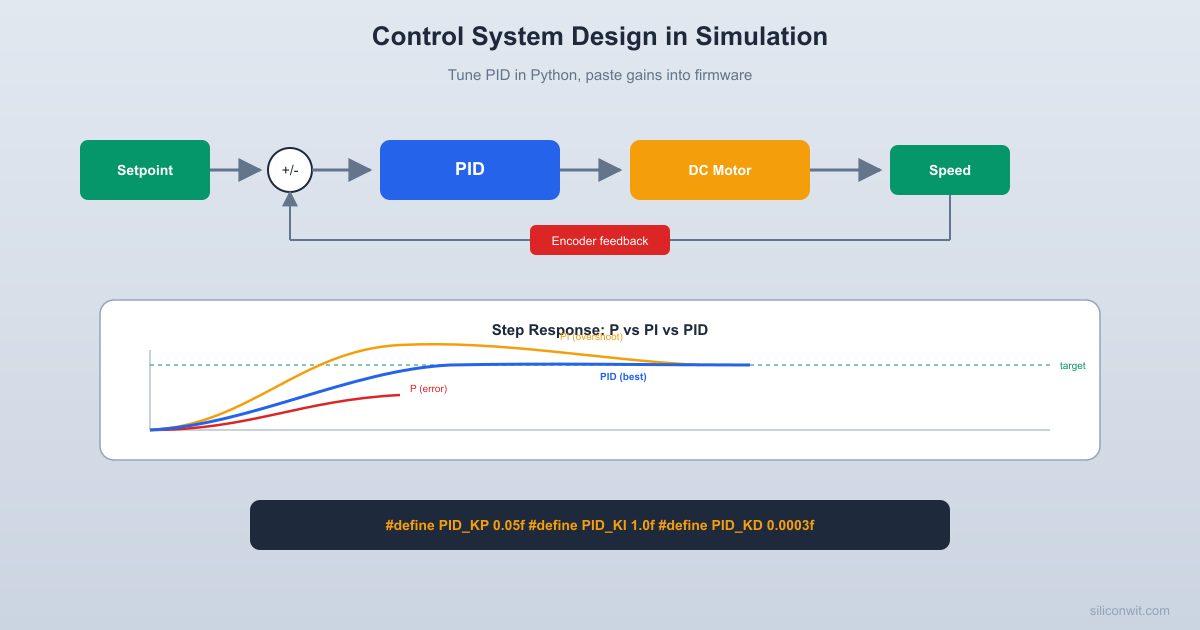
# 1. Demonstrate P, PI, and PID
# -------------------------------------------------------
def demo_controller_types():
"""Show the effect of P, PI, and PID control."""
("P only (Kp=0.1)", 0.1, 0.0, 0.0),
("PI (Kp=0.1, Ki=2.0)", 0.1, 2.0, 0.0),
("PID (Kp=0.1, Ki=2.0, Kd=0.0005)", 0.1, 2.0, 0.0005),
fig, axes = plt.subplots(2, 2, figsize=(13, 8))
fig.suptitle("PID Motor Control: Controller Comparison",
fontsize=13, fontweight="bold")
colors = ["tab:red", "tab:blue", "tab:green"]
for (label, Kp, Ki, Kd), color in zip(configs, colors):
t, speed, current, voltage, error = simulate_motor_pid(
Kp, Ki, Kd, setpoint_rpm=SETPOINT_RPM, t_end=0.5)
metrics = analyze_response(t, speed, SETPOINT_RPM)
print(f" Overshoot: {metrics['overshoot_pct']:.1f}%")
print(f" Rise time: {metrics['rise_time_ms']:.1f} ms")
print(f" Settling time: {metrics['settling_time_ms']:.1f} ms")
print(f" SS error: {metrics['ss_error_rpm']:.1f} RPM")
axes[0, 0].plot(t * 1000, speed, color=color, linewidth=2,
axes[0, 1].plot(t * 1000, current, color=color, linewidth=1.5,
axes[1, 0].plot(t * 1000, voltage, color=color, linewidth=1.5,
axes[1, 1].plot(t * 1000, error, color=color, linewidth=1.5,
axes[0, 0].axhline(y=SETPOINT_RPM, color="gray", linestyle="--",
alpha=0.5, label="Setpoint")
axes[0, 0].set_ylabel("Speed (RPM)")
axes[0, 0].set_title("Motor Speed")
axes[0, 0].legend(fontsize=7)
axes[0, 0].grid(True, alpha=0.3)
axes[0, 1].set_ylabel("Current (A)")
axes[0, 1].set_title("Motor Current")
axes[0, 1].legend(fontsize=7)
axes[0, 1].grid(True, alpha=0.3)
axes[1, 0].set_xlabel("Time (ms)")
axes[1, 0].set_ylabel("Voltage (V)")
axes[1, 0].set_title("Applied Voltage")
axes[1, 0].legend(fontsize=7)
axes[1, 0].grid(True, alpha=0.3)
axes[1, 1].set_xlabel("Time (ms)")
axes[1, 1].set_ylabel("Error (RPM)")
axes[1, 1].set_title("Speed Error")
axes[1, 1].legend(fontsize=7)
axes[1, 1].grid(True, alpha=0.3)
plt.savefig("pid_comparison.png", dpi=150, bbox_inches="tight")
print("\nSaved: pid_comparison.png")
# -------------------------------------------------------
# 2. Sweep Kp to show its effect
# -------------------------------------------------------
"""Sweep proportional gain and show the tradeoff."""
kp_values = [0.02, 0.05, 0.1, 0.2, 0.5]
fig, axes = plt.subplots(1, 2, figsize=(13, 5))
fig.suptitle("Effect of Proportional Gain (Kp)",
fontsize=13, fontweight="bold")
colors = plt.cm.viridis(np.linspace(0.1, 0.9, len(kp_values)))
for Kp, color in zip(kp_values, colors):
t, speed, _, _, _ = simulate_motor_pid(
Kp, Ki_fixed, Kd_fixed, t_end=0.5)
metrics = analyze_response(t, speed, SETPOINT_RPM)
overshoots.append(metrics["overshoot_pct"])
settling_times.append(metrics["settling_time_ms"])
axes[0].plot(t * 1000, speed, color=color, linewidth=2,
axes[0].axhline(y=SETPOINT_RPM, color="gray", linestyle="--", alpha=0.5)
axes[0].set_xlabel("Time (ms)")
axes[0].set_ylabel("Speed (RPM)")
axes[0].set_title("Step Response")
axes[0].legend(fontsize=8)
axes[0].grid(True, alpha=0.3)
ax_os.plot(kp_values, overshoots, "o-", color="tab:red",
linewidth=2, label="Overshoot (%)")
ax_st.plot(kp_values, settling_times, "s-", color="tab:blue",
linewidth=2, label="Settling time (ms)")
ax_os.set_ylabel("Overshoot (%)", color="tab:red")
ax_st.set_ylabel("Settling Time (ms)", color="tab:blue")
axes[1].set_title("Kp Tradeoff")
lines1, labels1 = ax_os.get_legend_handles_labels()
lines2, labels2 = ax_st.get_legend_handles_labels()
ax_os.legend(lines1 + lines2, labels1 + labels2, fontsize=8)
ax_os.grid(True, alpha=0.3)
plt.savefig("kp_sweep.png", dpi=150, bbox_inches="tight")
print("Saved: kp_sweep.png")
# -------------------------------------------------------
# 3. Auto-tuner: grid search for optimal PID gains
# -------------------------------------------------------
Search for PID gains that minimize a cost function
balancing settling time and overshoot.
print(" PID AUTO-TUNER (Grid Search)")
Kp_range = np.linspace(0.05, 0.3, 10)
Ki_range = np.linspace(0.5, 5.0, 10)
Kd_range = np.linspace(0.0001, 0.002, 8)
total = len(Kp_range) * len(Ki_range) * len(Kd_range)
print(f" Evaluating {total} gain combinations...")
t, speed, _, _, _ = simulate_motor_pid(
Kp, Ki, Kd, t_end=0.5, n_points=1000)
metrics = analyze_response(t, speed, SETPOINT_RPM)
# Cost function: weighted sum of settling time,
# overshoot, and steady-state error
cost = (metrics["settling_time_ms"] * 1.0 +
metrics["overshoot_pct"] * 5.0 +
abs(metrics["ss_error_rpm"]) * 0.5)
# Penalize instability (very large overshoot)
if metrics["overshoot_pct"] > 30:
best_gains = (Kp, Ki, Kd)
Kp_opt, Ki_opt, Kd_opt = best_gains
print(f"\n Optimal gains found:")
print(f" Kp = {Kp_opt:.4f}")
print(f" Ki = {Ki_opt:.4f}")
print(f" Kd = {Kd_opt:.6f}")
print(f"\n Performance:")
print(f" Overshoot: {best_metrics['overshoot_pct']:.1f}%")
print(f" Rise time: {best_metrics['rise_time_ms']:.1f} ms")
print(f" Settling time: {best_metrics['settling_time_ms']:.1f} ms")
print(f" SS error: {best_metrics['ss_error_rpm']:.1f} RPM")
# Simulate with optimal gains
t, speed, current, voltage, error = simulate_motor_pid(
Kp_opt, Ki_opt, Kd_opt, t_end=0.5, n_points=2000)
# Simulate with disturbance
t_d, speed_d, _, voltage_d, _ = simulate_motor_pid(
Kp_opt, Ki_opt, Kd_opt, t_end=1.0, n_points=4000,
disturbance_time=0.5, disturbance_torque=0.005)
fig, axes = plt.subplots(2, 2, figsize=(13, 8))
f"Optimal PID: Kp={Kp_opt:.4f}, Ki={Ki_opt:.4f}, "
fontsize=12, fontweight="bold")
axes[0, 0].plot(t * 1000, speed, "tab:blue", linewidth=2)
axes[0, 0].axhline(y=SETPOINT_RPM, color="gray", linestyle="--",
alpha=0.5, label="Setpoint")
axes[0, 0].axhline(y=SETPOINT_RPM * 1.02, color="red", linestyle=":",
alpha=0.3, label="2% band")
axes[0, 0].axhline(y=SETPOINT_RPM * 0.98, color="red", linestyle=":",
axes[0, 0].set_xlabel("Time (ms)")
axes[0, 0].set_ylabel("Speed (RPM)")
axes[0, 0].set_title("Step Response")
axes[0, 0].legend(fontsize=8)
axes[0, 0].grid(True, alpha=0.3)
axes[0, 1].plot(t * 1000, current, "tab:orange", linewidth=1.5)
axes[0, 1].set_xlabel("Time (ms)")
axes[0, 1].set_ylabel("Current (A)")
axes[0, 1].set_title("Motor Current")
axes[0, 1].grid(True, alpha=0.3)
axes[1, 0].plot(t * 1000, voltage, "tab:green", linewidth=1.5)
axes[1, 0].set_xlabel("Time (ms)")
axes[1, 0].set_ylabel("Voltage (V)")
axes[1, 0].set_title("Control Voltage")
axes[1, 0].grid(True, alpha=0.3)
axes[1, 1].plot(t_d * 1000, speed_d, "tab:blue", linewidth=2)
axes[1, 1].axhline(y=SETPOINT_RPM, color="gray", linestyle="--",
axes[1, 1].axvline(x=500, color="red", linestyle="--", alpha=0.5,
label="Load disturbance")
axes[1, 1].set_xlabel("Time (ms)")
axes[1, 1].set_ylabel("Speed (RPM)")
axes[1, 1].set_title("Disturbance Rejection")
axes[1, 1].legend(fontsize=8)
axes[1, 1].grid(True, alpha=0.3)
plt.savefig("pid_optimal.png", dpi=150, bbox_inches="tight")
print("\nSaved: pid_optimal.png")
# Print firmware-ready gains
print(" FIRMWARE-READY PID GAINS")
print(f" // Paste these into your motor controller firmware")
print(f" #define PID_KP {Kp_opt:.4f}f")
print(f" #define PID_KI {Ki_opt:.4f}f")
print(f" #define PID_KD {Kd_opt:.6f}f")
print(f" // Setpoint: {SETPOINT_RPM:.0f} RPM")
print(f" // Expected overshoot: {best_metrics['overshoot_pct']:.1f}%")
print(f" // Expected settling: {best_metrics['settling_time_ms']:.0f} ms")
return Kp_opt, Ki_opt, Kd_opt
# -------------------------------------------------------
# -------------------------------------------------------
if __name__ == "__main__":
print(" DC MOTOR PID CONTROLLER SIMULATOR")
print(f" Motor: R={MOTOR['R']} ohm, L={MOTOR['L']*1000} mH, "
f"J={MOTOR['J']*1e6} g*cm^2")
print(f" Kt = Ke = {MOTOR['Kt']} N*m/A")
print(f" Friction: {MOTOR['b']} N*m*s/rad")
print(f" Max voltage: {MOTOR['V_max']} V")
print(f" Setpoint: {SETPOINT_RPM:.0f} RPM")
# Part 1: Compare P, PI, PID
print("\n--- Controller Type Comparison ---")
print("\n--- Proportional Gain Sweep ---")



Comments