Skip to content

HTTP Server and REST API

HTTP Server and REST API hero image
Modified:
Published:

Turning an ESP32 into a web server means any device with a browser becomes your control panel. In this lesson you will build a thermostat you can operate from your phone or laptop: set a target temperature, see live readings from a DHT22 sensor, and watch the relay click on and off as the system maintains your setpoint. The firmware runs an HTTP server with clean REST endpoints, parses JSON, and serves a responsive UI from the SPIFFS filesystem. Type thermostat.local in your browser and you are connected, no IP address needed. #ESP32 #HTTPServer #IoT

What We Are Building

Browser-Controlled Thermostat

A complete thermostat system with a web interface. The ESP32 reads temperature and humidity from a DHT22 sensor, compares against a user-defined setpoint, and drives a relay to control a heater or fan. The web UI displays live readings, lets you adjust the setpoint, toggle manual override, and view a recent history chart. REST API endpoints allow integration with other tools or scripts.

Project specifications:

ParameterValue
MCUESP32 DevKitC
Temperature SensorDHT22 (temperature and humidity)
Actuator5V single-channel relay module
Web ServerESP-IDF HTTP server, port 80
DiscoverymDNS (“thermostat.local”)
REST EndpointsGET /api/status, POST /api/setpoint, POST /api/mode
Web UIResponsive HTML/CSS/JS served from SPIFFS
Data FormatJSON (cJSON library)
Hysteresis0.5 degrees C (prevents relay chatter)
Sample RateDHT22 read every 2 seconds

Bill of Materials

RefComponentQuantityNotes
U1ESP32 DevKitC1Same board from previous lessons
S1DHT22 temperature/humidity sensor13.3V compatible, with pull-up resistor
K15V relay module (1-channel)1Opto-isolated preferred
R14.7k ohm resistor1DHT22 data line pull-up
Breadboard + jumper wires1 set

Circuit Connections


Thermostat Circuit
┌──────────────┐
│ ESP32 │
│ GP4 ├──┬──[R1 4.7K]── 3.3V
│ │ │
│ │ └── DHT22 Data
│ │ DHT22 VCC ── 3.3V
│ │ DHT22 GND ── GND
│ │
│ GP5 ├───── Relay IN (active low)
│ │ Relay VCC ── 5V (VBUS)
│ │ Relay GND ── GND
│ │ Relay COM/NO ── Load
│ │
│ USB │ thermostat.local
└──────┤├──────┘ (mDNS, port 80)

Connect the components on a breadboard as follows:

ESP32 PinComponentNotes
GPIO 4DHT22 data pinWith 4.7k pull-up to 3.3V
GPIO 5Relay module IN pinActive low on most modules
3.3VDHT22 VCC, relay module VCC logicPower supply
5V (VBUS)Relay module VCC (coil side)From USB 5V
GNDDHT22 GND, relay module GNDCommon ground

The DHT22 has four pins (left to right, with the grille facing you): VCC, Data, NC (not connected), and GND. Place the 4.7k pull-up resistor between the Data pin and VCC (3.3V). Without this pull-up, the one-wire protocol will produce unreliable readings.

For the relay module, most opto-isolated boards accept a 3.3V logic input on the IN pin but need 5V for the relay coil. The ESP32 DevKitC provides 5V on the VBUS pin when powered over USB. If your relay module has separate VCC and JD-VCC headers, connect VCC to 3.3V and JD-VCC to 5V. The relay output terminals (COM, NO, NC) connect to whatever load you want to switch. For testing, you can simply listen for the relay click or connect an LED across COM and NO with a current-limiting resistor.

ESP-IDF HTTP Server


The ESP-IDF includes a lightweight HTTP server component (esp_http_server) that runs as a FreeRTOS task. It handles connection management, request parsing, and response buffering so you can focus on writing handler functions. The server supports GET, POST, PUT, DELETE, and other methods, and can serve multiple clients simultaneously.

Starting the Server

The httpd_start() function creates and starts the server. You pass a configuration structure that controls the port, stack size, maximum number of connections, and other parameters:

#include "esp_http_server.h"
static httpd_handle_t server = NULL;
static httpd_handle_t start_webserver(void)
{
httpd_config_t config = HTTPD_DEFAULT_CONFIG();
config.uri_match_fn = httpd_uri_match_wildcard;
config.stack_size = 8192;
if (httpd_start(&server, &config) == ESP_OK) {
/* Register URI handlers here */
return server;
}
return NULL;
}

The HTTPD_DEFAULT_CONFIG() macro sets sensible defaults: port 80, maximum 7 URI handlers, and 4 simultaneous connections. We override uri_match_fn with httpd_uri_match_wildcard so we can use wildcard patterns like /static/* for serving files.

Registering URI Handlers

Each endpoint is defined by an httpd_uri_t structure that specifies the URI pattern, HTTP method, handler function, and optional user context:

static esp_err_t status_get_handler(httpd_req_t *req)
{
/* Build and send a JSON response */
const char *resp = "{\"temp\":22.5}";
httpd_resp_set_type(req, "application/json");
httpd_resp_sendstr(req, resp);
return ESP_OK;
}
httpd_uri_t status_uri = {
.uri = "/api/status",
.method = HTTP_GET,
.handler = status_get_handler,
.user_ctx = NULL,
};
httpd_register_uri_handler(server, &status_uri);

The handler receives an httpd_req_t pointer that carries the request details. You set the content type with httpd_resp_set_type(), then send the response body with httpd_resp_sendstr() (for strings) or httpd_resp_send() (for binary data with an explicit length). The server automatically adds the HTTP status line and headers.

Reading POST Request Bodies

For POST handlers, you read the request body using httpd_req_recv(). The body is not automatically buffered, so you must allocate a buffer and read into it:

static esp_err_t setpoint_post_handler(httpd_req_t *req)
{
char buf[128];
int received = httpd_req_recv(req, buf, sizeof(buf) - 1);
if (received <= 0) {
httpd_resp_send_err(req, HTTPD_400_BAD_REQUEST, "Empty body");
return ESP_FAIL;
}
buf[received] = '\0';
/* Parse buf as JSON and process the setpoint */
/* ... */
httpd_resp_sendstr(req, "{\"status\":\"ok\"}");
return ESP_OK;
}

The httpd_req_recv() function returns the number of bytes read, 0 if the connection closed, or a negative value on error. Always null-terminate the buffer before passing it to a string parser.

REST API Design


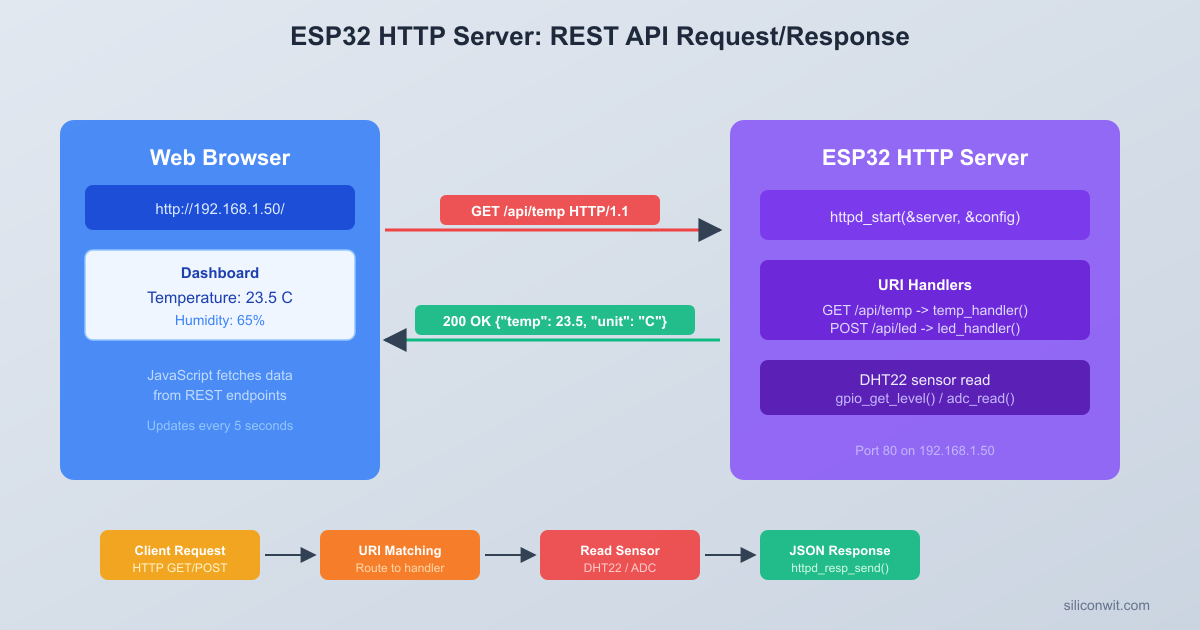
Browser-to-ESP32 Request Flow
┌──────────┐ HTTP GET /api/status ┌──────────┐
│ Browser ├───────────────────────>│ ESP32 │
│ │ │ HTTP Srv │
│ │ 200 OK + JSON body │ │
│ │<───────────────────────┤ DHT22 │
│ │ {"temp":22.5, │ Relay │
│ │ "humidity":45.2, │ SPIFFS │
│ │ "setpoint":23.0} │ │
└──────────┘ └──────────┘
Phone/Laptop 192.168.x.x
thermostat.local (mDNS)

The thermostat exposes three endpoints. All communication uses JSON:

MethodURIPurposeRequest BodyResponse Body
GET/api/statusRead current state(none){"temp":22.5, "humidity":45.2, "setpoint":23.0, "relay":true, "mode":"auto"}
POST/api/setpointChange target temperature{"setpoint":25.0}{"status":"ok", "setpoint":25.0}
POST/api/modeChange operating mode{"mode":"manual_on"}{"status":"ok", "mode":"manual_on"}

Operating Modes

The thermostat supports three modes:

  • auto: The thermostat compares the current temperature against the setpoint and drives the relay automatically with hysteresis. This is the default mode.
  • manual_on: The relay is forced on regardless of temperature. Useful for testing or overriding the thermostat logic.
  • manual_off: The relay is forced off. Useful for shutting down the heater without changing the setpoint.

CORS Headers

If you open the web UI from a different origin (for example, during development on a desktop), the browser will block fetch() requests unless the server sends CORS headers. We add them to every response by setting a custom httpd_resp_set_hdr() call in each handler:

httpd_resp_set_hdr(req, "Access-Control-Allow-Origin", "*");

For a production system you would restrict this to specific origins, but for a local IoT device the wildcard is acceptable.

JSON with cJSON


The ESP-IDF bundles the cJSON library, so you do not need to add any external dependencies. cJSON provides a simple API for building and parsing JSON objects.

Building a JSON Response

#include "cJSON.h"
static char *build_status_json(float temp, float humidity,
float setpoint, bool relay_on,
const char *mode)
{
cJSON *root = cJSON_CreateObject();
cJSON_AddNumberToObject(root, "temp", temp);
cJSON_AddNumberToObject(root, "humidity", humidity);
cJSON_AddNumberToObject(root, "setpoint", setpoint);
cJSON_AddBoolToObject(root, "relay", relay_on);
cJSON_AddStringToObject(root, "mode", mode);
char *json_str = cJSON_PrintUnformatted(root);
cJSON_Delete(root);
return json_str; /* Caller must free() this */
}

cJSON_PrintUnformatted() returns a compact JSON string without whitespace. Use cJSON_Print() for pretty-printed output (useful during debugging but wasteful over the network). The returned string is heap-allocated, so you must call free() on it after sending.

Parsing a JSON Request

static float parse_setpoint(const char *json_str)
{
cJSON *root = cJSON_Parse(json_str);
if (root == NULL) {
return -1.0f; /* Parse error */
}
cJSON *sp = cJSON_GetObjectItem(root, "setpoint");
float value = -1.0f;
if (cJSON_IsNumber(sp)) {
value = (float)sp->valuedouble;
}
cJSON_Delete(root);
return value;
}

Always check cJSON_IsNumber(), cJSON_IsString(), or cJSON_IsBool() before accessing the value fields. If the key is missing or the wrong type, these checks return false and you can send back an error response.

SPIFFS Filesystem


SPIFFS (SPI Flash File System) is a lightweight filesystem designed for NOR flash. The ESP-IDF includes full SPIFFS support, and we will use it to store the HTML, CSS, and JavaScript files that make up the web UI. This separates the UI from the firmware binary, so you can update the web interface without recompiling the C code.

Partition Table

You need a custom partition table that includes a SPIFFS partition. Create a file called partitions.csv in your project root:

# Name, Type, SubType, Offset, Size
nvs, data, nvs, 0x9000, 0x6000
phy_init, data, phy, 0xf000, 0x1000
factory, app, factory, 0x10000, 0x180000
storage, data, spiffs, 0x190000, 0x70000

The storage partition gets 448 KB of flash, which is more than enough for a simple web UI. The factory app partition gets 1.5 MB. These sizes work on the standard 4 MB flash found on most ESP32 DevKitC boards.

Tell the build system to use this partition table by running idf.py menuconfig and setting:

  • Partition Table > Partition Table > Custom partition table CSV
  • Partition Table > Custom partition CSV file > partitions.csv

Or add these lines to sdkconfig.defaults:

CONFIG_PARTITION_TABLE_CUSTOM=y
CONFIG_PARTITION_TABLE_CUSTOM_FILENAME="partitions.csv"

Initializing SPIFFS

#include "esp_spiffs.h"
static esp_err_t init_spiffs(void)
{
esp_vfs_spiffs_conf_t conf = {
.base_path = "/spiffs",
.partition_label = "storage",
.max_files = 5,
.format_if_mount_failed = true,
};
esp_err_t ret = esp_vfs_spiffs_register(&conf);
if (ret != ESP_OK) {
ESP_LOGE("spiffs", "Failed to mount SPIFFS (%s)",
esp_err_to_name(ret));
return ret;
}
size_t total = 0, used = 0;
esp_spiffs_info("storage", &total, &used);
ESP_LOGI("spiffs", "SPIFFS: total=%d, used=%d", total, used);
return ESP_OK;
}

After mounting, files are accessible through standard C functions like fopen(), fread(), and fclose() under the /spiffs/ path. For example, /spiffs/index.html maps to a file called index.html in the SPIFFS image.

Serving Static Files

The HTTP server handler for static files reads from SPIFFS and streams the content to the client:

static esp_err_t static_file_handler(httpd_req_t *req)
{
char filepath[64];
const char *uri = req->uri;
/* Default to index.html for root */
if (strcmp(uri, "/") == 0) {
uri = "/index.html";
}
snprintf(filepath, sizeof(filepath), "/spiffs%s", uri);
FILE *f = fopen(filepath, "r");
if (f == NULL) {
httpd_resp_send_err(req, HTTPD_404_NOT_FOUND, "File not found");
return ESP_FAIL;
}
/* Set content type based on file extension */
if (strstr(uri, ".html")) {
httpd_resp_set_type(req, "text/html");
} else if (strstr(uri, ".css")) {
httpd_resp_set_type(req, "text/css");
} else if (strstr(uri, ".js")) {
httpd_resp_set_type(req, "application/javascript");
} else {
httpd_resp_set_type(req, "text/plain");
}
char buf[512];
size_t read_bytes;
while ((read_bytes = fread(buf, 1, sizeof(buf), f)) > 0) {
httpd_resp_send_chunk(req, buf, read_bytes);
}
fclose(f);
/* End chunked response */
httpd_resp_send_chunk(req, NULL, 0);
return ESP_OK;
}

We register this handler with a wildcard pattern so it catches all URIs that do not match an API endpoint. The wildcard handler must be registered last, after all API handlers, because httpd_uri_match_wildcard matches greedily.

mDNS Discovery


Typing an IP address every time you want to access the thermostat is inconvenient, and the IP can change if your router reassigns it. mDNS (Multicast DNS) lets you assign a human-readable hostname to the ESP32. Any device on the same local network can then reach it by typing thermostat.local in a browser.

Initializing mDNS

#include "mdns.h"
static void init_mdns(void)
{
mdns_init();
mdns_hostname_set("thermostat");
mdns_instance_name_set("ESP32 Thermostat");
/* Advertise the HTTP service so discovery tools can find it */
mdns_service_add(NULL, "_http", "_tcp", 80, NULL, 0);
ESP_LOGI("mdns", "mDNS hostname: thermostat.local");
}

After calling mdns_hostname_set("thermostat"), the ESP32 responds to thermostat.local queries. The mdns_service_add() call is optional but useful: it advertises the HTTP service so tools like avahi-browse or dns-sd -B _http._tcp can discover the device automatically.

Platform Notes

mDNS works out of the box on macOS (via Bonjour) and Linux (if Avahi is installed). On Windows, mDNS support depends on the browser. Chrome and Edge resolve .local addresses natively on recent Windows 10/11 builds. If thermostat.local does not resolve on your machine, install Apple’s Bonjour Print Services for Windows or use the IP address directly.

Adding mDNS to the Build

Add mdns to the component requirements in main/CMakeLists.txt:

idf_component_register(SRCS "main.c"
INCLUDE_DIRS "."
REQUIRES esp_http_server
esp_spiffs
mdns
nvs_flash
json)

The json component provides cJSON. It is included in ESP-IDF by default but listing it explicitly makes the dependency clear.

DHT22 Sensor Reading


The DHT22 communicates over a proprietary single-wire protocol that requires precise timing. The host (ESP32) pulls the data line low for at least 1 ms to signal a read request, then releases it. The sensor responds with 40 bits of data: 16 bits of humidity, 16 bits of temperature, and 8 bits of checksum.

Protocol Timing

The communication sequence works as follows:

  1. Host start signal: Pull data line low for 1 to 10 ms, then release.
  2. Sensor response: Sensor pulls low for 80 us, then high for 80 us.
  3. Data transmission: For each of the 40 bits, the sensor pulls low for 50 us (sync pulse), then pulls high. The duration of the high period determines the bit value:
    • Bit 0: High for 26 to 28 us
    • Bit 1: High for 70 us

Bit-Banging Implementation

We use GPIO-level reads with esp_timer_get_time() for microsecond timing. This approach avoids external library dependencies and works reliably when called from a FreeRTOS task with sufficient priority:

#include "driver/gpio.h"
#include "esp_timer.h"
#define DHT_GPIO GPIO_NUM_4
#define DHT_TIMEOUT 1000 /* Timeout in microseconds */
typedef struct {
float temperature;
float humidity;
bool valid;
} dht_reading_t;
static int dht_wait_for_level(int level, int timeout_us)
{
int64_t start = esp_timer_get_time();
while (gpio_get_level(DHT_GPIO) != level) {
if ((esp_timer_get_time() - start) > timeout_us) {
return -1; /* Timeout */
}
}
return (int)(esp_timer_get_time() - start);
}
static dht_reading_t dht_read(void)
{
dht_reading_t result = { .valid = false };
uint8_t data[5] = {0};
/* --- Host start signal --- */
gpio_set_direction(DHT_GPIO, GPIO_MODE_OUTPUT);
gpio_set_level(DHT_GPIO, 0);
vTaskDelay(pdMS_TO_TICKS(2)); /* Hold low for 2 ms */
gpio_set_level(DHT_GPIO, 1);
/* Switch to input to read sensor response */
gpio_set_direction(DHT_GPIO, GPIO_MODE_INPUT);
/* --- Wait for sensor response --- */
if (dht_wait_for_level(0, DHT_TIMEOUT) < 0) return result;
if (dht_wait_for_level(1, DHT_TIMEOUT) < 0) return result;
if (dht_wait_for_level(0, DHT_TIMEOUT) < 0) return result;
/* --- Read 40 bits --- */
for (int i = 0; i < 40; i++) {
/* Wait for the sync pulse (low) to end */
if (dht_wait_for_level(1, DHT_TIMEOUT) < 0) return result;
/* Measure how long the data pulse (high) lasts */
int high_us = dht_wait_for_level(0, DHT_TIMEOUT);
if (high_us < 0) return result;
/* If high for more than 40 us, it is a '1' */
data[i / 8] <<= 1;
if (high_us > 40) {
data[i / 8] |= 1;
}
}
/* --- Verify checksum --- */
uint8_t checksum = data[0] + data[1] + data[2] + data[3];
if (checksum != data[4]) {
ESP_LOGW("dht", "Checksum mismatch: computed=%d, received=%d",
checksum, data[4]);
return result;
}
/* --- Decode humidity and temperature --- */
result.humidity = ((data[0] << 8) | data[1]) / 10.0f;
int16_t raw_temp = ((data[2] & 0x7F) << 8) | data[3];
if (data[2] & 0x80) {
raw_temp = -raw_temp; /* Negative temperature */
}
result.temperature = raw_temp / 10.0f;
result.valid = true;
return result;
}

The DHT22 should not be read more often than once every 2 seconds. Reading too frequently produces stale data or communication errors. The sensor task will enforce this interval.

Critical Section Considerations

The DHT22 timing is sensitive to interrupts. If a Wi-Fi interrupt fires in the middle of a bit read, the timing measurement will be wrong and the read will fail. This is normal. The sensor task simply retries on the next cycle. In practice, about 90% of reads succeed, which is more than adequate for a thermostat that updates every 2 seconds.

For higher reliability, you could disable interrupts during the bit-reading loop using portDISABLE_INTERRUPTS() and portENABLE_INTERRUPTS(), but this blocks Wi-Fi for up to 5 ms per read, which can cause packet loss. The retry approach is a better tradeoff for a system that also runs an HTTP server.

Relay Control and Hysteresis


A relay is a mechanical switch controlled by an electrical signal. When the ESP32 drives the relay module’s input pin low (for active-low modules), the relay coil energizes and the contacts close, connecting the load. When the pin goes high, the relay opens.

GPIO Configuration

#define RELAY_GPIO GPIO_NUM_5
static void relay_init(void)
{
gpio_config_t io_conf = {
.pin_bit_mask = (1ULL << RELAY_GPIO),
.mode = GPIO_MODE_OUTPUT,
.pull_up_en = GPIO_PULLUP_DISABLE,
.pull_down_en = GPIO_PULLDOWN_DISABLE,
.intr_type = GPIO_INTR_DISABLE,
};
gpio_config(&io_conf);
gpio_set_level(RELAY_GPIO, 1); /* Start with relay OFF (active low) */
}
static void relay_set(bool on)
{
gpio_set_level(RELAY_GPIO, on ? 0 : 1); /* Active low */
}

Why Hysteresis Matters

Without hysteresis, the relay would chatter rapidly when the temperature hovers near the setpoint. If the setpoint is 23.0 C and the temperature oscillates between 22.9 and 23.1 due to sensor noise, the relay would toggle every 2 seconds. Mechanical relays have a limited switching lifetime (typically 100,000 cycles), so this chatter wears them out quickly and produces an annoying clicking sound.

Hysteresis adds a deadband around the setpoint. With a 0.5 C deadband:

  • The relay turns ON when temperature drops below setpoint - 0.5 (22.5 C)
  • The relay turns OFF when temperature rises above setpoint + 0.5 (23.5 C)
  • Between 22.5 and 23.5 C, the relay holds its current state

This creates a 1.0 C total band where no switching occurs, which eliminates chatter while keeping the temperature within an acceptable range of the setpoint.

Thermostat Logic


The thermostat control loop ties together the sensor reading, relay control, and operating mode:

#define HYSTERESIS 0.5f
typedef enum {
MODE_AUTO,
MODE_MANUAL_ON,
MODE_MANUAL_OFF,
} thermostat_mode_t;
typedef struct {
float temperature;
float humidity;
float setpoint;
bool relay_on;
thermostat_mode_t mode;
SemaphoreHandle_t mutex;
} thermostat_state_t;
static thermostat_state_t state;
static void thermostat_update(void)
{
xSemaphoreTake(state.mutex, portMAX_DELAY);
switch (state.mode) {
case MODE_AUTO:
if (state.temperature < (state.setpoint - HYSTERESIS)) {
state.relay_on = true;
} else if (state.temperature > (state.setpoint + HYSTERESIS)) {
state.relay_on = false;
}
/* Between the bounds, relay holds its current state */
break;
case MODE_MANUAL_ON:
state.relay_on = true;
break;
case MODE_MANUAL_OFF:
state.relay_on = false;
break;
}
relay_set(state.relay_on);
xSemaphoreGive(state.mutex);
}

The mutex protects the shared state structure because it is accessed from both the sensor task (writing temperature/humidity) and the HTTP server task (reading state for the API and writing setpoint/mode changes). Without the mutex, a partially updated structure could produce inconsistent JSON responses.

Web UI


The web interface is a single HTML file with embedded CSS and JavaScript. It fetches data from the REST API every 2 seconds and displays the current temperature, humidity, relay state, and mode. The user can adjust the setpoint and change modes directly from the page.

Create a directory called spiffs_data in your project root and add this file as spiffs_data/index.html:

<!DOCTYPE html>
<html lang="en">
<head>
<meta charset="UTF-8">
<meta name="viewport" content="width=device-width, initial-scale=1.0">
<title>ESP32 Thermostat</title>
<style>
* { box-sizing: border-box; margin: 0; padding: 0; }
body {
font-family: -apple-system, BlinkMacSystemFont, "Segoe UI",
Roboto, sans-serif;
background: #1a1a2e;
color: #e0e0e0;
min-height: 100vh;
display: flex;
justify-content: center;
align-items: flex-start;
padding: 20px;
}
.container {
max-width: 420px;
width: 100%;
}
h1 {
text-align: center;
font-size: 1.4em;
margin-bottom: 20px;
color: #00d2ff;
}
.card {
background: #16213e;
border-radius: 12px;
padding: 20px;
margin-bottom: 16px;
}
.reading {
display: flex;
justify-content: space-between;
align-items: center;
padding: 8px 0;
}
.reading-label {
font-size: 0.9em;
color: #888;
}
.reading-value {
font-size: 1.8em;
font-weight: bold;
}
.temp-value { color: #ff6b6b; }
.humid-value { color: #48dbfb; }
.relay-on { color: #2ecc71; }
.relay-off { color: #95a5a6; }
.setpoint-control {
display: flex;
align-items: center;
justify-content: center;
gap: 16px;
margin-top: 12px;
}
.sp-btn {
width: 48px;
height: 48px;
border-radius: 50%;
border: 2px solid #00d2ff;
background: transparent;
color: #00d2ff;
font-size: 1.5em;
cursor: pointer;
display: flex;
align-items: center;
justify-content: center;
}
.sp-btn:active { background: #00d2ff; color: #1a1a2e; }
.sp-value {
font-size: 2em;
font-weight: bold;
min-width: 80px;
text-align: center;
}
.mode-buttons {
display: flex;
gap: 8px;
margin-top: 12px;
}
.mode-btn {
flex: 1;
padding: 10px;
border: 1px solid #444;
border-radius: 8px;
background: transparent;
color: #ccc;
cursor: pointer;
font-size: 0.85em;
}
.mode-btn.active {
border-color: #00d2ff;
color: #00d2ff;
background: rgba(0, 210, 255, 0.1);
}
.status-dot {
display: inline-block;
width: 10px;
height: 10px;
border-radius: 50%;
margin-right: 6px;
}
.dot-on { background: #2ecc71; }
.dot-off { background: #95a5a6; }
.label { font-size: 0.85em; color: #888; margin-bottom: 8px; }
</style>
</head>
<body>
<div class="container">
<h1>ESP32 Thermostat</h1>
<div class="card">
<div class="reading">
<span class="reading-label">Temperature</span>
<span class="reading-value temp-value"
id="temp">--.-</span>
</div>
<div class="reading">
<span class="reading-label">Humidity</span>
<span class="reading-value humid-value"
id="humid">--.-</span>
</div>
</div>
<div class="card">
<div class="reading">
<span class="reading-label">Relay</span>
<span id="relay">
<span class="status-dot dot-off"></span>OFF
</span>
</div>
</div>
<div class="card">
<div class="label">Setpoint</div>
<div class="setpoint-control">
<button class="sp-btn" onclick="adjustSp(-0.5)">-</button>
<span class="sp-value" id="setpoint">23.0</span>
<button class="sp-btn" onclick="adjustSp(+0.5)">+</button>
</div>
</div>
<div class="card">
<div class="label">Mode</div>
<div class="mode-buttons">
<button class="mode-btn" id="btn-auto"
onclick="setMode('auto')">Auto</button>
<button class="mode-btn" id="btn-manual_on"
onclick="setMode('manual_on')">Manual ON</button>
<button class="mode-btn" id="btn-manual_off"
onclick="setMode('manual_off')">Manual OFF</button>
</div>
</div>
</div>
<script>
let currentSp = 23.0;
let currentMode = "auto";
async function fetchStatus() {
try {
const res = await fetch("/api/status");
const d = await res.json();
document.getElementById("temp").textContent =
d.temp.toFixed(1) + " C";
document.getElementById("humid").textContent =
d.humidity.toFixed(1) + " %";
currentSp = d.setpoint;
document.getElementById("setpoint").textContent =
currentSp.toFixed(1) + " C";
const relayEl = document.getElementById("relay");
if (d.relay) {
relayEl.innerHTML =
'<span class="status-dot dot-on"></span>ON';
relayEl.className = "relay-on";
} else {
relayEl.innerHTML =
'<span class="status-dot dot-off"></span>OFF';
relayEl.className = "relay-off";
}
currentMode = d.mode;
document.querySelectorAll(".mode-btn").forEach(b => {
b.classList.remove("active");
});
const activeBtn = document.getElementById(
"btn-" + currentMode);
if (activeBtn) activeBtn.classList.add("active");
} catch (e) {
console.error("Fetch error:", e);
}
}
async function adjustSp(delta) {
currentSp += delta;
if (currentSp < 10.0) currentSp = 10.0;
if (currentSp > 35.0) currentSp = 35.0;
document.getElementById("setpoint").textContent =
currentSp.toFixed(1) + " C";
await fetch("/api/setpoint", {
method: "POST",
headers: {"Content-Type": "application/json"},
body: JSON.stringify({setpoint: currentSp})
});
}
async function setMode(mode) {
await fetch("/api/mode", {
method: "POST",
headers: {"Content-Type": "application/json"},
body: JSON.stringify({mode: mode})
});
fetchStatus();
}
fetchStatus();
setInterval(fetchStatus, 2000);
</script>
</body>
</html>

The UI is fully self-contained in a single file, which keeps the SPIFFS image small and avoids multiple HTTP requests for separate CSS and JS files. The dark theme is chosen for readability on mobile screens. The setpoint buttons adjust in 0.5 C increments and clamp between 10 C and 35 C.

Complete Firmware


Here is the complete main.c that ties everything together. It initializes Wi-Fi in station mode (reusing the event-driven pattern from Lesson 3), mounts SPIFFS, starts the HTTP server, registers REST API handlers, and runs a sensor task that reads the DHT22 every 2 seconds and updates the thermostat logic.

#include <stdio.h>
#include <stdlib.h>
#include <string.h>
#include <math.h>
#include "freertos/FreeRTOS.h"
#include "freertos/task.h"
#include "freertos/event_groups.h"
#include "freertos/semphr.h"
#include "esp_system.h"
#include "esp_wifi.h"
#include "esp_event.h"
#include "esp_log.h"
#include "esp_spiffs.h"
#include "esp_http_server.h"
#include "esp_timer.h"
#include "nvs_flash.h"
#include "mdns.h"
#include "driver/gpio.h"
#include "cJSON.h"
static const char *TAG = "thermostat";
/* ================================================================
* Configuration
* ================================================================ */
#define WIFI_SSID CONFIG_WIFI_SSID
#define WIFI_PASS CONFIG_WIFI_PASSWORD
#define WIFI_MAX_RETRY 10
#define DHT_GPIO GPIO_NUM_4
#define RELAY_GPIO GPIO_NUM_5
#define DHT_TIMEOUT_US 1000
#define DEFAULT_SETPOINT 23.0f
#define HYSTERESIS 0.5f
#define SENSOR_READ_MS 2000
/* ================================================================
* Wi-Fi
* ================================================================ */
static EventGroupHandle_t wifi_event_group;
#define WIFI_CONNECTED_BIT BIT0
#define WIFI_FAIL_BIT BIT1
static int wifi_retry_count = 0;
static void wifi_event_handler(void *arg, esp_event_base_t base,
int32_t event_id, void *event_data)
{
if (base == WIFI_EVENT && event_id == WIFI_EVENT_STA_START) {
esp_wifi_connect();
} else if (base == WIFI_EVENT &&
event_id == WIFI_EVENT_STA_DISCONNECTED) {
if (wifi_retry_count < WIFI_MAX_RETRY) {
esp_wifi_connect();
wifi_retry_count++;
ESP_LOGI(TAG, "Retrying Wi-Fi connection (%d/%d)",
wifi_retry_count, WIFI_MAX_RETRY);
} else {
xEventGroupSetBits(wifi_event_group, WIFI_FAIL_BIT);
}
} else if (base == IP_EVENT && event_id == IP_EVENT_STA_GOT_IP) {
ip_event_got_ip_t *event = (ip_event_got_ip_t *)event_data;
ESP_LOGI(TAG, "Connected. IP: " IPSTR,
IP2STR(&event->ip_info.ip));
wifi_retry_count = 0;
xEventGroupSetBits(wifi_event_group, WIFI_CONNECTED_BIT);
}
}
static void wifi_init_sta(void)
{
wifi_event_group = xEventGroupCreate();
ESP_ERROR_CHECK(esp_netif_init());
ESP_ERROR_CHECK(esp_event_loop_create_default());
esp_netif_create_default_wifi_sta();
wifi_init_config_t cfg = WIFI_INIT_CONFIG_DEFAULT();
ESP_ERROR_CHECK(esp_wifi_init(&cfg));
esp_event_handler_instance_t instance_any_id;
esp_event_handler_instance_t instance_got_ip;
ESP_ERROR_CHECK(esp_event_handler_instance_register(
WIFI_EVENT, ESP_EVENT_ANY_ID,
&wifi_event_handler, NULL, &instance_any_id));
ESP_ERROR_CHECK(esp_event_handler_instance_register(
IP_EVENT, IP_EVENT_STA_GOT_IP,
&wifi_event_handler, NULL, &instance_got_ip));
wifi_config_t wifi_config = {
.sta = {
.ssid = WIFI_SSID,
.password = WIFI_PASS,
.threshold.authmode = WIFI_AUTH_WPA2_PSK,
},
};
ESP_ERROR_CHECK(esp_wifi_set_mode(WIFI_MODE_STA));
ESP_ERROR_CHECK(esp_wifi_set_config(WIFI_IF_STA, &wifi_config));
ESP_ERROR_CHECK(esp_wifi_start());
ESP_LOGI(TAG, "Connecting to %s ...", WIFI_SSID);
EventBits_t bits = xEventGroupWaitBits(
wifi_event_group,
WIFI_CONNECTED_BIT | WIFI_FAIL_BIT,
pdFALSE, pdFALSE, portMAX_DELAY);
if (bits & WIFI_CONNECTED_BIT) {
ESP_LOGI(TAG, "Wi-Fi connected");
} else {
ESP_LOGE(TAG, "Wi-Fi connection failed");
}
}
/* ================================================================
* SPIFFS
* ================================================================ */
static esp_err_t init_spiffs(void)
{
esp_vfs_spiffs_conf_t conf = {
.base_path = "/spiffs",
.partition_label = "storage",
.max_files = 5,
.format_if_mount_failed = true,
};
esp_err_t ret = esp_vfs_spiffs_register(&conf);
if (ret != ESP_OK) {
ESP_LOGE(TAG, "SPIFFS mount failed: %s", esp_err_to_name(ret));
return ret;
}
size_t total = 0, used = 0;
esp_spiffs_info("storage", &total, &used);
ESP_LOGI(TAG, "SPIFFS: total=%d, used=%d", total, used);
return ESP_OK;
}
/* ================================================================
* mDNS
* ================================================================ */
static void init_mdns(void)
{
mdns_init();
mdns_hostname_set("thermostat");
mdns_instance_name_set("ESP32 Thermostat");
mdns_service_add(NULL, "_http", "_tcp", 80, NULL, 0);
ESP_LOGI(TAG, "mDNS: thermostat.local");
}
/* ================================================================
* DHT22 Sensor
* ================================================================ */
typedef struct {
float temperature;
float humidity;
bool valid;
} dht_reading_t;
static int dht_wait_for_level(int level, int timeout_us)
{
int64_t start = esp_timer_get_time();
while (gpio_get_level(DHT_GPIO) != level) {
if ((esp_timer_get_time() - start) > timeout_us) {
return -1;
}
}
return (int)(esp_timer_get_time() - start);
}
static dht_reading_t dht_read(void)
{
dht_reading_t result = { .valid = false };
uint8_t data[5] = {0};
/* Host start signal: pull low for 2 ms, then release */
gpio_set_direction(DHT_GPIO, GPIO_MODE_OUTPUT);
gpio_set_level(DHT_GPIO, 0);
vTaskDelay(pdMS_TO_TICKS(2));
gpio_set_level(DHT_GPIO, 1);
gpio_set_direction(DHT_GPIO, GPIO_MODE_INPUT);
/* Sensor response: low 80 us, high 80 us */
if (dht_wait_for_level(0, DHT_TIMEOUT_US) < 0) return result;
if (dht_wait_for_level(1, DHT_TIMEOUT_US) < 0) return result;
if (dht_wait_for_level(0, DHT_TIMEOUT_US) < 0) return result;
/* Read 40 bits */
for (int i = 0; i < 40; i++) {
if (dht_wait_for_level(1, DHT_TIMEOUT_US) < 0) return result;
int high_us = dht_wait_for_level(0, DHT_TIMEOUT_US);
if (high_us < 0) return result;
data[i / 8] <<= 1;
if (high_us > 40) {
data[i / 8] |= 1;
}
}
/* Verify checksum */
uint8_t checksum = data[0] + data[1] + data[2] + data[3];
if ((checksum & 0xFF) != data[4]) {
ESP_LOGW(TAG, "DHT checksum error");
return result;
}
/* Decode values */
result.humidity = ((data[0] << 8) | data[1]) / 10.0f;
int16_t raw_temp = ((data[2] & 0x7F) << 8) | data[3];
if (data[2] & 0x80) {
raw_temp = -raw_temp;
}
result.temperature = raw_temp / 10.0f;
result.valid = true;
return result;
}
/* ================================================================
* Relay Control
* ================================================================ */
static void relay_init(void)
{
gpio_config_t io_conf = {
.pin_bit_mask = (1ULL << RELAY_GPIO),
.mode = GPIO_MODE_OUTPUT,
.pull_up_en = GPIO_PULLUP_DISABLE,
.pull_down_en = GPIO_PULLDOWN_DISABLE,
.intr_type = GPIO_INTR_DISABLE,
};
gpio_config(&io_conf);
gpio_set_level(RELAY_GPIO, 1); /* OFF (active low) */
}
static void relay_set(bool on)
{
gpio_set_level(RELAY_GPIO, on ? 0 : 1);
}
/* ================================================================
* Thermostat State
* ================================================================ */
typedef enum {
MODE_AUTO,
MODE_MANUAL_ON,
MODE_MANUAL_OFF,
} thermostat_mode_t;
static const char *mode_to_str(thermostat_mode_t m)
{
switch (m) {
case MODE_AUTO: return "auto";
case MODE_MANUAL_ON: return "manual_on";
case MODE_MANUAL_OFF: return "manual_off";
default: return "auto";
}
}
static thermostat_mode_t str_to_mode(const char *s)
{
if (strcmp(s, "manual_on") == 0) return MODE_MANUAL_ON;
if (strcmp(s, "manual_off") == 0) return MODE_MANUAL_OFF;
return MODE_AUTO;
}
typedef struct {
float temperature;
float humidity;
float setpoint;
bool relay_on;
thermostat_mode_t mode;
SemaphoreHandle_t mutex;
} thermostat_state_t;
static thermostat_state_t state;
static void state_init(void)
{
state.temperature = 0.0f;
state.humidity = 0.0f;
state.setpoint = DEFAULT_SETPOINT;
state.relay_on = false;
state.mode = MODE_AUTO;
state.mutex = xSemaphoreCreateMutex();
}
static void thermostat_update(void)
{
xSemaphoreTake(state.mutex, portMAX_DELAY);
switch (state.mode) {
case MODE_AUTO:
if (state.temperature < (state.setpoint - HYSTERESIS)) {
state.relay_on = true;
} else if (state.temperature > (state.setpoint + HYSTERESIS)) {
state.relay_on = false;
}
break;
case MODE_MANUAL_ON:
state.relay_on = true;
break;
case MODE_MANUAL_OFF:
state.relay_on = false;
break;
}
relay_set(state.relay_on);
xSemaphoreGive(state.mutex);
}
/* ================================================================
* HTTP Server: REST API Handlers
* ================================================================ */
/* GET /api/status */
static esp_err_t api_status_handler(httpd_req_t *req)
{
xSemaphoreTake(state.mutex, portMAX_DELAY);
cJSON *root = cJSON_CreateObject();
cJSON_AddNumberToObject(root, "temp", state.temperature);
cJSON_AddNumberToObject(root, "humidity", state.humidity);
cJSON_AddNumberToObject(root, "setpoint", state.setpoint);
cJSON_AddBoolToObject(root, "relay", state.relay_on);
cJSON_AddStringToObject(root, "mode", mode_to_str(state.mode));
xSemaphoreGive(state.mutex);
char *json = cJSON_PrintUnformatted(root);
cJSON_Delete(root);
httpd_resp_set_type(req, "application/json");
httpd_resp_set_hdr(req, "Access-Control-Allow-Origin", "*");
httpd_resp_sendstr(req, json);
free(json);
return ESP_OK;
}
/* POST /api/setpoint */
static esp_err_t api_setpoint_handler(httpd_req_t *req)
{
char buf[128];
int received = httpd_req_recv(req, buf, sizeof(buf) - 1);
if (received <= 0) {
httpd_resp_send_err(req, HTTPD_400_BAD_REQUEST, "Empty body");
return ESP_FAIL;
}
buf[received] = '\0';
cJSON *root = cJSON_Parse(buf);
if (root == NULL) {
httpd_resp_send_err(req, HTTPD_400_BAD_REQUEST, "Invalid JSON");
return ESP_FAIL;
}
cJSON *sp = cJSON_GetObjectItem(root, "setpoint");
if (!cJSON_IsNumber(sp)) {
cJSON_Delete(root);
httpd_resp_send_err(req, HTTPD_400_BAD_REQUEST,
"Missing setpoint field");
return ESP_FAIL;
}
float new_sp = (float)sp->valuedouble;
cJSON_Delete(root);
/* Clamp to a reasonable range */
if (new_sp < 10.0f) new_sp = 10.0f;
if (new_sp > 35.0f) new_sp = 35.0f;
xSemaphoreTake(state.mutex, portMAX_DELAY);
state.setpoint = new_sp;
xSemaphoreGive(state.mutex);
ESP_LOGI(TAG, "Setpoint changed to %.1f C", new_sp);
/* Respond with confirmation */
cJSON *resp = cJSON_CreateObject();
cJSON_AddStringToObject(resp, "status", "ok");
cJSON_AddNumberToObject(resp, "setpoint", new_sp);
char *json = cJSON_PrintUnformatted(resp);
cJSON_Delete(resp);
httpd_resp_set_type(req, "application/json");
httpd_resp_set_hdr(req, "Access-Control-Allow-Origin", "*");
httpd_resp_sendstr(req, json);
free(json);
return ESP_OK;
}
/* POST /api/mode */
static esp_err_t api_mode_handler(httpd_req_t *req)
{
char buf[128];
int received = httpd_req_recv(req, buf, sizeof(buf) - 1);
if (received <= 0) {
httpd_resp_send_err(req, HTTPD_400_BAD_REQUEST, "Empty body");
return ESP_FAIL;
}
buf[received] = '\0';
cJSON *root = cJSON_Parse(buf);
if (root == NULL) {
httpd_resp_send_err(req, HTTPD_400_BAD_REQUEST, "Invalid JSON");
return ESP_FAIL;
}
cJSON *mode_item = cJSON_GetObjectItem(root, "mode");
if (!cJSON_IsString(mode_item)) {
cJSON_Delete(root);
httpd_resp_send_err(req, HTTPD_400_BAD_REQUEST,
"Missing mode field");
return ESP_FAIL;
}
thermostat_mode_t new_mode = str_to_mode(mode_item->valuestring);
cJSON_Delete(root);
xSemaphoreTake(state.mutex, portMAX_DELAY);
state.mode = new_mode;
xSemaphoreGive(state.mutex);
ESP_LOGI(TAG, "Mode changed to %s", mode_to_str(new_mode));
/* Immediately apply the new mode */
thermostat_update();
cJSON *resp = cJSON_CreateObject();
cJSON_AddStringToObject(resp, "status", "ok");
cJSON_AddStringToObject(resp, "mode", mode_to_str(new_mode));
char *json = cJSON_PrintUnformatted(resp);
cJSON_Delete(resp);
httpd_resp_set_type(req, "application/json");
httpd_resp_set_hdr(req, "Access-Control-Allow-Origin", "*");
httpd_resp_sendstr(req, json);
free(json);
return ESP_OK;
}
/* ================================================================
* HTTP Server: Static File Handler
* ================================================================ */
static esp_err_t static_file_handler(httpd_req_t *req)
{
char filepath[64];
const char *uri = req->uri;
if (strcmp(uri, "/") == 0) {
uri = "/index.html";
}
snprintf(filepath, sizeof(filepath), "/spiffs%s", uri);
FILE *f = fopen(filepath, "r");
if (f == NULL) {
httpd_resp_send_err(req, HTTPD_404_NOT_FOUND, "File not found");
return ESP_FAIL;
}
if (strstr(uri, ".html")) {
httpd_resp_set_type(req, "text/html");
} else if (strstr(uri, ".css")) {
httpd_resp_set_type(req, "text/css");
} else if (strstr(uri, ".js")) {
httpd_resp_set_type(req, "application/javascript");
} else {
httpd_resp_set_type(req, "text/plain");
}
httpd_resp_set_hdr(req, "Access-Control-Allow-Origin", "*");
char chunk[512];
size_t read_bytes;
while ((read_bytes = fread(chunk, 1, sizeof(chunk), f)) > 0) {
httpd_resp_send_chunk(req, chunk, read_bytes);
}
fclose(f);
httpd_resp_send_chunk(req, NULL, 0);
return ESP_OK;
}
/* ================================================================
* HTTP Server: Start and Register Handlers
* ================================================================ */
static httpd_handle_t start_webserver(void)
{
httpd_config_t config = HTTPD_DEFAULT_CONFIG();
config.uri_match_fn = httpd_uri_match_wildcard;
config.stack_size = 8192;
httpd_handle_t server = NULL;
if (httpd_start(&server, &config) != ESP_OK) {
ESP_LOGE(TAG, "Failed to start HTTP server");
return NULL;
}
/* API endpoints (register before the wildcard catch-all) */
httpd_uri_t status_uri = {
.uri = "/api/status",
.method = HTTP_GET,
.handler = api_status_handler,
};
httpd_register_uri_handler(server, &status_uri);
httpd_uri_t setpoint_uri = {
.uri = "/api/setpoint",
.method = HTTP_POST,
.handler = api_setpoint_handler,
};
httpd_register_uri_handler(server, &setpoint_uri);
httpd_uri_t mode_uri = {
.uri = "/api/mode",
.method = HTTP_POST,
.handler = api_mode_handler,
};
httpd_register_uri_handler(server, &mode_uri);
/* Static file handler (wildcard, must be last) */
httpd_uri_t static_uri = {
.uri = "/*",
.method = HTTP_GET,
.handler = static_file_handler,
};
httpd_register_uri_handler(server, &static_uri);
ESP_LOGI(TAG, "HTTP server started on port 80");
return server;
}
/* ================================================================
* Sensor Task
* ================================================================ */
static void sensor_task(void *pvParameters)
{
ESP_LOGI(TAG, "Sensor task started on core %d", xPortGetCoreID());
while (1) {
dht_reading_t reading = dht_read();
if (reading.valid) {
xSemaphoreTake(state.mutex, portMAX_DELAY);
state.temperature = reading.temperature;
state.humidity = reading.humidity;
xSemaphoreGive(state.mutex);
ESP_LOGI(TAG, "Temp=%.1f C Humidity=%.1f %% "
"Setpoint=%.1f Relay=%s Mode=%s",
reading.temperature, reading.humidity,
state.setpoint,
state.relay_on ? "ON" : "OFF",
mode_to_str(state.mode));
thermostat_update();
} else {
ESP_LOGW(TAG, "DHT read failed, skipping cycle");
}
vTaskDelay(pdMS_TO_TICKS(SENSOR_READ_MS));
}
}
/* ================================================================
* Entry Point
* ================================================================ */
void app_main(void)
{
ESP_LOGI(TAG, "ESP32 Thermostat starting");
/* Initialize NVS (required by Wi-Fi) */
esp_err_t ret = nvs_flash_init();
if (ret == ESP_ERR_NVS_NO_FREE_PAGES ||
ret == ESP_ERR_NVS_NEW_VERSION_FOUND) {
nvs_flash_erase();
nvs_flash_init();
}
/* Initialize thermostat state */
state_init();
/* Initialize relay (off by default) */
relay_init();
/* Connect to Wi-Fi */
wifi_init_sta();
/* Initialize mDNS */
init_mdns();
/* Mount SPIFFS filesystem */
init_spiffs();
/* Start the HTTP server */
start_webserver();
/* Start the sensor reading task */
xTaskCreatePinnedToCore(
sensor_task,
"sensor_task",
4096,
NULL,
5,
NULL,
1 /* Run on APP_CPU */
);
ESP_LOGI(TAG, "System ready. Open http://thermostat.local");

}

How the Code Works

The firmware is organized into six layers that each handle a specific concern:

  1. Wi-Fi layer: wifi_init_sta() connects to the configured access point using the event-driven pattern from Lesson 3. The function blocks until the connection succeeds or fails. Wi-Fi credentials come from Kconfig (CONFIG_WIFI_SSID and CONFIG_WIFI_PASSWORD), which you set through idf.py menuconfig.

  2. SPIFFS layer: init_spiffs() mounts the flash partition labeled “storage” at /spiffs. Files placed in the SPIFFS image during the build are accessible through standard C file operations. The format_if_mount_failed flag ensures the partition is usable even on first boot.

  3. mDNS layer: init_mdns() registers the hostname “thermostat” and advertises an HTTP service. After this call, any device on the same network can resolve thermostat.local to the ESP32’s IP address.

  4. DHT22 layer: dht_read() performs the full one-wire protocol sequence: start signal, sensor response, 40-bit data capture, and checksum verification. It returns a struct with temperature, humidity, and a validity flag. Failed reads are silently skipped.

  5. HTTP server layer: start_webserver() creates the server and registers four URI handlers. The three API handlers read or modify the thermostat state under mutex protection and return JSON responses. The wildcard static handler serves files from SPIFFS for the web UI.

  6. Sensor task: sensor_task() runs on Core 1 in a loop. Every 2 seconds it reads the DHT22, updates the shared state, runs the thermostat control logic, and logs the current readings. The thermostat logic applies hysteresis in auto mode or forces the relay in manual modes.

Kconfig Menu


Add a main/Kconfig.projbuild file to provide Wi-Fi configuration options in the menuconfig interface:

menu "Thermostat Configuration"
config WIFI_SSID
string "WiFi SSID"
default "myssid"
help
SSID (network name) to connect to.
config WIFI_PASSWORD
string "WiFi Password"
default "mypassword"
help
WiFi password (WPA2).
endmenu

This lets you set the SSID and password through idf.py menuconfig under the “Thermostat Configuration” menu, rather than hardcoding them in the source file.

Project Structure


The complete project has the following layout:

  • Directoryesp32-thermostat/
    • CMakeLists.txt
    • partitions.csv
    • sdkconfig.defaults
    • Directorymain/
      • CMakeLists.txt
      • main.c
      • Kconfig.projbuild
    • Directoryspiffs_data/
      • index.html

Top-Level CMakeLists.txt

cmake_minimum_required(VERSION 3.16)
include($ENV{IDF_PATH}/tools/cmake/project.cmake)
project(esp32-thermostat)

main/CMakeLists.txt

idf_component_register(SRCS "main.c"
INCLUDE_DIRS "."
REQUIRES esp_http_server
esp_spiffs
mdns
nvs_flash
json
esp_wifi
driver)

sdkconfig.defaults

CONFIG_PARTITION_TABLE_CUSTOM=y
CONFIG_PARTITION_TABLE_CUSTOM_FILENAME="partitions.csv"

Building and Flashing


  1. Create the project directory and place all files according to the project structure above:

    Terminal window
    mkdir -p esp32-thermostat/main
    mkdir -p esp32-thermostat/spiffs_data
  2. Set the target chip:

    Terminal window
    cd esp32-thermostat
    idf.py set-target esp32
  3. Configure Wi-Fi credentials:

    Terminal window
    idf.py menuconfig

    Navigate to Thermostat Configuration and enter your Wi-Fi SSID and password.

  4. Build the firmware:

    Terminal window
    idf.py build
  5. Create the SPIFFS image and flash everything. The spiffsgen.py tool (included with ESP-IDF) creates a filesystem image from the spiffs_data directory. The partition offset and size must match partitions.csv:

    Terminal window
    python $IDF_PATH/components/spiffs/spiffsgen.py \
    0x70000 spiffs_data spiffs_image.bin
  6. Flash the firmware and SPIFFS image together:

    Terminal window
    idf.py -p /dev/ttyUSB0 flash
    esptool.py --port /dev/ttyUSB0 write_flash 0x190000 spiffs_image.bin

    On macOS use /dev/cu.usbserial-XXXX. On Windows use COM3 or your port.

  7. Start the serial monitor:

    Terminal window
    idf.py -p /dev/ttyUSB0 monitor
  8. Watch the boot log:

    I (325) thermostat: ESP32 Thermostat starting
    I (1245) thermostat: Connected. IP: 192.168.1.42
    I (1247) thermostat: mDNS: thermostat.local
    I (1250) thermostat: SPIFFS: total=438272, used=4096
    I (1253) thermostat: HTTP server started on port 80
    I (1255) thermostat: System ready. Open http://thermostat.local
    I (3260) thermostat: Temp=22.3 C Humidity=45.1 % Setpoint=23.0 Relay=ON Mode=auto
  9. Open a browser on any device connected to the same Wi-Fi network and navigate to http://thermostat.local. You should see the thermostat web interface with live temperature and humidity readings. Adjust the setpoint and observe the relay clicking on and off as the temperature crosses the hysteresis boundaries.

  10. Press Ctrl+] to exit the serial monitor.

Troubleshooting

ProblemSolution
thermostat.local does not resolveUse the IP address printed in the boot log. On Windows, install Bonjour Print Services.
DHT read failures on every cycleCheck wiring: data pin to GPIO4, 4.7k pull-up to 3.3V. Verify the sensor is a DHT22 (not DHT11, which has a different data format).
SPIFFS mount failsVerify partitions.csv matches the offsets used in spiffsgen.py and write_flash. Run idf.py erase-flash and reflash.
Web page loads but shows ”—.-“Check the browser console for fetch errors. Ensure the ESP32 and your device are on the same network.
Relay chatters rapidlyIncrease HYSTERESIS from 0.5 to 1.0. If the sensor readings are noisy, add a software moving average filter.

Exercises


  1. Add a temperature history endpoint. Create a circular buffer that stores the last 60 temperature readings (2 minutes of data at 2-second intervals). Add a GET /api/history endpoint that returns the buffer as a JSON array of objects with timestamp and temp fields. Use esp_timer_get_time() for the timestamps and convert to seconds since boot. Update the web UI to display a simple bar chart of the history using CSS bars (no charting library needed).

  2. Persist the setpoint in NVS. Currently the setpoint resets to 23.0 C on every reboot. Use the NVS API from Lesson 2 to save the setpoint whenever it changes and restore it on boot. Be careful not to write to flash on every 0.5 C button press if the user holds the button. Add a 3-second debounce timer that only writes to NVS after the user stops adjusting.

  3. Add OTA-updateable web UI. Instead of flashing the SPIFFS image separately, embed the HTML file as a binary blob in the firmware using EMBED_FILES in CMakeLists.txt. This eliminates the separate SPIFFS flash step. Modify the static file handler to serve from the embedded data. Compare the tradeoffs (larger firmware binary, simpler flash process, no filesystem overhead) with the SPIFFS approach.

  4. Implement a moving average filter for the DHT22. Raw DHT22 readings can jump by 0.3 to 0.5 C between consecutive reads due to sensor noise and quantization. Implement a simple moving average over the last 5 valid readings. Store the readings in a circular buffer and compute the average before updating state.temperature. Compare the filtered and unfiltered readings in the serial log and observe how the filter reduces relay toggling near the setpoint boundary.

Summary


You built a complete HTTP server on the ESP32 that serves a responsive web interface from the SPIFFS filesystem and exposes RESTful JSON endpoints for status, setpoint, and mode control. The firmware reads temperature and humidity from a DHT22 sensor using a bit-banged one-wire protocol, applies hysteresis-based thermostat logic to prevent relay chatter, and makes the device discoverable on the local network through mDNS. The thermostat state is protected by a FreeRTOS mutex so the sensor task and HTTP handler threads can safely share data. The REST API design follows a clean pattern: GET for reading state, POST for modifying it, JSON for all payloads, and proper error responses for malformed requests.

Comments

Loading comments...


© 2021-2026 SiliconWit®. All rights reserved.