Skip to content

TensorFlow Lite Micro Model Deployment

TensorFlow Lite Micro Model Deployment hero image
Modified:
Published:

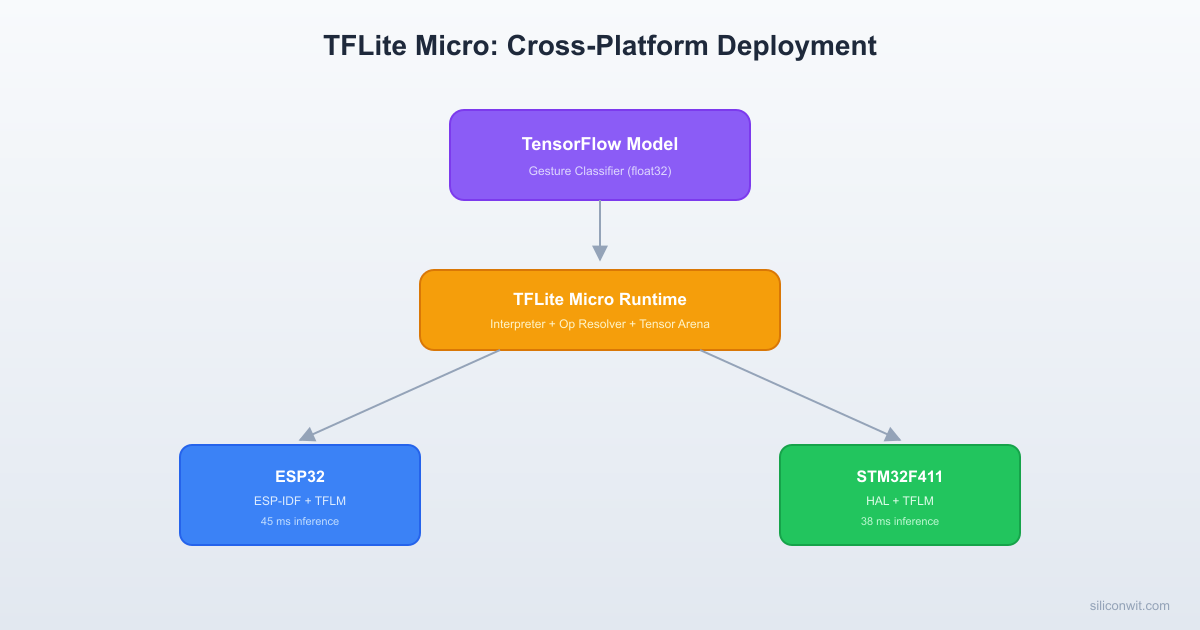
Platforms like Edge Impulse can handle model conversion and deployment automatically, but that convenience comes at the cost of understanding. This lesson takes you inside the TensorFlow Lite for Microcontrollers (TFLM) runtime. You will train a gesture classifier locally in TensorFlow, walk through each stage of model conversion, and deploy the same model on both an ESP32 and an STM32. By porting the model across two different architectures, you will understand exactly how the TFLM interpreter, tensor arena, and op resolver work, and where platform-specific code lives. #TFLiteMicro #ESP32 #STM32

What We Are Building

Cross-Platform Gesture Classifier

A 3-class gesture classifier (wave, punch, flex) that runs on both ESP32 and STM32 using the same TFLite model. An MPU6050 accelerometer captures gesture data at 50 Hz. The firmware collects a 1-second window (50 samples, 3 axes = 150 features), runs inference through the TFLM interpreter, and prints the classified gesture with confidence scores and inference timing.

Project specifications:

ParameterValue
Gestureswave, punch, flex
SensorMPU6050 (I2C) at 50 Hz
Window1 second (50 samples x 3 axes = 150 float inputs)
Model3-layer FC network, int8 quantized
Target 1ESP32 (Xtensa LX6, 240 MHz, ESP-IDF)
Target 2STM32F4 (Cortex-M4F, 168 MHz, HAL or Makefile)

TFLM Architecture Deep Dive


The TensorFlow Lite for Microcontrollers runtime has four key components. Understanding each one is essential for debugging deployment issues.

TFLM Runtime Components
──────────────────────────────────────────
Flash (read-only) RAM (tensor arena)
────────────────── ──────────────────
┌──────────────────┐ ┌────────────────┐
│ Model FlatBuffer │ │ Input tensor │
│ (weights + graph)│ │ [150 x int8] │
│ ~8 KB │ ├────────────────┤
└──────────────────┘ │ Layer 1 output │
│ [64 x int8] │
┌──────────────────┐ ├────────────────┤
│ TFLM Interpreter │ │ Layer 2 output │
│ code (~30 KB) │ │ [32 x int8] │
└──────────────────┘ ├────────────────┤
│ Output tensor │
┌──────────────────┐ │ [3 x int8] │
│ Op Resolver │ └────────────────┘
│ (selected ops) │ Total arena: ~4 KB
└──────────────────┘

1. The Model (FlatBuffer)

The .tflite file is a FlatBuffers binary that encodes the model graph (operators and their connections), the quantized weights, tensor shapes and types, and quantization parameters (scale and zero point for each tensor). When embedded as a const unsigned char[] in firmware, the model lives in flash. The interpreter reads it in place; there is no copy to RAM.

Model Conversion Pipeline
──────────────────────────────────────────
TensorFlow (Python, PC)
model.h5 (float32, ~32 KB)
▼ TFLiteConverter
model.tflite (int8, ~8 KB)
▼ xxd -i model.tflite > model_data.h
const unsigned char model_data[] = {
0x20, 0x00, 0x00, 0x00, 0x54, 0x46,
0x4C, 0x33, ... // FlatBuffer binary
};
▼ #include "model_data.h"
ESP32 / STM32 firmware
(model lives in flash, read in place)

2. The Op Resolver

// Register only the operators your model uses
static tflite::MicroMutableOpResolver<5> resolver;
resolver.AddFullyConnected();
resolver.AddRelu();
resolver.AddSoftmax();
resolver.AddQuantize();
resolver.AddDequantize();

Every neural network layer maps to one or more “ops” (operations). The op resolver is a lookup table that connects op names in the FlatBuffer to kernel implementations compiled into the firmware. Using MicroMutableOpResolver<N> instead of AllOpsResolver keeps the binary small. Each unused kernel you exclude saves 1 KB to 10 KB of flash.

If inference fails with “Didn’t find op for builtin opcode”, you forgot to register an op that the model needs. Check the model ops with:

Terminal window
python3 -c "
import tensorflow as tf
interpreter = tf.lite.Interpreter(model_path='gesture_model_int8.tflite')
interpreter.allocate_tensors()
# The ops are visible in the model graph
"

Or use flatc to dump the FlatBuffer schema and inspect the operator codes.

3. The Tensor Arena

constexpr int kTensorArenaSize = 8 * 1024;
alignas(16) static uint8_t tensor_arena[kTensorArenaSize];

The tensor arena is a single contiguous block of RAM that holds all runtime tensors: input tensor, output tensor, intermediate activation tensors, and scratch buffers for ops that need temporary workspace. The interpreter performs its own memory planning within this arena during AllocateTensors(). There is no malloc after that call.

Sizing the arena: Start large (e.g., 32 KB) and use interpreter.arena_used_bytes() to find the actual usage. Then shrink the arena to the actual usage plus a 10% to 20% margin. An arena that is too small causes AllocateTensors() to fail. An arena that is too large wastes RAM.

4. The Interpreter

static tflite::MicroInterpreter interpreter(model, resolver,
tensor_arena, kTensorArenaSize);

The MicroInterpreter ties everything together. It parses the model, allocates tensors in the arena, and on each Invoke() call, executes the ops in topological order. The interpreter is stateless between invocations (given the same input, it produces the same output). This makes it safe to call from a FreeRTOS task without additional synchronization.

Step 1: Collect Gesture Training Data


Use the MPU6050 data collection firmware from Lesson 2. For each gesture, collect at least 50 samples (1-second recordings at 50 Hz).

Gesture Definitions

GestureMotion Description
waveMove hand left-right repeatedly (lateral oscillation)
punchThrust hand forward sharply (acceleration spike on one axis)
flexRotate wrist upward slowly (gradual tilt change)

Collect data using the serial capture method:

Terminal window
# Collect 50+ recordings per class, each 1 second (50 samples)
python collect_gesture.py --label wave --output data/wave/
python collect_gesture.py --label punch --output data/punch/
python collect_gesture.py --label flex --output data/flex/

A simple collection script:

collect_gesture.py
# Collect 1-second gesture recordings from ESP32 over serial
import serial
import argparse
import os
import numpy as np
parser = argparse.ArgumentParser()
parser.add_argument('--label', required=True)
parser.add_argument('--output', required=True)
parser.add_argument('--port', default='/dev/ttyUSB0')
parser.add_argument('--baud', type=int, default=115200)
parser.add_argument('--num_recordings', type=int, default=50)
args = parser.parse_args()
os.makedirs(args.output, exist_ok=True)
ser = serial.Serial(args.port, args.baud, timeout=2)
for rec in range(args.num_recordings):
input(f"[{args.label}] Recording {rec+1}/{args.num_recordings}. "
f"Perform gesture and press Enter...")
# Send start command to ESP32
ser.write(b'start\n')
samples = []
for _ in range(50): # 50 samples at 50 Hz = 1 second
line = ser.readline().decode('utf-8', errors='ignore').strip()
if ',' in line:
parts = line.split(',')
if len(parts) >= 4:
try:
ax, ay, az = float(parts[1]), float(parts[2]), float(parts[3])
samples.append([ax, ay, az])
except ValueError:
pass
if len(samples) >= 40: # allow some dropped samples
filename = os.path.join(args.output, f"{args.label}_{rec:03d}.npy")
np.save(filename, np.array(samples, dtype=np.float32))
print(f" Saved {filename} ({len(samples)} samples)")
else:
print(f" Too few samples ({len(samples)}), skipping")
ser.close()
print("Collection complete.")

Step 2: Train the Gesture Model


train_gesture_model.py
# Train a gesture classifier and export to TFLite (int8)
import os
import numpy as np
import tensorflow as tf
from sklearn.model_selection import train_test_split
# Load data
classes = ['wave', 'punch', 'flex']
X_all = []
y_all = []
for class_idx, class_name in enumerate(classes):
data_dir = f"data/{class_name}/"
for filename in sorted(os.listdir(data_dir)):
if filename.endswith('.npy'):
sample = np.load(os.path.join(data_dir, filename))
# Pad or truncate to exactly 50 samples
if len(sample) > 50:
sample = sample[:50]
elif len(sample) < 50:
pad = np.zeros((50 - len(sample), 3), dtype=np.float32)
sample = np.vstack([sample, pad])
# Flatten: 50 samples x 3 axes = 150 features
X_all.append(sample.flatten())
y_all.append(class_idx)
X_all = np.array(X_all, dtype=np.float32)
y_all = np.array(y_all, dtype=np.int32)
print(f"Dataset: {len(X_all)} samples, {len(classes)} classes")
print(f"Class distribution: {np.bincount(y_all)}")
# Normalize features to [0, 1] range
# Accelerometer values are typically in [-4, 4] g range
X_min = X_all.min()
X_max = X_all.max()
X_all = (X_all - X_min) / (X_max - X_min)
# Save normalization parameters (needed for inference firmware)
np.savez('norm_params.npz', x_min=X_min, x_max=X_max)
print(f"Normalization: min={X_min:.4f}, max={X_max:.4f}")
# Split
X_train, X_test, y_train, y_test = train_test_split(
X_all, y_all, test_size=0.2, random_state=42, stratify=y_all
)
# One-hot encode labels
y_train_oh = tf.keras.utils.to_categorical(y_train, num_classes=len(classes))
y_test_oh = tf.keras.utils.to_categorical(y_test, num_classes=len(classes))
# Define model
model = tf.keras.Sequential([
tf.keras.layers.Dense(64, activation='relu', input_shape=(150,)),
tf.keras.layers.Dropout(0.2),
tf.keras.layers.Dense(32, activation='relu'),
tf.keras.layers.Dropout(0.2),
tf.keras.layers.Dense(len(classes), activation='softmax')
])
model.compile(
optimizer=tf.keras.optimizers.Adam(learning_rate=0.001),
loss='categorical_crossentropy',
metrics=['accuracy']
)
model.summary()
# Train
history = model.fit(
X_train, y_train_oh,
epochs=100,
batch_size=16,
validation_data=(X_test, y_test_oh),
verbose=1
)
# Evaluate
loss, accuracy = model.evaluate(X_test, y_test_oh, verbose=0)
print(f"\nTest accuracy: {accuracy:.4f}")
# Convert to TFLite with int8 quantization
def representative_dataset():
for i in range(min(100, len(X_train))):
yield [X_train[i:i+1].astype(np.float32)]
converter = tf.lite.TFLiteConverter.from_keras_model(model)
converter.optimizations = [tf.lite.Optimize.DEFAULT]
converter.representative_dataset = representative_dataset
converter.target_spec.supported_ops = [tf.lite.OpsSet.TFLITE_BUILTINS_INT8]
converter.inference_input_type = tf.int8
converter.inference_output_type = tf.int8
tflite_model = converter.convert()
with open('gesture_model_int8.tflite', 'wb') as f:
f.write(tflite_model)
print(f"TFLite model size: {len(tflite_model)} bytes")
# Validate quantized model
interpreter = tf.lite.Interpreter(model_content=tflite_model)
interpreter.allocate_tensors()
input_details = interpreter.get_input_details()
output_details = interpreter.get_output_details()
print(f"Input: shape={input_details[0]['shape']}, "
f"type={input_details[0]['dtype']}, "
f"scale={input_details[0]['quantization'][0]:.6f}, "
f"zp={input_details[0]['quantization'][1]}")
print(f"Output: shape={output_details[0]['shape']}, "
f"type={output_details[0]['dtype']}, "
f"scale={output_details[0]['quantization'][0]:.6f}, "
f"zp={output_details[0]['quantization'][1]}")
# Test accuracy of quantized model
correct = 0
for i in range(len(X_test)):
input_scale = input_details[0]['quantization'][0]
input_zp = input_details[0]['quantization'][1]
x_q = np.round(X_test[i] / input_scale + input_zp).astype(np.int8)
interpreter.set_tensor(input_details[0]['index'], x_q.reshape(1, 150))
interpreter.invoke()
output = interpreter.get_tensor(output_details[0]['index'])[0]
predicted = np.argmax(output)
if predicted == y_test[i]:
correct += 1
print(f"Quantized model test accuracy: {correct / len(X_test):.4f}")

Convert to C Array

Terminal window
xxd -i gesture_model_int8.tflite > gesture_model_data.cc

Edit the generated file to make the array const and alignas(8):

gesture_model_data.h
#ifndef GESTURE_MODEL_DATA_H
#define GESTURE_MODEL_DATA_H
extern const unsigned char gesture_model_int8_tflite[];
extern const unsigned int gesture_model_int8_tflite_len;
// Normalization parameters (from training)
#define GESTURE_INPUT_MIN -4.0f
#define GESTURE_INPUT_MAX 4.0f
#define GESTURE_NUM_CLASSES 3
static const char* gesture_labels[] = {"wave", "punch", "flex"};
#endif

Step 3: ESP32 Deployment (ESP-IDF)


// main/main.cc (ESP32 version)
// Gesture classifier using TFLite Micro on ESP32
#include <cstdio>
#include <cmath>
#include <cstring>
#include "freertos/FreeRTOS.h"
#include "freertos/task.h"
#include "driver/i2c.h"
#include "esp_timer.h"
#include "esp_log.h"
#include "tensorflow/lite/micro/micro_mutable_op_resolver.h"
#include "tensorflow/lite/micro/micro_interpreter.h"
#include "tensorflow/lite/schema/schema_generated.h"
#include "gesture_model_data.h"
static const char *TAG = "gesture";
#define MPU6050_ADDR 0x68
#define I2C_SDA 21
#define I2C_SCL 22
#define SAMPLE_RATE_HZ 50
#define WINDOW_SAMPLES 50
#define NUM_AXES 3
#define NUM_FEATURES (WINDOW_SAMPLES * NUM_AXES) // 150
// Tensor arena
constexpr int kArenaSize = 16 * 1024;
alignas(16) static uint8_t tensor_arena[kArenaSize];
// I2C and MPU6050 functions (same as Lesson 2)
static void i2c_init(void) {
i2c_config_t conf = {
.mode = I2C_MODE_MASTER,
.sda_io_num = I2C_SDA,
.scl_io_num = I2C_SCL,
.sda_pullup_en = GPIO_PULLUP_ENABLE,
.scl_pullup_en = GPIO_PULLUP_ENABLE,
.master = { .clk_speed = 400000 },
};
i2c_param_config(I2C_NUM_0, &conf);
i2c_driver_install(I2C_NUM_0, conf.mode, 0, 0, 0);
}
static void mpu6050_init(void) {
uint8_t buf[2] = {0x6B, 0x00};
i2c_master_write_to_device(I2C_NUM_0, MPU6050_ADDR, buf, 2, pdMS_TO_TICKS(100));
vTaskDelay(pdMS_TO_TICKS(100));
buf[0] = 0x1C; buf[1] = 0x00;
i2c_master_write_to_device(I2C_NUM_0, MPU6050_ADDR, buf, 2, pdMS_TO_TICKS(100));
}
static void read_accel(float *ax, float *ay, float *az) {
uint8_t reg = 0x3B, data[6];
i2c_master_write_read_device(I2C_NUM_0, MPU6050_ADDR,
&reg, 1, data, 6, pdMS_TO_TICKS(100));
int16_t rx = (int16_t)((data[0] << 8) | data[1]);
int16_t ry = (int16_t)((data[2] << 8) | data[3]);
int16_t rz = (int16_t)((data[4] << 8) | data[5]);
*ax = rx / 16384.0f;
*ay = ry / 16384.0f;
*az = rz / 16384.0f;
}
extern "C" void app_main(void) {
i2c_init();
mpu6050_init();
ESP_LOGI(TAG, "Loading gesture model (%u bytes)", gesture_model_int8_tflite_len);
const tflite::Model *model = tflite::GetModel(gesture_model_int8_tflite);
if (model->version() != TFLITE_SCHEMA_VERSION) {
ESP_LOGE(TAG, "Model schema mismatch");
return;
}
// Register ops
static tflite::MicroMutableOpResolver<5> resolver;
resolver.AddFullyConnected();
resolver.AddRelu();
resolver.AddSoftmax();
resolver.AddQuantize();
resolver.AddDequantize();
// Create interpreter
static tflite::MicroInterpreter interpreter(model, resolver,
tensor_arena, kArenaSize);
if (interpreter.AllocateTensors() != kTfLiteOk) {
ESP_LOGE(TAG, "AllocateTensors failed");
return;
}
TfLiteTensor *input = interpreter.input(0);
TfLiteTensor *output = interpreter.output(0);
float input_scale = input->params.scale;
int32_t input_zp = input->params.zero_point;
float output_scale = output->params.scale;
int32_t output_zp = output->params.zero_point;
ESP_LOGI(TAG, "Arena used: %zu bytes", interpreter.arena_used_bytes());
ESP_LOGI(TAG, "Input: scale=%.6f zp=%d", input_scale, input_zp);
ESP_LOGI(TAG, "Output: scale=%.6f zp=%d", output_scale, output_zp);
float raw_buffer[NUM_FEATURES];
int interval_ms = 1000 / SAMPLE_RATE_HZ;
ESP_LOGI(TAG, "Ready. Perform gestures...");
while (1) {
// Collect 1 second of accelerometer data
for (int i = 0; i < WINDOW_SAMPLES; i++) {
float ax, ay, az;
read_accel(&ax, &ay, &az);
raw_buffer[i * 3 + 0] = ax;
raw_buffer[i * 3 + 1] = ay;
raw_buffer[i * 3 + 2] = az;
vTaskDelay(pdMS_TO_TICKS(interval_ms));
}
// Normalize and quantize
for (int i = 0; i < NUM_FEATURES; i++) {
float normalized = (raw_buffer[i] - GESTURE_INPUT_MIN) /
(GESTURE_INPUT_MAX - GESTURE_INPUT_MIN);
// Clamp to [0, 1]
if (normalized < 0.0f) normalized = 0.0f;
if (normalized > 1.0f) normalized = 1.0f;
input->data.int8[i] = (int8_t)roundf(normalized / input_scale + input_zp);
}
// Run inference
int64_t t_start = esp_timer_get_time();
TfLiteStatus status = interpreter.Invoke();
int64_t t_end = esp_timer_get_time();
if (status != kTfLiteOk) {
ESP_LOGE(TAG, "Invoke failed");
continue;
}
// Dequantize output and find best class
float scores[GESTURE_NUM_CLASSES];
int best_idx = 0;
float best_score = -1.0f;
for (int c = 0; c < GESTURE_NUM_CLASSES; c++) {
int8_t q_val = output->data.int8[c];
scores[c] = (q_val - output_zp) * output_scale;
if (scores[c] > best_score) {
best_score = scores[c];
best_idx = c;
}
}
int64_t inference_us = t_end - t_start;
ESP_LOGI(TAG, "Gesture: %s (%.1f%%) | wave=%.2f punch=%.2f flex=%.2f | %lld us",
gesture_labels[best_idx], best_score * 100.0f,
scores[0], scores[1], scores[2], inference_us);
}
}

Step 4: STM32 Deployment


The same TFLite model runs on STM32 with minimal changes. The core inference code is identical; only the hardware abstraction layer (I2C, timing, logging) differs.

STM32 Project Structure

  • Directorygesture_stm32/
    • Makefile
    • Directorysrc/
      • main.cpp
      • mpu6050.c
      • mpu6050.h
      • gesture_model_data.h
      • gesture_model_data.cc
    • Directorylib/
      • Directorytflite-micro/
    • Directorystm32f4xx/
      • startup_stm32f411xe.s
      • system_stm32f4xx.c
      • STM32F411RETx_FLASH.ld

STM32 Inference Code

// src/main.cpp (STM32F4 version)
// Gesture classifier using TFLite Micro on STM32F411
#include <cstdio>
#include <cmath>
#include <cstring>
#include "stm32f4xx_hal.h"
#include "tensorflow/lite/micro/micro_mutable_op_resolver.h"
#include "tensorflow/lite/micro/micro_interpreter.h"
#include "tensorflow/lite/schema/schema_generated.h"
#include "gesture_model_data.h"
#include "mpu6050.h"
// UART handle for printf redirect
extern UART_HandleTypeDef huart2;
// Redirect printf to UART2
extern "C" int _write(int file, char *ptr, int len) {
HAL_UART_Transmit(&huart2, (uint8_t *)ptr, len, HAL_MAX_DELAY);
return len;
}
// Tensor arena (STM32F411 has 128 KB SRAM, budget carefully)
constexpr int kArenaSize = 16 * 1024;
alignas(16) static uint8_t tensor_arena[kArenaSize];
#define WINDOW_SAMPLES 50
#define NUM_AXES 3
#define NUM_FEATURES (WINDOW_SAMPLES * NUM_AXES)
#define SAMPLE_RATE_HZ 50
int main(void) {
HAL_Init();
SystemClock_Config(); // Configure to 168 MHz (or 100 MHz for F411)
MX_GPIO_Init();
MX_USART2_UART_Init();
MX_I2C1_Init();
MPU6050_Init();
printf("STM32 gesture classifier starting\r\n");
const tflite::Model *model = tflite::GetModel(gesture_model_int8_tflite);
if (model->version() != TFLITE_SCHEMA_VERSION) {
printf("Model schema mismatch\r\n");
while (1);
}
static tflite::MicroMutableOpResolver<5> resolver;
resolver.AddFullyConnected();
resolver.AddRelu();
resolver.AddSoftmax();
resolver.AddQuantize();
resolver.AddDequantize();
static tflite::MicroInterpreter interpreter(model, resolver,
tensor_arena, kArenaSize);
if (interpreter.AllocateTensors() != kTfLiteOk) {
printf("AllocateTensors failed\r\n");
while (1);
}
TfLiteTensor *input = interpreter.input(0);
TfLiteTensor *output = interpreter.output(0);
float input_scale = input->params.scale;
int32_t input_zp = input->params.zero_point;
float output_scale = output->params.scale;
int32_t output_zp = output->params.zero_point;
printf("Arena used: %u bytes\r\n", (unsigned)interpreter.arena_used_bytes());
float raw_buffer[NUM_FEATURES];
while (1) {
// Collect accelerometer window
for (int i = 0; i < WINDOW_SAMPLES; i++) {
float ax, ay, az;
MPU6050_ReadAccel(&ax, &ay, &az);
raw_buffer[i * 3 + 0] = ax;
raw_buffer[i * 3 + 1] = ay;
raw_buffer[i * 3 + 2] = az;
HAL_Delay(1000 / SAMPLE_RATE_HZ);
}
// Normalize and quantize input
for (int i = 0; i < NUM_FEATURES; i++) {
float norm = (raw_buffer[i] - GESTURE_INPUT_MIN) /
(GESTURE_INPUT_MAX - GESTURE_INPUT_MIN);
if (norm < 0.0f) norm = 0.0f;
if (norm > 1.0f) norm = 1.0f;
input->data.int8[i] = (int8_t)roundf(norm / input_scale + input_zp);
}
// Time the inference
uint32_t t_start = HAL_GetTick();
TfLiteStatus status = interpreter.Invoke();
uint32_t t_end = HAL_GetTick();
if (status != kTfLiteOk) {
printf("Invoke failed\r\n");
continue;
}
// Dequantize and find best class
float best_score = -1.0f;
int best_idx = 0;
for (int c = 0; c < GESTURE_NUM_CLASSES; c++) {
float score = (output->data.int8[c] - output_zp) * output_scale;
if (score > best_score) {
best_score = score;
best_idx = c;
}
}
printf("Gesture: %s (%.1f%%) | %lu ms\r\n",
gesture_labels[best_idx], best_score * 100.0f,
(unsigned long)(t_end - t_start));
}
}

Step 5: Cross-Platform Comparison


Deploy the same int8 model on both platforms and measure the results.

Inference Time Comparison

MetricESP32 (240 MHz Xtensa)STM32F411 (100 MHz Cortex-M4F)
Model size in flash~12 KB~12 KB (identical)
Tensor arena used~6 KB~6 KB (identical)
Inference time0.5 to 2 ms2 to 8 ms
Total firmware size~400 KB (with ESP-IDF)~120 KB (bare metal)

Why the Timing Difference?

The model and runtime are identical. The timing difference comes from three factors:

  1. Clock speed. The ESP32 runs at 240 MHz; the STM32F411 runs at 100 MHz. Higher clock means fewer microseconds per operation.

  2. Cache architecture. The ESP32 has instruction cache for flash-mapped code. The STM32F4 has ART Accelerator (flash prefetch). Both help, but behave differently for the mixed sequential/branching pattern of interpreter execution.

  3. CMSIS-NN acceleration. On Cortex-M4, TFLM can use CMSIS-NN optimized kernels that exploit the DSP instructions (SMLAD, etc.) for int8 dot products. The Xtensa architecture has its own optimizations through Espressif’s esp-nn library. Both provide significant speedups over generic C implementations.

RAM Budget Comparison

RAM UsageESP32STM32F411
Total SRAM520 KB128 KB
TFLM arena6 KB6 KB
Stack (main task)8 KB4 KB
FreeRTOS overhead~15 KB0 (bare metal)
Available for application~490 KB~118 KB

The ESP32 has abundant RAM for TinyML. The STM32F411 is tighter, but 128 KB is still comfortable for models that need 10 to 20 KB of arena space. Smaller Cortex-M0+ devices (like the RPi Pico with 264 KB, or an STM32L0 with 20 KB) require more careful arena sizing.

Debugging Common Issues


AllocateTensors() fails

The tensor arena is too small. Increase kArenaSize and retry. Use interpreter.arena_used_bytes() after a successful allocation to find the minimum size.

Didn't find op for builtin opcode X

You forgot to register an op. Check which ops the model uses by inspecting it with netron.app (a web-based model visualizer) or by running interpreter.get_output_details() in Python. Add the missing op to the resolver.

Output values are all the same

Check your quantization parameters. If input normalization does not match the training preprocessing (same min, max, scale), the quantized input values will be wrong, and the model output will be garbage. Print the raw quantized input values and verify them against the Python reference.

Inference is too slow

Make sure you are using the optimized kernel implementations (CMSIS-NN for Cortex-M, esp-nn for Xtensa). Check that the build system is compiling with optimization flags (-O2 or -Os). For ESP-IDF, ensure CONFIG_COMPILER_OPTIMIZATION_PERF is enabled in menuconfig.

Model too large for flash

The int8 model should be 3x to 4x smaller than float32. If it is still too large, reduce the number of neurons or layers in the training script. A model with 32 and 16 hidden neurons instead of 64 and 32 cuts the size roughly in half.

Hard fault on STM32

Check stack size. The TFLM interpreter uses significant stack space during AllocateTensors() and Invoke(). Allocate at least 4 KB of stack for the calling thread (or the main stack in bare metal). Also check that the tensor arena is properly aligned (alignas(16)).

Porting Checklist


When moving a TFLM application from one MCU to another, only these pieces change:

ComponentPlatform-Specific?Notes
Model (.tflite / C array)NoIdentical binary on all platforms
Op resolver setupNoSame ops registered everywhere
Tensor arenaNoSame size, same alignment
Interpreter usageNoSame API calls
I2C / sensor driverYesHAL differs per MCU family
Timing measurementYesesp_timer_get_time() vs HAL_GetTick()
Printf / loggingYesESP_LOGI vs UART printf vs SWO
Build systemYesESP-IDF CMake vs STM32 Makefile vs Arduino

The TFLM code itself is fully portable. This is by design. The “micro” in TFLite Micro means it has no OS dependencies, no dynamic allocation, and no file I/O. You bring the platform layer; TFLM brings the inference engine.

Exercises


Exercise 1: Add RPi Pico

Port the gesture classifier to the RPi Pico W (Cortex-M0+). The Pico lacks an FPU, so int8 quantization is even more important. Compare inference time against the ESP32 and STM32.

Exercise 2: Visualize with Netron

Open your .tflite file in netron.app. Identify each operator, check the tensor shapes, and verify quantization parameters match what the firmware prints.

Exercise 3: AllOpsResolver Comparison

Replace MicroMutableOpResolver<5> with AllOpsResolver. Rebuild and compare the firmware binary size. This shows the cost of unused kernel code.

Exercise 4: Continuous Inference

Implement a sliding window: shift the buffer by 10 samples (200 ms) and re-run inference instead of collecting a full fresh window. Measure how much faster the system responds to gestures.

What Comes Next


You can now train, convert, and deploy TFLite Micro models on multiple platforms. But the models so far have been small, and we accepted the default quantization without questioning it. In Lesson 4 you will take a larger CNN model, apply both post-training quantization and quantization-aware training, and benchmark the accuracy, speed, and size trade-offs in detail.

Comments

Loading comments...


© 2021-2026 SiliconWit®. All rights reserved.