Skip to content

I2C Protocol: Sensors and Displays

I2C Protocol: Sensors and Displays hero image
Modified:
Published:

I2C is the workhorse bus for low-speed peripherals: sensors, displays, EEPROMs, real-time clocks, and dozens of other chips share two wires and coexist at different addresses. In this lesson you will connect three I2C devices to a single bus on the STM32 Blue Pill, write drivers for each, and combine them into a weather station that reads environmental data, displays it on an OLED screen, and logs history to non-volatile memory. A button cycles through live readings, stored history, and min/max statistics. #STM32 #I2C #Sensors

What We Are Building

Weather Station with OLED Display and EEPROM Logging

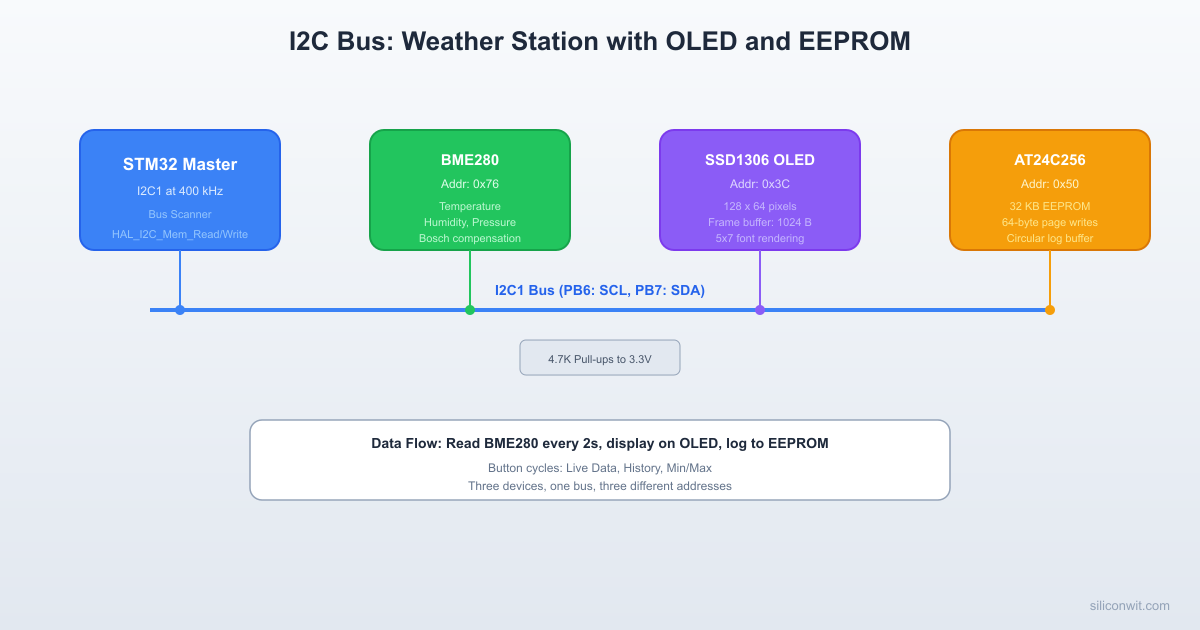
A self-contained weather station that reads temperature, humidity, and barometric pressure from a BME280 sensor every 2 seconds, displays the values on a 128x64 SSD1306 OLED screen, and stores each reading in an AT24C256 EEPROM using a circular buffer. Pressing a button cycles the display between three modes: live data, scrollable log history, and min/max summary. All three devices share the same I2C1 bus.

Project specifications:

ParameterValue
BoardBlue Pill (STM32F103C8T6)
I2C peripheralI2C1 (PB6 SCL, PB7 SDA)
I2C speed400 kHz (Fast mode)
BME280 address0x76 (SDO pin tied to GND)
SSD1306 address0x3C (SA0 pin tied to GND)
AT24C256 address0x50 (A0, A1, A2 all tied to GND)
Pull-up resistors2.2K on SDA and SCL (for 400 kHz)
ButtonPB10 (GPIO input, internal pull-up)
Serial debugUSART1 on PA9/PA10 (115200 baud)
Sensor read interval2 seconds
EEPROM log capacity512 entries (8 bytes each, 4 KB used of 32 KB total)

Bill of Materials

ComponentQuantityNotes
Blue Pill (STM32F103C8T6)1WeAct version recommended
ST-Link V2 clone1SWD programmer/debugger
BME280 module (I2C)1GY-BME280 breakout, 3.3V compatible
SSD1306 OLED 128x64 (I2C)14-pin module (VCC, GND, SCL, SDA)
AT24C256 EEPROM module132 KB I2C EEPROM
Pull-up resistors (2.2K)2For SDA and SCL lines
Push button1Display mode toggle
Breadboard + jumper wires1 setAssorted lengths

I2C Protocol Fundamentals


I2C (Inter-Integrated Circuit) uses two open-drain lines: SDA (data) and SCL (clock). The master (STM32) generates the clock and initiates transfers. Multiple slaves share the bus, each responding only to its own address. Because the lines are open-drain, external pull-up resistors are mandatory.

I2C Bus with Three Devices
3.3V
│ │
[2.2K] [2.2K]
│ │
SDA ───────┼─────────┼──────────────
│ │
SCL ───────┼─────────┼──────────────
│ │
┌───────┐ ┌┴───────┐ ┌┴──────────┐
│BME280 │ │SSD1306 │ │AT24C256 │
│ 0x76 │ │ 0x3C │ │ 0x50 │
│Sensor │ │ OLED │ │ EEPROM │
└───────┘ └────────┘ └──────────┘
PB6 = SCL, PB7 = SDA (I2C1)

Signal Timing

I2C Write Transaction
SCL: ──┐ ┌─┐ ┌─┐ ┌─┐ ┌─┐ ┌─┐ ┌─┐ ┌─┐ ┌─┐ ┌──
└─┘ └─┘ └─┘ └─┘ └─┘ └─┘ └─┘ └─┘ └─┘
SDA: ─┐ A6 A5 A4 A3 A2 A1 A0 W ACK ┌─
└──┤───┤───┤───┤───┤───┤───┤──┤──┤────┘
START|<-- 7-bit address -->|R/W| |STOP
Slave pulls SDA low ──┘

A transfer begins with a start condition (SDA falls while SCL is high) and ends with a stop condition (SDA rises while SCL is high). Between start and stop, data bits are clocked on SCL edges. Each byte is followed by an ACK bit: the receiver pulls SDA low to acknowledge, or leaves it high (NACK) to signal an error or end of transfer.

7-bit addressing: The first byte after the start condition contains the 7-bit slave address in bits [7:1] and the R/W direction in bit [0]. So address 0x76 becomes 0xEC for a write (0x76 shifted left, OR with 0) and 0xED for a read (0x76 shifted left, OR with 1). The HAL functions handle this shift automatically; you pass the 8-bit shifted address (0x76 << 1 = 0xEC).

Pull-Up Resistor Selection

The pull-up resistor value depends on bus speed and total bus capacitance:

Bus SpeedTypical Pull-UpMax Bus Capacitance
100 kHz (Standard)4.7K400 pF
400 kHz (Fast)2.2K400 pF

Lower resistance means faster rise times but higher power consumption. With three devices on a breadboard (roughly 50 to 100 pF total capacitance), 2.2K resistors work well at 400 kHz. Some breakout modules include onboard pull-ups (typically 4.7K or 10K). If multiple modules each have pull-ups, the effective resistance drops too low. Check your modules and remove extra pull-ups by desoldering the resistors or cutting the trace, keeping only one pair of 2.2K pull-ups on the bus.

Clock Stretching

Some slow devices hold SCL low to pause the master while they process data. The STM32 I2C peripheral supports clock stretching by default. The BME280 and AT24C256 both use clock stretching during certain operations.

I2C Device Address Map


Device7-bit Address8-bit Write8-bit ReadFunction
BME2800x760xEC0xEDTemperature, humidity, pressure
SSD13060x3C0x780x79128x64 OLED display
AT24C2560x500xA00xA132 KB EEPROM storage

CubeMX I2C Configuration


  1. In the Pinout view, enable I2C1. CubeMX assigns PB6 (SCL) and PB7 (SDA) by default. If you need remapped pins (PB8/PB9), enable the AFIO remap in the System Core section.

  2. In the I2C1 Parameter Settings, set I2C Speed Mode to “Fast Mode” and I2C Clock Speed to 400000 (400 kHz). Leave the duty cycle at 2 (16/9 is optional for noise reduction).

  3. Set PB10 as GPIO_Input with internal pull-up (button).

  4. Enable USART1 in asynchronous mode at 115200 baud for debug output.

  5. Generate the project code. CubeMX creates the I2C1 handle (hi2c1) and all initialization code.

Wiring


STM32 PinConnects ToFunction
PB6BME280 SCL, SSD1306 SCL, AT24C256 SCLI2C1 SCL (shared bus)
PB7BME280 SDA, SSD1306 SDA, AT24C256 SDAI2C1 SDA (shared bus)
PB10Push button (other side to GND)Display mode toggle
PA9USB-Serial RXUSART1_TX debug
3.3VBME280 VCC, SSD1306 VCC, AT24C256 VCCDevice power
GNDBME280 GND, SSD1306 GND, AT24C256 GND, buttonCommon ground
3.3V2.2K resistor to PB6, 2.2K resistor to PB7I2C pull-ups

I2C Bus Scanner


Before writing device-specific drivers, scan the bus to verify that all devices respond. This is the single most useful I2C debugging tool.

i2c_scan.c
void i2c_scan(I2C_HandleTypeDef *hi2c)
{
char buf[64];
uint8_t found = 0;
uart_print("I2C bus scan starting...\r\n");
for (uint8_t addr = 1; addr < 128; addr++)
{
/* HAL_I2C_IsDeviceReady sends the address and checks for ACK */
if (HAL_I2C_IsDeviceReady(hi2c, addr << 1, 1, 10) == HAL_OK)
{
snprintf(buf, sizeof(buf), " Device found at 0x%02X\r\n", addr);
uart_print(buf);
found++;
}
}
snprintf(buf, sizeof(buf), "Scan complete: %u device(s) found\r\n", found);
uart_print(buf);
}

Expected output with all three devices connected:

I2C bus scan starting...
Device found at 0x3C
Device found at 0x50
Device found at 0x76
Scan complete: 3 device(s) found

If a device does not appear, check wiring, pull-ups, and power supply. If no devices appear at all, the I2C peripheral may not be initialized or the pins may be misconfigured.

BME280 Sensor Driver


The BME280 measures temperature, pressure, and humidity. Bosch provides compensation formulas in the datasheet that convert raw ADC values to calibrated readings. The calibration coefficients are unique to each sensor and stored in the device’s non-volatile memory.

BME280 Register Map (Key Registers)

RegisterAddressDescription
chip_id0xD0Returns 0x60 for BME280, 0x58 for BMP280
ctrl_hum0xF2Humidity oversampling
ctrl_meas0xF4Temperature/pressure oversampling, mode
config0xF5Standby time, IIR filter, SPI enable
calib00..calib250x88..0xA1Temperature and pressure calibration
calib26..calib410xE1..0xF0Humidity calibration
press_msb..hum_lsb0xF7..0xFERaw measurement data (8 bytes)

Driver Header

bme280.h
#ifndef BME280_H
#define BME280_H
#include "stm32f1xx_hal.h"
#define BME280_ADDR (0x76 << 1)
#define BME280_CHIP_ID 0x60
#define BME280_REG_ID 0xD0
#define BME280_REG_RESET 0xE0
#define BME280_REG_CTRL_HUM 0xF2
#define BME280_REG_CTRL_MEAS 0xF4
#define BME280_REG_CONFIG 0xF5
#define BME280_REG_DATA 0xF7
#define BME280_REG_CALIB_T 0x88
#define BME280_REG_CALIB_H 0xE1
typedef struct {
/* Temperature calibration */
uint16_t dig_T1;
int16_t dig_T2;
int16_t dig_T3;
/* Pressure calibration */
uint16_t dig_P1;
int16_t dig_P2;
int16_t dig_P3;
int16_t dig_P4;
int16_t dig_P5;
int16_t dig_P6;
int16_t dig_P7;
int16_t dig_P8;
int16_t dig_P9;
/* Humidity calibration */
uint8_t dig_H1;
int16_t dig_H2;
uint8_t dig_H3;
int16_t dig_H4;
int16_t dig_H5;
int8_t dig_H6;
} BME280_Calib;
typedef struct {
I2C_HandleTypeDef *hi2c;
BME280_Calib calib;
int32_t t_fine; /* Shared between temperature and pressure compensation */
} BME280_Handle;
typedef struct {
float temperature; /* Celsius */
float pressure; /* hPa (hectopascals) */
float humidity; /* % relative humidity */
} BME280_Data;
HAL_StatusTypeDef BME280_Init(BME280_Handle *dev, I2C_HandleTypeDef *hi2c);
HAL_StatusTypeDef BME280_Read(BME280_Handle *dev, BME280_Data *data);
#endif

Driver Implementation

bme280.c
#include "bme280.h"
static HAL_StatusTypeDef bme280_read_reg(BME280_Handle *dev,
uint8_t reg, uint8_t *buf, uint16_t len)
{
return HAL_I2C_Mem_Read(dev->hi2c, BME280_ADDR, reg,
I2C_MEMADD_SIZE_8BIT, buf, len, 100);
}
static HAL_StatusTypeDef bme280_write_reg(BME280_Handle *dev,
uint8_t reg, uint8_t val)
{
return HAL_I2C_Mem_Write(dev->hi2c, BME280_ADDR, reg,
I2C_MEMADD_SIZE_8BIT, &val, 1, 100);
}
static void bme280_read_calibration(BME280_Handle *dev)
{
uint8_t buf[26];
bme280_read_reg(dev, BME280_REG_CALIB_T, buf, 26);
dev->calib.dig_T1 = (uint16_t)(buf[1] << 8 | buf[0]);
dev->calib.dig_T2 = (int16_t)(buf[3] << 8 | buf[2]);
dev->calib.dig_T3 = (int16_t)(buf[5] << 8 | buf[4]);
dev->calib.dig_P1 = (uint16_t)(buf[7] << 8 | buf[6]);
dev->calib.dig_P2 = (int16_t)(buf[9] << 8 | buf[8]);
dev->calib.dig_P3 = (int16_t)(buf[11] << 8 | buf[10]);
dev->calib.dig_P4 = (int16_t)(buf[13] << 8 | buf[12]);
dev->calib.dig_P5 = (int16_t)(buf[15] << 8 | buf[14]);
dev->calib.dig_P6 = (int16_t)(buf[17] << 8 | buf[16]);
dev->calib.dig_P7 = (int16_t)(buf[19] << 8 | buf[18]);
dev->calib.dig_P8 = (int16_t)(buf[21] << 8 | buf[20]);
dev->calib.dig_P9 = (int16_t)(buf[23] << 8 | buf[22]);
dev->calib.dig_H1 = buf[25];
uint8_t hbuf[7];
bme280_read_reg(dev, BME280_REG_CALIB_H, hbuf, 7);
dev->calib.dig_H2 = (int16_t)(hbuf[1] << 8 | hbuf[0]);
dev->calib.dig_H3 = hbuf[2];
dev->calib.dig_H4 = (int16_t)((hbuf[3] << 4) | (hbuf[4] & 0x0F));
dev->calib.dig_H5 = (int16_t)((hbuf[5] << 4) | (hbuf[4] >> 4));
dev->calib.dig_H6 = (int8_t)hbuf[6];
}
/* Bosch compensation formulas from the BME280 datasheet (Section 4.2.3) */
static int32_t bme280_compensate_temp(BME280_Handle *dev, int32_t adc_T)
{
int32_t var1, var2, T;
var1 = ((((adc_T >> 3) - ((int32_t)dev->calib.dig_T1 << 1))) *
((int32_t)dev->calib.dig_T2)) >> 11;
var2 = (((((adc_T >> 4) - ((int32_t)dev->calib.dig_T1)) *
((adc_T >> 4) - ((int32_t)dev->calib.dig_T1))) >> 12) *
((int32_t)dev->calib.dig_T3)) >> 14;
dev->t_fine = var1 + var2;
T = (dev->t_fine * 5 + 128) >> 8;
return T; /* Returns temperature in 0.01 degree C units */
}
static uint32_t bme280_compensate_press(BME280_Handle *dev, int32_t adc_P)
{
int64_t var1, var2, p;
var1 = ((int64_t)dev->t_fine) - 128000;
var2 = var1 * var1 * (int64_t)dev->calib.dig_P6;
var2 = var2 + ((var1 * (int64_t)dev->calib.dig_P5) << 17);
var2 = var2 + (((int64_t)dev->calib.dig_P4) << 35);
var1 = ((var1 * var1 * (int64_t)dev->calib.dig_P3) >> 8) +
((var1 * (int64_t)dev->calib.dig_P2) << 12);
var1 = (((((int64_t)1) << 47) + var1)) * ((int64_t)dev->calib.dig_P1) >> 33;
if (var1 == 0) return 0;
p = 1048576 - adc_P;
p = (((p << 31) - var2) * 3125) / var1;
var1 = (((int64_t)dev->calib.dig_P9) * (p >> 13) * (p >> 13)) >> 25;
var2 = (((int64_t)dev->calib.dig_P8) * p) >> 19;
p = ((p + var1 + var2) >> 8) + (((int64_t)dev->calib.dig_P7) << 4);
return (uint32_t)p; /* Returns pressure in Pa as Q24.8 (divide by 256) */
}
static uint32_t bme280_compensate_hum(BME280_Handle *dev, int32_t adc_H)
{
int32_t v_x1_u32r;
v_x1_u32r = (dev->t_fine - ((int32_t)76800));
v_x1_u32r = (((((adc_H << 14) - (((int32_t)dev->calib.dig_H4) << 20) -
(((int32_t)dev->calib.dig_H5) * v_x1_u32r)) +
((int32_t)16384)) >> 15) *
(((((((v_x1_u32r * ((int32_t)dev->calib.dig_H6)) >> 10) *
(((v_x1_u32r * ((int32_t)dev->calib.dig_H3)) >> 11) +
((int32_t)32768))) >> 10) +
((int32_t)2097152)) *
((int32_t)dev->calib.dig_H2) + 8192) >> 14));
v_x1_u32r = (v_x1_u32r - (((((v_x1_u32r >> 15) * (v_x1_u32r >> 15)) >> 7) *
((int32_t)dev->calib.dig_H1)) >> 4));
v_x1_u32r = (v_x1_u32r < 0) ? 0 : v_x1_u32r;
v_x1_u32r = (v_x1_u32r > 419430400) ? 419430400 : v_x1_u32r;
return (uint32_t)(v_x1_u32r >> 12); /* Returns humidity in Q22.10 (divide by 1024) */
}
HAL_StatusTypeDef BME280_Init(BME280_Handle *dev, I2C_HandleTypeDef *hi2c)
{
dev->hi2c = hi2c;
/* Verify chip ID */
uint8_t id;
if (bme280_read_reg(dev, BME280_REG_ID, &id, 1) != HAL_OK)
return HAL_ERROR;
if (id != BME280_CHIP_ID)
return HAL_ERROR; /* Not a BME280 (maybe BMP280 with id 0x58) */
/* Soft reset */
bme280_write_reg(dev, BME280_REG_RESET, 0xB6);
HAL_Delay(10);
/* Read calibration data */
bme280_read_calibration(dev);
/* Configure: humidity oversampling x1 (must be written before ctrl_meas) */
bme280_write_reg(dev, BME280_REG_CTRL_HUM, 0x01);
/* Config: standby 1000ms, IIR filter coeff 4, no SPI */
bme280_write_reg(dev, BME280_REG_CONFIG, 0x90);
/* ctrl_meas: temp oversampling x2, press oversampling x16, normal mode */
bme280_write_reg(dev, BME280_REG_CTRL_MEAS, 0x57);
return HAL_OK;
}
HAL_StatusTypeDef BME280_Read(BME280_Handle *dev, BME280_Data *data)
{
uint8_t buf[8];
if (bme280_read_reg(dev, BME280_REG_DATA, buf, 8) != HAL_OK)
return HAL_ERROR;
/* Parse raw 20-bit pressure and temperature, 16-bit humidity */
int32_t adc_P = ((int32_t)buf[0] << 12) | ((int32_t)buf[1] << 4) | (buf[2] >> 4);
int32_t adc_T = ((int32_t)buf[3] << 12) | ((int32_t)buf[4] << 4) | (buf[5] >> 4);
int32_t adc_H = ((int32_t)buf[6] << 8) | buf[7];
/* Compensate (temperature must be first, it sets t_fine) */
int32_t temp_raw = bme280_compensate_temp(dev, adc_T);
uint32_t press_raw = bme280_compensate_press(dev, adc_P);
uint32_t hum_raw = bme280_compensate_hum(dev, adc_H);
data->temperature = temp_raw / 100.0f; /* Celsius */
data->pressure = (press_raw / 256.0f) / 100.0f; /* hPa */
data->humidity = hum_raw / 1024.0f; /* % RH */
return HAL_OK;
}

SSD1306 OLED Display Driver


The SSD1306 is a 128x64 monochrome OLED controller. It stores pixel data in a 1024-byte frame buffer organized as 8 pages of 128 columns, where each byte represents 8 vertical pixels. To update the display, you write the entire frame buffer (or a portion of it) over I2C.

SSD1306 I2C Protocol

I2C communication with the SSD1306 uses a control byte before each data byte (or data block):

Control ByteMeaning
0x00Next byte is a command
0x40Next byte(s) are display data
0x80Next byte is a command, more commands follow

Driver Header

ssd1306.h
#ifndef SSD1306_H
#define SSD1306_H
#include "stm32f1xx_hal.h"
#define SSD1306_ADDR (0x3C << 1)
#define SSD1306_WIDTH 128
#define SSD1306_HEIGHT 64
#define SSD1306_PAGES (SSD1306_HEIGHT / 8)
#define SSD1306_BUF_SIZE (SSD1306_WIDTH * SSD1306_PAGES)
typedef struct {
I2C_HandleTypeDef *hi2c;
uint8_t buffer[SSD1306_BUF_SIZE];
} SSD1306_Handle;
HAL_StatusTypeDef SSD1306_Init(SSD1306_Handle *dev, I2C_HandleTypeDef *hi2c);
void SSD1306_Clear(SSD1306_Handle *dev);
void SSD1306_SetPixel(SSD1306_Handle *dev, uint8_t x, uint8_t y, uint8_t on);
void SSD1306_WriteString(SSD1306_Handle *dev, uint8_t x, uint8_t y,
const char *str, uint8_t size);
HAL_StatusTypeDef SSD1306_Update(SSD1306_Handle *dev);
#endif

Driver Implementation

ssd1306.c
#include "ssd1306.h"
#include <string.h>
/*
* Minimal 5x7 font: space, 0-9, A-Z, and a few symbols (. : / % C H P)
* Each character is 5 bytes wide, MSB at top. Index = char - ' '
* Extend with the full ASCII table from any SSD1306 font library as needed.
*/
static const uint8_t font5x7[][5] = {
{0x00,0x00,0x00,0x00,0x00}, /* (space, index 0) */
{0x00,0x00,0x5F,0x00,0x00}, /* ! */
{0x00,0x07,0x00,0x07,0x00}, /* " */
{0x14,0x7F,0x14,0x7F,0x14}, /* # */
{0x24,0x2A,0x7F,0x2A,0x12}, /* $ */
{0x23,0x13,0x08,0x64,0x62}, /* % */
{0x36,0x49,0x56,0x20,0x50}, /* & */
{0x00,0x00,0x07,0x00,0x00}, /* ' */
{0x00,0x1C,0x22,0x41,0x00}, /* ( */
{0x00,0x41,0x22,0x1C,0x00}, /* ) */
{0x14,0x08,0x3E,0x08,0x14}, /* * */
{0x08,0x08,0x3E,0x08,0x08}, /* + */
{0x00,0x50,0x30,0x00,0x00}, /* , */
{0x08,0x08,0x08,0x08,0x08}, /* - */
{0x00,0x60,0x60,0x00,0x00}, /* . */
{0x20,0x10,0x08,0x04,0x02}, /* / */
{0x3E,0x51,0x49,0x45,0x3E}, /* 0 */
{0x00,0x42,0x7F,0x40,0x00}, /* 1 */
{0x42,0x61,0x51,0x49,0x46}, /* 2 */
{0x21,0x41,0x45,0x4B,0x31}, /* 3 */
{0x18,0x14,0x12,0x7F,0x10}, /* 4 */
{0x27,0x45,0x45,0x45,0x39}, /* 5 */
{0x3C,0x4A,0x49,0x49,0x30}, /* 6 */
{0x01,0x71,0x09,0x05,0x03}, /* 7 */
{0x36,0x49,0x49,0x49,0x36}, /* 8 */
{0x06,0x49,0x49,0x29,0x1E}, /* 9 */
{0x00,0x36,0x36,0x00,0x00}, /* : */
{0x00,0x56,0x36,0x00,0x00}, /* ; */
{0x08,0x14,0x22,0x41,0x00}, /* < */
{0x14,0x14,0x14,0x14,0x14}, /* = */
{0x00,0x41,0x22,0x14,0x08}, /* > */
{0x02,0x01,0x51,0x09,0x06}, /* ? */
{0x3E,0x41,0x5D,0x55,0x1E}, /* @ */
{0x7E,0x11,0x11,0x11,0x7E}, /* A */ {0x7F,0x49,0x49,0x49,0x36}, /* B */
{0x3E,0x41,0x41,0x41,0x22}, /* C */ {0x7F,0x41,0x41,0x22,0x1C}, /* D */
{0x7F,0x49,0x49,0x49,0x41}, /* E */ {0x7F,0x09,0x09,0x09,0x01}, /* F */
{0x3E,0x41,0x49,0x49,0x7A}, /* G */ {0x7F,0x08,0x08,0x08,0x7F}, /* H */
{0x00,0x41,0x7F,0x41,0x00}, /* I */ {0x20,0x40,0x41,0x3F,0x01}, /* J */
{0x7F,0x08,0x14,0x22,0x41}, /* K */ {0x7F,0x40,0x40,0x40,0x40}, /* L */
{0x7F,0x02,0x0C,0x02,0x7F}, /* M */ {0x7F,0x04,0x08,0x10,0x7F}, /* N */
{0x3E,0x41,0x41,0x41,0x3E}, /* O */ {0x7F,0x09,0x09,0x09,0x06}, /* P */
{0x3E,0x41,0x51,0x21,0x5E}, /* Q */ {0x7F,0x09,0x19,0x29,0x46}, /* R */
{0x26,0x49,0x49,0x49,0x32}, /* S */ {0x01,0x01,0x7F,0x01,0x01}, /* T */
{0x3F,0x40,0x40,0x40,0x3F}, /* U */ {0x1F,0x20,0x40,0x20,0x1F}, /* V */
{0x3F,0x40,0x38,0x40,0x3F}, /* W */ {0x63,0x14,0x08,0x14,0x63}, /* X */
{0x07,0x08,0x70,0x08,0x07}, /* Y */ {0x61,0x51,0x49,0x45,0x43}, /* Z */
};
static HAL_StatusTypeDef ssd1306_cmd(SSD1306_Handle *dev, uint8_t cmd)
{
uint8_t data[2] = {0x00, cmd};
return HAL_I2C_Master_Transmit(dev->hi2c, SSD1306_ADDR, data, 2, 100);
}
HAL_StatusTypeDef SSD1306_Init(SSD1306_Handle *dev, I2C_HandleTypeDef *hi2c)
{
dev->hi2c = hi2c;
HAL_Delay(100); /* Wait for display power stabilization */
/* Initialization sequence */
ssd1306_cmd(dev, 0xAE); /* Display off */
ssd1306_cmd(dev, 0xD5); /* Set display clock divide */
ssd1306_cmd(dev, 0x80); /* Recommended value */
ssd1306_cmd(dev, 0xA8); /* Set multiplex ratio */
ssd1306_cmd(dev, 0x3F); /* 64 lines */
ssd1306_cmd(dev, 0xD3); /* Set display offset */
ssd1306_cmd(dev, 0x00); /* No offset */
ssd1306_cmd(dev, 0x40); /* Set start line to 0 */
ssd1306_cmd(dev, 0x8D); /* Charge pump setting */
ssd1306_cmd(dev, 0x14); /* Enable charge pump */
ssd1306_cmd(dev, 0x20); /* Set memory addressing mode */
ssd1306_cmd(dev, 0x00); /* Horizontal addressing */
ssd1306_cmd(dev, 0xA1); /* Segment remap (column 127 mapped to SEG0) */
ssd1306_cmd(dev, 0xC8); /* COM output scan direction (remapped) */
ssd1306_cmd(dev, 0xDA); /* Set COM pins hardware config */
ssd1306_cmd(dev, 0x12); /* Alternative COM pin config */
ssd1306_cmd(dev, 0x81); /* Set contrast */
ssd1306_cmd(dev, 0xCF); /* High contrast */
ssd1306_cmd(dev, 0xD9); /* Set pre-charge period */
ssd1306_cmd(dev, 0xF1); /* Phase 1: 1 DCLK, Phase 2: 15 DCLKs */
ssd1306_cmd(dev, 0xDB); /* Set VCOMH deselect level */
ssd1306_cmd(dev, 0x40); /* 0.77 x VCC */
ssd1306_cmd(dev, 0xA4); /* Display from RAM */
ssd1306_cmd(dev, 0xA6); /* Normal display (not inverted) */
ssd1306_cmd(dev, 0xAF); /* Display on */
SSD1306_Clear(dev);
return SSD1306_Update(dev);
}
void SSD1306_Clear(SSD1306_Handle *dev)
{
memset(dev->buffer, 0x00, SSD1306_BUF_SIZE);
}
void SSD1306_SetPixel(SSD1306_Handle *dev, uint8_t x, uint8_t y, uint8_t on)
{
if (x >= SSD1306_WIDTH || y >= SSD1306_HEIGHT) return;
if (on)
dev->buffer[x + (y / 8) * SSD1306_WIDTH] |= (1 << (y & 7));
else
dev->buffer[x + (y / 8) * SSD1306_WIDTH] &= ~(1 << (y & 7));
}
void SSD1306_WriteString(SSD1306_Handle *dev, uint8_t x, uint8_t y,
const char *str, uint8_t size)
{
while (*str)
{
char c = *str;
if (c < ' ' || c > 'Z') { str++; continue; }
uint8_t idx = c - ' ';
if (idx >= sizeof(font5x7) / sizeof(font5x7[0])) { str++; continue; }
for (uint8_t col = 0; col < 5; col++)
{
uint8_t line = font5x7[idx][col];
for (uint8_t row = 0; row < 7; row++)
{
if (line & (1 << row))
{
if (size == 1)
SSD1306_SetPixel(dev, x + col, y + row, 1);
else
{
/* Scale up: each source pixel becomes size x size */
for (uint8_t sy = 0; sy < size; sy++)
for (uint8_t sx = 0; sx < size; sx++)
SSD1306_SetPixel(dev, x + col * size + sx,
y + row * size + sy, 1);
}
}
}
}
x += (5 * size) + size; /* Character width plus 1-pixel gap */
str++;
}
}
HAL_StatusTypeDef SSD1306_Update(SSD1306_Handle *dev)
{
/* Set column address range: 0 to 127 */
ssd1306_cmd(dev, 0x21);
ssd1306_cmd(dev, 0x00);
ssd1306_cmd(dev, 0x7F);
/* Set page address range: 0 to 7 */
ssd1306_cmd(dev, 0x22);
ssd1306_cmd(dev, 0x00);
ssd1306_cmd(dev, 0x07);
/*
* Send frame buffer with data control byte prefix.
* Static buffer avoids placing 1025 bytes on the stack,
* which can overflow the default 1 KB stack on STM32F1.
*/
static uint8_t tx_buf[SSD1306_BUF_SIZE + 1];
tx_buf[0] = 0x40; /* Data stream */
memcpy(&tx_buf[1], dev->buffer, SSD1306_BUF_SIZE);
return HAL_I2C_Master_Transmit(dev->hi2c, SSD1306_ADDR,
tx_buf, SSD1306_BUF_SIZE + 1, 500);
}

AT24C256 EEPROM Driver


The AT24C256 is a 32 KB I2C EEPROM organized in 64-byte pages. Key characteristics:

ParameterValue
Total capacity32,768 bytes (256 Kbit)
Page size64 bytes
Address size2 bytes (16-bit internal address)
Write cycle time5 ms maximum
Endurance1,000,000 write cycles per page

Write cycle time is the critical constraint. After writing a byte or page, you must wait at least 5 ms before the next write operation. The HAL write function returns immediately, but the EEPROM is internally busy. You can either wait 5 ms (simple) or poll the device with HAL_I2C_IsDeviceReady() until it ACKs (faster, called “acknowledge polling”).

Page boundary handling: A page write wraps within the 64-byte page boundary. If you start writing at byte 60 within a page and send 10 bytes, only the first 4 bytes land at addresses 60 to 63; the remaining 6 bytes wrap around to addresses 0 to 5 within the same page, overwriting existing data. To write across page boundaries, split the write into multiple page-aligned transactions.

eeprom.h
#ifndef EEPROM_H
#define EEPROM_H
#include "stm32f1xx_hal.h"
#define EEPROM_ADDR (0x50 << 1)
#define EEPROM_PAGE_SIZE 64
#define EEPROM_TOTAL_SIZE 32768
HAL_StatusTypeDef EEPROM_WriteByte(I2C_HandleTypeDef *hi2c,
uint16_t mem_addr, uint8_t data);
HAL_StatusTypeDef EEPROM_WritePage(I2C_HandleTypeDef *hi2c,
uint16_t mem_addr, uint8_t *data, uint16_t len);
HAL_StatusTypeDef EEPROM_ReadBytes(I2C_HandleTypeDef *hi2c,
uint16_t mem_addr, uint8_t *data, uint16_t len);
#endif
eeprom.c
#include "eeprom.h"
static uint8_t eeprom_wait_ready(I2C_HandleTypeDef *hi2c)
{
/* Acknowledge polling: keep trying until the EEPROM responds.
* Timeout after 50 ms (10x the 5 ms max write cycle). */
uint32_t start = HAL_GetTick();
while (HAL_I2C_IsDeviceReady(hi2c, EEPROM_ADDR, 1, 10) != HAL_OK)
{
if (HAL_GetTick() - start > 50) return 0; /* Timeout */
}
return 1;
}
HAL_StatusTypeDef EEPROM_WriteByte(I2C_HandleTypeDef *hi2c,
uint16_t mem_addr, uint8_t data)
{
HAL_StatusTypeDef status;
status = HAL_I2C_Mem_Write(hi2c, EEPROM_ADDR, mem_addr,
I2C_MEMADD_SIZE_16BIT, &data, 1, 100);
if (status == HAL_OK)
eeprom_wait_ready(hi2c);
return status;
}
HAL_StatusTypeDef EEPROM_WritePage(I2C_HandleTypeDef *hi2c,
uint16_t mem_addr, uint8_t *data, uint16_t len)
{
while (len > 0)
{
/* Calculate remaining bytes in the current page */
uint16_t page_offset = mem_addr % EEPROM_PAGE_SIZE;
uint16_t page_remain = EEPROM_PAGE_SIZE - page_offset;
uint16_t write_len = (len < page_remain) ? len : page_remain;
HAL_StatusTypeDef status;
status = HAL_I2C_Mem_Write(hi2c, EEPROM_ADDR, mem_addr,
I2C_MEMADD_SIZE_16BIT, data, write_len, 100);
if (status != HAL_OK)
return status;
eeprom_wait_ready(hi2c);
mem_addr += write_len;
data += write_len;
len -= write_len;
}
return HAL_OK;
}
HAL_StatusTypeDef EEPROM_ReadBytes(I2C_HandleTypeDef *hi2c,
uint16_t mem_addr, uint8_t *data, uint16_t len)
{
return HAL_I2C_Mem_Read(hi2c, EEPROM_ADDR, mem_addr,
I2C_MEMADD_SIZE_16BIT, data, len, 100);
}

Complete Project Code


The main application ties all three devices together. Sensor readings are taken every 2 seconds, displayed on the OLED, and logged to EEPROM. A button cycles through three display modes.

main.c
/* USER CODE BEGIN Includes */
#include <stdio.h>
#include <string.h>
#include "bme280.h"
#include "ssd1306.h"
#include "eeprom.h"
/* USER CODE END Includes */
/* USER CODE BEGIN PV */
/* Display modes */
#define MODE_LIVE 0
#define MODE_HISTORY 1
#define MODE_MINMAX 2
/* EEPROM log layout:
* Bytes 0..3: header (write index as uint16_t, entry count as uint16_t)
* Bytes 4..4099: circular buffer, 512 entries x 8 bytes each
* Entry format: temp (int16, 0.01C), press (uint16, 0.1hPa),
* hum (uint16, 0.1%), padding (2 bytes)
*/
#define LOG_HEADER_ADDR 0
#define LOG_DATA_ADDR 4
#define LOG_ENTRY_SIZE 8
#define LOG_MAX_ENTRIES 512
#define LOG_DATA_SIZE (LOG_MAX_ENTRIES * LOG_ENTRY_SIZE)
/* Device handles */
static BME280_Handle bme280;
static SSD1306_Handle oled;
static BME280_Data sensor_data;
/* State */
static uint8_t display_mode = MODE_LIVE;
static uint16_t log_write_idx = 0;
static uint16_t log_count = 0;
static uint8_t history_page = 0;
/* Min/max tracking */
static float temp_min = 999.0f, temp_max = -999.0f;
static float hum_min = 999.0f, hum_max = -999.0f;
static float press_min = 99999.0f, press_max = 0.0f;
/* Button debounce */
#define DEBOUNCE_MS 200
static uint32_t last_btn_tick = 0;
/* UART buffer */
static char uart_buf[128];
/* USER CODE END PV */
/* USER CODE BEGIN PFP */
static void uart_print(const char *msg);
static void log_reading(BME280_Data *data);
static void load_log_header(void);
static void save_log_header(void);
static void update_minmax(BME280_Data *data);
static void display_live(BME280_Data *data);
static void display_history(void);
static void display_minmax(void);
static void handle_button(void);
/* USER CODE END PFP */
main.c (continued: helper functions)
/* USER CODE BEGIN 0 */
static void uart_print(const char *msg)
{
HAL_UART_Transmit(&huart1, (uint8_t *)msg, strlen(msg), 100);
}
static void load_log_header(void)
{
uint8_t hdr[4];
EEPROM_ReadBytes(&hi2c1, LOG_HEADER_ADDR, hdr, 4);
log_write_idx = (uint16_t)(hdr[0] | (hdr[1] << 8));
log_count = (uint16_t)(hdr[2] | (hdr[3] << 8));
/* Sanity check: reset if values are out of range */
if (log_write_idx >= LOG_MAX_ENTRIES || log_count > LOG_MAX_ENTRIES)
{
log_write_idx = 0;
log_count = 0;
save_log_header();
}
}
static void save_log_header(void)
{
uint8_t hdr[4];
hdr[0] = log_write_idx & 0xFF;
hdr[1] = (log_write_idx >> 8) & 0xFF;
hdr[2] = log_count & 0xFF;
hdr[3] = (log_count >> 8) & 0xFF;
EEPROM_WritePage(&hi2c1, LOG_HEADER_ADDR, hdr, 4);
}
static void log_reading(BME280_Data *data)
{
uint8_t entry[LOG_ENTRY_SIZE];
int16_t temp_i = (int16_t)(data->temperature * 100.0f);
uint16_t press_i = (uint16_t)(data->pressure * 10.0f);
uint16_t hum_i = (uint16_t)(data->humidity * 10.0f);
entry[0] = temp_i & 0xFF;
entry[1] = (temp_i >> 8) & 0xFF;
entry[2] = press_i & 0xFF;
entry[3] = (press_i >> 8) & 0xFF;
entry[4] = hum_i & 0xFF;
entry[5] = (hum_i >> 8) & 0xFF;
entry[6] = 0; /* Reserved */
entry[7] = 0; /* Reserved */
uint16_t addr = LOG_DATA_ADDR + (log_write_idx * LOG_ENTRY_SIZE);
EEPROM_WritePage(&hi2c1, addr, entry, LOG_ENTRY_SIZE);
log_write_idx = (log_write_idx + 1) % LOG_MAX_ENTRIES;
if (log_count < LOG_MAX_ENTRIES)
log_count++;
save_log_header();
}
static void update_minmax(BME280_Data *data)
{
if (data->temperature < temp_min) temp_min = data->temperature;
if (data->temperature > temp_max) temp_max = data->temperature;
if (data->humidity < hum_min) hum_min = data->humidity;
if (data->humidity > hum_max) hum_max = data->humidity;
if (data->pressure < press_min) press_min = data->pressure;
if (data->pressure > press_max) press_max = data->pressure;
}
static void display_live(BME280_Data *data)
{
char line[22]; /* 128px / 6px per char = ~21 chars at size 1 */
SSD1306_Clear(&oled);
SSD1306_WriteString(&oled, 0, 0, "WEATHER STATION", 1);
snprintf(line, sizeof(line), "TEMP: %d.%d C",
(int)data->temperature,
((int)(data->temperature * 10)) % 10);
SSD1306_WriteString(&oled, 0, 16, line, 1);
snprintf(line, sizeof(line), "HUM: %d.%d %%",
(int)data->humidity,
((int)(data->humidity * 10)) % 10);
SSD1306_WriteString(&oled, 0, 28, line, 1);
snprintf(line, sizeof(line), "PRES: %d.%d HPA",
(int)data->pressure,
((int)(data->pressure * 10)) % 10);
SSD1306_WriteString(&oled, 0, 40, line, 1);
snprintf(line, sizeof(line), "LOG: %u ENTRIES", log_count);
SSD1306_WriteString(&oled, 0, 55, line, 1);
SSD1306_Update(&oled);
}
static void display_history(void)
{
char line[22];
SSD1306_Clear(&oled);
SSD1306_WriteString(&oled, 0, 0, "LOG HISTORY", 1);
if (log_count == 0)
{
SSD1306_WriteString(&oled, 0, 20, "NO DATA", 1);
SSD1306_Update(&oled);
return;
}
/* Show 4 entries per page, most recent first */
uint8_t entries_per_page = 4;
uint16_t start = history_page * entries_per_page;
for (uint8_t i = 0; i < entries_per_page && (start + i) < log_count; i++)
{
/* Calculate index in circular buffer (most recent first) */
int16_t idx = (int16_t)log_write_idx - 1 - (int16_t)(start + i);
if (idx < 0) idx += LOG_MAX_ENTRIES;
uint8_t entry[LOG_ENTRY_SIZE];
uint16_t addr = LOG_DATA_ADDR + ((uint16_t)idx * LOG_ENTRY_SIZE);
EEPROM_ReadBytes(&hi2c1, addr, entry, LOG_ENTRY_SIZE);
int16_t temp_i = (int16_t)(entry[0] | (entry[1] << 8));
uint16_t hum_i = (uint16_t)(entry[4] | (entry[5] << 8));
snprintf(line, sizeof(line), "%d: %d.%dC %d.%d%%",
start + i + 1,
temp_i / 100, (temp_i % 100) / 10,
hum_i / 10, hum_i % 10);
SSD1306_WriteString(&oled, 0, 12 + i * 12, line, 1);
}
snprintf(line, sizeof(line), "PAGE %d/%d",
history_page + 1,
(log_count + entries_per_page - 1) / entries_per_page);
SSD1306_WriteString(&oled, 0, 55, line, 1);
SSD1306_Update(&oled);
}
static void display_minmax(void)
{
char line[22];
SSD1306_Clear(&oled);
SSD1306_WriteString(&oled, 0, 0, "MIN / MAX", 1);
snprintf(line, sizeof(line), "T: %d.%d / %d.%d C",
(int)temp_min, ((int)(temp_min * 10)) % 10,
(int)temp_max, ((int)(temp_max * 10)) % 10);
SSD1306_WriteString(&oled, 0, 16, line, 1);
snprintf(line, sizeof(line), "H: %d.%d / %d.%d %%",
(int)hum_min, ((int)(hum_min * 10)) % 10,
(int)hum_max, ((int)(hum_max * 10)) % 10);
SSD1306_WriteString(&oled, 0, 28, line, 1);
snprintf(line, sizeof(line), "P: %d / %d HPA",
(int)press_min, (int)press_max);
SSD1306_WriteString(&oled, 0, 40, line, 1);
SSD1306_Update(&oled);
}
static void handle_button(void)
{
uint32_t now = HAL_GetTick();
if ((now - last_btn_tick) < DEBOUNCE_MS) return;
if (HAL_GPIO_ReadPin(GPIOB, GPIO_PIN_10) == GPIO_PIN_RESET)
{
last_btn_tick = now;
if (display_mode == MODE_HISTORY)
{
/* In history mode, button advances page; long gap resets to live */
uint16_t max_pages = (log_count + 3) / 4;
history_page++;
if (history_page >= max_pages)
{
history_page = 0;
display_mode = MODE_MINMAX;
}
}
else
{
display_mode = (display_mode + 1) % 3;
history_page = 0;
}
}
}
/* USER CODE END 0 */
main.c (continued: main loop)
/* USER CODE BEGIN 2 */
uart_print("I2C Weather Station starting...\r\n");
/* Scan bus first */
i2c_scan(&hi2c1);
/* Initialize BME280 */
if (BME280_Init(&bme280, &hi2c1) != HAL_OK)
{
uart_print("ERROR: BME280 init failed\r\n");
/* Continue anyway; display will show zeros */
}
else
{
uart_print("BME280 initialized (chip ID 0x60)\r\n");
}
/* Initialize OLED */
if (SSD1306_Init(&oled, &hi2c1) != HAL_OK)
{
uart_print("ERROR: SSD1306 init failed\r\n");
}
else
{
uart_print("SSD1306 OLED initialized\r\n");
}
/* Load EEPROM log header */
load_log_header();
snprintf(uart_buf, sizeof(uart_buf),
"EEPROM log: %u entries, write index %u\r\n",
log_count, log_write_idx);
uart_print(uart_buf);
/* Show splash screen */
SSD1306_Clear(&oled);
SSD1306_WriteString(&oled, 10, 20, "WEATHER", 2);
SSD1306_WriteString(&oled, 10, 42, "STATION", 2);
SSD1306_Update(&oled);
HAL_Delay(1500);
/* USER CODE END 2 */
/* Infinite loop */
/* USER CODE BEGIN WHILE */
uint32_t last_read_tick = 0;
while (1)
{
uint32_t now = HAL_GetTick();
/* Read sensor every 2 seconds */
if ((now - last_read_tick) >= 2000)
{
last_read_tick = now;
if (BME280_Read(&bme280, &sensor_data) == HAL_OK)
{
update_minmax(&sensor_data);
log_reading(&sensor_data);
snprintf(uart_buf, sizeof(uart_buf),
"T=%.1fC H=%.1f%% P=%.1fhPa\r\n",
sensor_data.temperature,
sensor_data.humidity,
sensor_data.pressure);
uart_print(uart_buf);
}
else
{
uart_print("BME280 read error\r\n");
}
/* Update display in current mode */
if (display_mode == MODE_LIVE)
display_live(&sensor_data);
}
/* Handle button (checked every loop iteration) */
handle_button();
/* Refresh non-live displays when mode changes */
static uint8_t prev_mode = MODE_LIVE;
static uint8_t prev_page = 0;
if (display_mode != prev_mode || history_page != prev_page)
{
prev_mode = display_mode;
prev_page = history_page;
switch (display_mode)
{
case MODE_LIVE: display_live(&sensor_data); break;
case MODE_HISTORY: display_history(); break;
case MODE_MINMAX: display_minmax(); break;
}
}
HAL_Delay(10);
/* USER CODE END WHILE */
/* USER CODE BEGIN 3 */
}
/* USER CODE END 3 */

CubeIDE Project Structure


  • Directoryi2c_weather_station/
    • DirectoryCore/
      • DirectoryInc/
        • main.h
        • bme280.h
        • ssd1306.h
        • eeprom.h
        • stm32f1xx_hal_conf.h
        • stm32f1xx_it.h
      • DirectorySrc/
        • main.c
        • bme280.c
        • ssd1306.c
        • eeprom.c
        • stm32f1xx_hal_msp.c
        • stm32f1xx_it.c
        • system_stm32f1xx.c
    • DirectoryDrivers/
      • DirectoryCMSIS/
      • DirectorySTM32F1xx_HAL_Driver/
    • i2c_weather_station.ioc

Testing and Verification


  1. Run the I2C scanner first. Flash the project, open a serial terminal at 115200 baud, and verify that all three devices (0x3C, 0x50, 0x76) appear. If a device is missing, check its wiring and power before proceeding.

  2. Verify BME280 readings. Compare the temperature reading against a known thermometer. The BME280 self-heats by roughly 1 to 2 degrees Celsius when running continuously; this is normal and documented in the datasheet. Humidity and pressure should be reasonable for your location (sea level pressure is approximately 1013 hPa).

  3. Test the OLED display. The splash screen should appear for 1.5 seconds, then live readings update every 2 seconds. If the display shows garbled content, check the I2C address (some modules use 0x3D instead of 0x3C) and verify the initialization sequence.

  4. Test EEPROM logging. Let the station run for a minute (30 entries), then press the button twice to reach history mode. You should see logged entries with temperature and humidity values. Power cycle the board and verify that the log persists; the entry count and write index are stored in EEPROM.

  5. Test all display modes. Press the button to cycle: Live, History (multiple pages if enough entries), Min/Max. Verify that min/max values update when you warm the sensor (breathe on it) or cool it.

Production Notes


Pull-up resistor selection. On a breadboard with short wires and three devices, 2.2K pull-ups at 400 kHz work reliably. On a PCB with longer traces or more devices, measure the bus capacitance with an oscilloscope: the SCL rise time should be under 300 ns for Fast mode. If rise times are too slow, reduce the pull-up resistance (minimum 1K for 3.3V logic to stay within the 3 mA sink current spec).

Bus capacitance. Each I2C device adds roughly 10 pF of input capacitance. The PCB traces add about 1 to 2 pF per centimeter. The I2C specification limits total bus capacitance to 400 pF. On a breadboard you are well within this limit, but on a product with long ribbon cables to remote sensors, you may need an I2C bus extender (such as the PCA9600) or slower bus speed.

Level shifting for 5V devices. The BME280 and SSD1306 are 3.3V devices and connect directly to the STM32. Some EEPROM modules are 5V. If your AT24C256 module runs at 5V, use a bidirectional level shifter (such as the BSS138 MOSFET circuit) between the STM32 and the module. Never connect a 5V I2C pull-up directly to the STM32; the GPIO pins are not 5V tolerant on all I2C-capable pins (PB6 and PB7 are 5V tolerant on the F103, but relying on this is risky for production).

BME280 self-heating. In forced mode, the sensor powers down between measurements and self-heating is negligible. In normal mode (used here for convenience), the sensor self-heats by 1 to 2 degrees Celsius. For accurate temperature readings in a product, use forced mode: write the mode bits in ctrl_meas to 01 or 10 (forced), trigger a single measurement, read the result, then the sensor returns to sleep automatically.

EEPROM write endurance. The AT24C256 is rated for 1,000,000 write cycles per page. At one write every 2 seconds, a single page would wear out in about 23 days. The circular buffer in this project distributes writes across 64 pages (4 KB / 64 bytes per page), extending the effective lifetime to roughly 4 years of continuous operation. For longer lifetimes, use a larger portion of the EEPROM or implement wear leveling.

I2C error recovery. If a slave device holds SDA low (bus lockup), the master cannot issue a start condition. The standard recovery procedure is to toggle SCL manually (9 clock pulses) to force the slave to release SDA. The STM32 HAL does not do this automatically. For robust firmware, implement a bus recovery function that temporarily reconfigures PB6 as GPIO output, sends 9 clock pulses, then reconfigures it as I2C SCL.

Comments

Loading comments...


© 2021-2026 SiliconWit®. All rights reserved.

