Skip to content

Userspace I/O: GPIO, I2C, SPI

Userspace I/O: GPIO, I2C, SPI hero image
Modified:
Published:

Embedded Linux gives you multiple ways to interact with hardware from userspace, and choosing the right interface matters. The old sysfs GPIO approach is deprecated, character device access through libgpiod is the modern replacement, and I2C/SPI peripherals are reached through /dev entries and ioctl calls. In this lesson, you will build a practical doorbell monitor application: a push button triggers a GPIO event that lights an LED and simultaneously logs temperature, humidity, and pressure readings from a BME280 sensor over I2C. The entire application runs in userspace with no kernel module required. #LinuxGPIO #Libgpiod #UserspaceDrivers

What We Are Building

GPIO Doorbell Monitor with I2C Sensor Logging

A C application that uses libgpiod to monitor a push button via edge-detection events (no polling), toggles an LED on each press, and reads the BME280 sensor over I2C using the i2c-dev interface. Each button event triggers a timestamped log entry with the current temperature, humidity, and pressure. The application demonstrates event-driven GPIO, raw I2C transactions via ioctl, and basic SPI access patterns using spidev.

Project specifications:

ParameterValue
GPIO librarylibgpiod v2 (character device API)
Button inputGPIO17 with internal pull-up, falling-edge event
LED outputGPIO27, active-high
I2C device/dev/i2c-1 via i2c-dev
SensorBME280 at 0x76, raw register reads via ioctl
SPI example/dev/spidev0.0 via spidev (loopback demo)
Log outputTimestamped CSV to stdout or file
LanguageC (compiled with aarch64-linux-gnu-gcc)

Bill of Materials

RefComponentQuantityNotes
1Push button (tactile switch)1Doorbell trigger on GPIO17
2LED (any color, 3mm or 5mm)1Visual indicator on GPIO27
3330 ohm resistor1Current limiting for LED
4BME280 breakout module1Reuse from Lesson 3
5Jumper wires6+Button, LED, BME280 connections
6Breadboard1For prototyping the circuit

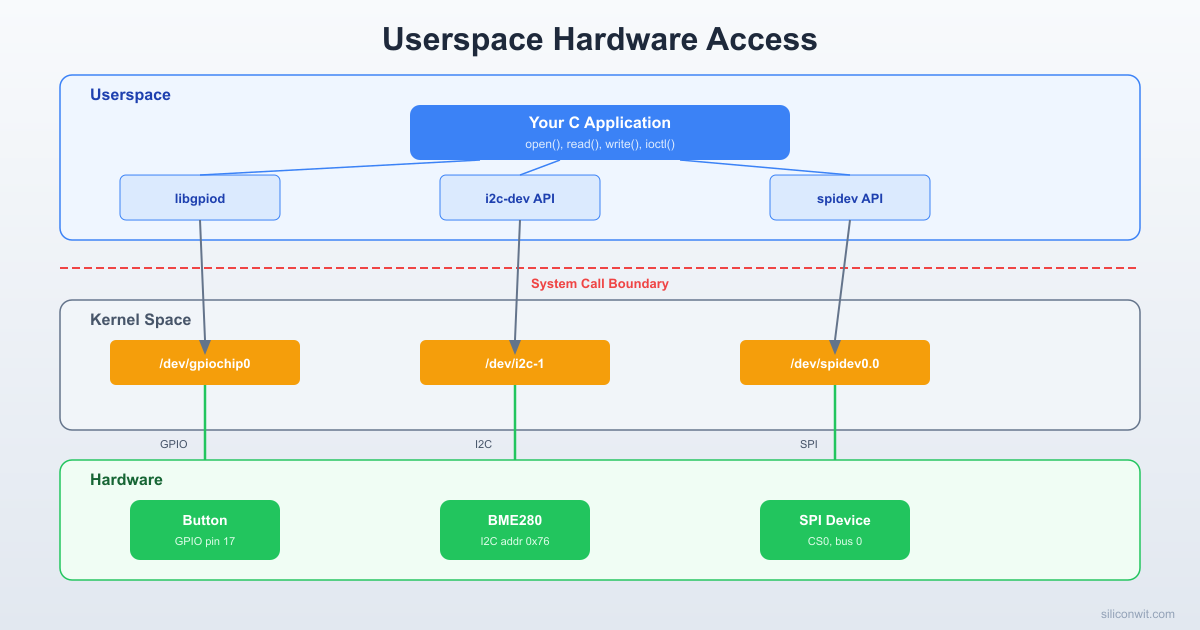
Userspace vs Kernel-Space Hardware Access


Linux provides two fundamentally different approaches to interacting with hardware peripherals. Each has distinct trade-offs.

AspectUserspace AccessKernel-Space Access
InterfaceCharacter devices (/dev/i2c-1, /dev/spidev0.0, /dev/gpiochipN)Kernel modules and drivers
LatencyHigher (syscall overhead, scheduling)Lower (direct register access, interrupt context)
SafetyCrash does not take down the systemBug can panic the kernel
Development speedFast iteration, no reboot neededSlower, requires module reload or reboot
DebuggingStandard tools (gdb, printf, strace)printk, ftrace, kgdb
When to usePrototyping, moderate-speed peripherals, sensors, user-facing appsHard real-time, DMA, high-speed protocols, shared hardware

For a BME280 sensor that updates a few times per second, or an LED that toggles on a button press, userspace access is the right choice. You get simpler code, safer operation, and faster development cycles. The kernel IIO driver (loaded via the device tree overlay from Lesson 3) handles the low-level register protocol; your userspace code reads the processed values.

Linux Userspace Hardware Access
──────────────────────────────────────────
Your C Application
│ │ │
▼ ▼ ▼
libgpiod /dev/i2c-1 /dev/spidev0.0
(GPIO) (I2C ioctl) (SPI ioctl)
│ │ │
▼ ▼ ▼
┌──────────────────────────────────────┐
│ Linux Kernel │
│ gpiochip driver i2c-bcm spi-bcm │
└──────────────────────────────────────┘
│ │ │
▼ ▼ ▼
GPIO pins SDA/SCL MOSI/MISO/CLK
GPIO Event Detection (libgpiod)
──────────────────────────────────────────
Button ──► GPIO17 (pull-up, active-low)
gpiod_line_event_wait() ◄── blocks here
│ falling edge detected
gpiod_line_event_read()
├──► Toggle LED (GPIO27)
├──► Read BME280 via I2C
└──► Log: "23.5C, 65%, 1013hPa"
No polling loop needed. The kernel wakes
your process only when the button fires.

For this lesson, we will interact with hardware through three userspace interfaces: libgpiod for GPIO, i2c-dev for I2C, and spidev for SPI.


GPIO with libgpiod


Why sysfs GPIO is Deprecated

The old way to control GPIO from userspace was through /sys/class/gpio/:

Terminal window
# DO NOT USE - deprecated interface
echo 27 > /sys/class/gpio/export
echo out > /sys/class/gpio/gpio27/direction
echo 1 > /sys/class/gpio/gpio27/value

This interface has several problems: no proper ownership model (any process can unexpectedly change pins), race conditions between export and configuration, no support for atomic multi-pin operations, and no clean event notification mechanism. The sysfs GPIO interface was formally deprecated in Linux 4.8 and is absent from many modern kernel configurations.

The replacement is the GPIO character device interface, accessed through /dev/gpiochip0, /dev/gpiochip1, etc. The libgpiod library provides both command-line tools and a C API for this interface.

Install libgpiod

Terminal window
sudo apt update
sudo apt install -y gpiod libgpiod-dev

Command-Line Tools

After installing, you have several useful tools:

List available GPIO chips:

Terminal window
gpiodetect

Output on a Pi Zero 2 W:

gpiochip0 [pinctrl-bcm2835] (54 lines)
gpiochip1 [raspberrypi-exp-gpio] (8 lines)

List all lines on a chip:

Terminal window
gpioinfo gpiochip0

This shows all 54 GPIO lines, their names, direction, and current consumer (if any).

Set a GPIO output (blink an LED on GPIO27):

Terminal window
# Turn LED on
gpioset gpiochip0 27=1
# Turn LED off
gpioset gpiochip0 27=0
# Hold LED on for 2 seconds then release
gpioset --mode=time --sec=2 gpiochip0 27=1

Read a GPIO input (button on GPIO17):

Terminal window
gpioget gpiochip0 17

Monitor edges (button press events):

Terminal window
gpiomon --falling-edge gpiochip0 17

Create a file called blink.c:

blink.c
#include <gpiod.h>
#include <stdio.h>
#include <unistd.h>
#define GPIO_CHIP "/dev/gpiochip0"
#define LED_LINE 27
int main(void)
{
struct gpiod_chip *chip;
struct gpiod_line *led;
int ret;
chip = gpiod_chip_open(GPIO_CHIP);
if (!chip) {
perror("gpiod_chip_open");
return 1;
}
led = gpiod_chip_get_line(chip, LED_LINE);
if (!led) {
perror("gpiod_chip_get_line");
gpiod_chip_close(chip);
return 1;
}
ret = gpiod_line_request_output(led, "blink-app", 0);
if (ret < 0) {
perror("gpiod_line_request_output");
gpiod_chip_close(chip);
return 1;
}
printf("Blinking LED on GPIO%d. Press Ctrl+C to stop.\n", LED_LINE);
for (int i = 0; i < 20; i++) {
gpiod_line_set_value(led, 1);
usleep(500000); /* 500 ms on */
gpiod_line_set_value(led, 0);
usleep(500000); /* 500 ms off */
}
gpiod_line_release(led);
gpiod_chip_close(chip);
return 0;
}

Compile and run:

Terminal window
gcc -o blink blink.c -lgpiod
sudo ./blink

The program opens the GPIO chip, requests GPIO27 as an output line with the consumer name "blink-app", then toggles it 20 times with a 500 ms period. After finishing, it cleanly releases the line and closes the chip. While the program runs, gpioinfo will show GPIO27 with consumer "blink-app".


Edge Detection and Events


Polling a GPIO input in a tight loop wastes CPU time and misses fast events. The libgpiod event API lets your application block efficiently until a rising or falling edge occurs, using the kernel’s interrupt mechanism internally.

button_event.c
#include <gpiod.h>
#include <stdio.h>
#include <time.h>
#define GPIO_CHIP "/dev/gpiochip0"
#define BUTTON_LINE 17
int main(void)
{
struct gpiod_chip *chip;
struct gpiod_line *button;
struct gpiod_line_event event;
struct timespec timeout = { .tv_sec = 10, .tv_nsec = 0 };
int ret;
chip = gpiod_chip_open(GPIO_CHIP);
if (!chip) {
perror("gpiod_chip_open");
return 1;
}
button = gpiod_chip_get_line(chip, BUTTON_LINE);
if (!button) {
perror("gpiod_chip_get_line");
gpiod_chip_close(chip);
return 1;
}
/* Request falling-edge events with internal pull-up bias */
struct gpiod_line_request_config config = {
.consumer = "button-monitor",
.request_type = GPIOD_LINE_REQUEST_EVENT_FALLING_EDGE,
.flags = GPIOD_LINE_REQUEST_FLAG_BIAS_PULL_UP,
};
ret = gpiod_line_request(button, &config, 0);
if (ret < 0) {
perror("gpiod_line_request");
gpiod_chip_close(chip);
return 1;
}
printf("Waiting for button press on GPIO%d (10s timeout)...\n", BUTTON_LINE);
printf("%-6s %-20s %s\n", "Event", "Timestamp (s.ns)", "Type");
int count = 0;
while (1) {
ret = gpiod_line_event_wait(button, &timeout);
if (ret < 0) {
perror("gpiod_line_event_wait");
break;
}
if (ret == 0) {
printf("Timeout, no event detected.\n");
break;
}
ret = gpiod_line_event_read(button, &event);
if (ret < 0) {
perror("gpiod_line_event_read");
break;
}
count++;
printf("%-6d %ld.%09ld %s\n",
count,
event.ts.tv_sec,
event.ts.tv_nsec,
(event.event_type == GPIOD_LINE_EVENT_FALLING_EDGE)
? "FALLING" : "RISING");
}
gpiod_line_release(button);
gpiod_chip_close(chip);
printf("Total events: %d\n", count);
return 0;
}

Compile and run:

Terminal window
gcc -o button_event button_event.c -lgpiod
sudo ./button_event

Key points about this code:

  • GPIOD_LINE_REQUEST_FLAG_BIAS_PULL_UP enables the internal pull-up resistor on GPIO17, so the button just needs to connect GPIO17 to GND. No external resistor required.
  • gpiod_line_event_wait() blocks the process (sleeping, not spinning) until an edge occurs or the timeout expires. This uses almost zero CPU while waiting.
  • The event timestamp comes from the kernel’s monotonic clock, giving you precise timing of each edge.
  • The 10-second timeout prevents the program from hanging indefinitely during testing.

I2C from Userspace


The i2c-dev kernel module exposes each I2C bus as a character device (/dev/i2c-0, /dev/i2c-1, etc.). You interact with the bus using standard open(), ioctl(), read(), and write() system calls.

Enable i2c-dev

The module is usually loaded automatically, but you can ensure it is available:

Terminal window
sudo modprobe i2c-dev
ls /dev/i2c-*

You should see /dev/i2c-1 (the I2C bus exposed on the GPIO header).

Scan the Bus

Terminal window
i2cdetect -y 1

If your BME280 is wired correctly, you will see 76 (or 77) in the output. If the kernel IIO driver from Lesson 3 has already claimed the device, you will see UU instead.

Important

If a kernel driver (like the IIO bme280 driver from your device tree overlay) has already bound to the sensor, you cannot also access it via i2c-dev. The kernel locks the address. For raw userspace I2C access, either remove the device tree overlay or unload the driver: sudo rmmod bme280. For production use, choose one approach, not both.

BME280 I2C Communication in C

The BME280 uses a register-based protocol. You write a register address, then read back data bytes. The chip ID register (0xD0) should return 0x60 for a BME280 (or 0x58 for a BMP280).

bme280_i2c.c
#include <stdio.h>
#include <stdlib.h>
#include <stdint.h>
#include <fcntl.h>
#include <unistd.h>
#include <sys/ioctl.h>
#include <linux/i2c-dev.h>
#define I2C_BUS "/dev/i2c-1"
#define BME280_ADDR 0x76
/* BME280 register addresses */
#define REG_CHIP_ID 0xD0
#define REG_CTRL_HUM 0xF2
#define REG_CTRL_MEAS 0xF4
#define REG_CONFIG 0xF5
#define REG_PRESS_MSB 0xF7
#define REG_CALIB_T1 0x88
#define REG_CALIB_H1 0xA1
#define REG_CALIB_H2 0xE1
static int i2c_fd;
static int i2c_write_byte(uint8_t reg, uint8_t value)
{
uint8_t buf[2] = { reg, value };
if (write(i2c_fd, buf, 2) != 2) {
perror("i2c write");
return -1;
}
return 0;
}
static int i2c_read_bytes(uint8_t reg, uint8_t *buf, int len)
{
if (write(i2c_fd, &reg, 1) != 1) {
perror("i2c write register address");
return -1;
}
if (read(i2c_fd, buf, len) != len) {
perror("i2c read");
return -1;
}
return 0;
}
/* Calibration data structure */
struct bme280_calib {
uint16_t dig_T1;
int16_t dig_T2;
int16_t dig_T3;
uint16_t dig_P1;
int16_t dig_P2;
int16_t dig_P3;
int16_t dig_P4;
int16_t dig_P5;
int16_t dig_P6;
int16_t dig_P7;
int16_t dig_P8;
int16_t dig_P9;
uint8_t dig_H1;
int16_t dig_H2;
uint8_t dig_H3;
int16_t dig_H4;
int16_t dig_H5;
int8_t dig_H6;
};
static struct bme280_calib calib;
static int32_t t_fine; /* shared between temperature and pressure compensation */
static int read_calibration(void)
{
uint8_t buf[26];
uint8_t hbuf[7];
/* Read temperature and pressure calibration (0x88..0xA1) */
if (i2c_read_bytes(REG_CALIB_T1, buf, 26) < 0)
return -1;
calib.dig_T1 = (uint16_t)(buf[1] << 8 | buf[0]);
calib.dig_T2 = (int16_t)(buf[3] << 8 | buf[2]);
calib.dig_T3 = (int16_t)(buf[5] << 8 | buf[4]);
calib.dig_P1 = (uint16_t)(buf[7] << 8 | buf[6]);
calib.dig_P2 = (int16_t)(buf[9] << 8 | buf[8]);
calib.dig_P3 = (int16_t)(buf[11] << 8 | buf[10]);
calib.dig_P4 = (int16_t)(buf[13] << 8 | buf[12]);
calib.dig_P5 = (int16_t)(buf[15] << 8 | buf[14]);
calib.dig_P6 = (int16_t)(buf[17] << 8 | buf[16]);
calib.dig_P7 = (int16_t)(buf[19] << 8 | buf[18]);
calib.dig_P8 = (int16_t)(buf[21] << 8 | buf[20]);
calib.dig_P9 = (int16_t)(buf[23] << 8 | buf[22]);
/* Read H1 calibration (0xA1) */
if (i2c_read_bytes(REG_CALIB_H1, &calib.dig_H1, 1) < 0)
return -1;
/* Read H2..H6 calibration (0xE1..0xE7) */
if (i2c_read_bytes(REG_CALIB_H2, hbuf, 7) < 0)
return -1;
calib.dig_H2 = (int16_t)(hbuf[1] << 8 | hbuf[0]);
calib.dig_H3 = hbuf[2];
calib.dig_H4 = (int16_t)((hbuf[3] << 4) | (hbuf[4] & 0x0F));
calib.dig_H5 = (int16_t)((hbuf[5] << 4) | (hbuf[4] >> 4));
calib.dig_H6 = (int8_t)hbuf[6];
return 0;
}
static double compensate_temperature(int32_t adc_T)
{
int32_t var1, var2;
var1 = ((((adc_T >> 3) - ((int32_t)calib.dig_T1 << 1)))
* ((int32_t)calib.dig_T2)) >> 11;
var2 = (((((adc_T >> 4) - ((int32_t)calib.dig_T1))
* ((adc_T >> 4) - ((int32_t)calib.dig_T1))) >> 12)
* ((int32_t)calib.dig_T3)) >> 14;
t_fine = var1 + var2;
return (t_fine * 5 + 128) / 256 / 100.0;
}
static double compensate_pressure(int32_t adc_P)
{
int64_t var1, var2, p;
var1 = ((int64_t)t_fine) - 128000;
var2 = var1 * var1 * (int64_t)calib.dig_P6;
var2 = var2 + ((var1 * (int64_t)calib.dig_P5) << 17);
var2 = var2 + (((int64_t)calib.dig_P4) << 35);
var1 = ((var1 * var1 * (int64_t)calib.dig_P3) >> 8)
+ ((var1 * (int64_t)calib.dig_P2) << 12);
var1 = (((((int64_t)1) << 47) + var1)) * ((int64_t)calib.dig_P1) >> 33;
if (var1 == 0)
return 0.0;
p = 1048576 - adc_P;
p = (((p << 31) - var2) * 3125) / var1;
var1 = (((int64_t)calib.dig_P9) * (p >> 13) * (p >> 13)) >> 25;
var2 = (((int64_t)calib.dig_P8) * p) >> 19;
p = ((p + var1 + var2) >> 8) + (((int64_t)calib.dig_P7) << 4);
return (double)p / 256.0 / 100.0; /* hPa */
}
static double compensate_humidity(int32_t adc_H)
{
int32_t v;
v = t_fine - 76800;
v = (((((adc_H << 14) - (((int32_t)calib.dig_H4) << 20)
- (((int32_t)calib.dig_H5) * v)) + 16384) >> 15)
* (((((((v * ((int32_t)calib.dig_H6)) >> 10)
* (((v * ((int32_t)calib.dig_H3)) >> 11) + 32768)) >> 10)
+ 2097152) * ((int32_t)calib.dig_H2) + 8192) >> 14));
v = v - (((((v >> 15) * (v >> 15)) >> 7) * ((int32_t)calib.dig_H1)) >> 4);
v = (v < 0) ? 0 : v;
v = (v > 419430400) ? 419430400 : v;
return (double)(v >> 12) / 1024.0;
}
int main(void)
{
uint8_t chip_id;
uint8_t data[8];
int32_t adc_T, adc_P, adc_H;
/* Open I2C bus */
i2c_fd = open(I2C_BUS, O_RDWR);
if (i2c_fd < 0) {
perror("open i2c bus");
return 1;
}
/* Set slave address */
if (ioctl(i2c_fd, I2C_SLAVE, BME280_ADDR) < 0) {
perror("ioctl I2C_SLAVE");
close(i2c_fd);
return 1;
}
/* Read and verify chip ID */
if (i2c_read_bytes(REG_CHIP_ID, &chip_id, 1) < 0) {
close(i2c_fd);
return 1;
}
printf("Chip ID: 0x%02X", chip_id);
if (chip_id == 0x60)
printf(" (BME280 confirmed)\n");
else if (chip_id == 0x58)
printf(" (BMP280, no humidity)\n");
else {
printf(" (unexpected, check wiring)\n");
close(i2c_fd);
return 1;
}
/* Read calibration data */
if (read_calibration() < 0) {
close(i2c_fd);
return 1;
}
/* Configure: humidity oversampling x1 */
i2c_write_byte(REG_CTRL_HUM, 0x01);
/* Configure: temp oversampling x1, pressure oversampling x1, normal mode */
i2c_write_byte(REG_CTRL_MEAS, 0x27);
/* Configure: standby 1000ms, filter off */
i2c_write_byte(REG_CONFIG, 0xA0);
/* Wait for first measurement */
usleep(50000);
/* Read raw data (pressure[0:2], temperature[3:5], humidity[6:7]) */
if (i2c_read_bytes(REG_PRESS_MSB, data, 8) < 0) {
close(i2c_fd);
return 1;
}
adc_P = ((int32_t)data[0] << 12) | ((int32_t)data[1] << 4) | (data[2] >> 4);
adc_T = ((int32_t)data[3] << 12) | ((int32_t)data[4] << 4) | (data[5] >> 4);
adc_H = ((int32_t)data[6] << 8) | (int32_t)data[7];
/* Compensate (temperature must be first, it sets t_fine) */
double temp = compensate_temperature(adc_T);
double pres = compensate_pressure(adc_P);
double humi = compensate_humidity(adc_H);
printf("Temperature: %.2f C\n", temp);
printf("Pressure: %.2f hPa\n", pres);
printf("Humidity: %.2f %%RH\n", humi);
close(i2c_fd);
return 0;
}

Compile and run:

Terminal window
gcc -o bme280_i2c bme280_i2c.c
sudo ./bme280_i2c

Expected output:

Chip ID: 0x60 (BME280 confirmed)
Temperature: 23.45 C
Pressure: 1013.25 hPa
Humidity: 45.30 %RH

The compensation formulas come directly from the Bosch BME280 datasheet (section 4.2.3). They convert the raw 20-bit ADC values into physical units using factory-programmed calibration coefficients stored on the sensor chip.


SPI from Userspace


The spidev kernel module exposes SPI buses as character devices (/dev/spidev0.0, /dev/spidev0.1, etc.). The first number is the bus, the second is the chip select line.

Enable SPI

Add the following to /boot/config.txt:

dtparam=spi=on

Reboot, then verify:

Terminal window
ls /dev/spidev*

You should see /dev/spidev0.0 and /dev/spidev0.1.

SPI Loopback Test

A loopback test physically connects MOSI (GPIO10) to MISO (GPIO9) with a jumper wire. Whatever you send out on MOSI should come back on MISO. This verifies your SPI configuration without needing an external device.

spi_loopback.c
#include <stdio.h>
#include <stdlib.h>
#include <stdint.h>
#include <string.h>
#include <fcntl.h>
#include <unistd.h>
#include <sys/ioctl.h>
#include <linux/spi/spidev.h>
#define SPI_DEVICE "/dev/spidev0.0"
#define SPI_SPEED 500000 /* 500 kHz */
#define SPI_BITS 8
#define SPI_MODE SPI_MODE_0
int main(void)
{
int fd;
uint8_t mode = SPI_MODE;
uint8_t bits = SPI_BITS;
uint32_t speed = SPI_SPEED;
int ret;
fd = open(SPI_DEVICE, O_RDWR);
if (fd < 0) {
perror("open spidev");
return 1;
}
/* Set SPI mode */
ret = ioctl(fd, SPI_IOC_WR_MODE, &mode);
if (ret < 0) {
perror("set SPI mode");
close(fd);
return 1;
}
/* Set bits per word */
ret = ioctl(fd, SPI_IOC_WR_BITS_PER_WORD, &bits);
if (ret < 0) {
perror("set bits per word");
close(fd);
return 1;
}
/* Set max speed */
ret = ioctl(fd, SPI_IOC_WR_MAX_SPEED_HZ, &speed);
if (ret < 0) {
perror("set max speed");
close(fd);
return 1;
}
printf("SPI mode: 0x%02X\n", mode);
printf("Bits per word: %d\n", bits);
printf("Max speed: %d Hz\n", speed);
/* Prepare test data */
uint8_t tx_buf[] = { 0xDE, 0xAD, 0xBE, 0xEF, 0x01, 0x02, 0x03, 0x04 };
uint8_t rx_buf[sizeof(tx_buf)];
memset(rx_buf, 0, sizeof(rx_buf));
/* Build transfer structure */
struct spi_ioc_transfer transfer = {
.tx_buf = (unsigned long)tx_buf,
.rx_buf = (unsigned long)rx_buf,
.len = sizeof(tx_buf),
.speed_hz = speed,
.delay_usecs = 0,
.bits_per_word = bits,
};
/* Perform full-duplex transfer */
ret = ioctl(fd, SPI_IOC_MESSAGE(1), &transfer);
if (ret < 0) {
perror("SPI transfer");
close(fd);
return 1;
}
/* Compare TX and RX */
printf("\nTX: ");
for (size_t i = 0; i < sizeof(tx_buf); i++)
printf("0x%02X ", tx_buf[i]);
printf("\nRX: ");
for (size_t i = 0; i < sizeof(rx_buf); i++)
printf("0x%02X ", rx_buf[i]);
printf("\n");
if (memcmp(tx_buf, rx_buf, sizeof(tx_buf)) == 0)
printf("\nLoopback test PASSED: TX matches RX.\n");
else
printf("\nLoopback test FAILED: TX does not match RX.\n"
"Check that MOSI (GPIO10) is connected to MISO (GPIO9).\n");
close(fd);
return 0;
}

Compile and run:

Terminal window
gcc -o spi_loopback spi_loopback.c
sudo ./spi_loopback

The struct spi_ioc_transfer is the core of userspace SPI. It describes a single full-duplex transfer: the kernel clocks out tx_buf on MOSI while simultaneously clocking in data on MISO into rx_buf. The SPI_IOC_MESSAGE(1) ioctl sends one transfer. You can batch multiple transfers by passing an array and using SPI_IOC_MESSAGE(N).


The Doorbell Monitor Application


Now let’s combine GPIO events, I2C sensor reads, and LED control into a single event-driven application. When the button is pressed, the program toggles the LED and reads the BME280 sensor, logging a timestamped CSV entry.

Circuit Connections

ComponentPi GPIONotes
Button (one leg)GPIO17Internal pull-up enabled in software
Button (other leg)GNDPress pulls GPIO17 low (falling edge)
LED anode (long leg)GPIO27Through 330 ohm resistor
LED cathode (short leg)GND
BME280 SDAGPIO2 (SDA1)I2C data
BME280 SCLGPIO3 (SCL1)I2C clock
BME280 VCC3.3V
BME280 GNDGND

Complete Source Code

doorbell_monitor.c
#include <stdio.h>
#include <stdlib.h>
#include <stdint.h>
#include <string.h>
#include <signal.h>
#include <time.h>
#include <fcntl.h>
#include <unistd.h>
#include <sys/ioctl.h>
#include <linux/i2c-dev.h>
#include <gpiod.h>
/* ---- Configuration ---- */
#define GPIO_CHIP "/dev/gpiochip0"
#define BUTTON_LINE 17
#define LED_LINE 27
#define I2C_BUS "/dev/i2c-1"
#define BME280_ADDR 0x76
#define LOG_FILE "doorbell_log.csv"
/* ---- BME280 Registers ---- */
#define REG_CHIP_ID 0xD0
#define REG_CTRL_HUM 0xF2
#define REG_CTRL_MEAS 0xF4
#define REG_CONFIG 0xF5
#define REG_PRESS_MSB 0xF7
#define REG_CALIB_T1 0x88
#define REG_CALIB_H1 0xA1
#define REG_CALIB_H2 0xE1
/* ---- Globals ---- */
static volatile int running = 1;
static int i2c_fd = -1;
static struct gpiod_chip *chip = NULL;
static struct gpiod_line *button = NULL;
static struct gpiod_line *led = NULL;
static FILE *logfile = NULL;
static struct bme280_calib {
uint16_t dig_T1;
int16_t dig_T2, dig_T3;
uint16_t dig_P1;
int16_t dig_P2, dig_P3, dig_P4, dig_P5;
int16_t dig_P6, dig_P7, dig_P8, dig_P9;
uint8_t dig_H1, dig_H3;
int16_t dig_H2, dig_H4, dig_H5;
int8_t dig_H6;
} calib;
static int32_t t_fine;
/* ---- Signal Handler ---- */
static void sigint_handler(int sig)
{
(void)sig;
running = 0;
}
/* ---- I2C Helpers ---- */
static int i2c_write_byte(uint8_t reg, uint8_t value)
{
uint8_t buf[2] = { reg, value };
return (write(i2c_fd, buf, 2) == 2) ? 0 : -1;
}
static int i2c_read_bytes(uint8_t reg, uint8_t *buf, int len)
{
if (write(i2c_fd, &reg, 1) != 1) return -1;
if (read(i2c_fd, buf, len) != len) return -1;
return 0;
}
/* ---- BME280 Calibration ---- */
static int bme280_read_calibration(void)
{
uint8_t buf[26], hbuf[7];
if (i2c_read_bytes(REG_CALIB_T1, buf, 26) < 0) return -1;
calib.dig_T1 = (uint16_t)(buf[1] << 8 | buf[0]);
calib.dig_T2 = (int16_t)(buf[3] << 8 | buf[2]);
calib.dig_T3 = (int16_t)(buf[5] << 8 | buf[4]);
calib.dig_P1 = (uint16_t)(buf[7] << 8 | buf[6]);
calib.dig_P2 = (int16_t)(buf[9] << 8 | buf[8]);
calib.dig_P3 = (int16_t)(buf[11] << 8 | buf[10]);
calib.dig_P4 = (int16_t)(buf[13] << 8 | buf[12]);
calib.dig_P5 = (int16_t)(buf[15] << 8 | buf[14]);
calib.dig_P6 = (int16_t)(buf[17] << 8 | buf[16]);
calib.dig_P7 = (int16_t)(buf[19] << 8 | buf[18]);
calib.dig_P8 = (int16_t)(buf[21] << 8 | buf[20]);
calib.dig_P9 = (int16_t)(buf[23] << 8 | buf[22]);
if (i2c_read_bytes(REG_CALIB_H1, &calib.dig_H1, 1) < 0) return -1;
if (i2c_read_bytes(REG_CALIB_H2, hbuf, 7) < 0) return -1;
calib.dig_H2 = (int16_t)(hbuf[1] << 8 | hbuf[0]);
calib.dig_H3 = hbuf[2];
calib.dig_H4 = (int16_t)((hbuf[3] << 4) | (hbuf[4] & 0x0F));
calib.dig_H5 = (int16_t)((hbuf[5] << 4) | (hbuf[4] >> 4));
calib.dig_H6 = (int8_t)hbuf[6];
return 0;
}
/* ---- BME280 Compensation (Bosch datasheet formulas) ---- */
static double bme280_compensate_temp(int32_t adc_T)
{
int32_t v1, v2;
v1 = ((((adc_T >> 3) - ((int32_t)calib.dig_T1 << 1)))
* ((int32_t)calib.dig_T2)) >> 11;
v2 = (((((adc_T >> 4) - ((int32_t)calib.dig_T1))
* ((adc_T >> 4) - ((int32_t)calib.dig_T1))) >> 12)
* ((int32_t)calib.dig_T3)) >> 14;
t_fine = v1 + v2;
return (t_fine * 5 + 128) / 256 / 100.0;
}
static double bme280_compensate_pres(int32_t adc_P)
{
int64_t v1, v2, p;
v1 = ((int64_t)t_fine) - 128000;
v2 = v1 * v1 * (int64_t)calib.dig_P6;
v2 = v2 + ((v1 * (int64_t)calib.dig_P5) << 17);
v2 = v2 + (((int64_t)calib.dig_P4) << 35);
v1 = ((v1 * v1 * (int64_t)calib.dig_P3) >> 8)
+ ((v1 * (int64_t)calib.dig_P2) << 12);
v1 = (((((int64_t)1) << 47) + v1)) * ((int64_t)calib.dig_P1) >> 33;
if (v1 == 0) return 0.0;
p = 1048576 - adc_P;
p = (((p << 31) - v2) * 3125) / v1;
v1 = (((int64_t)calib.dig_P9) * (p >> 13) * (p >> 13)) >> 25;
v2 = (((int64_t)calib.dig_P8) * p) >> 19;
p = ((p + v1 + v2) >> 8) + (((int64_t)calib.dig_P7) << 4);
return (double)p / 256.0 / 100.0;
}
static double bme280_compensate_hum(int32_t adc_H)
{
int32_t v;
v = t_fine - 76800;
v = (((((adc_H << 14) - (((int32_t)calib.dig_H4) << 20)
- (((int32_t)calib.dig_H5) * v)) + 16384) >> 15)
* (((((((v * ((int32_t)calib.dig_H6)) >> 10)
* (((v * ((int32_t)calib.dig_H3)) >> 11) + 32768)) >> 10)
+ 2097152) * ((int32_t)calib.dig_H2) + 8192) >> 14));
v = v - (((((v >> 15) * (v >> 15)) >> 7) * ((int32_t)calib.dig_H1)) >> 4);
v = (v < 0) ? 0 : v;
v = (v > 419430400) ? 419430400 : v;
return (double)(v >> 12) / 1024.0;
}
/* ---- BME280 Read All ---- */
static int bme280_read(double *temp, double *pres, double *hum)
{
uint8_t data[8];
int32_t adc_T, adc_P, adc_H;
if (i2c_read_bytes(REG_PRESS_MSB, data, 8) < 0)
return -1;
adc_P = ((int32_t)data[0] << 12) | ((int32_t)data[1] << 4) | (data[2] >> 4);
adc_T = ((int32_t)data[3] << 12) | ((int32_t)data[4] << 4) | (data[5] >> 4);
adc_H = ((int32_t)data[6] << 8) | (int32_t)data[7];
*temp = bme280_compensate_temp(adc_T);
*pres = bme280_compensate_pres(adc_P);
*hum = bme280_compensate_hum(adc_H);
return 0;
}
/* ---- BME280 Init ---- */
static int bme280_init(void)
{
uint8_t chip_id;
i2c_fd = open(I2C_BUS, O_RDWR);
if (i2c_fd < 0) {
perror("open i2c");
return -1;
}
if (ioctl(i2c_fd, I2C_SLAVE, BME280_ADDR) < 0) {
perror("ioctl I2C_SLAVE");
return -1;
}
if (i2c_read_bytes(REG_CHIP_ID, &chip_id, 1) < 0)
return -1;
if (chip_id != 0x60) {
fprintf(stderr, "Unexpected chip ID: 0x%02X (expected 0x60)\n", chip_id);
return -1;
}
if (bme280_read_calibration() < 0)
return -1;
/* Humidity oversampling x1 */
i2c_write_byte(REG_CTRL_HUM, 0x01);
/* Temp x1, pressure x1, normal mode */
i2c_write_byte(REG_CTRL_MEAS, 0x27);
/* Standby 1000ms, filter off */
i2c_write_byte(REG_CONFIG, 0xA0);
usleep(50000);
printf("BME280 initialized (chip ID: 0x60)\n");
return 0;
}
/* ---- GPIO Init ---- */
static int gpio_init(void)
{
int ret;
chip = gpiod_chip_open(GPIO_CHIP);
if (!chip) {
perror("gpiod_chip_open");
return -1;
}
/* Configure button with pull-up, falling edge events */
button = gpiod_chip_get_line(chip, BUTTON_LINE);
if (!button) {
perror("get button line");
return -1;
}
struct gpiod_line_request_config btn_cfg = {
.consumer = "doorbell-monitor",
.request_type = GPIOD_LINE_REQUEST_EVENT_FALLING_EDGE,
.flags = GPIOD_LINE_REQUEST_FLAG_BIAS_PULL_UP,
};
ret = gpiod_line_request(button, &btn_cfg, 0);
if (ret < 0) {
perror("request button");
return -1;
}
/* Configure LED as output */
led = gpiod_chip_get_line(chip, LED_LINE);
if (!led) {
perror("get led line");
return -1;
}
ret = gpiod_line_request_output(led, "doorbell-monitor", 0);
if (ret < 0) {
perror("request led");
return -1;
}
printf("GPIO initialized: button=GPIO%d, LED=GPIO%d\n",
BUTTON_LINE, LED_LINE);
return 0;
}
/* ---- Cleanup ---- */
static void cleanup(void)
{
if (led) {
gpiod_line_set_value(led, 0);
gpiod_line_release(led);
}
if (button) gpiod_line_release(button);
if (chip) gpiod_chip_close(chip);
if (i2c_fd >= 0) close(i2c_fd);
if (logfile) fclose(logfile);
printf("\nCleanup complete.\n");
}
/* ---- Get Timestamp String ---- */
static void get_timestamp(char *buf, size_t len)
{
time_t now = time(NULL);
struct tm *tm_info = localtime(&now);
strftime(buf, len, "%Y-%m-%d %H:%M:%S", tm_info);
}
/* ---- Main Loop ---- */
int main(void)
{
struct gpiod_line_event event;
struct timespec timeout = { .tv_sec = 1, .tv_nsec = 0 };
int led_state = 0;
int press_count = 0;
int ret;
signal(SIGINT, sigint_handler);
if (gpio_init() < 0) {
cleanup();
return 1;
}
if (bme280_init() < 0) {
cleanup();
return 1;
}
/* Open log file */
logfile = fopen(LOG_FILE, "a");
if (!logfile) {
perror("open log file");
cleanup();
return 1;
}
/* Write CSV header if file is empty */
fseek(logfile, 0, SEEK_END);
if (ftell(logfile) == 0) {
fprintf(logfile, "timestamp,press_count,led_state,"
"temp_c,pressure_hpa,humidity_pct\n");
fflush(logfile);
}
printf("\n--- Doorbell Monitor Running ---\n");
printf("Press the button on GPIO%d. Ctrl+C to quit.\n\n", BUTTON_LINE);
printf("%-20s %-6s %-4s %-8s %-10s %-8s\n",
"Timestamp", "Press", "LED", "Temp(C)", "Press(hPa)", "Hum(%%)");
while (running) {
ret = gpiod_line_event_wait(button, &timeout);
if (ret < 0) {
if (running) perror("event_wait");
break;
}
if (ret == 0) {
/* Timeout, loop again (allows Ctrl+C check) */
continue;
}
/* Read the event to clear it */
ret = gpiod_line_event_read(button, &event);
if (ret < 0) {
perror("event_read");
break;
}
/* Toggle LED */
led_state = !led_state;
gpiod_line_set_value(led, led_state);
press_count++;
/* Simple debounce: ignore events for 200ms */
usleep(200000);
/* Read sensor */
double temp, pres, hum;
if (bme280_read(&temp, &pres, &hum) < 0) {
fprintf(stderr, "Warning: failed to read BME280\n");
continue;
}
/* Get timestamp */
char ts[32];
get_timestamp(ts, sizeof(ts));
/* Print to console */
printf("%-20s %-6d %-4s %-8.2f %-10.2f %-8.2f\n",
ts, press_count,
led_state ? "ON" : "OFF",
temp, pres, hum);
/* Write to CSV */
fprintf(logfile, "%s,%d,%d,%.2f,%.2f,%.2f\n",
ts, press_count, led_state, temp, pres, hum);

fflush(logfile);
}
cleanup();
return 0;
}

The design uses gpiod_line_event_wait() with a 1-second timeout as the main loop mechanism. This serves two purposes: it sleeps efficiently while waiting for button presses, and the periodic timeout lets the program check the running flag so it can respond to Ctrl+C cleanly. The 200 ms usleep() after each event acts as a simple debounce filter.


Compiling and Running


Compile on the Pi (Native)

Terminal window
gcc -Wall -o doorbell_monitor doorbell_monitor.c -lgpiod

Cross-Compile on a Host Machine

If you prefer cross-compilation from an x86 host:

Terminal window
aarch64-linux-gnu-gcc -Wall -o doorbell_monitor doorbell_monitor.c \
-lgpiod \
--sysroot=/path/to/pi-sysroot

The sysroot must contain the aarch64 versions of libgpiod.so and linux/i2c-dev.h. If you set up the cross-compilation environment in Lesson 2, you already have these.

Transfer to the Pi

Terminal window
scp doorbell_monitor [email protected]:~/

Run with Proper Permissions

GPIO and I2C device access requires either root privileges or group membership:

Terminal window
sudo ./doorbell_monitor

Expected Output

BME280 initialized (chip ID: 0x60)
GPIO initialized: button=GPIO17, LED=GPIO27
--- Doorbell Monitor Running ---
Press the button on GPIO17. Ctrl+C to quit.
Timestamp Press LED Temp(C) Press(hPa) Hum(%)
2026-02-14 10:23:15 1 ON 23.45 1013.25 45.30
2026-02-14 10:23:18 2 OFF 23.47 1013.24 45.28
2026-02-14 10:23:22 3 ON 23.46 1013.26 45.32
^C
Cleanup complete.

The log file (doorbell_log.csv) accumulates entries across multiple runs, making it easy to import into a spreadsheet or plotting tool.

Project File Structure

  • Directorydoorbell-project/
    • blink.c
    • button_event.c
    • bme280_i2c.c
    • spi_loopback.c
    • doorbell_monitor.c
    • doorbell_log.csv
    • Makefile

A simple Makefile to build everything:

Makefile
CC = gcc
CFLAGS = -Wall -Wextra -O2
LDFLAGS_GPIO = -lgpiod
all: blink button_event bme280_i2c spi_loopback doorbell_monitor
blink: blink.c
$(CC) $(CFLAGS) -o $@ $< $(LDFLAGS_GPIO)
button_event: button_event.c
$(CC) $(CFLAGS) -o $@ $< $(LDFLAGS_GPIO)
bme280_i2c: bme280_i2c.c
$(CC) $(CFLAGS) -o $@ $<
spi_loopback: spi_loopback.c
$(CC) $(CFLAGS) -o $@ $<
doorbell_monitor: doorbell_monitor.c
$(CC) $(CFLAGS) -o $@ $< $(LDFLAGS_GPIO)
clean:
rm -f blink button_event bme280_i2c spi_loopback doorbell_monitor
.PHONY: all clean

Exercises


Exercise 1: Multi-Line GPIO

Modify the blink program to control three LEDs on GPIO27, GPIO22, and GPIO23 in a sequential pattern (one lights up after the other, like a running light). Use gpiod_chip_get_lines() to request all three lines in a single call with a struct gpiod_line_bulk. Toggle them in sequence with 200 ms spacing.

Exercise 2: Double-Press Detection

Extend the doorbell monitor to distinguish between a single press and a double press (two presses within 500 ms). On a single press, toggle the LED normally. On a double press, flash the LED three times rapidly and log a “DOUBLE” event type in the CSV. Hint: after detecting the first falling edge, wait up to 500 ms for a second edge using gpiod_line_event_wait() with a short timeout.

Exercise 3: I2C Bus Scanner

Write a C program that replicates i2cdetect: scan all 112 valid I2C addresses (0x03 to 0x77) on /dev/i2c-1 by attempting to read one byte from each address. Print a grid showing which addresses respond with an ACK. Compare your output to i2cdetect -y 1 to verify correctness.

Exercise 4: SPI Sensor Integration

Connect an MCP3008 ADC to SPI0 and write a C program that reads analog channel 0 using the spidev interface. The MCP3008 protocol requires a 3-byte SPI transaction: send 0x01 (start bit), 0x80 (single-ended, channel 0), 0x00 (don’t care), then the 10-bit result is in the lower bits of the last two received bytes. Display the raw ADC value (0 to 1023) and the corresponding voltage (assuming 3.3V reference).

Comments

Loading comments...


© 2021-2026 SiliconWit®. All rights reserved.