Skip to content

Camera Image Classification on ESP32

Camera Image Classification on ESP32 hero image
Modified:
Published:
ESP32-CAM Memory Layout
──────────────────────────────────────────
Internal SRAM (~520 KB)
┌─────────────────────────────────────┐
│ FreeRTOS heap + task stacks 200 KB │
│ TFLM interpreter + ops 50 KB │
│ Tensor arena 100 KB │
│ Misc (WiFi, drivers) 170 KB │
└─────────────────────────────────────┘
PSRAM (4 MB, SPI-connected)
┌─────────────────────────────────────┐
│ Camera frame buffer (QVGA) 150 KB │
│ Resized input (96x96) 9 KB │
│ Model weights (flash-mapped)250 KB │
│ Available ~3.5 MB │
└─────────────────────────────────────┘
Key: tensor arena MUST be in internal
SRAM for speed. Image buffers can use
PSRAM (slower but larger).

Image classification is the most demanding TinyML task you can run on a microcontroller. A single 96x96 grayscale image is 9,216 bytes. A 96x96 RGB image is 27,648 bytes. The model weights, intermediate activations, and the image buffer all compete for the same limited RAM. The ESP32-CAM module solves part of this problem with 4 MB of PSRAM, but you still need careful memory management to make everything fit. This capstone lesson puts together everything from the course: model training, quantization, TFLM deployment, and real-time embedded application logic, all applied to the hardest modality. #ComputerVision #TinyML #ESP32CAM

What We Are Building

ESP32-CAM Image Classifier

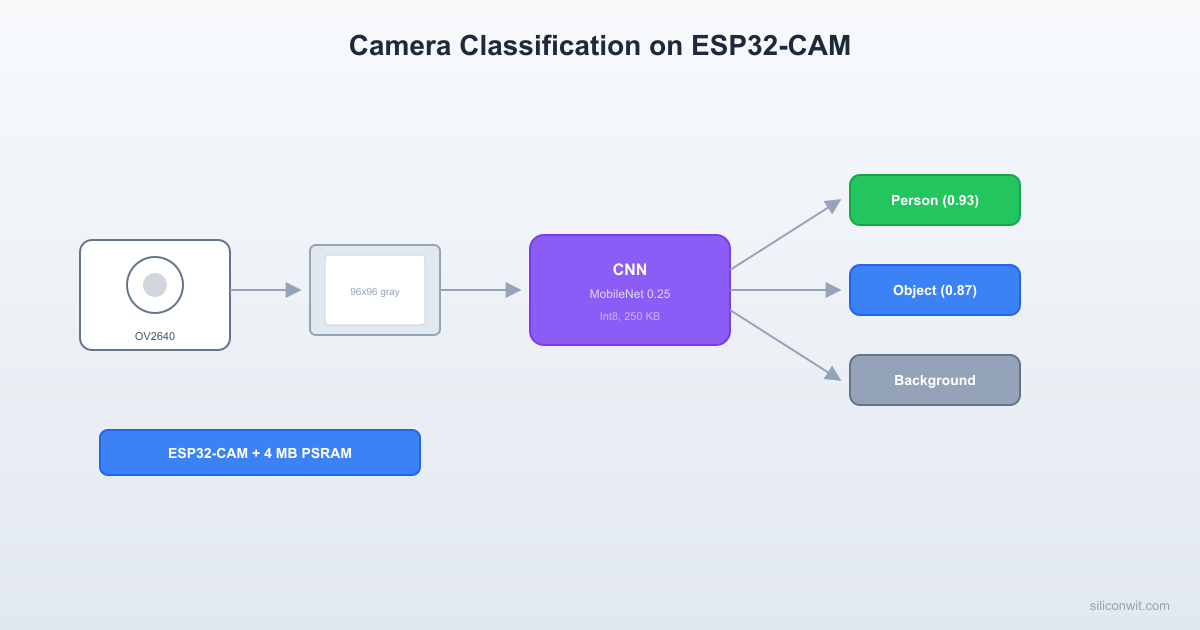
An ESP32-CAM module (AI-Thinker variant with OV2640 camera and 4 MB PSRAM) that captures images, preprocesses them to 96x96 grayscale, runs a quantized MobileNetV1 (alpha=0.25) or custom CNN through TFLite Micro, and outputs the classification result over serial. Two demo applications: person detection (binary: person/no-person) and object classification (multi-class: 5 to 10 categories). The system runs inference at approximately 2 to 5 frames per second.

Project specifications:

ParameterValue
ModuleESP32-CAM (AI-Thinker)
CameraOV2640, 2MP
PSRAM4 MB
Internal SRAM~520 KB
Input resolution96 x 96 grayscale
Model (person detection)Custom CNN, ~30 KB quantized
Model (object classification)MobileNetV1 0.25, ~250 KB quantized
Inference rate2 to 5 FPS (model dependent)
OutputSerial (class + confidence), onboard LED flash

Bill of Materials

RefComponentQuantityNotes
U1ESP32-CAM (AI-Thinker)1OV2640 camera, 4 MB PSRAM
USB-to-serial adapter (e.g., FTDI FT232RL)1For programming and serial output
Jumper wires4For serial connection
Image Processing Pipeline (on ESP32)
──────────────────────────────────────────
OV2640 Camera
1600x1200 JPEG
▼ decode + resize
96 x 96 grayscale (9,216 bytes)
▼ normalize to [0, 1] or [-128, 127]
96 x 96 x 1 int8 tensor
▼ TFLM inference (~200 ms)
┌────────────────────────┐
│ person: 0.87 │
│ no_person: 0.13 │
└────────────────────────┘
▼ if person > 0.7
LED flash + serial output

Image Classification on Constrained Hardware


Running a CNN on a microcontroller is fundamentally different from running one on a GPU. On a GPU, you load the entire model into VRAM, process a batch of images, and the framework handles memory allocation transparently. On an MCU, every byte matters.

ResourceESP32-CAM AvailablePerson Detection ModelMobileNetV1 0.25
Flash (model storage)4 MB~30 KB~250 KB
SRAM (tensor arena)~200 KB usable~100 KB~180 KB
PSRAM (image buffer)4 MB9 KB (96x96x1)9 KB (96x96x1)
Inference timeN/A~200 ms~800 ms

The tensor arena is the memory block where TFLite Micro stores input/output tensors and intermediate activations during inference. For image models, the arena must be large enough to hold the largest intermediate activation map. In a CNN, the first few layers often produce the largest feature maps (e.g., 96x96x8 = 73,728 bytes for 8 filters at input resolution). The arena size is the primary constraint on model complexity.

ESP32-CAM Hardware Overview


The AI-Thinker ESP32-CAM module integrates:

  • ESP32-S (no USB): Dual-core Xtensa LX6 at 240 MHz, 520 KB SRAM, Wi-Fi, Bluetooth
  • OV2640 camera: 2 MP, supports JPEG and raw (YUV, RGB) output, connected via DVP 8-bit parallel interface
  • 4 MB PSRAM: Connected via SPI, accessible as external RAM through the ESP32’s cache
  • 4 MB Flash: For firmware and model storage
  • Onboard LED flash: GPIO 4, useful for low-light image capture
  • MicroSD card slot: GPIO 2, 12, 13, 14, 15 (shared with some camera pins in certain modes)

Pin Connections for Programming

USB-Serial AdapterESP32-CAMNotes
TXU0R (GPIO 3)Adapter TX to ESP32 RX
RXU0T (GPIO 1)Adapter RX to ESP32 TX
GNDGNDCommon ground
5V5VPower supply (5V input, onboard 3.3V regulator)

To enter flash mode, connect GPIO 0 to GND before powering on or pressing the reset button. Remove the GPIO 0 to GND connection after flashing.

Camera Driver Setup


The ESP-IDF camera driver handles the OV2640 initialization, frame capture, and pixel format conversion. The key configuration parameters are the resolution, pixel format, and frame buffer location.

#include <stdio.h>
#include <string.h>
#include "freertos/FreeRTOS.h"
#include "freertos/task.h"
#include "esp_log.h"
#include "esp_timer.h"
#include "esp_camera.h"
#include "driver/gpio.h"
static const char *TAG = "cam_classify";
/* AI-Thinker ESP32-CAM pin definitions */
#define CAM_PIN_PWDN 32
#define CAM_PIN_RESET -1
#define CAM_PIN_XCLK 0
#define CAM_PIN_SIOD 26
#define CAM_PIN_SIOC 27
#define CAM_PIN_D7 35
#define CAM_PIN_D6 34
#define CAM_PIN_D5 39
#define CAM_PIN_D4 36
#define CAM_PIN_D3 21
#define CAM_PIN_D2 19
#define CAM_PIN_D1 18
#define CAM_PIN_D0 5
#define CAM_PIN_VSYNC 25
#define CAM_PIN_HREF 23
#define CAM_PIN_PCLK 22
/* Onboard flash LED */
#define FLASH_LED_PIN 4
/* Image parameters */
#define IMG_WIDTH 96
#define IMG_HEIGHT 96
static esp_err_t camera_init(void)
{
camera_config_t config = {
.pin_pwdn = CAM_PIN_PWDN,
.pin_reset = CAM_PIN_RESET,
.pin_xclk = CAM_PIN_XCLK,
.pin_sccb_sda = CAM_PIN_SIOD,
.pin_sccb_scl = CAM_PIN_SIOC,
.pin_d7 = CAM_PIN_D7,
.pin_d6 = CAM_PIN_D6,
.pin_d5 = CAM_PIN_D5,
.pin_d4 = CAM_PIN_D4,
.pin_d3 = CAM_PIN_D3,
.pin_d2 = CAM_PIN_D2,
.pin_d1 = CAM_PIN_D1,
.pin_d0 = CAM_PIN_D0,
.pin_vsync = CAM_PIN_VSYNC,
.pin_href = CAM_PIN_HREF,
.pin_pclk = CAM_PIN_PCLK,
.xclk_freq_hz = 20000000,
.ledc_timer = LEDC_TIMER_0,
.ledc_channel = LEDC_CHANNEL_0,
.pixel_format = PIXFORMAT_GRAYSCALE,
.frame_size = FRAMESIZE_96X96,
.jpeg_quality = 12,
.fb_count = 1,
.fb_location = CAMERA_FB_IN_PSRAM,
.grab_mode = CAMERA_GRAB_WHEN_EMPTY,
};
esp_err_t err = esp_camera_init(&config);
if (err != ESP_OK) {
ESP_LOGE(TAG, "Camera init failed: 0x%x", err);
return err;
}
/* Adjust camera settings for indoor use */
sensor_t *s = esp_camera_sensor_get();
s->set_brightness(s, 1);
s->set_contrast(s, 1);
s->set_gainceiling(s, GAINCEILING_4X);
ESP_LOGI(TAG, "Camera initialized: 96x96 grayscale");
return ESP_OK;
}

Key configuration choices:

  • PIXFORMAT_GRAYSCALE: Outputs 1 byte per pixel instead of 2 (RGB565) or 3 (RGB888). Grayscale is sufficient for person detection and many classification tasks, and it halves the memory needed for the image buffer and model input.
  • FRAMESIZE_96X96: Matches the model input size directly, avoiding the need for a resize step. The OV2640 supports this resolution natively.
  • CAMERA_FB_IN_PSRAM: Stores the frame buffer in PSRAM, keeping the internal SRAM free for the TFLite Micro tensor arena.

Image Preprocessing Pipeline


Even with the camera configured to output 96x96 grayscale, the raw pixel values need normalization before they can be fed to the model.

/* Preprocess a grayscale frame buffer for model input.
The model expects int8 values in [-128, 127].
Raw pixels are uint8 [0, 255].
Mapping: int8_value = pixel - 128 */
static void preprocess_grayscale(const uint8_t *src,
int8_t *dst,
size_t width,
size_t height)
{
size_t total = width * height;
for (size_t i = 0; i < total; i++) {
dst[i] = (int8_t)(src[i] - 128);
}
}

If you use a higher camera resolution and need to resize:

/* Bilinear interpolation resize from src (src_w x src_h)
to dst (dst_w x dst_h), grayscale */
static void resize_bilinear(const uint8_t *src, int src_w, int src_h,
uint8_t *dst, int dst_w, int dst_h)
{
float x_ratio = (float)(src_w - 1) / (dst_w - 1);
float y_ratio = (float)(src_h - 1) / (dst_h - 1);
for (int y = 0; y < dst_h; y++) {
float src_y = y * y_ratio;
int y0 = (int)src_y;
int y1 = y0 + 1;
if (y1 >= src_h) y1 = src_h - 1;
float fy = src_y - y0;
for (int x = 0; x < dst_w; x++) {
float src_x = x * x_ratio;
int x0 = (int)src_x;
int x1 = x0 + 1;
if (x1 >= src_w) x1 = src_w - 1;
float fx = src_x - x0;
float val =
src[y0 * src_w + x0] * (1 - fx) * (1 - fy) +
src[y0 * src_w + x1] * fx * (1 - fy) +
src[y1 * src_w + x0] * (1 - fx) * fy +
src[y1 * src_w + x1] * fx * fy;
dst[y * dst_w + x] = (uint8_t)(val + 0.5f);
}
}
}

Training a Small Classifier


We train two models: a custom small CNN for person detection (binary) and a MobileNetV1 0.25 for multi-class object classification (transfer learning). Both use grayscale 96x96 input.

Person Detection CNN

import tensorflow as tf
from tensorflow import keras
from tensorflow.keras import layers
import numpy as np
import os
IMG_SIZE = 96
def build_person_detector():
"""Small CNN for binary person/no-person classification."""
model = keras.Sequential([
layers.Input(shape=(IMG_SIZE, IMG_SIZE, 1)),
# Block 1: 96x96 -> 48x48
layers.Conv2D(8, 3, padding='same', activation='relu'),
layers.MaxPooling2D(2),
# Block 2: 48x48 -> 24x24
layers.Conv2D(16, 3, padding='same', activation='relu'),
layers.MaxPooling2D(2),
# Block 3: 24x24 -> 12x12
layers.Conv2D(16, 3, padding='same', activation='relu'),
layers.MaxPooling2D(2),
# Block 4: 12x12 -> 6x6
layers.Conv2D(32, 3, padding='same', activation='relu'),
layers.MaxPooling2D(2),
# Classification head
layers.GlobalAveragePooling2D(),
layers.Dense(16, activation='relu'),
layers.Dropout(0.3),
layers.Dense(2, activation='softmax'),
])
model.compile(
optimizer=keras.optimizers.Adam(learning_rate=0.001),
loss='sparse_categorical_crossentropy',
metrics=['accuracy'])
return model
model = build_person_detector()
model.summary()

Expected model summary:

Layer (type) Output Shape Param #
================================================================
conv2d (Conv2D) (None, 96, 96, 8) 80
max_pooling2d (None, 48, 48, 8) 0
conv2d_1 (Conv2D) (None, 48, 48, 16) 1168
max_pooling2d_1 (None, 24, 24, 16) 0
conv2d_2 (Conv2D) (None, 24, 24, 16) 2320
max_pooling2d_2 (None, 12, 12, 16) 0
conv2d_3 (Conv2D) (None, 12, 12, 32) 4640
max_pooling2d_3 (None, 6, 6, 32) 0
global_average_pooling2d (None, 32) 0
dense (Dense) (None, 16) 528
dropout (None, 16) 0
dense_1 (Dense) (None, 2) 34
================================================================
Total params: 8,770
Trainable params: 8,770

Dataset Preparation

The Visual Wake Words (VWW) dataset is a subset of MS COCO with binary labels (person present / no person). It is specifically designed for TinyML benchmarking.

import tensorflow_datasets as tfds
# Load Visual Wake Words dataset
# If VWW is not available, use a person/no-person subset of CIFAR or a custom dataset
def load_vww_dataset():
"""Load and preprocess the Visual Wake Words dataset."""
try:
ds_train, ds_val = tfds.load(
'visual_wake_words',
split=['train', 'val'],
as_supervised=True)
except Exception:
print("VWW not available in tfds. Using alternative approach.")
return create_custom_person_dataset()
def preprocess(image, label):
image = tf.image.resize(image, [IMG_SIZE, IMG_SIZE])
image = tf.image.rgb_to_grayscale(image)
image = tf.cast(image, tf.float32) / 255.0
return image, label
ds_train = ds_train.map(preprocess, num_parallel_calls=tf.data.AUTOTUNE)
ds_val = ds_val.map(preprocess, num_parallel_calls=tf.data.AUTOTUNE)
return ds_train, ds_val
def create_custom_person_dataset():
"""Alternative: create dataset from a directory of images."""
ds_train = keras.utils.image_dataset_from_directory(
'person_dataset/train',
labels='inferred',
label_mode='int',
color_mode='grayscale',
image_size=(IMG_SIZE, IMG_SIZE),
batch_size=None)
ds_val = keras.utils.image_dataset_from_directory(
'person_dataset/val',
labels='inferred',
label_mode='int',
color_mode='grayscale',
image_size=(IMG_SIZE, IMG_SIZE),
batch_size=None)
def normalize(image, label):
return tf.cast(image, tf.float32) / 255.0, label
return (ds_train.map(normalize, num_parallel_calls=tf.data.AUTOTUNE),
ds_val.map(normalize, num_parallel_calls=tf.data.AUTOTUNE))
ds_train, ds_val = load_vww_dataset()
# Data augmentation
data_augmentation = keras.Sequential([
layers.RandomFlip('horizontal'),
layers.RandomRotation(0.1),
layers.RandomBrightness(0.2),
layers.RandomContrast(0.2),
])
ds_train_aug = ds_train.map(
lambda x, y: (data_augmentation(x, training=True), y),
num_parallel_calls=tf.data.AUTOTUNE)
ds_train_batched = ds_train_aug.shuffle(1000).batch(32).prefetch(tf.data.AUTOTUNE)
ds_val_batched = ds_val.batch(32).prefetch(tf.data.AUTOTUNE)
# Train
history = model.fit(
ds_train_batched,
validation_data=ds_val_batched,
epochs=30,
callbacks=[
keras.callbacks.EarlyStopping(patience=5, restore_best_weights=True),
keras.callbacks.ReduceLROnPlateau(factor=0.5, patience=3),
])
test_loss, test_acc = model.evaluate(ds_val_batched)
print(f"Validation accuracy: {test_acc:.4f}")

MobileNetV1 0.25 with Transfer Learning

For multi-class classification (e.g., 5 object categories), we use MobileNetV1 with width multiplier 0.25 and transfer learning from ImageNet weights.

def build_mobilenet_classifier(num_classes=5):
"""MobileNetV1 alpha=0.25 with transfer learning."""
# MobileNetV1 expects RGB input, but we convert grayscale to 3-channel
base_model = keras.applications.MobileNet(
input_shape=(IMG_SIZE, IMG_SIZE, 3),
alpha=0.25,
depth_multiplier=1,
include_top=False,
weights='imagenet',
pooling='avg')
# Freeze base layers initially
base_model.trainable = False
model = keras.Sequential([
layers.Input(shape=(IMG_SIZE, IMG_SIZE, 1)),
# Convert grayscale to 3-channel for MobileNet
layers.Conv2D(3, 1, padding='same', activation='linear',
name='gray_to_rgb'),
base_model,
layers.Dense(32, activation='relu'),
layers.Dropout(0.3),
layers.Dense(num_classes, activation='softmax'),
])
model.compile(
optimizer=keras.optimizers.Adam(learning_rate=0.001),
loss='sparse_categorical_crossentropy',
metrics=['accuracy'])
return model, base_model
# Train in two phases
# Phase 1: Train only the new layers (feature extraction)
model_mob, base = build_mobilenet_classifier(num_classes=5)
# Assume ds_train_5class and ds_val_5class are prepared
# with 5 object categories from a custom dataset
model_mob.fit(ds_train_batched, validation_data=ds_val_batched,
epochs=10)
# Phase 2: Fine-tune the last few layers
base.trainable = True
for layer in base.layers[:-20]:
layer.trainable = False
model_mob.compile(
optimizer=keras.optimizers.Adam(learning_rate=1e-4),
loss='sparse_categorical_crossentropy',
metrics=['accuracy'])
model_mob.fit(ds_train_batched, validation_data=ds_val_batched,
epochs=20,
callbacks=[
keras.callbacks.EarlyStopping(patience=5,
restore_best_weights=True)])

Quantization for ESP32’s Memory Budget


def quantize_model(keras_model, representative_data, output_path):
"""Full int8 quantization for ESP32 deployment."""
converter = tf.lite.TFLiteConverter.from_keras_model(keras_model)
converter.optimizations = [tf.lite.Optimize.DEFAULT]
converter.representative_dataset = representative_data
converter.target_spec.supported_ops = [
tf.lite.OpsSet.TFLITE_BUILTINS_INT8]
converter.inference_input_type = tf.int8
converter.inference_output_type = tf.int8
tflite_model = converter.convert()
with open(output_path, 'wb') as f:
f.write(tflite_model)
print(f"Model saved: {output_path} ({len(tflite_model)} bytes)")
return tflite_model
# Representative dataset for calibration
def make_representative_dataset(dataset, num_samples=100):
def gen():
for img, _ in dataset.take(num_samples):
yield [tf.expand_dims(img, 0)]
return gen
# Quantize person detector
person_tflite = quantize_model(
model,
make_representative_dataset(ds_val),
'person_detect_model.tflite')
# Convert to C header
import subprocess
subprocess.run(['xxd', '-i', 'person_detect_model.tflite',
'person_detect_model.h'])
print("C header generated: person_detect_model.h")

Verifying Quantized Model Accuracy

# Load and test the quantized model
interpreter = tf.lite.Interpreter(model_path='person_detect_model.tflite')
interpreter.allocate_tensors()
input_details = interpreter.get_input_details()
output_details = interpreter.get_output_details()
print(f"Input: {input_details[0]['shape']}, "
f"dtype: {input_details[0]['dtype']}")
print(f"Output: {output_details[0]['shape']}, "
f"dtype: {output_details[0]['dtype']}")
print(f"Input scale: {input_details[0]['quantization'][0]:.6f}, "
f"zero_point: {input_details[0]['quantization'][1]}")
# Test accuracy
correct = 0
total = 0
for img, label in ds_val.take(200):
# Quantize input
scale = input_details[0]['quantization'][0]
zp = input_details[0]['quantization'][1]
img_np = img.numpy()
quantized = np.clip(img_np / scale + zp, -128, 127).astype(np.int8)
quantized = np.expand_dims(quantized, 0)
interpreter.set_tensor(input_details[0]['index'], quantized)
interpreter.invoke()
output = interpreter.get_tensor(output_details[0]['index'])
predicted = np.argmax(output)
if predicted == label.numpy():
correct += 1
total += 1
print(f"Quantized model accuracy: {correct / total:.4f} ({correct}/{total})")

Deploying with TFLM on ESP32-CAM


Complete Inference Firmware

#include <stdio.h>
#include <string.h>
#include "freertos/FreeRTOS.h"
#include "freertos/task.h"
#include "esp_log.h"
#include "esp_timer.h"
#include "esp_camera.h"
#include "esp_heap_caps.h"
#include "driver/gpio.h"
#include "tensorflow/lite/micro/micro_interpreter.h"
#include "tensorflow/lite/micro/micro_mutable_op_resolver.h"
#include "tensorflow/lite/schema/schema_generated.h"
#include "person_detect_model.h"
static const char *TAG = "cam_classify";
/* Camera pins (AI-Thinker ESP32-CAM) */
#define CAM_PIN_PWDN 32
#define CAM_PIN_RESET -1
#define CAM_PIN_XCLK 0
#define CAM_PIN_SIOD 26
#define CAM_PIN_SIOC 27
#define CAM_PIN_D7 35
#define CAM_PIN_D6 34
#define CAM_PIN_D5 39
#define CAM_PIN_D4 36
#define CAM_PIN_D3 21
#define CAM_PIN_D2 19
#define CAM_PIN_D1 18
#define CAM_PIN_D0 5
#define CAM_PIN_VSYNC 25
#define CAM_PIN_HREF 23
#define CAM_PIN_PCLK 22
#define FLASH_LED_PIN 4
#define IMG_WIDTH 96
#define IMG_HEIGHT 96
#define NUM_CLASSES 2
static const char *CLASS_LABELS[] = {"no_person", "person"};
/* TFLite Micro arena - allocated in PSRAM for large models */
#define TENSOR_ARENA_SIZE (150 * 1024)
static uint8_t *s_tensor_arena = NULL;
/* ---- Camera initialization ---- */
static esp_err_t camera_init(void)
{
camera_config_t config = {
.pin_pwdn = CAM_PIN_PWDN,
.pin_reset = CAM_PIN_RESET,
.pin_xclk = CAM_PIN_XCLK,
.pin_sccb_sda = CAM_PIN_SIOD,
.pin_sccb_scl = CAM_PIN_SIOC,
.pin_d7 = CAM_PIN_D7,
.pin_d6 = CAM_PIN_D6,
.pin_d5 = CAM_PIN_D5,
.pin_d4 = CAM_PIN_D4,
.pin_d3 = CAM_PIN_D3,
.pin_d2 = CAM_PIN_D2,
.pin_d1 = CAM_PIN_D1,
.pin_d0 = CAM_PIN_D0,
.pin_vsync = CAM_PIN_VSYNC,
.pin_href = CAM_PIN_HREF,
.pin_pclk = CAM_PIN_PCLK,
.xclk_freq_hz = 20000000,
.ledc_timer = LEDC_TIMER_0,
.ledc_channel = LEDC_CHANNEL_0,
.pixel_format = PIXFORMAT_GRAYSCALE,
.frame_size = FRAMESIZE_96X96,
.jpeg_quality = 12,
.fb_count = 1,
.fb_location = CAMERA_FB_IN_PSRAM,
.grab_mode = CAMERA_GRAB_WHEN_EMPTY,
};
esp_err_t err = esp_camera_init(&config);
if (err != ESP_OK) {
ESP_LOGE(TAG, "Camera init failed: 0x%x", err);
return err;
}
sensor_t *s = esp_camera_sensor_get();
s->set_brightness(s, 1);
s->set_contrast(s, 1);
ESP_LOGI(TAG, "Camera initialized: %dx%d grayscale",
IMG_WIDTH, IMG_HEIGHT);
return ESP_OK;
}
/* ---- Flash LED ---- */
static void flash_led_init(void)
{
gpio_config_t io_conf = {
.pin_bit_mask = (1ULL << FLASH_LED_PIN),
.mode = GPIO_MODE_OUTPUT,
};
gpio_config(&io_conf);
gpio_set_level(FLASH_LED_PIN, 0);
}
static void flash_led_pulse(int duration_ms)
{
gpio_set_level(FLASH_LED_PIN, 1);
vTaskDelay(pdMS_TO_TICKS(duration_ms));
gpio_set_level(FLASH_LED_PIN, 0);
}
/* ---- Classification task ---- */
static void classification_task(void *arg)
{
/* Allocate tensor arena in PSRAM */
s_tensor_arena = (uint8_t *)heap_caps_malloc(
TENSOR_ARENA_SIZE, MALLOC_CAP_SPIRAM | MALLOC_CAP_8BIT);
if (s_tensor_arena == NULL) {
ESP_LOGE(TAG, "Failed to allocate tensor arena in PSRAM");
/* Fall back to internal RAM */
s_tensor_arena = (uint8_t *)heap_caps_malloc(
TENSOR_ARENA_SIZE, MALLOC_CAP_INTERNAL | MALLOC_CAP_8BIT);
if (s_tensor_arena == NULL) {
ESP_LOGE(TAG, "Failed to allocate tensor arena");
vTaskDelete(NULL);
return;
}
ESP_LOGW(TAG, "Tensor arena allocated in internal RAM");
} else {
ESP_LOGI(TAG, "Tensor arena allocated in PSRAM (%d KB)",
TENSOR_ARENA_SIZE / 1024);
}
/* Initialize TFLite Micro */
const tflite::Model *model =
tflite::GetModel(person_detect_model_tflite);
if (model->version() != TFLITE_SCHEMA_VERSION) {
ESP_LOGE(TAG, "Model schema version mismatch: %lu vs %d",
(unsigned long)model->version(), TFLITE_SCHEMA_VERSION);
vTaskDelete(NULL);
return;
}
static tflite::MicroMutableOpResolver<8> resolver;
resolver.AddConv2D();
resolver.AddMaxPool2D();
resolver.AddReshape();
resolver.AddFullyConnected();
resolver.AddSoftmax();
resolver.AddMean(); /* For GlobalAveragePooling */
resolver.AddDepthwiseConv2D(); /* For MobileNet */
resolver.AddPad();
static tflite::MicroInterpreter interpreter(
model, resolver, s_tensor_arena, TENSOR_ARENA_SIZE);
if (interpreter.AllocateTensors() != kTfLiteOk) {
ESP_LOGE(TAG, "AllocateTensors failed");
vTaskDelete(NULL);
return;
}
TfLiteTensor *input = interpreter.input(0);
TfLiteTensor *output = interpreter.output(0);
ESP_LOGI(TAG, "Model loaded. Arena used: %zu / %d bytes",
interpreter.arena_used_bytes(), TENSOR_ARENA_SIZE);
ESP_LOGI(TAG, "Input: [%d, %d, %d, %d], scale=%.6f, zp=%d",
input->dims->data[0], input->dims->data[1],
input->dims->data[2], input->dims->data[3],
input->params.scale, input->params.zero_point);
/* Classification loop */
int frame_count = 0;
int64_t total_inference_us = 0;
while (1) {
/* Capture frame */
camera_fb_t *fb = esp_camera_fb_get();
if (fb == NULL) {
ESP_LOGE(TAG, "Camera capture failed");
vTaskDelay(pdMS_TO_TICKS(100));
continue;
}
/* Verify frame dimensions */
if (fb->width != IMG_WIDTH || fb->height != IMG_HEIGHT) {
ESP_LOGE(TAG, "Unexpected frame size: %dx%d",
fb->width, fb->height);
esp_camera_fb_return(fb);
continue;
}
/* Preprocess: uint8 [0,255] to int8 [-128,127] */
int8_t *input_data = input->data.int8;
for (size_t i = 0; i < fb->len; i++) {
input_data[i] = (int8_t)(fb->buf[i] - 128);
}
esp_camera_fb_return(fb);
/* Run inference */
int64_t t_start = esp_timer_get_time();
TfLiteStatus status = interpreter.Invoke();
int64_t t_end = esp_timer_get_time();
int64_t inference_us = t_end - t_start;
if (status != kTfLiteOk) {
ESP_LOGE(TAG, "Inference failed");
continue;
}
/* Dequantize output and find best class */
float out_scale = output->params.scale;
int out_zp = output->params.zero_point;
int8_t *out_data = output->data.int8;
int best_class = 0;
float best_score = -100.0f;
for (int i = 0; i < NUM_CLASSES; i++) {
float score = (out_data[i] - out_zp) * out_scale;
if (score > best_score) {
best_score = score;
best_class = i;
}
}
frame_count++;
total_inference_us += inference_us;
ESP_LOGI(TAG, "[%d] %s (%.2f), Infer: %lld ms",
frame_count, CLASS_LABELS[best_class], best_score,
(long long)(inference_us / 1000));
/* Flash LED on person detection */
if (best_class == 1 && best_score > 0.7f) {
flash_led_pulse(50);
}
/* Print FPS every 10 frames */
if (frame_count % 10 == 0) {
float avg_ms = (total_inference_us / frame_count) / 1000.0f;
float fps = 1000.0f / avg_ms;
ESP_LOGI(TAG, "Avg inference: %.1f ms (%.1f FPS)",
avg_ms, fps);
}
}
}
/* ---- Entry point ---- */
extern "C" void app_main(void)
{
ESP_LOGI(TAG, "ESP32-CAM Image Classifier starting");
/* Print memory info */
ESP_LOGI(TAG, "Free internal RAM: %zu bytes",
heap_caps_get_free_size(MALLOC_CAP_INTERNAL));
ESP_LOGI(TAG, "Free PSRAM: %zu bytes",
heap_caps_get_free_size(MALLOC_CAP_SPIRAM));
flash_led_init();
if (camera_init() != ESP_OK) {
ESP_LOGE(TAG, "Camera initialization failed. Halting.");
return;
}
/* Start classification on core 1 (core 0 handles Wi-Fi if needed) */
xTaskCreatePinnedToCore(classification_task, "classify",

8192, NULL, 5, NULL, 1);
}

Project Configuration

# Top-level CMakeLists.txt
cmake_minimum_required(VERSION 3.16)
include($ENV{IDF_PATH}/tools/cmake/project.cmake)
project(cam-classifier)
main/CMakeLists.txt
idf_component_register(SRCS "main.cc"
INCLUDE_DIRS "."
REQUIRES esp_timer driver)
main/idf_component.yml
dependencies:
espressif/esp32-camera: "~2.0.0"
espressif/esp-tflite-micro: "~1.3.1"

sdkconfig Defaults

Add these to sdkconfig.defaults to enable PSRAM and allocate sufficient memory:

CONFIG_ESP32_SPIRAM_SUPPORT=y
CONFIG_SPIRAM=y
CONFIG_SPIRAM_USE_MALLOC=y
CONFIG_SPIRAM_MALLOC_ALWAYSINTERNAL=4096
CONFIG_SPIRAM_MALLOC_RESERVE_INTERNAL=32768
CONFIG_CAMERA_TASK_STACK_SIZE=4096

Person Detection Demo


  1. Build and flash the firmware:

    Terminal window
    cd cam-classifier
    idf.py set-target esp32
    idf.py build
    idf.py -p /dev/ttyUSB0 flash monitor
  2. Point the camera at a person. The serial monitor shows:

    I (1234) cam_classify: [1] person (0.91), Infer: 198 ms
    I (1432) cam_classify: [2] person (0.88), Infer: 195 ms
    I (1630) cam_classify: [3] person (0.85), Infer: 201 ms
  3. Point the camera at an empty room:

    I (1834) cam_classify: [4] no_person (0.94), Infer: 196 ms
    I (2032) cam_classify: [5] no_person (0.92), Infer: 199 ms
  4. The onboard flash LED blinks briefly each time a person is detected with confidence above 0.7.

Object Classification Demo


To switch from person detection to multi-class object classification, replace the model header with the MobileNetV1 0.25 model, update the class labels and count, and increase the tensor arena if needed:

/* For MobileNetV1 0.25 multi-class model */
#include "mobilenet_model.h"
#define NUM_CLASSES 5
static const char *CLASS_LABELS[] = {
"cup", "book", "phone", "plant", "shoe"
};
/* MobileNet needs more arena space */
#define TENSOR_ARENA_SIZE (300 * 1024)

The MobileNetV1 0.25 model is larger (~250 KB) and slower (~800 ms per inference) but significantly more capable. With transfer learning from ImageNet, it can distinguish between 5 to 10 object categories with reasonable accuracy (85% or better) even at 96x96 grayscale resolution.

Memory Optimization Techniques


PSRAM Usage Strategy

The ESP32-CAM has 4 MB of PSRAM, but PSRAM access is slower than internal SRAM (roughly 3x slower for random access). The strategy is:

DataLocationReason
Camera frame bufferPSRAMLarge (9 KB+), infrequently accessed
Tensor arenaPSRAMLarge (100-300 KB), accessed linearly
Model weightsFlash (mmap)Read-only, accessed by TFLM
TFLite interpreter stateInternal SRAMSmall, frequently accessed
Stack and task memoryInternal SRAMPerformance critical
/* Print detailed memory breakdown */
static void print_memory_info(void)
{
ESP_LOGI(TAG, "=== Memory Report ===");
ESP_LOGI(TAG, "Internal free: %6zu bytes",
heap_caps_get_free_size(MALLOC_CAP_INTERNAL));
ESP_LOGI(TAG, "Internal largest block: %6zu bytes",
heap_caps_get_largest_free_block(MALLOC_CAP_INTERNAL));
ESP_LOGI(TAG, "PSRAM free: %6zu bytes",
heap_caps_get_free_size(MALLOC_CAP_SPIRAM));
ESP_LOGI(TAG, "PSRAM largest block: %6zu bytes",
heap_caps_get_largest_free_block(MALLOC_CAP_SPIRAM));
ESP_LOGI(TAG, "====================");
}

Model Partitioning

For very large models that do not fit entirely in the tensor arena, you can split the model into two parts:

  1. Feature extractor (convolutional layers): runs first, outputs a small feature vector
  2. Classifier (dense layers): runs second, takes the feature vector as input

This reduces the peak memory usage because only one part’s intermediate activations exist at a time. However, it requires modifying the TFLite model export to produce two separate models, which adds complexity.

Reducing Arena Size

If the model barely fits, try these techniques:

  • Reduce input resolution. Going from 96x96 to 64x64 reduces the input by 55% and proportionally reduces the first few layers’ activation sizes.
  • Use depthwise separable convolutions. MobileNet already does this; for custom CNNs, replace standard Conv2D layers with DepthwiseConv2D + Conv2D(1x1).
  • Reduce the number of filters. The first convolutional layer’s filter count multiplied by the input resolution determines the first activation map size.
  • Use stride instead of pooling. Replace MaxPooling with stride-2 convolutions to reduce spatial dimensions and activation size simultaneously.

Performance Results


ModelSize (int8)ArenaInferenceFPSAccuracy
Person CNN30 KB100 KB~200 ms~589%
MobileNetV1 0.25 (5 class)250 KB280 KB~800 ms~1.286%
MobileNetV1 0.25 (person)250 KB280 KB~800 ms~1.292%

Notes:

  • Inference time measured at 240 MHz, tensor arena in PSRAM.
  • FPS includes camera capture time (~5 ms) plus inference time.
  • Accuracy measured on held-out validation sets after int8 quantization.
  • Moving the tensor arena to internal SRAM (when it fits) improves inference time by approximately 30%.

Project File Structure


  • Directorycam-classifier/
    • CMakeLists.txt
    • sdkconfig.defaults
    • Directorymain/
      • CMakeLists.txt
      • idf_component.yml
      • main.cc
      • person_detect_model.h
      • mobilenet_model.h

Course Wrap-Up and Next Steps


Over nine lessons you progressed from deploying a pre-trained sine wave model to building a real-time image classifier on an ESP32-CAM and then connecting edge inference to cloud infrastructure. Here is what you covered:

LessonSkill GainedModel TypePlatform
1TinyML pipeline, first deploymentSine predictorESP32
2Edge Impulse workflowMotion classifierESP32
3TFLite Micro cross-platformGesture classifierESP32, STM32
4Quantization (PTQ, QAT)Comparison benchESP32
5Audio ML, MFCC featuresWake word CNNESP32
6IMU data pipeline, dual-platformGesture dense NNPico, STM32
7Anomaly detection, autoencodersVibration autoencoderESP32
8Vision ML, PSRAM managementPerson/object CNNESP32-CAM
9Edge-cloud hybrid, OTA modelsTiered inference systemESP32 + Cloud

Where to Go From Here

Lesson 9: Edge-Cloud Hybrid Architectures. The next lesson ties edge inference to cloud infrastructure. You will build a system where the ESP32 runs local classification, escalates uncertain results to the cloud for a larger model, and receives updated models via OTA. If you completed the IoT Systems course, you already have the MQTT, dashboard, and REST API skills that Lesson 9 builds on.

Combine modalities. A device that runs both a wake word detector and a camera classifier can respond to voice commands with visual confirmation. The ESP32’s dual cores make this feasible: one core handles audio, the other handles vision.

Explore on-device learning. Transfer learning on the MCU itself is an active research area. Frameworks like TinyOL (Tiny On-device Learning) allow updating the last layer’s weights based on new data collected in the field, without sending data to the cloud.

Scale to production. For commercial IoT products, look into model signing (ensuring the model has not been tampered with), OTA model updates (without reflashing the entire firmware), and power profiling (measuring real battery life under realistic inference workloads).

Try different hardware. The ESP32-S3 has vector instructions that accelerate int8 MAC operations, potentially doubling inference speed for CNN models. The Nordic nRF5340 has a dual-core Cortex-M33 with DSP extensions. Each platform offers different tradeoffs between power, performance, and connectivity.

Exercises


  1. Add a web server for live classification. Extend the firmware to serve a simple web page over Wi-Fi that displays the latest camera frame (as JPEG) and the classification result. Use the ESP-IDF HTTP server component. The page should auto-refresh every 2 seconds using a meta refresh tag or JavaScript fetch.

  2. Build a custom 3-class classifier. Collect 200 images each of three objects on your desk (e.g., coffee mug, water bottle, keyboard) using the ESP32-CAM’s JPEG mode. Transfer the images to your PC, train a small CNN, quantize it, and deploy. Measure the accuracy difference between your custom CNN and MobileNetV1 0.25 for this specific task.

  3. Implement a person counter. Instead of just detecting person/no-person, count the number of times a person enters and exits the frame. Use a simple state machine: if the previous frame was “no_person” and the current frame is “person”, increment the entry counter. If the previous was “person” and current is “no_person”, increment the exit counter. Display the counts over serial.

  4. Optimize for speed with internal SRAM. For the person detection CNN (which needs ~100 KB arena), try allocating the tensor arena in internal SRAM instead of PSRAM. Measure the inference time improvement. Then try a hybrid approach: allocate the arena in PSRAM but copy the input tensor to internal SRAM before inference. Document the performance difference for each approach.

  5. Compare ESP32 and ESP32-S3. If you have access to an ESP32-S3-CAM module, port the person detection firmware and measure the inference time. The S3’s vector instructions should provide a measurable speedup for the int8 convolution operations. Document the exact speedup and whether it changes the practical FPS.

Summary


You deployed image classification models on the most constrained vision platform in this course: the ESP32-CAM with its OV2640 camera and 4 MB PSRAM. A custom 4-layer CNN for person detection achieved ~89% accuracy at 5 FPS with a 30 KB quantized model. A MobileNetV1 0.25 with transfer learning handled 5-class object classification at ~86% accuracy and 1.2 FPS with a 250 KB model. PSRAM management was the central engineering challenge: the camera frame buffer and tensor arena both reside in PSRAM to keep internal SRAM free for the interpreter and task stacks. Preprocessing was straightforward (grayscale pixel shift from uint8 to int8), and the OV2640’s native 96x96 output mode eliminated the need for software resizing. This lesson demonstrated that useful computer vision is possible on a microcontroller that costs a few dollars and runs on milliwatts. Lesson 9 takes this further by connecting edge inference to cloud infrastructure for tiered classification, model retraining, and OTA updates.

Comments

Loading comments...


© 2021-2026 SiliconWit®. All rights reserved.