Skip to content

DMA and High-Speed Data Pipelines

DMA and High-Speed Data Pipelines hero image
Modified:
Published:

Recording audio on a microcontroller means sampling thousands of times per second without missing a single conversion. If the CPU handles each sample individually, it spends most of its time just moving bytes around. The RP2040’s DMA controller changes this completely. You configure a channel, point it at the ADC result register, set a pacing timer, and the hardware streams samples into memory continuously while both CPU cores remain free. In this lesson you will chain two DMA channels in a ping-pong configuration to capture audio from an electret microphone and write the recordings to an external SPI flash chip. #DMA #AudioSampling #DataPipelines

What We Are Building

Audio Sampler

A voice/sound recorder built on the RP2040. An electret microphone module feeds the ADC, which is paced by a DMA timer at 8 kHz sample rate. Two DMA channels alternate in a ping-pong buffer arrangement: while one fills, the CPU writes the other to a W25Q SPI flash module. A button starts and stops recording. Playback streams samples back from flash to a PWM audio output.

Project specifications:

ParameterValue
Sample Rate8 kHz (configurable up to 48 kHz)
ADC Resolution12-bit (stored as 16-bit for alignment)
DMA Configuration2 channels, chained ping-pong
Buffer Size2 x 1024 samples (double buffer)
StorageW25Q32 SPI flash (4 MB, ~4 minutes at 8 kHz)
Audio OutputPWM playback on GP18
Recording TriggerButton on GP10

Bill of Materials

RefComponentQuantityNotes
1Raspberry Pi Pico1From previous lessons
2Electret microphone module1MAX4466 or MAX9814 breakout with gain control
3W25Q32 SPI flash module14 MB, 3.3V compatible
4Push button1Record start/stop
5Piezo buzzer or speaker1For playback (reuse from Lesson 4)
6Breadboard + jumper wires1 set

How DMA Works on RP2040


The RP2040 contains a DMA controller with 12 independent channels. Each channel can move data between any two addresses in the chip’s memory map: peripheral to memory, memory to peripheral, or memory to memory. The CPU sets up the transfer by writing a source address, a destination address, a transfer count, and a control register. Once triggered, the DMA engine handles every byte without CPU involvement.

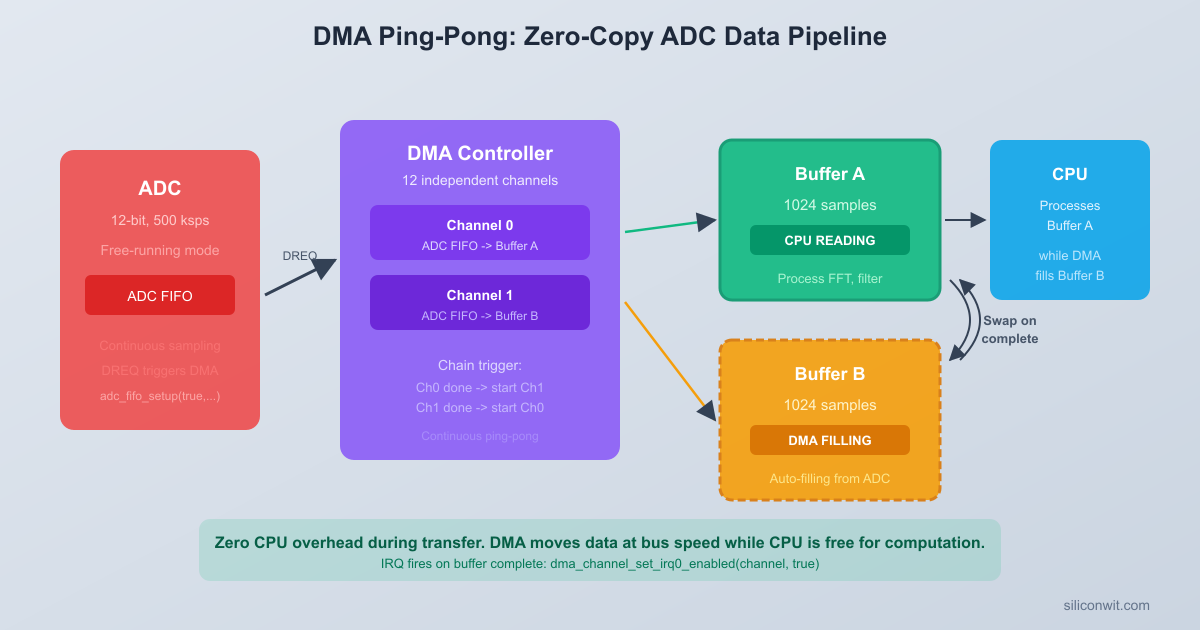
DMA Ping-Pong Audio Pipeline
┌─────────┐ DREQ_ADC ┌──────────────────┐
│ ADC ├────────────>│ DMA Channel 0 │
│ FIFO │ paced by │ Write to Buf A │
│ (8 kHz) │ ADC clock │ (1024 samples) │
└─────────┘ └────────┬─────────┘
chain │ on complete
┌────────v─────────┐
│ DMA Channel 1 │
│ Write to Buf B │
│ (1024 samples) │
└────────┬─────────┘
chain │ back to Ch0
┌────────v─────────┐
│ CPU writes the │
│ filled buffer │
│ to SPI flash │
└──────────────────┘

DMA Channel Registers

Each of the 12 channels has four core registers:

RegisterPurpose
READ_ADDRSource address. The DMA reads data from here.
WRITE_ADDRDestination address. The DMA writes data here.
TRANS_COUNTNumber of transfers to perform before completion.
CTRL / CTRL_TRIGControl register: data size, increment settings, DREQ source, chain target, IRQ enable. Writing CTRL_TRIG also starts the transfer.

The control register packs several fields. The most important ones for this lesson:

FieldBitsDescription
DATA_SIZE1:0Transfer width: 0 = byte, 1 = halfword (16-bit), 2 = word (32-bit)
INCR_READ4If set, increment READ_ADDR after each transfer
INCR_WRITE5If set, increment WRITE_ADDR after each transfer
TREQ_SEL20:15Transfer request signal (DREQ) that paces the channel
CHAIN_TO24:21Channel number to trigger when this channel completes
IRQ_QUIET21If clear, raise an interrupt when transfer completes

Transfer Request Signals (DREQ)

A DMA channel does not necessarily run at full bus speed. The TREQ_SEL field selects a pacing signal, so the channel only transfers one data element each time the chosen peripheral asserts its DREQ line. This prevents the DMA from overrunning a peripheral’s FIFO.

Common DREQ assignments on the RP2040:

DREQ ValueSignalTypical Use
0DREQ_PIO0_TX0PIO0 state machine 0 TX FIFO
4DREQ_PIO1_TX0PIO1 state machine 0 TX FIFO
16DREQ_SPI0_TXSPI0 transmit FIFO
17DREQ_SPI0_RXSPI0 receive FIFO
18DREQ_SPI1_TXSPI1 transmit FIFO
19DREQ_SPI1_RXSPI1 receive FIFO
24DREQ_ADCADC FIFO has data ready
0x3FDREQ_FORCEUnpaced (transfer as fast as possible)

For audio sampling, DREQ_ADC is the key signal. Each time the ADC completes a conversion and places a result in its FIFO, it asserts this DREQ line, and the DMA transfers exactly one sample.

Pacing Timers

The RP2040 DMA block also contains four pacing timers (timers 0 through 3). Each timer divides the system clock by a programmable ratio and can serve as a DREQ source. This is useful when you want DMA to run at a specific rate that is not tied to any particular peripheral. You configure a pacing timer by writing a numerator and denominator to its register: the timer asserts its DREQ at a rate of (sys_clk * numerator) / denominator Hz.

For ADC sampling at a fixed rate, we will use the ADC’s own clock divider rather than a DMA pacing timer. The ADC peripheral has a DIV register that controls how many clock cycles pass between conversions. This is more precise for audio work because the ADC DREQ fires exactly when a new sample is ready.

ADC with DMA Pacing


The RP2040’s ADC can run in free-running mode, where it continuously converts and pushes results into a 4-entry FIFO. When the FIFO contains at least one sample, the ADC asserts DREQ_ADC. A DMA channel configured with TREQ_SEL = DREQ_ADC will then read one sample from the ADC FIFO register each time a conversion completes.

ADC Clock Divider

The ADC runs at 48 MHz and needs 96 cycles per conversion, giving a maximum rate of 500 kHz. To sample at 8 kHz, we set the clock divider:

divider = (48,000,000 / 96) / 8000 - 1 = 624 - 1 = 623

Calling adc_set_clkdiv(623.0f) inserts 623 extra cycles between conversions, yielding one sample every 125 microseconds (8 kHz).

ADC FIFO Configuration

The adc_fifo_setup() function configures the ADC FIFO behavior:

adc_fifo_setup(
true, // Enable FIFO
true, // Enable DMA requests (assert DREQ_ADC when FIFO not empty)
1, // DREQ threshold: assert when at least 1 sample in FIFO
false, // Do not report conversion errors in FIFO
false // Do not reduce samples to 8-bit (keep full 12-bit)
);

The DMA read address points to the ADC FIFO register at &adc_hw->fifo. Since this is a hardware register, the read address must not increment. The write address points into a RAM buffer and must increment after each transfer.

// Minimal ADC + DMA setup (single channel, no chaining yet)
#define SAMPLE_COUNT 1024
uint16_t sample_buffer[SAMPLE_COUNT];
int dma_chan = dma_claim_unused_channel(true);
dma_channel_config cfg = dma_channel_get_default_config(dma_chan);
channel_config_set_transfer_data_size(&cfg, DMA_SIZE_16); // 16-bit transfers
channel_config_set_read_increment(&cfg, false); // Fixed read address (ADC FIFO)
channel_config_set_write_increment(&cfg, true); // Increment through buffer
channel_config_set_dreq(&cfg, DREQ_ADC); // Paced by ADC
dma_channel_configure(
dma_chan,
&cfg,
sample_buffer, // Write address (destination)
&adc_hw->fifo, // Read address (source)
SAMPLE_COUNT, // Number of transfers
false // Do not start yet
);

When you call dma_channel_start(dma_chan) followed by adc_run(true), the ADC begins converting at 8 kHz and the DMA silently fills sample_buffer with 1024 samples. The CPU can do other work, then check dma_channel_is_busy(dma_chan) or wait on an interrupt.

Ping-Pong Double Buffering


A single DMA buffer creates a problem: once it fills, you need to process the data and restart the DMA. During that processing gap, any new ADC samples are lost. The solution is double buffering (also called ping-pong buffering), where two DMA channels alternate between two buffers.

How Channel Chaining Works

Each DMA channel has a chain_to field in its control register. When a channel finishes its transfer count, it triggers the channel specified by chain_to. If channel A chains to channel B, and channel B chains back to channel A, you get an automatic alternating pattern:

  1. Channel A starts, filling Buffer A from the ADC FIFO.
  2. Channel A finishes its 1024 transfers and fires an interrupt. It then triggers Channel B via chain_to.
  3. Channel B immediately starts filling Buffer B. No samples are lost because the handoff is instantaneous in hardware.
  4. While Channel B fills, the CPU processes (or writes to flash) the completed Buffer A.
  5. Channel B finishes, fires an interrupt, and triggers Channel A again via its own chain_to.
  6. The cycle repeats indefinitely until the CPU disables both channels.

Configuring the Ping-Pong Pair

#define BUF_SIZE 1024
uint16_t buf_a[BUF_SIZE];
uint16_t buf_b[BUF_SIZE];
int chan_a = dma_claim_unused_channel(true);
int chan_b = dma_claim_unused_channel(true);
// Configure Channel A
dma_channel_config cfg_a = dma_channel_get_default_config(chan_a);
channel_config_set_transfer_data_size(&cfg_a, DMA_SIZE_16);
channel_config_set_read_increment(&cfg_a, false);
channel_config_set_write_increment(&cfg_a, true);
channel_config_set_dreq(&cfg_a, DREQ_ADC);
channel_config_set_chain_to(&cfg_a, chan_b); // When done, trigger Channel B
dma_channel_configure(chan_a, &cfg_a,
buf_a, // Write to Buffer A
&adc_hw->fifo, // Read from ADC FIFO
BUF_SIZE, // Transfer count
false // Don't start yet
);
// Configure Channel B
dma_channel_config cfg_b = dma_channel_get_default_config(chan_b);
channel_config_set_transfer_data_size(&cfg_b, DMA_SIZE_16);
channel_config_set_read_increment(&cfg_b, false);
channel_config_set_write_increment(&cfg_b, true);
channel_config_set_dreq(&cfg_b, DREQ_ADC);
channel_config_set_chain_to(&cfg_b, chan_a); // When done, trigger Channel A
dma_channel_configure(chan_b, &cfg_b,
buf_b, // Write to Buffer B
&adc_hw->fifo, // Read from ADC FIFO
BUF_SIZE, // Transfer count
false // Don't start yet
);

The critical detail: when a chained channel is triggered, it reloads its own write address and transfer count from its configuration registers. This means Channel A always writes to buf_a and Channel B always writes to buf_b, no matter how many times they cycle.

DMA Interrupts

Both channels need to raise an interrupt when they finish, so the CPU knows which buffer is ready for processing:

// Enable IRQ0 for both channels
dma_channel_set_irq0_enabled(chan_a, true);
dma_channel_set_irq0_enabled(chan_b, true);
irq_set_exclusive_handler(DMA_IRQ_0, dma_irq_handler);
irq_set_enabled(DMA_IRQ_0, true);

The interrupt handler checks which channel completed and sets a flag:

volatile int buffer_ready = -1; // -1 = none, 0 = buf_a ready, 1 = buf_b ready
void dma_irq_handler(void) {
if (dma_hw->ints0 & (1u << chan_a)) {
dma_hw->ints0 = 1u << chan_a; // Clear interrupt
buffer_ready = 0; // Buffer A is complete
}
if (dma_hw->ints0 & (1u << chan_b)) {
dma_hw->ints0 = 1u << chan_b; // Clear interrupt
buffer_ready = 1; // Buffer B is complete
}
}

SPI Flash Driver


The W25Q32 is a 4 MB SPI NOR flash chip. It communicates over standard SPI at up to 80 MHz. For audio storage, we need three operations: sector erase, page program (write), and read.

W25Q32 Command Reference

CommandOpcodeDescription
Write Enable0x06Must be sent before every program or erase
Page Program0x02Write up to 256 bytes to a page
Read Data0x03Read continuous bytes starting at an address
Sector Erase0x20Erase 4 KB sector (sets all bits to 1)
Read Status Register 10x05Bit 0 (BUSY) indicates operation in progress
Chip Erase0xC7Erase the entire chip (takes several seconds)

Flash Constraints

Flash memory has two important constraints. First, you can only write to erased memory. An erased byte is 0xFF, and programming can only change bits from 1 to 0. Second, erasing happens in 4 KB sectors (the smallest erasable unit). Page programming writes up to 256 bytes at a time. These constraints shape how we organize our recording: we erase sectors ahead of time and write in 256-byte pages.

Minimal SPI Flash Driver

// Pin definitions for SPI flash (using SPI1)
#define FLASH_SPI spi1
#define FLASH_SCK 10
#define FLASH_MOSI 11
#define FLASH_MISO 12
#define FLASH_CS 13
// W25Q commands
#define W25Q_CMD_WRITE_ENABLE 0x06
#define W25Q_CMD_PAGE_PROGRAM 0x02
#define W25Q_CMD_READ_DATA 0x03
#define W25Q_CMD_SECTOR_ERASE 0x20
#define W25Q_CMD_READ_STATUS 0x05
#define W25Q_CMD_CHIP_ERASE 0xC7
static inline void flash_cs_select(void) {
gpio_put(FLASH_CS, 0);
}
static inline void flash_cs_deselect(void) {
gpio_put(FLASH_CS, 1);
}
void flash_spi_init(void) {
spi_init(FLASH_SPI, 10 * 1000 * 1000); // 10 MHz
gpio_set_function(FLASH_SCK, GPIO_FUNC_SPI);
gpio_set_function(FLASH_MOSI, GPIO_FUNC_SPI);
gpio_set_function(FLASH_MISO, GPIO_FUNC_SPI);
gpio_init(FLASH_CS);
gpio_set_dir(FLASH_CS, GPIO_OUT);
gpio_put(FLASH_CS, 1); // Deselect
}
void flash_wait_busy(void) {
uint8_t cmd = W25Q_CMD_READ_STATUS;
uint8_t status;
do {
flash_cs_select();
spi_write_blocking(FLASH_SPI, &cmd, 1);
spi_read_blocking(FLASH_SPI, 0, &status, 1);
flash_cs_deselect();
} while (status & 0x01); // Bit 0 = BUSY
}
void flash_write_enable(void) {
uint8_t cmd = W25Q_CMD_WRITE_ENABLE;
flash_cs_select();
spi_write_blocking(FLASH_SPI, &cmd, 1);
flash_cs_deselect();
}
void flash_sector_erase(uint32_t addr) {
flash_write_enable();
uint8_t cmd[4] = {
W25Q_CMD_SECTOR_ERASE,
(addr >> 16) & 0xFF,
(addr >> 8) & 0xFF,
addr & 0xFF
};
flash_cs_select();
spi_write_blocking(FLASH_SPI, cmd, 4);
flash_cs_deselect();
flash_wait_busy(); // Sector erase takes ~45 ms typical
}
void flash_page_program(uint32_t addr, const uint8_t *data, size_t len) {
if (len > 256) len = 256; // Page size limit
flash_write_enable();
uint8_t cmd[4] = {
W25Q_CMD_PAGE_PROGRAM,
(addr >> 16) & 0xFF,
(addr >> 8) & 0xFF,
addr & 0xFF
};
flash_cs_select();
spi_write_blocking(FLASH_SPI, cmd, 4);
spi_write_blocking(FLASH_SPI, data, len);
flash_cs_deselect();
flash_wait_busy(); // Page program takes ~0.7 ms typical
}
void flash_read(uint32_t addr, uint8_t *data, size_t len) {
uint8_t cmd[4] = {
W25Q_CMD_READ_DATA,
(addr >> 16) & 0xFF,
(addr >> 8) & 0xFF,
addr & 0xFF
};
flash_cs_select();
spi_write_blocking(FLASH_SPI, cmd, 4);
spi_read_blocking(FLASH_SPI, 0, data, len);
flash_cs_deselect();
}
void flash_chip_erase(void) {
flash_write_enable();
uint8_t cmd = W25Q_CMD_CHIP_ERASE;
flash_cs_select();
spi_write_blocking(FLASH_SPI, &cmd, 1);
flash_cs_deselect();
flash_wait_busy(); // Full chip erase takes ~10-25 seconds
}

The flash write functions include flash_wait_busy() calls, which block until the flash chip finishes its internal operation. During recording, the CPU calls these functions on the completed ping-pong buffer while the DMA fills the other buffer. Since a page program takes about 0.7 ms and we get a new 2048-byte buffer every 128 ms (1024 samples at 8 kHz), there is plenty of time.

Complete Project Code


The following is the full source for the audio sampler. It combines the ADC, DMA ping-pong, SPI flash driver, and PWM playback into a single program.

audio_sampler.c
// Audio recorder using DMA ping-pong buffering with ADC and SPI flash storage
#include <stdio.h>
#include <string.h>
#include "pico/stdlib.h"
#include "hardware/dma.h"
#include "hardware/adc.h"
#include "hardware/spi.h"
#include "hardware/pwm.h"
#include "hardware/irq.h"
#include "hardware/gpio.h"
// -------------------------------------------------------
// Pin Definitions
// -------------------------------------------------------
#define MIC_PIN 26 // ADC0 input (microphone)
#define BUTTON_PIN 10 // Record start/stop button
#define PWM_PIN 18 // PWM audio output
#define LED_PIN 25 // Onboard LED (recording indicator)
// SPI Flash Pins (SPI1)
#define FLASH_SPI spi1
#define FLASH_SCK_PIN 14
#define FLASH_MOSI_PIN 15
#define FLASH_MISO_PIN 12
#define FLASH_CS_PIN 13
// -------------------------------------------------------
// Audio Parameters
// -------------------------------------------------------
#define SAMPLE_RATE 8000
#define BUF_SIZE 1024 // Samples per buffer
#define BUF_BYTES (BUF_SIZE * 2) // Bytes per buffer (16-bit samples)
// Flash storage parameters
#define FLASH_MAX_ADDR 0x400000 // 4 MB total
#define FLASH_SECTOR_SIZE 4096
#define FLASH_PAGE_SIZE 256
// W25Q command opcodes
#define CMD_WRITE_ENABLE 0x06
#define CMD_PAGE_PROGRAM 0x02
#define CMD_READ_DATA 0x03
#define CMD_SECTOR_ERASE 0x20
#define CMD_READ_STATUS 0x05
#define CMD_CHIP_ERASE 0xC7
#define CMD_JEDEC_ID 0x9F
// -------------------------------------------------------
// Global State
// -------------------------------------------------------
uint16_t buf_a[BUF_SIZE];
uint16_t buf_b[BUF_SIZE];
int dma_chan_a = -1;
int dma_chan_b = -1;
volatile int buffer_ready = -1; // -1 = none, 0 = A ready, 1 = B ready
volatile bool recording = false;
uint32_t flash_write_addr = 0;
uint32_t flash_read_addr = 0;
uint32_t recorded_length = 0; // Total bytes recorded
// -------------------------------------------------------
// SPI Flash Driver
// -------------------------------------------------------
static inline void cs_select(void) {
gpio_put(FLASH_CS_PIN, 0);
}
static inline void cs_deselect(void) {
gpio_put(FLASH_CS_PIN, 1);
}
void flash_init(void) {
spi_init(FLASH_SPI, 10 * 1000 * 1000);
gpio_set_function(FLASH_SCK_PIN, GPIO_FUNC_SPI);
gpio_set_function(FLASH_MOSI_PIN, GPIO_FUNC_SPI);
gpio_set_function(FLASH_MISO_PIN, GPIO_FUNC_SPI);
gpio_init(FLASH_CS_PIN);
gpio_set_dir(FLASH_CS_PIN, GPIO_OUT);
gpio_put(FLASH_CS_PIN, 1);
}
void flash_wait_done(void) {
uint8_t cmd = CMD_READ_STATUS;
uint8_t status;
do {
cs_select();
spi_write_blocking(FLASH_SPI, &cmd, 1);
spi_read_blocking(FLASH_SPI, 0, &status, 1);
cs_deselect();
} while (status & 0x01);
}
void flash_write_enable(void) {
uint8_t cmd = CMD_WRITE_ENABLE;
cs_select();
spi_write_blocking(FLASH_SPI, &cmd, 1);
cs_deselect();
}
void flash_sector_erase(uint32_t addr) {
flash_write_enable();
uint8_t cmd[4] = {
CMD_SECTOR_ERASE,
(addr >> 16) & 0xFF,
(addr >> 8) & 0xFF,
addr & 0xFF
};
cs_select();
spi_write_blocking(FLASH_SPI, cmd, 4);
cs_deselect();
flash_wait_done();
}
void flash_page_program(uint32_t addr, const uint8_t *data, size_t len) {
if (len > FLASH_PAGE_SIZE) len = FLASH_PAGE_SIZE;
flash_write_enable();
uint8_t cmd[4] = {
CMD_PAGE_PROGRAM,
(addr >> 16) & 0xFF,
(addr >> 8) & 0xFF,
addr & 0xFF
};
cs_select();
spi_write_blocking(FLASH_SPI, cmd, 4);
spi_write_blocking(FLASH_SPI, data, len);
cs_deselect();
flash_wait_done();
}
void flash_read_data(uint32_t addr, uint8_t *data, size_t len) {
uint8_t cmd[4] = {
CMD_READ_DATA,
(addr >> 16) & 0xFF,
(addr >> 8) & 0xFF,
addr & 0xFF
};
cs_select();
spi_write_blocking(FLASH_SPI, cmd, 4);
spi_read_blocking(FLASH_SPI, 0, data, len);
cs_deselect();
}
uint32_t flash_read_jedec_id(void) {
uint8_t cmd = CMD_JEDEC_ID;
uint8_t id[3];
cs_select();
spi_write_blocking(FLASH_SPI, &cmd, 1);
spi_read_blocking(FLASH_SPI, 0, id, 3);
cs_deselect();
return (id[0] << 16) | (id[1] << 8) | id[2];
}
// Write a full buffer (BUF_BYTES) to flash, handling sector erases and page boundaries
void flash_write_buffer(const uint8_t *data, size_t total_len) {
size_t written = 0;
while (written < total_len) {
uint32_t addr = flash_write_addr + written;
// If we are at a sector boundary, erase the sector first
if ((addr % FLASH_SECTOR_SIZE) == 0) {
flash_sector_erase(addr);
}
// Calculate how many bytes we can write in this page
size_t page_offset = addr % FLASH_PAGE_SIZE;
size_t page_remaining = FLASH_PAGE_SIZE - page_offset;
size_t chunk = total_len - written;
if (chunk > page_remaining) chunk = page_remaining;
flash_page_program(addr, data + written, chunk);
written += chunk;
}
flash_write_addr += total_len;
}
// -------------------------------------------------------
// DMA Interrupt Handler
// -------------------------------------------------------
void dma_irq_handler(void) {
if (dma_hw->ints0 & (1u << dma_chan_a)) {
dma_hw->ints0 = 1u << dma_chan_a; // Clear interrupt flag
buffer_ready = 0; // Buffer A is full
}
if (dma_hw->ints0 & (1u << dma_chan_b)) {
dma_hw->ints0 = 1u << dma_chan_b; // Clear interrupt flag
buffer_ready = 1; // Buffer B is full
}
}
// -------------------------------------------------------
// ADC and DMA Setup
// -------------------------------------------------------
void adc_dma_init(void) {
// Initialize ADC
adc_init();
adc_gpio_init(MIC_PIN);
adc_select_input(0); // ADC0 = GP26
// Set sample rate: 48 MHz / 96 = 500 kHz max rate
// For 8 kHz: divider = 500000 / 8000 - 1 = 61.5 (using adc_set_clkdiv which adds 1)
// More precisely: 48000000 / (96 * 8000) = 62.5, so clkdiv = 62.5 - 1 = 61.5
// But the SDK function expects the full divider value
float clkdiv = (48000000.0f / 8000.0f / 96.0f) - 1.0f;
adc_set_clkdiv(clkdiv);
adc_fifo_setup(
true, // Enable FIFO
true, // Enable DREQ
1, // DREQ asserted when at least 1 sample in FIFO
false, // No error bit
false // Keep full 12-bit samples (no 8-bit shift)
);
// Claim two DMA channels
dma_chan_a = dma_claim_unused_channel(true);
dma_chan_b = dma_claim_unused_channel(true);
// Configure Channel A
dma_channel_config cfg_a = dma_channel_get_default_config(dma_chan_a);
channel_config_set_transfer_data_size(&cfg_a, DMA_SIZE_16);
channel_config_set_read_increment(&cfg_a, false);
channel_config_set_write_increment(&cfg_a, true);
channel_config_set_dreq(&cfg_a, DREQ_ADC);
channel_config_set_chain_to(&cfg_a, dma_chan_b);
dma_channel_configure(dma_chan_a, &cfg_a,
buf_a, // Destination
&adc_hw->fifo, // Source
BUF_SIZE, // Transfer count
false // Don't start yet
);
// Configure Channel B
dma_channel_config cfg_b = dma_channel_get_default_config(dma_chan_b);
channel_config_set_transfer_data_size(&cfg_b, DMA_SIZE_16);
channel_config_set_read_increment(&cfg_b, false);
channel_config_set_write_increment(&cfg_b, true);
channel_config_set_dreq(&cfg_b, DREQ_ADC);
channel_config_set_chain_to(&cfg_b, dma_chan_a);
dma_channel_configure(dma_chan_b, &cfg_b,
buf_b, // Destination
&adc_hw->fifo, // Source
BUF_SIZE, // Transfer count
false // Don't start yet
);
// Enable interrupts for both channels on IRQ0
dma_channel_set_irq0_enabled(dma_chan_a, true);
dma_channel_set_irq0_enabled(dma_chan_b, true);
irq_set_exclusive_handler(DMA_IRQ_0, dma_irq_handler);
irq_set_enabled(DMA_IRQ_0, true);
}
// -------------------------------------------------------
// Recording Control
// -------------------------------------------------------
void start_recording(void) {
printf("Recording started...\n");
recording = true;
flash_write_addr = 0;
recorded_length = 0;
buffer_ready = -1;
gpio_put(LED_PIN, 1); // LED on = recording
// Drain any leftover ADC FIFO entries
adc_fifo_drain();
// Start Channel A, which will chain to B when done
dma_channel_start(dma_chan_a);
adc_run(true);
}
void stop_recording(void) {
adc_run(false);
adc_fifo_drain();
// Abort both DMA channels
dma_channel_abort(dma_chan_a);
dma_channel_abort(dma_chan_b);
recorded_length = flash_write_addr;
recording = false;
buffer_ready = -1;
gpio_put(LED_PIN, 0); // LED off
printf("Recording stopped. %u bytes stored.\n", (unsigned)recorded_length);
}
// -------------------------------------------------------
// PWM Playback
// -------------------------------------------------------
void pwm_audio_init(void) {
gpio_set_function(PWM_PIN, GPIO_FUNC_PWM);
uint slice = pwm_gpio_to_slice_num(PWM_PIN);
uint channel = pwm_gpio_to_channel(PWM_PIN);
// Configure PWM for audio output
// Wrap at 4095 to match 12-bit ADC range
pwm_set_wrap(slice, 4095);
pwm_set_chan_level(slice, channel, 0);
pwm_set_enabled(slice, true);
}
void play_recording(void) {
if (recorded_length == 0) {
printf("No recording to play.\n");
return;
}
printf("Playing back %u bytes...\n", (unsigned)recorded_length);
gpio_put(LED_PIN, 1);
uint slice = pwm_gpio_to_slice_num(PWM_PIN);
uint channel = pwm_gpio_to_channel(PWM_PIN);
uint8_t page_buf[FLASH_PAGE_SIZE];
uint32_t addr = 0;
while (addr < recorded_length) {
size_t chunk = recorded_length - addr;
if (chunk > FLASH_PAGE_SIZE) chunk = FLASH_PAGE_SIZE;
flash_read_data(addr, page_buf, chunk);
// Output samples via PWM
for (size_t i = 0; i + 1 < chunk; i += 2) {
uint16_t sample = page_buf[i] | (page_buf[i + 1] << 8);
sample &= 0x0FFF; // Mask to 12 bits
pwm_set_chan_level(slice, channel, sample);
// Wait for one sample period (125 us at 8 kHz)
sleep_us(125);
}
addr += chunk;
}
// Silence output after playback
pwm_set_chan_level(slice, channel, 0);
gpio_put(LED_PIN, 0);
printf("Playback complete.\n");
}
// -------------------------------------------------------
// Button Handling
// -------------------------------------------------------
void button_init(void) {
gpio_init(BUTTON_PIN);
gpio_set_dir(BUTTON_PIN, GPIO_IN);
gpio_pull_up(BUTTON_PIN);
}
bool button_pressed(void) {
static bool last_state = true; // Pull-up: idle = high
static uint32_t debounce_time = 0;
bool current = gpio_get(BUTTON_PIN);
if (current != last_state) {
if (time_us_32() - debounce_time > 200000) { // 200 ms debounce
debounce_time = time_us_32();
last_state = current;
if (!current) { // Button pressed (active low)
return true;
}
}
}
return false;
}
// -------------------------------------------------------
// Main
// -------------------------------------------------------
int main(void) {
stdio_init_all();
sleep_ms(2000); // Wait for USB serial to connect
printf("=== RP2040 Audio Sampler ===\n");
// Initialize LED
gpio_init(LED_PIN);
gpio_set_dir(LED_PIN, GPIO_OUT);
gpio_put(LED_PIN, 0);
// Initialize peripherals
button_init();
flash_init();
pwm_audio_init();
adc_dma_init();
// Verify flash chip
uint32_t jedec_id = flash_read_jedec_id();
printf("Flash JEDEC ID: 0x%06X\n", jedec_id);
if ((jedec_id & 0xFF0000) == 0) {
printf("WARNING: Flash not detected. Check wiring.\n");
}
printf("Press button to start/stop recording.\n");
printf("Press and hold for 2s to play back.\n");
uint32_t press_start = 0;
bool held = false;
while (true) {
// Handle button presses
if (button_pressed()) {
press_start = time_us_32();
held = false;
}
// Detect long press for playback (button held > 1.5 seconds)
if (!gpio_get(BUTTON_PIN) && press_start != 0 && !held) {
if (time_us_32() - press_start > 1500000) {
held = true;
if (!recording) {
play_recording();
}
press_start = 0;
}
}
// Short press toggles recording
if (gpio_get(BUTTON_PIN) && press_start != 0 && !held) {
if (time_us_32() - press_start > 50000) { // Debounce
if (recording) {
stop_recording();
} else {
start_recording();
}
press_start = 0;
}
}
// Process completed DMA buffers during recording
if (recording && buffer_ready >= 0) {
int buf_idx = buffer_ready;
buffer_ready = -1;
uint8_t *data;
if (buf_idx == 0) {
data = (uint8_t *)buf_a;
} else {
data = (uint8_t *)buf_b;
}
// Check if we have space in flash
if (flash_write_addr + BUF_BYTES > FLASH_MAX_ADDR) {
printf("Flash full!\n");
stop_recording();
continue;
}
// Write the completed buffer to flash
flash_write_buffer(data, BUF_BYTES);

}
tight_loop_contents();
}
return 0;
}

Project Structure


  • Directoryaudio_sampler/
    • CMakeLists.txt
    • audio_sampler.c
    • pico_sdk_import.cmake
    • Directorybuild/
      • audio_sampler.uf2

Build and Flash


The CMakeLists.txt for this project links the hardware libraries for ADC, DMA, SPI, PWM, and IRQ:

cmake_minimum_required(VERSION 3.13)
include(pico_sdk_import.cmake)
project(audio_sampler C CXX ASM)
set(CMAKE_C_STANDARD 11)
set(CMAKE_CXX_STANDARD 17)
pico_sdk_init()
add_executable(audio_sampler
audio_sampler.c
)
target_link_libraries(audio_sampler
pico_stdlib
hardware_dma
hardware_adc
hardware_spi
hardware_pwm
hardware_irq
hardware_gpio
)
# Enable USB serial output, disable UART
pico_enable_stdio_usb(audio_sampler 1)
pico_enable_stdio_uart(audio_sampler 0)
pico_add_extra_outputs(audio_sampler)

Copy pico_sdk_import.cmake from the Pico SDK’s external directory into your project folder, then build:

Terminal window
mkdir build && cd build
cmake -DPICO_SDK_PATH=/path/to/pico-sdk ..
make -j4

The build produces audio_sampler.uf2 in the build directory.

  1. Hold the BOOTSEL button on the Pico and plug it into USB. It appears as a mass storage drive called RPI-RP2.
  2. Drag audio_sampler.uf2 onto the RPI-RP2 drive. The Pico reboots and starts the program.
  3. Open a serial terminal (minicom, PuTTY, or screen /dev/ttyACM0 115200) to see status messages.

Wiring Summary

Audio Sampler Circuit
┌──────────────────┐
│ Pico │ ┌─────────────┐
│ GP26 (ADC0) ────┼───────┤ Mic Module │
│ │ │ (MAX4466) │
│ GP10 ───────────┼─┤BTN├─┤ GND │
│ │ └─────────────┘
│ GP18 ───────────┼──── Speaker/Buzzer
│ │
│ GP14 (SCK) ─────┼──┐ ┌─────────────┐
│ GP15 (MOSI) ────┼──┼───┤ W25Q32 │
│ GP12 (MISO) ────┼──┼───┤ SPI Flash │
│ GP13 (CS) ──────┼──┘ │ (4 MB) │
│ │ └─────────────┘
│ 3V3, GND ───────┼──── Power rails
└───────┤├─────────┘
Pico PinConnectionNotes
GP26 (ADC0)Microphone OUTAnalog signal from MAX4466/MAX9814
GP10ButtonOther leg to GND (uses internal pull-up)
GP18Speaker/buzzerPWM audio output
GP14Flash SCKSPI1 clock
GP15Flash MOSISPI1 TX
GP12Flash MISOSPI1 RX
GP13Flash CSDirectly controlled as GPIO
3V3(OUT)Mic VCC, Flash VCCPower for both modules
GNDMic GND, Flash GND, ButtonCommon ground

How It Works


Here is the step-by-step flow of the DMA chain during a recording session:

  1. The user presses the button. start_recording() drains the ADC FIFO, starts DMA Channel A, and enables ADC free-running mode.
  2. The ADC converts one sample every 125 microseconds (8 kHz). Each conversion pushes a 12-bit value into the ADC FIFO and asserts DREQ_ADC.
  3. DMA Channel A responds to DREQ_ADC, reads one halfword (16 bits) from the ADC FIFO register, and writes it to the next position in buf_a. The read address stays fixed; the write address increments by 2 bytes.
  4. After 1024 transfers, Channel A has filled buf_a completely. The DMA hardware clears Channel A’s enable bit, fires an interrupt on DMA_IRQ_0, and triggers Channel B through the chain_to field.
  5. Channel B starts immediately. It reads from the same ADC FIFO register and writes into buf_b. No samples are lost because the chain trigger is a single-cycle hardware operation.
  6. The DMA interrupt handler sets buffer_ready = 0, signaling the main loop that buf_a contains valid data.
  7. The main loop detects buffer_ready == 0, casts buf_a to a byte pointer, and writes 2048 bytes to the SPI flash. It handles sector erases at 4 KB boundaries and splits writes into 256-byte pages.
  8. While the CPU writes buf_a to flash, Channel B continues filling buf_b in the background. At 8 kHz, filling 1024 samples takes 128 ms. Flash writes for 2048 bytes (eight 256-byte pages) take about 6 ms total. The CPU finishes well before the buffer fills.
  9. Channel B completes, fires an interrupt, and chains back to Channel A. The cycle continues.
  10. The user presses the button again. stop_recording() halts the ADC, aborts both DMA channels, and records the total byte count.

The critical timing constraint: the CPU must finish processing one buffer before the other buffer fills. At 8 kHz with 1024-sample buffers, each buffer takes 128 ms to fill. The flash writes take roughly 6 ms (eight pages at 0.7 ms each plus overhead). This leaves over 120 ms of margin, which is more than enough even if the CPU handles additional tasks.

Experiments


Try these modifications to deepen your understanding of DMA and the audio pipeline:

1. Increase the Sample Rate

Change the sample rate from 8 kHz to 16 kHz or even 44.1 kHz. You need to adjust the ADC clock divider (adc_set_clkdiv). At higher rates, the buffers fill faster, so check whether the flash writes still complete in time. At 44.1 kHz, each 1024-sample buffer fills in about 23 ms, which is still comfortable for flash page writes. Monitor the serial output to confirm no buffers are missed.

2. Add Simple Compression

The raw 12-bit samples are stored as 16-bit values, wasting 4 bits per sample. Implement ADPCM (Adaptive Differential Pulse Code Modulation) to compress the audio to 4 bits per sample, giving you 8x more recording time. The IMA ADPCM algorithm uses a step table and an index to encode differences between consecutive samples. Compress in the main loop before writing to flash, and decompress during playback.

3. Use DMA Pacing Timer Instead of ADC Clock Divider

Replace the ADC clock divider approach with a DMA pacing timer. Set the ADC to run at its maximum rate and configure one of the four DMA pacing timers (TREQ values 0x3B through 0x3E) to throttle the DMA transfers to 8 kHz. Compare the sample timing accuracy with an oscilloscope or by recording a known-frequency tone and checking the playback pitch.

4. Add a Recording Index

Reserve the first sector of flash (4 KB) as a directory that stores the start address, length, and timestamp of each recording. This lets you store multiple recordings and select which one to play back. Extend the button interface: single press for record, double press for playback of the latest clip, long press for playback of the next stored clip.

Comments

Loading comments...


© 2021-2026 SiliconWit®. All rights reserved.