Build complete robot simulations that bring together forward kinematics, inverse kinematics, Jacobian velocity control, and trajectory planning into one interactive Python framework. This final lesson walks through a multi-robot agricultural harvesting system, connecting every concept from the course to real applications in manufacturing, logistics, medicine, and agriculture. #RobotSimulation #PythonVisualization #AppliedRobotics
Learning Objectives
By the end of this lesson, you will be able to:
Build simulation framework combining FK, IK, Jacobian, and trajectory planning into one Python class
Animate robot motion using matplotlib FuncAnimation with real-time arm rendering and trajectory trails
Implement safety systems including joint limits, singularity avoidance, and workspace boundaries
Design multi-robot coordination for agricultural harvesting with collision-free task allocation
Apply robotics principles across manufacturing, logistics, medical, and agricultural domains
Real-World Engineering Challenge: Multi-Robot Agricultural Harvesting System
A precision agriculture company is deploying three 2R robot arms mounted on a mobile gantry to harvest ripe strawberries in a greenhouse row. Each robot must identify ripe fruit positions (provided by a vision system), plan collision-free reach trajectories, execute pick-and-place sequences to deposit fruit into collection bins, and coordinate with its neighbors so that no two arms collide in the shared workspace. The entire operation must run in real time with smooth, jerk-limited motion.
System Description
Multi-Robot Strawberry Harvesting Cell:
Three 2R Planar Arms mounted at fixed base positions along a gantry rail
Shared Workspace Region where adjacent arms can overlap
Vision System Feed providing (x, y) positions of ripe fruit
Collection Bins at each arm’s base for depositing harvested fruit
Cycle Time Target of 3 seconds per fruit (reach, pick, return, place)
The Simulation Challenge
Why Agricultural Robotics Is a Growing Field
Labor shortages in agriculture are accelerating the adoption of robotic harvesters worldwide. Strawberry harvesting is particularly challenging because the fruit is delicate, partially hidden by leaves, and ripens at different rates across a field. A successful harvesting robot must combine accurate positioning (kinematics), gentle contact (force control), and efficient sequencing (trajectory planning) with multi-robot coordination when scaling to commercial throughput. The simulation tools in this lesson form the foundation for prototyping and validating these systems before deployment.
Consequences of Poor Simulation Design
Without proper simulation:
Robots collide in shared workspace, damaging arms and crushing fruit
Singular configurations cause sudden velocity spikes that tear plants
Uncoordinated task allocation leaves some arms idle while others are overloaded
Joint limit violations stall motors and require manual resets
Operators cannot predict system behavior before field deployment
With a well-designed simulation framework:
All collision scenarios are detected and resolved before hardware testing
Smooth trajectories are verified visually and numerically
Task allocation is balanced and optimized in simulation
Safety limits are enforced at every time step
The entire system can be tuned and validated on a laptop
Fundamental Theory
Simulation vs. Animation
It is important to distinguish between simulation and animation, because they serve different purposes and require different computational approaches. A simulation computes the physical state of a system at each time step using mathematical models (kinematics, dynamics, constraints). An animation simply displays a sequence of frames, which may or may not come from a physics-based model. In robotics, we need simulation first and then use the computed states to drive the animation.
where is the joint angle vector, is the joint velocity vector, and is the time step.
What it does: Renders a visual representation of the robot at each frame, driven by simulation data.
Key characteristics:
Frame-based: renders at a fixed display rate (e.g., 30 FPS)
Visual only: does not compute physics, just draws geometry
May interpolate between simulation steps for smoother display
Uses matplotlib FuncAnimation for 2D robot arm visualization
Animation loop:
Building a Robot Simulation Framework in Python
A well-structured simulation framework encapsulates the robot model, state management, safety checks, and visualization into a single reusable class. This class brings together the forward kinematics, inverse kinematics, Jacobian analysis, and trajectory planning from earlier lessons into one coherent system.
Robot Class Architecture
The simulation class needs four core subsystems:
Kinematic Model
Store link lengths and compute FK, IK, and Jacobian as methods. These are the same equations derived in the earlier kinematics and Jacobian lessons.
State Management
Track the current joint angles , joint velocities , and end-effector position at every time step.
Safety and Constraint System
Enforce joint angle limits , check for proximity to singular configurations (), and verify that targets lie within the reachable workspace.
Visualization Engine
Render the robot arm, trajectory trail, workspace boundary, and safety zones using matplotlib.
Forward Kinematics
The end-effector position of a 2R planar arm:
Inverse Kinematics
Given a target , solve for joint angles:
Jacobian Matrix
The velocity relationship :
The determinant vanishes when or (fully extended or fully folded), indicating a singularity.
Visualization with matplotlib
The matplotlib library provides everything needed for 2D robot simulation visualization. The FuncAnimation class drives the animation loop, calling an update function at each frame to redraw the robot arm, trajectory trail, and workspace overlays. This approach is simple enough for educational use while being powerful enough to visualize complex multi-robot scenarios.
FuncAnimation Usage
The animation loop follows this structure:
import matplotlib.pyplot as plt
from matplotlib.animation import FuncAnimation
fig, ax = plt.subplots(figsize=(10, 10))
definit():
"""Set up the plot elements (called once)."""
ax.set_xlim(-3,3)
ax.set_ylim(-3,3)
ax.set_aspect('equal')
ax.grid(True,alpha=0.3)
return[]
defupdate(frame):
"""Update robot state and redraw (called every frame)."""
# 1. Advance simulation state
# 2. Compute FK for current joint angles
# 3. Redraw arm links and joints
# 4. Update trajectory trail
return[arm_line, joint_dots, trail_line]
anim =FuncAnimation(fig, update,init_func=init,
frames=num_frames,interval=33,blit=True)
plt.show()
Real-Time Arm Rendering
Each frame redraws the robot arm as connected line segments:
defdraw_arm(ax, theta1, theta2, L1, L2):
"""Draw 2R arm from base to end-effector."""
# Joint positions
x0, y0 =0.0, 0.0# base
x1 = L1 * np.cos(theta1)
y1 = L1 * np.sin(theta1)
x2 = x1 + L2 * np.cos(theta1 + theta2)
y2 = y1 + L2 * np.sin(theta1 + theta2)
# Draw links
arm_x =[x0, x1, x2]
arm_y =[y0, y1, y2]
arm_line.set_data(arm_x, arm_y)
# Draw joints as circles
joints.set_data([x0, x1, x2],[y0, y1, y2])
return x2, y2 # end-effector position
Trajectory Trails
Appending the end-effector position at each frame creates a trajectory trail:
trail_x, trail_y =[], []
defupdate_trail(ex, ey, max_points=200):
"""Add end-effector position to trail, trim to max length."""
trail_x.append(ex)
trail_y.append(ey)
iflen(trail_x) > max_points:
trail_x.pop(0)
trail_y.pop(0)
trail_line.set_data(trail_x, trail_y)
Workspace Overlay
Draw the workspace annulus (reachable region) as a visual reference:
The following Python class combines all concepts from Lessons 1 through 5 into a single simulation framework. It includes forward kinematics, inverse kinematics with solution selection, Jacobian computation with singularity detection, cubic polynomial trajectory generation, joint limit enforcement, and matplotlib-based visualization. This is the core building block for the multi-robot system that follows.
import numpy as np
import matplotlib.pyplot as plt
from matplotlib.animation import FuncAnimation
from matplotlib.patches import Circle
classRobot2R:
"""Complete 2R planar robot simulator.
Combines FK, IK, Jacobian, and trajectory planning from the
"""Return True if all joints are within limits."""
for i, (lo, hi) inenumerate(self.joint_limits):
if q[i] < lo or q[i] > hi:
returnFalse
returnTrue
defclamp_joints(self, q):
"""Clamp joint angles to their limits."""
q_clamped = q.copy()
for i, (lo, hi) inenumerate(self.joint_limits):
q_clamped[i] = np.clip(q[i], lo, hi)
return q_clamped
defis_in_workspace(self, target):
"""Check if a target position is within the reachable workspace."""
dx = target[0] -self.base[0]
dy = target[1] -self.base[1]
r = np.sqrt(dx**2+ dy**2)
returnself.r_inner < r <self.r_outer
# ---- State Update ----
defset_configuration(self, q):
"""Set joint angles (with limit enforcement)."""
self.q =self.clamp_joints(q)
ee, _ =self.forward_kinematics()
self.trail_x.append(ee[0])
self.trail_y.append(ee[1])
defreset_trail(self):
"""Clear the trajectory trail."""
self.trail_x =[]
self.trail_y =[]
Animated Pick-and-Place Demonstration
The following script creates an animated pick-and-place sequence for a single 2R robot. It plans a trajectory from a home configuration to a pick location, then to a place location, and back to home. The animation shows the arm moving, the end-effector trail, and the workspace boundary in real time.
import numpy as np
import matplotlib.pyplot as plt
from matplotlib.animation import FuncAnimation
# Create robot
robot =Robot2R(L1=1.0,L2=0.8,base=(0.0, 0.0))
# Define pick-and-place task
pick_position = np.array([1.2, 0.8])
place_position = np.array([-0.5, 1.0])
home_angles = np.array([np.pi /4, np.pi /4])
# Plan trajectory
trajectory = robot.plan_pick_and_place(
pick_position, place_position,
home_q=home_angles,steps_per_segment=40
)
if trajectory isNone:
print("Error: one or more targets are unreachable.")
When you run this script, a matplotlib window opens showing:
Green dashed circle: the outer workspace boundary ( m)
Red dashed circle: the inner workspace boundary ( m)
Red triangle: the pick location
Blue square: the place location
Dark arm with red joints: the 2R robot arm moving through the pick-and-place sequence
Blue trail: the path traced by the end-effector
The arm starts at the home configuration, smoothly moves to the pick position, then to the place position, and finally returns home. The motion is smooth at start and end of each segment because the cubic trajectory enforces zero-velocity boundary conditions.
ax.set_title('Workspace Manipulability Map with Safety Zones')
ax.legend(loc='upper right',fontsize=9)
ax.grid(True,alpha=0.2,color='white')
plt.tight_layout()
plt.show()
# Usage
robot =Robot2R(L1=1.0,L2=0.8)
visualize_workspace_safety(robot,resolution=150)
Practical Applications of Robotics
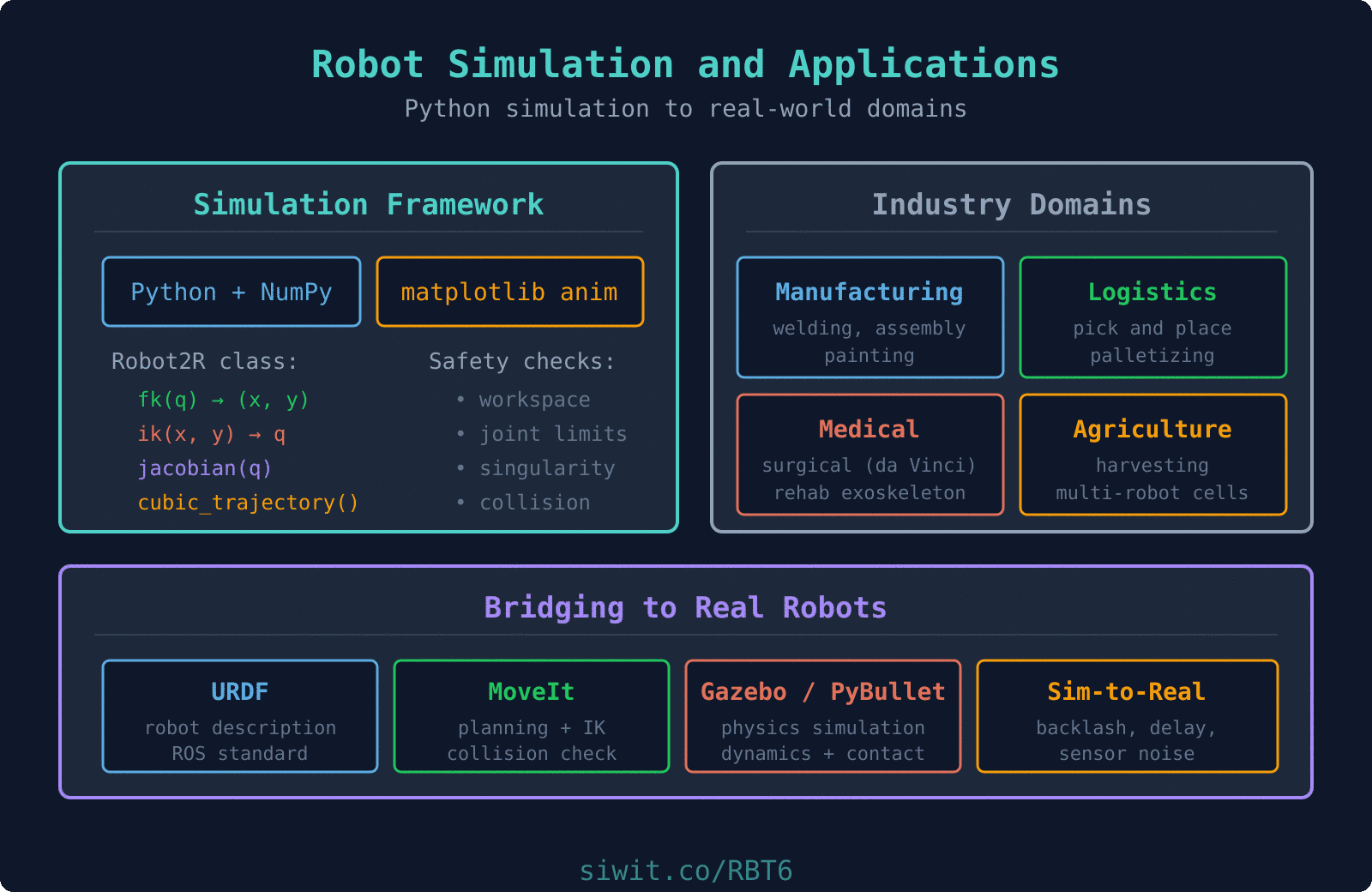
The kinematic principles, trajectory planning methods, and simulation tools developed throughout this course apply directly to real-world robotic systems across many industries. Each application domain has specific requirements, but the underlying mathematics is the same: FK to predict position, IK to reach targets, Jacobian for velocity control, and trajectory planning for smooth, safe motion.
Manufacturing
Assembly Lines: Robots place components with sub-millimeter precision using IK to reach exact mounting positions and trajectory planning for repeatable cycle times.
Welding: Seam tracking requires real-time Jacobian-based velocity control to maintain consistent torch speed along curved weld paths.
Painting: Spray robots follow complex surface contours using task-space trajectory planning with orientation control (quaternions applied to 6-DOF arms).
Key metrics: cycle time, positioning repeatability, throughput
Logistics and Warehousing
Warehouse Sorting: Pick-and-place robots sort thousands of packages per hour, using IK to reach varying bin positions and cubic trajectories for gentle handling.
Palletizing: Stacking robots plan layer patterns and compute IK solutions for each placement position, adjusting for pallet height as layers build up.
Order Picking: Mobile manipulators combine navigation with arm kinematics to retrieve items from shelving, requiring workspace analysis for reach planning.
Key metrics: picks per hour, error rate, package damage rate
Medical Robotics
Surgical Systems (e.g., da Vinci): Teleoperated arms use Jacobian-based resolved-rate control so surgeons can command end-effector velocity in task space while the system computes joint velocities.
Rehabilitation: Exoskeleton robots guide patient limbs along therapeutic trajectories using joint-space interpolation with force limits for safety.
Pharmacy Automation: Dispensing robots use precise IK solutions to pick medications from storage bins and place them in patient trays with zero-error requirements.
Key metrics: positioning accuracy, force limits, safety redundancy
Agriculture
Harvesting: Robots identify ripe fruit with vision systems and use IK to reach each fruit position. Gentle cubic trajectories prevent bruising.
Planting: Seed placement robots compute IK for precise soil positions along pre-planned rows, maintaining consistent depth and spacing.
Crop Monitoring: Arms mounted on rovers extend sensors into crop canopies, using workspace analysis to determine which plants are reachable from each rover position.
Key metrics: harvest rate, fruit damage rate, field coverage
Food Processing
Packaging: High-speed pick-and-place robots sort and package food items, requiring fast IK solutions and minimum-time trajectories.
Quality Inspection: Camera-equipped arms scan products from multiple angles, using FK to position the camera at precise inspection viewpoints.
Deboning and Cutting: Force-controlled arms follow complex 3D paths through variable-geometry products, combining trajectory planning with real-time Jacobian-based compliance.
A production-grade robot simulation must handle errors and enforce safety constraints at every time step. The four most important safety systems for a planar robot arm are joint limit checking, singularity avoidance, workspace boundary enforcement, and collision detection. In simulation, these checks prevent invalid states. On real hardware, they prevent damage, injury, or system failure.
Joint Limit Checking
Every motor has a physical rotation range. Exceeding it can damage gears, belts, or the motor itself.
defenforce_joint_limits(q, limits):
"""Clamp angles and return violation flag."""
q_safe = q.copy()
violated =False
for i, (lo, hi) inenumerate(limits):
if q[i] < lo:
q_safe[i] = lo
violated =True
elif q[i] > hi:
q_safe[i] = hi
violated =True
return q_safe, violated
Singularity Avoidance
When , the inverse Jacobian blows up, causing extreme joint velocities for small task-space commands.
The damped least-squares method (also called Levenberg-Marquardt for IK) adds a regularization term to the matrix before inversion. This ensures the matrix is always invertible, even at exact singularities. The trade-off is that the end-effector velocity will deviate slightly from the commanded direction near singularities, but the joint velocities remain bounded. The damping factor increases as the manipulability decreases, providing more regularization exactly where it is needed. This technique was introduced conceptually in the velocity-kinematics lesson and is now applied in the simulation framework.
Workspace Boundary Enforcement
Targets outside the reachable annulus must be rejected or projected onto the boundary.
"""Project an out-of-workspace target onto the nearest reachable point."""
d = target - base
r = np.linalg.norm(d)
if r <1e-10:
# Target is at the base; project to inner boundary
return base + np.array([r_inner + margin, 0.0])
direction = d / r
if r > r_outer - margin:
return base + direction * (r_outer - margin)
elif r < r_inner + margin:
return base + direction * (r_inner + margin)
else:
return target # already inside workspace
Collision Detection Basics
For multi-robot systems, check whether any link of one robot intersects any link of another.
defsegments_intersect(p1, p2, p3, p4):
"""Check if line segment (p1,p2) intersects segment (p3,p4).
Uses the cross-product orientation method.
"""
defcross2d(a, b):
return a[0] * b[1] - a[1] * b[0]
d1 = p2 - p1
d2 = p4 - p3
denom =cross2d(d1, d2)
ifabs(denom) <1e-10:
returnFalse# parallel segments
t =cross2d(p3 - p1, d2) / denom
u =cross2d(p3 - p1, d1) / denom
return0<= t <=1and0<= u <=1
defcheck_robot_collision(robot_a, robot_b):
"""Check if any links of two robots intersect."""
ee_a, elbow_a = robot_a.forward_kinematics()
ee_b, elbow_b = robot_b.forward_kinematics()
# Robot A segments: base->elbow, elbow->ee
seg_a =[(robot_a.base, elbow_a), (elbow_a, ee_a)]
# Robot B segments: base->elbow, elbow->ee
seg_b =[(robot_b.base, elbow_b), (elbow_b, ee_b)]
for (a1, a2) in seg_a:
for (b1, b2) in seg_b:
ifsegments_intersect(a1, a2, b1, b2):
returnTrue
returnFalse
System Application: Multi-Robot Agricultural Harvesting
Now we bring everything together into the multi-robot strawberry harvesting system described in the engineering challenge. Three 2R arms are mounted along a gantry, each with its own workspace. A set of fruit positions is provided by the vision system. The simulation allocates fruit to the nearest available robot, plans collision-free trajectories, and animates the entire sequence.
Task Allocation Strategy
Each fruit is assigned to the robot whose base is closest, provided the fruit is within that robot’s workspace. If a fruit falls in the overlap zone between two robots, it is assigned to the one with higher manipulability at that point (better dexterity means faster, more accurate motion).
# Generate fruit positions (scattered in the harvesting zone)
np.random.seed(42)
num_fruit =12
fruit_x = np.random.uniform(-3.5,3.5, num_fruit)
fruit_y = np.random.uniform(0.5,1.8, num_fruit)
fruit_positions =[np.array([fx, fy]) for fx, fy inzip(fruit_x, fruit_y)]
# Create and run harvesting cell
cell =HarvestingCell()
cell.animate(fruit_positions)
What the simulation shows
The animation displays three robot arms (red, green, blue) mounted along a horizontal gantry. Red dots scattered in the upper half of the frame represent strawberries. Colored rectangles below each base represent collection bins.
Each arm reaches for its assigned fruit, picks it, deposits it in the bin, and returns home before moving to the next fruit. The trajectory trails show the end-effector paths in each arm’s color. The status bar shows the frame count, fruit allocation per robot, and a collision warning if any arms intersect.
You can modify the fruit_positions array or change the robot spacing to explore how the allocation strategy adapts. Try placing fruit directly in the overlap zone between two robots to see the manipulability-based tiebreaker in action.
Design Guidelines for Building Stable Simulations
Separate Simulation from Visualization
Keep the kinematic computation (simulation) independent of the rendering (animation). The simulation should produce a trajectory (sequence of joint angle vectors) first. The animation then plays back that trajectory. This separation makes it easy to swap visualization backends, save trajectories to files, or run batch simulations without rendering.
Always Check Feasibility Before Planning
Before computing a trajectory to a target, verify: (1) the target is inside the workspace, (2) an IK solution exists and satisfies joint limits, and (3) the configuration is not near a singularity. Failing to check these conditions leads to invalid trajectories, numerical errors, or sudden arm jerks.
Use Smooth Trajectory Profiles
Cubic or quintic polynomials ensure zero-velocity starts and stops, which prevent mechanical shock and reduce motor wear. For multi-segment paths, ensure velocity continuity at segment boundaries. Never command step changes in joint angles.
Implement Collision Checking for Multi-Robot
In multi-robot cells, collision detection is not optional. At minimum, check segment-segment intersection between all robot links at every time step. For real-time systems, spatial partitioning (bounding boxes, sweep-and-prune) reduces the computational cost from to . Production systems use mature libraries: FCL (Flexible Collision Library, what MoveIt calls internally), Bullet (what Gazebo and PyBullet use), and ODE. These handle meshes, convex decompositions, and broad-phase pruning far better than hand-rolled code, and they scale to hundreds of obstacles without a frame-rate hit.
Scale Simulations Incrementally
Start with a single robot performing one pick-and-place. Validate the kinematics, trajectory, and visualization. Then add a second robot and test collision detection. Only then scale to the full multi-robot system. Debugging a 3-robot system from scratch is far harder than building up from a validated single-robot simulator.
Log and Replay for Debugging
Store the complete trajectory (all joint angles at all time steps) in a NumPy array or CSV file. This allows you to replay any simulation run, analyze it frame by frame, and compare different planning strategies without re-running the simulation.
Bridging to Real Robots
The Python simulator in this lesson is complete enough to validate kinematics and trajectory planning, but production robotics development happens in a larger ecosystem. The single biggest gap between the code above and a working factory cell is that the simulator treats the robot as ideal, while real hardware is not.
The Sim-to-Real Gap
Every real actuator has friction that is nonzero at rest and changes with temperature. Cables and gearboxes have backlash, measured in tenths of a degree and varying with direction of travel. Payloads sag the arm by millimeters in ways a point-mass model does not capture. Sensors drift and add noise. Communication buses introduce delay. A trajectory that executes perfectly in simulation can still miss the target by centimeters on hardware because every one of these effects is absent from the idealized Python model.
Practical mitigations:
Identify the gap early. Run the simulator’s commanded trajectory on the real robot and log joint position error at every tick. The residuals tell you which effects dominate.
Add first-order models of the worst offenders (backlash, torque saturation, actuator delay) to the simulator once you measure them. A rough model is vastly better than none.
Close the loop on the robot, not the plan. Command trajectories with feedback, not open-loop playback.
Budget margin. Do not design processes that rely on the robot hitting a 0.1 mm target if the measured tracking error is 0.5 mm.
ROS, MoveIt, and the URDF Ecosystem
For anything beyond a single demo, you will eventually interface with the ROS (Robot Operating System) ecosystem. The essentials:
URDF (Unified Robot Description Format) is the standard XML file describing a robot’s links, joints, joint limits, meshes, and inertial properties. Every major manufacturer publishes a URDF for their arm. Load it with urdfpy, pinocchio, or inside robotics_toolbox; the DH parameters you have been using are a subset of what URDF specifies.
MoveIt is a motion-planning framework that layers IK solvers (KDL, TRAC-IK, BioIK), sampling-based planners (OMPL), collision checking (FCL), and execution monitoring on top of a URDF. For a Universal Robots arm or a Franka Panda, you can go from apt install to a planned pick-and-place in an afternoon.
Gazebo, Drake, and PyBullet are physics-based simulators that handle dynamics, contact, and sensor models. Unlike the kinematic simulator in this lesson, they model forces and masses; use them to validate control algorithms before touching real hardware.
ROS topics and actions carry JointTrajectory messages from your planner to the real robot. A trajectory computed in NumPy can be converted to a ROS trajectory_msgs/JointTrajectory with about ten lines of glue code.
The Python simulator you built here is the right foundation for learning the algorithms; ROS / MoveIt is the right tool the moment you have real hardware or more than one team member.
Always Export Trajectories
Even when you are only running simulations, save every trajectory to disk as CSV or NumPy .npz with timestamps, joint angles, joint velocities, and the commanded Cartesian pose. This makes the difference between “it worked once” and a reproducible system: you can replay a trajectory, diff two planning strategies, feed the data to a plotting pipeline, or hand it to a downstream controller for hardware testing without re-running the planner.
Course Summary
This completes the six-lesson Robotics course. Here is a recap of the entire learning path and how each lesson connects:
Robot Arm Geometry and Configuration
Established the foundation: link lengths, joint types (revolute, prismatic), workspace geometry, and common architectures (SCARA, articulated, delta). These parameters define what a robot can physically reach.
Forward and Inverse Kinematics
Derived the FK equations that map joint angles to end-effector positions, and the IK equations that solve the reverse problem. Handled multiple solutions and workspace boundaries, the core position-level tools used throughout the course.
Orientation and Quaternions
Introduced Euler angles, exposed their gimbal lock limitation, and developed quaternion mathematics for singularity-free orientation representation. SLERP interpolation provided smooth rotational motion, essential for 6-DOF robots.
Velocity Kinematics and the Jacobian
Built the Jacobian matrix linking joint velocities to task-space velocities. Analyzed singularities, computed manipulability ellipsoids, and introduced damped least-squares for stable velocity control near singular configurations.
Trajectory Planning and Motion Control
Compared joint-space and task-space planning. Implemented cubic and quintic polynomial interpolation, trapezoidal velocity profiles, and multi-point path sequencing for complete pick-and-place operations.
Robot Simulation and Practical Applications (this lesson)
Combined all previous concepts into a complete Python simulation framework with real-time visualization, safety systems, multi-robot coordination, and application across manufacturing, logistics, medical, and agricultural domains.
What You Can Build Now
With the tools from this course, you can:
Design robot arm configurations for specific workspace requirements
Solve forward and inverse kinematics for planar and spatial arms
Plan smooth, safe trajectories with velocity and acceleration limits
Detect and avoid singularities using Jacobian analysis
Build Python simulations to prototype and validate robotic systems
Coordinate multiple robots in shared workspaces
Where to Go Next
This course covered kinematics (position, velocity, trajectory). The natural next steps are:
Dynamics: forces, torques, and the equations of motion (Lagrangian and Newton-Euler methods)
Control: PID, computed torque, and impedance control for real hardware
Perception: computer vision and sensor fusion for autonomous operation
Planning under uncertainty: probabilistic roadmaps, RRT, and motion planning in cluttered environments
Congratulations on completing the Robotics course. The mathematical foundation and simulation skills you have developed form a solid basis for working with real robotic systems, whether in a research lab, a factory floor, a surgical suite, or a greenhouse.




Comments