Skip to content

USB Device with embassy-usb

USB Device with embassy-usb hero image
Modified:
Published:

The RP2040 has a built-in USB 1.1 controller with an integrated PHY, so it can act as a USB device without any external chip. Plug it into a computer and it can appear as a serial port, a keyboard, a mouse, or all of these at once. In this lesson you will use embassy-usb to build a USB CDC virtual serial port that streams sensor data, a USB HID keyboard that sends keystrokes when you press a button, and finally a composite device that combines both. The embassy-usb builder pattern makes USB descriptor construction type-safe, catching errors at compile time that would silently corrupt a raw byte array in C. #USB #EmbassyRust #HID

What We Are Building

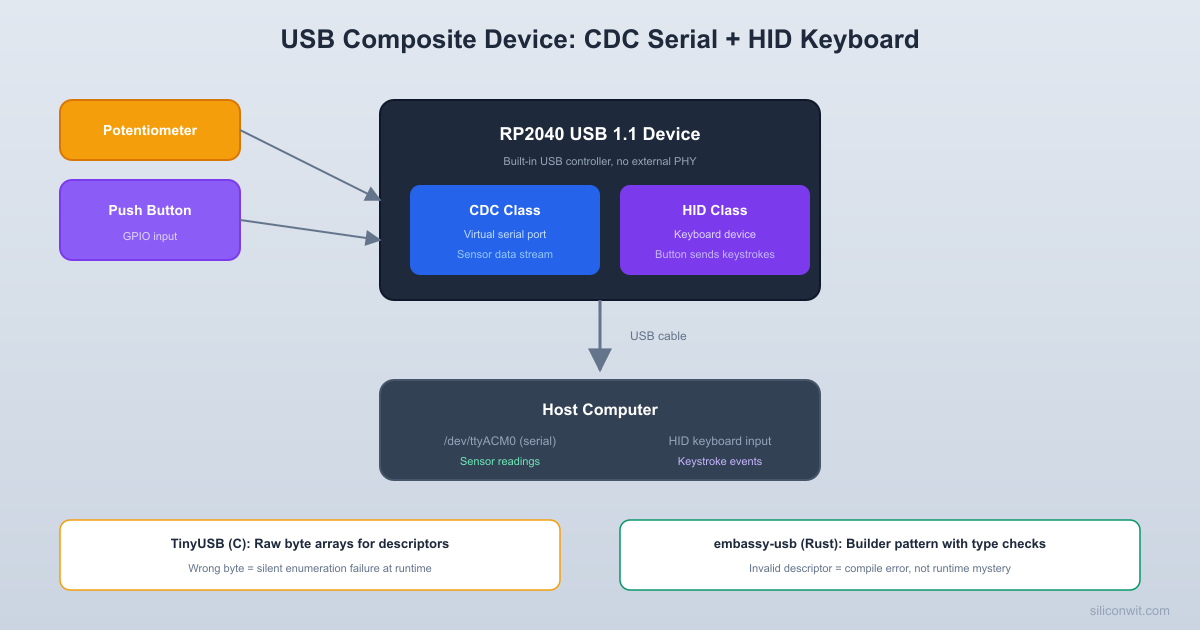
USB Composite Device: CDC Serial + HID Keyboard

A Pico that appears as two USB devices simultaneously when plugged into a computer. The CDC interface acts as a virtual serial port that prints ADC readings from a potentiometer every 500 ms. The HID interface acts as a keyboard: pressing a button on the breadboard types a predefined string on the host computer. Both functions run as separate async tasks on the Embassy executor.

Project specifications:

ParameterValue
USB ClassesCDC ACM (virtual serial) + HID Keyboard (composite)
CDC FunctionStream potentiometer ADC readings as text
HID FunctionButton press types a string on the host
FrameworkEmbassy (embassy-rp, embassy-usb)
USB SpeedFull Speed (12 Mbit/s, USB 1.1)
Polling RateHID: 10 ms (100 Hz), CDC: continuous
CompatibilityWindows, macOS, Linux (driverless)

Bill of Materials

RefComponentQuantityNotes
1Raspberry Pi Pico1Any Pico or Pico W variant
210K potentiometer1For analog input to CDC serial
3Push button1Momentary tactile switch for HID keyboard
410K ohm resistor1External pull-down (or use internal pull-up)
5Breadboard + jumper wires1 set
6Micro USB cable1Data cable, not charge-only

USB on the RP2040


The RP2040’s USB controller supports USB 1.1 Full Speed (12 Mbit/s). It has 16 endpoints (including endpoint 0 for control transfers), double-buffered FIFOs for each endpoint, and handles all the low-level protocol signaling in hardware. The integrated PHY means the D+ and D- data lines connect directly to the chip with only a few passive components on the PCB (which the Pico board already provides).

When the Pico is plugged into a USB host, the following sequence occurs:

  1. The host detects the device by sensing the pull-up resistor on D+ (Full Speed indication).

  2. The host resets the bus and begins enumeration: it reads the device descriptor, configuration descriptor, and string descriptors through control transfers on endpoint 0.

  3. Based on the descriptors, the host loads the appropriate class drivers. For CDC ACM, this is a virtual COM port driver. For HID, the operating system uses a built-in generic input driver.

  4. The host sets the configuration (usually configuration 1), and the device is ready for data transfers on the class-specific endpoints.

Embassy’s embassy-usb crate handles all of this automatically. You describe your device using a builder API, and the library generates the correct descriptors, manages endpoint allocation, and responds to host requests. Your application code only interacts with high-level class interfaces.

USB Descriptor Hierarchy

Every USB device describes itself through a tree of descriptors:

LevelDescriptorPurpose
1Device DescriptorVendor ID, product ID, USB version, device class
2Configuration DescriptorGroups interfaces; specifies max power draw
3Interface DescriptorOne function (HID, CDC, MSC, etc.) with its class codes
4Endpoint DescriptorCommunication pipe: direction, transfer type, packet size, polling interval

A composite device has multiple interfaces under one configuration. Our device will have three interfaces: two for CDC (communication + data) and one for HID.

Project Setup


Cargo.toml

Cargo.toml
[package]
name = "usb-composite"
version = "0.1.0"
edition = "2021"
[dependencies]
embassy-executor = { version = "0.7", features = ["arch-cortex-m", "executor-thread"] }
embassy-rp = { version = "0.3", features = ["time-driver", "rp2040"] }
embassy-usb = { version = "0.4" }
embassy-time = { version = "0.4" }
embassy-futures = { version = "0.1" }
embassy-sync = { version = "0.6" }
usbd-hid = { version = "0.8" }
defmt = "0.3"
defmt-rtt = "0.4"
panic-probe = { version = "0.3", features = ["print-defmt"] }
cortex-m = "0.7"
cortex-m-rt = "0.7"
static_cell = "2"
portable-atomic = { version = "1", features = ["critical-section"] }
[profile.release]
debug = 2
lto = true
opt-level = "s"

Project Structure

  • Directoryusb-composite/
    • Cargo.toml
    • build.rs
    • memory.x
    • Directory.cargo/
      • config.toml
    • Directorysrc/
      • main.rs

build.rs

build.rs
fn main() {
println!("cargo:rustc-link-arg-bins=--nmagic");
println!("cargo:rustc-link-arg-bins=-Tlink.x");
println!("cargo:rustc-link-arg-bins=-Tdefmt.x");
}

memory.x

memory.x
MEMORY {
BOOT2 : ORIGIN = 0x10000000, LENGTH = 0x100
FLASH : ORIGIN = 0x10000100, LENGTH = 2048K - 0x100
RAM : ORIGIN = 0x20000000, LENGTH = 256K
}

.cargo/config.toml

.cargo/config.toml
[target.thumbv6m-none-eabi]
runner = "probe-rs run --chip RP2040 --protocol swd"
[build]
target = "thumbv6m-none-eabi"
[env]
DEFMT_LOG = "debug"

USB CDC: Virtual Serial Port


USB CDC ACM (Communication Device Class, Abstract Control Model) creates a virtual serial port. On the host, it appears as /dev/ttyACM0 on Linux, COM3 on Windows, or /dev/cu.usbmodem* on macOS. Applications can open it just like a physical serial port and read/write data.

Let’s start with a standalone CDC example before building the composite device. This firmware reads the potentiometer via ADC and prints the value over the USB serial port every 500 ms.

Circuit Connections (CDC Only)

Pico PinComponentFunction
GP26 (ADC0)Potentiometer wiperAnalog input
3V3Potentiometer one endReference voltage
GNDPotentiometer other endGround reference

CDC Firmware

src/main.rs (CDC only)
#![no_std]
#![no_main]
use defmt::*;
use defmt_rtt as _;
use panic_probe as _;
use embassy_executor::Spawner;
use embassy_rp::adc::{Adc, Channel, Config as AdcConfig, InterruptHandler as AdcIrq};
use embassy_rp::bind_interrupts;
use embassy_rp::gpio::Pull;
use embassy_rp::peripherals::USB;
use embassy_rp::usb::{Driver, InterruptHandler as UsbIrq};
use embassy_time::Timer;
use embassy_usb::class::cdc_acm::{CdcAcmClass, State};
use embassy_usb::UsbDevice;
use static_cell::StaticCell;
bind_interrupts!(struct Irqs {
USBCTRL_IRQ => UsbIrq<USB>;
ADC_IRQ_FIFO => AdcIrq;
});
#[embassy_executor::task]
async fn usb_task(mut usb: UsbDevice<'static, Driver<'static, USB>>) {
usb.run().await;
}
#[embassy_executor::main]
async fn main(spawner: Spawner) {
let p = embassy_rp::init(Default::default());
// Create USB driver
let driver = Driver::new(p.USB, Irqs);
// Configure USB device descriptor
let mut config = embassy_usb::Config::new(0xc0de, 0xcafe);
config.manufacturer = Some("Pico Workshop");
config.product = Some("Pico CDC Sensor");
config.serial_number = Some("001");
config.max_power = 100; // 100 mA
config.max_packet_size_0 = 64;
// Allocate buffers for the USB stack
static CONFIG_DESC: StaticCell<[u8; 256]> = StaticCell::new();
static BOS_DESC: StaticCell<[u8; 256]> = StaticCell::new();
static CONTROL_BUF: StaticCell<[u8; 64]> = StaticCell::new();
static CDC_STATE: StaticCell<State> = StaticCell::new();
let config_desc = CONFIG_DESC.init([0; 256]);
let bos_desc = BOS_DESC.init([0; 256]);
let control_buf = CONTROL_BUF.init([0; 64]);
let cdc_state = CDC_STATE.init(State::new());
// Build the USB device
let mut builder = embassy_usb::Builder::new(
driver,
config,
config_desc,
bos_desc,
&mut [], // no msos descriptors
control_buf,
);
// Create CDC ACM class
let mut cdc = CdcAcmClass::new(&mut builder, cdc_state, 64);
// Build and spawn the USB device task
let usb = builder.build();
spawner.spawn(usb_task(usb)).unwrap();
// Set up ADC for potentiometer on GP26
let mut adc = Adc::new(p.ADC, Irqs, AdcConfig::default());
let mut pot_pin = Channel::new_pin(p.PIN_26, Pull::None);
// Main loop: read ADC and write to USB serial
let mut buf = [0u8; 64];
loop {
// Wait for the host to open the serial port
cdc.wait_connection().await;
info!("CDC connected");
loop {
let adc_val = adc.read(&mut pot_pin).await.unwrap_or(0);
let voltage_mv = (adc_val as u32 * 3300) / 4095;
// Format the output string
let msg = format_msg(&mut buf, adc_val, voltage_mv);
// Write to USB CDC; break if disconnected
if cdc.write_packet(msg).await.is_err() {
info!("CDC disconnected");
break;
}
Timer::after_millis(500).await;
}
}
}
fn format_msg(buf: &mut [u8; 64], raw: u16, mv: u32) -> &[u8] {
// Manual formatting since we are in no_std
let mut pos = 0;
let prefix = b"ADC: ";
buf[pos..pos + prefix.len()].copy_from_slice(prefix);
pos += prefix.len();
pos += write_u32(&mut buf[pos..], raw as u32);
let mid = b" | ";
buf[pos..pos + mid.len()].copy_from_slice(mid);
pos += mid.len();
pos += write_u32(&mut buf[pos..], mv);
let suffix = b" mV\r\n";
buf[pos..pos + suffix.len()].copy_from_slice(suffix);
pos += suffix.len();
&buf[..pos]
}
fn write_u32(buf: &mut [u8], val: u32) -> usize {
if val == 0 {
buf[0] = b'0';
return 1;
}
let mut tmp = [0u8; 10];
let mut n = val;
let mut i = 0;
while n > 0 {
tmp[i] = b'0' + (n % 10) as u8;
n /= 10;
i += 1;
}
for j in 0..i {
buf[j] = tmp[i - 1 - j];
}
i
}

How it works: The embassy_usb::Builder constructs the USB device descriptor tree at initialization time. You pass in static buffers for the configuration descriptor, BOS (Binary Object Store) descriptor, and control endpoint buffer. The CdcAcmClass::new() call adds the CDC ACM interface (which internally creates two interfaces: the communication interface and the data interface, plus three endpoints). The builder handles all endpoint numbering and descriptor layout automatically.

The usb_task runs the USB stack in the background, handling enumeration, control transfers, and bus events. Your application code calls cdc.wait_connection().await to block until a host opens the serial port, then writes data with cdc.write_packet(). If the host closes the connection or unplugs the cable, write_packet returns an error and we loop back to waiting.

USB HID: Keyboard


USB HID (Human Interface Device) covers keyboards, mice, gamepads, and other input devices. The key feature of HID is that it is self-describing: the HID report descriptor tells the host exactly how to interpret each byte of data. This is why HID devices work without custom drivers on every operating system.

For our keyboard, each button press sends a “key down” report followed by a “key up” report. The HID report descriptor defines the keyboard layout according to the USB HID Usage Tables specification.

HID Report Descriptor

The report descriptor defines a standard keyboard with modifier keys and a 6-key rollover array:

// Standard keyboard report descriptor
// Byte 0: modifier keys (Ctrl, Shift, Alt, GUI)
// Byte 1: reserved (padding)
// Bytes 2-7: up to 6 simultaneous key codes
const KEYBOARD_REPORT_DESC: &[u8] = &[
0x05, 0x01, // Usage Page (Generic Desktop)
0x09, 0x06, // Usage (Keyboard)
0xA1, 0x01, // Collection (Application)
// Modifier keys (8 bits)
0x05, 0x07, // Usage Page (Key Codes)
0x19, 0xE0, // Usage Minimum (Left Control)
0x29, 0xE7, // Usage Maximum (Right GUI)
0x15, 0x00, // Logical Minimum (0)
0x25, 0x01, // Logical Maximum (1)
0x75, 0x01, // Report Size (1)
0x95, 0x08, // Report Count (8)
0x81, 0x02, // Input (Data, Variable, Absolute)
// Reserved byte
0x95, 0x01, // Report Count (1)
0x75, 0x08, // Report Size (8)
0x81, 0x01, // Input (Constant)
// Key codes (6 bytes)
0x95, 0x06, // Report Count (6)
0x75, 0x08, // Report Size (8)
0x15, 0x00, // Logical Minimum (0)
0x25, 0x65, // Logical Maximum (101)
0x05, 0x07, // Usage Page (Key Codes)
0x19, 0x00, // Usage Minimum (0)
0x29, 0x65, // Usage Maximum (101)
0x81, 0x00, // Input (Data, Array)
0xC0, // End Collection
];

The report is 8 bytes total. Byte 0 holds modifier flags (one bit each for Left Ctrl, Left Shift, Left Alt, Left GUI, Right Ctrl, Right Shift, Right Alt, Right GUI). Byte 1 is reserved padding. Bytes 2 through 7 hold up to 6 simultaneous key codes. A key code of 0x00 means “no key” in that slot.

Keyboard Report Structure

#[derive(Clone, Copy)]
#[repr(C, packed)]
struct KeyboardReport {
modifier: u8,
reserved: u8,
keycodes: [u8; 6],
}
impl KeyboardReport {
const fn empty() -> Self {
Self {
modifier: 0,
reserved: 0,
keycodes: [0; 6],
}
}
fn with_key(keycode: u8) -> Self {
Self {
modifier: 0,
reserved: 0,
keycodes: [keycode, 0, 0, 0, 0, 0],
}
}
fn as_bytes(&self) -> &[u8] {
unsafe {
core::slice::from_raw_parts(
self as *const _ as *const u8,
core::mem::size_of::<Self>(),
)
}
}
}

USB HID Key Codes

The USB HID specification assigns a numeric code to each key. These codes are independent of the keyboard layout; the operating system maps them to characters based on the active language setting. Common codes:

KeyHID CodeKeyHID Code
A0x0410x1E
B0x0520x1F
C0x06Space0x2C
H0x0BEnter0x28
E0x08Period0x37
L0x0FComma0x36
O0x12ExclamationShift + 0x1E

To type the letter “H”, you send a report with keycode 0x0B. To type uppercase “H”, you set the Shift modifier bit (bit 1 of the modifier byte = 0x02) along with the keycode.

Composite Device: CDC + HID


Now we combine both classes into a single USB device. The Pico appears as both a serial port and a keyboard simultaneously. This is the complete project firmware.

Circuit Connections

Pico PinComponentFunction
GP26 (ADC0)Potentiometer wiperAnalog input for CDC serial data
GP15Push button (one leg)HID keyboard trigger
GNDButton other leg, pot endGround
3V3Potentiometer endReference voltage

The button connects between GP15 and GND. We enable the internal pull-up resistor, so the pin reads high when released and low when pressed.

Complete Firmware

src/main.rs
#![no_std]
#![no_main]
use defmt::*;
use defmt_rtt as _;
use panic_probe as _;
use embassy_executor::Spawner;
use embassy_rp::adc::{Adc, Channel, Config as AdcConfig, InterruptHandler as AdcIrq};
use embassy_rp::bind_interrupts;
use embassy_rp::gpio::{Input, Pull};
use embassy_rp::peripherals::USB;
use embassy_rp::usb::{Driver, InterruptHandler as UsbIrq};
use embassy_time::Timer;
use embassy_usb::class::cdc_acm::{CdcAcmClass, State as CdcState};
use embassy_usb::class::hid::{HidReaderWriter, ReportId, RequestHandler, State as HidState};
use embassy_usb::control::OutResponse;
use embassy_usb::UsbDevice;
use static_cell::StaticCell;
bind_interrupts!(struct Irqs {
USBCTRL_IRQ => UsbIrq<USB>;
ADC_IRQ_FIFO => AdcIrq;
});
// ── HID Report Descriptor ──────────────────────────────────────────
const KEYBOARD_REPORT_DESC: &[u8] = &[
0x05, 0x01, // Usage Page (Generic Desktop)
0x09, 0x06, // Usage (Keyboard)
0xA1, 0x01, // Collection (Application)
// Modifier keys (8 bits: L-Ctrl, L-Shift, L-Alt, L-GUI, R-Ctrl, ...)
0x05, 0x07, // Usage Page (Key Codes)
0x19, 0xE0, // Usage Minimum (Left Control)
0x29, 0xE7, // Usage Maximum (Right GUI)
0x15, 0x00, // Logical Minimum (0)
0x25, 0x01, // Logical Maximum (1)
0x75, 0x01, // Report Size (1)
0x95, 0x08, // Report Count (8)
0x81, 0x02, // Input (Data, Variable, Absolute)
// Reserved byte (padding)
0x95, 0x01, // Report Count (1)
0x75, 0x08, // Report Size (8)
0x81, 0x01, // Input (Constant)
// Key codes (6 key rollover)
0x95, 0x06, // Report Count (6)
0x75, 0x08, // Report Size (8)
0x15, 0x00, // Logical Minimum (0)
0x25, 0x65, // Logical Maximum (101)
0x05, 0x07, // Usage Page (Key Codes)
0x19, 0x00, // Usage Minimum (0)
0x29, 0x65, // Usage Maximum (101)
0x81, 0x00, // Input (Data, Array)
0xC0, // End Collection
];
// ── Keyboard Report Structure ──────────────────────────────────────
#[derive(Clone, Copy)]
#[repr(C, packed)]
struct KeyboardReport {
modifier: u8,
reserved: u8,
keycodes: [u8; 6],
}
impl KeyboardReport {
const fn empty() -> Self {
Self {
modifier: 0,
reserved: 0,
keycodes: [0; 6],
}
}
fn as_bytes(&self) -> &[u8; 8] {
unsafe { &*(self as *const Self as *const [u8; 8]) }
}
}
// ── HID Request Handler ────────────────────────────────────────────
struct MyRequestHandler;
impl RequestHandler for MyRequestHandler {
fn get_report(&mut self, _id: ReportId, _buf: &mut [u8]) -> Option<usize> {
None
}
fn set_report(&mut self, _id: ReportId, _data: &[u8]) -> OutResponse {
OutResponse::Accepted
}
fn set_idle_ms(&mut self, _id: Option<ReportId>, _dur: u32) {}
fn get_idle_ms(&mut self, _id: Option<ReportId>) -> Option<u32> {
None
}
}
// ── USB Background Task ────────────────────────────────────────────
#[embassy_executor::task]
async fn usb_task(mut usb: UsbDevice<'static, Driver<'static, USB>>) {
usb.run().await;
}
// ── CDC Serial Task ────────────────────────────────────────────────
#[embassy_executor::task]
async fn cdc_task(
mut cdc: CdcAcmClass<'static, Driver<'static, USB>>,
mut adc: Adc<'static, embassy_rp::adc::Async>,
mut pot_pin: Channel<'static>,
) {
loop {
cdc.wait_connection().await;
info!("CDC: host connected");
loop {
let raw = adc.read(&mut pot_pin).await.unwrap_or(0);
let mv = (raw as u32 * 3300) / 4095;
let mut buf = [0u8; 48];
let len = format_reading(&mut buf, raw, mv);
if cdc.write_packet(&buf[..len]).await.is_err() {
info!("CDC: host disconnected");
break;
}
Timer::after_millis(500).await;
}
}
}
fn format_reading(buf: &mut [u8], raw: u16, mv: u32) -> usize {
let mut pos = 0;
let prefix = b"ADC: ";
buf[pos..pos + prefix.len()].copy_from_slice(prefix);
pos += prefix.len();
pos += write_u32(&mut buf[pos..], raw as u32);
let mid = b" | ";
buf[pos..pos + mid.len()].copy_from_slice(mid);
pos += mid.len();
pos += write_u32(&mut buf[pos..], mv);
let suffix = b" mV\r\n";
buf[pos..pos + suffix.len()].copy_from_slice(suffix);
pos += suffix.len();
pos
}
fn write_u32(buf: &mut [u8], val: u32) -> usize {
if val == 0 {
buf[0] = b'0';
return 1;
}
let mut tmp = [0u8; 10];
let mut n = val;
let mut i = 0;
while n > 0 {
tmp[i] = b'0' + (n % 10) as u8;
n /= 10;
i += 1;
}
for j in 0..i {
buf[j] = tmp[i - 1 - j];
}
i
}
// ── HID Keyboard Task ─────────────────────────────────────────────
#[embassy_executor::task]
async fn hid_task(
hid: HidReaderWriter<'static, Driver<'static, USB>, 1, 8>,
mut button: Input<'static>,
) {
let (reader, mut writer) = hid.split();
// We only use the writer; spawn a task to drain the reader
// so the host does not stall on SET_REPORT/OUTPUT reports.
let _reader = reader;
// The string to type when the button is pressed
let message: &[u8] = b"Hello from Pico!";
loop {
// Wait for button press (falling edge: high to low)
button.wait_for_falling_edge().await;
info!("Button pressed, typing message");
// Type each character
for &ch in message {
let keycode = ascii_to_hid(ch);
let needs_shift = ch.is_ascii_uppercase()
|| matches!(ch, b'!' | b'@' | b'#' | b'$' | b'%'
| b'^' | b'&' | b'*' | b'(' | b')');
// Key down
let report = KeyboardReport {
modifier: if needs_shift { 0x02 } else { 0x00 },
reserved: 0,
keycodes: [keycode, 0, 0, 0, 0, 0],
};
let _ = writer.write(report.as_bytes()).await;
// Small delay between key down and key up
Timer::after_millis(10).await;
// Key up (empty report)
let empty = KeyboardReport::empty();
let _ = writer.write(empty.as_bytes()).await;
// Delay between characters
Timer::after_millis(30).await;
}
// Debounce: wait before accepting the next press
Timer::after_millis(300).await;
}
}
/// Convert an ASCII character to a USB HID keycode.
fn ascii_to_hid(ch: u8) -> u8 {
match ch {
b'a'..=b'z' => ch - b'a' + 0x04,
b'A'..=b'Z' => ch - b'A' + 0x04,
b'1'..=b'9' => ch - b'1' + 0x1E,
b'0' => 0x27,
b' ' => 0x2C,
b'!' => 0x1E, // Shift + 1
b'@' => 0x1F, // Shift + 2
b'#' => 0x20, // Shift + 3
b'.' => 0x37,
b',' => 0x36,
b'\n' => 0x28, // Enter
b'-' => 0x2D,
b'=' => 0x2E,
b'[' => 0x2F,
b']' => 0x30,
b'\\' => 0x31,
b';' => 0x33,
b'\'' => 0x34,
b'/' => 0x38,
_ => 0x00, // No key
}
}
// ── Main ───────────────────────────────────────────────────────────
#[embassy_executor::main]
async fn main(spawner: Spawner) {
let p = embassy_rp::init(Default::default());
// ── USB Device Configuration ───────────────────────────────────
let driver = Driver::new(p.USB, Irqs);
let mut config = embassy_usb::Config::new(0xc0de, 0xcafe);
config.manufacturer = Some("Pico Workshop");
config.product = Some("Pico CDC+Keyboard");
config.serial_number = Some("RUST-001");
config.max_power = 100;
config.max_packet_size_0 = 64;
// Composite device: class defined at interface level
config.device_class = 0xEF; // Miscellaneous
config.device_sub_class = 0x02; // Common Class
config.device_protocol = 0x01; // Interface Association Descriptor
// ── Static Buffers ─────────────────────────────────────────────
static CONFIG_DESC: StaticCell<[u8; 256]> = StaticCell::new();
static BOS_DESC: StaticCell<[u8; 256]> = StaticCell::new();
static MSOS_DESC: StaticCell<[u8; 256]> = StaticCell::new();
static CONTROL_BUF: StaticCell<[u8; 64]> = StaticCell::new();
static CDC_STATE: StaticCell<CdcState> = StaticCell::new();
static HID_STATE: StaticCell<HidState> = StaticCell::new();
let config_desc = CONFIG_DESC.init([0; 256]);
let bos_desc = BOS_DESC.init([0; 256]);
let msos_desc = MSOS_DESC.init([0; 256]);
let control_buf = CONTROL_BUF.init([0; 64]);
let cdc_state = CDC_STATE.init(CdcState::new());
let hid_state = HID_STATE.init(HidState::new());
// ── Build USB Device ───────────────────────────────────────────
let mut builder = embassy_usb::Builder::new(
driver,
config,
config_desc,
bos_desc,
msos_desc,
control_buf,
);
// Add CDC ACM class (virtual serial port)
let cdc = CdcAcmClass::new(&mut builder, cdc_state, 64);
// Add HID class (keyboard)
let hid_config = embassy_usb::class::hid::Config {
report_descriptor: KEYBOARD_REPORT_DESC,
request_handler: None,
poll_ms: 10,
max_packet_size: 8,
};
let hid = HidReaderWriter::<_, 1, 8>::new(&mut builder, hid_state, hid_config);
// Build the USB device
let usb = builder.build();
// ── Peripherals ────────────────────────────────────────────────
// ADC for potentiometer
let adc = Adc::new(p.ADC, Irqs, AdcConfig::default());
let pot_pin = Channel::new_pin(p.PIN_26, Pull::None);
// Button on GP15 with internal pull-up
let button = Input::new(p.PIN_15, Pull::Up);
// ── Spawn Tasks ────────────────────────────────────────────────
spawner.spawn(usb_task(usb)).unwrap();
spawner.spawn(cdc_task(cdc, adc, pot_pin)).unwrap();
spawner.spawn(hid_task(hid, button)).unwrap();
info!("USB composite device started: CDC + HID Keyboard");
// Main task has nothing else to do; it can idle forever.
// The executor will run the spawned tasks.
loop {
Timer::after_millis(1000).await;
}
}

How the Composite Device Works

Three concurrent tasks: The Embassy executor runs three tasks. usb_task handles the USB protocol stack (enumeration, control transfers, bus events). cdc_task reads the potentiometer and writes formatted text to the CDC serial interface. hid_task waits for button presses and sends keyboard reports. All three run concurrently on the single-threaded async executor, yielding at every .await point.

Builder pattern: The embassy_usb::Builder allocates endpoints and constructs descriptors in the correct order. When you call CdcAcmClass::new(), the builder internally adds two interfaces (communication + data) and three endpoints (notification IN, data IN, data OUT). When you call HidReaderWriter::new(), it adds one interface with one interrupt IN endpoint and one interrupt OUT endpoint. The builder handles all the byte-level descriptor layout, endpoint numbering, and interface numbering. You never touch a raw descriptor byte.

Composite class codes: The device descriptor uses class 0xEF (Miscellaneous), subclass 0x02, protocol 0x01. This tells the host to look for Interface Association Descriptors (IADs) in the configuration descriptor, which group the CDC interfaces together. Without these class codes, some operating systems (Windows in particular) would not correctly recognize the CDC interface in a composite device.

Keyboard typing: The hid_task converts each ASCII character to a HID keycode, sends a key-down report (with the keycode in slot 0 and optionally the Shift modifier), waits 10 ms, then sends a key-up report (all zeros). The 30 ms delay between characters prevents the host from merging reports or dropping keys. The 300 ms debounce delay after the full string prevents accidental double-triggers.

C vs Rust: USB Descriptor Construction


In C with TinyUSB, USB descriptors are raw byte arrays. Every field position, length, and value must be correct or the device will fail to enumerate. Here is a typical TinyUSB configuration descriptor for a composite CDC+HID device:

C with TinyUSB (error-prone)
// Must manually calculate CONFIG_TOTAL_LEN
#define CONFIG_TOTAL_LEN (TUD_CONFIG_DESC_LEN + TUD_CDC_DESC_LEN + TUD_HID_DESC_LEN)
static const uint8_t desc_configuration[] = {
TUD_CONFIG_DESCRIPTOR(1, 3, 0, CONFIG_TOTAL_LEN, 0x00, 100),
TUD_CDC_DESCRIPTOR(0, 4, 0x81, 8, 0x02, 0x82, 64),
TUD_HID_DESCRIPTOR(2, 5, HID_ITF_PROTOCOL_NONE,
sizeof(desc_hid_report), 0x83, 8, 10),
};

Common mistakes with this approach:

  • Wrong CONFIG_TOTAL_LEN (forgot to update after adding an interface)
  • Duplicate endpoint numbers (0x82 used twice)
  • Wrong interface count (says 3 but only defines 2)
  • Byte order errors in multi-byte fields
  • Mismatched HID report descriptor length

With embassy-usb in Rust, none of these errors are possible:

Rust with embassy-usb (type-safe)
let mut builder = embassy_usb::Builder::new(driver, config, ...);
// Each call automatically:
// - Allocates the next available interface numbers
// - Allocates the next available endpoint numbers
// - Computes the correct descriptor lengths
// - Adds the Interface Association Descriptor for CDC
let cdc = CdcAcmClass::new(&mut builder, cdc_state, 64);
let hid = HidReaderWriter::new(&mut builder, hid_state, hid_config);
let usb = builder.build(); // Finalizes CONFIG_TOTAL_LEN automatically

The builder pattern eliminates the entire category of descriptor construction bugs. Interface numbers, endpoint numbers, and descriptor lengths are computed automatically. If you try to allocate more endpoints than the hardware supports, you get a compile-time error (or a clear panic at initialization), not a silent enumeration failure.

Building and Flashing


  1. Make sure you have the Rust embedded toolchain installed:

    Terminal window
    rustup target add thumbv6m-none-eabi
    cargo install probe-rs-tools
  2. Build the firmware in release mode:

    Terminal window
    cargo build --release
  3. Flash using probe-rs (if you have a debug probe connected to the SWD pins):

    Terminal window
    cargo run --release
  4. Alternatively, convert to UF2 and flash via BOOTSEL. Install elf2uf2-rs:

    Terminal window
    cargo install elf2uf2-rs

    Then hold BOOTSEL while plugging in the Pico, and run:

    Terminal window
    elf2uf2-rs target/thumbv6m-none-eabi/release/usb-composite

    The tool finds the mounted RPI-RP2 drive and copies the firmware automatically.

  5. After flashing, the Pico reboots and enumerates as a composite USB device.

Testing


  1. Check that both interfaces appeared:

    Terminal window
    lsusb -d c0de:cafe -v 2>/dev/null | grep -E "iProduct|bInterfaceClass"

    You should see iProduct: Pico CDC+Keyboard, with interface classes for CDC (0x02) and HID (0x03).

  2. Open the CDC serial port:

    Terminal window
    screen /dev/ttyACM0 115200

    Turn the potentiometer and watch the ADC readings update every 500 ms.

  3. Open a text editor (any window that accepts keyboard input). Press the button on GP15. The text “Hello from Pico!” should appear, typed one character at a time.

  4. To see defmt debug output (if using a debug probe):

    Terminal window
    probe-rs run --chip RP2040 target/thumbv6m-none-eabi/release/usb-composite

Troubleshooting

SymptomLikely CauseFix
Device not recognizedDescriptor buffer too smallIncrease CONFIG_DESC size from 256 to 512
CDC port not visibleMissing IAD class codesVerify device_class = 0xEF, sub_class = 0x02, protocol = 0x01
Keyboard types wrong charactersKeycode mapping errorCheck ascii_to_hid() against the USB HID Usage Tables
Button press types multiple timesDebounce too shortIncrease the 300 ms debounce delay
ADC reads stuck at 0Wiring issueVerify potentiometer wiper connects to GP26, ends to 3V3 and GND
Firmware panics on startupEndpoint allocation failedRP2040 supports 16 endpoints; composite device uses 7 (well within limits)

Production Notes


If you plan to build a product around USB on the RP2040, keep these points in mind:

USB Vendor and Product IDs: The IDs 0xc0de:0xcafe used in this lesson are for development only. For a real product, you must obtain a vendor ID from the USB Implementers Forum (USB-IF) or use a shared vendor ID program like pid.codes (which provides free product IDs under vendor ID 0x1209).

USB compliance testing: Consumer USB devices should pass the USB-IF compliance tests. The RP2040’s USB controller is compliant at the silicon level, but your firmware must handle all standard requests correctly. Embassy-usb handles the mandatory requests, but if you add vendor-specific functionality, test thoroughly with the USB Command Verifier (USB CV) tool.

String descriptors: Include meaningful manufacturer, product, and serial number strings. The serial number should be unique per device. You can derive it from the RP2040’s unique flash ID (accessible through embassy_rp::flash).

Power descriptors: The max_power field in the USB configuration tells the host how much current the device draws. If your device draws more than 100 mA, you must declare it. USB 2.0 allows up to 500 mA per port, but some hubs and laptops limit current on unpowered ports.

Suspend and resume: USB devices are required to enter a low-power state when the host suspends the bus (e.g., when the computer sleeps). Embassy-usb handles the protocol, but you should also reduce your application’s power consumption during suspend. The UsbDevice provides a suspended() method to check the current state.

Experiments


Experiment 1: USB Mouse

Replace the keyboard HID descriptor with a mouse descriptor (Usage 0x02 under Generic Desktop). The mouse report needs X and Y relative movement (signed 8-bit) and button bits. Connect a joystick module for X/Y input and use the button for mouse clicks. The Pico becomes a USB mouse.

Experiment 2: Multi-Key Macros

Extend the keyboard task to support multiple buttons, each mapped to a different text macro. Wire four buttons and store four strings. Add a configuration mode where connecting to the CDC serial port lets you update the stored strings at runtime, saved to flash memory.

Experiment 3: USB Mass Storage

Embassy-usb does not include a built-in MSC (Mass Storage Class) driver, but the USB stack supports custom class implementations. Research the USB MSC Bulk-Only Transport protocol and implement a minimal read-only flash drive that exposes a FAT12 filesystem with a single text file. This is an advanced challenge that teaches you how USB class drivers work at the protocol level.

Summary


You built a USB composite device on the RP2040 using embassy-usb in Rust. The device combines a CDC ACM virtual serial port (streaming potentiometer readings) with an HID keyboard (typing text on button press). Embassy’s builder pattern constructs all USB descriptors automatically, eliminating the raw byte arrays and manual length calculations required in C with TinyUSB. Three async tasks run concurrently on the Embassy executor: the USB stack, the CDC serial task, and the HID keyboard task. Each task owns its peripherals exclusively, with no shared mutable state and no locks. The device enumerates correctly on Windows, macOS, and Linux without custom drivers.

Comments

Loading comments...


© 2021-2026 SiliconWit®. All rights reserved.