



Board Outline
Lines and arcs on the Edge.Cuts layer define the PCB boundary. These are gr_line, gr_arc, and gr_circle elements with layer "Edge.Cuts".
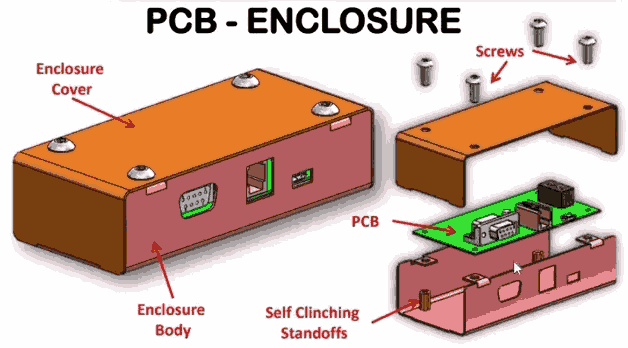
Automate enclosure design by parsing KiCad PCB files and generating print-ready housings with CadQuery. Your script will extract board outlines, mounting holes, and connector positions, then produce a complete enclosure with standoffs, port cutouts, ventilation, and snap-fit lids that updates whenever the PCB layout changes. #KiCad #EnclosureDesign #PCBAutomation
By the end of this lesson, you will be able to:
.kicad_pcb S-expression files to extract board outlines, mounting holes, and component positionsKiCad stores PCB data as S-expressions, nested parenthesized lists similar to Lisp syntax. Every element in the file, from board outlines to component footprints, follows this structure.
A .kicad_pcb file looks like this at the top level:
(kicad_pcb (version 20211014) (generator pcbnew) (general (thickness 1.6)) (layers ...) (setup ...) (net 0 "") (footprint "Connector_USB:USB_C_Receptacle" (at 82.55 24.13) ...) (gr_line (start 0 0) (end 85 0) (layer "Edge.Cuts") ...) (segment ...) (via ...))The key elements we need to extract are:
Board Outline
Lines and arcs on the Edge.Cuts layer define the PCB boundary. These are gr_line, gr_arc, and gr_circle elements with layer "Edge.Cuts".
Mounting Holes
Footprints named MountingHole* contain pad elements with drill sizes. Their (at x y) fields give positions.
Connector Positions
Footprints for USB, HDMI, Ethernet, etc. contain (at x y rotation) and pad geometry that defines connector extents.
Component Heights
3D model references within footprints (model elements) include Z-offsets and can indicate component heights for clearance.
We will build a lightweight S-expression parser rather than relying on external libraries. This keeps the tool self-contained and teaches the parsing fundamentals.
"""S-expression parser for KiCad .kicad_pcb files.Converts nested parenthesized text into Python lists and strings."""
import refrom typing import Union
# Type alias for parsed S-expression treeSExpr = Union[str, list]
def tokenize(text: str) -> list[str]:    """    Break S-expression text into tokens: '(', ')', quoted strings, and atoms.    """    token_pattern = r'''        \(              |   # open paren        \)              |   # close paren        "[^"]*"         |   # quoted string (preserves spaces)        [^\s()"]+           # unquoted atom (numbers, keywords)    '''    return re.findall(token_pattern, text, re.VERBOSE)
def parse_sexpr(text: str) -> SExpr:    """    Parse an S-expression string into nested Python lists.
    Example:        '(footprint "USB_C" (at 82.55 24.13))'        → ['footprint', 'USB_C', ['at', '82.55', '24.13']]    """    tokens = tokenize(text)    pos = [0]  # mutable index for recursive descent
    def parse_one() -> SExpr:        if pos[0] >= len(tokens):            raise ValueError("Unexpected end of input")
        token = tokens[pos[0]]
        if token == '(':            pos[0] += 1            result = []            while pos[0] < len(tokens) and tokens[pos[0]] != ')':                result.append(parse_one())            if pos[0] >= len(tokens):                raise ValueError("Missing closing parenthesis")            pos[0] += 1  # skip ')'            return result        elif token == ')':            raise ValueError("Unexpected closing parenthesis")        else:            pos[0] += 1            # Strip quotes from quoted strings            if token.startswith('"') and token.endswith('"'):                return token[1:-1]            return token
return parse_one()"""Extract board geometry from parsed KiCad S-expression tree.Returns board outline, mounting holes, and connector positions."""
from dataclasses import dataclass, field
@dataclassclass Point2D: x: float y: float
@dataclassclass MountingHole: position: Point2D drill_diameter: float # mm
@dataclassclass Connector: name: str position: Point2D rotation: float # degrees width: float # mm (extent along board edge) height: float # mm (protrusion above PCB) depth: float # mm (protrusion from board edge) connector_type: str # "USB_C", "HDMI", "RJ45", "GPIO", etc.
@dataclassclass BoardData: outline_points: list[Point2D] = field(default_factory=list) width: float = 0.0 height: float = 0.0 mounting_holes: list[MountingHole] = field(default_factory=list) connectors: list[Connector] = field(default_factory=list) board_thickness: float = 1.6 # mm (standard FR4)
def find_elements(tree: list, tag: str) -> list[list]: """Recursively find all elements with a given tag.""" results = [] if isinstance(tree, list) and len(tree) > 0: if tree[0] == tag: results.append(tree) for item in tree[1:]: if isinstance(item, list): results.extend(find_elements(item, tag)) return results
def get_attr(tree: list, tag: str) -> list | None: """Find a direct child element by tag.""" for item in tree: if isinstance(item, list) and len(item) > 0 and item[0] == tag: return item return None
def extract_board_outline(tree: list) -> list[Point2D]: """ Extract board outline from Edge.Cuts layer geometry. Returns ordered list of corner points. """ points = set()
# Find gr_line elements on Edge.Cuts for elem in tree: if not isinstance(elem, list): continue if elem[0] == 'gr_line': layer = get_attr(elem, 'layer') if layer and layer[1] == 'Edge.Cuts': start = get_attr(elem, 'start') end = get_attr(elem, 'end') if start and end: points.add((float(start[1]), float(start[2]))) points.add((float(end[1]), float(end[2])))
# Sort points to form a closed polygon (convex hull order) point_list = [Point2D(x, y) for x, y in sorted(points)] return point_list
def extract_mounting_holes(tree: list) -> list[MountingHole]: """Extract mounting hole positions and drill sizes from footprints.""" holes = []
for elem in tree: if not isinstance(elem, list) or elem[0] != 'footprint': continue
footprint_name = elem[1] if len(elem) > 1 else "" if 'MountingHole' not in footprint_name: continue
at = get_attr(elem, 'at') if not at: continue
x, y = float(at[1]), float(at[2])
# Find pad with drill size drill_dia = 2.7 # default M2.5 mounting hole for sub in elem: if isinstance(sub, list) and sub[0] == 'pad': drill = get_attr(sub, 'drill') if drill: drill_dia = float(drill[1])
holes.append(MountingHole( position=Point2D(x, y), drill_diameter=drill_dia ))
return holes
def extract_connectors(tree: list) -> list[Connector]: """ Extract connector positions and types from footprints. Identifies connector type from footprint library name. """ connectors = []
# Map footprint library prefixes to connector types and typical dimensions connector_map = { 'USB_C': {'type': 'USB_C', 'w': 9.0, 'h': 3.2, 'd': 7.5}, 'USB_Micro': {'type': 'USB_Micro', 'w': 8.0, 'h': 2.8, 'd': 6.0}, 'USB_A': {'type': 'USB_A', 'w': 14.0, 'h': 7.0, 'd': 17.0}, 'HDMI_Micro':{'type': 'HDMI_Micro','w': 7.5,'h': 3.5, 'd': 8.0}, 'HDMI_A': {'type': 'HDMI', 'w': 15.0, 'h': 6.0, 'd': 12.0}, 'RJ45': {'type': 'RJ45', 'w': 16.0, 'h': 13.5,'d': 21.5}, 'PinHeader': {'type': 'GPIO', 'w': 50.8, 'h': 8.5, 'd': 2.54}, 'BarrelJack':{'type': 'Power', 'w': 9.0, 'h': 11.0,'d': 14.0}, 'Jack_DC': {'type': 'Power', 'w': 9.0, 'h': 11.0,'d': 14.0}, }
for elem in tree: if not isinstance(elem, list) or elem[0] != 'footprint': continue
fp_name = elem[1] if len(elem) > 1 else ""
matched = None for prefix, dims in connector_map.items(): if prefix in fp_name: matched = dims break
if not matched: continue
at = get_attr(elem, 'at') if not at: continue
x, y = float(at[1]), float(at[2]) rotation = float(at[3]) if len(at) > 3 else 0.0
connectors.append(Connector( name=fp_name, position=Point2D(x, y), rotation=rotation, width=matched['w'], height=matched['h'], depth=matched['d'], connector_type=matched['type'] ))
return connectors"""Complete pipeline: read .kicad_pcb file → BoardData object."""
def parse_kicad_pcb(filepath: str) -> BoardData: """ Parse a KiCad PCB file and return structured board data.
Args: filepath: Path to .kicad_pcb file
Returns: BoardData with outline, mounting holes, and connectors """ with open(filepath, 'r') as f: text = f.read()
tree = parse_sexpr(text)
# Extract board outline outline = extract_board_outline(tree)
# Calculate bounding box if outline: xs = [p.x for p in outline] ys = [p.y for p in outline] min_x, max_x = min(xs), max(xs) min_y, max_y = min(ys), max(ys) width = max_x - min_x height = max_y - min_y else: min_x = min_y = 0 width = height = 0
# Normalize coordinates to origin for p in outline: p.x -= min_x p.y -= min_y
# Extract mounting holes (normalize coords) mounting_holes = extract_mounting_holes(tree) for mh in mounting_holes: mh.position.x -= min_x mh.position.y -= min_y
# Extract connectors (normalize coords) connectors = extract_connectors(tree) for c in connectors: c.position.x -= min_x c.position.y -= min_y
# Board thickness from general section board_thickness = 1.6 general = get_attr(tree, 'general') if general: thick = get_attr(general, 'thickness') if thick: board_thickness = float(thick[1])
return BoardData( outline_points=outline, width=width, height=height, mounting_holes=mounting_holes, connectors=connectors, board_thickness=board_thickness )
# --- Raspberry Pi 4 hardcoded data (for use without a .kicad_pcb file) ---
def raspberry_pi_4_data() -> BoardData: """ Return BoardData for a Raspberry Pi 4 Model B. Dimensions from official mechanical drawing. Board: 85mm x 56mm, 1.4mm thick, mounting holes M2.7 """ return BoardData( outline_points=[ Point2D(0, 0), Point2D(85, 0), Point2D(85, 56), Point2D(0, 56) ], width=85.0, height=56.0, mounting_holes=[ MountingHole(Point2D(3.5, 3.5), 2.7), MountingHole(Point2D(61.5, 3.5), 2.7), MountingHole(Point2D(3.5, 52.5), 2.7), MountingHole(Point2D(61.5, 52.5), 2.7), ], connectors=[ # USB-C power (bottom edge, near left) Connector("USB_C_Power", Point2D(11.2, 56.0), 0, 9.0, 3.2, 7.5, "USB_C"), # Micro HDMI 0 (bottom edge) Connector("HDMI_Micro_0", Point2D(26.0, 56.0), 0, 7.5, 3.5, 8.0, "HDMI_Micro"), # Micro HDMI 1 (bottom edge) Connector("HDMI_Micro_1", Point2D(39.5, 56.0), 0, 7.5, 3.5, 8.0, "HDMI_Micro"), # 3.5mm audio jack (bottom edge) Connector("AudioJack", Point2D(54.0, 56.0), 0, 7.0, 6.0, 12.0, "Audio"), # USB-A 2.0 (right edge, bottom pair) Connector("USB_A_2", Point2D(85.0, 29.0), 90, 14.0, 7.0, 17.0, "USB_A"), # USB-A 3.0 (right edge, top pair) Connector("USB_A_3", Point2D(85.0, 47.0), 90, 14.0, 7.0, 17.0, "USB_A"), # Ethernet RJ45 (right edge, top) Connector("RJ45", Point2D(85.0, 10.25), 90, 16.0, 13.5, 21.5, "RJ45"), # GPIO header (top edge) Connector("GPIO_40pin", Point2D(32.5, 3.5), 0, 51.0, 8.5, 2.54, "GPIO"), ], board_thickness=1.4 )Before generating geometry, we define all enclosure parameters in one place. This makes the design fully parametric: any parameter change propagates through the entire model.
Shell Parameters
Tolerance & Fit
Standoff Dimensions
Ventilation
"""Enclosure design parameters — single source of truth.All dimensions in millimeters."""
from dataclasses import dataclass
@dataclassclass EnclosureParams:    # Shell geometry    wall_thickness: float = 2.0    corner_radius: float = 3.0    bottom_thickness: float = 2.0
    # PCB clearances    pcb_clearance_below: float = 3.0   # space under PCB (standoff height)    pcb_clearance_above: float = 15.0  # space above PCB top surface
    # Tolerances    pcb_tolerance: float = 0.5         # gap between PCB edge and inner wall    connector_tolerance: float = 0.3   # extra clearance around port cutouts    lid_tolerance: float = 0.15        # gap for lid fit
    # Standoffs    standoff_outer_dia: float = 6.0    standoff_hole_dia: float = 2.2     # M2.5 self-tapping or heat-set    standoff_chamfer: float = 0.5
    # Snap-fit    snap_width: float = 8.0    snap_depth: float = 1.5            # how far the hook protrudes    snap_height: float = 2.0           # height of the catch    snap_interference: float = 0.3     # press-fit interference
    # Ventilation slots    vent_slot_width: float = 1.5    vent_slot_length: float = 12.0    vent_slot_spacing: float = 3.0    vent_margin: float = 5.0
    @property    def interior_height(self) -> float:        """Total interior height = below PCB + board + above PCB."""        return self.pcb_clearance_below + 1.6 + self.pcb_clearance_above
    @property    def exterior_height(self) -> float:        """Total box height = interior + bottom + top wall."""        return self.interior_height + self.bottom_thickness + self.wall_thickness
    def interior_width(self, board: 'BoardData') -> float:        return board.width + 2 * self.pcb_tolerance
def interior_depth(self, board: 'BoardData') -> float: return board.height + 2 * self.pcb_toleranceNow we build the enclosure step by step. Each function handles one feature, and they compose together to produce the final shell and lid.
"""Generate the main enclosure shell — a hollow box with rounded corners."""
import cadquery as cq
def make_shell_body(board: BoardData, params: EnclosureParams) -> cq.Workplane:    """    Create the outer shell as a rounded box, then hollow it out.
    The shell is oriented with:    - X along board width (85mm for RPi)    - Y along board depth (56mm for RPi)    - Z upward (bottom of enclosure at Z=0)    """    # Interior dimensions    int_w = params.interior_width(board)    int_d = params.interior_depth(board)    int_h = params.interior_height
    # Exterior dimensions    ext_w = int_w + 2 * params.wall_thickness    ext_d = int_d + 2 * params.wall_thickness    ext_h = int_h + params.bottom_thickness  # open top for now
    # Outer box with rounded vertical edges    outer = (        cq.Workplane("XY")        .box(ext_w, ext_d, ext_h, centered=(True, True, False))        .edges("|Z")  # select vertical edges        .fillet(params.corner_radius)    )
    # Inner cavity (cut from top)    inner = (        cq.Workplane("XY")        .workplane(offset=params.bottom_thickness)        .rect(int_w, int_d)        .extrude(int_h + 1)  # +1 to ensure clean cut through top    )
    # Apply corner radius to interior    inner_radius = max(params.corner_radius - params.wall_thickness, 0.5)    inner = inner.edges("|Z").fillet(inner_radius)
    shell = outer.cut(inner)
    return shell
def add_shell_lip(shell: cq.Workplane, board: BoardData,                  params: EnclosureParams) -> cq.Workplane:    """    Add a stepped lip around the top of the shell for lid alignment.    The lip is a thin ledge recessed inward by half the wall thickness.    """    int_w = params.interior_width(board)    int_d = params.interior_depth(board)
    lip_width = params.wall_thickness / 2 - params.lid_tolerance    lip_height = 2.0  # mm, how tall the lip step is
    # The lip sits at the top of the shell, inset from the outer wall    lip_offset = params.bottom_thickness + params.interior_height - lip_height
    lip = (        cq.Workplane("XY")        .workplane(offset=lip_offset)        .rect(int_w + lip_width * 2, int_d + lip_width * 2)        .rect(int_w, int_d)  # inner cutout        .extrude(lip_height)    )
shell = shell.union(lip) return shell"""Generate PCB standoff bosses at each mounting hole location.Standoffs are cylindrical posts rising from the enclosure floor."""
import cadquery as cqimport math
def add_standoffs(shell: cq.Workplane, board: BoardData, params: EnclosureParams) -> cq.Workplane: """ Add cylindrical standoffs at each mounting hole position.
Each standoff: - Rises from the enclosure floor to support the PCB - Has a center hole for M2.5 screw or heat-set insert - Includes a chamfer at the top for PCB alignment
Coordinate mapping: - Board origin (0,0) maps to enclosure interior corner - Board coords offset by pcb_tolerance + wall_thickness from enclosure edge """ int_w = params.interior_width(board) int_d = params.interior_depth(board)
# Offset from enclosure center to board origin origin_x = -int_w / 2 + params.pcb_tolerance origin_y = -int_d / 2 + params.pcb_tolerance
for hole in board.mounting_holes: # Map board coordinates to enclosure coordinates cx = origin_x + hole.position.x cy = origin_y + hole.position.y
# Create standoff cylinder standoff = ( cq.Workplane("XY") .workplane(offset=params.bottom_thickness) .center(cx, cy) .circle(params.standoff_outer_dia / 2) .extrude(params.pcb_clearance_below) )
# Chamfer top edge for easier PCB placement standoff = ( standoff.faces(">Z") .edges() .chamfer(params.standoff_chamfer) )
# Center hole for screw screw_hole = ( cq.Workplane("XY") .workplane(offset=params.bottom_thickness) .center(cx, cy) .circle(params.standoff_hole_dia / 2) .extrude(params.pcb_clearance_below) )
shell = shell.union(standoff).cut(screw_hole)
return shell
def add_corner_gussets(shell: cq.Workplane, board: BoardData, params: EnclosureParams) -> cq.Workplane: """ Add triangular gussets at the base of each standoff for strength. These connect the standoff to the nearest wall for rigidity. """ int_w = params.interior_width(board) int_d = params.interior_depth(board) origin_x = -int_w / 2 + params.pcb_tolerance origin_y = -int_d / 2 + params.pcb_tolerance
gusset_size = params.standoff_outer_dia # triangular base length gusset_thickness = 1.5 # mm
for hole in board.mounting_holes: cx = origin_x + hole.position.x cy = origin_y + hole.position.y
# Determine which corner this hole is nearest to # and add a small triangular rib connecting standoff to wall near_x_wall = -int_w / 2 if cx < 0 else int_w / 2 near_y_wall = -int_d / 2 if cy < 0 else int_d / 2
# X-direction gusset (connects standoff to nearest X wall) dir_x = 1 if near_x_wall > cx else -1 gusset_x = ( cq.Workplane("XZ") .workplane(offset=cy) .center(cx, params.bottom_thickness) .lineTo(cx + dir_x * gusset_size, params.bottom_thickness) .lineTo(cx, params.bottom_thickness + params.pcb_clearance_below) .close() .extrude(gusset_thickness / 2, both=True) )
shell = shell.union(gusset_x)
return shell"""Cut port openings in the enclosure walls for connectors.Each cutout is positioned based on the connector's board coordinatesand sized with clearance tolerance."""
import cadquery as cq
def add_port_cutouts(shell: cq.Workplane, board: BoardData, params: EnclosureParams) -> cq.Workplane: """ Cut rectangular openings for each connector that sits on a board edge.
The cutout is positioned: - Horizontally: centered on the connector's X/Y position on the board - Vertically: from the PCB bottom surface to connector height + tolerance - Depth: through the enclosure wall + extra for clean cut
Connector rotation determines which wall gets the cutout: - 0° → bottom wall (positive Y face of enclosure) - 90° → right wall (positive X face) - 180° → top wall (negative Y face) - 270° → left wall (negative X face) """ int_w = params.interior_width(board) int_d = params.interior_depth(board) origin_x = -int_w / 2 + params.pcb_tolerance origin_y = -int_d / 2 + params.pcb_tolerance
tol = params.connector_tolerance
# PCB sits at this Z height inside the enclosure pcb_z = params.bottom_thickness + params.pcb_clearance_below
for conn in board.connectors: # Cutout dimensions with tolerance cut_w = conn.width + 2 * tol cut_h = conn.height + 2 * tol
# Z position: bottom of connector to top, relative to enclosure floor cut_z_bottom = pcb_z - tol # slightly below PCB surface cut_z_center = cut_z_bottom + cut_h / 2
cx = origin_x + conn.position.x cy = origin_y + conn.position.y
# Determine which wall to cut based on connector position # (connectors on board edges face outward) wall_cut_depth = params.wall_thickness + 2 # extra for clean boolean
if conn.position.y >= board.height - 1: # Connector on bottom edge → cut in +Y wall cutout = ( cq.Workplane("XZ") .workplane(offset=int_d / 2 + params.wall_thickness / 2) .center(cx, cut_z_center) .rect(cut_w, cut_h) .extrude(wall_cut_depth, both=True) ) elif conn.position.y <= 1: # Connector on top edge → cut in -Y wall cutout = ( cq.Workplane("XZ") .workplane(offset=-int_d / 2 - params.wall_thickness / 2) .center(cx, cut_z_center) .rect(cut_w, cut_h) .extrude(wall_cut_depth, both=True) ) elif conn.position.x >= board.width - 1: # Connector on right edge → cut in +X wall cutout = ( cq.Workplane("YZ") .workplane(offset=int_w / 2 + params.wall_thickness / 2) .center(cy, cut_z_center) .rect(cut_w, cut_h) .extrude(wall_cut_depth, both=True) ) elif conn.position.x <= 1: # Connector on left edge → cut in -X wall cutout = ( cq.Workplane("YZ") .workplane(offset=-int_w / 2 - params.wall_thickness / 2) .center(cy, cut_z_center) .rect(cut_w, cut_h) .extrude(wall_cut_depth, both=True) ) else: # Connector not on an edge — skip (internal component) continue
shell = shell.cut(cutout)
# Add chamfer around cutout for plug alignment (0.5mm) # This helps guide connectors into the opening
return shell
def add_gpio_slot(shell: cq.Workplane, board: BoardData, params: EnclosureParams) -> cq.Workplane: """ Special handling for GPIO header: cut a slot in the lid area rather than a wall cutout, since GPIO pins face upward. This function cuts a slot in the top portion of the shell (or is handled separately in the lid). """ int_w = params.interior_width(board) int_d = params.interior_depth(board) origin_x = -int_w / 2 + params.pcb_tolerance origin_y = -int_d / 2 + params.pcb_tolerance
for conn in board.connectors: if conn.connector_type != "GPIO": continue
# GPIO slot is cut from the lid (handled in lid generation) # Mark position for later use pass
return shell"""Add ventilation patterns to enclosure walls and/or bottom.Two patterns supported: linear slot arrays and hexagonal grids."""
import cadquery as cqimport math
def add_ventilation_slots(shell: cq.Workplane, board: BoardData, params: EnclosureParams, face: str = "bottom") -> cq.Workplane: """ Cut a rectangular array of ventilation slots.
Args: shell: Current enclosure body board: Board data for sizing params: Enclosure parameters face: "bottom", "left", "right", "front", "back" """ slot_w = params.vent_slot_width slot_l = params.vent_slot_length spacing = params.vent_slot_spacing margin = params.vent_margin
int_w = params.interior_width(board) int_d = params.interior_depth(board)
if face == "bottom": # Slots on the bottom face (Z=0 plane) # Available area for vents avail_x = int_w - 2 * margin avail_y = int_d - 2 * margin
# Number of slot rows and columns n_cols = int(avail_x / (slot_l + spacing)) n_rows = int(avail_y / (slot_w + spacing))
# Center the pattern pattern_w = n_cols * slot_l + (n_cols - 1) * spacing pattern_h = n_rows * slot_w + (n_rows - 1) * spacing start_x = -pattern_w / 2 start_y = -pattern_h / 2
for row in range(n_rows): for col in range(n_cols): cx = start_x + col * (slot_l + spacing) + slot_l / 2 cy = start_y + row * (slot_w + spacing) + slot_w / 2
slot = ( cq.Workplane("XY") .center(cx, cy) .rect(slot_l, slot_w) .extrude(params.bottom_thickness + 1) )
# Round the slot ends slot = slot.edges("|Z").fillet(slot_w / 2 - 0.01)
shell = shell.cut(slot)
elif face in ("left", "right"): # Ventilation on side walls sign = 1 if face == "right" else -1 wall_x = sign * (int_w / 2 + params.wall_thickness / 2)
avail_y = int_d - 2 * margin avail_z = params.interior_height - 2 * margin
pcb_z = params.bottom_thickness + params.pcb_clearance_below
n_rows = int(avail_z / (slot_w + spacing)) n_cols = int(avail_y / (slot_l + spacing))
pattern_y = n_cols * slot_l + (n_cols - 1) * spacing start_y = -pattern_y / 2
for row in range(n_rows): z_center = (pcb_z + params.pcb_clearance_above / 2 + (row - n_rows / 2) * (slot_w + spacing)) for col in range(n_cols): cy = start_y + col * (slot_l + spacing) + slot_l / 2
slot = ( cq.Workplane("YZ") .workplane(offset=wall_x) .center(cy, z_center) .rect(slot_l, slot_w) .extrude(params.wall_thickness + 1, both=True) )
shell = shell.cut(slot)
return shell
def add_hex_ventilation(shell: cq.Workplane, board: BoardData, params: EnclosureParams, hex_radius: float = 3.0, hex_spacing: float = 1.5) -> cq.Workplane: """ Cut a hexagonal grid pattern on the bottom face. More aesthetically pleasing and structurally efficient than slots.
Args: hex_radius: Radius of each hexagonal hole (mm) hex_spacing: Wall thickness between hexagons (mm) """ int_w = params.interior_width(board) int_d = params.interior_depth(board) margin = params.vent_margin
avail_x = int_w - 2 * margin avail_y = int_d - 2 * margin
# Hex grid spacing dx = (hex_radius * 2 + hex_spacing) * math.cos(math.radians(30)) dy = hex_radius * 2 + hex_spacing
n_cols = int(avail_x / dx) n_rows = int(avail_y / dy)
start_x = -(n_cols - 1) * dx / 2 start_y = -(n_rows - 1) * dy / 2
for row in range(n_rows): for col in range(n_cols): cx = start_x + col * dx # Offset every other row for hex packing cy = start_y + row * dy + (col % 2) * dy / 2
if abs(cx) > avail_x / 2 or abs(cy) > avail_y / 2: continue
# Create hexagonal hole hex_hole = ( cq.Workplane("XY") .center(cx, cy) .polygon(6, hex_radius * 2) .extrude(params.bottom_thickness + 1) )
shell = shell.cut(hex_hole)
return shell"""Snap-fit hooks for tool-free lid attachment.Uses cantilever snap-fit design with calculated deflection."""
import cadquery as cqimport math
def calculate_snap_fit(params: EnclosureParams, material: str = "PLA") -> dict: """ Calculate snap-fit geometry from material properties.
Cantilever beam deflection: delta = (P * L^3) / (3 * E * I) Maximum strain: epsilon = (3 * delta * t) / (2 * L^2)
For PLA: E ≈ 3500 MPa, allowable strain ≈ 2% For PETG: E ≈ 2100 MPa, allowable strain ≈ 3% """ properties = { "PLA": {"E": 3500, "max_strain": 0.02}, "PETG": {"E": 2100, "max_strain": 0.03}, "ABS": {"E": 2300, "max_strain": 0.03}, }
prop = properties.get(material, properties["PLA"])
# Snap hook thickness (beam thickness) t = 1.0 # mm
# Required deflection = snap depth delta = params.snap_depth
# Minimum beam length to stay within allowable strain # epsilon = (3 * delta * t) / (2 * L^2) # L = sqrt((3 * delta * t) / (2 * epsilon_max)) L_min = math.sqrt((3 * delta * t) / (2 * prop["max_strain"]))
# Use at least 1.5× minimum length for safety factor L = max(L_min * 1.5, 8.0)
return { "beam_length": L, "beam_thickness": t, "hook_depth": params.snap_depth, "hook_height": params.snap_height, "beam_width": params.snap_width, "material": material, "E_modulus": prop["E"], "max_strain": prop["max_strain"], "min_length": L_min, }
def add_snap_hooks(shell: cq.Workplane, board: BoardData, params: EnclosureParams) -> cq.Workplane: """ Add snap-fit hooks on the interior wall near the top of the shell. Hooks are placed on the long sides (front and back walls).
Each hook is a cantilever beam with a 45° catch at the end. """ snap = calculate_snap_fit(params) int_w = params.interior_width(board) int_d = params.interior_depth(board)
L = snap["beam_length"] t = snap["beam_thickness"] w = snap["beam_width"] hook_d = snap["hook_depth"] hook_h = snap["hook_height"]
# Hook Z position: near top of shell shell_top = params.bottom_thickness + params.interior_height hook_z_start = shell_top - L
# Place hooks on front and back walls (Y walls), centered for y_sign in [1, -1]: wall_y = y_sign * int_d / 2
# Cantilever beam on interior wall face beam = ( cq.Workplane("XZ") .workplane(offset=wall_y - y_sign * t / 2) .center(0, hook_z_start + L / 2) .rect(w, L) .extrude(t * y_sign * -1) # into the interior )
# Hook catch at the bottom of the cantilever # 45° ramp + vertical catch face hook_pts = [ (0, 0), (hook_d, 0), (hook_d, hook_h), (0, hook_h + hook_d), # 45° ramp ]
hook = ( cq.Workplane("XZ") .workplane(offset=wall_y - y_sign * (t + hook_d / 2)) .center(-w / 2, hook_z_start) .polyline(hook_pts).close() .extrude(w) )
shell = shell.union(beam).union(hook)
return shell
def add_snap_catches(lid: cq.Workplane, board: BoardData, params: EnclosureParams) -> cq.Workplane: """ Add matching snap catch slots on the lid edges. These are recesses that the shell hooks engage into. """ snap = calculate_snap_fit(params) int_w = params.interior_width(board) int_d = params.interior_depth(board)
w = snap["beam_width"] hook_h = snap["hook_height"] hook_d = snap["hook_depth"]
for y_sign in [1, -1]: wall_y = y_sign * int_d / 2
# Cut a slot in the lid edge for the hook to engage catch_slot = ( cq.Workplane("XZ") .workplane(offset=wall_y) .center(0, -hook_h / 2) .rect(w + 0.6, hook_h + 0.3) .extrude(hook_d + 1, both=True) )
lid = lid.cut(catch_slot)
return lidThe lid completes the enclosure. It includes alignment features to register with the shell lip and an optional GPIO slot for the Raspberry Pi header.
"""Lid generation with alignment lip and optional GPIO slot."""
import cadquery as cq
def make_lid(board: BoardData, params: EnclosureParams) -> cq.Workplane:    """    Create the enclosure lid with:    - Flat top panel    - Alignment lip that nests inside the shell walls    - Rounded corners matching the shell    """    int_w = params.interior_width(board)    int_d = params.interior_depth(board)
    # Outer dimensions match shell exterior    ext_w = int_w + 2 * params.wall_thickness    ext_d = int_d + 2 * params.wall_thickness
    lid_thickness = params.wall_thickness  # same as walls    lip_height = 2.0  # must match shell lip    lip_inset = params.wall_thickness / 2 + params.lid_tolerance
    # Main lid panel    lid = (        cq.Workplane("XY")        .box(ext_w, ext_d, lid_thickness, centered=(True, True, False))        .edges("|Z")        .fillet(params.corner_radius)    )
    # Alignment lip hanging down from lid interior    lip_w = ext_w - 2 * lip_inset    lip_d = ext_d - 2 * lip_inset    inner_lip_w = lip_w - 2 * params.wall_thickness / 2    inner_lip_d = lip_d - 2 * params.wall_thickness / 2
    lip = (        cq.Workplane("XY")        .workplane(offset=-lip_height)        .rect(lip_w, lip_d)        .rect(inner_lip_w, inner_lip_d)        .extrude(lip_height)    )
    lip_radius = max(params.corner_radius - lip_inset, 0.5)    lip = lip.edges("|Z").fillet(lip_radius)
    lid = lid.union(lip)
    return lid
def add_gpio_slot_to_lid(lid: cq.Workplane, board: BoardData,                          params: EnclosureParams) -> cq.Workplane:    """    Cut a slot in the lid for GPIO header access.    Only applies if a GPIO connector exists in the board data.    """    int_w = params.interior_width(board)    int_d = params.interior_depth(board)    origin_x = -int_w / 2 + params.pcb_tolerance    origin_y = -int_d / 2 + params.pcb_tolerance    tol = params.connector_tolerance
    for conn in board.connectors:        if conn.connector_type != "GPIO":            continue
        cx = origin_x + conn.position.x        cy = origin_y + conn.position.y
        # GPIO slot dimensions        slot_w = conn.width + 2 * tol        slot_d = conn.depth + 2 * tol
        slot = (            cq.Workplane("XY")            .workplane(offset=-1)            .center(cx, cy)            .rect(slot_w, slot_d)            .extrude(params.wall_thickness + 2)        )
        lid = lid.cut(slot)
    return lid
def add_lid_label(lid: cq.Workplane, text: str = "RPi4",                  depth: float = 0.4) -> cq.Workplane:    """    Emboss or engrave a text label on the lid top surface.    Note: CadQuery text requires the 'text' parameter as a string.    Engraved text is easier to print reliably than embossed.    """    label = (        cq.Workplane("XY")        .workplane(offset=0)  # top surface of lid        .text(text, fontsize=8, distance=-depth)    )
lid = lid.cut(label) return lidNow we bring all the pieces together. This is the main script that generates the complete enclosure from Raspberry Pi 4 board data.
"""Complete Raspberry Pi 4 enclosure generation.Run this script to produce shell.step, lid.step, shell.stl, lid.stl."""
import cadquery as cq
# --- Configuration ---board = raspberry_pi_4_data()params = EnclosureParams(    wall_thickness=2.0,    corner_radius=3.0,    bottom_thickness=2.0,    pcb_clearance_below=3.0,    pcb_clearance_above=15.0,    pcb_tolerance=0.5,    connector_tolerance=0.3,)
# --- Shell Generation ---print("Building shell body...")shell = make_shell_body(board, params)
print("Adding shell lip...")shell = add_shell_lip(shell, board, params)
print("Adding PCB standoffs...")shell = add_standoffs(shell, board, params)
print("Cutting port openings...")shell = add_port_cutouts(shell, board, params)
print("Adding ventilation (hex pattern on bottom)...")shell = add_hex_ventilation(shell, board, params, hex_radius=2.5, hex_spacing=1.5)
print("Adding side ventilation slots...")shell = add_ventilation_slots(shell, board, params, face="left")shell = add_ventilation_slots(shell, board, params, face="right")
print("Adding snap-fit hooks...")shell = add_snap_hooks(shell, board, params)
# --- Lid Generation ---print("Building lid...")lid = make_lid(board, params)
print("Cutting GPIO slot...")lid = add_gpio_slot_to_lid(lid, board, params)
print("Engraving label...")lid = add_lid_label(lid, text="RPi 4B")
# --- Export ---print("Exporting STEP files...")cq.exporters.export(shell, "rpi4_shell.step")cq.exporters.export(lid, "rpi4_lid.step")
print("Exporting STL files (for 3D printing)...")cq.exporters.export(shell, "rpi4_shell.stl")cq.exporters.export(lid, "rpi4_lid.stl")
# --- Print summary ---ext_w = params.interior_width(board) + 2 * params.wall_thicknessext_d = params.interior_depth(board) + 2 * params.wall_thicknessext_h = params.exterior_height
print(f"\nEnclosure dimensions (exterior):")print(f" Width: {ext_w:.1f} mm")print(f" Depth: {ext_d:.1f} mm")print(f" Height: {ext_h:.1f} mm")print(f"\nBoard: {board.width} x {board.height} mm")print(f"Mounting holes: {len(board.mounting_holes)}")print(f"Port cutouts: {len(board.connectors)}")print(f"\nFiles exported:")print(f" rpi4_shell.step — CNC/CAD interchange")print(f" rpi4_lid.step — CNC/CAD interchange")print(f" rpi4_shell.stl — 3D printing")print(f" rpi4_lid.stl — 3D printing")Building shell body...Adding shell lip...Adding PCB standoffs...Cutting port openings...Adding ventilation (hex pattern on bottom)...Adding side ventilation slots...Adding snap-fit hooks...Building lid...Cutting GPIO slot...Engraving label...Exporting STEP files...Exporting STL files (for 3D printing)...
Enclosure dimensions (exterior): Width: 90.0 mm Depth: 61.0 mm Height: 23.6 mm
Board: 85.0 x 56.0 mmMounting holes: 4Port cutouts: 8
Files exported: rpi4_shell.step — CNC/CAD interchange rpi4_lid.step — CNC/CAD interchange rpi4_shell.stl — 3D printing rpi4_lid.stl — 3D printingEnclosures are almost always 3D-printed during prototyping. Here are critical considerations for printability.
Print the shell upside down (open side facing up):
Print the lid top face down:
| Property | PLA | PETG | ABS |
|---|---|---|---|
| Print ease | Excellent | Good | Moderate |
| Heat resistance | 60°C | 80°C | 105°C |
| Impact strength | Low | High | High |
| Snap-fit suitability | Fair | Excellent | Good |
| UV resistance | Poor | Good | Poor |
| Cost | Low | Low | Low |
Recommended: PETG for enclosures. It balances printability, temperature resistance, and snap-fit flexibility.
Every FDM printer has slightly different dimensional accuracy. Run this test procedure before printing your final enclosure.
Print a tolerance test piece: a block with slots of 0.1, 0.2, 0.3, 0.4, 0.5 mm clearance on each side of a reference PCB cutout
Measure which clearance gives a snug sliding fit: the PCB should drop in easily but not rattle
Update pcb_tolerance parameter in EnclosureParams with your measured value
Repeat for snap-fit interference: print test hooks at 0.1, 0.2, 0.3, 0.4 mm interference and test which gives a satisfying click without requiring excessive force
Repeat for lid fit: test lid_tolerance values for a smooth sliding engagement
# After calibration, update parameters:params = EnclosureParams( pcb_tolerance=0.35, # from step 2 snap_interference=0.25, # from step 4 lid_tolerance=0.12, # from step 5 # ... other params unchanged)Custom Boards
Replace raspberry_pi_4_data() with parse_kicad_pcb("your_board.kicad_pcb") to generate enclosures for any KiCad PCB. The parser extracts all geometry automatically.
Screw Bosses
Replace snap-fits with screw bosses by adding threaded inserts at the shell corners. Heat-set inserts (M2.5 or M3) provide the strongest joint for production enclosures.
Light Pipes
Add conical light pipes from LED positions on the PCB to the lid surface. Parse LED footprint positions from the PCB data and generate matching geometry.
EMI Shielding
For RF applications, add a conductive gasket groove around the lid perimeter. The groove geometry is a simple rectangular channel milled into the shell lip face.
In this lesson, you:
.kicad_pcb S-expression files to extract board outlines, mounting holes, and connector positions using a custom Python parserNext up: Heat Sink Design & Thermal Optimization. Model thermal resistance from junction to ambient, compare fin geometries, and optimize heat sink designs with parameter sweeps.
Comments