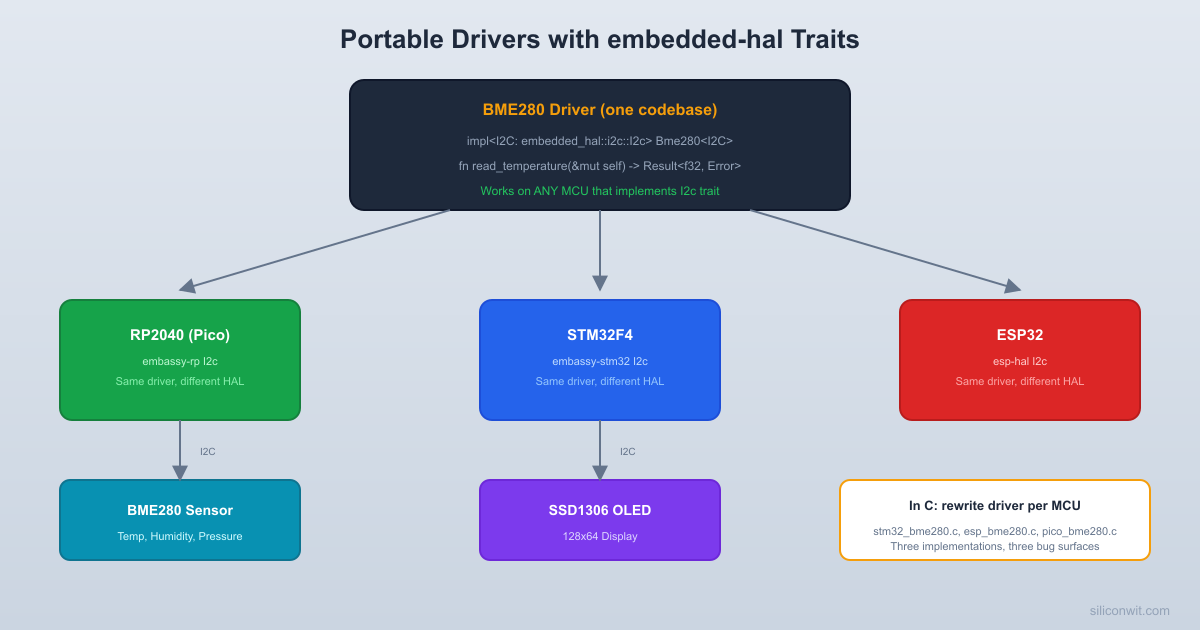
In C embedded development, every I2C or SPI driver is written for one specific microcontroller. Move from an STM32 to an RP2040, and you rewrite every sensor driver from scratch. Rust solves this with embedded-hal, a set of traits that define what an I2C bus or SPI bus can do without specifying how any particular chip implements it. A BME280 driver written against embedded-hal traits compiles and runs on an RP2040, an STM32F4, an ESP32, or a Nordic nRF52 without changing a single line. In this lesson you will wire up a BME280 temperature/humidity/pressure sensor over I2C and an SSD1306 OLED display over I2C, then build a weather station that reads the sensor and formats the data on the display, all using Embassy async drivers. #EmbeddedHAL #I2C #WeatherStation
What We Are Building
Weather Station
A Raspberry Pi Pico reads temperature, humidity, and barometric pressure from a BME280 sensor over I2C. It formats the readings and displays them on a 128x64 SSD1306 OLED screen (also I2C). Readings update every 2 seconds using an Embassy async task. The system also prints readings over USB serial for data logging.
Project specifications:
Parameter
Value
Sensor
BME280 (temperature, humidity, pressure)
Display
SSD1306 128x64 OLED (I2C)
I2C Bus
I2C0, 400 kHz
I2C Pins
SDA = GP4, SCL = GP5
Update Rate
Every 2 seconds
Serial Output
USB CDC or defmt-rtt
Framework
Embassy (embassy-rp, async I2C)
Bill of Materials
Ref
Component
Quantity
Notes
1
Raspberry Pi Pico
1
RP2040-based board
2
BME280 breakout module
1
I2C address 0x76 or 0x77 (check your board)
3
SSD1306 OLED 128x64 module
1
I2C interface, 0.96 inch
4
Breadboard + jumper wires
1 set
5
USB Micro-B cable
1
For programming and serial
Wiring Table
Both the BME280 and SSD1306 share the same I2C bus. They have different addresses, so they coexist on the same two wires.
Pico Pin
GPIO
Connection
Notes
Pin 6
GP4
BME280 SDA, SSD1306 SDA
I2C0 data line
Pin 7
GP5
BME280 SCL, SSD1306 SCL
I2C0 clock line
Pin 36
3V3(OUT)
BME280 VIN, SSD1306 VCC
3.3V supply
Pin 38
GND
BME280 GND, SSD1306 GND
Common ground
Most BME280 and SSD1306 breakout boards include pull-up resistors on SDA and SCL. If you have bare modules without pull-ups, add 4.7K ohm resistors from SDA to 3.3V and from SCL to 3.3V.
The embedded-hal Trait System
The embedded-hal crate defines traits (interfaces) for common hardware operations. It does not contain any implementation code. Think of it as a contract: “any type that implements I2c must provide a write, read, and write_read method with these signatures.”
Implements sensor logic using embedded-hal traits. Knows nothing about any specific MCU.
HAL crate
embassy-rp
Implements embedded-hal traits for the RP2040’s actual I2C hardware.
Application
Your main.rs
Connects the HAL to the driver.
When you write:
letmutbme= Bme280::new(i2c, 0x76);
The Bme280 struct is generic over any type T where T: I2c. On an RP2040, T is embassy_rp::i2c::I2c. On an STM32, T would be embassy_stm32::i2c::I2c. The BME280 driver code is identical in both cases.
The Async Variant: embedded-hal-async
For Embassy, there is embedded-hal-async, which defines the same traits but with async fn methods. This allows I2C and SPI operations to yield to other tasks while waiting for hardware to complete the transfer, instead of busy-waiting.
Embassy’s embassy-rp crate implements both the blocking embedded-hal::I2c and the async embedded-hal-async::I2c traits.
I2C Configuration with Embassy
Setting up I2C on the RP2040 with Embassy requires binding the interrupt handler and configuring the peripheral.
use embassy_rp::i2c::{self, Config as I2cConfig, InterruptHandler as I2cInterruptHandler};
use embassy_rp::bind_interrupts;
use embassy_rp::peripherals::I2C0;
// Bind the I2C0 interrupt to Embassy's handler
bind_interrupts!(struct Irqs {
I2C0_IRQ => I2cInterruptHandler<I2C0>;
});
#[embassy_executor::main]
asyncfnmain(_spawner: Spawner) {
letp= embassy_rp::init(Default::default());
// Configure I2C0 on GP4 (SDA) and GP5 (SCL) at 400 kHz
letmuti2c_config= I2cConfig::default();
i2c_config.frequency =400_000;
leti2c= i2c::I2c::new_async(
p.I2C0,
p.PIN_5, // SCL
p.PIN_4, // SDA
Irqs,
i2c_config,
);
}
Note the argument order: SCL first, then SDA. This matches the RP2040 hardware initialization sequence.
Scanning the I2C Bus
Before connecting sensors, it is useful to scan the bus for devices. This function tries to read one byte from every possible 7-bit address and reports which ones respond.
use embedded_hal_async::i2c::I2c as AsyncI2c;
asyncfnscan_i2c_bus<T: AsyncI2c>(i2c:&mut T) {
defmt::info!("Scanning I2C bus...");
letmutfound=0u8;
foraddrin0x08..=0x77 {
letmutbuf= [0u8; 1];
ifi2c.read(addr, &mutbuf).await.is_ok() {
defmt::info!(" Device found at address 0x{:02X}", addr);
The BME280 is a combined temperature, humidity, and barometric pressure sensor from Bosch. In the Rust ecosystem, several crate options exist. We will use the bme280 crate, which is written against embedded-hal traits.
Project Dependencies
Add these to your Cargo.toml:
[dependencies]
embassy-executor = { version = "0.7", features = ["arch-cortex-m", "executor-thread"] }
embassy-rp = { version = "0.3", features = ["time-driver", "rp2040"] }
embassy-time = { version = "0.4", features = ["generic-queue-8"] }
embassy-sync = "0.6"
cortex-m = { version = "0.7", features = ["inline-asm"] }
cortex-m-rt = "0.7"
panic-halt = "1.0"
defmt = "0.3"
defmt-rtt = "0.4"
# BME280 driver (uses embedded-hal traits)
bme280 = "0.5"
# SSD1306 OLED driver
ssd1306 = "0.9"
# Graphics primitives for the display
embedded-graphics = "0.8"
# Shared I2C bus (allows multiple devices on one bus)
embedded-hal-bus = "0.2"
portable-atomic = { version = "1.10", features = ["critical-section"] }
static_cell = "2.1"
Reading the BME280
The BME280 requires an initialization sequence: read calibration data from internal registers, configure oversampling, and set the operating mode. The bme280 crate handles all of this behind the embedded-hal traits.
use bme280::i2c::BME280;
use embassy_time::Delay;
// Create the BME280 driver instance
// The second argument is the I2C address (0x76 or 0x77)
letmutbme=BME280::new_primary(i2c);
// new_primary = 0x76, new_secondary = 0x77
// Initialize the sensor (reads calibration data, sets oversampling)
The Delay type from embassy_time implements the embedded-hal::delay::DelayNs trait, which the BME280 driver needs for timing its measurement cycles.
How the Same Driver Works on STM32 and ESP32
This is the key insight of embedded-hal. The BME280 driver source code contains no RP2040-specific logic. It only uses the I2c trait. Here is how the same driver call looks on three different MCUs:
letmutbme=BME280::new_primary(i2c); // Same driver call
bme.init(&mut Delay).unwrap(); // Same init
letdata=bme.measure(&mut Delay).unwrap(); // Same read
The only thing that changes is the I2C peripheral initialization (the first line). The BME280 driver code is identical across all three platforms. In C, you would need three completely different driver implementations, each calling platform-specific register manipulation functions.
SSD1306 OLED Display Driver
The SSD1306 is a common 128x64 monochrome OLED controller. The ssd1306 crate provides a driver written against embedded-hal traits, and the embedded-graphics crate provides drawing primitives (text, shapes, images).
Sharing the I2C Bus
Both the BME280 and SSD1306 are on the same I2C bus. In Rust, the I2C peripheral is an owned resource. You cannot pass it to two different drivers because that would require two mutable references. The solution is embedded-hal-bus, which provides a RefCellDevice wrapper that lets multiple drivers share a bus safely.
The embedded-graphics crate provides a text rendering system. You define a text style (font, color) and draw text at specific positions on the display buffer, then flush the buffer to the hardware.
use embedded_graphics::mono_font::ascii::FONT_6X10;
use embedded_graphics::mono_font::MonoTextStyleBuilder;
// Three different APIs, three different driver implementations,
// three times the testing, three times the bugs.
// BME280 driver using embedded-hal traits
// Works on ANY MCU that implements embedded-hal::i2c::I2c
use embedded_hal::i2c::I2c;
constBME280_ADDR: u8 =0x76;
fnbme280_read_reg<T: I2c>(
i2c:&mut T,
reg: u8,
buf:&mut [u8],
) -> Result<(), T::Error> {
// This single implementation works on:
// - RP2040 (embassy-rp)
// - STM32 (embassy-stm32)
// - ESP32 (esp-hal)
// - nRF52 (embassy-nrf)
// - Any future MCU that implements embedded-hal
i2c.write_read(BME280_ADDR, &[reg], buf)
}
// One driver. All platforms. Compile-time type checking.
// The generic parameter T is resolved at compile time,
// so there is zero runtime overhead from the abstraction.
The Rust version uses a generic parameter T: I2c, which means “any type that implements the I2c trait.” The compiler monomorphizes this function for each concrete type, generating platform-specific machine code with zero overhead. You get the abstraction of a virtual interface with the performance of a direct function call.
Complete Project: Weather Station
Project Structure
Directoryweather-station/
Directory.cargo/
config.toml
Directorysrc/
main.rs
Cargo.toml
build.rs
memory.x
rust-toolchain.toml
Full Source Code
src/main.rs
// Weather Station: BME280 + SSD1306 OLED on shared I2C bus
#![no_std]
#![no_main]
use core::cell::RefCell;
use embassy_executor::Spawner;
use embassy_rp::bind_interrupts;
use embassy_rp::i2c::{self, Config as I2cConfig, InterruptHandler as I2cInterruptHandler};
use embassy_rp::peripherals::I2C0;
use embassy_time::{Delay, Duration, Timer};
use {defmt_rtt as _, panic_halt as _};
// Display imports
use ssd1306::mode::BufferedGraphicsMode;
use ssd1306::prelude::*;
use ssd1306::rotation::DisplayRotation;
use ssd1306::size::DisplaySize128x64;
use ssd1306::I2CDisplayInterface;
use ssd1306::Ssd1306;
// Graphics imports
use embedded_graphics::mono_font::ascii::FONT_6X10;
use embedded_graphics::mono_font::MonoTextStyleBuilder;
defmt::error!("BME280 read failed at reading #{}", reading_num);
// Show error on display
let_=display.clear(BinaryColor::Off);
Text::with_baseline(
"Sensor Error!",
Point::new(15, 25),
text_style,
Baseline::Top,
)
.draw(&mutdisplay)
.ok();
let_=display.flush();
}
}
Timer::after(Duration::from_secs(2)).await;
}
}
Cargo.toml for the Complete Project
[package]
name = "weather-station"
version = "0.1.0"
edition = "2021"
[dependencies]
embassy-executor = { version = "0.7", features = ["arch-cortex-m", "executor-thread"] }
embassy-rp = { version = "0.3", features = ["time-driver", "rp2040"] }
embassy-time = { version = "0.4", features = ["generic-queue-8"] }
embassy-sync = "0.6"
cortex-m = { version = "0.7", features = ["inline-asm"] }
cortex-m-rt = "0.7"
panic-halt = "1.0"
defmt = "0.3"
defmt-rtt = "0.4"
bme280 = "0.5"
ssd1306 = "0.9"
embedded-graphics = "0.8"
embedded-hal-bus = "0.2"
portable-atomic = { version = "1.10", features = ["critical-section"] }
static_cell = "2.1"
[profile.release]
opt-level = "s"
debug = true
lto = true
codegen-units = 1
The embedded-hal-async Traits for Non-Blocking I/O
The weather station above uses blocking I2C for simplicity. In a multi-task Embassy application, you would want async I2C so that other tasks can run while waiting for a sensor read to complete. Embassy’s embassy-rp crate provides async I2C through i2c::I2c::new_async().
The key difference:
Aspect
Blocking I2C
Async I2C
Constructor
I2c::new_blocking(...)
I2c::new_async(...)
During transfer
CPU busy-waits
CPU runs other tasks
Requires interrupt
No
Yes (must bind I2C0_IRQ)
Good for single-task
Yes
Overkill
Good for multi-task
Blocks other tasks
Ideal
To convert the weather station to async I2C, change the initialization:
// Async I2C requires the interrupt binding
bind_interrupts!(struct Irqs {
I2C0_IRQ => I2cInterruptHandler<I2C0>;
});
// Use new_async instead of new_blocking
leti2c= i2c::I2c::new_async(
p.I2C0,
p.PIN_5,
p.PIN_4,
Irqs,
i2c_config,
);
Note that the BME280 crate must also support embedded-hal-async traits for fully async operation. Check the crate documentation for async support. Many crates in the embedded Rust ecosystem are migrating to support both blocking and async interfaces.
SPI Configuration
While both devices in this project use I2C, many sensors and displays use SPI. Embassy configures SPI similarly to I2C.
use embassy_rp::spi::{self, Config as SpiConfig, Spi};
use embassy_rp::gpio::{Level, Output};
// SPI0 pin configuration
// GP18: SCK
// GP19: MOSI (TX)
// GP16: MISO (RX)
// GP17: CS (manual chip select)
letmutspi_config= SpiConfig::default();
spi_config.frequency =1_000_000; // 1 MHz
letspi= Spi::new_blocking(
p.SPI0,
p.PIN_18, // SCK
p.PIN_19, // MOSI
p.PIN_16, // MISO
spi_config,
);
// Chip select is managed manually
letcs= Output::new(p.PIN_17, Level::High);
For SPI devices that use the SpiDevice trait from embedded-hal, you can use embedded-hal-bus::spi::ExclusiveDevice to bundle the SPI bus with the chip select pin:
// Pass spi_device to any driver that expects impl SpiDevice
Production Notes
Sensor Calibration
The BME280 contains factory-calibrated compensation coefficients stored in its internal registers. The bme280 crate reads these during init() and applies them to every measurement. The raw ADC values from the sensor are meaningless without this calibration. If you are writing your own driver, be sure to implement the compensation formulas from the Bosch BME280 datasheet (Section 8.1).
I2C Bus Speed Considerations
Speed
Frequency
Max Cable Length
Use Case
Standard
100 kHz
~1 meter
Long wires, noisy environments
Fast
400 kHz
~30 cm
Breadboard projects (recommended)
Fast Plus
1 MHz
~10 cm
Short PCB traces only
The RP2040 supports all three modes. For breadboard projects, 400 kHz is the best balance of speed and reliability. If you get intermittent read failures, try reducing to 100 kHz.
Display Update Strategy
Flushing the entire 128x64 SSD1306 buffer (1 KB) over I2C at 400 kHz takes about 20 ms. If you are updating the display every 2 seconds, this is negligible. For faster update rates, consider partial updates (only redraw changed regions) or SPI connection (which is 10x faster than I2C for bulk data).
Error Handling
The complete project uses .unwrap() on many results for clarity. In production code, handle errors explicitly:
matchbme.measure(&mut Delay) {
Ok(m) => {
// Use measurements
}
Err(bme280::Error::Bus(_)) => {
// I2C communication error. Sensor disconnected?
// Try reinitializing after a delay.
Timer::after_secs(5).await;
let_=bme.init(&mut Delay);
}
Err(bme280::Error::InvalidData) => {
// Sensor returned garbage. Skip this reading.
}
Err(_) => {
// Other error
}
}
Testing
Wire the BME280 and SSD1306 to the Pico according to the wiring table above.
Build and flash:
Terminal window
cargobuild--release
cargorun--release
The OLED should display “Initializing…” for 1 second, then show live readings:
Weather Station
Temp: 23.4 C
Hum: 45.2 %
Pres: 1013.2 hPa
Reading #1
Breathe on the BME280 sensor. The temperature and humidity should rise noticeably within 2 to 4 seconds.
Cover the sensor with your hand (warm, humid air). Temperature should increase, humidity should spike.
Check the defmt serial output for matching readings:
#1: T=23.4 C, H=45.2 %, P=1013.2 hPa
#2: T=23.5 C, H=46.1 %, P=1013.2 hPa
If the display shows “Sensor Error!”, check the I2C wiring and verify the BME280 address (0x76 vs 0x77). Use the I2C bus scanner to confirm both devices respond.
If nothing appears on the OLED, verify the display address is 0x3C by running the bus scanner.
Summary
The embedded-hal trait system is what makes Rust embedded drivers reusable across every ARM, RISC-V, and Xtensa microcontroller in the ecosystem. You write a sensor driver once, test it once, and deploy it on any platform. The BME280 and SSD1306 crates we used in this lesson were not written for the RP2040 specifically. They were written against abstract traits, and Embassy’s HAL implementation made them work on our Pico without any platform-specific code. In the next lesson, we will explore UART communication with DMA transfers, where Rust’s ownership model prevents an entire class of buffer aliasing bugs that plague C firmware.



Comments