Skip to content

Bluetooth Low Energy (BLE)

Bluetooth Low Energy (BLE) hero image
Modified:
Published:

Wi-Fi is powerful but requires infrastructure. Bluetooth Low Energy works anywhere, consumes far less power, and lets phones connect directly to your device without any network setup. In this lesson you will build a BLE environmental beacon that advertises temperature and humidity data from a DHT22 sensor. Open any BLE scanner app on your phone and the readings appear instantly. You will also implement GATT notifications so connected clients receive updates automatically, and learn how BLE and Wi-Fi share the ESP32’s single radio without stepping on each other. #ESP32 #BLE #Bluetooth

What We Are Building

BLE Environmental Beacon

A wireless environmental sensor that broadcasts data over Bluetooth Low Energy. The ESP32 reads the DHT22 sensor and exposes temperature, humidity, and battery level through standard BLE Environmental Sensing Service (ESS) characteristics. Any BLE scanner app (nRF Connect, LightBlue) can discover and read the values. Connected clients receive automatic notifications when readings change. The beacon also supports Wi-Fi coexistence for dual-mode applications.

Project specifications:

ParameterValue
MCUESP32 DevKitC
SensorDHT22 (reused from Lesson 4)
BLE RolePeripheral (GATT server)
ServiceEnvironmental Sensing Service (UUID 0x181A)
CharacteristicsTemperature (0x2A6E), Humidity (0x2A6F)
Advertising Interval100 ms (fast) / 1000 ms (slow, after 30s)
Notification IntervalEvery 5 seconds on value change
Connection ParametersMin 7.5 ms, Max 30 ms, Latency 0
CoexistenceBLE + Wi-Fi simultaneous operation demonstrated
Phone AppnRF Connect, LightBlue, or any GATT browser

Bill of Materials

RefComponentQuantityNotes
U1ESP32 DevKitC1Same board from previous lessons
S1DHT22 temperature/humidity sensor1Reused from Lesson 4
R14.7k ohm resistor1DHT22 data line pull-up
Breadboard + jumper wires1 set
Smartphone with BLE scanner app1nRF Connect recommended

BLE Architecture Overview


Bluetooth Low Energy (BLE) is a wireless protocol designed for short bursts of data at minimal power. Unlike Classic Bluetooth, which maintains a continuous connection for streaming audio or transferring files, BLE wakes up only when it has something to send, transmits a small packet, and goes back to sleep. This makes it ideal for IoT sensors, wearables, and beacons where battery life matters more than throughput.

The key differences from Classic Bluetooth:

FeatureClassic BluetoothBLE
Power consumption30+ mA sustainedPeaks of ~15 mA, average < 1 mA
Connection setupSecondsMilliseconds
Data throughputUp to 3 Mbps~1 Mbps (effective ~200 kbps)
Range~10 m typical~10 m typical (up to 100 m open air)
TopologyPoint to pointPoint to point, broadcast, mesh
Use caseAudio, file transferSensors, beacons, control

BLE is organized into two major layers: GAP and GATT.

BLE Protocol Stack
┌────────────────────────────────┐
│ Application (Your firmware) │
├────────────────────────────────┤
│ GAP │ GATT │
│ (Discovery, │ (Services, │
│ Advertise) │ Read/Write) │
├──────────────┴────────────────┤
│ ATT (Attribute Protocol) │
├────────────────────────────────┤
│ L2CAP (Logical Link) │
├────────────────────────────────┤
│ Link Layer (LL) │
│ 40 channels, 2 MHz spacing │
├────────────────────────────────┤
│ Physical Layer (PHY) │
│ 2.4 GHz ISM, 1 Mbps │
└────────────────────────────────┘

GAP: The Advertising and Connection Layer

The Generic Access Profile (GAP) handles device discovery and connection establishment. A BLE device operates in one of several roles:

  1. Broadcaster: sends advertising packets without accepting connections (beacon mode).
  2. Observer: listens for advertising packets without connecting.
  3. Peripheral: advertises and accepts connections. This is our ESP32’s role.
  4. Central: scans for peripherals and initiates connections. This is your phone’s role.

The advertising process works like this: the peripheral sends a short packet (up to 31 bytes) on three dedicated advertising channels (37, 38, 39) at a configurable interval. A scanning central device picks up these packets and can either read the embedded data directly (passive scanning) or request a scan response for more information (active scanning). If the central wants structured data exchange, it initiates a connection.

GATT: The Data Layer

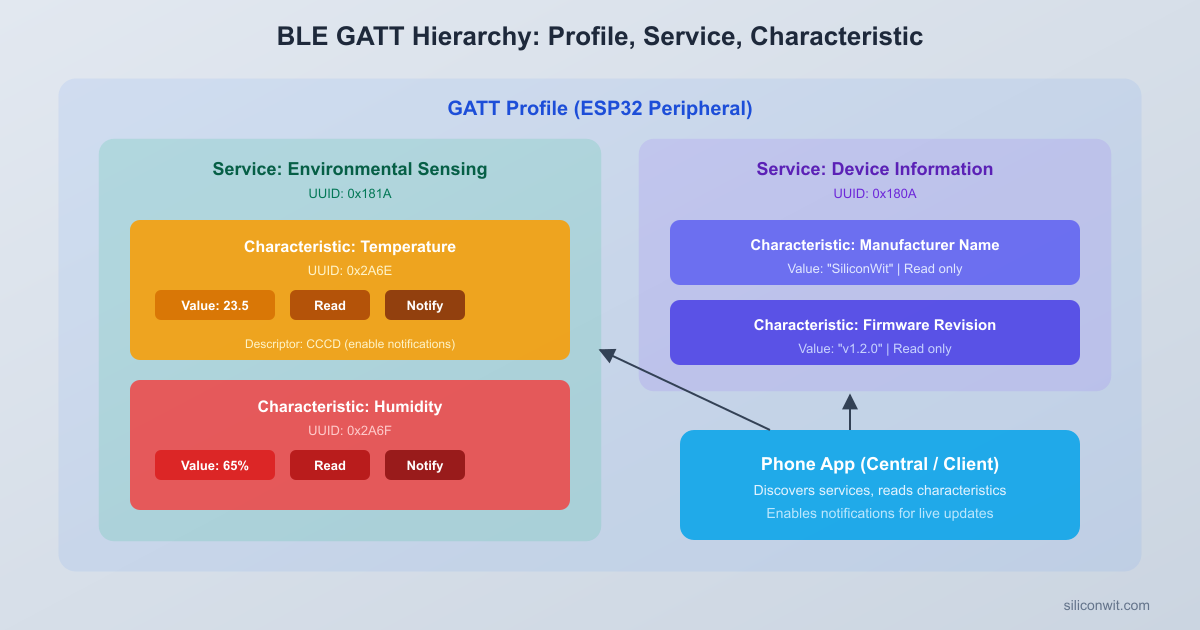
Once connected, data exchange follows the Generic Attribute Profile (GATT). GATT defines a hierarchy:

  1. Profile: a collection of services for a use case (not a protocol element, just a design pattern).
  2. Service: a group of related data points, identified by a UUID. For example, the Environmental Sensing Service is UUID 0x181A.
  3. Characteristic: a single data point within a service. Temperature is 0x2A6E, Humidity is 0x2A6F.
  4. Descriptor: metadata about a characteristic. The most important one is the Client Characteristic Configuration Descriptor (CCCD, UUID 0x2902), which controls notifications.
BLE GATT Hierarchy
┌─────────────────────────────────────────┐
│ Profile (Environmental Sensing) │
│ ┌───────────────────────────────────┐ │
│ │ Service: ESS (UUID 0x181A) │ │
│ │ ┌─────────────────────────────┐ │ │
│ │ │ Characteristic: Temperature │ │ │
│ │ │ UUID: 0x2A6E │ │ │
│ │ │ Properties: Read, Notify │ │ │
│ │ │ ┌───────────────────────┐ │ │ │
│ │ │ │ CCCD (0x2902) │ │ │ │
│ │ │ │ Enable notifications │ │ │ │
│ │ │ └───────────────────────┘ │ │ │
│ │ └─────────────────────────────┘ │ │
│ │ ┌─────────────────────────────┐ │ │
│ │ │ Characteristic: Humidity │ │ │
│ │ │ UUID: 0x2A6F │ │ │
│ │ │ Properties: Read, Notify │ │ │
│ │ └─────────────────────────────┘ │ │
│ └───────────────────────────────────┘ │
└─────────────────────────────────────────┘

Each characteristic has properties that define how it can be accessed: read, write, notify, or indicate. Our temperature and humidity characteristics will support read (client polls the value) and notify (server pushes updates automatically).

NimBLE Stack on ESP-IDF


ESP-IDF provides two BLE stacks: Bluedroid (the Android BLE/Classic stack) and NimBLE (a lightweight BLE-only stack from Apache Mynewt). Starting with ESP-IDF v5.x, NimBLE is the recommended choice for BLE-only projects because it uses roughly 50% less flash and 40% less RAM than Bluedroid.

Enabling NimBLE in Your Project

In menuconfig, navigate to Component config > Bluetooth and set the host stack to NimBLE:

idf.py menuconfig
  1. Component config > Bluetooth > Enable Bluetooth
  2. Set Bluetooth host to NimBLE
  3. Component config > Bluetooth > NimBLE Options > Set device name to ESP32-ENV
  4. Save and exit

Your project’s CMakeLists.txt needs the BLE components. The main CMakeLists.txt remains standard:

cmake_minimum_required(VERSION 3.16)
include($ENV{IDF_PATH}/tools/cmake/project.cmake)
project(ble_env_sensor)

And in main/CMakeLists.txt, list the required components:

idf_component_register(
SRCS "main.c"
INCLUDE_DIRS "."
REQUIRES bt nvs_flash driver
)

The bt component pulls in NimBLE automatically when you have selected it in menuconfig. The driver component is needed for the DHT22 GPIO access.

NimBLE Programming Model

NimBLE uses a callback-driven architecture similar to the Wi-Fi event model you learned in Lesson 4. The key concepts are:

  1. Host task: NimBLE runs its own FreeRTOS task (nimble_port_freertos_init). All BLE operations happen in this task’s context.
  2. GAP event callback: handles advertising, connection, and disconnection events.
  3. GATT access callback: handles read and write requests for each characteristic.
  4. Sync callback: called when the BLE host and controller have synchronized. This is where you start advertising.

GAP: Advertising Configuration


Advertising is how your ESP32 announces its presence to the world. The advertising data packet is limited to 31 bytes, so you must be selective about what to include. Typically you include:

  1. Flags: indicate BLE support and discoverability mode (3 bytes).
  2. Complete Local Name: the device name scanners will display.
  3. Service UUIDs: tells scanners what services are available.

Here is how to configure advertising with NimBLE:

#include "host/ble_hs.h"
#include "services/gap/ble_svc_gap.h"
static const char *device_name = "ESP32-ENV";
static void start_advertising(void)
{
struct ble_gap_adv_params adv_params;
struct ble_hs_adv_fields fields;
int rc;
memset(&fields, 0, sizeof(fields));
/* Flags: general discoverable + BLE only */
fields.flags = BLE_HS_ADV_F_DISC_GEN | BLE_HS_ADV_F_BREDR_UNSUP;
/* Include the complete device name */
fields.name = (uint8_t *)device_name;
fields.name_len = strlen(device_name);
fields.name_is_complete = 1;
/* Include 16-bit service UUID: Environmental Sensing (0x181A) */
ble_uuid16_t ess_uuid = BLE_UUID16_INIT(0x181A);
fields.uuids16 = &ess_uuid;
fields.num_uuids16 = 1;
fields.uuids16_is_complete = 1;
rc = ble_gap_adv_set_fields(&fields);
if (rc != 0) {
ESP_LOGE(TAG, "Failed to set adv fields, rc=%d", rc);
return;
}
/* Advertising parameters */
memset(&adv_params, 0, sizeof(adv_params));
adv_params.conn_mode = BLE_GAP_CONN_MODE_UND; /* Undirected connectable */
adv_params.disc_mode = BLE_GAP_DISC_MODE_GEN; /* General discoverable */
adv_params.itvl_min = BLE_GAP_ADV_ITVL_MS(100); /* 100 ms min interval */
adv_params.itvl_max = BLE_GAP_ADV_ITVL_MS(150); /* 150 ms max interval */
rc = ble_gap_adv_start(BLE_OWN_ADDR_PUBLIC, NULL, BLE_HS_FOREVER,
&adv_params, gap_event_handler, NULL);
if (rc != 0) {
ESP_LOGE(TAG, "Failed to start advertising, rc=%d", rc);
}
ESP_LOGI(TAG, "Advertising started");
}

The advertising interval controls how often the ESP32 sends packets. A shorter interval (100 ms) means faster discovery but higher power consumption. For a battery-powered beacon you might increase this to 1000 ms after the initial discovery window. For our mains-powered development setup, 100 ms is fine.

Connection Mode and Discoverability

The conn_mode field determines whether a central can connect:

ModeConstantBehavior
Non-connectableBLE_GAP_CONN_MODE_NONBroadcast only, no connections
Undirected connectableBLE_GAP_CONN_MODE_UNDAny central can connect
Directed connectableBLE_GAP_CONN_MODE_DIROnly a specific central can connect

For our environmental sensor, we use undirected connectable so any phone can connect and read data.

GATT Server: Services and Characteristics


The GATT server defines the data your device exposes. NimBLE uses a table-driven approach: you define your services and characteristics in a static array, and NimBLE handles all the protocol details.

UUID Types

BLE uses two UUID formats:

  1. 16-bit UUIDs: assigned by the Bluetooth SIG for standard services and characteristics. Environmental Sensing Service is 0x181A, Temperature is 0x2A6E.
  2. 128-bit UUIDs: custom UUIDs for vendor-specific services. Format: xxxxxxxx-xxxx-xxxx-xxxx-xxxxxxxxxxxx.

For our project we use standard 16-bit UUIDs because we are implementing the official Environmental Sensing Service. This means any BLE client that understands ESS will automatically know how to interpret our data.

Defining the GATT Table

NimBLE defines the GATT structure using an array of ble_gatt_svc_def entries. Each service contains an array of characteristics, and each characteristic can have descriptors:

#include "host/ble_uuid.h"
#include "services/gatt/ble_svc_gatt.h"
/* Characteristic value handles (set by NimBLE during registration) */
static uint16_t temp_chr_val_handle;
static uint16_t humi_chr_val_handle;
/* Forward declarations */
static int gatt_access_cb(uint16_t conn_handle, uint16_t attr_handle,
struct ble_gatt_access_ctxt *ctxt, void *arg);
/* GATT service definitions */
static const struct ble_gatt_svc_def gatt_svr_svcs[] = {
{
/* Environmental Sensing Service (0x181A) */
.type = BLE_GATT_SVC_TYPE_PRIMARY,
.uuid = BLE_UUID16_DECLARE(0x181A),
.characteristics = (struct ble_gatt_chr_def[]) {
{
/* Temperature characteristic (0x2A6E) */
.uuid = BLE_UUID16_DECLARE(0x2A6E),
.access_cb = gatt_access_cb,
.val_handle = &temp_chr_val_handle,
.flags = BLE_GATT_CHR_F_READ | BLE_GATT_CHR_F_NOTIFY,
},
{
/* Humidity characteristic (0x2A6F) */
.uuid = BLE_UUID16_DECLARE(0x2A6F),
.access_cb = gatt_access_cb,
.val_handle = &humi_chr_val_handle,
.flags = BLE_GATT_CHR_F_READ | BLE_GATT_CHR_F_NOTIFY,
},
{
0, /* Terminator */
},
},
},
{
0, /* Terminator */
},
};

The val_handle pointers are filled in by NimBLE during service registration. You use these handles later to send notifications. The flags field sets the characteristic properties: our characteristics support both read (polling) and notify (push).

Characteristic Values and BLE Data Formats


The Bluetooth SIG defines standard data formats for each characteristic. Following these formats ensures interoperability with any compliant BLE client.

Temperature (0x2A6E)

The Temperature characteristic uses a signed 16-bit integer (int16_t) representing degrees Celsius with a resolution of 0.01. So a reading of 23.45 C is encoded as 2345.

Humidity (0x2A6F)

The Humidity characteristic uses an unsigned 16-bit integer (uint16_t) representing percent relative humidity with a resolution of 0.01. So a reading of 55.20% is encoded as 5520.

The GATT Access Callback

When a client reads a characteristic, NimBLE calls the access callback. The callback must append the value to a memory buffer (os_mbuf):

/* Current sensor values (updated by the sensor task) */
static int16_t current_temp_ble = 0; /* Temperature in 0.01 C units */
static uint16_t current_humi_ble = 0; /* Humidity in 0.01% units */
static int gatt_access_cb(uint16_t conn_handle, uint16_t attr_handle,
struct ble_gatt_access_ctxt *ctxt, void *arg)
{
uint16_t uuid16;
int rc;
uuid16 = ble_uuid_u16(ctxt->chr->uuid);
switch (ctxt->op) {
case BLE_GATT_ACCESS_OP_READ_CHR:
if (uuid16 == 0x2A6E) {
/* Temperature: sint16, little-endian */
rc = os_mbuf_append(ctxt->om, &current_temp_ble,
sizeof(current_temp_ble));
return rc == 0 ? 0 : BLE_ATT_ERR_INSUFFICIENT_RES;
}
if (uuid16 == 0x2A6F) {
/* Humidity: uint16, little-endian */
rc = os_mbuf_append(ctxt->om, &current_humi_ble,
sizeof(current_humi_ble));
return rc == 0 ? 0 : BLE_ATT_ERR_INSUFFICIENT_RES;
}
return BLE_ATT_ERR_UNLIKELY;
default:
return BLE_ATT_ERR_UNLIKELY;
}
}

Note that BLE uses little-endian byte order, which matches the ESP32’s native byte order. No byte swapping is needed.

Converting DHT22 Readings to BLE Format

The DHT22 sensor returns temperature as a float in degrees Celsius and humidity as a float in percent. Converting to BLE format is straightforward:

static void convert_sensor_to_ble(float temp_c, float humi_pct)
{
/* Temperature: multiply by 100 to get 0.01 C resolution */
current_temp_ble = (int16_t)(temp_c * 100.0f);
/* Humidity: multiply by 100 to get 0.01% resolution */
current_humi_ble = (uint16_t)(humi_pct * 100.0f);
}

For example, if the DHT22 reads 24.3 C and 61.8%, the BLE values become 2430 and 6180.

Notifications


Notifications allow the server to push updated values to a connected client without the client polling. This is more power-efficient than repeated reads and provides real-time updates.

How Notifications Work

Notifications are controlled by the Client Characteristic Configuration Descriptor (CCCD), a special descriptor with UUID 0x2902 that NimBLE adds automatically to any characteristic with the NOTIFY flag. The CCCD is a 16-bit value where:

  • Bit 0 = 1: notifications enabled
  • Bit 1 = 1: indications enabled (like notifications but with acknowledgment)

The client writes to the CCCD to subscribe. NimBLE handles CCCD writes internally and generates a BLE_GAP_EVENT_SUBSCRIBE event in your GAP callback.

Tracking Subscriptions

You need to track which connection handles have subscribed to notifications:

static uint16_t conn_handle_active = 0;
static bool temp_notify_enabled = false;
static bool humi_notify_enabled = false;
static int gap_event_handler(struct ble_gap_event *event, void *arg)
{
switch (event->type) {
case BLE_GAP_EVENT_CONNECT:
if (event->connect.status == 0) {
ESP_LOGI(TAG, "Connected, handle=%d", event->connect.conn_handle);
conn_handle_active = event->connect.conn_handle;
} else {
ESP_LOGW(TAG, "Connection failed, status=%d", event->connect.status);
start_advertising();
}
break;
case BLE_GAP_EVENT_DISCONNECT:
ESP_LOGI(TAG, "Disconnected, reason=%d",
event->disconnect.reason);
conn_handle_active = 0;
temp_notify_enabled = false;
humi_notify_enabled = false;
start_advertising(); /* Resume advertising */
break;
case BLE_GAP_EVENT_SUBSCRIBE:
ESP_LOGI(TAG, "Subscribe event: attr_handle=%d, cur_notify=%d",
event->subscribe.attr_handle,
event->subscribe.cur_notify);
if (event->subscribe.attr_handle == temp_chr_val_handle) {
temp_notify_enabled = event->subscribe.cur_notify;
ESP_LOGI(TAG, "Temperature notifications %s",
temp_notify_enabled ? "enabled" : "disabled");
}
if (event->subscribe.attr_handle == humi_chr_val_handle) {
humi_notify_enabled = event->subscribe.cur_notify;
ESP_LOGI(TAG, "Humidity notifications %s",
humi_notify_enabled ? "enabled" : "disabled");
}
break;
case BLE_GAP_EVENT_ADV_COMPLETE:
ESP_LOGI(TAG, "Advertising complete");
start_advertising();
break;
case BLE_GAP_EVENT_MTU:
ESP_LOGI(TAG, "MTU updated: %d", event->mtu.value);
break;
default:
break;
}
return 0;
}

Sending Notifications

To push a value update, use ble_gatts_notify_custom(). This builds a notification packet and sends it to the connected client:

static void send_notification(uint16_t attr_handle, void *data, uint16_t len)
{
if (conn_handle_active == 0) {
return; /* No connection */
}
struct os_mbuf *om = ble_hs_mbuf_from_flat(data, len);
if (om == NULL) {
ESP_LOGE(TAG, "Failed to allocate mbuf for notification");
return;
}
int rc = ble_gatts_notify_custom(conn_handle_active, attr_handle, om);
if (rc != 0) {
ESP_LOGE(TAG, "Notification failed, rc=%d", rc);
}
}

The sensor task calls this function whenever a new reading is available:

/* In the sensor reading task */
if (temp_notify_enabled) {
send_notification(temp_chr_val_handle,
&current_temp_ble, sizeof(current_temp_ble));
}
if (humi_notify_enabled) {
send_notification(humi_chr_val_handle,
&current_humi_ble, sizeof(current_humi_ble));
}

Connection Management


When a central connects to your peripheral, BLE negotiates connection parameters that affect latency, throughput, and power consumption.

Connection Parameters

The three key parameters are:

ParameterDescriptionOur Value
Connection IntervalHow often the central and peripheral exchange data7.5 ms min, 30 ms max
Slave LatencyHow many intervals the peripheral can skip if it has nothing to send0 (respond every interval)
Supervision TimeoutHow long before a missed response is treated as a disconnect4000 ms

After a connection is established, either side can request a parameter update. The peripheral typically requests parameters that match its use case:

case BLE_GAP_EVENT_CONNECT:
if (event->connect.status == 0) {
conn_handle_active = event->connect.conn_handle;
/* Request connection parameter update */
struct ble_gap_upd_params params = {
.itvl_min = BLE_GAP_INITIAL_CONN_ITVL_MIN, /* 7.5 ms */
.itvl_max = 24, /* 30 ms (units of 1.25 ms) */
.latency = 0,
.supervision_timeout = 400, /* 4000 ms (units of 10 ms) */
.min_ce_len = 0,
.max_ce_len = 0,
};
ble_gap_update_params(conn_handle_active, &params);
}
break;

Bonding Basics

Bonding stores pairing information so that reconnections skip the pairing process. For our environmental sensor, bonding is not strictly necessary (the data is not sensitive), but NimBLE supports it through the Security Manager. Enabling bonding requires:

  1. Configuring the security manager with ble_hs_cfg.sm_bonding = 1.
  2. Setting I/O capabilities (for a headless device: BLE_SM_IO_CAP_NO_IO).
  3. Storing bond keys in NVS using NimBLE’s built-in store.

We will keep our project simple and skip bonding, but you should know it exists for projects that handle sensitive data.

BLE and Wi-Fi Coexistence


The ESP32 has a single 2.4 GHz radio shared between Wi-Fi and Bluetooth. It cannot transmit on both simultaneously; instead, it uses a time-division multiplexing scheme called coexistence (coex). The hardware arbiter grants radio access to whichever protocol has the highest priority at any given moment.

How Coexistence Works

When both BLE and Wi-Fi are active, the coex arbiter follows these rules:

  1. Wi-Fi beacons and BLE advertising events have high priority because missing them causes connection drops.
  2. Wi-Fi data transfer gets priority during active TCP sessions.
  3. BLE connection events are scheduled in the gaps between Wi-Fi transmissions.
  4. If a conflict occurs, the lower-priority operation is delayed or skipped.

Enabling Coexistence

Coexistence is enabled in menuconfig:

Component config > Wi-Fi > Software controls WiFi/Bluetooth coexistence > Enable

You can also set the coexistence mode to favor one protocol:

ModeBehavior
ESP_COEX_PREFER_WIFIWi-Fi gets priority. BLE may experience higher latency
ESP_COEX_PREFER_BTBLE gets priority. Wi-Fi throughput may drop
ESP_COEX_PREFER_BALANCEBalanced approach for mixed workloads

In code, set the preference with:

#include "esp_coexist.h"
esp_coex_preference_set(ESP_COEX_PREFER_BALANCE);

Practical Tips for Coexistence

  1. Increase BLE connection interval when Wi-Fi is active. A 30 ms interval gives Wi-Fi more time slots than a 7.5 ms interval.
  2. Avoid large Wi-Fi transfers during BLE advertising. If you need to send an HTTP request, do it between advertising bursts.
  3. Use BLE notifications instead of reads. Notifications are scheduled by the peripheral, so the stack can plan around Wi-Fi activity. Client-initiated reads arrive at unpredictable times.
  4. Monitor RSSI on both links. If BLE RSSI drops sharply when Wi-Fi is active, increase the connection interval or reduce Wi-Fi duty cycle.

Complete Firmware


Here is the full main.c that integrates everything: NimBLE initialization, GATT server with the Environmental Sensing Service, DHT22 sensor reading, advertising, notifications, and connection handling.

Project Structure

  • Directoryble_env_sensor/
    • CMakeLists.txt
    • sdkconfig.defaults
    • Directorymain/
      • CMakeLists.txt
      • main.c

sdkconfig.defaults

Set these defaults so you do not have to run menuconfig manually every time:

# Enable Bluetooth with NimBLE host
CONFIG_BT_ENABLED=y
CONFIG_BT_NIMBLE_ENABLED=y
CONFIG_BT_NIMBLE_DEVICE_NAME="ESP32-ENV"
# BLE settings
CONFIG_BT_NIMBLE_MAX_CONNECTIONS=1
CONFIG_BT_NIMBLE_ROLE_CENTRAL=n
CONFIG_BT_NIMBLE_ROLE_OBSERVER=n
# Wi-Fi coexistence
CONFIG_ESP_COEX_SW_COEXIST_ENABLE=y

main/CMakeLists.txt

idf_component_register(
SRCS "main.c"
INCLUDE_DIRS "."
REQUIRES bt nvs_flash driver esp_timer
)

main/main.c

#include <stdio.h>
#include <string.h>
#include <stdlib.h>
#include "freertos/FreeRTOS.h"
#include "freertos/task.h"
#include "driver/gpio.h"
#include "esp_log.h"
#include "esp_timer.h"
#include "nvs_flash.h"
/* NimBLE headers */
#include "nimble/nimble_port.h"
#include "nimble/nimble_port_freertos.h"
#include "host/ble_hs.h"
#include "host/util/util.h"
#include "services/gap/ble_svc_gap.h"
#include "services/gatt/ble_svc_gatt.h"
static const char *TAG = "BLE_ENV";
/* ------------------------------------------------------------------ */
/* DHT22 Configuration */
/* ------------------------------------------------------------------ */
#define DHT22_GPIO GPIO_NUM_4
#define SENSOR_READ_INTERVAL_MS 5000
/* ------------------------------------------------------------------ */
/* BLE State */
/* ------------------------------------------------------------------ */
static const char *device_name = "ESP32-ENV";
static uint16_t conn_handle_active = 0;
static bool is_connected = false;
static bool temp_notify_enabled = false;
static bool humi_notify_enabled = false;
static uint16_t temp_chr_val_handle;
static uint16_t humi_chr_val_handle;
/* Sensor values in BLE format */
static int16_t current_temp_ble = 0; /* 0.01 C units */
static uint16_t current_humi_ble = 0; /* 0.01 % units */
/* ------------------------------------------------------------------ */
/* DHT22 Bit-Bang Driver */
/* ------------------------------------------------------------------ */
static bool dht22_read(float *temperature, float *humidity)
{
uint8_t data[5] = {0};
int64_t timeout;
/* Send start signal: pull low 1 ms, then release */
gpio_set_direction(DHT22_GPIO, GPIO_MODE_OUTPUT);
gpio_set_level(DHT22_GPIO, 0);
vTaskDelay(pdMS_TO_TICKS(2));
gpio_set_level(DHT22_GPIO, 1);
/* Switch to input and wait for sensor response */
gpio_set_direction(DHT22_GPIO, GPIO_MODE_INPUT);
/* Wait for sensor to pull low (response signal) */
timeout = esp_timer_get_time() + 100;
while (gpio_get_level(DHT22_GPIO) == 1) {
if (esp_timer_get_time() > timeout) return false;
}
/* Sensor holds low ~80 us, then high ~80 us */
timeout = esp_timer_get_time() + 100;
while (gpio_get_level(DHT22_GPIO) == 0) {
if (esp_timer_get_time() > timeout) return false;
}
timeout = esp_timer_get_time() + 100;
while (gpio_get_level(DHT22_GPIO) == 1) {
if (esp_timer_get_time() > timeout) return false;
}
/* Read 40 bits (5 bytes) */
for (int i = 0; i < 40; i++) {
/* Wait for bit start (low ~50 us) */
timeout = esp_timer_get_time() + 100;
while (gpio_get_level(DHT22_GPIO) == 0) {
if (esp_timer_get_time() > timeout) return false;
}
/* Measure high duration: ~26 us = 0, ~70 us = 1 */
int64_t start = esp_timer_get_time();
timeout = start + 100;
while (gpio_get_level(DHT22_GPIO) == 1) {
if (esp_timer_get_time() > timeout) return false;
}
int64_t duration = esp_timer_get_time() - start;
data[i / 8] <<= 1;
if (duration > 40) {
data[i / 8] |= 1;
}
}
/* Verify checksum */
uint8_t checksum = data[0] + data[1] + data[2] + data[3];
if (checksum != data[4]) {
ESP_LOGW(TAG, "DHT22 checksum mismatch");
return false;
}
/* Parse humidity (unsigned) */
uint16_t raw_humi = (data[0] << 8) | data[1];
*humidity = raw_humi * 0.1f;
/* Parse temperature (signed: bit 15 = sign) */
uint16_t raw_temp = (data[2] << 8) | data[3];
if (raw_temp & 0x8000) {
raw_temp &= 0x7FFF;
*temperature = raw_temp * -0.1f;
} else {
*temperature = raw_temp * 0.1f;
}
return true;
}
/* ------------------------------------------------------------------ */
/* GATT Access Callback */
/* ------------------------------------------------------------------ */
static int gatt_access_cb(uint16_t conn_handle, uint16_t attr_handle,
struct ble_gatt_access_ctxt *ctxt, void *arg)
{
uint16_t uuid16 = ble_uuid_u16(ctxt->chr->uuid);
int rc;
if (ctxt->op == BLE_GATT_ACCESS_OP_READ_CHR) {
if (uuid16 == 0x2A6E) {
rc = os_mbuf_append(ctxt->om, &current_temp_ble,
sizeof(current_temp_ble));
ESP_LOGI(TAG, "Temperature read: %d (0.01 C)", current_temp_ble);
return rc == 0 ? 0 : BLE_ATT_ERR_INSUFFICIENT_RES;
}
if (uuid16 == 0x2A6F) {
rc = os_mbuf_append(ctxt->om, &current_humi_ble,
sizeof(current_humi_ble));
ESP_LOGI(TAG, "Humidity read: %d (0.01%%)", current_humi_ble);
return rc == 0 ? 0 : BLE_ATT_ERR_INSUFFICIENT_RES;
}
}
return BLE_ATT_ERR_UNLIKELY;
}
/* ------------------------------------------------------------------ */
/* GATT Service Definitions */
/* ------------------------------------------------------------------ */
static const struct ble_gatt_svc_def gatt_svr_svcs[] = {
{
.type = BLE_GATT_SVC_TYPE_PRIMARY,
.uuid = BLE_UUID16_DECLARE(0x181A), /* Environmental Sensing */
.characteristics = (struct ble_gatt_chr_def[]) {
{
.uuid = BLE_UUID16_DECLARE(0x2A6E), /* Temperature */
.access_cb = gatt_access_cb,
.val_handle = &temp_chr_val_handle,
.flags = BLE_GATT_CHR_F_READ | BLE_GATT_CHR_F_NOTIFY,
},
{
.uuid = BLE_UUID16_DECLARE(0x2A6F), /* Humidity */
.access_cb = gatt_access_cb,
.val_handle = &humi_chr_val_handle,
.flags = BLE_GATT_CHR_F_READ | BLE_GATT_CHR_F_NOTIFY,
},
{ 0 },
},
},
{ 0 },
};
static int gatt_svr_init(void)
{
int rc;
ble_svc_gap_init();
ble_svc_gatt_init();
rc = ble_gatts_count_cfg(gatt_svr_svcs);
if (rc != 0) {
ESP_LOGE(TAG, "ble_gatts_count_cfg failed, rc=%d", rc);
return rc;
}
rc = ble_gatts_add_svcs(gatt_svr_svcs);
if (rc != 0) {
ESP_LOGE(TAG, "ble_gatts_add_svcs failed, rc=%d", rc);
return rc;
}
return 0;
}
/* ------------------------------------------------------------------ */
/* Notification Helper */
/* ------------------------------------------------------------------ */
static void send_notification(uint16_t attr_handle, void *data, uint16_t len)
{
if (!is_connected) {
return;
}
struct os_mbuf *om = ble_hs_mbuf_from_flat(data, len);
if (om == NULL) {
ESP_LOGE(TAG, "Failed to allocate mbuf for notification");
return;
}
int rc = ble_gatts_notify_custom(conn_handle_active, attr_handle, om);
if (rc != 0) {
ESP_LOGW(TAG, "Notification failed, rc=%d", rc);
}
}
/* Forward declarations (start_advertising and gap_event_handler reference each other) */
static int gap_event_handler(struct ble_gap_event *event, void *arg);
static void start_advertising(void);
/* ------------------------------------------------------------------ */
/* Advertising */
/* ------------------------------------------------------------------ */
static void start_advertising(void)
{
struct ble_gap_adv_params adv_params;
struct ble_hs_adv_fields fields;
int rc;
memset(&fields, 0, sizeof(fields));
fields.flags = BLE_HS_ADV_F_DISC_GEN | BLE_HS_ADV_F_BREDR_UNSUP;
fields.name = (uint8_t *)device_name;
fields.name_len = strlen(device_name);
fields.name_is_complete = 1;
ble_uuid16_t ess_uuid = BLE_UUID16_INIT(0x181A);
fields.uuids16 = &ess_uuid;
fields.num_uuids16 = 1;
fields.uuids16_is_complete = 1;
rc = ble_gap_adv_set_fields(&fields);
if (rc != 0) {
ESP_LOGE(TAG, "ble_gap_adv_set_fields failed, rc=%d", rc);
return;
}
memset(&adv_params, 0, sizeof(adv_params));
adv_params.conn_mode = BLE_GAP_CONN_MODE_UND;
adv_params.disc_mode = BLE_GAP_DISC_MODE_GEN;
rc = ble_gap_adv_start(BLE_OWN_ADDR_PUBLIC, NULL, BLE_HS_FOREVER,
&adv_params, gap_event_handler, NULL);
if (rc != 0 && rc != BLE_HS_EALREADY) {
ESP_LOGE(TAG, "ble_gap_adv_start failed, rc=%d", rc);
} else {
ESP_LOGI(TAG, "Advertising started");
}
}
/* ------------------------------------------------------------------ */
/* GAP Event Handler */
/* ------------------------------------------------------------------ */
static int gap_event_handler(struct ble_gap_event *event, void *arg)
{
switch (event->type) {
case BLE_GAP_EVENT_CONNECT:
if (event->connect.status == 0) {
ESP_LOGI(TAG, "Connection established, handle=%d",
event->connect.conn_handle);
conn_handle_active = event->connect.conn_handle;
is_connected = true;
/* Request preferred connection parameters */
struct ble_gap_upd_params params = {
.itvl_min = BLE_GAP_INITIAL_CONN_ITVL_MIN,
.itvl_max = 24, /* 30 ms */
.latency = 0,
.supervision_timeout = 400, /* 4 seconds */
.min_ce_len = 0,
.max_ce_len = 0,
};
ble_gap_update_params(conn_handle_active, &params);
} else {
ESP_LOGW(TAG, "Connection failed, status=%d",
event->connect.status);
is_connected = false;
start_advertising();
}
break;
case BLE_GAP_EVENT_DISCONNECT:
ESP_LOGI(TAG, "Disconnected, reason=0x%02x",
event->disconnect.reason);
conn_handle_active = 0;
is_connected = false;
temp_notify_enabled = false;
humi_notify_enabled = false;
start_advertising();
break;
case BLE_GAP_EVENT_SUBSCRIBE:
ESP_LOGI(TAG, "Subscribe: handle=%d, notify=%d, indicate=%d",
event->subscribe.attr_handle,
event->subscribe.cur_notify,
event->subscribe.cur_indicate);
if (event->subscribe.attr_handle == temp_chr_val_handle) {
temp_notify_enabled = event->subscribe.cur_notify;
}
if (event->subscribe.attr_handle == humi_chr_val_handle) {
humi_notify_enabled = event->subscribe.cur_notify;
}
break;
case BLE_GAP_EVENT_ADV_COMPLETE:
start_advertising();
break;
case BLE_GAP_EVENT_MTU:
ESP_LOGI(TAG, "MTU update: conn_handle=%d, mtu=%d",
event->mtu.conn_handle, event->mtu.value);
break;
case BLE_GAP_EVENT_CONN_UPDATE:
ESP_LOGI(TAG, "Connection parameters updated");
break;
default:
break;
}
return 0;
}
/* ------------------------------------------------------------------ */
/* BLE Host Task and Sync Callback */
/* ------------------------------------------------------------------ */
static void ble_on_sync(void)
{
int rc;
/* Use the default public address */
rc = ble_hs_util_ensure_addr(0);
if (rc != 0) {
ESP_LOGE(TAG, "Failed to ensure address, rc=%d", rc);
return;
}
start_advertising();
}
static void ble_on_reset(int reason)
{
ESP_LOGE(TAG, "BLE host reset, reason=%d", reason);
}
static void ble_host_task(void *param)
{
ESP_LOGI(TAG, "NimBLE host task started");
nimble_port_run();
nimble_port_freertos_deinit();
}
/* ------------------------------------------------------------------ */
/* Sensor Reading Task */
/* ------------------------------------------------------------------ */
static void sensor_task(void *param)
{
float temperature, humidity;
/* Configure DHT22 GPIO */
gpio_reset_pin(DHT22_GPIO);
gpio_set_pull_mode(DHT22_GPIO, GPIO_PULLUP_ONLY);
/* Wait for initial sensor warm-up */
vTaskDelay(pdMS_TO_TICKS(2000));
while (1) {
if (dht22_read(&temperature, &humidity)) {
/* Convert to BLE format */
current_temp_ble = (int16_t)(temperature * 100.0f);
current_humi_ble = (uint16_t)(humidity * 100.0f);
ESP_LOGI(TAG, "Sensor: %.1f C, %.1f%% RH | BLE: temp=%d, humi=%d",
temperature, humidity,
current_temp_ble, current_humi_ble);
/* Send notifications if subscribed */
if (temp_notify_enabled) {
send_notification(temp_chr_val_handle,
&current_temp_ble, sizeof(current_temp_ble));
}
if (humi_notify_enabled) {
send_notification(humi_chr_val_handle,
&current_humi_ble, sizeof(current_humi_ble));
}
} else {
ESP_LOGW(TAG, "DHT22 read failed");
}
vTaskDelay(pdMS_TO_TICKS(SENSOR_READ_INTERVAL_MS));
}
}
/* ------------------------------------------------------------------ */
/* Application Entry Point */
/* ------------------------------------------------------------------ */
void app_main(void)
{
int rc;
ESP_LOGI(TAG, "BLE Environmental Sensor starting");
/* Initialize NVS (required for BLE bonding storage) */
esp_err_t ret = nvs_flash_init();
if (ret == ESP_ERR_NVS_NO_FREE_PAGES ||
ret == ESP_ERR_NVS_NEW_VERSION_FOUND) {
ESP_ERROR_CHECK(nvs_flash_erase());
ret = nvs_flash_init();
}
ESP_ERROR_CHECK(ret);
/* Initialize the NimBLE host */
ret = nimble_port_init();
if (ret != ESP_OK) {
ESP_LOGE(TAG, "nimble_port_init failed, ret=%d", ret);
return;
}
/* Configure the NimBLE host */
ble_hs_cfg.sync_cb = ble_on_sync;
ble_hs_cfg.reset_cb = ble_on_reset;
/* Set the device name */
rc = ble_svc_gap_device_name_set(device_name);
if (rc != 0) {
ESP_LOGE(TAG, "Failed to set device name, rc=%d", rc);
}
/* Initialize the GATT server */
rc = gatt_svr_init();
if (rc != 0) {
ESP_LOGE(TAG, "GATT server init failed, rc=%d", rc);
return;
}
/* Start the NimBLE host task */
nimble_port_freertos_init(ble_host_task);
/* Start the sensor reading task */
xTaskCreate(sensor_task, "sensor_task", 4096, NULL, 5, NULL);
ESP_LOGI(TAG, "Initialization complete");

}

Forward Declaration Note

In the code above, gap_event_handler is referenced by start_advertising and vice versa. If your compiler complains about forward references, add a forward declaration at the top of the file:

static int gap_event_handler(struct ble_gap_event *event, void *arg);
static void start_advertising(void);

Build and Flash

Terminal window
idf.py set-target esp32
idf.py build
idf.py -p /dev/ttyUSB0 flash monitor

You should see output like this:

I (423) BLE_ENV: BLE Environmental Sensor starting
I (453) NimBLE: BLE Host Task Started
I (453) BLE_ENV: NimBLE host task started
I (463) BLE_ENV: Advertising started
I (463) BLE_ENV: Initialization complete
I (2463) BLE_ENV: Sensor: 24.3 C, 61.8% RH | BLE: temp=2430, humi=6180
I (7463) BLE_ENV: Sensor: 24.4 C, 61.5% RH | BLE: temp=2440, humi=6150

Testing with a Phone App


The easiest way to test your BLE environmental beacon is with the nRF Connect app, available free for both Android and iOS.

  1. Install nRF Connect from the Google Play Store or Apple App Store.

  2. Open the app and tap Scan. Your device should appear as ESP32-ENV with a small tag showing the Environmental Sensing Service UUID.

  3. Tap Connect on the ESP32-ENV entry. The app will establish a BLE connection and display the GATT service tree.

  4. Expand the Environmental Sensing service (UUID 0x181A). You will see two characteristics:

    • Temperature (0x2A6E)
    • Humidity (0x2A6F)
  5. Tap the single down-arrow icon next to Temperature to perform a read. The app will display the raw value and, because it recognizes the standard UUID, it may show the interpreted value (e.g., “24.30 C”).

  6. Tap the triple down-arrow icon (or the notification icon) next to Temperature to enable notifications. The value will now update automatically every 5 seconds.

  7. Repeat for Humidity. Both values should update in real-time as the DHT22 takes new readings.

  8. Check the ESP32 serial monitor. You should see log messages confirming the connection, subscription, and notification sends.

Troubleshooting

ProblemPossible CauseSolution
Device not found in scanAdvertising not startedCheck serial output for “Advertising started” message
Connection drops immediatelyParameter negotiation failureTry removing the ble_gap_update_params call
Read returns 0Sensor not initialized yetWait for the first DHT22 reading (2 second warm-up)
Notifications not receivedCCCD not writtenTap the notification icon in nRF Connect (not just the read icon)
“GATT Error 0x0E”MTU too small for dataDefault MTU (23 bytes) is enough for 2-byte values; check data size

Exercises


Exercise 1: Battery Level Service

Add a second GATT service: the Battery Service (UUID 0x180F) with the Battery Level characteristic (UUID 0x2A19). The battery level is a single uint8_t representing percentage (0 to 100). Since the ESP32 DevKitC is USB-powered, simulate the battery level by reading the ESP32’s internal hall sensor or simply decrementing a counter every 60 seconds.

Exercise 2: Advertising with Sensor Data

Modify the advertising data to include the latest temperature reading as manufacturer-specific data. Use company ID 0xFFFF (reserved for testing). This allows passive scanners to read the temperature without connecting. Keep the advertising packet under 31 bytes.

Exercise 3: Multi-Client Support

Modify the firmware to support up to 3 simultaneous connections. Replace the single conn_handle_active variable with an array of connection handles and track notification subscriptions per connection. Update send_notification to iterate over all active connections.

Exercise 4: BLE + Wi-Fi Dual Mode

Combine this lesson with Lesson 5 (HTTP Server). Run the BLE GATT server and an HTTP server simultaneously. The HTTP endpoint /api/sensor returns JSON with temperature and humidity. The BLE characteristics serve the same data. Verify that both interfaces work at the same time, and measure the impact on BLE notification latency when the HTTP server is handling requests.

Summary


In this lesson you built a complete BLE environmental sensor using the NimBLE stack on ESP-IDF. You learned the BLE protocol stack from the ground up: GAP for advertising and connection management, GATT for structured data exchange, and the notification mechanism for real-time updates.

Key takeaways:

  • BLE is event-driven. Both GAP and GATT use callbacks for connection events, read requests, and subscription changes.
  • Standard UUIDs matter. Using the official Environmental Sensing Service (0x181A) with standard Temperature (0x2A6E) and Humidity (0x2A6F) characteristics means any compliant BLE client can interpret your data without custom code.
  • NimBLE is the right choice for BLE-only projects on ESP32. It uses significantly less memory than Bluedroid and integrates cleanly with ESP-IDF v5.x.
  • Notifications are more efficient than polling. The client subscribes once by writing to the CCCD, and the server pushes updates only when values change.
  • Coexistence requires planning. When running BLE and Wi-Fi simultaneously, increase BLE connection intervals and schedule Wi-Fi transfers to minimize radio conflicts.

In the next lesson you will add MQTT cloud communication, enabling your sensor data to flow from BLE to the internet.

Comments

Loading comments...


© 2021-2026 SiliconWit®. All rights reserved.