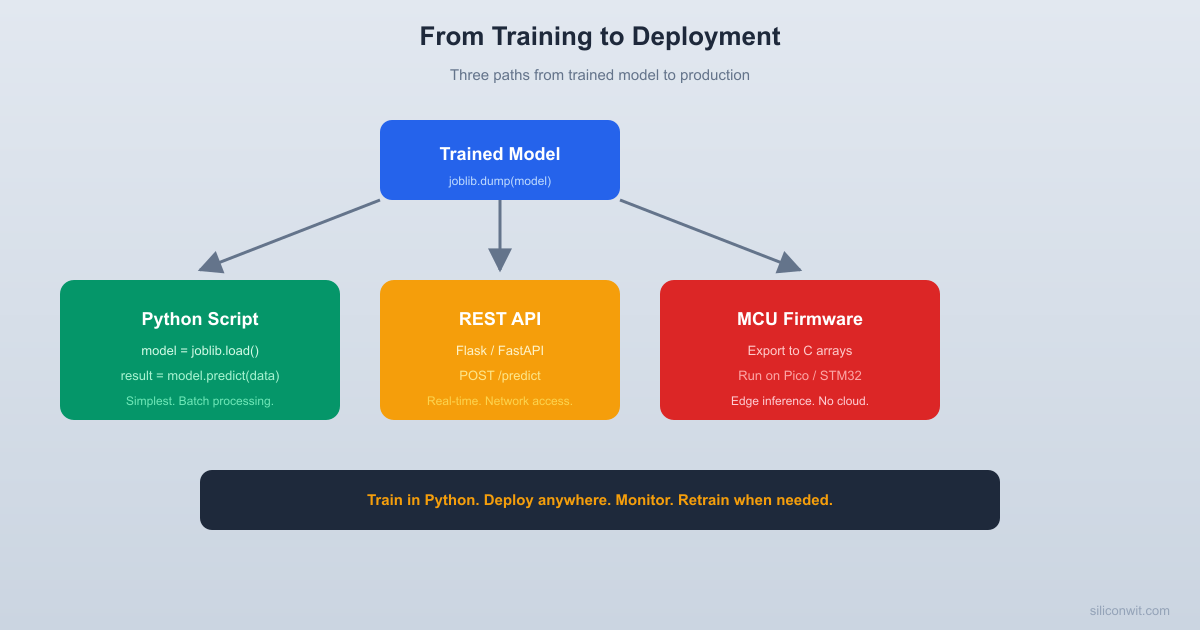
You have a trained model that scores well on test data. Now what? A model sitting in a Jupyter notebook is not useful. This lesson covers the three most common deployment paths: a Python script for batch processing, a REST API for real-time predictions, and a C array export for running on microcontrollers. You will also learn when and why models degrade in production, and how to detect it. #MLDeployment #ModelServing #MLOps
The ML Lifecycle
Training is one step in a continuous loop. Deployment, monitoring, and retraining complete the cycle.
Most teams spend 20% of time on training and 80% on everything else.
Step 1: Train and Save the Model
First, train a model and save it with joblib. This model will be deployed in all three ways below.
import numpy as np
import pandas as pd
import joblib
from sklearn.ensemble import GradientBoostingClassifier
from sklearn.preprocessing import StandardScaler
from sklearn.pipeline import Pipeline
from sklearn.model_selection import train_test_split
from sklearn.metrics import classification_report
np.random.seed(42)
# Generate sensor data for equipment health classification
This is appropriate when predictions are needed periodically (hourly, daily) rather than in real time.
Option 2: Flask REST API
For real-time predictions, wrap the model in an HTTP endpoint. Any device that can send an HTTP request (an ESP32, a Raspberry Pi, a web dashboard) can get predictions.
In Production: Validate the Request Payload
The simple required / missing check below is fine for a demo. For anything going to production, use a schema validator so malformed JSON returns a clean 400 instead of crashing inside np.array(). The standard choice is Pydantic:
from pydantic import BaseModel, Field, ValidationError
classSensorReading(BaseModel):
vibration_g: float=Field(ge=0,le=20)
temperature_c: float=Field(ge=-40,le=150)
pressure_bar: float=Field(ge=0,le=20)
current_a: float=Field(ge=0,le=100)
@app.route('/predict',methods=['POST'])
defpredict():
try:
reading =SensorReading(**request.get_json())
except ValidationError as e:
returnjsonify({'error': e.errors()}), 400
# reading is now typed and bounds-checked
...
Pydantic (or flask-pydantic, FastAPI, pyiceberg, and similar) catches missing fields, wrong types, and out-of-range values in one line per field. This prevents the 3 AM page where the API crashes because an ESP32 firmware bug started sending pressure as a string.
For microcontrollers with no Python runtime, you can convert a simple model into hardcoded C arrays. This works well for decision trees and small neural networks.
import numpy as np
import joblib
np.random.seed(42)
# For MCU deployment, we train a simple decision tree
print("\nThis header can be included directly in Arduino/ESP-IDF/STM32 firmware.")
print("No Python, no ML library needed. Just basic float arithmetic.")
Expected output:
Generated: equipment_model.h
Tree depth: 6
Tree leaves: 18
File size: 2847 bytes
This header can be included directly in Arduino/ESP-IDF/STM32 firmware.
No Python, no ML library needed. Just basic float arithmetic.
The generated header contains the scaler parameters (mean and scale for each feature), a scale_features() function, and the decision tree as nested if/else statements. Your MCU firmware calls scale_features() on raw sensor readings, then calls predict() to get the class index.
Connecting to Edge AI
This C export approach works for simple models (decision trees, small neural networks). For more complex models like convolutional neural networks or LSTMs, use TensorFlow Lite for Microcontrollers, which provides a full inference runtime on MCUs. See the Edge AI / TinyML course for deploying quantized TensorFlow models on ESP32 and STM32.
Model Monitoring: Detecting Drift
Drift detection is only possible if you have been logging. Before you can detect anything, every prediction request should be written to disk (or a database, or a log aggregator) with enough context to reconstruct what happened later.
# Inside your /predict handler, after returning the response:
log_record = {
'timestamp': datetime.utcnow().isoformat(),
'model_version': 'equipment_health_v1',
'features': reading.model_dump(), # the Pydantic input
'prediction': labels[prediction],
'probabilities': {labels[i]: float(p) for i, p inenumerate(probabilities)},
Log input features, model output, timestamp, and model version at minimum. Structured JSON (one record per line) makes later drift analysis trivial: you can load a week of logs with pandas.read_json(..., lines=True) and compute feature distributions directly. Without this, you will have no data to detect drift against and no way to debug wrong predictions after the fact.
Models degrade in production for two reasons.
Types of Model Drift
──────────────────────────────────────────
Data Drift:
The input distribution changes.
Training: vibration mean = 2.0g
Production (6 months later): vibration mean = 2.8g
Cause: new equipment, seasonal change, sensor aging
Concept Drift:
The relationship between inputs and outputs changes.
Training: high vibration = bearing failure
Production: high vibration = new motor type (normal)
WARNING: Data drift detected. Model predictions may be unreliable.
Action: collect new labeled data and retrain the model.
Vibration has shifted by 1.63 standard deviations from training. The model was trained on data with lower vibration levels, so its predictions on this new data may be inaccurate. This is your signal to collect new labeled data and retrain.
The Retraining Decision
Monitor continuously: run the drift check on every batch of incoming data. Log the results.
Set thresholds: a shift of 1.5 to 2.0 standard deviations is a reasonable starting point. Adjust based on how sensitive your application is.
Version your models: save each retrained model with a timestamp and the training data statistics. This lets you roll back if a new model performs worse.
Automate when ready: once you have a reliable pipeline, trigger retraining automatically when drift exceeds the threshold. But start with manual retraining and human review.
A practical naming convention: equipment_health_v1.0_2025-09-15.joblib. Include the version, the date, and optionally the training data hash. Store the corresponding training_stats.joblib alongside it so drift checks always use the right baseline.
Deployment Summary
Deployment Method
Best For
Latency
Dependencies
Python batch script
Periodic predictions (hourly/daily)
Seconds
Python, joblib
Flask REST API
Real-time predictions from any HTTP client
~10ms per request
Python, Flask
C array export
MCU firmware, no network required
~1ms inference
None (bare metal)
Where to Go Next
Edge AI / TinyML
Deploy quantized neural networks on ESP32 and STM32 using TensorFlow Lite for Microcontrollers. The Edge AI / TinyML course covers the full pipeline from training to on-device inference.
IoT Systems
Connect your deployed models to cloud dashboards, MQTT brokers, and alerting systems. The IoT Systems course covers cloud integration, data pipelines, and remote model updates.
The model you trained in this course is the starting point. The real work begins when it meets production data, when sensors drift, when equipment changes, and when you need to retrain without downtime. That is the engineering challenge, and it is where ML becomes genuinely useful.



Comments