Buildroot works well for small projects, but when you need license auditing, reproducible builds across a team, a shared SDK, and a layered architecture that separates board support from application logic, the Yocto Project is the industry standard. In this final lesson, you will set up a Yocto build environment, create a custom BSP layer for the Raspberry Pi Zero 2 W, write BitBake recipes for the sensor daemon and client tool, generate a portable SDK that any developer on your team can install, and structure the image for over-the-air (OTA) updates using dual root filesystem partitions. The result is a reproducible, production-ready image built from version-controlled metadata. #YoctoProject #BitBake #ProductionLinux
What We Are Building
Production Yocto Image with Custom BSP and SDK
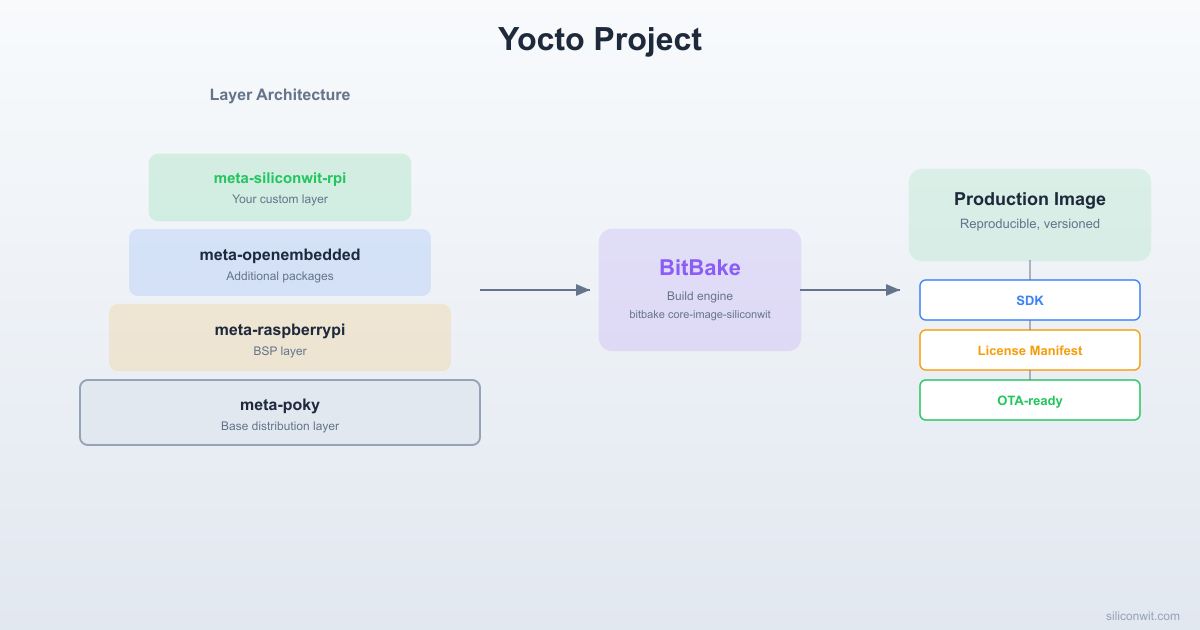
A complete Yocto-based Linux distribution for the Raspberry Pi Zero 2 W containing a custom BSP layer (meta-siliconwit-rpi), application recipes for sensor-monitord and sensor-query, a generated cross-compilation SDK (.sh installer), and a dual-rootfs partition layout ready for A/B OTA updates. The build is fully reproducible: checking out the same manifest and running BitBake produces an identical image byte-for-byte.
The Yocto Project is a collaboration that provides tools and metadata for building custom Linux distributions for embedded systems. Rather than shipping a pre-built distribution, you define exactly what goes into your image through recipes (build instructions), layers (organized collections of recipes), and configuration files.
Core Components
BitBake: the task execution engine that parses recipes and runs build tasks (fetch, configure, compile, install, package)
OpenEmbedded-Core (OE-Core): the foundational set of recipes for building a minimal Linux system (kernel, glibc, busybox, systemd, etc.)
Poky: the Yocto reference distribution that combines OE-Core with tools and a default configuration
Buildroot (Lesson 6): Makefile-based, fast builds, single-config output, ideal for small dedicated systems
Yocto: recipe-based, layered architecture, shared state cache, SDK generation, license auditing, better for teams and products shipping at scale
Buildroot builds everything from scratch each time; Yocto caches intermediate results (sstate) so incremental builds are fast
Yocto has a steeper learning curve but pays off when you need reproducibility, compliance, and maintainability
When to choose Yocto: when your project has multiple developers, needs license compliance tracking, requires a cross-compilation SDK for application developers who do not need the full build system, targets multiple hardware platforms from a shared codebase, or must support field updates with rollback capability.
Setting Up the Build Environment
Yocto builds are resource-intensive. The first build downloads all source tarballs, compiles the toolchain from scratch, and builds every package. Plan for significant disk space and build time.
This creates a build-rpi directory with default configuration files and sets up environment variables so that bitbake is in your PATH. Every time you open a new terminal, you must source this script again to restore the environment.
After sourcing, your working directory changes to ~/yocto/poky/build-rpi. The directory structure is:
Directorypoky/
Directorymeta/
…
Directorymeta-poky/
…
Directorymeta-yocto-bsp/
…
Directorybuild-rpi/
Directoryconf/
local.conf
bblayers.conf
Understanding Layers
A layer is a directory containing recipes, configuration, and classes organized under a common purpose. Layer names conventionally start with meta-. Each layer has a conf/layer.conf that declares its name, priority, and compatibility.
Yocto resolves recipes by searching layers in priority order. A recipe in a higher-priority layer overrides one with the same name in a lower-priority layer. This is how BSP layers customize core recipes without forking them.
Adding Required Layers
You need two additional layers: meta-raspberrypi for Raspberry Pi BSP support, and meta-openembedded for additional libraries.
The priority of 10 is higher than all other layers, ensuring your recipes take precedence when there is a conflict.
Writing Application Recipes
A BitBake recipe (.bb) is a file that describes how to fetch, configure, compile, install, and package a piece of software. Recipe filenames follow the convention <name>_<version>.bb.
Before building, check that BitBake can parse the recipes without errors:
Terminal window
cd~/yocto/poky
sourceoe-init-build-envbuild-rpi
bitbake-esensor-monitord|grep^SRC_URI=
bitbake-esensor-query|grep^SRC_URI=
If there are parse errors, BitBake prints the file and line number. Common mistakes include missing backslashes in multi-line variables and incorrect indentation (BitBake uses Python-style syntax in recipe metadata).
The Image Recipe
An image recipe defines the final root filesystem contents. It inherits from core-image (which provides the base functionality) and adds your application packages.
recipes-core/images/siliconwit-image-sensor.bb
SUMMARY="SiliconWit Sensor Image for Raspberry Pi Zero 2 W"
DESCRIPTION="Production image with BME280 sensor daemon, client tool, \
systemd integration, and essential networking utilities."
LICENSE="MIT"
inherit core-image
# Base system features
IMAGE_FEATURES+="\
ssh-server-dropbear \
package-management \
"
# Application packages
IMAGE_INSTALL+="\
sensor-monitord \
sensor-query \
"
# System utilities
IMAGE_INSTALL+="\
i2c-tools \
systemd-analyze \
htop \
nano \
socat \
"
# Networking
IMAGE_INSTALL+="\
openssh-sftp-server \
wpa-supplicant \
dhcpcd \
ntp \
"
# Kernel modules for I2C
IMAGE_INSTALL+="\
kernel-module-i2c-bcm2835 \
kernel-module-i2c-dev \
"
# Set root password (change for production)
EXTRA_IMAGE_FEATURES+="debug-tweaks"
# Image size settings
IMAGE_ROOTFS_EXTRA_SPACE="131072"
Key points:
inherit core-image provides the IMAGE_INSTALL mechanism and the root filesystem assembly logic.
ssh-server-dropbear installs a lightweight SSH server so you can access the board remotely.
debug-tweaks sets an empty root password and enables root login. Remove this for production images.
IMAGE_ROOTFS_EXTRA_SPACE adds 128 MB (in KB) of free space beyond what the installed packages require.
Each IMAGE_INSTALL entry must correspond to a recipe (or package name) that BitBake can find in the configured layers.
Machine and Distro Configuration
Machine Configuration (local.conf)
Edit conf/local.conf in your build directory to target the Raspberry Pi Zero 2 W:
The MACHINE variable is the most important setting. It determines which BSP recipes are used, which kernel configuration is applied, and which device tree files are included. The raspberrypi0-2w-64 machine definition comes from the meta-raspberrypi layer and targets the 64-bit (AArch64) configuration.
Custom Distro Configuration (Optional)
For production, you may want a custom distro configuration that overrides Poky defaults. Create a distro conf file:
conf/distro/siliconwit-rpi.conf
require conf/distro/poky.conf
DISTRO="siliconwit-rpi"
DISTRO_NAME="SiliconWit RPi Distribution"
DISTRO_VERSION="1.0"
# Strip down DISTRO_FEATURES for an embedded target
To use this distro, set DISTRO = "siliconwit-rpi" in local.conf. If you skip this step, the default Poky distro works fine for development.
Building the Image
With all layers, recipes, and configuration in place, build the image:
Terminal window
cd~/yocto/poky
sourceoe-init-build-envbuild-rpi
bitbakesiliconwit-image-sensor
Build Stages
BitBake processes each recipe through a series of tasks. For the entire image, this involves hundreds of recipes, but the stages for each one follow the same pattern:
Task
Description
do_fetch
Download source code from SRC_URI (tarballs, git repos, local files)
do_unpack
Extract archives into the work directory
do_patch
Apply any patches listed in SRC_URI
do_configure
Run configure scripts (autotools, cmake, etc.)
do_compile
Compile the source code using the cross-toolchain
do_install
Install built files into a staging directory
do_package
Split installed files into packages (rpm, deb, or ipk)
do_rootfs
(Image only) Assemble all packages into the root filesystem
do_image
(Image only) Generate the final image files (ext4, wic, etc.)
The first build takes 1 to 3 hours depending on your hardware. Subsequent builds are much faster because BitBake caches intermediate results in the shared state (sstate) directory.
Build Output
After a successful build, the output images are in:
The dd command writes raw data to a block device. Writing to the wrong device will destroy data. Use lsblk to identify your SD card before running dd. The SD card is typically /dev/sdb or /dev/mmcblk0.
SDK Generation
The SDK (Software Development Kit) is a self-contained, portable toolchain installer that any developer on your team can use to cross-compile applications for the target without setting up the full Yocto build environment. The SDK includes the cross-compiler, sysroot with all target libraries and headers, and environment setup scripts.
Building the SDK
Terminal window
bitbake-cpopulate_sdksiliconwit-image-sensor
This produces an SDK installer script in tmp/deploy/sdk/:
Terminal window
lstmp/deploy/sdk/
The output is a self-extracting shell script, for example:
Accept the default installation directory or specify a custom path. The installer copies the toolchain and sysroot and creates an environment setup script.
Terminal window
# Source the environment (required before each build session)
# sensor-query: ELF 64-bit LSB executable, ARM aarch64, ...
The SDK is useful for application developers who need to compile code for the target but should not have to wait for a full Yocto build. Distribute the .sh installer to your team, and they can set up their toolchain in minutes.
A/B Root Filesystem for OTA
Over-the-air (OTA) updates in the field require a strategy that avoids bricking the device if an update fails partway through. The dual root filesystem (A/B) approach is the most common pattern: the device has two root filesystem partitions, and the bootloader switches between them.
Partition Layout
Partition
Mount Point
Size
Purpose
boot
/boot
64 MB
FAT32, kernel + DTB + config.txt
rootfsA
/
512 MB
ext4, primary root filesystem
rootfsB
(inactive)
512 MB
ext4, update target
data
/data
Remaining
ext4, persistent application data
WKS File for SD Card Layout
Yocto uses WIC (a disk image creation tool) with .wks files that describe the partition layout. Create a custom WKS file:
After rebooting, the application should run a self-test. If everything passes, mark the update as successful. If the boot fails or the self-test fails, U-Boot increments boot_attempts. After max_boot_attempts failures, U-Boot falls back to the previous partition:
Terminal window
# Add this to the U-Boot bootcmd (before boot_kernel):
# if boot_attempts > max_boot_attempts, swap boot_slot back
The data partition (/data) is shared between both root filesystems and is never overwritten during an update. Store application configuration, sensor logs, and calibration data on this partition.
Reproducible Builds
A reproducible build means that checking out the same source revision and running the same build command produces an identical output image. This is essential for debugging field issues (“which exact code is running on that device?”) and for regulatory compliance.
Locking Layer Revisions with kas
kas is a setup tool that defines all layers, their git revisions, and build configuration in a single YAML file:
kas checks out the exact commit specified for each layer, generates local.conf and bblayers.conf, and runs BitBake. Anyone with this YAML file can reproduce the same image.
Sharing the Shared State Cache (SSTATE)
The sstate cache stores compiled artifacts keyed by recipe version, configuration, and input hashes. Sharing this cache across developers and CI systems eliminates redundant compilation.
Set up a shared cache on a network drive or HTTP server:
Inside the container, follow the same steps: source the environment, run BitBake. The container ensures every developer and CI system uses identical host tools.
License Compliance
Shipping a product that contains open-source software requires compliance with each component’s license terms. Yocto automates much of this process.
Generating the License Manifest
After building the image, generate a complete license manifest:
Terminal window
bitbake-cpopulate_licsiliconwit-image-sensor
The output is in tmp/deploy/licenses/siliconwit-image-sensor-raspberrypi0-2w-64/:
Check for any unexpected licenses (especially GPL in a proprietary product).
Generate source archives for GPL compliance
GPL licenses require that you provide the corresponding source code. Yocto can archive all sources:
Terminal window
# Add to local.conf
INHERIT+="archiver"
ARCHIVER_MODE[src]="original"
Rebuild, and source tarballs appear in tmp/deploy/sources/.
Include the license manifest in your product documentation
Many products ship a “Third-Party Software Notices” document generated from this manifest.
Exercises
Exercise 1: Add a Web Dashboard Recipe
Write a BitBake recipe for a lightweight web dashboard (using Python Flask or a static HTML page served by lighttpd) that displays real-time sensor readings. The recipe should depend on sensor-query, install a systemd service that starts the web server at boot, and be included in the image via IMAGE_INSTALL. Test the dashboard by accessing it from a browser on your development machine.
Exercise 2: Implement OTA Update Script
Write a complete OTA update script that: (a) downloads a new rootfs image from an HTTP server, (b) verifies its SHA256 checksum, (c) writes it to the inactive partition, (d) switches the boot slot, and (e) reboots. Include a post-boot verification step that reverts to the previous partition if the sensor daemon fails to start within 60 seconds. Package the script as a Yocto recipe.
Exercise 3: Multi-Machine Build
Add a second MACHINE target (raspberrypi4-64) to your build and produce images for both the Pi Zero 2 W and the Pi 4. Use a single set of application recipes and a shared sstate cache. Compare the image sizes and boot times. Document any recipe changes needed to support both machines.
Exercise 4: Automated CI Build
Set up a CI pipeline (using GitHub Actions or GitLab CI) that builds the Yocto image inside a Docker container whenever a commit is pushed to the meta-siliconwit-rpi repository. The pipeline should: fetch layers from the kas YAML file, build the image, run a basic validation (check that the manifest includes sensor-monitord), and archive the output image as a build artifact. Use the shared sstate cache to keep build times under 30 minutes.



Comments