Skip to content

Wi-Fi and Networking (Pico W)

Wi-Fi and Networking (Pico W) hero image
Modified:
Published:

The Pico W adds an Infineon CYW43439 Wi-Fi chip to the standard Pico board, giving the RP2040 wireless connectivity over 802.11n on the 2.4 GHz band. In Rust, the cyw43 crate provides the driver and embassy-net provides a full async TCP/IP stack, all without an operating system. In this lesson you will connect to a Wi-Fi network, open TCP sockets, send an HTTP GET request by hand, and build a complete MQTT sensor node that reads a BME280 sensor and publishes JSON payloads to a broker every 10 seconds, with automatic reconnection when the network drops. #PicoW #EmbassyNet #MQTT

What We Are Building

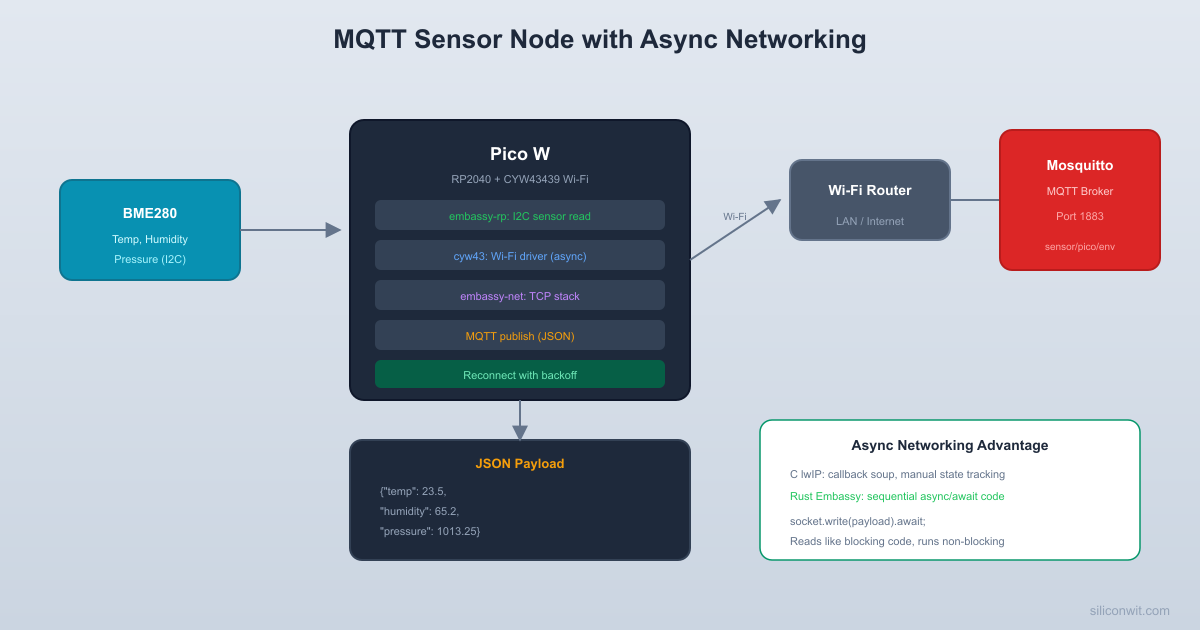
MQTT Sensor Node with BME280

A Pico W that connects to Wi-Fi, reads temperature, humidity, and pressure from a BME280 sensor over I2C every 10 seconds, formats the data as JSON, and publishes it to an MQTT broker. The firmware handles Wi-Fi disconnection and broker reconnection gracefully using async patterns. A status LED blinks to indicate the current connection state.

Project specifications:

ParameterValue
BoardRaspberry Pi Pico W (CYW43439)
Wireless802.11n, 2.4 GHz (station mode)
TCP/IP Stackembassy-net (smoltcp-based, no OS)
SensorBME280 (I2C, temperature, humidity, pressure)
ProtocolMQTT v3.1.1 (QoS 0)
Publish Interval10 seconds
Payload FormatJSON
ReconnectionAutomatic, with exponential backoff
FrameworkEmbassy (embassy-rp, embassy-net, cyw43)

Bill of Materials

RefComponentQuantityNotes
1Raspberry Pi Pico W1Must be Pico W (not standard Pico)
2BME280 breakout board1I2C interface, 3.3V compatible
3LED (any color)1Status indicator
4330 ohm resistor1LED current limiter
5Breadboard + jumper wires1 set
6Micro USB cable1For power and flashing

The Pico W Hardware


The CYW43439 wireless chip sits on the back of the Pico W board. It communicates with the RP2040 over an SPI bus that uses dedicated pins (not the general-purpose GPIO). This means Wi-Fi does not consume any of the GPIO pins available for your own peripherals.

One important change from the standard Pico: the onboard LED is routed through the CYW43 chip. You cannot control it with a simple GPIO write. Instead, the cyw43 driver provides a method to set the LED state. In Embassy, this looks like control.gpio_set(0, true).await where GPIO 0 on the CYW43 is the onboard LED.

Pico W vs Standard Pico

FeaturePicoPico W
RP2040 GPIO30 pins30 pins (same)
Onboard LEDGP25 (direct GPIO)CYW43 GPIO 0 (via SPI)
WirelessNone802.11n + BLE 5.2
Flash2 MB2 MB
CYW43 firmwareN/AMust be included in binary
Power consumption~25 mA active~45 mA idle, ~300 mA peak TX

The CYW43439 requires firmware that is loaded by the driver at boot time. In the Rust ecosystem, the cyw43-firmware crate includes the firmware blob. The driver loads it over SPI during initialization, which takes about 200 ms.

Project Setup


Cargo.toml

Cargo.toml
[package]
name = "pico-w-mqtt"
version = "0.1.0"
edition = "2021"
[dependencies]
embassy-executor = { version = "0.7", features = ["arch-cortex-m", "executor-thread"] }
embassy-rp = { version = "0.3", features = ["time-driver", "rp2040"] }
embassy-net = { version = "0.6", features = ["tcp", "dns", "dhcpv4", "medium-ethernet"] }
embassy-time = { version = "0.4" }
embassy-futures = { version = "0.1" }
embassy-sync = { version = "0.6" }
cyw43 = { version = "0.4" }
cyw43-pio = { version = "0.4", features = ["overclock"] }
cyw43-firmware = { version = "0.4" }
defmt = "0.3"
defmt-rtt = "0.4"
panic-probe = { version = "0.3", features = ["print-defmt"] }
cortex-m = "0.7"
cortex-m-rt = "0.7"
static_cell = "2"
portable-atomic = { version = "1", features = ["critical-section"] }
[profile.release]
debug = 2
lto = true
opt-level = "s"

Project Structure

  • Directorypico-w-mqtt/
    • Cargo.toml
    • build.rs
    • memory.x
    • Directory.cargo/
      • config.toml
    • Directorysrc/
      • main.rs

build.rs

build.rs
fn main() {
println!("cargo:rustc-link-arg-bins=--nmagic");
println!("cargo:rustc-link-arg-bins=-Tlink.x");
println!("cargo:rustc-link-arg-bins=-Tdefmt.x");
}

memory.x

memory.x
MEMORY {
BOOT2 : ORIGIN = 0x10000000, LENGTH = 0x100
FLASH : ORIGIN = 0x10000100, LENGTH = 2048K - 0x100
RAM : ORIGIN = 0x20000000, LENGTH = 256K
}

.cargo/config.toml

.cargo/config.toml
[target.thumbv6m-none-eabi]
runner = "probe-rs run --chip RP2040 --protocol swd"
[build]
target = "thumbv6m-none-eabi"
[env]
DEFMT_LOG = "debug"

Wi-Fi Connection with cyw43


The cyw43 driver initializes the wireless chip, loads its firmware, and provides an async interface for scanning, connecting, and managing the Wi-Fi link. The embassy-net crate sits on top, providing TCP sockets, DNS resolution, and DHCP.

Initialization Sequence

Bringing up Wi-Fi on the Pico W involves several steps:

  1. Configure the PIO and SPI pins that connect the RP2040 to the CYW43439.

  2. Create the cyw43 driver, passing it the firmware blob from the cyw43-firmware crate.

  3. Spawn the cyw43 background task, which handles interrupts and SPI communication.

  4. Use control.join_wpa2() to connect to a Wi-Fi network.

  5. Create an embassy-net stack with DHCP, which obtains an IP address automatically.

  6. Spawn the network stack task, which processes packets in the background.

Standalone Wi-Fi Example

Before building the MQTT sensor node, let’s get Wi-Fi working with a minimal example that connects and prints the assigned IP address:

src/main.rs (Wi-Fi connect only)
#![no_std]
#![no_main]
use defmt::*;
use defmt_rtt as _;
use panic_probe as _;
use embassy_executor::Spawner;
use embassy_rp::bind_interrupts;
use embassy_rp::gpio::{Level, Output};
use embassy_rp::peripherals::{DMA_CH0, PIO0};
use embassy_rp::pio::{InterruptHandler as PioIrq, Pio};
use embassy_net::{Config as NetConfig, StackResources};
use embassy_time::{Duration, Timer};
use cyw43_pio::PioSpi;
use static_cell::StaticCell;
bind_interrupts!(struct Irqs {
PIO0_IRQ_0 => PioIrq<PIO0>;
});
// Wi-Fi credentials
const WIFI_SSID: &str = "YourNetworkName";
const WIFI_PASS: &str = "YourNetworkPassword";
#[embassy_executor::task]
async fn cyw43_task(
runner: cyw43::Runner<'static, Output<'static>, PioSpi<'static, PIO0, 0, DMA_CH0>>,
) -> ! {
runner.run().await
}
#[embassy_executor::task]
async fn net_task(mut runner: embassy_net::Runner<'static, cyw43::NetDriver<'static>>) -> ! {
runner.run().await
}
#[embassy_executor::main]
async fn main(spawner: Spawner) {
let p = embassy_rp::init(Default::default());
// ── CYW43 Initialization ───────────────────────────────────────
let fw = cyw43_firmware::firmware();
let clm = cyw43_firmware::clm();
let pwr = Output::new(p.PIN_23, Level::Low);
let cs = Output::new(p.PIN_25, Level::High);
let mut pio = Pio::new(p.PIO0, Irqs);
let spi = PioSpi::new(
&mut pio.common,
pio.sm0,
pio.irq0,
cs,
p.PIN_24,
p.PIN_29,
p.DMA_CH0,
);
static STATE: StaticCell<cyw43::State> = StaticCell::new();
let state = STATE.init(cyw43::State::new());
let (net_device, mut control, runner) = cyw43::new(state, pwr, spi, fw).await;
spawner.spawn(cyw43_task(runner)).unwrap();
control.init(clm).await;
control.set_power_management(cyw43::PowerManagement::PowerSave).await;
// ── Network Stack ──────────────────────────────────────────────
let net_config = NetConfig::dhcpv4(Default::default());
static RESOURCES: StaticCell<StackResources<3>> = StaticCell::new();
let resources = RESOURCES.init(StackResources::new());
let (stack, runner) = embassy_net::new(net_device, net_config, resources, embassy_rp::clocks::RoscRng);
spawner.spawn(net_task(runner)).unwrap();
// ── Connect to Wi-Fi ───────────────────────────────────────────
info!("Connecting to Wi-Fi: {}", WIFI_SSID);
loop {
match control.join_wpa2(WIFI_SSID, WIFI_PASS).await {
Ok(_) => {
info!("Wi-Fi connected");
break;
}
Err(e) => {
info!("Wi-Fi join failed: status={}", e.status);
Timer::after(Duration::from_secs(2)).await;
}
}
}
// Wait for DHCP to assign an IP address
info!("Waiting for DHCP...");
loop {
if let Some(config) = stack.config_v4() {
info!("IP address: {}", config.address);
info!("Gateway: {}", config.gateway.unwrap());
break;
}
Timer::after(Duration::from_millis(500)).await;
}
info!("Network is ready");
// Blink the onboard LED to confirm connection
loop {
control.gpio_set(0, true).await;
Timer::after(Duration::from_millis(500)).await;
control.gpio_set(0, false).await;
Timer::after(Duration::from_millis(500)).await;
}
}

How it works: The cyw43 driver uses PIO (Programmable I/O) to communicate with the CYW43439 over SPI. The PioSpi struct configures PIO state machine 0 on PIO0 to run the SPI protocol, freeing the RP2040’s hardware SPI peripherals for your own use. Pin 23 is the power enable for the CYW43, pin 25 is SPI chip select, pin 24 is SPI data, and pin 29 is SPI clock. These are fixed on the Pico W PCB.

The cyw43::new() function loads the firmware blob into the wireless chip and returns three things: a network device (implements the embassy-net driver trait), a control handle (for Wi-Fi management and GPIO control), and a runner (background task that pumps the SPI bus). The runner must be spawned as a task; it runs forever, handling interrupts and data transfer between the RP2040 and the CYW43.

TCP Client and HTTP GET


With the network stack running, you can open TCP connections to remote servers. Let’s make an HTTP GET request to demonstrate raw TCP networking. This is not how you would build a production HTTP client, but it shows exactly what happens at the TCP layer.

Manual HTTP GET

use embassy_net::tcp::TcpSocket;
async fn http_get(stack: embassy_net::Stack<'static>) {
let mut rx_buf = [0u8; 4096];
let mut tx_buf = [0u8; 4096];
let mut socket = TcpSocket::new(stack, &mut rx_buf, &mut tx_buf);
socket.set_timeout(Some(Duration::from_secs(10)));
// Connect to httpbin.org on port 80
let remote = embassy_net::Ipv4Address::new(34, 227, 213, 82);
let remote_endpoint = (remote, 80);
info!("Connecting to httpbin.org...");
if let Err(e) = socket.connect(remote_endpoint).await {
info!("TCP connect failed: {:?}", e);
return;
}
// Send HTTP GET request
let request = b"GET /get HTTP/1.1\r\nHost: httpbin.org\r\nConnection: close\r\n\r\n";
if let Err(e) = socket.write_all(request).await {
info!("Write failed: {:?}", e);
return;
}
// Read the response
let mut buf = [0u8; 1024];
loop {
match socket.read(&mut buf).await {
Ok(0) => {
info!("Connection closed by server");
break;
}
Ok(n) => {
// In a real application you would parse the response.
// Here we just log the number of bytes received.
info!("Received {} bytes", n);
}
Err(e) => {
info!("Read error: {:?}", e);
break;
}
}
}
}

This function creates a TCP socket with 4 KB buffers for send and receive. The connect() call performs the TCP three-way handshake. Then we write a raw HTTP/1.1 GET request and read the response in a loop until the server closes the connection (indicated by Ok(0)).

DNS Resolution

Hardcoding IP addresses is not practical. Embassy-net includes a DNS resolver that works with the DHCP-provided DNS server:

use embassy_net::dns::DnsQueryType;
async fn resolve_host(stack: embassy_net::Stack<'static>, hostname: &str) {
match stack.dns_query(hostname, DnsQueryType::A).await {
Ok(addrs) => {
if let Some(addr) = addrs.first() {
info!("Resolved {} to {}", hostname, addr);
}
}
Err(e) => {
info!("DNS query failed: {:?}", e);
}
}
}

The dns_query method sends a DNS query to the server provided by DHCP and returns the resolved IP addresses. You can use this to look up your MQTT broker’s hostname before connecting.

MQTT Protocol Overview


MQTT (Message Queuing Telemetry Transport) is a lightweight publish/subscribe protocol designed for constrained devices and unreliable networks. It runs over TCP and uses a broker as an intermediary. Clients connect to the broker, publish messages to topics, and subscribe to topics to receive messages from other clients.

MQTT Packet Types

PacketDirectionPurpose
CONNECTClient to BrokerInitiate a session
CONNACKBroker to ClientAcknowledge connection
PUBLISHBothSend a message to a topic
SUBSCRIBEClient to BrokerRegister interest in topics
SUBACKBroker to ClientAcknowledge subscription
PINGREQClient to BrokerKeep the connection alive
PINGRESPBroker to ClientRespond to keep-alive
DISCONNECTClient to BrokerClose the session cleanly

For our sensor node, we only need CONNECT, CONNACK, PUBLISH, PINGREQ, and PINGRESP. We will implement a minimal MQTT 3.1.1 client directly on TCP, which gives full visibility into how the protocol works. In production, you would use a crate like rust-mqtt, but understanding the wire format is valuable.

MQTT Packet Format

Every MQTT packet starts with a fixed header:

ByteFieldDescription
0Packet type + flagsUpper 4 bits = packet type, lower 4 bits = flags
1+Remaining lengthVariable-length encoding (1 to 4 bytes)

The remaining length uses a variable-length encoding where each byte contributes 7 bits of value and 1 continuation bit. For packets under 128 bytes, the remaining length is a single byte.

Minimal MQTT Client in Rust


We will build a small MQTT client module that handles connection, publishing, and keep-alive. This is intentionally minimal to fit in a single file while demonstrating the protocol.

MQTT client module (included in main.rs)
// ── Minimal MQTT 3.1.1 Client ──────────────────────────────────────
struct MqttClient<'a> {
socket: TcpSocket<'a>,
buf: [u8; 512],
}
impl<'a> MqttClient<'a> {
fn new(socket: TcpSocket<'a>) -> Self {
Self {
socket,
buf: [0u8; 512],
}
}
/// Send MQTT CONNECT packet and wait for CONNACK.
async fn connect(&mut self, client_id: &str) -> Result<(), MqttError> {
let mut pos = 0;
// Fixed header: CONNECT (type 1, flags 0)
self.buf[pos] = 0x10;
pos += 1;
// We will fill in the remaining length later
let len_pos = pos;
pos += 1; // Reserve 1 byte for remaining length
// Variable header: Protocol Name "MQTT"
self.buf[pos] = 0x00; pos += 1; // Length MSB
self.buf[pos] = 0x04; pos += 1; // Length LSB
self.buf[pos..pos + 4].copy_from_slice(b"MQTT");
pos += 4;
// Protocol Level: 4 (MQTT 3.1.1)
self.buf[pos] = 0x04; pos += 1;
// Connect Flags: Clean Session
self.buf[pos] = 0x02; pos += 1;
// Keep Alive: 60 seconds
self.buf[pos] = 0x00; pos += 1; // MSB
self.buf[pos] = 0x3C; pos += 1; // LSB (60)
// Payload: Client ID
let id_bytes = client_id.as_bytes();
self.buf[pos] = 0x00; pos += 1;
self.buf[pos] = id_bytes.len() as u8; pos += 1;
self.buf[pos..pos + id_bytes.len()].copy_from_slice(id_bytes);
pos += id_bytes.len();
// Fill in remaining length (everything after the fixed header)
let remaining = pos - 2; // Subtract fixed header (1 byte type + 1 byte length)
self.buf[len_pos] = remaining as u8;
// Send CONNECT packet
self.socket.write_all(&self.buf[..pos]).await
.map_err(|_| MqttError::WriteError)?;
// Read CONNACK (4 bytes)
let mut connack = [0u8; 4];
self.socket.read_exact(&mut connack).await
.map_err(|_| MqttError::ReadError)?;
// Verify CONNACK: type 0x20, length 0x02, return code 0x00
if connack[0] != 0x20 || connack[3] != 0x00 {
return Err(MqttError::ConnectRejected);
}
Ok(())
}
/// Publish a message to a topic (QoS 0, no acknowledgment needed).
async fn publish(&mut self, topic: &str, payload: &[u8]) -> Result<(), MqttError> {
let topic_bytes = topic.as_bytes();
let remaining_len = 2 + topic_bytes.len() + payload.len();
let mut pos = 0;
// Fixed header: PUBLISH (type 3, flags 0 for QoS 0)
self.buf[pos] = 0x30;
pos += 1;
// Remaining length (variable-length encoding)
pos += encode_remaining_length(&mut self.buf[pos..], remaining_len);
// Topic name (length-prefixed UTF-8 string)
self.buf[pos] = (topic_bytes.len() >> 8) as u8; pos += 1;
self.buf[pos] = (topic_bytes.len() & 0xFF) as u8; pos += 1;
self.buf[pos..pos + topic_bytes.len()].copy_from_slice(topic_bytes);
pos += topic_bytes.len();
// Payload (no packet identifier for QoS 0)
self.buf[pos..pos + payload.len()].copy_from_slice(payload);
pos += payload.len();
self.socket.write_all(&self.buf[..pos]).await
.map_err(|_| MqttError::WriteError)
}
/// Send PINGREQ and expect PINGRESP (keep-alive).
async fn ping(&mut self) -> Result<(), MqttError> {
// PINGREQ: type 0xC0, remaining length 0
self.socket.write_all(&[0xC0, 0x00]).await
.map_err(|_| MqttError::WriteError)?;
// PINGRESP: type 0xD0, remaining length 0
let mut resp = [0u8; 2];
self.socket.read_exact(&mut resp).await
.map_err(|_| MqttError::ReadError)?;
if resp[0] != 0xD0 {
return Err(MqttError::PingFailed);
}
Ok(())
}
/// Send DISCONNECT packet (clean shutdown).
async fn disconnect(&mut self) -> Result<(), MqttError> {
self.socket.write_all(&[0xE0, 0x00]).await
.map_err(|_| MqttError::WriteError)
}
}
fn encode_remaining_length(buf: &mut [u8], mut len: usize) -> usize {
let mut pos = 0;
loop {
let mut byte = (len % 128) as u8;
len /= 128;
if len > 0 {
byte |= 0x80; // Set continuation bit
}
buf[pos] = byte;
pos += 1;
if len == 0 {
break;
}
}
pos
}
#[derive(Debug)]
enum MqttError {
WriteError,
ReadError,
ConnectRejected,
PingFailed,
}

The MqttClient struct wraps a TCP socket and provides three operations: connect (establishes an MQTT session), publish (sends a message to a topic at QoS 0), and ping (keeps the connection alive). QoS 0 means “fire and forget.” The broker does not acknowledge receipt, which keeps the implementation simple and the bandwidth low. For sensor data that is published frequently, QoS 0 is usually sufficient because a single lost reading is insignificant.

BME280 Sensor Reading


The BME280 is a combined temperature, humidity, and pressure sensor from Bosch. It communicates over I2C at address 0x76 (or 0x77 if the SDO pin is pulled high). Reading the sensor involves writing calibration data from the chip’s internal registers, triggering a measurement, reading the raw ADC values, and applying the compensation formulas from the datasheet.

BME280 I2C Communication

BME280 driver (simplified, included in main.rs)
use embassy_rp::i2c::{Async, I2c, Config as I2cConfig, InterruptHandler as I2cIrq};
use embassy_rp::peripherals::I2C0;
bind_interrupts!(struct I2cIrqs {
I2C0_IRQ => I2cIrq<I2C0>;
});
const BME280_ADDR: u8 = 0x76;
struct Bme280Reading {
temperature_c: i32, // Temperature in centidegrees (2345 = 23.45 C)
humidity_pct: u32, // Humidity in centi-percent (5678 = 56.78%)
pressure_pa: u32, // Pressure in Pascals
}
struct Bme280Calibration {
dig_t1: u16, dig_t2: i16, dig_t3: i16,
dig_p1: u16, dig_p2: i16, dig_p3: i16, dig_p4: i16,
dig_p5: i16, dig_p6: i16, dig_p7: i16, dig_p8: i16, dig_p9: i16,
dig_h1: u8, dig_h2: i16, dig_h3: u8, dig_h4: i16, dig_h5: i16, dig_h6: i8,
}
async fn bme280_init(i2c: &mut I2c<'_, I2C0, Async>) -> Result<Bme280Calibration, ()> {
// Check chip ID (should be 0x60)
let mut id = [0u8; 1];
i2c.write_read(BME280_ADDR, &[0xD0], &mut id).await.map_err(|_| ())?;
if id[0] != 0x60 {
return Err(());
}
// Soft reset
i2c.write(BME280_ADDR, &[0xE0, 0xB6]).await.map_err(|_| ())?;
Timer::after(Duration::from_millis(10)).await;
// Read calibration data
let mut cal_buf = [0u8; 26];
i2c.write_read(BME280_ADDR, &[0x88], &mut cal_buf).await.map_err(|_| ())?;
let mut cal_h = [0u8; 7];
i2c.write_read(BME280_ADDR, &[0xE1], &mut cal_h).await.map_err(|_| ())?;
let mut dig_h1 = [0u8; 1];
i2c.write_read(BME280_ADDR, &[0xA1], &mut dig_h1).await.map_err(|_| ())?;
let cal = Bme280Calibration {
dig_t1: u16::from_le_bytes([cal_buf[0], cal_buf[1]]),
dig_t2: i16::from_le_bytes([cal_buf[2], cal_buf[3]]),
dig_t3: i16::from_le_bytes([cal_buf[4], cal_buf[5]]),
dig_p1: u16::from_le_bytes([cal_buf[6], cal_buf[7]]),
dig_p2: i16::from_le_bytes([cal_buf[8], cal_buf[9]]),
dig_p3: i16::from_le_bytes([cal_buf[10], cal_buf[11]]),
dig_p4: i16::from_le_bytes([cal_buf[12], cal_buf[13]]),
dig_p5: i16::from_le_bytes([cal_buf[14], cal_buf[15]]),
dig_p6: i16::from_le_bytes([cal_buf[16], cal_buf[17]]),
dig_p7: i16::from_le_bytes([cal_buf[18], cal_buf[19]]),
dig_p8: i16::from_le_bytes([cal_buf[20], cal_buf[21]]),
dig_p9: i16::from_le_bytes([cal_buf[22], cal_buf[23]]),
dig_h1: dig_h1[0],
dig_h2: i16::from_le_bytes([cal_h[0], cal_h[1]]),
dig_h3: cal_h[2],
dig_h4: ((cal_h[3] as i16) << 4) | ((cal_h[4] as i16) & 0x0F),
dig_h5: ((cal_h[5] as i16) << 4) | (((cal_h[4] as i16) >> 4) & 0x0F),
dig_h6: cal_h[6] as i8,
};
// Configure: humidity oversampling x1
i2c.write(BME280_ADDR, &[0xF2, 0x01]).await.map_err(|_| ())?;
// Configure: temp oversampling x1, pressure oversampling x1, normal mode
i2c.write(BME280_ADDR, &[0xF4, 0x27]).await.map_err(|_| ())?;
// Configure: standby 1000ms, filter off
i2c.write(BME280_ADDR, &[0xF5, 0xA0]).await.map_err(|_| ())?;
Ok(cal)
}
async fn bme280_read(
i2c: &mut I2c<'_, I2C0, Async>,
cal: &Bme280Calibration,
) -> Result<Bme280Reading, ()> {
// Read raw data (pressure, temperature, humidity: 8 bytes starting at 0xF7)
let mut raw = [0u8; 8];
i2c.write_read(BME280_ADDR, &[0xF7], &mut raw).await.map_err(|_| ())?;
let adc_p = ((raw[0] as i32) << 12) | ((raw[1] as i32) << 4) | ((raw[2] as i32) >> 4);
let adc_t = ((raw[3] as i32) << 12) | ((raw[4] as i32) << 4) | ((raw[5] as i32) >> 4);
let adc_h = ((raw[6] as i32) << 8) | (raw[7] as i32);
// Temperature compensation (from BME280 datasheet)
let var1 = ((((adc_t >> 3) - ((cal.dig_t1 as i32) << 1))) * (cal.dig_t2 as i32)) >> 11;
let var2 = (((((adc_t >> 4) - (cal.dig_t1 as i32))
* ((adc_t >> 4) - (cal.dig_t1 as i32))) >> 12)
* (cal.dig_t3 as i32)) >> 14;
let t_fine = var1 + var2;
let temperature = (t_fine * 5 + 128) >> 8; // centidegrees
// Pressure compensation
let mut var1_p = (t_fine as i64) - 128000;
let mut var2_p = var1_p * var1_p * (cal.dig_p6 as i64);
var2_p = var2_p + ((var1_p * (cal.dig_p5 as i64)) << 17);
var2_p = var2_p + ((cal.dig_p4 as i64) << 35);
var1_p = ((var1_p * var1_p * (cal.dig_p3 as i64)) >> 8)
+ ((var1_p * (cal.dig_p2 as i64)) << 12);
var1_p = (((1i64 << 47) + var1_p) * (cal.dig_p1 as i64)) >> 33;
let pressure = if var1_p == 0 {
0u32
} else {
let mut p: i64 = 1048576 - adc_p as i64;
p = (((p << 31) - var2_p) * 3125) / var1_p;
let var1_p = ((cal.dig_p9 as i64) * (p >> 13) * (p >> 13)) >> 25;
let var2_p = ((cal.dig_p8 as i64) * p) >> 19;
((p + var1_p + var2_p) >> 8) as u32 + (((cal.dig_p7 as i64) << 4) as u32)
};
// Humidity compensation
let mut v_x1 = t_fine - 76800i32;
v_x1 = (((((adc_h << 14) - ((cal.dig_h4 as i32) << 20)
- ((cal.dig_h5 as i32) * v_x1)) + 16384) >> 15)
* (((((((v_x1 * (cal.dig_h6 as i32)) >> 10)
* (((v_x1 * (cal.dig_h3 as i32)) >> 11) + 32768)) >> 10)
+ 2097152) * (cal.dig_h2 as i32) + 8192) >> 14));
v_x1 = v_x1 - (((((v_x1 >> 15) * (v_x1 >> 15)) >> 7) * (cal.dig_h1 as i32)) >> 4);
let v_x1 = if v_x1 < 0 { 0 } else if v_x1 > 419430400 { 419430400 } else { v_x1 };
let humidity = (v_x1 >> 12) as u32; // Q22.10 format, divide by 1024 for percent
Ok(Bme280Reading {
temperature_c: temperature,
humidity_pct: (humidity * 100) / 1024, // centi-percent
pressure_pa: pressure / 256,
})
}

The compensation formulas come directly from the BME280 datasheet (section 4.2.3). They are integer-only arithmetic (no floating point), which is efficient on the Cortex-M0+ core. The temperature result is in centidegrees (2345 means 23.45 degrees C), humidity is in centi-percent, and pressure is in Pascals.

Complete MQTT Sensor Node


Now we combine everything into the final project: Wi-Fi connection, BME280 reading, JSON formatting, MQTT publishing, and reconnection logic.

Circuit Connections

Pico W PinComponentFunction
GP4 (I2C0 SDA)BME280 SDAI2C data
GP5 (I2C0 SCL)BME280 SCLI2C clock
GP16LED anode (through 330 ohm)Status indicator
3V3BME280 VINSensor power
GNDBME280 GND, LED cathodeGround

JSON Formatting (no_std)

Since we are in a no_std environment, we format JSON manually:

fn format_json(
buf: &mut [u8],
temp_c: i32,
hum_pct: u32,
press_pa: u32,
) -> usize {
let mut pos = 0;
let header = b"{\"temperature\":";
buf[pos..pos + header.len()].copy_from_slice(header);
pos += header.len();
// Temperature: integer part.decimal part (2 digits)
pos += write_fixed_point(&mut buf[pos..], temp_c, 2);
let mid1 = b",\"humidity\":";
buf[pos..pos + mid1.len()].copy_from_slice(mid1);
pos += mid1.len();
pos += write_fixed_point(&mut buf[pos..], hum_pct as i32, 2);
let mid2 = b",\"pressure\":";
buf[pos..pos + mid2.len()].copy_from_slice(mid2);
pos += mid2.len();
pos += write_u32_to_buf(&mut buf[pos..], press_pa);
let trailer = b"}";
buf[pos..pos + trailer.len()].copy_from_slice(trailer);
pos += trailer.len();
pos
}
fn write_fixed_point(buf: &mut [u8], val: i32, decimals: u32) -> usize {
let mut pos = 0;
let divisor = 10i32.pow(decimals);
if val < 0 {
buf[pos] = b'-';
pos += 1;
}
let abs_val = val.unsigned_abs() as u32;
let integer_part = abs_val / divisor as u32;
let decimal_part = abs_val % divisor as u32;
pos += write_u32_to_buf(&mut buf[pos..], integer_part);
buf[pos] = b'.';
pos += 1;
// Pad decimal part with leading zeros if needed
if decimals == 2 && decimal_part < 10 {
buf[pos] = b'0';
pos += 1;
}
pos += write_u32_to_buf(&mut buf[pos..], decimal_part);
pos
}
fn write_u32_to_buf(buf: &mut [u8], val: u32) -> usize {
if val == 0 {
buf[0] = b'0';
return 1;
}
let mut tmp = [0u8; 10];
let mut n = val;
let mut i = 0;
while n > 0 {
tmp[i] = b'0' + (n % 10) as u8;
n /= 10;
i += 1;
}
for j in 0..i {
buf[j] = tmp[i - 1 - j];
}
i
}

This produces JSON like: {"temperature":23.45,"humidity":56.78,"pressure":101325}

Complete main.rs

src/main.rs
#![no_std]
#![no_main]
use defmt::*;
use defmt_rtt as _;
use panic_probe as _;
use embassy_executor::Spawner;
use embassy_rp::bind_interrupts;
use embassy_rp::gpio::{Level, Output};
use embassy_rp::i2c::{Async, I2c, Config as I2cConfig, InterruptHandler as I2cIrq};
use embassy_rp::peripherals::{DMA_CH0, I2C0, PIO0};
use embassy_rp::pio::{InterruptHandler as PioIrq, Pio};
use embassy_net::tcp::TcpSocket;
use embassy_net::{Config as NetConfig, StackResources};
use embassy_time::{Duration, Timer};
use cyw43_pio::PioSpi;
use static_cell::StaticCell;
bind_interrupts!(struct Irqs {
PIO0_IRQ_0 => PioIrq<PIO0>;
I2C0_IRQ => I2cIrq<I2C0>;
});
// ── Configuration ──────────────────────────────────────────────────
const WIFI_SSID: &str = "YourNetworkName";
const WIFI_PASS: &str = "YourNetworkPassword";
const MQTT_BROKER_IP: [u8; 4] = [192, 168, 1, 100]; // Your broker IP
const MQTT_PORT: u16 = 1883;
const MQTT_CLIENT_ID: &str = "pico-w-bme280";
const MQTT_TOPIC: &str = "sensors/pico-w/bme280";
const PUBLISH_INTERVAL_SECS: u64 = 10;
// ── BME280 constants ───────────────────────────────────────────────
const BME280_ADDR: u8 = 0x76;
struct Bme280Calibration {
dig_t1: u16, dig_t2: i16, dig_t3: i16,
dig_p1: u16, dig_p2: i16, dig_p3: i16, dig_p4: i16,
dig_p5: i16, dig_p6: i16, dig_p7: i16, dig_p8: i16, dig_p9: i16,
dig_h1: u8, dig_h2: i16, dig_h3: u8, dig_h4: i16, dig_h5: i16, dig_h6: i8,
}
struct Bme280Reading {
temperature_c: i32,
humidity_pct: u32,
pressure_pa: u32,
}
// ── Background Tasks ───────────────────────────────────────────────
#[embassy_executor::task]
async fn cyw43_task(
runner: cyw43::Runner<'static, Output<'static>, PioSpi<'static, PIO0, 0, DMA_CH0>>,
) -> ! {
runner.run().await
}
#[embassy_executor::task]
async fn net_task(mut runner: embassy_net::Runner<'static, cyw43::NetDriver<'static>>) -> ! {
runner.run().await
}
// ── Main ───────────────────────────────────────────────────────────
#[embassy_executor::main]
async fn main(spawner: Spawner) {
let p = embassy_rp::init(Default::default());
// ── Status LED ─────────────────────────────────────────────────
let mut led = Output::new(p.PIN_16, Level::Low);
// ── CYW43 Initialization ───────────────────────────────────────
let fw = cyw43_firmware::firmware();
let clm = cyw43_firmware::clm();
let pwr = Output::new(p.PIN_23, Level::Low);
let cs = Output::new(p.PIN_25, Level::High);
let mut pio = Pio::new(p.PIO0, Irqs);
let spi = PioSpi::new(
&mut pio.common,
pio.sm0,
pio.irq0,
cs,
p.PIN_24,
p.PIN_29,
p.DMA_CH0,
);
static STATE: StaticCell<cyw43::State> = StaticCell::new();
let state = STATE.init(cyw43::State::new());
let (net_device, mut control, runner) = cyw43::new(state, pwr, spi, fw).await;
spawner.spawn(cyw43_task(runner)).unwrap();
control.init(clm).await;
control.set_power_management(cyw43::PowerManagement::PowerSave).await;
// ── Network Stack ──────────────────────────────────────────────
let net_config = NetConfig::dhcpv4(Default::default());
static RESOURCES: StaticCell<StackResources<5>> = StaticCell::new();
let resources = RESOURCES.init(StackResources::new());
let (stack, net_runner) = embassy_net::new(
net_device, net_config, resources, embassy_rp::clocks::RoscRng,
);
spawner.spawn(net_task(net_runner)).unwrap();
// ── Connect to Wi-Fi ───────────────────────────────────────────
info!("Connecting to Wi-Fi: {}", WIFI_SSID);
loop {
match control.join_wpa2(WIFI_SSID, WIFI_PASS).await {
Ok(_) => {
info!("Wi-Fi connected");
break;
}
Err(e) => {
warn!("Wi-Fi join failed: status={}", e.status);
Timer::after(Duration::from_secs(2)).await;
}
}
}
// Wait for DHCP
info!("Waiting for DHCP...");
loop {
if let Some(config) = stack.config_v4() {
info!("IP address: {}", config.address);
break;
}
Timer::after(Duration::from_millis(500)).await;
}
// Blink LED 3 times to indicate Wi-Fi is connected
for _ in 0..3 {
led.set_high();
Timer::after(Duration::from_millis(200)).await;
led.set_low();
Timer::after(Duration::from_millis(200)).await;
}
// ── Initialize BME280 ──────────────────────────────────────────
let mut i2c = I2c::new_async(p.I2C0, p.PIN_5, p.PIN_4, Irqs, I2cConfig::default());
let cal = match bme280_init(&mut i2c).await {
Ok(c) => {
info!("BME280 initialized");
c
}
Err(_) => {
error!("BME280 initialization failed. Check wiring and I2C address.");
loop {
// Rapid blink to indicate sensor error
led.set_high();
Timer::after(Duration::from_millis(100)).await;
led.set_low();
Timer::after(Duration::from_millis(100)).await;
}
}
};
// ── MQTT Publish Loop with Reconnection ────────────────────────
let broker_addr = embassy_net::Ipv4Address::new(
MQTT_BROKER_IP[0], MQTT_BROKER_IP[1],
MQTT_BROKER_IP[2], MQTT_BROKER_IP[3],
);
let mut backoff_secs: u64 = 1;
let mut json_buf = [0u8; 256];
loop {
// Create TCP socket for this connection attempt
let mut rx_buf = [0u8; 1024];
let mut tx_buf = [0u8; 1024];
let socket = TcpSocket::new(stack, &mut rx_buf, &mut tx_buf);
let mut mqtt = MqttClient::new(socket);
// Connect TCP
info!("Connecting to MQTT broker...");
mqtt.socket.set_timeout(Some(Duration::from_secs(10)));
if let Err(e) = mqtt.socket.connect((broker_addr, MQTT_PORT)).await {
warn!("TCP connect failed: {:?}", e);
Timer::after(Duration::from_secs(backoff_secs)).await;
backoff_secs = (backoff_secs * 2).min(30);
continue;
}
// MQTT CONNECT
if let Err(e) = mqtt.connect(MQTT_CLIENT_ID).await {
warn!("MQTT connect failed: {:?}", e);
Timer::after(Duration::from_secs(backoff_secs)).await;
backoff_secs = (backoff_secs * 2).min(30);
continue;
}
info!("MQTT connected to broker");
backoff_secs = 1; // Reset backoff on successful connection
led.set_high(); // Solid LED = connected
let mut ping_counter: u32 = 0;
// Publish loop
loop {
// Read sensor
match bme280_read(&mut i2c, &cal).await {
Ok(reading) => {
let json_len = format_json(
&mut json_buf,
reading.temperature_c,
reading.humidity_pct,
reading.pressure_pa,
);
info!(
"Temp: {}.{} C, Hum: {}.{} %, Press: {} Pa",
reading.temperature_c / 100,
(reading.temperature_c % 100).unsigned_abs(),
reading.humidity_pct / 100,
reading.humidity_pct % 100,
reading.pressure_pa,
);
if let Err(_) = mqtt.publish(MQTT_TOPIC, &json_buf[..json_len]).await {
warn!("MQTT publish failed, reconnecting...");
break;
}
// Brief LED blink to indicate successful publish
led.set_low();
Timer::after(Duration::from_millis(50)).await;
led.set_high();
}
Err(_) => {
warn!("BME280 read failed");
}
}
// Send MQTT PINGREQ every 5 publishes (every 50 seconds)
ping_counter += 1;
if ping_counter >= 5 {
ping_counter = 0;
if let Err(_) = mqtt.ping().await {
warn!("MQTT ping failed, reconnecting...");
break;
}
}
Timer::after(Duration::from_secs(PUBLISH_INTERVAL_SECS)).await;
}
// Disconnected; turn off LED and retry
led.set_low();
info!("MQTT disconnected, will retry in {} seconds", backoff_secs);
Timer::after(Duration::from_secs(backoff_secs)).await;
backoff_secs = (backoff_secs * 2).min(30);
}
}
// ── MQTT Client ────────────────────────────────────────────────────
struct MqttClient<'a> {
socket: TcpSocket<'a>,
buf: [u8; 512],
}
#[derive(Debug)]
enum MqttError {
WriteError,
ReadError,
ConnectRejected,
PingFailed,
}
impl<'a> MqttClient<'a> {
fn new(socket: TcpSocket<'a>) -> Self {
Self {
socket,
buf: [0u8; 512],
}
}
async fn connect(&mut self, client_id: &str) -> Result<(), MqttError> {
let mut pos = 0;
self.buf[pos] = 0x10; pos += 1; // CONNECT packet type
let id_bytes = client_id.as_bytes();
let remaining = 10 + 2 + id_bytes.len(); // Variable header (10) + client ID string
self.buf[pos] = remaining as u8; pos += 1;
// Protocol Name
self.buf[pos] = 0x00; pos += 1;
self.buf[pos] = 0x04; pos += 1;
self.buf[pos..pos + 4].copy_from_slice(b"MQTT"); pos += 4;
// Protocol Level (4 = MQTT 3.1.1)
self.buf[pos] = 0x04; pos += 1;
// Connect Flags: Clean Session
self.buf[pos] = 0x02; pos += 1;
// Keep Alive: 60 seconds
self.buf[pos] = 0x00; pos += 1;
self.buf[pos] = 0x3C; pos += 1;
// Client ID
self.buf[pos] = (id_bytes.len() >> 8) as u8; pos += 1;
self.buf[pos] = (id_bytes.len() & 0xFF) as u8; pos += 1;
self.buf[pos..pos + id_bytes.len()].copy_from_slice(id_bytes);
pos += id_bytes.len();
self.socket.write_all(&self.buf[..pos]).await.map_err(|_| MqttError::WriteError)?;
let mut connack = [0u8; 4];
self.socket.read_exact(&mut connack).await.map_err(|_| MqttError::ReadError)?;
if connack[0] != 0x20 || connack[3] != 0x00 {
return Err(MqttError::ConnectRejected);
}
Ok(())
}
async fn publish(&mut self, topic: &str, payload: &[u8]) -> Result<(), MqttError> {
let topic_bytes = topic.as_bytes();
let remaining_len = 2 + topic_bytes.len() + payload.len();
let mut pos = 0;
self.buf[pos] = 0x30; pos += 1; // PUBLISH, QoS 0
// Remaining length (variable-length encoding)
let mut rem = remaining_len;
loop {
let mut byte = (rem % 128) as u8;
rem /= 128;
if rem > 0 { byte |= 0x80; }
self.buf[pos] = byte; pos += 1;
if rem == 0 { break; }
}
// Topic
self.buf[pos] = (topic_bytes.len() >> 8) as u8; pos += 1;
self.buf[pos] = (topic_bytes.len() & 0xFF) as u8; pos += 1;
self.buf[pos..pos + topic_bytes.len()].copy_from_slice(topic_bytes);
pos += topic_bytes.len();
// Payload
self.buf[pos..pos + payload.len()].copy_from_slice(payload);
pos += payload.len();
self.socket.write_all(&self.buf[..pos]).await.map_err(|_| MqttError::WriteError)
}
async fn ping(&mut self) -> Result<(), MqttError> {
self.socket.write_all(&[0xC0, 0x00]).await.map_err(|_| MqttError::WriteError)?;
let mut resp = [0u8; 2];
self.socket.read_exact(&mut resp).await.map_err(|_| MqttError::ReadError)?;
if resp[0] != 0xD0 { return Err(MqttError::PingFailed); }
Ok(())
}
}
// ── BME280 Driver ──────────────────────────────────────────────────
async fn bme280_init(i2c: &mut I2c<'_, I2C0, Async>) -> Result<Bme280Calibration, ()> {
let mut id = [0u8; 1];
i2c.write_read(BME280_ADDR, &[0xD0], &mut id).await.map_err(|_| ())?;
if id[0] != 0x60 {
return Err(());
}
i2c.write(BME280_ADDR, &[0xE0, 0xB6]).await.map_err(|_| ())?;
Timer::after(Duration::from_millis(10)).await;
let mut cal_buf = [0u8; 26];
i2c.write_read(BME280_ADDR, &[0x88], &mut cal_buf).await.map_err(|_| ())?;
let mut cal_h = [0u8; 7];
i2c.write_read(BME280_ADDR, &[0xE1], &mut cal_h).await.map_err(|_| ())?;
let mut dig_h1 = [0u8; 1];
i2c.write_read(BME280_ADDR, &[0xA1], &mut dig_h1).await.map_err(|_| ())?;
let cal = Bme280Calibration {
dig_t1: u16::from_le_bytes([cal_buf[0], cal_buf[1]]),
dig_t2: i16::from_le_bytes([cal_buf[2], cal_buf[3]]),
dig_t3: i16::from_le_bytes([cal_buf[4], cal_buf[5]]),
dig_p1: u16::from_le_bytes([cal_buf[6], cal_buf[7]]),
dig_p2: i16::from_le_bytes([cal_buf[8], cal_buf[9]]),
dig_p3: i16::from_le_bytes([cal_buf[10], cal_buf[11]]),
dig_p4: i16::from_le_bytes([cal_buf[12], cal_buf[13]]),
dig_p5: i16::from_le_bytes([cal_buf[14], cal_buf[15]]),
dig_p6: i16::from_le_bytes([cal_buf[16], cal_buf[17]]),
dig_p7: i16::from_le_bytes([cal_buf[18], cal_buf[19]]),
dig_p8: i16::from_le_bytes([cal_buf[20], cal_buf[21]]),
dig_p9: i16::from_le_bytes([cal_buf[22], cal_buf[23]]),
dig_h1: dig_h1[0],
dig_h2: i16::from_le_bytes([cal_h[0], cal_h[1]]),
dig_h3: cal_h[2],
dig_h4: ((cal_h[3] as i16) << 4) | ((cal_h[4] as i16) & 0x0F),
dig_h5: ((cal_h[5] as i16) << 4) | (((cal_h[4] as i16) >> 4) & 0x0F),
dig_h6: cal_h[6] as i8,
};
i2c.write(BME280_ADDR, &[0xF2, 0x01]).await.map_err(|_| ())?;
i2c.write(BME280_ADDR, &[0xF4, 0x27]).await.map_err(|_| ())?;
i2c.write(BME280_ADDR, &[0xF5, 0xA0]).await.map_err(|_| ())?;
Ok(cal)
}
async fn bme280_read(
i2c: &mut I2c<'_, I2C0, Async>,
cal: &Bme280Calibration,
) -> Result<Bme280Reading, ()> {
let mut raw = [0u8; 8];
i2c.write_read(BME280_ADDR, &[0xF7], &mut raw).await.map_err(|_| ())?;
let adc_p = ((raw[0] as i32) << 12) | ((raw[1] as i32) << 4) | ((raw[2] as i32) >> 4);
let adc_t = ((raw[3] as i32) << 12) | ((raw[4] as i32) << 4) | ((raw[5] as i32) >> 4);
let adc_h = ((raw[6] as i32) << 8) | (raw[7] as i32);
let var1 = ((((adc_t >> 3) - ((cal.dig_t1 as i32) << 1))) * (cal.dig_t2 as i32)) >> 11;
let var2 = (((((adc_t >> 4) - (cal.dig_t1 as i32))
* ((adc_t >> 4) - (cal.dig_t1 as i32))) >> 12)
* (cal.dig_t3 as i32)) >> 14;
let t_fine = var1 + var2;
let temperature = (t_fine * 5 + 128) >> 8;
let mut var1_p = (t_fine as i64) - 128000;
let mut var2_p = var1_p * var1_p * (cal.dig_p6 as i64);
var2_p = var2_p + ((var1_p * (cal.dig_p5 as i64)) << 17);
var2_p = var2_p + ((cal.dig_p4 as i64) << 35);
var1_p = ((var1_p * var1_p * (cal.dig_p3 as i64)) >> 8)
+ ((var1_p * (cal.dig_p2 as i64)) << 12);
var1_p = (((1i64 << 47) + var1_p) * (cal.dig_p1 as i64)) >> 33;
let pressure = if var1_p == 0 {
0u32
} else {
let mut p: i64 = 1048576 - adc_p as i64;
p = (((p << 31) - var2_p) * 3125) / var1_p;
let v1 = ((cal.dig_p9 as i64) * (p >> 13) * (p >> 13)) >> 25;
let v2 = ((cal.dig_p8 as i64) * p) >> 19;
((p + v1 + v2) >> 8) as u32 + (((cal.dig_p7 as i64) << 4) as u32)
};
let mut v_x1 = t_fine - 76800i32;
v_x1 = (((((adc_h << 14) - ((cal.dig_h4 as i32) << 20)
- ((cal.dig_h5 as i32) * v_x1)) + 16384) >> 15)
* (((((((v_x1 * (cal.dig_h6 as i32)) >> 10)
* (((v_x1 * (cal.dig_h3 as i32)) >> 11) + 32768)) >> 10)
+ 2097152) * (cal.dig_h2 as i32) + 8192) >> 14));
v_x1 = v_x1 - (((((v_x1 >> 15) * (v_x1 >> 15)) >> 7) * (cal.dig_h1 as i32)) >> 4);
let v_x1 = if v_x1 < 0 { 0 } else if v_x1 > 419430400 { 419430400 } else { v_x1 };
let humidity = (v_x1 >> 12) as u32;
Ok(Bme280Reading {
temperature_c: temperature,
humidity_pct: (humidity * 100) / 1024,
pressure_pa: pressure / 256,
})
}
// ── JSON Formatter ─────────────────────────────────────────────────
fn format_json(buf: &mut [u8], temp_c: i32, hum_pct: u32, press_pa: u32) -> usize {
let mut pos = 0;
let h = b"{\"temperature\":";
buf[pos..pos + h.len()].copy_from_slice(h);
pos += h.len();
pos += write_fixed(&mut buf[pos..], temp_c);
let h2 = b",\"humidity\":";
buf[pos..pos + h2.len()].copy_from_slice(h2);
pos += h2.len();
pos += write_fixed(&mut buf[pos..], hum_pct as i32);
let h3 = b",\"pressure\":";
buf[pos..pos + h3.len()].copy_from_slice(h3);
pos += h3.len();
pos += write_u32_str(&mut buf[pos..], press_pa);
buf[pos] = b'}';
pos += 1;
pos
}
fn write_fixed(buf: &mut [u8], val: i32) -> usize {
let mut pos = 0;
if val < 0 { buf[pos] = b'-'; pos += 1; }
let abs = val.unsigned_abs();
pos += write_u32_str(&mut buf[pos..], abs / 100);
buf[pos] = b'.'; pos += 1;
let frac = abs % 100;
if frac < 10 { buf[pos] = b'0'; pos += 1; }
pos += write_u32_str(&mut buf[pos..], frac);
pos
}
fn write_u32_str(buf: &mut [u8], val: u32) -> usize {
if val == 0 { buf[0] = b'0'; return 1; }
let mut tmp = [0u8; 10];
let mut n = val;
let mut i = 0;
while n > 0 { tmp[i] = b'0' + (n % 10) as u8; n /= 10; i += 1; }
for j in 0..i { buf[j] = tmp[i - 1 - j]; }

i
}

Reconnection Strategy

The outer loop in main implements exponential backoff for reconnection. When a TCP connect or MQTT connect fails, the firmware waits backoff_secs before retrying, doubling the delay each time up to a maximum of 30 seconds. On a successful connection, the backoff resets to 1 second.

The inner publish loop runs until a publish or ping operation fails, which indicates the TCP connection has dropped. The firmware then falls through to the outer loop, which handles reconnection. This pattern is robust against network interruptions: if the Wi-Fi drops temporarily, the MQTT publish will fail, and the firmware will reconnect automatically when the network is available again.

The status LED provides visual feedback: rapid blinking means a sensor error, three blinks at startup means Wi-Fi connected, solid on means MQTT connected and publishing, and off means disconnected and retrying.

C vs Rust: Networking


In C, network programming on embedded devices typically uses lwIP (Lightweight IP), which relies heavily on callbacks. Here is a simplified comparison of making a TCP connection and sending data:

C with lwIP (callback-based)
static err_t tcp_connected_cb(void *arg, struct tcp_pcb *pcb, err_t err) {
if (err != ERR_OK) {
/* Handle error... but how do you retry? Need state machine. */
return err;
}
/* Send data */
tcp_write(pcb, data, len, TCP_WRITE_FLAG_COPY);
tcp_output(pcb);
return ERR_OK;
}
static err_t tcp_recv_cb(void *arg, struct tcp_pcb *pcb, struct pbuf *p, err_t err) {
if (p == NULL) {
/* Connection closed */
tcp_close(pcb);
return ERR_OK;
}
/* Process received data */
pbuf_free(p);
return ERR_OK;
}
void start_connection(void) {
struct tcp_pcb *pcb = tcp_new();
tcp_recv(pcb, tcp_recv_cb);
tcp_connect(pcb, &server_ip, 1883, tcp_connected_cb);
/* Returns immediately. Logic continues in callbacks.
Error handling requires a state machine. */
}
Rust with embassy-net (async/await)
async fn start_connection(stack: Stack<'_>) -> Result<(), Error> {
let mut socket = TcpSocket::new(stack, &mut rx_buf, &mut tx_buf);
socket.connect((server_ip, 1883)).await?; // Awaits completion
socket.write_all(data).await?; // Awaits completion
let mut buf = [0u8; 256];
let n = socket.read(&mut buf).await?; // Awaits completion
Ok(()) // Error handling is just ? operator
}

The C version splits the connection flow across three callback functions. The control flow is implicit: each callback must set up the next step. Error handling requires maintaining a state machine with global or context-pointer state. Retry logic becomes a complex web of callbacks, timers, and state variables.

The Rust version reads top-to-bottom like sequential code. Each .await suspends the task until the operation completes, then resumes exactly where it left off. Error handling uses the standard ? operator. Retry logic is a simple loop with continue. The async executor handles the cooperative scheduling that makes this possible without threads or an RTOS.

Building and Flashing


  1. Build the firmware:

    Terminal window
    cargo build --release
  2. Flash via probe-rs:

    Terminal window
    cargo run --release
  3. Or flash via UF2 (hold BOOTSEL while plugging in):

    Terminal window
    cargo install elf2uf2-rs
    elf2uf2-rs target/thumbv6m-none-eabi/release/pico-w-mqtt
  4. The Pico W connects to Wi-Fi, initializes the BME280, and starts publishing to the MQTT broker.

Testing


Setting Up a Mosquitto Broker

You need an MQTT broker to receive the sensor data. Mosquitto is the most common open-source broker:

Terminal window
sudo apt install mosquitto mosquitto-clients
sudo systemctl start mosquitto

Subscribe to the sensor topic to see incoming data:

Terminal window
mosquitto_sub -h localhost -t "sensors/pico-w/bme280" -v

You should see JSON messages arriving every 10 seconds:

sensors/pico-w/bme280 {"temperature":23.45,"humidity":56.78,"pressure":101325}

Verifying the Connection

  1. After flashing, watch the defmt output (if using probe-rs) for connection status messages.
  2. The status LED should blink 3 times (Wi-Fi connected), then turn solid (MQTT connected).
  3. The Mosquitto subscriber terminal shows JSON sensor readings every 10 seconds.
  4. To test reconnection, briefly unplug the router or stop Mosquitto. The LED should turn off. When you restore the connection, the Pico W should reconnect automatically within 30 seconds.

Troubleshooting

SymptomLikely CauseFix
Wi-Fi join fails repeatedlyWrong credentials or 5 GHz networkVerify SSID/password; Pico W only supports 2.4 GHz
DHCP timeoutRouter not respondingCheck that DHCP is enabled on your router
TCP connect to broker failsWrong broker IP or firewallVerify IP with hostname -I on the broker machine; check firewall rules
MQTT CONNACK rejectedBroker requires authenticationAdd username/password to the MQTT CONNECT packet, or configure Mosquitto for anonymous access
BME280 init failsWrong I2C address or wiringSome BME280 boards use address 0x77; check SDO pin and SDA/SCL wiring
LED never turns solidMQTT publish failing silentlyCheck defmt logs for error messages; verify broker is running

Production Notes


Wi-Fi power management: The CYW43 supports several power management modes. PowerSave reduces idle current but adds latency to incoming packets. For a publish-only sensor node, this is a good trade-off. If the device needs to respond to incoming MQTT messages quickly, use PowerManagement::None for lower latency at the cost of higher power consumption (~300 mA peak during TX).

Connection stability: Wi-Fi connections can drop for many reasons: router reboots, signal interference, DHCP lease expiration. The reconnection loop with exponential backoff handles all of these gracefully. For long-running deployments, consider adding a watchdog timer that resets the device if no successful publish occurs within a configurable timeout.

TLS/SSL: The example uses unencrypted TCP for MQTT. In production, you should use MQTT over TLS (port 8883). Embassy-net supports TLS through the embedded-tls crate, but it adds significant code size and memory usage. For devices on a trusted local network, unencrypted MQTT may be acceptable.

MQTT QoS levels: This example uses QoS 0 (at most once delivery). For critical data, use QoS 1 (at least once) or QoS 2 (exactly once). QoS 1 requires handling PUBACK responses from the broker. QoS 2 requires a four-packet handshake per message. The added complexity is usually not worth it for periodic sensor readings.

Experiments


Experiment 1: MQTT Subscriber

Extend the MQTT client to subscribe to a command topic (e.g., sensors/pico-w/config). Parse incoming JSON messages to change the publish interval at runtime. This requires implementing the SUBSCRIBE packet and handling incoming PUBLISH packets from the broker.

Experiment 2: HTTP REST API

Instead of MQTT, build a simple HTTP server on the Pico W. Listen on port 80 and serve the latest BME280 readings as a JSON response to GET requests. Use embassy-net’s TcpSocket in server mode (bind, listen, accept). This is the foundation for a REST API.

Experiment 3: NTP Time Sync

Add NTP (Network Time Protocol) support to timestamp each sensor reading. NTP uses UDP on port 123. Send a 48-byte NTP request to a public server (e.g., pool.ntp.org), parse the 48-byte response to extract the Unix timestamp, and include it in the JSON payload.

Summary


You connected the Pico W to Wi-Fi using the cyw43 driver and embassy-net, giving the RP2040 full TCP/IP networking without an operating system. The cyw43 driver communicates with the CYW43439 wireless chip over PIO-based SPI, and embassy-net provides async TCP sockets, DHCP, and DNS on top of the smoltcp TCP/IP stack. You built a minimal MQTT 3.1.1 client that connects to a broker, publishes JSON sensor data from a BME280, and handles disconnection with exponential backoff reconnection. The entire network stack runs as async tasks on the Embassy executor, using cooperative multitasking instead of threads. Compared to C with lwIP’s callback-based API, the Rust async/await model keeps the connection logic readable and sequential, with error handling through the standard ? operator instead of scattered callback chains.

Comments

Loading comments...


© 2021-2026 SiliconWit®. All rights reserved.