Skip to content

Anomaly Detection for Predictive Maintenance

Anomaly Detection for Predictive Maintenance hero image
Modified:
Published:
Anomaly Detection vs Classification
──────────────────────────────────────────
Classification (supervised):
Train: examples of EACH class needed
┌────────┐ ┌────────┐ ┌────────┐
│ Normal │ │Bearing │ │Imbal- │
│ 500 │ │ fault │ │ ance │
│samples │ │ 50 samp│ │ 30 samp│
└────────┘ └────────┘ └────────┘
Problem: hard to collect failure data
Anomaly Detection (unsupervised):
Train: ONLY normal data needed
┌──────────────────────────┐
│ Normal operation │
│ 500+ samples │
│ (easy to collect) │
└──────────────────────────┘
Anything that deviates = anomaly

Classification models need labeled examples of every category, but in predictive maintenance you rarely have enough failure data to train a classifier. Machines fail in unpredictable ways, and collecting labeled fault samples is expensive or dangerous. Anomaly detection sidesteps this problem: you train a model on normal operation only, and any significant deviation triggers an alert. This lesson builds that system with a vibration sensor on a motor, an autoencoder trained on healthy data, and an ESP32 running inference continuously. #AnomalyDetection #PredictiveMaintenance #TinyML

What We Are Building

Vibration Anomaly Detector

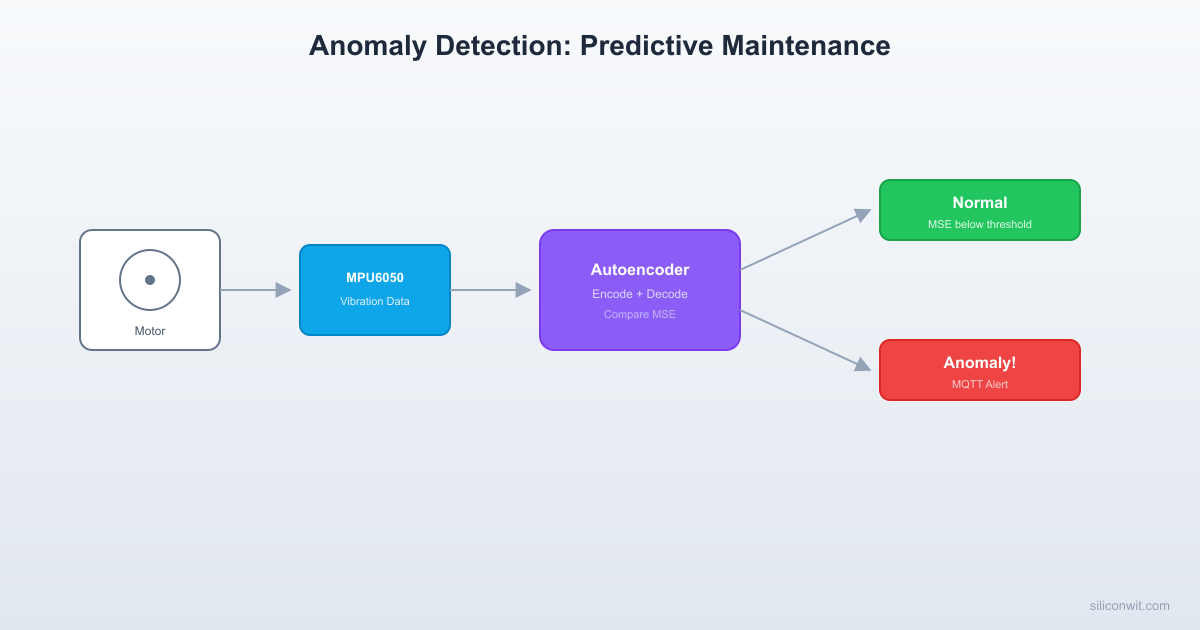
An ESP32 with an MPU6050 accelerometer mounted on a small DC motor (or fan). During a training phase, the device collects vibration data while the motor runs normally. A Python script on the PC trains an autoencoder that learns to reconstruct normal vibration patterns. After quantization and deployment, the ESP32 monitors vibration continuously. When the reconstruction error exceeds a threshold (indicating abnormal vibration from bearing wear, imbalance, or misalignment), the device triggers an LED alert and publishes an MQTT message.

Project specifications:

ParameterValue
MCUESP32 DevKitC
SensorMPU6050 (accelerometer only, 3 axes)
Sample rate200 Hz
Window length0.5 seconds (100 samples x 3 axes = 300 values)
ModelAutoencoder (encoder: 300 to 64 to 16; decoder: 16 to 64 to 300)
Model size~12 KB quantized
Anomaly metricMean squared reconstruction error
Alert thresholdSet from training data distribution (mean + 3 sigma)
OutputLED (GPIO 2), MQTT alert on device/anomaly/alert

Bill of Materials

RefComponentQuantityNotes
U1ESP32 DevKitC1Reuse from previous lessons
S1MPU6050 breakout module1I2C, 3.3V compatible
M1Small DC motor or PC fan1For generating vibration
Hot glue or double-sided tape1Mount MPU6050 to motor housing
Breadboard + jumper wires1 set
Autoencoder Architecture
──────────────────────────────────────────
Input (300) Output (300)
vibration ──► ──► reconstructed
window Encoder Decoder
────── ──────
[300] ──► [64] ──► [16] ──► [64] ──► [300]
compress bottleneck expand
Normal: input ~= output (low MSE)
Anomaly: input != output (high MSE)
┌────────────────────────────────────┐
│ MSE Distribution │
│ Normal: ████████░░ (low error) │
│ Anomaly: ░░░░░░░░████ (high err) │
│ ▲ │
│ threshold │
└────────────────────────────────────┘

Anomaly Detection vs Classification


In previous lessons, you trained classifiers: models that assign one of N known labels to an input. Classifiers require labeled training data for every category. For predictive maintenance, this approach has a fundamental limitation.

AspectClassificationAnomaly Detection
Training dataNeed examples of every fault typeOnly need normal operation data
Novel faultsCannot detect unseen fault typesDetects any deviation from normal
Data collectionExpensive (must induce failures)Easy (just run the machine normally)
OutputClass label (e.g., “bearing fault”)Anomaly score (how abnormal is this?)
False negativesMisses faults not in training setCan miss subtle, gradual degradation

An autoencoder learns to compress and reconstruct its training data. If trained only on normal vibration patterns, it will reconstruct normal inputs accurately (low error) but fail to reconstruct anomalous inputs (high error). The reconstruction error becomes our anomaly score.

Autoencoder Architecture for MCUs


The autoencoder has a symmetric encoder-decoder structure:

Input (300) -> Dense(64, ReLU) -> Dense(16, ReLU) -> Dense(64, ReLU) -> Dense(300, Linear)
| | |
| Bottleneck (16) | Reconstruction |
|__________________________________|______________________________________|
Reconstruction Error

Why this architecture works for MCUs:

  • 300-dimensional input (100 samples x 3 axes) is small enough to fit in a single tensor without fragmenting memory.
  • Bottleneck of 16 forces the encoder to learn a compressed representation of normal vibration. Anomalous patterns cannot be compressed into this bottleneck and therefore cannot be reconstructed.
  • Total parameters: 300x64 + 64 + 64x16 + 16 + 16x64 + 64 + 64x300 + 300 = ~40,000 weights. After int8 quantization, this is approximately 40 KB, but with the small layer sizes the actual model comes out to about 12 KB in TFLite format.

Collecting Normal Operation Data


Hardware Setup

Mount the MPU6050 on the motor housing using hot glue or strong double-sided tape. The sensor should be rigidly coupled to the motor body so it picks up vibration accurately. Loose mounting introduces noise that degrades model quality.

ESP32 PinMPU6050 PinNotes
GPIO 21 (SDA)SDAI2C data
GPIO 22 (SCL)SCLI2C clock
3.3VVCCPower supply
GNDGNDCommon ground

Data Collection Firmware

The following ESP-IDF firmware captures vibration windows and sends them to the PC over UART for training. Run the motor at its normal operating speed during data collection.

#include <stdio.h>
#include <string.h>
#include "freertos/FreeRTOS.h"
#include "freertos/task.h"
#include "driver/i2c_master.h"
#include "esp_log.h"
#include "esp_timer.h"
static const char *TAG = "vibration_collect";
/* I2C and sensor config */
#define I2C_MASTER_SCL_IO 22
#define I2C_MASTER_SDA_IO 21
#define I2C_MASTER_FREQ_HZ 400000
#define MPU6050_ADDR 0x68
/* Data collection parameters */
#define SAMPLE_RATE_HZ 200
#define WINDOW_SIZE 100 /* 0.5 seconds at 200 Hz */
#define NUM_AXES 3 /* Accelerometer only (x, y, z) */
#define NUM_WINDOWS 500 /* Collect 500 normal windows */
static i2c_master_bus_handle_t s_i2c_bus;
static i2c_master_dev_handle_t s_mpu_dev;
/* ---- I2C initialization ---- */
static void i2c_init(void)
{
i2c_master_bus_config_t bus_cfg = {
.clk_source = I2C_CLK_SRC_DEFAULT,
.i2c_port = I2C_NUM_0,
.scl_io_num = I2C_MASTER_SCL_IO,
.sda_io_num = I2C_MASTER_SDA_IO,
.glitch_ignore_cnt = 7,
.flags.enable_internal_pullup = true,
};
ESP_ERROR_CHECK(i2c_new_master_bus(&bus_cfg, &s_i2c_bus));
i2c_device_config_t dev_cfg = {
.dev_addr_length = I2C_ADDR_BIT_LEN_7,
.device_address = MPU6050_ADDR,
.scl_speed_hz = I2C_MASTER_FREQ_HZ,
};
ESP_ERROR_CHECK(i2c_master_bus_add_device(s_i2c_bus, &dev_cfg,
&s_mpu_dev));
}
static void mpu6050_write_reg(uint8_t reg, uint8_t val)
{
uint8_t buf[2] = {reg, val};
i2c_master_transmit(s_mpu_dev, buf, 2, 100);
}
static void mpu6050_init(void)
{
mpu6050_write_reg(0x6B, 0x00); /* Wake up */
vTaskDelay(pdMS_TO_TICKS(100));
mpu6050_write_reg(0x1C, 0x08); /* Accel +/- 4g */
mpu6050_write_reg(0x19, 0x04); /* Sample rate: 1 kHz / (1+4) = 200 Hz */
mpu6050_write_reg(0x1A, 0x03); /* DLPF ~44 Hz bandwidth */
ESP_LOGI(TAG, "MPU6050 initialized: 200 Hz, +/- 4g, DLPF 44 Hz");
}
static void mpu6050_read_accel(float *ax, float *ay, float *az)
{
uint8_t reg = 0x3B;
uint8_t raw[6];
i2c_master_transmit_receive(s_mpu_dev, &reg, 1, raw, 6, 100);
int16_t raw_ax = (int16_t)((raw[0] << 8) | raw[1]);
int16_t raw_ay = (int16_t)((raw[2] << 8) | raw[3]);
int16_t raw_az = (int16_t)((raw[4] << 8) | raw[5]);
/* +/- 4g range: sensitivity = 8192 LSB/g */
*ax = raw_ax / 8192.0f;
*ay = raw_ay / 8192.0f;
*az = raw_az / 8192.0f;
}
/* ---- Data collection ---- */
static float s_window[WINDOW_SIZE][NUM_AXES];
static void capture_window(void)
{
int64_t interval_us = 1000000 / SAMPLE_RATE_HZ;
for (int i = 0; i < WINDOW_SIZE; i++) {
int64_t start = esp_timer_get_time();
mpu6050_read_accel(&s_window[i][0], &s_window[i][1],
&s_window[i][2]);
while ((esp_timer_get_time() - start) < interval_us) {
/* spin */
}
}
}
static void print_window_csv(int window_idx)
{
printf("WINDOW,%d\n", window_idx);
for (int i = 0; i < WINDOW_SIZE; i++) {
printf("%.4f,%.4f,%.4f\n",
s_window[i][0], s_window[i][1], s_window[i][2]);
}
printf("END\n");
}
/* ---- Main ---- */
void app_main(void)
{
ESP_LOGI(TAG, "Vibration data collection starting");
i2c_init();
mpu6050_init();
/* Wait for motor to reach steady state */
ESP_LOGI(TAG, "Waiting 5 seconds for motor to stabilize...");
vTaskDelay(pdMS_TO_TICKS(5000));
ESP_LOGI(TAG, "Collecting %d windows at %d Hz...", NUM_WINDOWS,
SAMPLE_RATE_HZ);
for (int w = 0; w < NUM_WINDOWS; w++) {
capture_window();
print_window_csv(w);
if ((w + 1) % 50 == 0) {
ESP_LOGI(TAG, "Progress: %d/%d windows", w + 1, NUM_WINDOWS);
}
}
ESP_LOGI(TAG, "Collection complete. %d windows captured.",
NUM_WINDOWS);
}

PC-Side Capture Script

import serial
import numpy as np
import os
PORT = '/dev/ttyUSB0' # Adjust for your system
BAUD = 115200
OUTPUT_DIR = 'vibration_data/normal'
WINDOW_SIZE = 100
NUM_AXES = 3
os.makedirs(OUTPUT_DIR, exist_ok=True)
ser = serial.Serial(PORT, BAUD, timeout=5)
windows = []
current_window = []
window_idx = -1
print("Capturing vibration data. Run the motor at normal speed.")
while True:
line = ser.readline().decode('utf-8', errors='ignore').strip()
if line.startswith('WINDOW,'):
window_idx = int(line.split(',')[1])
current_window = []
elif line == 'END' and len(current_window) == WINDOW_SIZE:
arr = np.array(current_window, dtype=np.float32)
windows.append(arr)
filename = os.path.join(OUTPUT_DIR, f'window_{window_idx:04d}.npy')
np.save(filename, arr)
if (window_idx + 1) % 50 == 0:
print(f"Saved {window_idx + 1} windows")
elif ',' in line:
try:
values = [float(x) for x in line.split(',')]
if len(values) == NUM_AXES:
current_window.append(values)
except ValueError:
pass
# Save all windows as a single array
all_data = np.array(windows)
np.save(os.path.join(OUTPUT_DIR, 'all_windows.npy'), all_data)
print(f"Total windows saved: {len(windows)}, shape: {all_data.shape}")

Training the Autoencoder


With 500 windows of normal vibration data collected, we train the autoencoder on your PC.

import numpy as np
import tensorflow as tf
from tensorflow import keras
from tensorflow.keras import layers
import matplotlib
matplotlib.use('Agg')
import matplotlib.pyplot as plt
# Load data
data = np.load('vibration_data/normal/all_windows.npy')
print(f"Data shape: {data.shape}") # (500, 100, 3)
# Flatten each window: (500, 300)
X = data.reshape(data.shape[0], -1).astype(np.float32)
# Normalize to zero mean, unit variance
X_mean = X.mean(axis=0)
X_std = X.std(axis=0)
X_std[X_std == 0] = 1.0
X_norm = (X - X_mean) / X_std
# Save normalization parameters
np.save('norm_mean.npy', X_mean)
np.save('norm_std.npy', X_std)
# Train/validation split (no test set needed for anomaly detection;
# we evaluate with anomaly data later)
split = int(0.85 * len(X_norm))
X_train = X_norm[:split]
X_val = X_norm[split:]
print(f"Train: {len(X_train)}, Val: {len(X_val)}")
# Build autoencoder
INPUT_DIM = 300
encoder_input = keras.Input(shape=(INPUT_DIM,))
x = layers.Dense(64, activation='relu')(encoder_input)
x = layers.Dense(16, activation='relu')(x)
bottleneck = x
x = layers.Dense(64, activation='relu')(bottleneck)
decoder_output = layers.Dense(INPUT_DIM, activation='linear')(x)
autoencoder = keras.Model(encoder_input, decoder_output)
autoencoder.compile(
optimizer=keras.optimizers.Adam(learning_rate=0.001),
loss='mse')
autoencoder.summary()
# Train
history = autoencoder.fit(
X_train, X_train,
validation_data=(X_val, X_val),
epochs=100,
batch_size=32,
callbacks=[
keras.callbacks.EarlyStopping(patience=10,
restore_best_weights=True),
keras.callbacks.ReduceLROnPlateau(factor=0.5, patience=5),
])
# Plot training history
plt.figure(figsize=(8, 4))
plt.plot(history.history['loss'], label='Train Loss')
plt.plot(history.history['val_loss'], label='Val Loss')
plt.xlabel('Epoch')
plt.ylabel('MSE')
plt.title('Autoencoder Training')
plt.legend()
plt.savefig('training_history.png', dpi=100)
print("Training history saved to training_history.png")

Expected model summary:

Layer (type) Output Shape Param #
================================================================
dense (Dense) (None, 64) 19264
dense_1 (Dense) (None, 16) 1040
dense_2 (Dense) (None, 64) 1088
dense_3 (Dense) (None, 300) 19500
================================================================
Total params: 40,892
Trainable params: 40,892

Setting the Anomaly Threshold


The threshold determines when a reconstruction error is “too high” and should trigger an alert. We compute it from the distribution of reconstruction errors on the training data.

# Compute reconstruction errors on training data
reconstructed = autoencoder.predict(X_train)
mse_per_sample = np.mean((X_train - reconstructed) ** 2, axis=1)
error_mean = mse_per_sample.mean()
error_std = mse_per_sample.std()
# Threshold: mean + 3 standard deviations
threshold = error_mean + 3.0 * error_std
print(f"Training MSE - mean: {error_mean:.6f}, std: {error_std:.6f}")
print(f"Anomaly threshold (mean + 3*sigma): {threshold:.6f}")
# Plot error distribution
plt.figure(figsize=(8, 4))
plt.hist(mse_per_sample, bins=50, alpha=0.7, label='Normal errors')
plt.axvline(threshold, color='r', linestyle='--',
label=f'Threshold ({threshold:.4f})')
plt.xlabel('Reconstruction MSE')
plt.ylabel('Count')
plt.title('Reconstruction Error Distribution (Normal Data)')
plt.legend()
plt.savefig('error_distribution.png', dpi=100)
print("Error distribution saved to error_distribution.png")
# Export threshold as C constant
print(f"\n#define ANOMALY_THRESHOLD {threshold:.6f}f")

The 3-sigma rule means approximately 99.7% of normal samples fall below the threshold. Any sample exceeding this threshold is flagged as anomalous. You can adjust the multiplier based on your tolerance for false positives:

MultiplierFalse Positive RateSensitivity
2 sigma~4.6% of normal flaggedHigh sensitivity, more alerts
3 sigma~0.3% of normal flaggedBalanced (recommended)
4 sigma~0.006% of normal flaggedVery few false alarms, may miss subtle faults

Deploying on ESP32


Quantization and Conversion

# Post-training int8 quantization
def representative_dataset():
for i in range(min(100, len(X_train))):
yield [X_train[i:i+1]]
converter = tf.lite.TFLiteConverter.from_keras_model(autoencoder)
converter.optimizations = [tf.lite.Optimize.DEFAULT]
converter.representative_dataset = representative_dataset
converter.target_spec.supported_ops = [tf.lite.OpsSet.TFLITE_BUILTINS_INT8]
converter.inference_input_type = tf.int8
converter.inference_output_type = tf.int8
tflite_model = converter.convert()
with open('anomaly_model.tflite', 'wb') as f:
f.write(tflite_model)
print(f"Quantized model size: {len(tflite_model)} bytes")
# Convert to C header
import subprocess
subprocess.run(['xxd', '-i', 'anomaly_model.tflite', 'anomaly_model.h'])
# Export normalization constants as C arrays
print("\n/* Normalization constants */")
print("static const float NORM_MEAN[] = {")
for i in range(0, len(X_mean), 10):
chunk = X_mean[i:i+10]
print(" " + ', '.join(f'{v:.6f}f' for v in chunk) + ',')
print("};")
print("static const float NORM_STD[] = {")
for i in range(0, len(X_std), 10):
chunk = X_std[i:i+10]
print(" " + ', '.join(f'{v:.6f}f' for v in chunk) + ',')
print("};")

ESP32 Inference Firmware

#include <stdio.h>
#include <string.h>
#include <math.h>
#include "freertos/FreeRTOS.h"
#include "freertos/task.h"
#include "driver/i2c_master.h"
#include "driver/gpio.h"
#include "esp_log.h"
#include "esp_timer.h"
#include "tensorflow/lite/micro/micro_interpreter.h"
#include "tensorflow/lite/micro/micro_mutable_op_resolver.h"
#include "tensorflow/lite/schema/schema_generated.h"
#include "anomaly_model.h"
static const char *TAG = "anomaly_detect";
/* Hardware config (same as data collection) */
#define I2C_MASTER_SCL_IO 22
#define I2C_MASTER_SDA_IO 21
#define MPU6050_ADDR 0x68
/* Detection parameters */
#define SAMPLE_RATE_HZ 200
#define WINDOW_SIZE 100
#define NUM_AXES 3
#define INPUT_SIZE (WINDOW_SIZE * NUM_AXES)
#define LED_PIN 2
/* Anomaly threshold (from training script) */
#define ANOMALY_THRESHOLD 0.015000f /* Replace with your value */
/* Normalization constants (from training script) */
static const float NORM_MEAN[INPUT_SIZE] = {
/* Paste the 300 mean values from the training export */
0.0f /* placeholder */
};
static const float NORM_STD[INPUT_SIZE] = {
/* Paste the 300 std values from the training export */
1.0f /* placeholder */
};
/* TFLite Micro */
#define TENSOR_ARENA_SIZE (32 * 1024)
static uint8_t s_tensor_arena[TENSOR_ARENA_SIZE]
__attribute__((aligned(16)));
/* I2C handles */
static i2c_master_bus_handle_t s_i2c_bus;
static i2c_master_dev_handle_t s_mpu_dev;
/* Sensor window buffer */
static float s_window[WINDOW_SIZE][NUM_AXES];
static float s_flat_input[INPUT_SIZE];
/* ---- I2C and MPU6050 init (same as collection firmware) ---- */
static void i2c_init(void)
{
i2c_master_bus_config_t bus_cfg = {
.clk_source = I2C_CLK_SRC_DEFAULT,
.i2c_port = I2C_NUM_0,
.scl_io_num = I2C_MASTER_SCL_IO,
.sda_io_num = I2C_MASTER_SDA_IO,
.glitch_ignore_cnt = 7,
.flags.enable_internal_pullup = true,
};
i2c_new_master_bus(&bus_cfg, &s_i2c_bus);
i2c_device_config_t dev_cfg = {
.dev_addr_length = I2C_ADDR_BIT_LEN_7,
.device_address = MPU6050_ADDR,
.scl_speed_hz = 400000,
};
i2c_master_bus_add_device(s_i2c_bus, &dev_cfg, &s_mpu_dev);
}
static void mpu6050_write_reg(uint8_t reg, uint8_t val)
{
uint8_t buf[2] = {reg, val};
i2c_master_transmit(s_mpu_dev, buf, 2, 100);
}
static void mpu6050_init(void)
{
mpu6050_write_reg(0x6B, 0x00);
vTaskDelay(pdMS_TO_TICKS(100));
mpu6050_write_reg(0x1C, 0x08); /* +/- 4g */
mpu6050_write_reg(0x19, 0x04); /* 200 Hz */
mpu6050_write_reg(0x1A, 0x03); /* DLPF 44 Hz */
}
static void mpu6050_read_accel(float *ax, float *ay, float *az)
{
uint8_t reg = 0x3B;
uint8_t raw[6];
i2c_master_transmit_receive(s_mpu_dev, &reg, 1, raw, 6, 100);
*ax = (int16_t)((raw[0] << 8) | raw[1]) / 8192.0f;
*ay = (int16_t)((raw[2] << 8) | raw[3]) / 8192.0f;
*az = (int16_t)((raw[4] << 8) | raw[5]) / 8192.0f;
}
/* ---- LED ---- */
static void led_init(void)
{
gpio_config_t io_conf = {
.pin_bit_mask = (1ULL << LED_PIN),
.mode = GPIO_MODE_OUTPUT,
};
gpio_config(&io_conf);
gpio_set_level(LED_PIN, 0);
}
/* ---- Capture and normalize ---- */
static void capture_window(void)
{
int64_t interval_us = 1000000 / SAMPLE_RATE_HZ;
for (int i = 0; i < WINDOW_SIZE; i++) {
int64_t start = esp_timer_get_time();
mpu6050_read_accel(&s_window[i][0], &s_window[i][1],
&s_window[i][2]);
while ((esp_timer_get_time() - start) < interval_us) {
/* spin */
}
}
}
static void normalize_window(void)
{
for (int i = 0; i < WINDOW_SIZE; i++) {
for (int j = 0; j < NUM_AXES; j++) {
int idx = i * NUM_AXES + j;
s_flat_input[idx] =
(s_window[i][j] - NORM_MEAN[idx]) / NORM_STD[idx];
}
}
}
/* ---- Anomaly detection task ---- */
static void anomaly_detection_task(void *arg)
{
/* Initialize TFLite Micro */
const tflite::Model *model = tflite::GetModel(anomaly_model_tflite);
static tflite::MicroMutableOpResolver<3> resolver;
resolver.AddFullyConnected();
resolver.AddReshape();
resolver.AddRelu();
static tflite::MicroInterpreter interpreter(
model, resolver, s_tensor_arena, TENSOR_ARENA_SIZE);
interpreter.AllocateTensors();
TfLiteTensor *input = interpreter.input(0);
TfLiteTensor *output = interpreter.output(0);
ESP_LOGI(TAG, "TFLite Micro ready. Arena: %zu bytes",
interpreter.arena_used_bytes());
/* Exponential moving average for smoothing */
float ema_error = 0.0f;
float ema_alpha = 0.3f;
bool first_window = true;
int anomaly_count = 0;
int normal_count = 0;
while (1) {
/* Capture 0.5-second window */
capture_window();
normalize_window();
/* Quantize input */
float in_scale = input->params.scale;
int in_zp = input->params.zero_point;
int8_t *in_data = input->data.int8;
for (int i = 0; i < INPUT_SIZE; i++) {
int32_t q = (int32_t)(s_flat_input[i] / in_scale) + in_zp;
if (q < -128) q = -128;
if (q > 127) q = 127;
in_data[i] = (int8_t)q;
}
/* Run inference */
int64_t t_start = esp_timer_get_time();
interpreter.Invoke();
int64_t t_end = esp_timer_get_time();
/* Dequantize output and compute reconstruction error */
float out_scale = output->params.scale;
int out_zp = output->params.zero_point;
int8_t *out_data = output->data.int8;
float mse = 0.0f;
for (int i = 0; i < INPUT_SIZE; i++) {
float reconstructed =
(out_data[i] - out_zp) * out_scale;
float original =
(in_data[i] - in_zp) * in_scale;
float diff = original - reconstructed;
mse += diff * diff;
}
mse /= INPUT_SIZE;
/* Exponential moving average */
if (first_window) {
ema_error = mse;
first_window = false;
} else {
ema_error = ema_alpha * mse + (1.0f - ema_alpha) * ema_error;
}
bool is_anomaly = ema_error > ANOMALY_THRESHOLD;
if (is_anomaly) {
anomaly_count++;
gpio_set_level(LED_PIN, 1);
ESP_LOGW(TAG, "ANOMALY! MSE=%.6f, EMA=%.6f, "
"Threshold=%.6f, Infer=%lld us",
mse, ema_error, ANOMALY_THRESHOLD,
(long long)(t_end - t_start));
} else {
normal_count++;
gpio_set_level(LED_PIN, 0);
ESP_LOGI(TAG, "Normal. MSE=%.6f, EMA=%.6f, "
"Infer=%lld us",
mse, ema_error,
(long long)(t_end - t_start));
}
/* Print statistics every 100 windows */
if ((anomaly_count + normal_count) % 100 == 0) {
ESP_LOGI(TAG, "Stats: %d normal, %d anomalies (%.1f%%)",
normal_count, anomaly_count,
100.0f * anomaly_count
/ (anomaly_count + normal_count));
}
}
}
/* ---- Entry point ---- */
void app_main(void)
{
ESP_LOGI(TAG, "Vibration anomaly detector starting");
i2c_init();
mpu6050_init();
led_init();
/* Wait for motor to stabilize */
ESP_LOGI(TAG, "Waiting 3 seconds for motor to stabilize...");
vTaskDelay(pdMS_TO_TICKS(3000));
xTaskCreate(anomaly_detection_task, "anomaly_task",

8192, NULL, 5, NULL);
}

Real-Time Monitoring Loop


The detection task runs continuously at 2 Hz (one 0.5-second window every 0.5 seconds). The exponential moving average (EMA) with alpha=0.3 smooths out isolated spikes while still responding quickly to sustained anomalies. A single noisy window will not trigger an alert, but three consecutive anomalous windows will push the EMA above the threshold.

To test the detector, introduce a mechanical fault while the motor is running:

  • Imbalance: Attach a small piece of tape or a coin to one blade of a fan.
  • Bearing friction: Press lightly against the motor shaft with a pencil eraser.
  • Loosening: Partially detach the MPU6050 from the motor housing.

You should see the MSE spike immediately and the LED turn on within 1 to 2 seconds.

Edge vs Cloud Comparison


MetricEdge (ESP32)Cloud (MQTT + Server)
Detection latency0.5 s (one window)1 to 5 s (network + server processing)
Bandwidth0 bytes (inference local)1200 bytes/sec (raw data streaming)
AvailabilityCore inference works offlineRequires network connection
Power~80 mA (MCU only)~160 mA (MCU + Wi-Fi radio)
Model updateRequires OTA firmware updateUpdate model on server, instant
Compute costFree (on-device)Server compute charges
Multi-sensor fusionLimited by MCU resourcesUnlimited on server

The edge approach is clearly better for latency-critical alerts (a bearing failing in real time cannot wait for a network round trip) and for deployments in connectivity-poor environments (factory floors with RF interference, remote pump stations). The cloud approach wins when you need to aggregate data from hundreds of sensors, run complex models that do not fit on an MCU, or continuously update models without reflashing firmware.

A hybrid architecture is often the best practical choice: run a simple anomaly detector on the edge for immediate alerting, and periodically upload summarized feature data (not raw samples) to the cloud for long-term trend analysis and model retraining.

When Hybrid Beats Pure Edge

Pure edge inference works well for binary decisions (anomaly or normal) with a fixed model. But production systems face challenges that edge alone cannot solve:

  • Model drift. A motor’s vibration signature changes as bearings wear in. The threshold you set on day one may trigger false positives by month three. A cloud pipeline that collects edge feature summaries can retrain and push updated models via OTA.
  • Fleet-wide patterns. One sensor sees one machine. A cloud aggregation layer can detect that three machines on the same production line all shifted their vibration profiles simultaneously, suggesting a shared root cause (power quality, floor vibration, ambient temperature) that no single edge node could identify.
  • Uncertain classifications. When the MSE falls in a gray zone (close to the threshold but not clearly above or below), the edge node can escalate by uploading the raw feature window to the cloud for a more powerful model to evaluate. This tiered inference pattern keeps bandwidth low while improving accuracy for ambiguous cases.

Lesson 9 covers these hybrid patterns in depth, including a complete implementation of tiered inference with cloud-assisted retraining.

Integration with IoT Stack (MQTT Alert on Anomaly)


Add MQTT alerting to the detection loop. When an anomaly persists for 3 or more consecutive windows, publish an alert. When the system returns to normal, publish a recovery message.

#include "mqtt_client.h"
extern esp_mqtt_client_handle_t s_mqtt_client;
extern bool s_mqtt_connected;
#define ALERT_TOPIC "device/anomaly/alert"
#define STATUS_TOPIC "device/anomaly/status"
#define ALERT_WINDOW_COUNT 3
static int s_consecutive_anomalies = 0;
static bool s_alert_active = false;
static void check_and_publish_anomaly(float mse, float ema, bool is_anomaly)
{
if (!s_mqtt_connected) return;
if (is_anomaly) {
s_consecutive_anomalies++;
if (s_consecutive_anomalies >= ALERT_WINDOW_COUNT
&& !s_alert_active) {
/* Trigger alert */
char payload[256];
snprintf(payload, sizeof(payload),
"{\"status\":\"anomaly\","
"\"mse\":%.6f,\"ema\":%.6f,"
"\"threshold\":%.6f,"
"\"consecutive\":%d,"
"\"timestamp\":%lld}",
mse, ema, ANOMALY_THRESHOLD,
s_consecutive_anomalies,
(long long)(esp_timer_get_time() / 1000000));
esp_mqtt_client_publish(s_mqtt_client, ALERT_TOPIC,
payload, 0, 1, 0);
s_alert_active = true;
ESP_LOGW(TAG, "MQTT alert published");
}
} else {
if (s_alert_active) {
/* Recovery */
char payload[128];
snprintf(payload, sizeof(payload),
"{\"status\":\"normal\","
"\"mse\":%.6f,"
"\"timestamp\":%lld}",
mse,
(long long)(esp_timer_get_time() / 1000000));
esp_mqtt_client_publish(s_mqtt_client, STATUS_TOPIC,
payload, 0, 1, 0);
s_alert_active = false;
ESP_LOGI(TAG, "MQTT recovery published");
}
s_consecutive_anomalies = 0;
}
}

Practical Considerations for Industrial Deployment


Sensor mounting. The quality of the vibration data depends entirely on how rigidly the accelerometer is coupled to the machine. Hot glue works for prototyping, but industrial installations use threaded studs, magnets, or epoxy. The mounting surface should be flat and clean, as close to the bearing or vibration source as possible.

Sampling rate selection. 200 Hz is sufficient for low-frequency vibration from motors, fans, and pumps (dominant frequencies typically below 100 Hz). For high-speed machinery (spindles, turbines), you may need 1 kHz or higher. The MPU6050 supports up to 1 kHz output rate, but the autoencoder input size grows proportionally.

Temperature effects. The MPU6050’s offset drifts with temperature. In environments with wide temperature swings (outdoor installations, near heat sources), consider adding a temperature compensation step or retraining periodically.

Model drift. Machines change over time due to wear, lubrication cycles, and seasonal load variations. A model trained on data from a new machine may trigger false alarms after a few months of normal wear. Periodic retraining with fresh “normal” data is essential. Some production systems implement automatic retraining: the edge device uploads feature summaries to the cloud, a server retrains the autoencoder, and the new model is pushed back via OTA update.

Multi-axis vs single-axis. We use all three accelerometer axes, but for some machines a single axis (perpendicular to the mounting surface) carries most of the vibration information. Using fewer axes reduces the model input size and inference time. Experiment with your specific machine to determine which axes matter.

Project File Structure


  • Directoryanomaly-detector/
    • CMakeLists.txt
    • Directorymain/
      • CMakeLists.txt
      • main.c
      • anomaly_model.h
      • norm_constants.h
    • Directorycomponents/
      • Directoryesp-tflite-micro/

Exercises


  1. Collect anomaly data and measure detection accuracy. After training on normal data, deliberately introduce three types of faults (imbalance, friction, loosening) and collect 50 windows of each. Compute the MSE for each fault type and plot the distributions alongside the normal distribution. Report the detection rate (true positive rate) and false positive rate for each fault type at different threshold levels.

  2. Implement frequency-domain features. Instead of feeding raw time-domain samples to the autoencoder, compute an FFT of each window and use the magnitude spectrum as the model input. Compare the detection accuracy and model size with the time-domain approach. Frequency-domain features often perform better for rotational machinery because fault signatures appear as specific frequency peaks.

  3. Add a rolling baseline update. Implement a mechanism where the ESP32 maintains a running average of reconstruction errors over the last 1000 normal windows. If the baseline gradually increases (indicating slow wear), adjust the threshold upward to avoid nuisance alarms while still catching sudden changes. This mimics how industrial SCADA systems handle gradual degradation.

  4. Deploy on STM32 for comparison. Port the inference firmware to an STM32F4 using the HAL and TFLite Micro. Compare inference latency, memory usage, and power consumption with the ESP32 deployment. Document any differences in the TFLite Micro setup or op resolver configuration.

Summary


You built an anomaly detection system for predictive maintenance by training an autoencoder exclusively on normal vibration data from an MPU6050 mounted on a motor. The autoencoder learned to reconstruct normal vibration patterns, and any input that produced a high reconstruction error was flagged as anomalous. After int8 quantization, the model occupied approximately 12 KB of flash. The ESP32 firmware captures vibration windows at 200 Hz, runs inference in a few milliseconds, smooths the anomaly score with an exponential moving average, and triggers LED and MQTT alerts when sustained anomalies are detected. The edge-first architecture eliminates network dependency for critical alerts while remaining compatible with cloud-based trend analysis through selective MQTT publishing.

Comments

Loading comments...


© 2021-2026 SiliconWit®. All rights reserved.