Skip to content

System Services and Process Management

System Services and Process Management hero image
Modified:
Published:

A sensor reading application that runs in a terminal is fine for development, but a deployed embedded system needs its software to start at boot, recover from crashes, log diagnostic data, and communicate with other processes reliably. In this lesson, you will convert the sensor application from previous lessons into a proper Linux daemon managed by systemd. The daemon reads BME280 data on a configurable interval, feeds the hardware watchdog to prove it is alive, writes structured log entries through journald, and serves real-time readings to a client application over a Unix domain socket. You will also patch the kernel with PREEMPT_RT and configure real-time scheduling priorities for time-sensitive tasks. #Systemd #ProcessManagement #EmbeddedDaemon

What We Are Building

Systemd-Managed Sensor Daemon with IPC

A two-process system: a sensor daemon (sensor-monitord) that reads the BME280 every second, maintains a shared-memory ring buffer of recent readings, kicks the hardware watchdog, and listens on a Unix socket; and a client tool (sensor-query) that connects to the socket to retrieve the latest readings, request history, or change the sampling interval. Both processes are managed by systemd unit files with dependency ordering, resource limits, and automatic restart policies.

System specifications:

ParameterValue
Daemon namesensor-monitord
Client toolsensor-query
Init systemsystemd
WatchdogHardware watchdog (/dev/watchdog), 15-second timeout
IPC (primary)Unix domain socket (/run/sensor-monitor.sock)
IPC (secondary)POSIX shared memory ring buffer (recent 1000 readings)
Loggingsd-journal API (structured key-value fields)
SchedulingSCHED_FIFO priority 50 (with PREEMPT_RT kernel)
Restart policyon-failure, 3-second delay, max 5 retries in 60 seconds
Resource limitsMemoryMax=32M, CPUQuota=25%

Systemd Unit Features

FeatureImplementation
Auto-start at bootWantedBy=multi-user.target
Watchdog integrationWatchdogSec=15 with sd_notify
Restart on crashRestart=on-failure, RestartSec=3
Resource cappingMemoryMax, CPUQuota in [Service]
Socket activationsensor-monitor.socket unit (optional)
Dependency orderingAfter=i2c-dev.service, Requires=…
LoggingStandardOutput=journal, structured fields
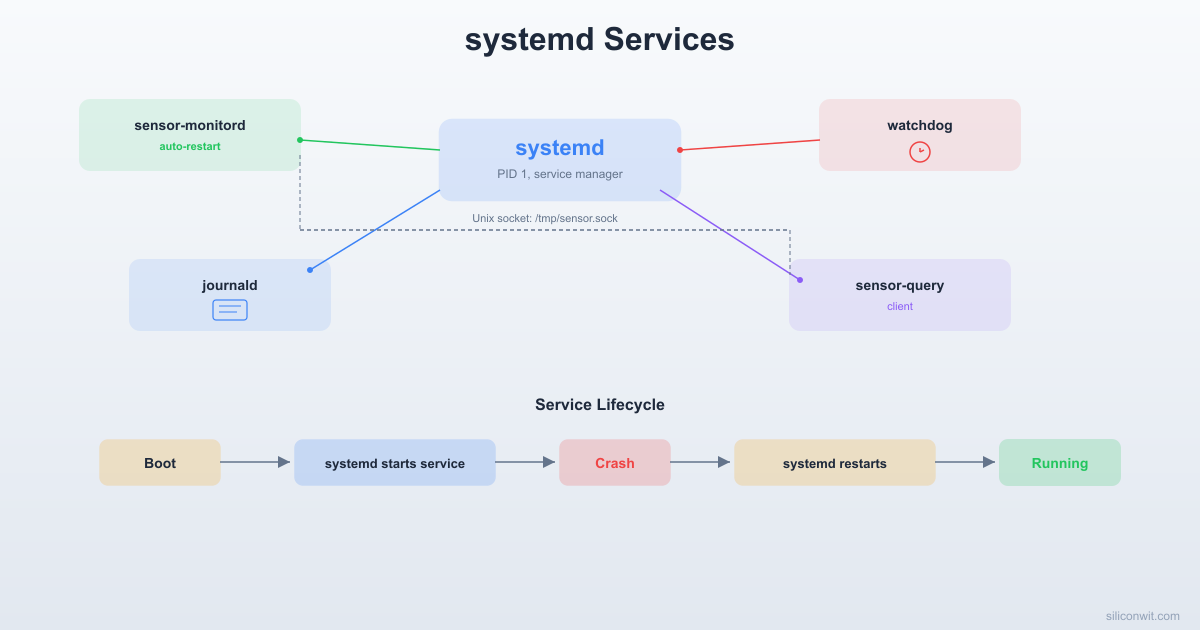
Systemd Service Lifecycle
──────────────────────────────────────────
systemctl start sensor-monitord
[Inactive] ──► [Activating] ──► [Active]
watchdog ping │ WatchdogSec=15
every 10s ◄────┘
crash / kill │
[Failed]
Restart=on-failure
RestartSec=3 │
[Activating]
[Active] (recovered)

Why systemd for Embedded?


IPC: Daemon + Client via Unix Socket
──────────────────────────────────────────
sensor-monitord sensor-query
(daemon, always running) (on-demand client)
───────────────── ──────────────
BME280 read (1 Hz)
Ring buffer (1000 readings)
├──► /dev/watchdog (kick every 10s)
└──► Unix socket
/run/sensor-monitor.sock
│ connect()
◄─────────────── sensor-query
│ "get_latest"
├────────────────► parse cmd
│ JSON response
◄──────────────── send result

Older init systems like SysVinit and BusyBox init start services sequentially using shell scripts. This works for simple cases, but production embedded systems need capabilities that shell scripts cannot reliably provide.

systemd Advantages

  • Dependency management: declare that your daemon requires I2C to be available, and systemd handles ordering automatically
  • Socket activation: systemd listens on your daemon’s socket and starts the daemon only when a client connects, saving memory on idle systems
  • Resource control: set hard memory and CPU limits per service using cgroups, preventing a runaway process from starving the rest of the system
  • Watchdog integration: systemd monitors your daemon’s heartbeat and restarts it (or reboots the board) if the heartbeat stops
  • Structured logging: journald captures log entries with metadata fields that you can query and filter programmatically
  • Parallel startup: independent services start simultaneously, reducing boot time

SysVinit / BusyBox init

  • Sequential startup (slow boot)
  • Restart logic requires custom shell wrappers
  • No built-in resource limits
  • No watchdog protocol
  • Logging depends on syslog configuration
  • Dependency ordering is manual (numbered scripts)

For Buildroot images (Lesson 6), BusyBox init is the default and makes sense for minimal systems. Yocto (Lesson 8) and Raspberry Pi OS both use systemd. This lesson targets systemd because the sensor daemon needs watchdog support, automatic restart, resource limits, and structured logging.

Project Directory Structure


Create the project directory on your host machine:

Terminal window
mkdir -p ~/rpi-sensor-daemon/{src,systemd}
cd ~/rpi-sensor-daemon
  • Directoryrpi-sensor-daemon/
    • Directorysrc/
      • sensor-monitord.c
      • sensor-query.c
      • sensor-protocol.h
      • Makefile
    • Directorysystemd/
      • sensor-monitord.service
      • sensor-monitor.socket

The Shared Protocol Header


Both the daemon and client share a simple text-based protocol over Unix domain sockets. Define the constants in a shared header.

src/sensor-protocol.h
#ifndef SENSOR_PROTOCOL_H
#define SENSOR_PROTOCOL_H
#define SENSOR_SOCK_PATH "/run/sensor-monitor.sock"
#define SHM_NAME "/sensor-ringbuf"
#define RING_CAPACITY 1000
#define MAX_CMD_LEN 64
#define MAX_RESPONSE_LEN 4096
/* Commands the client can send */
#define CMD_LATEST "latest"
#define CMD_HISTORY "history"
#define CMD_INTERVAL "interval"
/* One sensor reading */
struct sensor_reading {
double temperature; /* Celsius */
double pressure; /* hPa */
double humidity; /* %RH */
uint64_t timestamp_ms; /* milliseconds since epoch */
};
/* Shared memory ring buffer layout */
struct sensor_ring {
_Atomic uint32_t write_index; /* next write position */
_Atomic uint32_t count; /* total readings stored (capped at RING_CAPACITY) */
struct sensor_reading readings[RING_CAPACITY];
};
#endif /* SENSOR_PROTOCOL_H */

The protocol is intentionally simple: the client sends a text command terminated by a newline, and the daemon responds with text. This makes it easy to test with tools like socat or nc.

The Sensor Daemon (sensor-monitord)


This is the main daemon process. It performs five tasks in a single event loop:

  1. Reads the BME280 sensor over I2C at a configurable interval
  2. Stores readings in a POSIX shared memory ring buffer
  3. Listens on a Unix domain socket for client connections
  4. Feeds the hardware watchdog to prove it is alive
  5. Sends sd_notify heartbeats so systemd knows it is healthy
src/sensor-monitord.c
/*
* sensor-monitord.c - Systemd-managed BME280 sensor daemon
*
* Reads BME280 via /dev/i2c-1, stores readings in shared memory,
* serves clients over a Unix domain socket, and feeds the hardware
* watchdog. Designed for the Raspberry Pi Zero 2 W.
*
* Build: aarch64-linux-gnu-gcc -o sensor-monitord sensor-monitord.c \
* -lrt -lpthread -lsystemd -lm
*/
#define _GNU_SOURCE
#include <stdio.h>
#include <stdlib.h>
#include <stdint.h>
#include <stdatomic.h>
#include <string.h>
#include <unistd.h>
#include <signal.h>
#include <errno.h>
#include <fcntl.h>
#include <math.h>
#include <time.h>
#include <sched.h>
#include <pthread.h>
#include <sys/socket.h>
#include <sys/un.h>
#include <sys/stat.h>
#include <sys/mman.h>
#include <sys/ioctl.h>
#include <sys/select.h>
#include <linux/i2c-dev.h>
#include <systemd/sd-daemon.h>
#include <systemd/sd-journal.h>
#include "sensor-protocol.h"
/* BME280 I2C address and key registers */
#define BME280_ADDR 0x76
#define BME280_REG_ID 0xD0
#define BME280_REG_CTRL_HUM 0xF2
#define BME280_REG_CTRL_MEAS 0xF4
#define BME280_REG_CONFIG 0xF5
#define BME280_REG_DATA 0xF7
#define BME280_CHIP_ID 0x60
/* Calibration data storage */
struct bme280_calib {
uint16_t dig_T1;
int16_t dig_T2, dig_T3;
uint16_t dig_P1;
int16_t dig_P2, dig_P3, dig_P4, dig_P5;
int16_t dig_P6, dig_P7, dig_P8, dig_P9;
uint8_t dig_H1, dig_H3;
int16_t dig_H2, dig_H4, dig_H5;
int8_t dig_H6;
};
/* Global state */
static volatile sig_atomic_t running = 1;
static int i2c_fd = -1;
static int watchdog_fd = -1;
static int listen_fd = -1;
static struct sensor_ring *ring = NULL;
static struct bme280_calib calib;
static int sample_interval_ms = 1000;
/* ----------------------------------------------------------------
* Signal handling
* ---------------------------------------------------------------- */
static void signal_handler(int sig)
{
(void)sig;
running = 0;
}
static void install_signal_handlers(void)
{
struct sigaction sa;
memset(&sa, 0, sizeof(sa));
sa.sa_handler = signal_handler;
sigemptyset(&sa.sa_mask);
sigaction(SIGTERM, &sa, NULL);
sigaction(SIGINT, &sa, NULL);
sigaction(SIGHUP, &sa, NULL);
/* Ignore SIGPIPE so writing to a disconnected socket returns EPIPE */
signal(SIGPIPE, SIG_IGN);
}
/* ----------------------------------------------------------------
* I2C helpers
* ---------------------------------------------------------------- */
static int i2c_write_byte(int fd, uint8_t reg, uint8_t val)
{
uint8_t buf[2] = { reg, val };
if (write(fd, buf, 2) != 2)
return -1;
return 0;
}
static int i2c_read_bytes(int fd, uint8_t reg, uint8_t *buf, int len)
{
if (write(fd, &reg, 1) != 1)
return -1;
if (read(fd, buf, len) != len)
return -1;
return 0;
}
/* ----------------------------------------------------------------
* BME280 initialization and reading
* ---------------------------------------------------------------- */
static int bme280_init(const char *i2c_dev)
{
uint8_t id;
uint8_t cal1[26], cal2[7];
i2c_fd = open(i2c_dev, O_RDWR);
if (i2c_fd < 0) {
sd_journal_print(LOG_ERR, "Failed to open %s: %s",
i2c_dev, strerror(errno));
return -1;
}
if (ioctl(i2c_fd, I2C_SLAVE, BME280_ADDR) < 0) {
sd_journal_print(LOG_ERR, "I2C_SLAVE ioctl failed: %s",
strerror(errno));
close(i2c_fd);
i2c_fd = -1;
return -1;
}
/* Verify chip ID */
if (i2c_read_bytes(i2c_fd, BME280_REG_ID, &id, 1) < 0 ||
id != BME280_CHIP_ID) {
sd_journal_print(LOG_ERR, "BME280 not found (id=0x%02x)", id);
close(i2c_fd);
i2c_fd = -1;
return -1;
}
/* Read temperature and pressure calibration (0x88..0xA1) */
if (i2c_read_bytes(i2c_fd, 0x88, cal1, 26) < 0)
return -1;
calib.dig_T1 = (uint16_t)(cal1[1] << 8 | cal1[0]);
calib.dig_T2 = (int16_t)(cal1[3] << 8 | cal1[2]);
calib.dig_T3 = (int16_t)(cal1[5] << 8 | cal1[4]);
calib.dig_P1 = (uint16_t)(cal1[7] << 8 | cal1[6]);
calib.dig_P2 = (int16_t)(cal1[9] << 8 | cal1[8]);
calib.dig_P3 = (int16_t)(cal1[11] << 8 | cal1[10]);
calib.dig_P4 = (int16_t)(cal1[13] << 8 | cal1[12]);
calib.dig_P5 = (int16_t)(cal1[15] << 8 | cal1[14]);
calib.dig_P6 = (int16_t)(cal1[17] << 8 | cal1[16]);
calib.dig_P7 = (int16_t)(cal1[19] << 8 | cal1[18]);
calib.dig_P8 = (int16_t)(cal1[21] << 8 | cal1[20]);
calib.dig_P9 = (int16_t)(cal1[23] << 8 | cal1[22]);
/* Humidity calibration byte at 0xA1 */
calib.dig_H1 = cal1[25];
/* Read humidity calibration (0xE1..0xE7) */
if (i2c_read_bytes(i2c_fd, 0xE1, cal2, 7) < 0)
return -1;
calib.dig_H2 = (int16_t)(cal2[1] << 8 | cal2[0]);
calib.dig_H3 = cal2[2];
calib.dig_H4 = (int16_t)((cal2[3] << 4) | (cal2[4] & 0x0F));
calib.dig_H5 = (int16_t)((cal2[5] << 4) | (cal2[4] >> 4));
calib.dig_H6 = (int8_t)cal2[6];
/* Configure: humidity oversampling x1 */
i2c_write_byte(i2c_fd, BME280_REG_CTRL_HUM, 0x01);
/* Configure: standby 1000ms, filter off */
i2c_write_byte(i2c_fd, BME280_REG_CONFIG, 0xA0);
/* Configure: temp oversampling x1, pressure oversampling x1, normal mode */
i2c_write_byte(i2c_fd, BME280_REG_CTRL_MEAS, 0x27);
sd_journal_print(LOG_INFO, "BME280 initialized on %s", i2c_dev);
return 0;
}
static int bme280_read(struct sensor_reading *out)
{
uint8_t data[8];
int32_t adc_T, adc_P, adc_H;
int32_t t_fine;
double var1, var2, T, P, H;
struct timespec ts;
if (i2c_read_bytes(i2c_fd, BME280_REG_DATA, data, 8) < 0)
return -1;
adc_P = (int32_t)((data[0] << 12) | (data[1] << 4) | (data[2] >> 4));
adc_T = (int32_t)((data[3] << 12) | (data[4] << 4) | (data[5] >> 4));
adc_H = (int32_t)((data[6] << 8) | data[7]);
/* Temperature compensation (from BME280 datasheet) */
var1 = ((double)adc_T / 16384.0 - (double)calib.dig_T1 / 1024.0)
* (double)calib.dig_T2;
var2 = (((double)adc_T / 131072.0 - (double)calib.dig_T1 / 8192.0)
* ((double)adc_T / 131072.0 - (double)calib.dig_T1 / 8192.0))
* (double)calib.dig_T3;
t_fine = (int32_t)(var1 + var2);
T = (var1 + var2) / 5120.0;
/* Pressure compensation */
var1 = ((double)t_fine / 2.0) - 64000.0;
var2 = var1 * var1 * (double)calib.dig_P6 / 32768.0;
var2 = var2 + var1 * (double)calib.dig_P5 * 2.0;
var2 = (var2 / 4.0) + ((double)calib.dig_P4 * 65536.0);
var1 = ((double)calib.dig_P3 * var1 * var1 / 524288.0
+ (double)calib.dig_P2 * var1) / 524288.0;
var1 = (1.0 + var1 / 32768.0) * (double)calib.dig_P1;
if (var1 == 0.0) {
P = 0.0;
} else {
P = 1048576.0 - (double)adc_P;
P = (P - (var2 / 4096.0)) * 6250.0 / var1;
var1 = (double)calib.dig_P9 * P * P / 2147483648.0;
var2 = P * (double)calib.dig_P8 / 32768.0;
P = P + (var1 + var2 + (double)calib.dig_P7) / 16.0;
P = P / 100.0; /* Convert Pa to hPa */
}
/* Humidity compensation */
H = (double)t_fine - 76800.0;
if (H == 0.0) {
H = 0.0;
} else {
H = (adc_H - (calib.dig_H4 * 64.0 + calib.dig_H5 / 16384.0 * H))
* (calib.dig_H2 / 65536.0
* (1.0 + calib.dig_H6 / 67108864.0 * H
* (1.0 + calib.dig_H3 / 67108864.0 * H)));
H = H * (1.0 - calib.dig_H1 * H / 524288.0);
if (H > 100.0) H = 100.0;
if (H < 0.0) H = 0.0;
}
clock_gettime(CLOCK_REALTIME, &ts);
out->temperature = T;
out->pressure = P;
out->humidity = H;
out->timestamp_ms = (uint64_t)ts.tv_sec * 1000
+ (uint64_t)ts.tv_nsec / 1000000;
return 0;
}
/* ----------------------------------------------------------------
* Shared memory ring buffer
* ---------------------------------------------------------------- */
static int ring_init(void)
{
int shm_fd;
shm_fd = shm_open(SHM_NAME, O_CREAT | O_RDWR, 0644);
if (shm_fd < 0) {
sd_journal_print(LOG_ERR, "shm_open failed: %s", strerror(errno));
return -1;
}
if (ftruncate(shm_fd, sizeof(struct sensor_ring)) < 0) {
sd_journal_print(LOG_ERR, "ftruncate failed: %s", strerror(errno));
close(shm_fd);
return -1;
}
ring = mmap(NULL, sizeof(struct sensor_ring),
PROT_READ | PROT_WRITE, MAP_SHARED, shm_fd, 0);
close(shm_fd);
if (ring == MAP_FAILED) {
sd_journal_print(LOG_ERR, "mmap failed: %s", strerror(errno));
ring = NULL;
return -1;
}
/* Zero the ring on startup */
memset(ring, 0, sizeof(struct sensor_ring));
sd_journal_print(LOG_INFO, "Shared memory ring buffer initialized "
"(%zu bytes)", sizeof(struct sensor_ring));
return 0;
}
static void ring_push(const struct sensor_reading *r)
{
uint32_t idx = atomic_load(&ring->write_index);
ring->readings[idx % RING_CAPACITY] = *r;
atomic_store(&ring->write_index, idx + 1);
uint32_t cnt = atomic_load(&ring->count);
if (cnt < RING_CAPACITY)
atomic_store(&ring->count, cnt + 1);
}
static void ring_cleanup(void)
{
if (ring) {
munmap(ring, sizeof(struct sensor_ring));
ring = NULL;
}
shm_unlink(SHM_NAME);
}
/* ----------------------------------------------------------------
* Hardware watchdog
* ---------------------------------------------------------------- */
static int watchdog_init(void)
{
watchdog_fd = open("/dev/watchdog", O_WRONLY);
if (watchdog_fd < 0) {
sd_journal_print(LOG_WARNING,
"Cannot open /dev/watchdog: %s (continuing without "
"hardware watchdog)", strerror(errno));
return 0; /* Non-fatal: continue without hardware watchdog */
}
sd_journal_print(LOG_INFO, "Hardware watchdog opened");
return 0;
}
static void watchdog_kick(void)
{
if (watchdog_fd >= 0) {
if (write(watchdog_fd, "k", 1) != 1)
sd_journal_print(LOG_ERR, "Watchdog kick failed");
}
}
static void watchdog_close(void)
{
if (watchdog_fd >= 0) {
/* Write 'V' (magic close) to disable watchdog on clean shutdown */
write(watchdog_fd, "V", 1);
close(watchdog_fd);
watchdog_fd = -1;
}
}
/* ----------------------------------------------------------------
* Unix domain socket server
* ---------------------------------------------------------------- */
static int socket_init(void)
{
struct sockaddr_un addr;
listen_fd = socket(AF_UNIX, SOCK_STREAM | SOCK_NONBLOCK, 0);
if (listen_fd < 0) {
sd_journal_print(LOG_ERR, "socket() failed: %s", strerror(errno));
return -1;
}
memset(&addr, 0, sizeof(addr));
addr.sun_family = AF_UNIX;
strncpy(addr.sun_path, SENSOR_SOCK_PATH, sizeof(addr.sun_path) - 1);
unlink(SENSOR_SOCK_PATH);
if (bind(listen_fd, (struct sockaddr *)&addr, sizeof(addr)) < 0) {
sd_journal_print(LOG_ERR, "bind(%s) failed: %s",
SENSOR_SOCK_PATH, strerror(errno));
close(listen_fd);
listen_fd = -1;
return -1;
}
chmod(SENSOR_SOCK_PATH, 0666);
if (listen(listen_fd, 5) < 0) {
sd_journal_print(LOG_ERR, "listen() failed: %s", strerror(errno));
close(listen_fd);
listen_fd = -1;
return -1;
}
sd_journal_print(LOG_INFO, "Listening on %s", SENSOR_SOCK_PATH);
return 0;
}
static void handle_client(int client_fd)
{
char cmd[MAX_CMD_LEN];
char response[MAX_RESPONSE_LEN];
ssize_t n;
int len;
n = recv(client_fd, cmd, sizeof(cmd) - 1, 0);
if (n <= 0) {
close(client_fd);
return;
}
cmd[n] = '\0';
/* Strip trailing newline */
if (n > 0 && cmd[n - 1] == '\n')
cmd[n - 1] = '\0';
if (strcmp(cmd, CMD_LATEST) == 0) {
uint32_t widx = atomic_load(&ring->write_index);
if (widx == 0) {
len = snprintf(response, sizeof(response),
"ERROR: no readings yet\n");
} else {
struct sensor_reading *r =
&ring->readings[(widx - 1) % RING_CAPACITY];
len = snprintf(response, sizeof(response),
"temperature=%.2f C\n"
"pressure=%.2f hPa\n"
"humidity=%.2f %%RH\n"
"timestamp=%lu\n",
r->temperature, r->pressure,
r->humidity, (unsigned long)r->timestamp_ms);
}
} else if (strcmp(cmd, CMD_HISTORY) == 0) {
uint32_t widx = atomic_load(&ring->write_index);
uint32_t cnt = atomic_load(&ring->count);
int offset = 0;
/* Limit history output to last 10 readings */
uint32_t show = (cnt > 10) ? 10 : cnt;
uint32_t begin = (widx >= show) ? widx - show : 0;
offset += snprintf(response + offset, sizeof(response) - offset,
"count=%u\n", show);
for (uint32_t i = begin; i < widx && offset < (int)sizeof(response) - 128; i++) {
struct sensor_reading *r = &ring->readings[i % RING_CAPACITY];
offset += snprintf(response + offset, sizeof(response) - offset,
"%.2f,%.2f,%.2f,%lu\n",
r->temperature, r->pressure,
r->humidity, (unsigned long)r->timestamp_ms);
}
len = offset;
} else if (strncmp(cmd, CMD_INTERVAL, strlen(CMD_INTERVAL)) == 0) {
/* "interval 2000" sets sample interval to 2000ms */
const char *val = cmd + strlen(CMD_INTERVAL);
while (*val == ' ') val++;
int new_interval = atoi(val);
if (new_interval >= 100 && new_interval <= 60000) {
sample_interval_ms = new_interval;
len = snprintf(response, sizeof(response),
"OK: interval=%d ms\n", sample_interval_ms);
sd_journal_send("MESSAGE=Sample interval changed to %d ms",
sample_interval_ms,
"PRIORITY=%d", LOG_NOTICE,
"SENSOR_EVENT=interval_change",
NULL);
} else {
len = snprintf(response, sizeof(response),
"ERROR: interval must be 100..60000 ms\n");
}
} else {
len = snprintf(response, sizeof(response),
"ERROR: unknown command '%s'\n"
"Commands: latest, history, interval <ms>\n", cmd);
}
send(client_fd, response, len, 0);
close(client_fd);
}
/* ----------------------------------------------------------------
* Main event loop
* ---------------------------------------------------------------- */
int main(int argc, char *argv[])
{
uint64_t watchdog_usec = 0;
int wd_enabled;
struct timespec last_sample, now;
install_signal_handlers();
/* Parse optional command-line interval */
if (argc > 1)
sample_interval_ms = atoi(argv[1]);
if (sample_interval_ms < 100)
sample_interval_ms = 1000;
/* Initialize subsystems */
if (bme280_init("/dev/i2c-1") < 0)
return EXIT_FAILURE;
if (ring_init() < 0)
return EXIT_FAILURE;
if (watchdog_init() < 0)
return EXIT_FAILURE;
if (socket_init() < 0)
return EXIT_FAILURE;
/* Check if systemd watchdog is enabled */
wd_enabled = sd_watchdog_enabled(0, &watchdog_usec);
if (wd_enabled > 0) {
sd_journal_print(LOG_INFO,
"systemd watchdog enabled, interval=%lu us",
(unsigned long)watchdog_usec);
}
/* Notify systemd that startup is complete */
sd_notify(0, "READY=1\nSTATUS=Monitoring BME280 sensor");
clock_gettime(CLOCK_MONOTONIC, &last_sample);
sd_journal_send("MESSAGE=sensor-monitord started, interval=%d ms",
sample_interval_ms,
"PRIORITY=%d", LOG_INFO,
"SENSOR_TYPE=bme280",
"SAMPLE_INTERVAL_MS=%d", sample_interval_ms,
NULL);
while (running) {
fd_set readfds;
struct timeval tv;
/* Accept client connections with a short timeout */
FD_ZERO(&readfds);
if (listen_fd >= 0)
FD_SET(listen_fd, &readfds);
tv.tv_sec = 0;
tv.tv_usec = 50000; /* 50ms poll */
int sel = select(listen_fd + 1, &readfds, NULL, NULL, &tv);
if (sel > 0 && FD_ISSET(listen_fd, &readfds)) {
int client_fd = accept(listen_fd, NULL, NULL);
if (client_fd >= 0)
handle_client(client_fd);
}
/* Check if it is time to sample */
clock_gettime(CLOCK_MONOTONIC, &now);
long elapsed_ms = (now.tv_sec - last_sample.tv_sec) * 1000
+ (now.tv_nsec - last_sample.tv_nsec) / 1000000;
if (elapsed_ms >= sample_interval_ms) {
struct sensor_reading reading;
if (bme280_read(&reading) == 0) {
ring_push(&reading);
/* Log every 60th reading with structured fields */
static int log_counter = 0;
if (++log_counter >= 60) {
sd_journal_send(
"MESSAGE=T=%.2f C, P=%.2f hPa, H=%.2f %%RH",
reading.temperature, reading.pressure,
reading.humidity,
"PRIORITY=%d", LOG_INFO,
"SENSOR_TYPE=temperature",
"TEMPERATURE=%.2f", reading.temperature,
"PRESSURE=%.2f", reading.pressure,
"HUMIDITY=%.2f", reading.humidity,
NULL);
log_counter = 0;
}
} else {
sd_journal_print(LOG_WARNING, "BME280 read failed");
}
/* Kick hardware watchdog */
watchdog_kick();
/* Notify systemd watchdog */
if (wd_enabled > 0)
sd_notify(0, "WATCHDOG=1");
last_sample = now;
}
}
/* Clean shutdown */
sd_notify(0, "STOPPING=1\nSTATUS=Shutting down");
sd_journal_print(LOG_INFO, "sensor-monitord shutting down");
if (listen_fd >= 0) {
close(listen_fd);
unlink(SENSOR_SOCK_PATH);
}
watchdog_close();
ring_cleanup();
if (i2c_fd >= 0)
close(i2c_fd);
return EXIT_SUCCESS;
}

Key design decisions in this daemon:

  • Non-blocking socket with select(): the main loop checks for both client connections and sensor timing without blocking on either one. The 50ms select timeout keeps the loop responsive.
  • Atomic ring buffer writes: the shared memory ring buffer uses _Atomic fields so the client tool can read it without a lock (single writer, multiple readers pattern).
  • Magic close on watchdog: writing 'V' before closing /dev/watchdog tells the kernel to stop the watchdog timer. Without this, the board reboots after a clean shutdown.
  • sd_notify readiness: the daemon calls sd_notify(0, "READY=1") only after all subsystems are initialized. systemd waits for this signal before marking the service as “active.”

The Makefile


src/Makefile
CC = aarch64-linux-gnu-gcc
CFLAGS = -Wall -Wextra -O2 -std=gnu11
LDFLAGS_DAEMON = -lrt -lpthread -lsystemd -lm
LDFLAGS_CLIENT = -lrt
all: sensor-monitord sensor-query
sensor-monitord: sensor-monitord.c sensor-protocol.h
$(CC) $(CFLAGS) -o $@ sensor-monitord.c $(LDFLAGS_DAEMON)
sensor-query: sensor-query.c sensor-protocol.h
$(CC) $(CFLAGS) -o $@ sensor-query.c $(LDFLAGS_CLIENT)
clean:
rm -f sensor-monitord sensor-query
.PHONY: all clean

Build on your host machine:

Terminal window
cd ~/rpi-sensor-daemon/src
make

Cross-compilation Note

The daemon links against libsystemd (-lsystemd). You need the aarch64 version of this library in your cross-compilation sysroot. If you built the kernel and root filesystem with Buildroot (Lesson 6) or have a Raspberry Pi OS sysroot, the library should already be available. Alternatively, install libsystemd-dev:arm64 in a multiarch setup.

The Client Tool (sensor-query)


The client connects to the daemon’s Unix socket, sends a command, and prints the response. It is a standalone binary that can be run manually or from scripts and cron jobs.

src/sensor-query.c
/*
* sensor-query.c - Client tool for sensor-monitord
*
* Connects to the daemon's Unix domain socket, sends a command,
* and prints the response.
*
* Build: aarch64-linux-gnu-gcc -o sensor-query sensor-query.c -lrt
*/
#include <stdio.h>
#include <stdlib.h>
#include <string.h>
#include <unistd.h>
#include <sys/socket.h>
#include <sys/un.h>
#include "sensor-protocol.h"
static void usage(const char *progname)
{
fprintf(stderr,
"Usage: %s <command>\n"
"\n"
"Commands:\n"
" latest Show the most recent sensor reading\n"
" history Show the last 10 readings\n"
" interval <ms> Set the sampling interval (100..60000 ms)\n",
progname);
}
int main(int argc, char *argv[])
{
int sock_fd;
struct sockaddr_un addr;
char cmd[MAX_CMD_LEN];
char response[MAX_RESPONSE_LEN];
ssize_t n;
if (argc < 2) {
usage(argv[0]);
return EXIT_FAILURE;
}
/* Build the command string from arguments */
int offset = 0;
for (int i = 1; i < argc && offset < (int)sizeof(cmd) - 2; i++) {
if (i > 1)
cmd[offset++] = ' ';
int len = snprintf(cmd + offset, sizeof(cmd) - offset,
"%s", argv[i]);
offset += len;
}
cmd[offset++] = '\n';
cmd[offset] = '\0';
/* Connect to the daemon */
sock_fd = socket(AF_UNIX, SOCK_STREAM, 0);
if (sock_fd < 0) {
perror("socket");
return EXIT_FAILURE;
}
memset(&addr, 0, sizeof(addr));
addr.sun_family = AF_UNIX;
strncpy(addr.sun_path, SENSOR_SOCK_PATH, sizeof(addr.sun_path) - 1);
if (connect(sock_fd, (struct sockaddr *)&addr, sizeof(addr)) < 0) {
fprintf(stderr, "Cannot connect to %s: is sensor-monitord running?\n",
SENSOR_SOCK_PATH);
close(sock_fd);
return EXIT_FAILURE;
}
/* Send the command */
if (send(sock_fd, cmd, offset, 0) < 0) {
perror("send");
close(sock_fd);
return EXIT_FAILURE;
}
/* Read and print the response */
while ((n = recv(sock_fd, response, sizeof(response) - 1, 0)) > 0) {
response[n] = '\0';
fputs(response, stdout);
}
close(sock_fd);
return EXIT_SUCCESS;
}

Usage examples on the Pi:

Terminal window
# Get the latest reading
sensor-query latest
# Show recent history
sensor-query history
# Change the sampling interval to 2 seconds
sensor-query interval 2000

Writing the systemd Unit File


The unit file tells systemd how to manage the daemon: when to start it, how to monitor it, what to do when it fails, and what resources it may consume.

systemd/sensor-monitord.service
[Unit]
Description=BME280 Sensor Monitor Daemon
Documentation=man:sensor-monitord(1)
After=local-fs.target
After=sysinit.target
Wants=dev-i2c\x2d1.device
After=dev-i2c\x2d1.device
[Service]
Type=notify
ExecStart=/usr/local/bin/sensor-monitord 1000
NotifyAccess=main
# Watchdog: daemon must call sd_notify("WATCHDOG=1") within this interval
WatchdogSec=15
# Restart policy
Restart=on-failure
RestartSec=3
StartLimitIntervalSec=60
StartLimitBurst=5
# Resource limits (cgroup-based)
MemoryMax=32M
MemorySwapMax=0
CPUQuota=25%
# Security hardening
ProtectSystem=strict
ProtectHome=yes
PrivateTmp=yes
ReadWritePaths=/run /dev/i2c-1 /dev/watchdog
NoNewPrivileges=yes
# Runtime directory for the socket
RuntimeDirectory=sensor-monitor
RuntimeDirectoryMode=0755
[Install]
WantedBy=multi-user.target

Here is what each directive does:

DirectivePurpose
Type=notifysystemd waits for the daemon to send READY=1 via sd_notify before marking the service as active. This ensures all subsystems (I2C, shared memory, socket) are ready before dependents start
WatchdogSec=15If the daemon does not call sd_notify("WATCHDOG=1") within 15 seconds, systemd considers it hung and kills it. Combined with Restart=on-failure, the daemon restarts automatically
Restart=on-failureRestart the daemon only if it exits with a non-zero status or is killed by a signal. A clean exit(0) does not trigger a restart
RestartSec=3Wait 3 seconds between restart attempts to avoid a rapid restart loop
StartLimitIntervalSec=60 and StartLimitBurst=5Allow at most 5 restarts within 60 seconds. If the daemon keeps crashing, systemd stops trying and marks the unit as “failed”
MemoryMax=32MKill the process if it exceeds 32 MB of memory. On the Pi Zero 2 W with 512 MB total, this prevents a memory leak from starving other services
CPUQuota=25%Limit the daemon to 25% of one CPU core. The Pi Zero 2 W has four cores, so this leaves plenty of capacity for other tasks
ProtectSystem=strictMount the filesystem read-only except for paths listed in ReadWritePaths
WantedBy=multi-user.targetEnable the service to start automatically when the system reaches multi-user mode (normal boot)

Hardware Watchdog Integration


The Raspberry Pi has a hardware watchdog timer built into the BCM2710. When enabled, the watchdog expects periodic “kicks” (writes to /dev/watchdog). If no kick arrives within the timeout period, the watchdog resets the entire board.

The sensor daemon uses a two-level watchdog strategy:

  1. systemd watchdog (software level)

    systemd monitors sd_notify("WATCHDOG=1") calls. If the daemon misses a heartbeat within the WatchdogSec interval, systemd kills and restarts the daemon. This catches application-level hangs.

  2. Hardware watchdog (/dev/watchdog)

    The daemon also writes to /dev/watchdog directly. If the daemon process is killed and systemd itself has a problem restarting it, the hardware watchdog catches this deeper failure and reboots the board entirely. This catches system-level problems.

Enable the hardware watchdog on the Pi by adding this to /boot/config.txt:

dtparam=watchdog=on

Verify the watchdog device exists after reboot:

Terminal window
ls -la /dev/watchdog

The default timeout is 15 seconds. You can query and set the timeout using the watchdog ioctl interface, but the default works well for most applications.

What happens when the daemon hangs: if you send SIGSTOP to the daemon (which freezes it without killing it), neither the systemd heartbeat nor the hardware watchdog kick will arrive:

Terminal window
# Freeze the daemon (simulates a hang)
sudo kill -STOP $(pidof sensor-monitord)
# Within 15 seconds, systemd detects the missing heartbeat:
journalctl -u sensor-monitord --since "1 minute ago"
# You will see: "Watchdog timeout (limit 15s)!"
# Followed by: "sensor-monitord.service: Watchdog timeout..."
# Then: "sensor-monitord.service: Main process exited, code=killed, status=6/ABRT"
# Then: "sensor-monitord.service: Scheduled restart job..."

If systemd itself fails to restart the daemon (for example, because it also hung), the hardware watchdog kicks in and reboots the entire board within another 15 seconds.

Structured Logging with journald


Traditional syslog writes human-readable text lines. journald extends this with structured key-value fields that you can query programmatically. The daemon uses the sd-journal.h API instead of printf or syslog.

Two logging functions are used in the daemon:

/* Simple message with a priority level */
sd_journal_print(LOG_INFO, "BME280 initialized on %s", i2c_dev);
/* Structured message with custom key-value fields */
sd_journal_send("MESSAGE=T=%.2f C, P=%.2f hPa, H=%.2f %%RH",
reading.temperature, reading.pressure,
reading.humidity,
"PRIORITY=%d", LOG_INFO,
"SENSOR_TYPE=temperature",
"TEMPERATURE=%.2f", reading.temperature,
"PRESSURE=%.2f", reading.pressure,
"HUMIDITY=%.2f", reading.humidity,
NULL);

The sd_journal_send function accepts arbitrary key-value pairs. Custom field names (like SENSOR_TYPE, TEMPERATURE) must be uppercase and may contain only letters, digits, and underscores.

Querying Structured Logs

Filter by service unit:

Terminal window
# All logs from the daemon
journalctl -u sensor-monitord
# Follow logs in real time
journalctl -u sensor-monitord -f
# Logs since last boot
journalctl -u sensor-monitord -b

Filter by custom fields:

Terminal window
# Only temperature-tagged entries
journalctl SENSOR_TYPE=temperature
# Entries from the daemon with a specific event type
journalctl _SYSTEMD_UNIT=sensor-monitord.service SENSOR_EVENT=interval_change

Export logs as JSON for external processing:

Terminal window
journalctl -u sensor-monitord -o json --since "1 hour ago" | \
python3 -c "
import sys, json
for line in sys.stdin:
entry = json.loads(line)
if 'TEMPERATURE' in entry:
print(f\"{entry.get('__REALTIME_TIMESTAMP', '')}: {entry['TEMPERATURE']} C\")
"

Set a size limit on the journal to prevent it from filling the disk:

Terminal window
# Edit /etc/systemd/journald.conf
sudo tee -a /etc/systemd/journald.conf << 'EOF'
SystemMaxUse=16M
RuntimeMaxUse=8M
EOF
sudo systemctl restart systemd-journald

Inter-Process Communication


The daemon provides two IPC mechanisms, each suited to different access patterns.

Unix Domain Socket

The Unix domain socket (/run/sensor-monitor.sock) provides a request/response interface. A client connects, sends a text command, receives a text response, and disconnects. The protocol is intentionally simple:

CommandResponse
latestMost recent reading (temperature, pressure, humidity, timestamp)
historyLast 10 readings in CSV format
interval <ms>Acknowledges the new interval or returns an error

You can test the socket directly with socat without compiling the client:

Terminal window
# Install socat if not present
sudo apt install socat
# Query the latest reading
echo "latest" | socat - UNIX-CONNECT:/run/sensor-monitor.sock
# Request history
echo "history" | socat - UNIX-CONNECT:/run/sensor-monitor.sock

POSIX Shared Memory Ring Buffer

The shared memory segment (/sensor-ringbuf) provides a zero-copy, lock-free read path for high-frequency consumers. Any process can open it read-only and access the ring buffer directly.

The ring buffer uses a single-writer/multiple-reader pattern with atomic indices. The writer (daemon) increments write_index atomically after storing a reading. Readers check write_index to find the latest data. Because only one process writes and the struct is aligned, this is safe without a mutex.

Here is a standalone program that reads the shared memory directly, bypassing the socket:

shm-reader-example.c
#include <stdio.h>
#include <stdint.h>
#include <stdatomic.h>
#include <fcntl.h>
#include <sys/mman.h>
#include <unistd.h>
#include "sensor-protocol.h"
int main(void)
{
int shm_fd = shm_open(SHM_NAME, O_RDONLY, 0);
if (shm_fd < 0) {
perror("shm_open");
return 1;
}
struct sensor_ring *ring = mmap(NULL, sizeof(struct sensor_ring),
PROT_READ, MAP_SHARED, shm_fd, 0);
close(shm_fd);
if (ring == MAP_FAILED) {
perror("mmap");
return 1;
}
uint32_t widx = atomic_load(&ring->write_index);
if (widx == 0) {
printf("No readings available yet.\n");
} else {
struct sensor_reading *r = &ring->readings[(widx - 1) % RING_CAPACITY];
printf("Latest reading (from shared memory):\n");
printf(" Temperature: %.2f C\n", r->temperature);
printf(" Pressure: %.2f hPa\n", r->pressure);
printf(" Humidity: %.2f %%RH\n", r->humidity);
}
munmap(ring, sizeof(struct sensor_ring));
return 0;
}

Compile and run:

Terminal window
aarch64-linux-gnu-gcc -o shm-reader shm-reader-example.c -lrt
scp shm-reader [email protected]:~/
ssh [email protected] ./shm-reader

When to use which: use the Unix socket for interactive queries, configuration changes, and remote access (the socket can be proxied over SSH). Use shared memory when another local process needs continuous access to readings at high frequency (such as a control loop running at 100 Hz) without the overhead of socket round-trips.

PREEMPT_RT Kernel Patch


The standard Linux kernel is not a real-time operating system. A high-priority userspace process can still experience scheduling delays of several milliseconds due to kernel preemption points, interrupt handling, and lock contention. The PREEMPT_RT patch converts nearly all kernel spinlocks to sleeping mutexes and makes most of the kernel preemptible, reducing worst-case latency from milliseconds to microseconds.

Applying the Patch

  1. Download the PREEMPT_RT patch matching your kernel version

    Terminal window
    cd ~/rpi-linux
    KERNEL_VERSION=$(make kernelversion)
    echo "Kernel version: $KERNEL_VERSION"
    # Find the matching RT patch at:
    # https://cdn.kernel.org/pub/linux/kernel/projects/rt/
    # Example for 6.6.x:
    wget https://cdn.kernel.org/pub/linux/kernel/projects/rt/6.6/patch-6.6.21-rt26.patch.xz
  2. Apply the patch

    Terminal window
    xzcat patch-6.6.21-rt26.patch.xz | patch -p1

    If there are conflicts, you may need to adjust the patch version to match your exact kernel release.

  3. Configure the kernel for full preemption

    Terminal window
    make ARCH=arm64 CROSS_COMPILE=aarch64-linux-gnu- menuconfig

    Navigate to General setup > Preemption Model and select Fully Preemptible Kernel (Real-Time).

    Alternatively, set it directly:

    Terminal window
    scripts/config --enable PREEMPT_RT
  4. Build and install the kernel

    Terminal window
    make ARCH=arm64 CROSS_COMPILE=aarch64-linux-gnu- -j$(nproc) Image modules dtbs

    Follow the same installation steps from Lesson 4 to copy the kernel, modules, and device tree to the SD card.

  5. Verify PREEMPT_RT is active on the Pi

    Terminal window
    uname -a

    The output should contain PREEMPT_RT in the version string:

    Linux raspberrypi 6.6.21-rt26-v8+ #1 SMP PREEMPT_RT ...

Setting Real-Time Priority

With a PREEMPT_RT kernel, you can give the sensor daemon real-time scheduling priority so it always preempts normal processes. Add this code near the beginning of main() in the daemon (after argument parsing, before hardware init):

/* Set real-time scheduling (SCHED_FIFO, priority 50) */
struct sched_param sp;
sp.sched_priority = 50;
if (sched_setscheduler(0, SCHED_FIFO, &sp) < 0) {
sd_journal_print(LOG_WARNING,
"sched_setscheduler failed: %s (running without RT)",
strerror(errno));
} else {
sd_journal_print(LOG_INFO, "Real-time scheduling active: SCHED_FIFO, "
"priority=%d", sp.sched_priority);
}

Real-time priority values range from 1 (lowest) to 99 (highest). Priority 50 is a reasonable default that stays below critical kernel threads (which run at 90+) while preempting all normal (SCHED_OTHER) processes.

Priority Guidelines

Never use priority 99. This is reserved for kernel migration threads and watchdog threads. A userspace process at priority 99 can starve critical kernel work and hang the system. Keep application priorities in the 10 to 80 range.

Measuring Latency with cyclictest

cyclictest is the standard tool for measuring scheduling latency on real-time kernels. Install it from the rt-tests package:

Terminal window
sudo apt install rt-tests

Run a 60-second latency test:

Terminal window
# Standard kernel (before PREEMPT_RT)
sudo cyclictest --mlockall --smp --priority=80 --interval=1000 --distance=0 --duration=60
# PREEMPT_RT kernel (after patching)
sudo cyclictest --mlockall --smp --priority=80 --interval=1000 --distance=0 --duration=60

Typical results on the Pi Zero 2 W:

MetricStandard KernelPREEMPT_RT Kernel
Average latency15 to 30 us8 to 15 us
Max latency500 to 2000 us50 to 120 us

The key improvement is the maximum latency. For a sensor daemon, a worst-case jitter of 2 ms is acceptable. For motor control or audio processing, the 50 to 120 us worst case of PREEMPT_RT may be necessary.

Socket Activation (Optional)


Socket activation is a systemd feature where systemd creates and listens on the socket before the daemon even starts. When the first client connects, systemd starts the daemon and passes the already-open socket file descriptor to it. This saves memory on idle systems (the daemon does not run until needed) and eliminates race conditions during startup (the socket is ready before the daemon initializes).

The Socket Unit

systemd/sensor-monitor.socket
[Unit]
Description=Sensor Monitor Socket
[Socket]
ListenStream=/run/sensor-monitor.sock
SocketMode=0666
[Install]
WantedBy=sockets.target

Modified Service Unit

When using socket activation, remove the WantedBy=multi-user.target from the service (it starts on demand) and remove the daemon’s own socket creation code. systemd passes the socket as file descriptor 3.

The service unit changes:

sensor-monitord.service (socket-activated variant)
[Unit]
Description=BME280 Sensor Monitor Daemon
After=local-fs.target
[Service]
Type=notify
ExecStart=/usr/local/bin/sensor-monitord 1000
NotifyAccess=main
WatchdogSec=15
Restart=on-failure
RestartSec=3
MemoryMax=32M
CPUQuota=25%
# No [Install] section: the socket unit handles activation

Receiving the Socket in Code

When socket-activated, the daemon receives the listening socket from systemd instead of creating its own. Replace the socket_init() function with:

#include <systemd/sd-daemon.h>
static int socket_init_activated(void)
{
int n = sd_listen_fds(0);
if (n > 0) {
/* systemd passed us a socket */
listen_fd = SD_LISTEN_FDS_START; /* fd 3 */
sd_journal_print(LOG_INFO, "Using socket-activated fd %d", listen_fd);
return 0;
}
/* Fall back to creating our own socket (for manual testing) */
sd_journal_print(LOG_INFO, "No socket activation, creating our own");
return socket_init();
}

Enable socket activation:

Terminal window
# Install the units
sudo cp sensor-monitor.socket /etc/systemd/system/
sudo cp sensor-monitord.service /etc/systemd/system/
# Enable and start the socket (not the service)
sudo systemctl enable sensor-monitor.socket
sudo systemctl start sensor-monitor.socket
# Verify the socket is listening
sudo systemctl status sensor-monitor.socket
# The daemon is NOT running yet
sudo systemctl status sensor-monitord.service
# Now connect a client, and systemd starts the daemon
sensor-query latest
# The daemon is now running
sudo systemctl status sensor-monitord.service

Testing the Complete System


Deploy the daemon and unit files to the Pi, then walk through a full validation sequence.

  1. Copy files to the Pi

    Terminal window
    # From the host
    scp src/sensor-monitord src/sensor-query [email protected]:~/
    scp systemd/sensor-monitord.service [email protected]:~/
  2. Install on the Pi

    Terminal window
    # Install binaries
    sudo cp sensor-monitord /usr/local/bin/
    sudo cp sensor-query /usr/local/bin/
    sudo chmod +x /usr/local/bin/sensor-monitord /usr/local/bin/sensor-query
    # Install the service file
    sudo cp sensor-monitord.service /etc/systemd/system/
    sudo systemctl daemon-reload
  3. Enable and start the service

    Terminal window
    sudo systemctl enable sensor-monitord.service
    sudo systemctl start sensor-monitord.service
    sudo systemctl status sensor-monitord.service

    The status should show “active (running)” and the READY=1 notification should have been received.

  4. Query sensor readings

    Terminal window
    sensor-query latest

    Expected output:

    temperature=23.45 C
    pressure=1013.25 hPa
    humidity=45.30 %RH
    timestamp=1709827200000
  5. View history

    Terminal window
    sensor-query history
  6. Reboot and verify auto-start

    Terminal window
    sudo reboot
    # After reboot, SSH back in
    sensor-query latest

    The daemon should have started automatically and readings should be available.

  7. Test crash recovery (Restart=on-failure)

    Terminal window
    # Kill the daemon with SIGKILL (simulates a crash)
    sudo kill -9 $(pidof sensor-monitord)
    # Wait 3 seconds (RestartSec=3), then check
    sleep 4
    sudo systemctl status sensor-monitord.service

    The daemon should show “active (running)” again, and the journal should show the restart:

    Terminal window
    journalctl -u sensor-monitord --since "1 minute ago"
  8. Test watchdog recovery (simulated hang)

    Terminal window
    # Freeze the daemon
    sudo kill -STOP $(pidof sensor-monitord)
    # Wait for WatchdogSec (15s) + RestartSec (3s)
    sleep 20
    sudo systemctl status sensor-monitord.service

    The journal should show a watchdog timeout followed by an automatic restart.

  9. Check structured logs

    Terminal window
    # All daemon logs
    journalctl -u sensor-monitord -b
    # Only temperature entries
    journalctl SENSOR_TYPE=temperature --since "10 minutes ago"
    # JSON export
    journalctl -u sensor-monitord -o json --since "5 minutes ago" | head -5
  10. Verify resource limits

    Terminal window
    # Check cgroup limits
    systemctl show sensor-monitord.service | grep -E "Memory|CPU"

    You should see MemoryMax=33554432 (32M in bytes) and CPUQuotaPerSecUSec=250ms (25%).

Exercises


Exercise 1: Temperature Alert Service

Create a second systemd service (sensor-alertd) that connects to the sensor daemon’s Unix socket every 10 seconds and checks if the temperature exceeds a configurable threshold. If it does, log a high-priority journal entry with LOG_CRIT and a custom field ALERT_TYPE=temperature_high. Use OnFailure= in the sensor-monitord unit to trigger an alert if the daemon fails to restart.

Exercise 2: systemd Timer for Log Rotation

Create a systemd timer unit (sensor-log-export.timer) that runs every hour. The corresponding service unit runs a shell script that exports the last hour of structured journal entries to a CSV file in /var/log/sensor/. Use journalctl -o json and a Python or shell script to extract the TEMPERATURE, PRESSURE, and HUMIDITY fields. Set up LogsDirectory= in the service so systemd creates the output directory automatically.

Exercise 3: cgroup Memory Limit Testing

Temporarily modify the daemon to allocate memory in a loop (simulate a memory leak). Set MemoryMax=16M in the unit file and observe what happens when the daemon exceeds the limit. Check journalctl for the OOM (Out of Memory) kill message. Then add OOMPolicy=stop and compare the behavior with the default OOMPolicy=continue.

Exercise 4: Multi-Sensor Support

Extend the daemon to support multiple I2C sensors by accepting a configuration file that lists I2C bus paths and addresses. Use EnvironmentFile= in the systemd unit to pass the config file path. Modify the shared memory ring buffer to include a sensor ID field in each reading, and update the client tool to filter by sensor ID.

Comments

Loading comments...


© 2021-2026 SiliconWit®. All rights reserved.