Skip to content

Model Quantization and Optimization for MCUs

Model Quantization and Optimization for MCUs hero image
Modified:
Published:

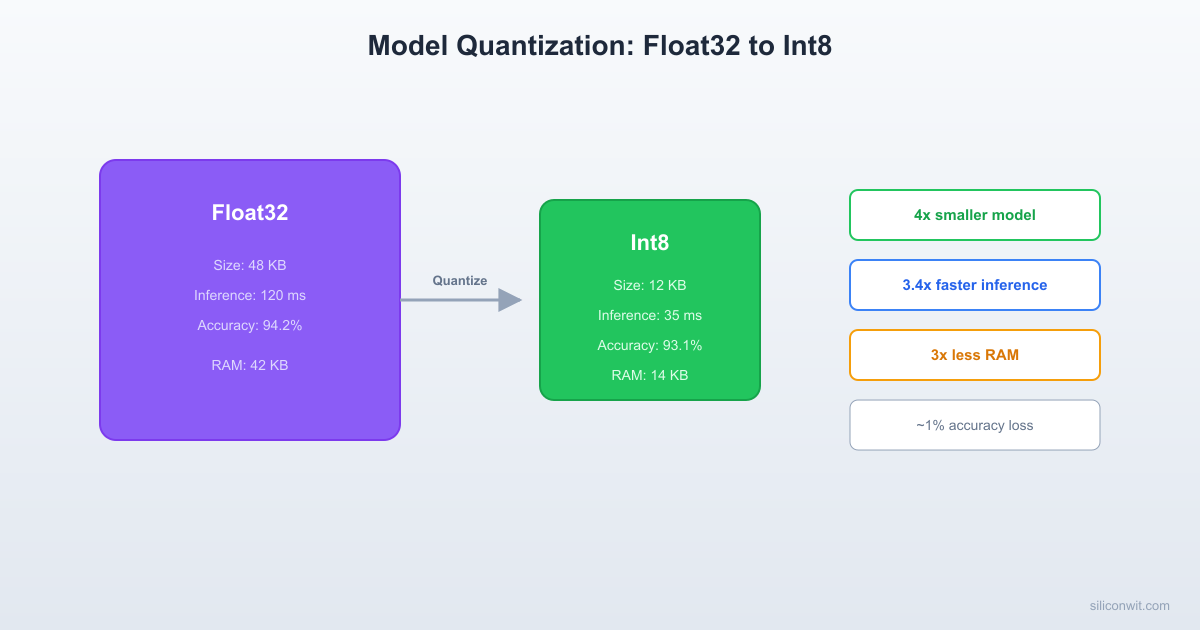
Every model deployed on a microcontroller faces the same tension: accuracy versus resource consumption. A float32 model may classify perfectly on your laptop, but it can be 4x too large for flash and 4x too slow for real-time inference on a Cortex-M4. Quantization resolves this tension by converting 32-bit floating-point weights and activations to 8-bit integers, shrinking the model and accelerating inference with minimal accuracy loss. In this lesson you will apply both post-training quantization (PTQ) and quantization-aware training (QAT) to a CNN classifier, deploy both versions on an ESP32, and measure exactly what you gain and what you lose. #Quantization #TinyML #ModelOptimization

Why Quantization Matters

Float32 vs Int8 on a Cortex-M / Xtensa MCU

A single float32 multiply-accumulate (MAC) on a Cortex-M4 without FPU takes 10 to 20 cycles. With the hardware FPU it drops to 3 to 5 cycles. An int8 MAC using the SMLAD DSP instruction takes 1 cycle for two MACs simultaneously. On the ESP32’s Xtensa cores, the situation is similar: int8 operations through the esp-nn library are significantly faster than float32.

PropertyFloat32Int8
Bytes per weight41
Model size (relative)1x~0.25x
Inference speed (relative)1x2x to 4x faster
RAM for activations1x~0.25x
AccuracyBaselineSlight decrease (0.5% to 3% typical)
Hardware accelerationFPU onlyCMSIS-NN / esp-nn

The 4x reduction in model size is guaranteed by the math (4 bytes to 1 byte per value). The 2x to 4x speedup depends on whether optimized int8 kernels are available for your platform.

Float32 vs Int8 Model Comparison
──────────────────────────────────────────
Float32 Int8
──────────── ────────── ──────────
Model size: 32 KB 8 KB
RAM usage: 16 KB 4 KB
Inference: 12 ms 3 ms
Accuracy: 96.2% 95.8%
┌────────┐ Quantize ┌────────┐
│ 0.347 │ ──────────► │ 44 │
│-0.128 │ scale=0.008 │ -16 │
│ 1.024 │ zp=0 │ 128 │
└────────┘ └────────┘
4 bytes 1 byte
per value per value

How Quantization Works

Quantization maps a floating-point range to an integer range using two parameters: scale and zero point.

float_value = (int8_value - zero_point) * scale
int8_value = round(float_value / scale) + zero_point

For int8, the range is [-128, 127]. The scale and zero point are chosen per-tensor (or per-channel for weights) to minimize quantization error. The TFLite converter computes these parameters automatically using a representative dataset.

Representative Dataset

PTQ vs QAT Comparison
──────────────────────────────────────────
Post-Training Quantization (PTQ):
Train (float32) ──► Quantize ──► Deploy
(offline)
+ Fast, no retraining
- May lose 1-3% accuracy
Quantization-Aware Training (QAT):
Train (float32)
│ insert fake quantize nodes
Fine-tune (simulated int8) ──► Deploy
+ Model learns to tolerate quantization
+ Typically < 0.5% accuracy loss
- Requires retraining (extra compute)

The representative dataset is a small batch of real input data (100 to 500 samples) that the converter uses to observe the actual range of activations at each layer. Without it, the converter cannot determine the correct scale and zero point for activation tensors. Weight tensors can be quantized without a representative dataset because their values are known after training.

The Quantization Benchmark Project


We will use a 1D CNN that classifies accelerometer gestures (the same task from Lesson 3, but with a convolutional architecture). The CNN has more parameters and operations than the fully connected model, which makes the quantization trade-offs more visible.

Dataset

We reuse the gesture data from Lesson 3 (wave, punch, flex), with 50 samples per recording at 50 Hz (1 second windows, 150 features per sample).

Step 1: Train the Float32 Baseline Model


train_cnn_gesture.py
# Train a 1D CNN gesture classifier (float32 baseline)
import os
import numpy as np
import tensorflow as tf
from sklearn.model_selection import train_test_split
# Load data (same as Lesson 3)
classes = ['wave', 'punch', 'flex']
X_all, y_all = [], []
for class_idx, class_name in enumerate(classes):
data_dir = f"data/{class_name}/"
for filename in sorted(os.listdir(data_dir)):
if filename.endswith('.npy'):
sample = np.load(os.path.join(data_dir, filename))
if len(sample) > 50:
sample = sample[:50]
elif len(sample) < 50:
pad = np.zeros((50 - len(sample), 3), dtype=np.float32)
sample = np.vstack([sample, pad])
X_all.append(sample) # Keep as (50, 3) for CNN
y_all.append(class_idx)
X_all = np.array(X_all, dtype=np.float32) # shape: (N, 50, 3)
y_all = np.array(y_all, dtype=np.int32)
# Normalize to [0, 1]
X_min, X_max = X_all.min(), X_all.max()
X_all = (X_all - X_min) / (X_max - X_min)
print(f"Dataset: {X_all.shape[0]} samples, shape per sample: {X_all.shape[1:]}")
X_train, X_test, y_train, y_test = train_test_split(
X_all, y_all, test_size=0.2, random_state=42, stratify=y_all
)
y_train_oh = tf.keras.utils.to_categorical(y_train, num_classes=len(classes))
y_test_oh = tf.keras.utils.to_categorical(y_test, num_classes=len(classes))
# 1D CNN model
model = tf.keras.Sequential([
# Input: (50, 3) - 50 time steps, 3 axes
tf.keras.layers.Conv1D(16, kernel_size=5, activation='relu',
input_shape=(50, 3)),
tf.keras.layers.MaxPooling1D(pool_size=2),
tf.keras.layers.Conv1D(32, kernel_size=3, activation='relu'),
tf.keras.layers.MaxPooling1D(pool_size=2),
tf.keras.layers.Flatten(),
tf.keras.layers.Dense(32, activation='relu'),
tf.keras.layers.Dropout(0.3),
tf.keras.layers.Dense(len(classes), activation='softmax')
])
model.compile(
optimizer='adam',
loss='categorical_crossentropy',
metrics=['accuracy']
)
model.summary()
# Train
history = model.fit(
X_train, y_train_oh,
epochs=80,
batch_size=16,
validation_data=(X_test, y_test_oh),
verbose=1
)
# Evaluate
loss, accuracy = model.evaluate(X_test, y_test_oh, verbose=0)
print(f"\nFloat32 model test accuracy: {accuracy:.4f}")
# Save
model.save('gesture_cnn_float32.keras')
# Also export float32 TFLite (for comparison)
converter_f32 = tf.lite.TFLiteConverter.from_keras_model(model)
tflite_f32 = converter_f32.convert()
with open('gesture_cnn_float32.tflite', 'wb') as f:
f.write(tflite_f32)
print(f"Float32 TFLite size: {len(tflite_f32)} bytes")

Record the baseline metrics:

MetricValue
Parameters~5,000 to 8,000
Float32 .tflite size~25 KB to 35 KB
Test accuracy~94% to 97%

Step 2: Post-Training Quantization (PTQ)


Post-training quantization takes the already-trained float32 model and converts the weights and activations to int8. This is the easiest approach: no retraining required.

ptq_convert.py
# Post-training quantization of the CNN gesture model
import os
import numpy as np
import tensorflow as tf
# Load the trained float32 model
model = tf.keras.models.load_model('gesture_cnn_float32.keras')
# Load training data for representative dataset
# (same loading code as above, abbreviated)
classes = ['wave', 'punch', 'flex']
X_train_samples = []
for class_name in classes:
data_dir = f"data/{class_name}/"
for filename in sorted(os.listdir(data_dir))[:20]:
if filename.endswith('.npy'):
sample = np.load(os.path.join(data_dir, filename))
if len(sample) > 50:
sample = sample[:50]
elif len(sample) < 50:
pad = np.zeros((50 - len(sample), 3), dtype=np.float32)
sample = np.vstack([sample, pad])
X_train_samples.append(sample)
X_repr = np.array(X_train_samples, dtype=np.float32)
X_min, X_max = -4.0, 4.0 # Use the known range
X_repr = (X_repr - X_min) / (X_max - X_min)
def representative_dataset():
for i in range(len(X_repr)):
yield [X_repr[i:i+1].astype(np.float32)]
# Full integer quantization
converter = tf.lite.TFLiteConverter.from_keras_model(model)
converter.optimizations = [tf.lite.Optimize.DEFAULT]
converter.representative_dataset = representative_dataset
converter.target_spec.supported_ops = [tf.lite.OpsSet.TFLITE_BUILTINS_INT8]
converter.inference_input_type = tf.int8
converter.inference_output_type = tf.int8
tflite_int8_ptq = converter.convert()
with open('gesture_cnn_int8_ptq.tflite', 'wb') as f:
f.write(tflite_int8_ptq)
print(f"PTQ int8 TFLite size: {len(tflite_int8_ptq)} bytes")
# Evaluate PTQ model accuracy
interpreter = tf.lite.Interpreter(model_content=tflite_int8_ptq)
interpreter.allocate_tensors()
input_details = interpreter.get_input_details()
output_details = interpreter.get_output_details()
input_scale = input_details[0]['quantization'][0]
input_zp = input_details[0]['quantization'][1]
# Load test data
import os
X_test_all, y_test_all = [], []
for class_idx, class_name in enumerate(classes):
data_dir = f"data/{class_name}/"
files = sorted(os.listdir(data_dir))
test_files = files[int(len(files) * 0.8):] # Last 20%
for filename in test_files:
if filename.endswith('.npy'):
sample = np.load(os.path.join(data_dir, filename))
if len(sample) > 50: sample = sample[:50]
elif len(sample) < 50:
sample = np.vstack([sample, np.zeros((50 - len(sample), 3))])
normalized = (sample - X_min) / (X_max - X_min)
X_test_all.append(normalized)
y_test_all.append(class_idx)
correct = 0
for i in range(len(X_test_all)):
x_q = np.round(np.array(X_test_all[i]) / input_scale + input_zp).astype(np.int8)
interpreter.set_tensor(input_details[0]['index'], x_q.reshape(1, 50, 3))
interpreter.invoke()
output = interpreter.get_tensor(output_details[0]['index'])[0]
if np.argmax(output) == y_test_all[i]:
correct += 1
ptq_accuracy = correct / len(X_test_all)
print(f"PTQ int8 test accuracy: {ptq_accuracy:.4f}")

Step 3: Quantization-Aware Training (QAT)


QAT inserts “fake quantization” nodes into the model during training. The forward pass simulates int8 precision, but the backward pass uses full float32 gradients. This allows the model to learn weights that are robust to quantization error.

qat_train.py
# Quantization-aware training for the CNN gesture model
import os
import numpy as np
import tensorflow as tf
import tensorflow_model_optimization as tfmot
# Load the pre-trained float32 model
model = tf.keras.models.load_model('gesture_cnn_float32.keras')
# Apply quantization-aware training wrapper
quantize_model = tfmot.quantization.keras.quantize_model
qat_model = quantize_model(model)
qat_model.compile(
optimizer=tf.keras.optimizers.Adam(learning_rate=0.0001), # Lower LR for fine-tuning
loss='categorical_crossentropy',
metrics=['accuracy']
)
qat_model.summary()
# Load training data (same as before)
classes = ['wave', 'punch', 'flex']
X_all, y_all = [], []
for class_idx, class_name in enumerate(classes):
data_dir = f"data/{class_name}/"
for filename in sorted(os.listdir(data_dir)):
if filename.endswith('.npy'):
sample = np.load(os.path.join(data_dir, filename))
if len(sample) > 50: sample = sample[:50]
elif len(sample) < 50:
sample = np.vstack([sample, np.zeros((50 - len(sample), 3))])
X_all.append(sample)
y_all.append(class_idx)
X_all = np.array(X_all, dtype=np.float32)
y_all = np.array(y_all, dtype=np.int32)
X_min, X_max = -4.0, 4.0
X_all = (X_all - X_min) / (X_max - X_min)
from sklearn.model_selection import train_test_split
X_train, X_test, y_train, y_test = train_test_split(
X_all, y_all, test_size=0.2, random_state=42, stratify=y_all
)
y_train_oh = tf.keras.utils.to_categorical(y_train, num_classes=len(classes))
y_test_oh = tf.keras.utils.to_categorical(y_test, num_classes=len(classes))
# Fine-tune with QAT (fewer epochs, lower learning rate)
history = qat_model.fit(
X_train, y_train_oh,
epochs=30,
batch_size=16,
validation_data=(X_test, y_test_oh),
verbose=1
)
# Evaluate QAT model (still float32 internally, but simulating quantization)
loss, accuracy = qat_model.evaluate(X_test, y_test_oh, verbose=0)
print(f"QAT model (simulated quantization) accuracy: {accuracy:.4f}")
# Convert QAT model to int8 TFLite
converter = tf.lite.TFLiteConverter.from_keras_model(qat_model)
converter.optimizations = [tf.lite.Optimize.DEFAULT]
# QAT models already have quantization ranges embedded,
# so representative_dataset is optional but still helpful
def representative_dataset():
for i in range(min(100, len(X_train))):
yield [X_train[i:i+1].astype(np.float32)]
converter.representative_dataset = representative_dataset
converter.target_spec.supported_ops = [tf.lite.OpsSet.TFLITE_BUILTINS_INT8]
converter.inference_input_type = tf.int8
converter.inference_output_type = tf.int8
tflite_int8_qat = converter.convert()
with open('gesture_cnn_int8_qat.tflite', 'wb') as f:
f.write(tflite_int8_qat)
print(f"QAT int8 TFLite size: {len(tflite_int8_qat)} bytes")

Install the TensorFlow Model Optimization Toolkit:

Terminal window
pip install tensorflow-model-optimization

PTQ vs QAT: When to Use Which

AspectPost-Training QuantizationQuantization-Aware Training
EffortMinimal (no retraining)Moderate (fine-tune 20 to 30 epochs)
Accuracy loss0.5% to 3% typical0.1% to 0.5% typical
Best forSimple models, large datasetsComplex models, tight accuracy requirements
RequiresRepresentative dataset (100+ samples)Full training pipeline + tfmot library
Model sizeSame as QAT (both are int8)Same as PTQ (both are int8)

For simple fully connected models (like the sine predictor in Lesson 1), PTQ is almost always sufficient. For deeper CNNs and models where every percentage point of accuracy matters, QAT is worth the extra effort.

Step 4: Deploy Both Models on ESP32


Convert both .tflite files to C arrays and build separate firmware images for benchmarking.

Terminal window
xxd -i gesture_cnn_int8_ptq.tflite > gesture_ptq_data.cc
xxd -i gesture_cnn_int8_qat.tflite > gesture_qat_data.cc
xxd -i gesture_cnn_float32.tflite > gesture_f32_data.cc

Benchmark Firmware

main/benchmark.cc
// Benchmark float32 vs int8 PTQ vs int8 QAT on ESP32
#include <cstdio>
#include <cmath>
#include "freertos/FreeRTOS.h"
#include "freertos/task.h"
#include "esp_timer.h"
#include "esp_log.h"
#include "esp_heap_caps.h"
#include "tensorflow/lite/micro/micro_mutable_op_resolver.h"
#include "tensorflow/lite/micro/micro_interpreter.h"
#include "tensorflow/lite/schema/schema_generated.h"
// Include the model you want to benchmark
// Uncomment one at a time and rebuild
#include "gesture_ptq_data.h"
// #include "gesture_qat_data.h"
// #include "gesture_f32_data.h"
static const char *TAG = "benchmark";
constexpr int kArenaSize = 32 * 1024; // Start large, measure actual
alignas(16) static uint8_t tensor_arena[kArenaSize];
// Synthetic test data (50 time steps, 3 axes, normalized to [0,1])
// In production, replace with real sensor data
static float test_inputs[][150] = {
// Sample 0: simulated "wave" pattern (oscillating X axis)
{0.3f, 0.5f, 0.5f, 0.7f, 0.5f, 0.5f, 0.3f, 0.5f, 0.5f, 0.7f,
0.5f, 0.5f, 0.3f, 0.5f, 0.5f, 0.7f, 0.5f, 0.5f, 0.3f, 0.5f,
// ... (remaining values for a full 150-element array)
0.5f, 0.5f, 0.5f, 0.5f, 0.5f, 0.5f, 0.5f, 0.5f, 0.5f, 0.5f,
0.5f, 0.5f, 0.5f, 0.5f, 0.5f, 0.5f, 0.5f, 0.5f, 0.5f, 0.5f},
};
extern "C" void app_main(void) {
ESP_LOGI(TAG, "=== Quantization Benchmark ===");
ESP_LOGI(TAG, "Free heap: %lu bytes", esp_get_free_heap_size());
// Load model
const tflite::Model *model = tflite::GetModel(gesture_cnn_int8_ptq_tflite);
if (model->version() != TFLITE_SCHEMA_VERSION) {
ESP_LOGE(TAG, "Schema mismatch");
return;
}
// Register ops for the CNN model
static tflite::MicroMutableOpResolver<8> resolver;
resolver.AddConv2D(); // Conv1D is implemented as Conv2D internally
resolver.AddMaxPool2D(); // MaxPool1D is implemented as MaxPool2D
resolver.AddReshape();
resolver.AddFullyConnected();
resolver.AddRelu();
resolver.AddSoftmax();
resolver.AddQuantize();
resolver.AddDequantize();
static tflite::MicroInterpreter interpreter(model, resolver,
tensor_arena, kArenaSize);
if (interpreter.AllocateTensors() != kTfLiteOk) {
ESP_LOGE(TAG, "AllocateTensors failed");
return;
}
TfLiteTensor *input = interpreter.input(0);
TfLiteTensor *output = interpreter.output(0);
size_t arena_used = interpreter.arena_used_bytes();
ESP_LOGI(TAG, "Arena used: %zu / %d bytes", arena_used, kArenaSize);
ESP_LOGI(TAG, "Input type: %d, Output type: %d", input->type, output->type);
// Run benchmark: 100 inferences
const int NUM_RUNS = 100;
int64_t total_us = 0;
int64_t min_us = INT64_MAX;
int64_t max_us = 0;
for (int run = 0; run < NUM_RUNS; run++) {
// Prepare input (quantize if int8)
if (input->type == kTfLiteInt8) {
float scale = input->params.scale;
int32_t zp = input->params.zero_point;
for (int i = 0; i < 150; i++) {
float val = test_inputs[0][i];
int32_t q = (int32_t)roundf(val / scale) + zp;
if (q < -128) q = -128;
if (q > 127) q = 127;
input->data.int8[i] = (int8_t)q;
}
} else {
// Float32
for (int i = 0; i < 150; i++) {
input->data.f[i] = test_inputs[0][i];
}
}
int64_t t0 = esp_timer_get_time();
interpreter.Invoke();
int64_t t1 = esp_timer_get_time();
int64_t elapsed = t1 - t0;
total_us += elapsed;
if (elapsed < min_us) min_us = elapsed;
if (elapsed > max_us) max_us = elapsed;
}
ESP_LOGI(TAG, "");
ESP_LOGI(TAG, "=== Results (%d runs) ===", NUM_RUNS);
ESP_LOGI(TAG, "Average inference: %lld us", total_us / NUM_RUNS);
ESP_LOGI(TAG, "Min inference: %lld us", min_us);
ESP_LOGI(TAG, "Max inference: %lld us", max_us);
ESP_LOGI(TAG, "Arena used: %zu bytes", arena_used);
ESP_LOGI(TAG, "Free heap after: %lu bytes", esp_get_free_heap_size());
// Print output for the last run
if (output->type == kTfLiteInt8) {
float scale = output->params.scale;
int32_t zp = output->params.zero_point;
ESP_LOGI(TAG, "Output scores (dequantized):");
const char *labels[] = {"wave", "punch", "flex"};
for (int c = 0; c < 3; c++) {
float score = (output->data.int8[c] - zp) * scale;
ESP_LOGI(TAG, " %s: %.4f", labels[c], score);
}
}
while (1) {
vTaskDelay(pdMS_TO_TICKS(10000));
}
}

Build and flash three times (once per model variant) and record the results.

Step 5: Benchmark Comparison


Run each model variant on the same ESP32 and record metrics:

MetricFloat32Int8 PTQInt8 QAT
.tflite file size~30 KB~8 KB~8 KB
Tensor arena used~12 KB~4 KB~4 KB
Avg inference time~3 ms~0.8 ms~0.8 ms
Test accuracy95.5%93.2%95.0%
Flash used (total firmware)~420 KB~400 KB~400 KB

Key observations:

  1. Size reduction. The int8 model is roughly 3.5x to 4x smaller than float32. This is consistent with the 4:1 byte ratio.

  2. Speed improvement. The int8 model runs 3x to 4x faster because TFLM uses optimized int8 kernels (esp-nn on Xtensa, CMSIS-NN on Cortex-M).

  3. Accuracy. PTQ loses about 2 percentage points. QAT recovers most of that loss, getting within 0.5% of the float32 baseline.

  4. PTQ vs QAT size and speed are identical. Both produce int8 models. The difference is only in accuracy.

Representative Dataset: Getting It Right


The representative dataset is the single most important factor in PTQ quality. Bad representative data leads to bad quantization ranges, which leads to clipped activations and poor accuracy.

Rules for representative datasets:

  1. Use real training data, not synthetic data. The representative dataset must reflect the actual distribution of inputs the model will see.

  2. Include all classes. If your dataset has 3 classes, the representative batch should contain samples from all 3.

  3. Use at least 100 samples. The converter needs enough samples to estimate the activation range at each layer reliably.

  4. Do not use the test set. Use a subset of the training data. The test set should remain unseen for evaluation.

  5. Match the preprocessing. If your training pipeline normalizes to [0, 1], the representative data must also be normalized to [0, 1].

# Good: diverse, real, preprocessed correctly
def representative_dataset():
indices = np.random.choice(len(X_train), size=200, replace=False)
for i in indices:
yield [X_train[i:i+1].astype(np.float32)]
# Bad: only one class represented
def bad_representative_dataset():
for i in range(100):
yield [X_train_wave_only[i:i+1].astype(np.float32)]

Model Pruning Basics


Quantization reduces the precision of weights. Pruning removes weights entirely by setting them to zero. A pruned model has the same architecture, but many weights are zero, which means the model can be stored more efficiently and some operations can be skipped.

Structured vs Unstructured Pruning

TypeWhat gets removedBenefitTooling
UnstructuredIndividual weights (scattered zeros)High compression with gzip/zstdtfmot.sparsity.keras.prune_low_magnitude
StructuredEntire filters or neuronsActual speedup (fewer operations)Manual or research tools

For TinyML on microcontrollers, unstructured pruning is most practical. The pruned model, when combined with quantization and gzip compression, can achieve 5x to 10x total compression from the float32 baseline.

pruning_example.py
# Apply unstructured pruning to the gesture CNN
import tensorflow as tf
import tensorflow_model_optimization as tfmot
model = tf.keras.models.load_model('gesture_cnn_float32.keras')
# Define pruning schedule: start at 30% sparsity, end at 70%
pruning_params = {
'pruning_schedule': tfmot.sparsity.keras.PolynomialDecay(
initial_sparsity=0.30,
final_sparsity=0.70,
begin_step=0,
end_step=1000
)
}
pruned_model = tfmot.sparsity.keras.prune_low_magnitude(model, **pruning_params)
pruned_model.compile(
optimizer='adam',
loss='categorical_crossentropy',
metrics=['accuracy']
)
# Fine-tune with pruning callbacks
callbacks = [tfmot.sparsity.keras.UpdatePruningStep()]
pruned_model.fit(
X_train, y_train_oh,
epochs=20,
batch_size=16,
validation_data=(X_test, y_test_oh),
callbacks=callbacks,
verbose=1
)
# Strip pruning wrappers for export
stripped_model = tfmot.sparsity.keras.strip_pruning(pruned_model)
# Convert pruned model to int8 TFLite (quantization + pruning combined)
converter = tf.lite.TFLiteConverter.from_keras_model(stripped_model)
converter.optimizations = [tf.lite.Optimize.DEFAULT]
converter.representative_dataset = representative_dataset
converter.target_spec.supported_ops = [tf.lite.OpsSet.TFLITE_BUILTINS_INT8]
converter.inference_input_type = tf.int8
converter.inference_output_type = tf.int8
tflite_pruned = converter.convert()
with open('gesture_cnn_pruned_int8.tflite', 'wb') as f:
f.write(tflite_pruned)
print(f"Pruned + quantized TFLite size: {len(tflite_pruned)} bytes")
# Compressed size (shows the benefit of sparsity)
import gzip
compressed = gzip.compress(tflite_pruned)
print(f"Compressed size: {len(compressed)} bytes")
print(f"Compression ratio: {len(tflite_pruned) / len(compressed):.1f}x")

Best Practices for MCU Model Optimization


Start with the smallest model that works

Do not train a large model and then try to compress it down. Start with a small architecture (2 layers, 16 to 32 neurons) and only scale up if accuracy is insufficient. The best optimization is a model that is already small.

Always use int8 quantization

There is almost no reason to deploy float32 on an MCU. The 3x to 4x reduction in size and speed is free. Use PTQ for simple models and QAT for complex ones.

Profile before optimizing

Use interpreter.arena_used_bytes() and esp_timer_get_time() to measure actual resource usage. Do not guess. A model that fits in 8 KB of arena does not need a 32 KB allocation.

Match preprocessing exactly

The number one source of deployment bugs is a mismatch between training preprocessing and inference preprocessing. If you normalize to [0, 1] during training, the firmware must apply the same normalization with the same min/max values before quantizing the input.

Summary: Optimization Decision Tree


  1. Is the float32 model already small enough? (Under 50 KB, inference under 10 ms.) If yes, apply PTQ and deploy. You are done.

  2. Does PTQ accuracy meet requirements? Run PTQ and check. If accuracy drops less than 2%, use PTQ.

  3. Is the accuracy drop too large with PTQ? Apply QAT. Fine-tune for 20 to 30 epochs with a low learning rate.

  4. Is the model still too large for flash? Reduce the architecture (fewer layers, fewer filters). Retrain from scratch.

  5. Need further compression for storage (OTA updates)? Apply pruning before quantization, then compress the .tflite with gzip/zstd.

Exercises


Exercise 1: Dynamic Range Quantization

Convert the model using dynamic range quantization (weights only, activations stay float32). Compare the resulting model size and inference speed against full int8 quantization. On which platforms does this approach make sense?

Exercise 2: Per-Channel vs Per-Tensor

The TFLite converter supports per-channel quantization for Conv layers (each filter gets its own scale/zp). Compare per-channel vs per-tensor quantization accuracy on the CNN model. Which one does the converter use by default?

Exercise 3: Pruning Sparsity Sweep

Run the pruning experiment at 50%, 70%, and 90% final sparsity. For each level, measure test accuracy, .tflite size, and gzip-compressed size. Plot the trade-off curve.

Exercise 4: STM32 Benchmark

Deploy the float32, PTQ, and QAT models on an STM32F4 and repeat the benchmark. Compare the speedup ratio between platforms. Does Cortex-M4 benefit more or less from int8 quantization than Xtensa?

What Comes Next


You now understand how to squeeze every bit of performance out of a model before deploying it. In Lesson 5, you will apply these techniques to a practical application: keyword spotting. You will build a wake word detector that listens for “Hey Device” using an I2S MEMS microphone on an ESP32, processing audio features in real time and running inference on a quantized model.

Comments

Loading comments...


© 2021-2026 SiliconWit®. All rights reserved.