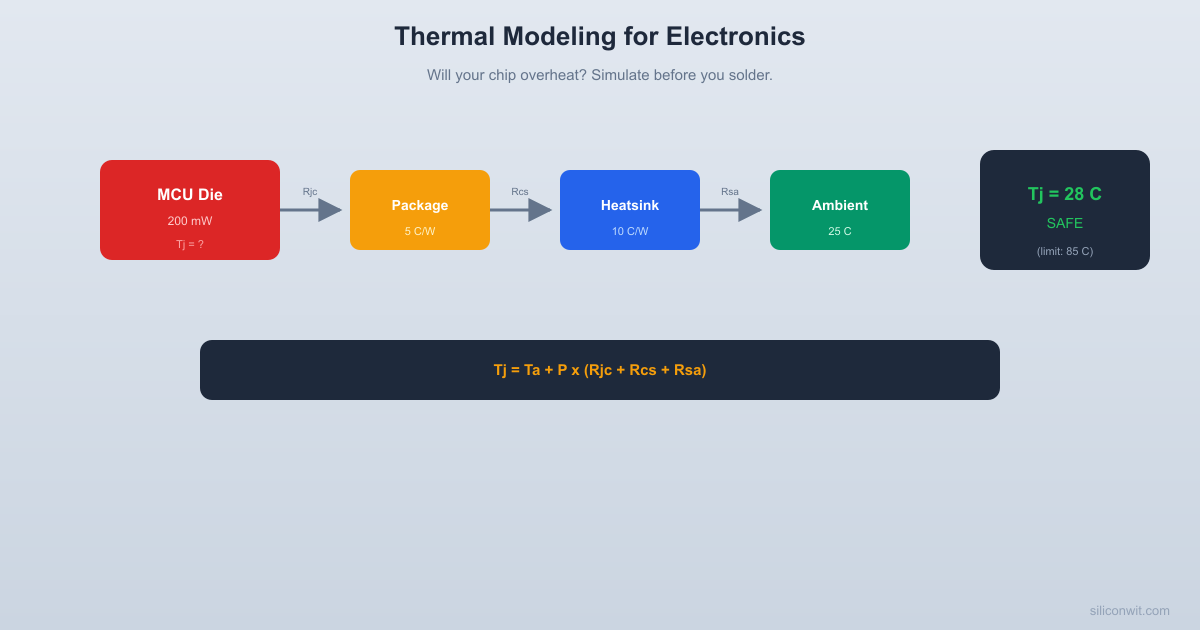
Models the thermal path from silicon junction to ambient.
Simulates transient heat-up and gives a SAFE/DANGER verdict.
from scipy.integrate import solve_ivp
import matplotlib.pyplot as plt
# -------------------------------------------------------
# Component database (example entries)
# -------------------------------------------------------
"r_jc": 30.0, # C/W, junction-to-case
"c_j": 0.5, # J/C, junction thermal capacitance
"c_c": 2.0, # J/C, case thermal capacitance
"Power MOSFET (TO-220)": {
# -------------------------------------------------------
# -------------------------------------------------------
"None (bare component)": {
"r_cs": 0.0, # No interface
"r_sa": 200.0, # Very high (natural convection from case only)
"Small clip-on (25x25 mm)": {
"r_cs": 1.0, # Thermal pad/paste
"r_sa": 20.0, # Modest fin area
"c_s": 10.0, # Aluminum mass
"Medium extruded (50x50 mm)": {
"Large finned (100x100 mm)": {
"Fan-cooled (50x50 mm + fan)": {
def thermal_ode(t, y, P, R_jc, R_cs, R_sa, C_j, C_c, C_s, T_a):
y = [T_junction, T_case, T_heatsink]
# Handle degenerate case: no heatsink (C_s = 0)
# In that case, T_s tracks T_c closely
# No separate heatsink node; collapse case and heatsink
# Use R_jc for junction-to-case, then R_sa from case to ambient
dTj_dt = (P - (T_j - T_c) / R_jc) / C_j
dTc_dt = ((T_j - T_c) / R_jc - (T_c - T_a) / R_sa) / C_c
dTj_dt = (P - (T_j - T_c) / R_jc) / C_j
dTc_dt = ((T_j - T_c) / R_jc - (T_c - T_s) / R_cs) / C_c
dTs_dt = ((T_c - T_s) / R_cs - (T_s - T_a) / R_sa) / C_s
return [dTj_dt, dTc_dt, dTs_dt]
def steady_state_temp(P, R_jc, R_cs, R_sa, T_a):
"""Calculate steady-state junction temperature analytically."""
R_total = R_jc + R_cs + R_sa
T_j_ss = T_a + P * R_total
T_c_ss = T_a + P * (R_cs + R_sa)
return T_j_ss, T_c_ss, T_s_ss, R_total
def analyze_thermal(component_name, heatsink_name, T_ambient=25.0,
Run full thermal analysis for a component + heatsink combination.
Returns steady-state junction temperature and safety verdict.
comp = COMPONENTS[component_name]
sink = HEATSINKS[heatsink_name]
T_j_ss, T_c_ss, T_s_ss, R_total = steady_state_temp(
P, R_jc, R_cs, R_sa, T_ambient)
is_safe = T_j_ss <= T_max
# Estimate time constant for simulation duration
# Dominant time constant is roughly (C_j + C_c + C_s) * R_total
C_total = C_j + C_c + max(C_s, 0.01)
tau_est = C_total * R_total
t_end = max(5 * tau_est, 60.0)
lambda t, y: thermal_ode(t, y, P, R_jc, R_cs, R_sa,
C_j, C_c, C_s, T_ambient),
[T_ambient, T_ambient, T_ambient], # Start at ambient
t = np.linspace(0, t_end, 1000)
# Find time to reach 90% of steady-state rise
delta_T = T_j_ss - T_ambient
target_90 = T_ambient + 0.9 * delta_T
idx_90 = np.where(T_j_t >= target_90)[0]
t_90 = t[idx_90[0]] if len(idx_90) > 0 else t_end
print(" THERMAL ANALYSIS")
print(f" Component: {component_name}")
print(f" Heatsink: {heatsink_name}")
print(f" Power: {P*1000:.0f} mW")
print(f" Ambient temp: {T_ambient:.0f} C")
print(f" R_jc: {R_jc:.1f} C/W")
print(f" R_cs: {R_cs:.1f} C/W")
print(f" R_sa: {R_sa:.1f} C/W")
print(f" R_total: {R_total:.1f} C/W")
print(f" Junction temp: {T_j_ss:.1f} C (steady-state)")
print(f" Case temp: {T_c_ss:.1f} C (steady-state)")
print(f" Heatsink temp: {T_s_ss:.1f} C (steady-state)")
print(f" Max rated: {T_max:.0f} C")
print(f" Margin: {margin:.1f} C")
print(f" Time to 90%: {t_90:.1f} seconds")
print(f" Verdict: SAFE ({margin:.1f} C margin)")
print(f" Verdict: DANGER (exceeds max by "
"T_j_ss": T_j_ss, "T_c_ss": T_c_ss, "T_s_ss": T_s_ss,
"is_safe": is_safe, "margin": margin, "t_90": t_90,
"t": t, "T_j_t": T_j_t, "T_c_t": T_c_t, "T_s_t": T_s_t,
def compare_heatsinks(component_name, T_ambient=25.0):
Compare all heatsink options for a given component.
print(f" HEATSINK COMPARISON: {component_name}")
comp = COMPONENTS[component_name]
fig, axes = plt.subplots(1, 2, figsize=(14, 5))
fig.suptitle(f"Thermal Analysis: {component_name} ({comp['power_w']*1000:.0f} mW)",
fontsize=13, fontweight="bold")
colors = ["tab:red", "tab:orange", "tab:blue", "tab:green", "tab:purple"]
for idx, (sink_name, sink) in enumerate(HEATSINKS.items()):
result = analyze_thermal(component_name, sink_name,
color = colors[idx % len(colors)]
axes[0].plot(result["t"], result["T_j_t"], color=color,
linewidth=2, label=sink_name)
"T_j_ss": result["T_j_ss"],
"safe": result["is_safe"],
"margin": result["margin"],
axes[0].axhline(y=T_max, color="red", linestyle="--", linewidth=2,
alpha=0.7, label=f"Max rated ({T_max:.0f} C)")
axes[0].axhline(y=T_ambient, color="gray", linestyle=":", alpha=0.3)
axes[0].set_xlabel("Time (seconds)")
axes[0].set_ylabel("Junction Temperature (C)")
axes[0].set_title("Transient Temperature Rise")
axes[0].legend(fontsize=7, loc="lower right")
axes[0].grid(True, alpha=0.3)
# Bar chart of steady-state temperatures
names = [d["name"] for d in summary_data]
temps = [d["T_j_ss"] for d in summary_data]
bar_colors = ["tab:red" if not d["safe"] else "tab:green"
y_pos = np.arange(len(names))
axes[1].barh(y_pos, temps, color=bar_colors, alpha=0.7, height=0.6)
axes[1].axvline(x=T_max, color="red", linestyle="--", linewidth=2,
alpha=0.7, label=f"Max ({T_max:.0f} C)")
axes[1].set_yticks(y_pos)
axes[1].set_yticklabels(names, fontsize=8)
axes[1].set_xlabel("Steady-State Junction Temp (C)")
axes[1].set_title("Heatsink Comparison")
axes[1].legend(fontsize=8)
axes[1].grid(True, alpha=0.3, axis="x")
# Add temperature labels on bars
for i, temp in enumerate(temps):
axes[1].text(temp + 1, i, f"{temp:.0f} C", va="center", fontsize=8)
filename = component_name.split("(")[0].strip().lower().replace(" ", "_")
plt.savefig(f"thermal_{filename}.png", dpi=150, bbox_inches="tight")
print(f"\nSaved: thermal_{filename}.png\n")
# -------------------------------------------------------
# Practical example: STM32 thermal design
# -------------------------------------------------------
Detailed example: Will an STM32F4 at 200 mW survive without a heatsink?
print(" PRACTICAL EXAMPLE: STM32F4 THERMAL DESIGN")
print("\n--- Without heatsink ---")
r1 = analyze_thermal("STM32F4 (LQFP-64)", "None (bare component)",
T_ambient=25.0, plot=False)
print("\n--- With small clip-on heatsink ---")
r2 = analyze_thermal("STM32F4 (LQFP-64)", "Small clip-on (25x25 mm)",
T_ambient=25.0, plot=False)
print(f" Without heatsink: {r1['T_j_ss']:.1f} C", end="")
print(f" ** EXCEEDS {85} C LIMIT **")
print(f" (margin: {r1['margin']:.1f} C)")
print(f" With heatsink: {r2['T_j_ss']:.1f} C", end="")
print(f" ** EXCEEDS {85} C LIMIT **")
print(f" (margin: {r2['margin']:.1f} C)")
fig, ax = plt.subplots(figsize=(10, 5))
ax.plot(r1["t"], r1["T_j_t"], "tab:red", linewidth=2,
ax.plot(r2["t"], r2["T_j_t"], "tab:blue", linewidth=2,
label="Small clip-on heatsink")
ax.axhline(y=85, color="red", linestyle="--", linewidth=2,
alpha=0.6, label="Max rated (85 C)")
ax.axhline(y=25, color="gray", linestyle=":", alpha=0.3,
ax.set_xlabel("Time (seconds)")
ax.set_ylabel("Junction Temperature (C)")
ax.set_title("STM32F4 at 200 mW: Heatsink vs. No Heatsink",
plt.savefig("stm32_thermal.png", dpi=150, bbox_inches="tight")
print("\nSaved: stm32_thermal.png")
# -------------------------------------------------------
# -------------------------------------------------------
if __name__ == "__main__":
# Run the STM32 practical example first
# Compare all heatsink options for the power MOSFET
compare_heatsinks("Power MOSFET (TO-220)")
# Compare for the voltage regulator
compare_heatsinks("LM7805 Regulator")



Comments