Skip to content

Linux Kernel Module Development

Linux Kernel Module Development hero image
Modified:
Published:

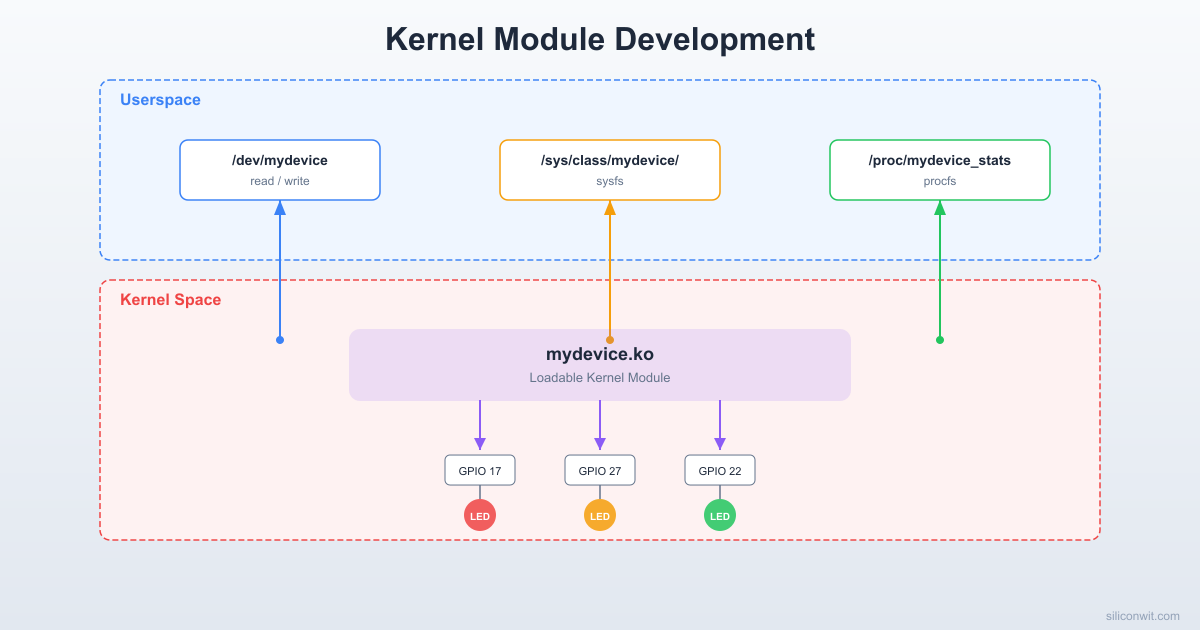
Userspace drivers are convenient, but some tasks require kernel-level access: direct hardware register manipulation, interrupt handling with guaranteed latency, or creating new device abstractions. In this lesson, you will write a complete Linux kernel module that registers a character device at /dev/mydevice, implements open, read, write, and ioctl file operations, and uses the kernel’s GPIO subsystem to drive LEDs in configurable blink patterns. You will also expose tunable parameters through sysfs and a status readout through procfs, giving you three different kernel-to-userspace communication channels in a single module. #KernelModule #CharacterDevice #LinuxDriver

What We Are Building

Custom Character Device Driver for LED Patterns

A loadable kernel module (.ko) that creates /dev/mydevice with full file operation support. Writing a pattern string (such as “101010”) to the device sets the blink sequence for GPIO-connected LEDs. Reading from the device returns the current pattern and cycle count. A sysfs attribute controls the blink speed, and a procfs entry displays driver statistics. The module handles concurrent access safely using mutexes and supports clean loading and unloading via insmod/rmmod.

Project specifications:

ParameterValue
Module typeLoadable kernel module (.ko)
Device node/dev/mydevice (character device, dynamic major)
File operationsopen, release, read, write, ioctl
sysfs interface/sys/class/mydevice/blink_speed_ms
procfs interface/proc/mydevice_stats
GPIO outputsGPIO17, GPIO27, GPIO22 (three LEDs)
Pattern formatBinary string, e.g., “101010” per LED
ConcurrencyMutex-protected shared state
Build systemOut-of-tree Makefile against kernel headers

Bill of Materials

RefComponentQuantityNotes
1LEDs (any color, 3mm or 5mm)3One per GPIO output
2330 ohm resistors3Current limiting for LEDs
3Jumper wires8+LED, resistor, and GND connections
4Breadboard1Reuse from prior lessons

Kernel Space vs Userspace


In the previous lessons, your code ran in userspace, where each process has its own isolated memory, can only access hardware through system calls, and crashes without affecting the rest of the system. Kernel modules operate in a fundamentally different environment.

Kernel Space (Ring 0)

  • Full access to all hardware and memory
  • A single null pointer dereference causes a kernel panic (full system crash)
  • No libc available; use kernel-provided APIs only (printk, kmalloc, copy_to_user)
  • Runs in the context of the calling process or in interrupt context
  • No floating point by default

Userspace (Ring 3)

  • Isolated virtual memory per process
  • Crashes are contained to the process
  • Full libc/POSIX available (printf, malloc, open)
  • Accesses hardware through /dev nodes, sysfs, or system calls
  • Standard debugging tools (gdb, valgrind, strace)
Kernel Module Load/Unload Flow
──────────────────────────────────────────
insmod mydevice.ko
module_init()
├──► alloc_chrdev_region() /dev/mydevice
├──► class_create()
├──► device_create()
├──► cdev_add() register fops
└──► gpio_request() claim GPIO pins
Module running, userspace can
open/read/write /dev/mydevice
rmmod mydevice
module_exit()
├──► gpio_free()
├──► cdev_del()
├──► device_destroy()
└──► unregister_chrdev_region()

Because a buggy kernel module can crash or corrupt the entire system, always develop on a test board (your Pi Zero 2 W) rather than on your development workstation. Keep a serial console connected so you can see kernel panic messages even when the system locks up.

Character Device Data Flow
──────────────────────────────────────────
Userspace Kernel Module
───────── ─────────────
fd = open("/dev/mydevice")
│ fops.open()
write(fd, "101010")
│ fops.write()
│ │
│ ▼
│ copy_from_user()
│ parse pattern
│ set GPIO pins
read(fd, buf, 64)
│ fops.read()
│ │
│ ▼
│ copy_to_user()
│ return pattern + count
close(fd) fops.release()

Module Skeleton


Every kernel module needs at minimum: an init function (called when loaded), an exit function (called when unloaded), and metadata macros. Here is the minimal skeleton.

Create a working directory on your host machine:

Terminal window
mkdir -p ~/rpi-kernel-modules/mydevice
cd ~/rpi-kernel-modules/mydevice

Create the module source file mydevice.c:

mydevice.c
#include <linux/module.h>
#include <linux/init.h>
#include <linux/kernel.h>
static int __init mydevice_init(void)
{
pr_info("mydevice: module loaded\n");
return 0; /* 0 = success, negative = error */
}
static void __exit mydevice_exit(void)
{
pr_info("mydevice: module unloaded\n");
}
module_init(mydevice_init);
module_exit(mydevice_exit);
MODULE_LICENSE("GPL");
MODULE_AUTHOR("Your Name");
MODULE_DESCRIPTION("LED pattern character device driver");

MODULE_VERSION("1.0");

Key points about this skeleton:

  • __init marks the function for automatic memory reclaim after boot (if built-in) or after loading (if module).
  • __exit marks the function as unneeded for built-in drivers.
  • pr_info is the preferred macro over raw printk(KERN_INFO ...). It prepends the log level automatically.
  • MODULE_LICENSE("GPL") is required. Without it, the kernel marks the module as “tainted” and some kernel symbols become unavailable.

The Out-of-Tree Makefile


Kernel modules use the kernel’s build system (Kbuild) rather than a standalone Makefile. For out-of-tree modules, you write a minimal Makefile that invokes the kernel build system.

Makefile
obj-m += mydevice.o
# Path to the cross-compiled kernel source tree
KERNELDIR ?= ~/rpi-linux
# Cross-compiler prefix (must match what you used to build the kernel)
CROSS_COMPILE ?= aarch64-linux-gnu-
ARCH ?= arm64
all:
$(MAKE) -C $(KERNELDIR) M=$(PWD) ARCH=$(ARCH) CROSS_COMPILE=$(CROSS_COMPILE) modules
clean:
$(MAKE) -C $(KERNELDIR) M=$(PWD) ARCH=$(ARCH) clean

Build the module:

Terminal window
cd ~/rpi-kernel-modules/mydevice
make

If the build succeeds, you will see mydevice.ko in the directory. The .ko extension stands for “kernel object,” which is an ELF file containing your compiled module plus metadata (version magic, parameter descriptions, dependency information).

Common Build Error

If you see Module.symvers is missing, it means KERNELDIR does not point to a properly built kernel tree. Ensure you have built the kernel at least once with make modules before building out-of-tree modules.

Loading and Unloading


Copy the module to the Pi and test it:

Terminal window
# Copy to the Pi
scp mydevice.ko [email protected]:~/
# SSH into the Pi
  1. Load the module with insmod

    Terminal window
    sudo insmod mydevice.ko

    insmod loads exactly the file you specify. It does not resolve dependencies automatically.

  2. Verify it loaded

    Terminal window
    lsmod | grep mydevice

    You should see mydevice in the output with a size and “used by” count of 0.

  3. Check the kernel log

    Terminal window
    dmesg | tail -5

    You should see: mydevice: module loaded

  4. Inspect module metadata

    Terminal window
    modinfo mydevice.ko

    This shows the license, author, description, version, and any parameters.

  5. Unload the module

    Terminal window
    sudo rmmod mydevice
    dmesg | tail -5

    You should see: mydevice: module unloaded

insmod vs modprobe: insmod loads a single .ko file by path. modprobe searches /lib/modules/$(uname -r)/ and automatically loads dependencies. During development, use insmod with your local .ko file. For production, install the module into the modules directory and run depmod -a so modprobe can find it.

Module Parameters


Module parameters let you pass configuration values at load time without recompiling. The module_param() macro defines a parameter, its type, and its permission bits in sysfs.

Add these lines to mydevice.c after the includes:

static int blink_speed_ms = 500;
module_param(blink_speed_ms, int, 0644);
MODULE_PARM_DESC(blink_speed_ms, "LED blink interval in milliseconds (default: 500)");

The third argument (0644) sets the sysfs permission: owner can read/write, group and others can read. This means you can change the value at runtime through /sys/module/mydevice/parameters/blink_speed_ms.

Load with a custom value:

Terminal window
sudo insmod mydevice.ko blink_speed_ms=200

Read the current value:

Terminal window
cat /sys/module/mydevice/parameters/blink_speed_ms

Change it at runtime:

Terminal window
echo 100 | sudo tee /sys/module/mydevice/parameters/blink_speed_ms

Character Device Registration


A character device is the standard Linux mechanism for userspace programs to communicate with drivers through file operations (open, read, write, close, ioctl). To register one, you need to:

  1. Allocate a device number (major/minor).
  2. Initialize and add a cdev structure with your file operations.
  3. Create a device class and device node so udev automatically creates /dev/mydevice.

Here are the key pieces. These will all come together in the full driver source below.

#include <linux/cdev.h>
#include <linux/fs.h>
#include <linux/device.h>
#include <linux/uaccess.h>
#define DEVICE_NAME "mydevice"
#define CLASS_NAME "mydevice"
static dev_t dev_number; /* Holds major/minor */
static struct cdev mydevice_cdev;
static struct class *mydevice_class;
static struct device *mydevice_device;
/* File operations */
static int mydevice_open(struct inode *inode, struct file *filp)
{
pr_info("mydevice: device opened\n");
return 0;
}
static int mydevice_release(struct inode *inode, struct file *filp)
{
pr_info("mydevice: device closed\n");
return 0;
}
static ssize_t mydevice_read(struct file *filp, char __user *buf,
size_t count, loff_t *offset)
{
/* Implementation below in full driver */
return 0;
}
static ssize_t mydevice_write(struct file *filp, const char __user *buf,
size_t count, loff_t *offset)
{
/* Implementation below in full driver */
return count;
}
static const struct file_operations mydevice_fops = {
.owner = THIS_MODULE,
.open = mydevice_open,
.release = mydevice_release,
.read = mydevice_read,
.write = mydevice_write,
};

The registration sequence in mydevice_init:

/* 1. Allocate a dynamic major number */
ret = alloc_chrdev_region(&dev_number, 0, 1, DEVICE_NAME);
/* 2. Initialize the cdev and link file_operations */
cdev_init(&mydevice_cdev, &mydevice_fops);
mydevice_cdev.owner = THIS_MODULE;
ret = cdev_add(&mydevice_cdev, dev_number, 1);
/* 3. Create device class (visible in /sys/class/) */
mydevice_class = class_create(CLASS_NAME);
/* 4. Create device node (triggers udev to create /dev/mydevice) */
mydevice_device = device_create(mydevice_class, NULL, dev_number,
NULL, DEVICE_NAME);

The cleanup sequence in mydevice_exit reverses the order:

device_destroy(mydevice_class, dev_number);
class_destroy(mydevice_class);
cdev_del(&mydevice_cdev);
unregister_chrdev_region(dev_number, 1);

copy_to_user and copy_from_user: You cannot directly dereference userspace pointers from kernel space. These functions safely copy data across the boundary and return the number of bytes that could not be copied (0 on success).

GPIO from Kernel Space


The kernel provides its own GPIO API, separate from the userspace /sys/class/gpio interface. For kernel modules, use the gpio_* family of functions.

#include <linux/gpio.h>
#define GPIO_LED1 17
#define GPIO_LED2 27
#define GPIO_LED3 22
static int gpio_leds[] = { GPIO_LED1, GPIO_LED2, GPIO_LED3 };
static const char *gpio_labels[] = { "led1", "led2", "led3" };
#define NUM_LEDS 3
/* Request and configure GPIOs */
static int setup_gpios(void)
{
int i, ret;
for (i = 0; i < NUM_LEDS; i++) {
ret = gpio_request(gpio_leds[i], gpio_labels[i]);
if (ret) {
pr_err("mydevice: failed to request GPIO %d\n", gpio_leds[i]);
goto err_free;
}
ret = gpio_direction_output(gpio_leds[i], 0);
if (ret) {
pr_err("mydevice: failed to set GPIO %d as output\n", gpio_leds[i]);
gpio_free(gpio_leds[i]);
goto err_free;
}
}
return 0;
err_free:
while (--i >= 0)
gpio_free(gpio_leds[i]);
return ret;
}
/* Release GPIOs */
static void cleanup_gpios(void)
{
int i;
for (i = 0; i < NUM_LEDS; i++) {
gpio_set_value(gpio_leds[i], 0);
gpio_free(gpio_leds[i]);
}
}

Each gpio_request claims the pin exclusively. If another driver or the userspace sysfs interface already holds the pin, the request fails. Always free GPIOs in your exit function or error paths.

The LED Pattern Driver


Here is the complete driver that combines all the pieces: character device, file operations, GPIO control, kernel timer, mutex protection, sysfs, and procfs. Create this as mydevice.c:

mydevice.c
/*
* mydevice.c - LED Pattern Character Device Driver
*
* Drives three LEDs (GPIO17, GPIO27, GPIO22) in a configurable
* blink pattern. Controlled via /dev/mydevice, with sysfs and
* procfs interfaces.
*
* Target: Raspberry Pi Zero 2 W (BCM2710A1)
*/
#include <linux/module.h>
#include <linux/init.h>
#include <linux/kernel.h>
#include <linux/cdev.h>
#include <linux/fs.h>
#include <linux/device.h>
#include <linux/uaccess.h>
#include <linux/gpio.h>
#include <linux/timer.h>
#include <linux/jiffies.h>
#include <linux/mutex.h>
#include <linux/slab.h>
#include <linux/proc_fs.h>
#include <linux/seq_file.h>
#include <linux/string.h>
#define DEVICE_NAME "mydevice"
#define CLASS_NAME "mydevice"
#define MAX_PATTERN 64
#define PROC_NAME "mydevice_stats"
/* GPIO pin assignments */
#define GPIO_LED1 17
#define GPIO_LED2 27
#define GPIO_LED3 22
#define NUM_LEDS 3
static int gpio_leds[NUM_LEDS] = { GPIO_LED1, GPIO_LED2, GPIO_LED3 };
static const char *gpio_labels[NUM_LEDS] = { "led1", "led2", "led3" };
/* Module parameter */
static int blink_speed_ms = 500;
module_param(blink_speed_ms, int, 0644);
MODULE_PARM_DESC(blink_speed_ms, "LED blink interval in ms (default: 500)");
/* Device state */
static dev_t dev_number;
static struct cdev mydevice_cdev;
static struct class *mydevice_class;
static struct device *mydevice_device;
/* Pattern state (protected by pattern_mutex) */
static DEFINE_MUTEX(pattern_mutex);
static char pattern_str[MAX_PATTERN] = "101010";
static int pattern_len = 6;
static int pattern_pos;
static unsigned long cycle_count;
static unsigned long load_time_jiffies;
/* Kernel timer for LED blinking */
static struct timer_list blink_timer;
/* ----------------------------------------------------------------
* GPIO helpers
* ---------------------------------------------------------------- */
static int setup_gpios(void)
{
int i, ret;
for (i = 0; i < NUM_LEDS; i++) {
ret = gpio_request(gpio_leds[i], gpio_labels[i]);
if (ret) {
pr_err("mydevice: GPIO %d request failed\n", gpio_leds[i]);
goto err_free;
}
ret = gpio_direction_output(gpio_leds[i], 0);
if (ret) {
pr_err("mydevice: GPIO %d direction set failed\n", gpio_leds[i]);
gpio_free(gpio_leds[i]);
goto err_free;
}
}
return 0;
err_free:
while (--i >= 0)
gpio_free(gpio_leds[i]);
return ret;
}
static void cleanup_gpios(void)
{
int i;
for (i = 0; i < NUM_LEDS; i++) {
gpio_set_value(gpio_leds[i], 0);
gpio_free(gpio_leds[i]);
}
}
static void set_leds_from_pattern(int pos)
{
int i;
/*
* Pattern string is read three bits at a time.
* Each character is '0' or '1'. If the pattern is shorter
* than 3 * position, it wraps around.
*/
for (i = 0; i < NUM_LEDS; i++) {
int idx = (pos * NUM_LEDS + i) % pattern_len;
int val = (pattern_str[idx] == '1') ? 1 : 0;
gpio_set_value(gpio_leds[i], val);
}
}
/* ----------------------------------------------------------------
* Timer callback
* ---------------------------------------------------------------- */
static void blink_timer_callback(struct timer_list *t)
{
mutex_lock(&pattern_mutex);
if (pattern_len > 0) {
set_leds_from_pattern(pattern_pos);
pattern_pos++;
if (pattern_pos * NUM_LEDS >= pattern_len) {
pattern_pos = 0;
cycle_count++;
}
}
mutex_unlock(&pattern_mutex);
/* Re-arm the timer */
mod_timer(&blink_timer, jiffies + msecs_to_jiffies(blink_speed_ms));
}
/* ----------------------------------------------------------------
* File operations
* ---------------------------------------------------------------- */
static int mydevice_open(struct inode *inode, struct file *filp)
{
pr_info("mydevice: device opened by pid %d\n", current->pid);
return 0;
}
static int mydevice_release(struct inode *inode, struct file *filp)
{
pr_info("mydevice: device closed\n");
return 0;
}
static ssize_t mydevice_read(struct file *filp, char __user *buf,
size_t count, loff_t *offset)
{
char tmp[MAX_PATTERN + 64];
int len;
mutex_lock(&pattern_mutex);
len = snprintf(tmp, sizeof(tmp), "pattern: %s\ncycles: %lu\n",
pattern_str, cycle_count);
mutex_unlock(&pattern_mutex);
if (*offset >= len)
return 0;
if (count > len - *offset)
count = len - *offset;
if (copy_to_user(buf, tmp + *offset, count))
return -EFAULT;
*offset += count;
return count;
}
static ssize_t mydevice_write(struct file *filp, const char __user *buf,
size_t count, loff_t *offset)
{
char tmp[MAX_PATTERN];
int i;
if (count == 0 || count >= MAX_PATTERN)
return -EINVAL;
if (copy_from_user(tmp, buf, count))
return -EFAULT;
/* Strip trailing newline */
if (tmp[count - 1] == '\n')
count--;
if (count == 0)
return -EINVAL;
/* Validate: only '0' and '1' allowed */
for (i = 0; i < count; i++) {
if (tmp[i] != '0' && tmp[i] != '1')
return -EINVAL;
}
tmp[count] = '\0';
mutex_lock(&pattern_mutex);
strncpy(pattern_str, tmp, MAX_PATTERN);
pattern_len = count;
pattern_pos = 0;
mutex_unlock(&pattern_mutex);
pr_info("mydevice: new pattern set: %s\n", pattern_str);
return count;
}
/* ioctl command definitions */
#define MYDEVICE_MAGIC 'M'
#define MYDEVICE_RESET_CYCLES _IO(MYDEVICE_MAGIC, 0)
#define MYDEVICE_GET_CYCLES _IOR(MYDEVICE_MAGIC, 1, unsigned long)
#define MYDEVICE_SET_SPEED _IOW(MYDEVICE_MAGIC, 2, int)
static long mydevice_ioctl(struct file *filp, unsigned int cmd,
unsigned long arg)
{
switch (cmd) {
case MYDEVICE_RESET_CYCLES:
mutex_lock(&pattern_mutex);
cycle_count = 0;
mutex_unlock(&pattern_mutex);
pr_info("mydevice: cycle counter reset\n");
return 0;
case MYDEVICE_GET_CYCLES:
mutex_lock(&pattern_mutex);
if (copy_to_user((unsigned long __user *)arg,
&cycle_count, sizeof(cycle_count))) {
mutex_unlock(&pattern_mutex);
return -EFAULT;
}
mutex_unlock(&pattern_mutex);
return 0;
case MYDEVICE_SET_SPEED:
if ((int)arg < 10 || (int)arg > 10000)
return -EINVAL;
blink_speed_ms = (int)arg;
pr_info("mydevice: blink speed set to %d ms\n", blink_speed_ms);
return 0;
default:
return -ENOTTY;
}
}
static const struct file_operations mydevice_fops = {
.owner = THIS_MODULE,
.open = mydevice_open,
.release = mydevice_release,
.read = mydevice_read,
.write = mydevice_write,
.unlocked_ioctl = mydevice_ioctl,
};
/* ----------------------------------------------------------------
* sysfs attribute: blink_speed_ms
* ---------------------------------------------------------------- */
static ssize_t blink_speed_show(struct device *dev,
struct device_attribute *attr, char *buf)
{
return sprintf(buf, "%d\n", blink_speed_ms);
}
static ssize_t blink_speed_store(struct device *dev,
struct device_attribute *attr,
const char *buf, size_t count)
{
int val;
if (kstrtoint(buf, 10, &val))
return -EINVAL;
if (val < 10 || val > 10000)
return -EINVAL;
blink_speed_ms = val;
pr_info("mydevice: blink_speed_ms set to %d via sysfs\n", val);
return count;
}
static DEVICE_ATTR_RW(blink_speed);
/* ----------------------------------------------------------------
* procfs: /proc/mydevice_stats
* ---------------------------------------------------------------- */
static int mydevice_proc_show(struct seq_file *m, void *v)
{
unsigned long uptime_sec;
mutex_lock(&pattern_mutex);
uptime_sec = (jiffies - load_time_jiffies) / HZ;
seq_printf(m, "driver: mydevice\n");
seq_printf(m, "pattern: %s\n", pattern_str);
seq_printf(m, "pattern_len: %d\n", pattern_len);
seq_printf(m, "cycle_count: %lu\n", cycle_count);
seq_printf(m, "blink_speed: %d ms\n", blink_speed_ms);
seq_printf(m, "uptime: %lu seconds\n", uptime_sec);
seq_printf(m, "gpio_pins: %d, %d, %d\n",
GPIO_LED1, GPIO_LED2, GPIO_LED3);
mutex_unlock(&pattern_mutex);
return 0;
}
static int mydevice_proc_open(struct inode *inode, struct file *file)
{
return single_open(file, mydevice_proc_show, NULL);
}
static const struct proc_ops mydevice_proc_ops = {
.proc_open = mydevice_proc_open,
.proc_read = seq_read,
.proc_lseek = seq_lseek,
.proc_release = single_release,
};
/* ----------------------------------------------------------------
* Module init and exit
* ---------------------------------------------------------------- */
static int __init mydevice_init(void)
{
int ret;
load_time_jiffies = jiffies;
/* 1. Set up GPIOs */
ret = setup_gpios();
if (ret)
return ret;
/* 2. Allocate character device region */
ret = alloc_chrdev_region(&dev_number, 0, 1, DEVICE_NAME);
if (ret) {
pr_err("mydevice: alloc_chrdev_region failed\n");
goto err_gpio;
}
/* 3. Initialize and add cdev */
cdev_init(&mydevice_cdev, &mydevice_fops);
mydevice_cdev.owner = THIS_MODULE;
ret = cdev_add(&mydevice_cdev, dev_number, 1);
if (ret) {
pr_err("mydevice: cdev_add failed\n");
goto err_region;
}
/* 4. Create device class */
mydevice_class = class_create(CLASS_NAME);
if (IS_ERR(mydevice_class)) {
pr_err("mydevice: class_create failed\n");
ret = PTR_ERR(mydevice_class);
goto err_cdev;
}
/* 5. Create device node */
mydevice_device = device_create(mydevice_class, NULL, dev_number,
NULL, DEVICE_NAME);
if (IS_ERR(mydevice_device)) {
pr_err("mydevice: device_create failed\n");
ret = PTR_ERR(mydevice_device);
goto err_class;
}
/* 6. Create sysfs attribute */
ret = device_create_file(mydevice_device, &dev_attr_blink_speed);
if (ret) {
pr_err("mydevice: sysfs attribute creation failed\n");
goto err_device;
}
/* 7. Create procfs entry */
if (!proc_create(PROC_NAME, 0444, NULL, &mydevice_proc_ops)) {
pr_err("mydevice: proc_create failed\n");
ret = -ENOMEM;
goto err_sysfs;
}
/* 8. Start the blink timer */
timer_setup(&blink_timer, blink_timer_callback, 0);
mod_timer(&blink_timer, jiffies + msecs_to_jiffies(blink_speed_ms));
pr_info("mydevice: loaded (major=%d, blink_speed=%d ms)\n",
MAJOR(dev_number), blink_speed_ms);
return 0;
err_sysfs:
device_remove_file(mydevice_device, &dev_attr_blink_speed);
err_device:
device_destroy(mydevice_class, dev_number);
err_class:
class_destroy(mydevice_class);
err_cdev:
cdev_del(&mydevice_cdev);
err_region:
unregister_chrdev_region(dev_number, 1);
err_gpio:
cleanup_gpios();
return ret;
}
static void __exit mydevice_exit(void)
{
del_timer_sync(&blink_timer);
remove_proc_entry(PROC_NAME, NULL);
device_remove_file(mydevice_device, &dev_attr_blink_speed);
device_destroy(mydevice_class, dev_number);
class_destroy(mydevice_class);
cdev_del(&mydevice_cdev);
unregister_chrdev_region(dev_number, 1);
cleanup_gpios();
pr_info("mydevice: unloaded\n");
}
module_init(mydevice_init);
module_exit(mydevice_exit);
MODULE_LICENSE("GPL");
MODULE_AUTHOR("Your Name");
MODULE_DESCRIPTION("LED pattern character device driver");
MODULE_VERSION("1.0");

The project directory should look like this:

  • Directorymydevice/
    • mydevice.c
    • Makefile

sysfs Interface


The driver creates a sysfs attribute at the device level using DEVICE_ATTR_RW(blink_speed). This macro automatically generates blink_speed_show and blink_speed_store function name expectations, and connects them to the attribute file at /sys/class/mydevice/mydevice/blink_speed.

Read the current blink speed:

Terminal window
cat /sys/class/mydevice/mydevice/blink_speed

Change the blink speed at runtime:

Terminal window
echo 100 | sudo tee /sys/class/mydevice/mydevice/blink_speed

The sysfs store function validates the input: it must be an integer between 10 and 10000 milliseconds. Invalid values return an error:

Terminal window
# This will fail with "Invalid argument"
echo -1 | sudo tee /sys/class/mydevice/mydevice/blink_speed

sysfs is ideal for simple key/value configuration. Each attribute is a single file that reads or writes one value. This is the preferred kernel interface for runtime-tunable parameters.

procfs Interface


The driver creates /proc/mydevice_stats using proc_create and the seq_file API. Unlike sysfs (which is meant for single values), procfs is appropriate for multi-line status output.

Terminal window
cat /proc/mydevice_stats

Expected output:

driver: mydevice
pattern: 101010
pattern_len: 6
cycle_count: 42
blink_speed: 500 ms
uptime: 120 seconds
gpio_pins: 17, 27, 22

The seq_file API handles buffer management for you. If your output is larger than a single page (4 KB), seq_file automatically handles the multiple-read pagination. For this driver, the output is small, so single_open/single_release (a simplified seq_file wrapper) is sufficient.

Testing the Driver


  1. Build and copy the module

    Terminal window
    # On host
    cd ~/rpi-kernel-modules/mydevice
    make
    scp mydevice.ko [email protected]:~/
  2. Load the module

    Terminal window
    # On the Pi
    sudo insmod mydevice.ko blink_speed_ms=300
    dmesg | tail -3

    Verify the output shows the module loaded with the correct blink speed.

  3. Check the device node exists

    Terminal window
    ls -la /dev/mydevice

    You should see a character device with the dynamically assigned major number.

  4. Write a pattern

    Terminal window
    echo "101010" | sudo tee /dev/mydevice

    The LEDs should begin blinking: LED1 on, LED2 off, LED3 on, then LED1 off, LED2 on, LED3 off, repeating.

  5. Read the current state

    Terminal window
    sudo cat /dev/mydevice

    Output:

    pattern: 101010
    cycles: 7
  6. Change the blink speed via sysfs

    Terminal window
    echo 100 | sudo tee /sys/class/mydevice/mydevice/blink_speed

    The LEDs should blink noticeably faster.

  7. Check procfs statistics

    Terminal window
    cat /proc/mydevice_stats
  8. Try a different pattern

    Terminal window
    echo "111000" | sudo tee /dev/mydevice

    Now all three LEDs turn on together, then all turn off together.

  9. Unload the module

    Terminal window
    sudo rmmod mydevice
    dmesg | tail -3

    All LEDs should turn off and the device node should disappear.

ioctl Commands


The ioctl (input/output control) system call provides a way to send commands to a driver that do not fit the read/write model. The driver defines three ioctl commands:

CommandMacroDirectionDescription
Reset cyclesMYDEVICE_RESET_CYCLESNone (_IO)Resets the cycle counter to zero
Get cyclesMYDEVICE_GET_CYCLESRead (_IOR)Copies cycle count to userspace
Set speedMYDEVICE_SET_SPEEDWrite (_IOW)Sets blink speed in milliseconds

The ioctl number macros use a “magic number” ('M') to avoid conflicts with other drivers. _IO, _IOR, and _IOW encode the direction and size of the data transfer.

Here is a userspace test program. Create this as test_ioctl.c:

test_ioctl.c
#include <stdio.h>
#include <stdlib.h>
#include <fcntl.h>
#include <unistd.h>
#include <sys/ioctl.h>
/* Must match the definitions in the kernel module */
#define MYDEVICE_MAGIC 'M'
#define MYDEVICE_RESET_CYCLES _IO(MYDEVICE_MAGIC, 0)
#define MYDEVICE_GET_CYCLES _IOR(MYDEVICE_MAGIC, 1, unsigned long)
#define MYDEVICE_SET_SPEED _IOW(MYDEVICE_MAGIC, 2, int)
int main(int argc, char *argv[])
{
int fd;
unsigned long cycles;
int new_speed;
fd = open("/dev/mydevice", O_RDWR);
if (fd < 0) {
perror("open /dev/mydevice");
return 1;
}
/* Get current cycle count */
if (ioctl(fd, MYDEVICE_GET_CYCLES, &cycles) < 0) {
perror("ioctl GET_CYCLES");
close(fd);
return 1;
}
printf("Current cycle count: %lu\n", cycles);
/* Reset the cycle counter */
if (ioctl(fd, MYDEVICE_RESET_CYCLES) < 0) {
perror("ioctl RESET_CYCLES");
close(fd);
return 1;
}
printf("Cycle counter reset.\n");
/* Verify it was reset */
if (ioctl(fd, MYDEVICE_GET_CYCLES, &cycles) < 0) {
perror("ioctl GET_CYCLES");
close(fd);
return 1;
}
printf("Cycle count after reset: %lu\n", cycles);
/* Set blink speed to 150ms */
new_speed = 150;
if (ioctl(fd, MYDEVICE_SET_SPEED, new_speed) < 0) {
perror("ioctl SET_SPEED");
close(fd);
return 1;
}
printf("Blink speed set to %d ms\n", new_speed);
close(fd);
return 0;
}

Cross-compile and run it:

Terminal window
# On host
aarch64-linux-gnu-gcc -o test_ioctl test_ioctl.c
scp test_ioctl [email protected]:~/
# On the Pi
sudo ./test_ioctl

Expected output:

Current cycle count: 42
Cycle counter reset.
Cycle count after reset: 0
Blink speed set to 150 ms

In a real project, you would put the ioctl definitions in a shared header file so that both the kernel module and userspace programs can include the same constants.

Exercises


Exercise 1: PWM Brightness Control

Add a fourth ioctl command MYDEVICE_SET_BRIGHTNESS that accepts a value from 0 to 100. Implement software PWM in the timer callback by varying the duty cycle of each LED based on the brightness level. Hint: use a fast timer (1 ms) and count ticks within a 100-tick PWM period.

Exercise 2: Button Input with Interrupts

Add a button on GPIO23 that pauses and resumes the LED pattern. Use request_irq to register an interrupt handler for the GPIO. Handle debouncing with a timestamp check (ignore interrupts within 200 ms of the last one). Update the procfs output to show the number of button presses.

Exercise 3: Multiple Device Instances

Modify the driver to support two independent device instances (/dev/mydevice0 and /dev/mydevice1), each controlling its own set of three LEDs with independent patterns and speeds. Use alloc_chrdev_region with count=2, and store per-device state in a struct accessed through filp->private_data in the open function.

Exercise 4: Kernel Log Levels

Replace all pr_info calls with appropriate log levels: pr_debug for open/close, pr_notice for configuration changes, pr_err for errors. Configure the Pi’s console log level with dmesg -n 5 and verify that only the expected messages appear. Add #define DEBUG at the top to enable pr_debug output.

Comments

Loading comments...


© 2021-2026 SiliconWit®. All rights reserved.

