Every robot arm is a chain of rigid links connected by joints. The geometry of these links, the types of joints connecting them, and the way they are arranged together determine what a robot can and cannot do. This lesson introduces the structural building blocks of robot arms, analyzes how different configurations produce different workspace shapes, and compares the most common industrial robot architectures used in manufacturing today. #robotics #robot-arm #workspace-analysis
Learning Objectives
By the end of this lesson, you will be able to:
Identify different joint types (revolute, prismatic, spherical) and their motion characteristics
Analyze how link lengths and joint limits define a robot’s workspace boundaries
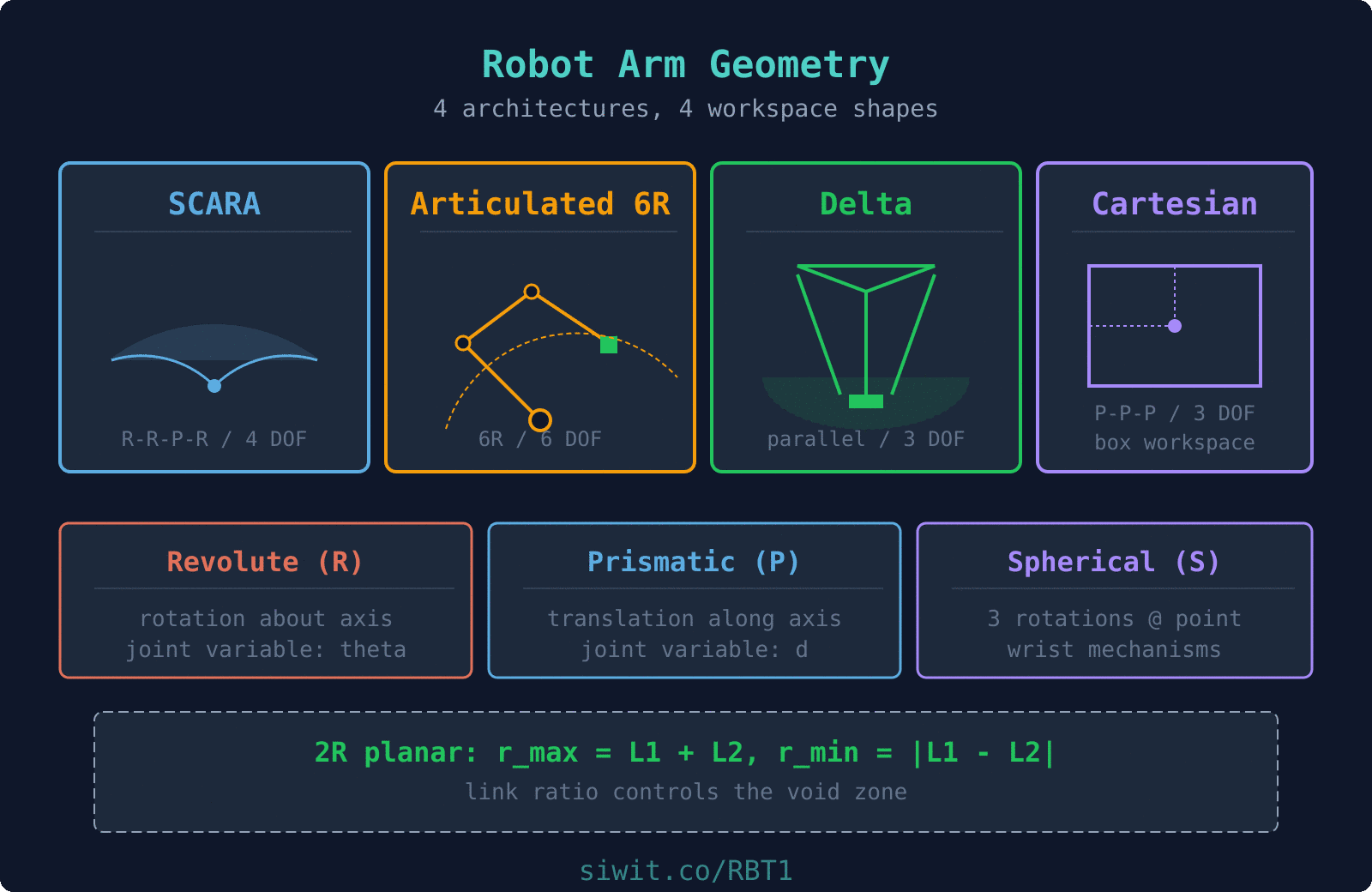
Compare common robot configurations: SCARA, articulated, delta, and Cartesian
Calculate reachable and dexterous workspace for a 2R planar arm
Visualize workspace boundaries using Python and matplotlib
Apply configuration selection criteria to real industrial pick-and-place problems
A consumer electronics factory needs to automate the transfer of circuit boards between three stations: a solder reflow oven, an optical inspection camera, and a packaging tray. The boards arrive on a conveyor at a fixed height, pass through inspection at a raised platform, and must be placed into trays arranged in a grid pattern below. Cycle time is 4 seconds per board, and the cell footprint is limited to a 1.2 m by 1.2 m floor area. The engineering team must select a robot configuration that can reach all three stations within the space constraints while maintaining the required speed and precision.
Why This Problem Matters for Configuration Selection
Choosing the wrong robot configuration for a cell layout is one of the most expensive mistakes in automation. A 6-DOF articulated arm might seem like the safe choice for any task, but it could be slower, more expensive, and harder to program than a SCARA robot for this particular application. The geometry of the task, the shape of the required workspace, and the motion constraints all point toward specific configurations. Understanding arm geometry lets you make this selection with confidence before committing to hardware.
Fundamental Theory: Robot Arm Structure
Links and Joints: The Building Blocks
A robot arm is a kinematic chain of rigid bodies called links, connected by joints that allow controlled relative motion between adjacent links. The first link is the base (fixed to the ground or a mounting surface), and the last link carries the end-effector (gripper, tool, or sensor). Every joint adds one or more degrees of freedom to the chain, and every link defines a geometric offset between the joints at its two ends.
Link Parameters
Each link in a robot arm is characterized by two geometric properties:
Link length (): the distance between adjacent joint axes, measured along the common normal
Link twist (): the angle between adjacent joint axes, measured about the common normal
These parameters, along with the joint variable, fully describe the relative position and orientation of consecutive links. We will formalize this using Denavit-Hartenberg parameters in a later lesson.
  Link Parameters Between Two Joints
     joint i-1 axis          joint i axis          |                       |          |                       |          |      link length      |          |<------- a_i -------->|          |                       |          +--- common normal ----+          |                       |          |   link twist = alpha_i          |   (angle between the          |    two joint axes,          |    measured about the          |    common normal)
Joint Types
Joints constrain the relative motion between two links. The type of joint determines how many degrees of freedom it contributes and what kind of motion it allows. For a detailed treatment of joint classification, DOF counting with Grubler’s formula, and 3D constraint analysis, see Kinematic Joints and Degrees of Freedom.
Workspace contribution: Each revolute joint sweeps an arc. Two revolute joints in series produce an annular (ring-shaped) workspace in the plane of rotation.
Motion: Pure translation along a single axis
DOF contributed: 1
Joint variable: Displacement (meters or millimeters)
Characteristics:
Provides linear positioning
Used in Cartesian and gantry robots
High load capacity along the axis of motion
Requires linear actuators (ball screws, pneumatic cylinders, linear motors)
Workspace contribution: Each prismatic joint extends the workspace in a straight line along its axis.
Motion: Rotation about three orthogonal axes through a single point
DOF contributed: 3
Characteristics:
Equivalent to three intersecting revolute joints
Found in wrist mechanisms of industrial robots
Allows arbitrary orientation changes
Complex mechanical design
Workspace contribution: A spherical joint alone does not translate the end-effector; it only changes orientation at a fixed point.
Cylindrical (C): Rotation + translation along the same axis (2 DOF)
Planar (E): Translation in two directions + rotation normal to the plane (3 DOF)
Screw (H): Coupled rotation and translation along the same axis (1 DOF, with a fixed pitch relating rotation to translation)
where is the screw pitch.
Fixed: No relative motion (0 DOF). Used for rigid connections and mounting.
Degrees of Freedom
The total degrees of freedom of a robot arm determine how many independent motions it can perform simultaneously. For a serial chain (no closed loops), the total DOF is simply the sum of the DOF contributed by each joint. A task in 3D space requires up to 6 DOF for full positioning and orientation control: 3 for position (x, y, z) and 3 for orientation (roll, pitch, yaw).
For a serial manipulator with joints:
where is the number of degrees of freedom of joint .
Under-actuated (DOF < 6)
Cannot reach arbitrary positions and orientations in 3D space. Sufficient for tasks constrained to a plane or requiring only position control.
Examples: 2R planar arm (2 DOF), SCARA (4 DOF)
Fully-actuated (DOF = 6)
Can reach any reachable position with any feasible orientation. The minimum for general-purpose 3D manipulation.
Examples: Standard 6R industrial arms (KUKA, ABB, FANUC)
Redundant (DOF > 6)
More DOF than required for the task. Extra DOF provide flexibility for obstacle avoidance, singularity avoidance, or optimization of secondary criteria.
Examples: 7-DOF collaborative robots, dual-arm systems
Link Lengths and Their Effects
Link lengths directly control the size and shape of the robot’s workspace. Longer links increase reach but reduce stiffness and payload capacity. Shorter links improve rigidity and precision but limit the work volume. The ratio between link lengths in a serial chain also affects the shape of the reachable workspace and the distribution of dexterous regions within it.
For a planar 2R robot arm with link lengths and :
Maximum reach: (arm fully extended)
Minimum reach: (arm fully folded)
Workspace shape: Annular region between and
When , the inner radius goes to zero and the workspace becomes a full disk (the arm can reach the base). When , a “hole” appears at the center.
Workspace Analysis: Reachable vs. Dexterous
Workspace Definitions
Reachable workspace: The set of all points in space that the end-effector can reach with at least one orientation. This is the total volume the robot can access.
Dexterous workspace: The subset of the reachable workspace where the end-effector can achieve any arbitrary orientation. This is always smaller than or equal to the reachable workspace.
Void zone: Regions inside the reachable workspace boundary that the robot cannot access due to joint limits, self-collision, or mechanical interference.
Joint Limits and Their Impact
Real joints cannot rotate or translate indefinitely. Mechanical stops, cable routing, and safety considerations impose limits on every joint variable. These limits reduce the theoretical workspace to a smaller, sometimes oddly shaped, practical workspace. Joint limits also create configurations where the robot is near a boundary and has limited mobility in certain directions.
For a 2R arm with joint limits and :
If has a full 360° range, the workspace is rotationally symmetric
If is limited (e.g., 150°), the workspace becomes a sector of the annulus
If is limited, the inner and outer boundaries change shape
Common Robot Configurations
Industrial robots come in several standard configurations, each designed for specific types of tasks. The configuration is defined by the sequence of joint types and the geometric arrangement of the links. Choosing the right configuration for a given application is one of the most important early decisions in robotic cell design.
Joint sequence: R-R-P-R (two revolute for planar motion, one prismatic for vertical, one revolute for end-effector rotation)
DOF: 4
Workspace shape: Cylindrical sector (fan-shaped in the horizontal plane, with vertical reach from the prismatic joint)
Key characteristics:
Very fast horizontal motion
Rigid in the vertical direction (good for insertion tasks)
Compliant in the horizontal plane (absorbs alignment errors)
Compact footprint
Typical applications:
PCB component insertion
Small parts assembly
Pick-and-place in electronics manufacturing
Screw driving
Workspace formula (horizontal plane):
with vertical stroke from the prismatic joint.
Articulated Robot (6-DOF)
Joint sequence: R-R-R-R-R-R (six revolute joints, typically grouped as 3 for position + 3 for orientation)
DOF: 6
Workspace shape: Irregular sphere-like volume (depends on link lengths and joint limits)
Key characteristics:
Most versatile configuration
Can reach around obstacles
Large workspace relative to footprint
Complex kinematics and control
Typical applications:
Welding
Painting
Material handling
Machine tending
General-purpose manufacturing
Joint grouping:
Joints 1, 2, 3: “Arm” (positions the wrist center in space)
Joints 4, 5, 6: “Wrist” (orients the end-effector)
When the last three joint axes intersect at a single point (spherical wrist), the inverse kinematics can be decoupled into position and orientation subproblems.
Delta (Parallel) Robot
Structure: Three or four kinematic chains connect the base platform to the end-effector platform in parallel
DOF: 3 (position only) or 4 (position + rotation)
Workspace shape: Dome-shaped or cylindrical volume below the base
Key characteristics:
Extremely fast (low moving mass since actuators are on the base)
High acceleration capability
Limited workspace volume
Primarily vertical orientation of end-effector
Typical applications:
High-speed pick-and-place (food, pharmaceuticals)
Packaging lines
Sorting operations
3D printing (some designs)
Speed advantage: Because the heavy motors are mounted on the fixed base and only lightweight links move, delta robots can achieve accelerations of 10g or more, with cycle times under 0.5 seconds.
Cartesian (Gantry) Robot
Joint sequence: P-P-P (three prismatic joints along X, Y, Z axes), sometimes with additional revolute joints for orientation
DOF: 3 to 6
Workspace shape: Rectangular prism (box-shaped)
Key characteristics:
Simplest kinematics (joint space = Cartesian space)
Very high rigidity and payload capacity
Large workspace possible
Easy to program and control
Large physical footprint
Typical applications:
CNC machines
Large-scale material handling
Palletizing
Overhead gantry systems in warehouses
3D printers (most common configuration)
Kinematic simplicity: For a Cartesian robot, the forward kinematics is trivial:
No trigonometric calculations are needed.
Configuration Comparison
Speed Champion: Delta
Accelerations up to 10g. Ideal when cycle time is the primary constraint and workspace volume is modest.
Versatility Champion: Articulated 6R
Full 6-DOF capability with large, flexible workspace. The default choice when task requirements are complex or varied.
Precision Assembly: SCARA
Fast horizontal motion with vertical rigidity. Purpose-built for insertion and assembly tasks in electronics.
Heavy Loads: Cartesian/Gantry
Highest stiffness and payload capacity. Best for large workspaces, heavy payloads, or applications where kinematic simplicity matters.
Python Workspace Visualization
To build intuition about how link lengths and joint limits shape the workspace, let us compute and visualize the workspace of a planar 2R robot arm. The forward kinematics of a 2R arm maps joint angles to end-effector position, and by sweeping through all feasible joint angle combinations, we can trace the workspace boundary.
Forward Kinematics of a 2R Planar Arm
The end-effector position for a 2R arm with link lengths , and joint angles , :
System Application: Solving the Pick-and-Place Problem
Let us return to the circuit board handling cell and apply what we have learned about arm geometry and configuration selection. The three stations (reflow oven output, inspection camera, packaging tray) define the workspace requirements, and the footprint constraint limits our configuration choices.
Place the robot base at the center of the 1.2 m x 1.2 m cell. The three stations are located at approximately:
Conveyor pickup: (0.45, 0.15) m from base
Inspection camera: (0.10, 0.50) m from base (raised platform)
Packaging tray grid: (-0.30, 0.35) m from base (below base height)
All three points must lie within the robot’s reachable workspace.
Calculate required reach
Maximum distance from base to any station:
The inspection station is the farthest point, requiring at least 0.51 m reach.
Determine DOF requirements
The task involves:
Horizontal positioning (2 DOF)
Vertical motion to pick up and place boards (1 DOF)
Rotation to align board orientation (1 DOF)
Total: 4 DOF minimum. No arbitrary 3D orientation is needed.
Select configuration
With 4 DOF, horizontal planar motion, vertical pick-and-place, and a compact footprint requirement, the SCARA configuration is the clear choice.
SCARA Sizing for the Cell
Link length selection and workspace verification
For a SCARA with links and :
Selected dimensions:
m, m
m (covers all stations with margin)
m (small void zone near the base)
Vertical stroke: 150 mm (sufficient for conveyor-to-tray height difference)
Verification:
Conveyor (0.47 m): within reach (0.47 < 0.55)
Inspection (0.51 m): within reach (0.51 < 0.55)
Tray (0.46 m): within reach (0.46 < 0.55)
All stations outside void zone (all > 0.05 m)
Why Not Other Configurations?
Articulated 6R
Overkill for this task. 6 DOF when only 4 are needed. Higher cost, more complex programming, slower for simple horizontal pick-and-place motions.
Delta
Excellent speed, but limited workspace volume. With a 1.2 m cell and stations spread at 0.5 m from center, a delta robot would need very long arms, reducing its speed advantage.
Cartesian
Could work, but the gantry structure would take significant overhead space. Also slower than SCARA for the cycle time requirement of 4 seconds per board.
Design Guidelines
Configuration Selection Rules
Start with the task DOF
Count the independent motions the end-effector must perform. If only planar positioning is needed, 3 DOF suffices. If full 3D positioning and orientation are needed, 6 DOF is the minimum.
Match workspace shape to station layout
SCARA and articulated arms produce annular workspaces. Cartesian robots produce rectangular workspaces. Delta robots produce dome-shaped volumes. Choose the shape that covers your stations most efficiently.
Size links using the reach equation
For serial arms: (all links extended). Ensure exceeds the farthest station distance by at least 10% for margin.
Check the void zone
For 2R and SCARA: . Ensure no stations lie within this radius. If they do, adjust link ratios.
Verify joint limits do not exclude stations
Plot the actual workspace with joint limits applied. Confirm all stations and the paths between them lie within the feasible region.
Consider cycle time and payload
Faster configurations (delta, SCARA) trade workspace volume for speed. Heavier payloads favor Cartesian or articulated designs with higher stiffness.
Common Design Pitfalls
Summary
This lesson covered the structural foundations of robot arm design:
Links and joints form the building blocks. Revolute joints provide rotation, prismatic joints provide translation, and the combination defines the arm’s motion capability.
Link lengths determine reach. For a 2R arm, and . The link ratio controls the void zone size.
Joint limits reduce the theoretical workspace to a practical workspace. Always design with real joint limits, not ideal full-rotation assumptions.
Four standard configurations cover most industrial applications: SCARA for fast planar assembly, articulated 6R for general-purpose manipulation, delta for high-speed pick-and-place, and Cartesian for large rectangular workspaces.
Configuration selection should be driven by task DOF, workspace shape, station layout, cycle time, and payload requirements.
What comes next:Forward and Inverse Kinematics formalizes the relationship between joint angles and end-effector position using the Denavit-Hartenberg convention, building the mathematical framework for precise robot motion control.




Comments