


Weight Reduction
Lattice-filled parts can achieve 50-90% weight reduction compared to solid equivalents while retaining a significant fraction of structural stiffness and strength.
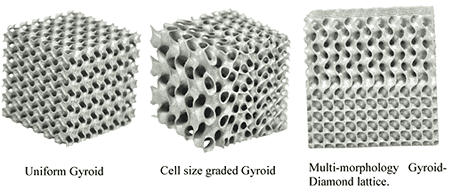
Create lightweight lattice structures and triply periodic minimal surfaces (TPMS) that are impossible to model by hand in traditional CAD. Using CadQuery and NumPy, you will generate strut-based unit cells, implicit gyroid and Schwarz-P surfaces, graded-density fills, and conformal lattices ready for SLA, SLS, or FDM printing. #LatticeDesign #TPMS #AdditiveManufacturing
By the end of this lesson, you will be able to:
Weight Reduction
Lattice-filled parts can achieve 50-90% weight reduction compared to solid equivalents while retaining a significant fraction of structural stiffness and strength.
Energy Absorption
Controlled cell collapse provides predictable energy absorption profiles, critical for crash structures, protective equipment, and packaging.
Biomedical Integration
Porous lattices match the stiffness of bone (reducing stress shielding) and promote osseointegration in orthopedic implants.
Thermal Management
High surface-area-to-volume ratios in TPMS structures create excellent heat exchanger geometries with low pressure drop.
Strut-based lattices are constructed from wireframe unit cells: nodes connected by cylindrical or tapered struts. The unit cell is then arrayed in three dimensions to fill a volume.
The three most common strut-based unit cells differ in their connectivity, which directly determines mechanical properties:
| Unit Cell | Nodes | Struts | Connectivity | Relative Density Range |
|---|---|---|---|---|
| Simple Cubic (SC) | 8 | 12 | Edge-connected | 5-30% |
| Body-Centered Cubic (BCC) | 9 | 8 | Diagonal body struts | 5-40% |
| Octet-Truss | 14 | 36 | Face + body diagonals | 10-50% |
The relative density
For cylindrical struts of diameter
The simple cubic unit cell connects the eight corner nodes with struts along the twelve edges.
import cadquery as cqimport numpy as np
def cubic_unit_cell(cell_size: float, strut_diameter: float) -> cq.Workplane:    """Generate a simple cubic unit cell.
    Args:        cell_size: Edge length of the cubic cell (mm)        strut_diameter: Diameter of cylindrical struts (mm)
    Returns:        CadQuery solid of one unit cell    """    L = cell_size    r = strut_diameter / 2.0    result = cq.Workplane("XY")
    # Define the 12 edges of a cube as (start, end) coordinate pairs    edges = [        # Bottom face edges        ((0, 0, 0), (L, 0, 0)),        ((L, 0, 0), (L, L, 0)),        ((L, L, 0), (0, L, 0)),        ((0, L, 0), (0, 0, 0)),        # Top face edges        ((0, 0, L), (L, 0, L)),        ((L, 0, L), (L, L, L)),        ((L, L, L), (0, L, L)),        ((0, L, L), (0, 0, L)),        # Vertical edges        ((0, 0, 0), (0, 0, L)),        ((L, 0, 0), (L, 0, L)),        ((L, L, 0), (L, L, L)),        ((0, L, 0), (0, L, L)),    ]
    # Build each strut as a cylinder between two points    struts = []    for (x1, y1, z1), (x2, y2, z2) in edges:        mid_x = (x1 + x2) / 2        mid_y = (y1 + y2) / 2        mid_z = (z1 + z2) / 2        length = np.sqrt((x2-x1)**2 + (y2-y1)**2 + (z2-z1)**2)
        # Determine strut direction for orientation        dx, dy, dz = x2 - x1, y2 - y1, z2 - z1
        strut = (            cq.Workplane("XY")            .transformed(offset=(mid_x, mid_y, mid_z))            .cylinder(length, r, centered=(True, True, True))        )        struts.append(strut)
    # Union all struts together    result = struts[0]    for s in struts[1:]:        result = result.union(s)
    # Add spherical nodes at corners for smooth joints    for x in [0, L]:        for y in [0, L]:            for z in [0, L]:                node = cq.Workplane("XY").newObject([                    cq.Solid.makeSphere(r * 1.2, pnt=cq.Vector(x, y, z))                ])                result = result.union(node)
    return result
# Generate a 10mm cubic cell with 1mm strutscell = cubic_unit_cell(cell_size=10.0, strut_diameter=1.0)
The BCC unit cell connects each corner node to the center node, producing eight diagonal struts.
import cadquery as cqimport numpy as npfrom typing import Tuple
def make_strut(p1: Tuple[float, float, float],               p2: Tuple[float, float, float],               diameter: float) -> cq.Workplane:    """Create a cylindrical strut between two 3D points.
    Uses the wire-and-sweep approach for arbitrary orientations.    """    wire = cq.Workplane("XY").moveTo(p1[0], p1[1]).lineTo(p2[0], p2[1])    # For true 3D struts, use the polyline + sweep approach    path = (        cq.Workplane("XY")        .pushPoints([p1])        .workplane()        .moveTo(0, 0)        .threePointArc((0, 0, 0), (0, 0, 0))  # placeholder    )
    # Simpler approach: calculate midpoint, length, and orientation    mid = tuple((a + b) / 2 for a, b in zip(p1, p2))    length = np.sqrt(sum((b - a)**2 for a, b in zip(p1, p2)))    direction = tuple((b - a) / length for a, b in zip(p1, p2))
    # Create cylinder along Z, then rotate to align with direction    r = diameter / 2.0    strut = cq.Workplane("XY").cylinder(length, r)
    # Compute rotation to align Z-axis with strut direction    z_axis = np.array([0, 0, 1])    d = np.array(direction)
    if np.allclose(d, z_axis):        rotation_axis = (0, 0, 1)        angle = 0    elif np.allclose(d, -z_axis):        rotation_axis = (1, 0, 0)        angle = 180    else:        rot_ax = np.cross(z_axis, d)        rot_ax = rot_ax / np.linalg.norm(rot_ax)        angle = np.degrees(np.arccos(np.clip(np.dot(z_axis, d), -1, 1)))        rotation_axis = tuple(rot_ax)
    strut = strut.val().Rotate(        (0, 0, 0), rotation_axis, angle    )    strut = cq.Workplane("XY").add(strut).translate(mid)
    return strut
def bcc_unit_cell(cell_size: float, strut_diameter: float) -> cq.Workplane:    """Generate a BCC unit cell.
    Eight diagonal struts connect corners to body center.    """    L = cell_size    r = strut_diameter / 2.0    center = (L/2, L/2, L/2)
    # BCC: 8 corners connected to body center    corners = [        (0, 0, 0), (L, 0, 0), (L, L, 0), (0, L, 0),        (0, 0, L), (L, 0, L), (L, L, L), (0, L, L),    ]
    struts = []    for corner in corners:        strut = make_strut(corner, center, strut_diameter)        struts.append(strut)
    # Union all struts    result = struts[0]    for s in struts[1:]:        result = result.union(s)
    # Add spherical nodes    all_nodes = corners + [center]    for node_pos in all_nodes:        node = cq.Workplane("XY").newObject([            cq.Solid.makeSphere(r * 1.3, pnt=cq.Vector(*node_pos))        ])        result = result.union(node)
    return result
# Generate a BCC cell: 10mm size, 0.8mm strutsbcc_cell = bcc_unit_cell(cell_size=10.0, strut_diameter=0.8)
The octet-truss is the highest-performance strut lattice. It combines face-centered and body-centered connectivity to create a stretch-dominated structure (much stiffer than bending-dominated alternatives at the same relative density).
import cadquery as cqimport numpy as np
def octet_truss_unit_cell(cell_size: float,                          strut_diameter: float) -> cq.Workplane:    """Generate an octet-truss unit cell.
    14 nodes: 8 corners + 6 face centers    36 struts connecting nearest neighbors    """    L = cell_size    r = strut_diameter / 2.0
    # 8 corner nodes    corners = [        (0, 0, 0), (L, 0, 0), (L, L, 0), (0, L, 0),        (0, 0, L), (L, 0, L), (L, L, L), (0, L, L),    ]
    # 6 face center nodes    face_centers = [        (L/2, L/2, 0),   # bottom        (L/2, L/2, L),   # top        (L/2, 0, L/2),   # front        (L/2, L, L/2),   # back        (0, L/2, L/2),   # left        (L, L/2, L/2),   # right    ]
    all_nodes = corners + face_centers
    # Connect each face center to the 4 corners of its face    # Plus connect face centers to each other through body diagonals    connections = []
    # Bottom face center (index 8) to bottom corners    connections += [(8, 0), (8, 1), (8, 2), (8, 3)]    # Top face center (index 9) to top corners    connections += [(9, 4), (9, 5), (9, 6), (9, 7)]    # Front face center (index 10) to front corners    connections += [(10, 0), (10, 1), (10, 4), (10, 5)]    # Back face center (index 11) to back corners    connections += [(11, 2), (11, 3), (11, 6), (11, 7)]    # Left face center (index 12) to left corners    connections += [(12, 0), (12, 3), (12, 4), (12, 7)]    # Right face center (index 13) to right corners    connections += [(13, 1), (13, 2), (13, 5), (13, 6)]
    # Cross-connections between face centers (internal bracing)    connections += [        (8, 9), (8, 10), (8, 11), (8, 12), (8, 13),        (9, 10), (9, 11), (9, 12), (9, 13),        (10, 11), (10, 12), (10, 13),        (11, 12), (11, 13),        (12, 13),    ]
    struts = []    for i, j in connections:        p1 = all_nodes[i]        p2 = all_nodes[j]        strut = make_strut(p1, p2, strut_diameter)        struts.append(strut)
    # Union all struts    result = struts[0]    for s in struts[1:]:        result = result.union(s)
    # Spherical joints at all nodes    for pos in all_nodes:        node = cq.Workplane("XY").newObject([            cq.Solid.makeSphere(r * 1.4, pnt=cq.Vector(*pos))        ])        result = result.union(node)
    return result
# Octet-truss: 12mm cell, 0.6mm strutsoctet = octet_truss_unit_cell(cell_size=12.0, strut_diameter=0.6)Once a unit cell is defined, you array it by translating copies across a 3D grid:
def array_lattice(unit_cell_func, cell_size: float,                  strut_diameter: float,                  nx: int, ny: int, nz: int) -> cq.Assembly:    """Array a unit cell into an nx × ny × nz lattice block.
    Args:        unit_cell_func: Function that returns a unit cell solid        cell_size: Size of each unit cell (mm)        strut_diameter: Strut diameter (mm)        nx, ny, nz: Number of cells in each direction
    Returns:        CadQuery Assembly of arrayed cells    """    assembly = cq.Assembly()
    # Generate one cell and reuse it    cell = unit_cell_func(cell_size, strut_diameter)
    for ix in range(nx):        for iy in range(ny):            for iz in range(nz):                offset = (                    ix * cell_size,                    iy * cell_size,                    iz * cell_size,                )                assembly.add(                    cell,                    loc=cq.Location(cq.Vector(*offset)),                    name=f"cell_{ix}_{iy}_{iz}",                )
    return assembly
# Create a 4x4x4 BCC lattice blocklattice_block = array_lattice( bcc_unit_cell, cell_size=8.0, strut_diameter=0.8, nx=4, ny=4, nz=4)TPMS are mathematically-defined surfaces that are periodic in all three spatial directions and have zero mean curvature at every point. They produce smooth, self-supporting geometries that are often superior to strut-based lattices for load-bearing and fluid-flow applications.
A TPMS is defined by an implicit equation
The gyroid is the most widely used TPMS in engineering. It has no straight lines, no planar symmetries, and is completely self-supporting (no overhangs greater than ~45 degrees).
where
Key property: The gyroid is self-supporting for most AM processes because maximum overhang angles stay below 42 degrees.
The Schwarz-P (or “Primitive”) surface has cubic symmetry and creates a network of interconnected spherical-like voids.
Key property: Schwarz-P has the highest stiffness-to-weight ratio among common TPMS types for uniaxial loading along the cell axes. However, it has 90-degree overhangs at certain orientations, requiring careful print orientation.
The Schwarz-D (Diamond) surface has the connectivity of a diamond crystal lattice. It creates two interpenetrating, non-connected channel networks.
Key property: Diamond TPMS provides the best isotropic stiffness among TPMS types. Its mechanical properties are nearly the same in all loading directions.
The threshold parameter
| TPMS Type | |||
|---|---|---|---|
| Gyroid | ~50% | ~35% | ~20% |
| Schwarz-P | ~50% | ~30% | ~15% |
| Diamond | ~50% | ~33% | ~18% |
Generating TPMS geometry involves evaluating the implicit function on a 3D voxel grid, then extracting an isosurface using the marching cubes algorithm. The resulting triangle mesh is converted into a CadQuery solid.
import numpy as npfrom scipy import ndimage
def evaluate_tpms(tpms_type: str,                  bounds: tuple,                  resolution: int,                  period: float,                  threshold: float = 0.0) -> np.ndarray:    """Evaluate a TPMS implicit function on a 3D grid.
    Args:        tpms_type: One of 'gyroid', 'schwarz_p', 'diamond'        bounds: (xmin, xmax, ymin, ymax, zmin, zmax) in mm        resolution: Number of voxels per axis        period: Unit cell period L (mm)        threshold: Level-set value t
    Returns:        3D numpy array of function values    """    xmin, xmax, ymin, ymax, zmin, zmax = bounds    x = np.linspace(xmin, xmax, resolution)    y = np.linspace(ymin, ymax, resolution)    z = np.linspace(zmin, zmax, resolution)    X, Y, Z = np.meshgrid(x, y, z, indexing='ij')
    # Scale to unit cell period    kx = 2 * np.pi * X / period    ky = 2 * np.pi * Y / period    kz = 2 * np.pi * Z / period
    if tpms_type == 'gyroid':        F = (np.sin(kx) * np.cos(ky) +             np.sin(ky) * np.cos(kz) +             np.sin(kz) * np.cos(kx))    elif tpms_type == 'schwarz_p':        F = np.cos(kx) + np.cos(ky) + np.cos(kz)    elif tpms_type == 'diamond':        F = (np.cos(kx) * np.cos(ky) * np.cos(kz) -             np.sin(kx) * np.sin(ky) * np.sin(kz))    else:        raise ValueError(f"Unknown TPMS type: {tpms_type}")
    # Return binary volume: 1 where F > threshold, 0 elsewhere    return (F - threshold)
# Example: Gyroid in a 40mm cube, 10mm periodfield = evaluate_tpms( 'gyroid', bounds=(0, 40, 0, 40, 0, 40), resolution=100, period=10.0, threshold=0.0)from skimage.measure import marching_cubesimport trimesh
def field_to_mesh(field: np.ndarray, bounds: tuple, level: float = 0.0) -> trimesh.Trimesh: """Convert a 3D scalar field to a triangle mesh.
Args: field: 3D numpy array from evaluate_tpms bounds: Physical bounds (xmin, xmax, ymin, ymax, zmin, zmax) level: Isosurface level (usually 0.0)
Returns: trimesh.Trimesh object """ xmin, xmax, ymin, ymax, zmin, zmax = bounds spacing = ( (xmax - xmin) / (field.shape[0] - 1), (ymax - ymin) / (field.shape[1] - 1), (zmax - zmin) / (field.shape[2] - 1), )
verts, faces, normals, _ = marching_cubes( field, level=level, spacing=spacing )
# Offset vertices to match physical bounds verts[:, 0] += xmin verts[:, 1] += ymin verts[:, 2] += zmin
mesh = trimesh.Trimesh( vertices=verts, faces=faces, vertex_normals=normals )
return mesh
# Extract the isosurfacemesh = field_to_mesh(field, bounds=(0, 40, 0, 40, 0, 40))mesh.export("gyroid_40mm.stl")print(f"Mesh: {len(mesh.vertices)} vertices, {len(mesh.faces)} faces")For boolean operations with CadQuery shapes, you can import the STL back as a solid:
import cadquery as cq
def stl_to_cadquery(stl_path: str) -> cq.Workplane:    """Import an STL file as a CadQuery solid.
    Note: This requires the STL to be a valid, watertight mesh.    """    result = cq.importers.importStl(stl_path)    return cq.Workplane("XY").add(result)
# Import gyroid mesh as CadQuery solidgyroid_solid = stl_to_cadquery("gyroid_40mm.stl")To create a thin-walled sheet TPMS (higher specific stiffness than solid TPMS):
def sheet_tpms(tpms_type: str, bounds: tuple, resolution: int,               period: float, wall_thickness: float) -> trimesh.Trimesh:    """Generate a sheet TPMS with defined wall thickness.
    Creates geometry where: -t/2 < f(x,y,z) < t/2
    Args:        wall_thickness: Desired wall thickness in mm        (other args as in evaluate_tpms)    """    field = evaluate_tpms(tpms_type, bounds, resolution, period,                          threshold=0.0)
    # The threshold range maps approximately to wall thickness    # Calibration: for gyroid with period L, threshold range dt    # gives wall_thickness ≈ dt * L / (2*pi)    dt = wall_thickness * 2 * np.pi / period
    # Sheet region: |f(x,y,z)| < dt/2    sheet_field = np.abs(field) - dt / 2
    # Extract outer surface (where sheet_field = 0)    mesh = field_to_mesh(-sheet_field, bounds)
    return mesh
# 0.4mm wall sheet gyroidsheet = sheet_tpms( 'gyroid', bounds=(0, 30, 0, 30, 0, 30), resolution=150, period=8.0, wall_thickness=0.4)sheet.export("gyroid_sheet_30mm.stl")Uniform lattices have the same density everywhere, but real load paths are not uniform. Graded lattices vary the density spatially, placing more material where stresses are high and less where loads are low.
For strut-based lattices, vary the strut diameter as a function of position:
def graded_bcc_lattice(cell_size: float,                       nx: int, ny: int, nz: int,                       d_min: float, d_max: float,                       gradient_axis: str = 'z') -> cq.Assembly:    """Generate a BCC lattice with linearly graded strut diameter.
    Args:        cell_size: Unit cell size (mm)        nx, ny, nz: Number of cells per axis        d_min: Minimum strut diameter (mm) at gradient start        d_max: Maximum strut diameter (mm) at gradient end        gradient_axis: Axis along which density varies ('x', 'y', 'z')    """    assembly = cq.Assembly()
    # Map axis to cell count    n_gradient = {'x': nx, 'y': ny, 'z': nz}[gradient_axis]
    for ix in range(nx):        for iy in range(ny):            for iz in range(nz):                # Compute gradient parameter (0 to 1)                if gradient_axis == 'z':                    t = iz / max(nz - 1, 1)                elif gradient_axis == 'y':                    t = iy / max(ny - 1, 1)                else:                    t = ix / max(nx - 1, 1)
                # Linear interpolation of strut diameter                d = d_min + t * (d_max - d_min)
                cell = bcc_unit_cell(cell_size, d)                offset = (                    ix * cell_size,                    iy * cell_size,                    iz * cell_size                )                assembly.add(                    cell,                    loc=cq.Location(cq.Vector(*offset)),                    name=f"cell_{ix}_{iy}_{iz}_d{d:.2f}",                )
    return assembly
# Graded BCC: thin at bottom (0.4mm), thick at top (1.2mm)graded = graded_bcc_lattice( cell_size=8.0, nx=5, ny=5, nz=8, d_min=0.4, d_max=1.2, gradient_axis='z')For TPMS, spatially vary the threshold parameter
where
def graded_tpms(tpms_type: str, bounds: tuple, resolution: int,                period: float, t_min: float, t_max: float,                gradient_axis: str = 'z') -> np.ndarray:    """Evaluate TPMS with spatially varying threshold.
    Creates a density gradient: dense where t is small,    sparse where t is large.    """    xmin, xmax, ymin, ymax, zmin, zmax = bounds    x = np.linspace(xmin, xmax, resolution)    y = np.linspace(ymin, ymax, resolution)    z = np.linspace(zmin, zmax, resolution)    X, Y, Z = np.meshgrid(x, y, z, indexing='ij')
    # Compute TPMS field    kx = 2 * np.pi * X / period    ky = 2 * np.pi * Y / period    kz = 2 * np.pi * Z / period
    if tpms_type == 'gyroid':        F = (np.sin(kx) * np.cos(ky) +             np.sin(ky) * np.cos(kz) +             np.sin(kz) * np.cos(kx))    elif tpms_type == 'schwarz_p':        F = np.cos(kx) + np.cos(ky) + np.cos(kz)    else:        raise ValueError(f"Unknown type: {tpms_type}")
    # Spatially varying threshold    if gradient_axis == 'z':        # Normalize Z to [0, 1] range        T = t_min + (t_max - t_min) * (Z - zmin) / (zmax - zmin)    elif gradient_axis == 'y':        T = t_min + (t_max - t_min) * (Y - ymin) / (ymax - ymin)    else:        T = t_min + (t_max - t_min) * (X - xmin) / (xmax - xmin)
    return F - T
# Dense at bottom (t=0.0), sparse at top (t=0.8)graded_field = graded_tpms(    'gyroid',    bounds=(0, 40, 0, 40, 0, 60),    resolution=120,    period=8.0,    t_min=0.0, t_max=0.8,    gradient_axis='z')
graded_mesh = field_to_mesh(graded_field, (0, 40, 0, 40, 0, 60))graded_mesh.export("gyroid_graded.stl")A conformal lattice fills an arbitrary 3D shape, not just a rectangular block. This is the most useful operation in practice: you have a part geometry (bracket, implant, etc.) and want to fill its interior with lattice while preserving the outer skin.
Define the outer envelope: your part geometry in CadQuery
Generate the lattice in a bounding box that encloses the part
Boolean intersection: cut the lattice to the part boundary
Shell the part (optional): create a solid skin around the lattice interior
import cadquery as cq
def conformal_lattice_fill(    envelope: cq.Workplane,    lattice_stl_path: str,    shell_thickness: float = 1.0) -> cq.Workplane:    """Fill an arbitrary shape with lattice structure.
    Args:        envelope: CadQuery solid defining the outer boundary        lattice_stl_path: Path to STL of the lattice block        shell_thickness: Thickness of solid outer skin (mm)
    Returns:        CadQuery solid: shell + internal lattice    """    # Create outer shell    shell = envelope.shell(-shell_thickness)
    # Import lattice mesh    lattice = cq.importers.importStl(lattice_stl_path)    lattice_wp = cq.Workplane("XY").add(lattice)
    # Boolean intersection: trim lattice to inner volume    inner_volume = envelope.cut(shell)    lattice_trimmed = lattice_wp.intersect(inner_volume)
    # Combine shell + trimmed lattice    result = shell.union(lattice_trimmed)
    return result
# Example: Cylindrical part filled with gyroidcylinder = (    cq.Workplane("XY")    .cylinder(50, 20)  # 50mm tall, 20mm radius)
# First generate a gyroid block covering the cylinder bounds# (done separately using the TPMS pipeline above)# Then fill:# filled_part = conformal_lattice_fill(# cylinder, "gyroid_40mm.stl", shell_thickness=1.5# )For complex shapes, a more robust approach is to evaluate the TPMS field and then mask it with the part’s signed distance field:
def conformal_tpms_direct(    tpms_type: str,    envelope_stl: str,    bounds: tuple,    resolution: int,    period: float,    threshold: float,    shell_thickness: float) -> trimesh.Trimesh:    """Generate conformal TPMS by voxel-level intersection.
    More robust than boolean operations for complex geometries.    """    import trimesh
    # Load envelope mesh and compute signed distance field    envelope = trimesh.load(envelope_stl)
    xmin, xmax, ymin, ymax, zmin, zmax = bounds    x = np.linspace(xmin, xmax, resolution)    y = np.linspace(ymin, ymax, resolution)    z = np.linspace(zmin, zmax, resolution)    X, Y, Z = np.meshgrid(x, y, z, indexing='ij')
    # Flatten grid points for proximity query    points = np.column_stack([X.ravel(), Y.ravel(), Z.ravel()])
    # Signed distance: negative inside, positive outside    sdf = trimesh.proximity.signed_distance(envelope, points)    sdf = sdf.reshape(X.shape)
    # Evaluate TPMS field    tpms_field = evaluate_tpms(        tpms_type, bounds, resolution, period, threshold    )
    # Combine: TPMS only where inside the envelope    # Shell region: -shell_thickness < sdf < 0    # Lattice region: sdf < -shell_thickness AND tpms_field > 0    shell_mask = (sdf < 0) & (sdf > -shell_thickness)    lattice_mask = (sdf < -shell_thickness) & (tpms_field > 0)
    combined = np.zeros_like(sdf)    combined[shell_mask] = 1.0    combined[lattice_mask] = 1.0
mesh = field_to_mesh(combined - 0.5, bounds) return meshNot all lattice geometries are printable on all machines. Each additive manufacturing process imposes specific constraints.
Fused Deposition Modeling (material extrusion) has the most restrictive constraints for lattice structures.
Minimum Strut Diameter
1.0 - 2.0 mm minimum for reliable printing. Below this, struts fail to form or are extremely fragile. Rule of thumb: minimum strut diameter = 2.5 x nozzle diameter.
Overhang Angle
Maximum 45 degrees from vertical without support. Gyroid TPMS is printable without supports. Schwarz-P requires careful orientation. BCC struts (54.7 degrees from vertical) are borderline.
Minimum Wall Thickness
0.8 - 1.2 mm for sheet TPMS walls. Must be at least 2x nozzle diameter for reliable extrusion paths.
Cell Size
Minimum 5 mm cell period for 0.4mm nozzle. Smaller cells produce features the nozzle cannot resolve.
Stereolithography (vat photopolymerization) can resolve much finer features than FDM.
Minimum Strut Diameter
0.3 - 0.5 mm depending on resin and layer height. Desktop SLA (e.g., Formlabs) can reliably print 0.4mm struts.
Drainage Holes
Enclosed cavities must have drainage holes (minimum 1.5 mm diameter) to remove uncured resin. TPMS structures are inherently open, which is one of their advantages.
Support Removal
Internal supports are impossible to remove from dense lattices. The lattice must be self-supporting, or the print orientation must be chosen so that no internal supports are generated.
Cell Size
Minimum 2 mm cell period is achievable. Some high-resolution SLA printers can go to 1 mm.
Selective Laser Sintering and Multi Jet Fusion (powder bed fusion) are ideal for lattice structures because no support structures are needed.
Minimum Strut Diameter
0.5 - 0.8 mm for Nylon PA12. Metal SLS (DMLS) can achieve 0.3 - 0.5 mm struts.
Powder Removal
Trapped powder inside closed cells cannot be removed. All lattice cells must be open and connected to the exterior. Minimum opening size: 1.0 mm for PA12, 0.5 mm for metals.
Self-Supporting
SLS/MJF: the powder bed acts as support, so all geometries are self-supporting. This makes them the ideal process for complex lattice structures.
Cell Size
Minimum 2-3 mm for PA12 powder. Metal DMLS can resolve 1.5 mm cells. Always verify with a test coupon.
Check minimum feature size: verify that all strut diameters and wall thicknesses exceed the process minimum
Analyze overhang angles: for FDM/SLA, compute the maximum overhang angle from the mesh normals and verify it is within limits
Verify powder/resin drainage: ensure all internal channels connect to the exterior with openings larger than the minimum drainage size
Check aspect ratio: long, thin struts (length/diameter > 10) are prone to warping and breakage during post-processing
Test coupon first: print a small sample (2x2x2 cells) before committing to a full part to verify dimensional accuracy and structural integrity
def validate_lattice_printability(    mesh: trimesh.Trimesh,    process: str = 'fdm',    nozzle_diameter: float = 0.4) -> dict:    """Check a lattice mesh against printability constraints.
    Args:        mesh: Trimesh of the lattice structure        process: 'fdm', 'sla', or 'sls'        nozzle_diameter: FDM nozzle diameter (mm)
    Returns:        Dictionary of check results    """    constraints = {        'fdm': {            'min_feature': 2.5 * nozzle_diameter,            'max_overhang_deg': 45,            'min_wall': 2 * nozzle_diameter,        },        'sla': {            'min_feature': 0.4,            'max_overhang_deg': 30,  # conservative for unsupported            'min_wall': 0.3,        },        'sls': {            'min_feature': 0.5,            'max_overhang_deg': 90,  # self-supporting            'min_wall': 0.5,        },    }
    c = constraints[process]
    # Check overhang angles from face normals    normals = mesh.face_normals    z_component = normals[:, 2]  # vertical component    overhang_angles = np.degrees(np.arccos(np.clip(        np.abs(z_component), 0, 1    )))    max_overhang = np.max(overhang_angles)
    # Check if mesh is watertight (required for all processes)    is_watertight = mesh.is_watertight
    results = {        'process': process,        'is_watertight': is_watertight,        'max_overhang_deg': float(max_overhang),        'overhang_ok': max_overhang <= c['max_overhang_deg'],        'min_feature_mm': c['min_feature'],        'min_wall_mm': c['min_wall'],    }
    return results
# Validate for FDM printing# results = validate_lattice_printability(mesh, process='fdm')# print(results)Aerospace
Lattice-filled brackets, panels, and structural nodes reduce mass by 40-70% while meeting stiffness requirements. Companies like Airbus use TPMS partition walls in cabin components.
Biomedical Implants
Porous titanium implants with gyroid lattice match the elastic modulus of cortical bone (10-30 GPa), reducing stress shielding and promoting osseointegration. Cell sizes of 300-800 micrometers optimize bone ingrowth.
Heat Exchangers
TPMS geometries create two non-intersecting fluid channels with massive surface area. Gyroid heat exchangers achieve 2-5x higher heat transfer coefficients compared to conventional fin designs at the same pressure drop.
Energy Absorption
Graded-density lattices can be tuned for specific energy absorption profiles. The crush force plateau can be designed to stay below injury thresholds for protective equipment (helmets, body armor, packaging).
This end-to-end example generates a cylindrical part with a solid outer shell and a density-graded gyroid interior, a common geometry for lightweight structural members or biomedical implants.
import numpy as npfrom skimage.measure import marching_cubesimport trimesh
# === Parameters ===outer_radius = 15.0     # mmheight = 50.0           # mmshell_thickness = 1.5   # mm solid outer wallperiod = 6.0            # mm gyroid cell periodt_bottom = 0.0          # dense at bottom (load-bearing end)t_top = 0.6             # sparse at top (weight savings)resolution = 200        # voxels per axis
# === Build coordinate grid ===bounds = (-outer_radius, outer_radius,          -outer_radius, outer_radius,          0, height)xmin, xmax, ymin, ymax, zmin, zmax = boundsx = np.linspace(xmin, xmax, resolution)y = np.linspace(ymin, ymax, resolution)z = np.linspace(zmin, zmax, resolution)X, Y, Z = np.meshgrid(x, y, z, indexing='ij')
# === Cylindrical signed distance field ===R = np.sqrt(X**2 + Y**2)# Negative inside cylinder, positive outsidesdf_outer = R - outer_radiussdf_inner = R - (outer_radius - shell_thickness)
# === Graded gyroid field ===kx = 2 * np.pi * X / periodky = 2 * np.pi * Y / periodkz = 2 * np.pi * Z / periodF_gyroid = (np.sin(kx) * np.cos(ky) +            np.sin(ky) * np.cos(kz) +            np.sin(kz) * np.cos(kx))
# Spatially varying threshold (linear gradient along Z)T = t_bottom + (t_top - t_bottom) * (Z - zmin) / (zmax - zmin)
# === Combine: shell + graded lattice interior ===# Shell region: inside outer cylinder, outside inner cylindershell_mask = (sdf_outer < 0) & (sdf_inner > 0)# Lattice region: inside inner cylinder AND gyroid > thresholdlattice_mask = (sdf_inner < 0) & (F_gyroid > T)# Top and bottom caps (solid)cap_mask = (sdf_outer < 0) & ((Z < zmin + shell_thickness) |                                (Z > zmax - shell_thickness))
combined = np.zeros_like(R, dtype=float)combined[shell_mask] = 1.0combined[lattice_mask] = 1.0combined[cap_mask] = 1.0
# === Extract isosurface ===spacing = (    (xmax - xmin) / (resolution - 1),    (ymax - ymin) / (resolution - 1),    (zmax - zmin) / (resolution - 1),)verts, faces, normals, _ = marching_cubes(combined, level=0.5,                                           spacing=spacing)verts[:, 0] += xminverts[:, 1] += yminverts[:, 2] += zmin
mesh = trimesh.Trimesh(vertices=verts, faces=faces)
# === Report ===solid_volume = np.pi * outer_radius**2 * heightlattice_volume = mesh.volumerelative_density = lattice_volume / solid_volume
print(f"Solid cylinder volume:  {solid_volume:.1f} mm³")print(f"Lattice part volume:    {lattice_volume:.1f} mm³")print(f"Relative density:       {relative_density:.1%}")print(f"Weight savings:         {1 - relative_density:.1%}")
# Exportmesh.export("graded_gyroid_cylinder.stl")print("Exported: graded_gyroid_cylinder.stl")Strut Lattices
Simple to implement and understand. BCC for general use, octet-truss for maximum stiffness. Limited to relatively coarse features on FDM.
TPMS Surfaces
Mathematically elegant, smooth, and often self-supporting. Gyroid is the default choice for most applications due to its isotropy and printability.
Graded Density
Always prefer graded over uniform because it places material where it is needed. Linear gradients are the starting point; use FEA-driven gradients for optimal results.
Process Awareness
Every design choice must account for the target AM process. Validate with the printability checklist and always print a test coupon before committing to full production.
Next lesson: We will design compression, extension, and torsion springs from load requirements, generate helical geometry with CadQuery wire sweeps, and verify designs with Wahl correction factor and Goodman fatigue analysis.
Comments