A traffic light seems simple until you need it to handle a pedestrian pressing a crossing button while an emergency vehicle demands immediate green. Suddenly you need tasks that can preempt each other, priorities that determine who runs first, and a scheduler that switches context in microseconds. In this lesson you will build exactly that: a three-task traffic light controller on FreeRTOS where the light cycle, pedestrian request, and emergency override each run at different priorities, giving you a hands-on view of task states, preemption, and context switching. #FreeRTOS #TaskScheduling #ContextSwitch
What We Are Building
Priority-Based Traffic Light Controller
Three FreeRTOS tasks manage a set of traffic LEDs. The lowest-priority task runs the normal red, yellow, green cycle. A medium-priority task listens for a pedestrian button press and interrupts the cycle to allow crossing. The highest-priority task monitors an emergency button and forces all lights to flashing red. Each priority level demonstrates preemptive scheduling in action.
Project specifications:
Parameter
Value
MCU
STM32 Blue Pill or ESP32 DevKit
RTOS
FreeRTOS
Tasks
3 (light cycle, pedestrian, emergency)
Priority levels
Low (1), Medium (2), High (3)
LEDs
Red, Yellow, Green (traffic signals)
Buttons
Pedestrian request, Emergency override
Scheduler
Priority-based preemptive with time slicing
Stack per task
256 words (configurable)
Parts List
Ref
Component
Quantity
Notes
U1
STM32 Blue Pill or ESP32 DevKit
1
Reuse from prior courses
D1
Red LED
1
Traffic stop signal
D2
Yellow LED
1
Traffic caution signal
D3
Green LED
1
Traffic go signal
R1, R2, R3
330 ohm resistor
3
LED current limiters
SW1
Tactile push button
1
Pedestrian request
SW2
Tactile push button
1
Emergency override
-
Breadboard and jumper wires
1 set
For prototyping
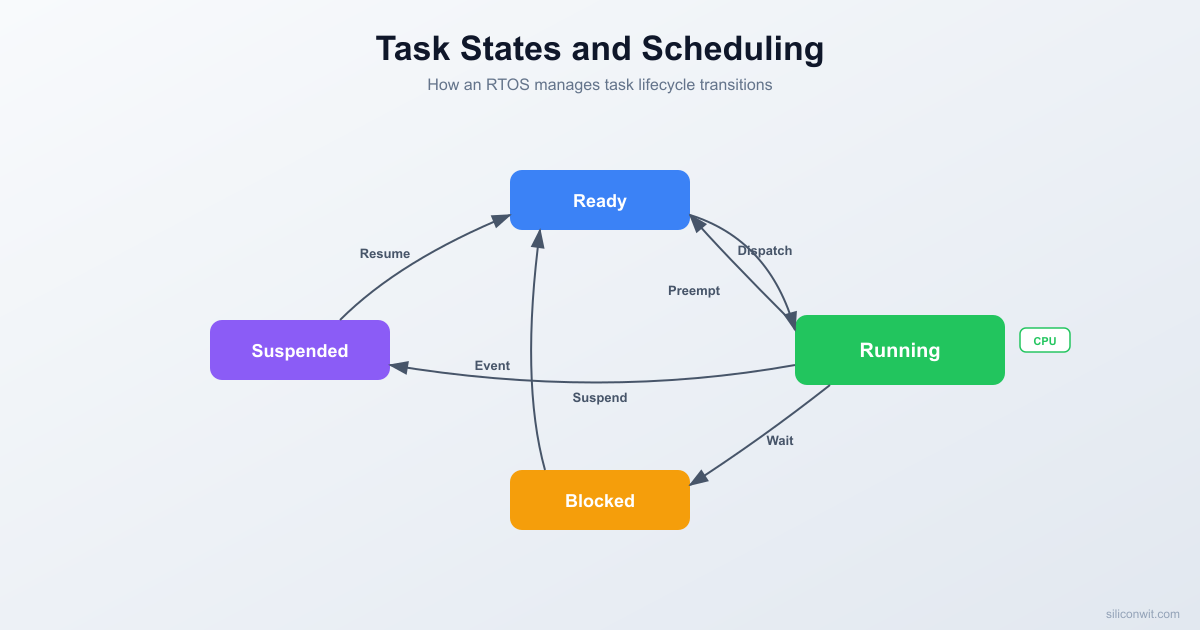
Task States in FreeRTOS
Every FreeRTOS task exists in one of four states at any given moment. Understanding these states is essential for predicting how the scheduler will behave and for debugging tasks that seem stuck or unresponsive.
The Four States
Ready: The task is able to run but is not currently executing because a higher-priority (or equal-priority) task holds the CPU. Ready tasks sit in a priority-ordered list, waiting for the scheduler to select them.
Running: The task currently has the CPU. On a single-core MCU like the STM32F103, exactly one task is in the Running state at any time.
Blocked: The task is waiting for an event. This could be a time delay (vTaskDelay), a queue receive, a semaphore take, or a task notification wait. Blocked tasks consume zero CPU cycles. They automatically move to the Ready state when the event they are waiting for occurs or their timeout expires.
Suspended: The task has been explicitly removed from scheduling by a call to vTaskSuspend(). It will not run, and no timeout will wake it. Only an explicit call to vTaskResume() (or xTaskResumeFromISR() from an interrupt) moves it back to Ready.
FreeRTOS Task State Machine
────────────────────────────────────────
vTaskResume()
┌─────────────────────┐
│ ▼
┌────────────┐ ┌───────────┐
│ SUSPENDED │ │ READY │◄──────────┐
└────────────┘ └─────┬─────┘ │
▲ │ scheduler │
│ vTaskSuspend() │ selects │
│ ▼ │
┌────────────┐ ┌───────────┐ preempted│
│ BLOCKED │◄──────│ RUNNING │───────────►│
│ (waiting │ block │ (on CPU) │
│ for event)│ API └───────────┘
└────────────┘
│ event occurs
└──────────────────────►READY
State Transitions
From
To
Triggered By
Ready
Running
Scheduler selects this task (highest priority in Ready list)
Running
Ready
A higher-priority task becomes Ready (preemption), or time slice expires for equal-priority tasks
Running
Blocked
Task calls a blocking API: vTaskDelay(), xQueueReceive(), xSemaphoreTake(), etc.
Running
Suspended
Task calls vTaskSuspend(NULL) on itself, or another task calls vTaskSuspend(handle)
Another task calls vTaskSuspend(handle) while this task is blocked
Suspended
Ready
Another task calls vTaskResume(handle) or ISR calls xTaskResumeFromISR(handle)
Task Control Block (TCB)
FreeRTOS maintains an internal structure for each task called the Task Control Block (TCB). You do not access this structure directly in application code, but understanding its contents helps you reason about memory usage and debug task-related issues.
Each TCB stores the following:
Field
Purpose
Stack pointer
Points to the current top of the task’s stack (updated on every context switch)
Priority
The task’s current priority level (may be temporarily elevated by priority inheritance)
State
Which list the task belongs to (Ready, Blocked, Suspended)
Task name
A string identifier used for debugging and trace output
Stack base
The starting address of the allocated stack memory
Stack high water mark
The smallest amount of remaining stack space ever recorded
Event list item
Links the task into event wait lists (queues, semaphores)
Notification value
A 32-bit value for lightweight task notifications
Why Stack Allocation Matters
Every task gets its own stack, allocated either from the FreeRTOS heap (dynamic) or from a statically declared array. If a task’s stack is too small, local variables and nested function calls will overflow into adjacent memory, corrupting other tasks or kernel data structures. There is no MMU on Cortex-M3 to catch this, so stack overflow often causes silent data corruption that manifests as seemingly random crashes.
A 256-word (1024-byte) stack is a reasonable starting point for most simple tasks. Tasks that use printf, snprintf, or deep call chains may need 512 words or more. Always verify with the stack high water mark during development.
Priority-Based Preemptive Scheduling
FreeRTOS uses a priority-based preemptive scheduler by default. The rule is straightforward: the highest-priority task in the Ready state always gets the CPU. If a higher-priority task becomes Ready while a lower-priority task is Running, the scheduler immediately preempts the lower-priority task and gives the CPU to the higher-priority one.
This preemption happens at any point in the lower-priority task’s code. The lower-priority task does not need to yield or reach a blocking call. The scheduler interrupts it, saves its context, and switches to the new task.
The idle task is a special task created automatically by FreeRTOS at priority 0 (the lowest possible priority). It runs whenever no other task is Ready. The idle task handles cleanup of deleted tasks and can optionally enter low-power sleep via the idle hook.
/* FreeRTOSConfig.h: enable preemption */
#defineconfigUSE_PREEMPTION1
#defineconfigMAX_PRIORITIES5
Priority-Based Preemptive Scheduling
─────────────────────────────────────
Priority 3 │ Emergency ░░░░▓▓▓▓▓▓░░░░░░░░░
Priority 2 │ Pedestrian ░░░░░░░░░░░░▓▓░░░░░
Priority 1 │ LightCycle ▓▓▓▓░░░░░░░░░░▓▓▓▓▓
Priority 0 │ Idle ░░░░░░░░░░░░░░░░░░░
└────────────────────────────────►
▓ = Running ░ = Ready/Blocked
With the traffic light controller, this means:
The emergency task (priority 3) will always preempt both other tasks immediately
The pedestrian task (priority 2) will preempt the light cycle task (priority 1)
The light cycle task (priority 1) runs only when both higher-priority tasks are blocked
Time Slicing
When two or more tasks share the same priority and are both in the Ready state, FreeRTOS uses time slicing to share the CPU between them. Each task runs for one tick period (typically 1 ms), then the scheduler rotates to the next equal-priority Ready task in round-robin fashion.
Time slicing is controlled by a configuration macro:
When enabled, the tick interrupt (SysTick on Cortex-M) checks at every tick whether another task of the same priority is Ready. If so, a context switch occurs. If disabled, a running task will continue until it blocks or is preempted by a higher-priority task, even if equal-priority tasks are Ready.
In our traffic light project, all three tasks have different priorities, so time slicing does not come into play. However, if you added a second priority-1 task (say, a status logging task), it would share time with the light cycle task in 1 ms slices.
Context Switch Mechanics
A context switch is the process of saving one task’s CPU state and restoring another’s. On ARM Cortex-M processors, the mechanism works as follows:
A trigger event occurs: a tick interrupt (SysTick) fires, or a task calls a blocking API, or a higher-priority task becomes Ready.
The running code sets the PendSV (Pendable Service Call) exception to pending. PendSV runs at the lowest exception priority, ensuring it does not interrupt other ISRs.
When PendSV executes, it saves the current task’s registers (R4 through R11, plus the link register) onto the current task’s stack. The hardware has already saved R0 through R3, R12, LR, PC, and xPSR as part of the exception entry sequence.
The scheduler selects the next task to run by examining the Ready lists from highest priority to lowest.
PendSV loads the new task’s saved registers from its stack, updates the stack pointer, and returns from exception. The hardware restores the remaining registers automatically.
The entire process takes approximately 5 to 15 microseconds on the STM32F103 at 72 MHz. This overhead is negligible for most applications, but it becomes relevant if you are switching thousands of times per second or have very tight timing requirements.
SysTick fires (every 1 ms)
|
v
xPortSysTickHandler()
-> Increment tick count
-> Check if any blocked tasks should unblock
-> If context switch needed, set PendSV pending
|
v
PendSV_Handler (runs at lowest exception priority)
-> Save R4-R11 to current task stack
-> Store stack pointer in current TCB
-> Call vTaskSwitchContext() to select next task
-> Load stack pointer from new TCB
-> Restore R4-R11 from new task stack
-> Return from exception (hardware restores R0-R3, PC, etc.)
Stack Allocation
Static vs Dynamic Allocation
FreeRTOS supports two approaches to stack allocation:
Dynamic allocation (default): xTaskCreate() allocates the task’s stack and TCB from the FreeRTOS heap. This is simpler to use but means the total memory available depends on configTOTAL_HEAP_SIZE.
/* Dynamic: FreeRTOS allocates 256 words from its heap */
Static allocation: xTaskCreateStatic() uses arrays you provide at compile time. This eliminates heap fragmentation and makes memory usage fully deterministic.
/* Static: you provide the stack and TCB memory */
staticStackType_tlight_stack[256];
staticStaticTask_t light_tcb;
xTaskCreateStatic(vLightCycleTask, "Light", 256,
NULL, 1, light_stack, &light_tcb);
To enable static allocation, set configSUPPORT_STATIC_ALLOCATION to 1 in FreeRTOSConfig.h.
Stack Size Estimation
Start with 256 words (1024 bytes) for simple tasks. Add more if the task uses snprintf, floating-point math, or deep call chains. During development, use uxTaskGetStackHighWaterMark() to check how close a task has come to overflowing:
/* Returns the minimum free stack (in words) since the task started.
If this returns less than ~20 words, increase the stack size. */
Stack Overflow Detection
Enable overflow checking in FreeRTOSConfig.h:
#defineconfigCHECK_FOR_STACK_OVERFLOW2
Method 1 (configCHECK_FOR_STACK_OVERFLOW = 1) checks whether the stack pointer has moved beyond the stack boundary when a context switch occurs. Method 2 (value 2) additionally fills the stack with a known pattern (0xA5) at creation time and checks whether the last 16 bytes have been overwritten. Method 2 catches more overflows but adds a small amount of overhead to each context switch.
When an overflow is detected, FreeRTOS calls vApplicationStackOverflowHook():
The firmware creates three tasks at different priorities. Each task manages its own aspect of the traffic light behavior. Task notifications are used for button events because they are faster and use less RAM than semaphores (no separate handle needed).
To solidify your understanding, let us walk through exactly what happens when the emergency button is pressed during a green light phase.
Initial state: The light cycle task (priority 1) is Running, executing its green phase vTaskDelay(3000). The pedestrian task (priority 2) and emergency task (priority 3) are both Blocked, waiting on xTaskNotifyWait(). The button poll task (priority 1) is Blocked on its 50 ms delay.
The button poll task wakes from its 50 ms delay. Since it shares priority 1 with the light cycle task (which is currently Blocked in vTaskDelay), the button poll task enters Running state and checks the GPIO pins.
The poll task detects the emergency button is pressed and calls xTaskNotify(xEmergencyHandle, ...). This moves the emergency task from Blocked to Ready.
The emergency task (priority 3) is now the highest-priority Ready task. The scheduler immediately preempts the button poll task (priority 1). This preemption happens inside the xTaskNotify() call itself, because the kernel detects that a higher-priority task just became Ready.
The emergency task enters Running state. It suspends the light cycle task and the pedestrian task, then takes control of the LEDs to begin flashing red.
During the 10-second emergency flash, the emergency task alternates between Running (setting LEDs) and Blocked (during its 250 ms delays). While the emergency task is Blocked in vTaskDelay(), the button poll task runs briefly to check buttons, but both the light cycle and pedestrian tasks remain Suspended and cannot execute regardless of their priority.
After the flash sequence completes, the emergency task resumes the pedestrian and light cycle tasks. The emergency task then loops back to xTaskNotifyWait() and enters the Blocked state.
The light cycle task, now Ready, becomes the highest-priority Ready task and resumes its normal sequence from wherever it left off in vTaskDelay().
The key insight is that the entire preemption chain happens automatically. You do not write any scheduling code. You simply assign priorities, and the FreeRTOS kernel handles the rest.
Project Structure
Directorytraffic-light-controller/
Directorysrc/
main.c
Directoryinclude/
FreeRTOSConfig.h
Directoryfreertos/
tasks.c
queue.c
list.c
Directoryinclude/
FreeRTOS.h
task.h
queue.h
semphr.h
Directoryportable/
DirectoryGCC/ARM_CM3/
port.c
portmacro.h
DirectoryMemMang/
heap_4.c
Makefile
STM32F103C8T6.ld
Makefile
TARGET = traffic_light
# Toolchain
CC = arm-none-eabi-gcc
OBJCOPY = arm-none-eabi-objcopy
SIZE = arm-none-eabi-size
# Directories
SRC_DIR = src
INC_DIR = include
FREERTOS_DIR = freertos
# Sources
SRCS = $(SRC_DIR)/main.c \
$(FREERTOS_DIR)/tasks.c \
$(FREERTOS_DIR)/queue.c \
$(FREERTOS_DIR)/list.c \
$(FREERTOS_DIR)/portable/GCC/ARM_CM3/port.c \
$(FREERTOS_DIR)/portable/MemMang/heap_4.c
# Includes
CFLAGS = -mcpu=cortex-m3 -mthumb -O2 -g \
-I$(INC_DIR)\
-I$(FREERTOS_DIR)/include \
-I$(FREERTOS_DIR)/portable/GCC/ARM_CM3 \
-DSTM32F103xB \
-Wall -Wextra
LDFLAGS = -T STM32F103C8T6.ld -nostartfiles \
--specs=nano.specs -lc -lnosys
all: $(TARGET).bin
$(TARGET).elf: $(SRCS)
$(CC)$(CFLAGS)$(LDFLAGS)$^ -o $@
$(SIZE)$@
$(TARGET).bin: $(TARGET).elf
$(OBJCOPY) -O binary $<$@
flash: $(TARGET).bin
st-flash write $< 0x8000000
clean:
rm -f $(TARGET).elf $(TARGET).bin
.PHONY: all flash clean
Experiments
Experiment 1: Add a Status Logger Task
Create a fourth task at priority 1 that prints the current light state to the serial port every 500 ms. Since it shares priority 1 with the light cycle task, observe how time slicing alternates between them. Check the serial output timestamps to confirm the 1 ms slice boundary.
Experiment 2: Swap Priorities
Change the emergency task to priority 1 and the light cycle task to priority 3. Press the emergency button and observe that nothing happens until the light cycle task enters a vTaskDelay() call. This demonstrates why priority assignment matters: the emergency task can only run when no higher-priority task is Ready.
Experiment 3: Disable Preemption
Set configUSE_PREEMPTION to 0 in FreeRTOSConfig.h and rebuild. Now the scheduler only switches tasks when the running task explicitly blocks (calls vTaskDelay, xTaskNotifyWait, etc.). Press the emergency button during a 3-second green delay. The emergency task will still respond because vTaskDelay is a blocking call, but try replacing it with a busy-wait loop and see what happens.
Experiment 4: Monitor Stack Usage
Add uxTaskGetStackHighWaterMark(NULL) calls inside each task and print the results. Reduce the light cycle task’s stack from 256 words to 128 words, then to 64 words. Watch the high water mark shrink until the stack overflow hook fires. This gives you intuition for stack sizing on real projects.



Comments