Skip to content

MQTT Clients on ESP32, Pico, and STM32

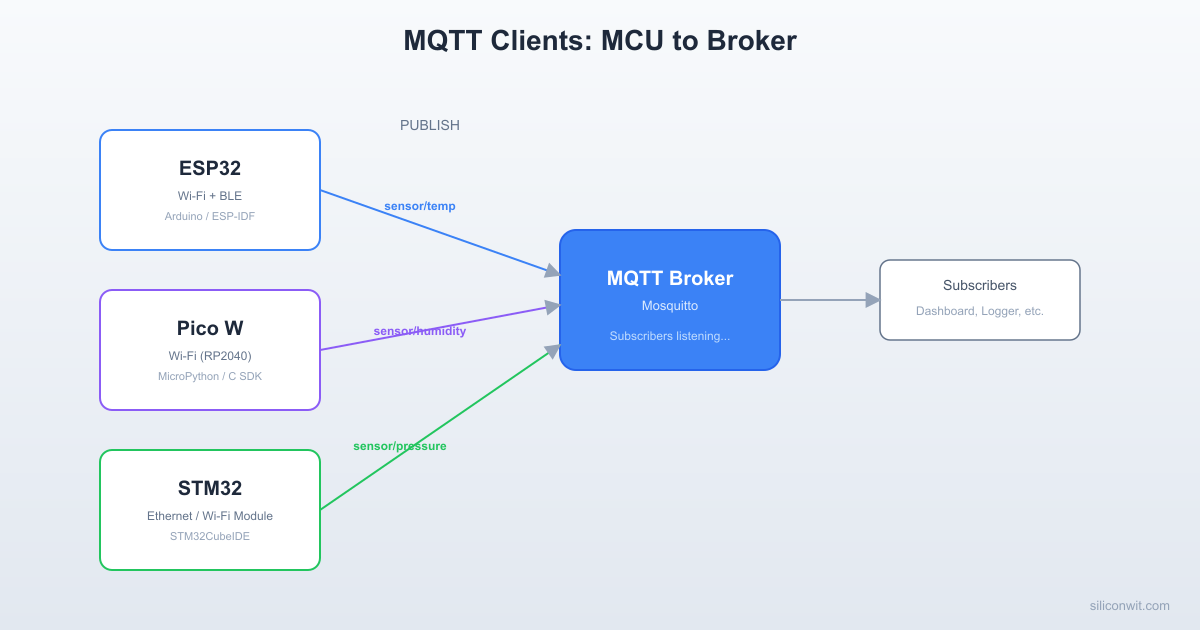
MQTT Clients on ESP32, Pico, and STM32 hero image
Modified:
Published:
MQTT Topic Hierarchy Design
──────────────────────────────────────────
site/
└── building_a/
├── esp32/
│ └── sensor_01/
│ ├── temperature ◄── 23.5
│ ├── humidity ◄── 65.2
│ └── status ◄── online
├── pico/
│ └── sensor_02/
│ ├── temperature
│ └── humidity
└── stm32/
└── sensor_03/
├── temperature
└── air_quality
Subscribe: site/building_a/+/+/temperature
Gets temperature from ALL devices.

A broker sitting idle is not very useful. The real work begins when embedded devices connect, authenticate, publish sensor data on well-structured topics, and recover gracefully from disconnections. In this lesson you will write MQTT client firmware for three different MCU platforms (ESP32, RPi Pico W, and STM32 with an ESP-01 Wi-Fi module), all publishing to the same Mosquitto broker you configured in Lesson 2. By the end, you will have a three-node sensor network with a consistent topic hierarchy, structured JSON payloads, and robust reconnection logic. #MQTT #ESP32 #MultiPlatform

What We Are Building

Three-MCU Sensor Network

Three microcontroller nodes, each reading a BME280 temperature/humidity sensor and publishing structured JSON to a shared MQTT broker. All nodes use the same topic hierarchy, the same payload format, and the same QoS strategy. You can monitor all three from a single mosquitto_sub session or from the SiliconWit.io dashboard.

Project specifications:

ParameterValue
PlatformsESP32 DevKitC, RPi Pico W, STM32F4 + ESP-01
SensorBME280 (I2C) on each platform
Broker (self-hosted)Mosquitto on port 1883 (plain) or 8883 (TLS)
SiliconWit.io MQTT endpointmqtt.siliconwit.io:8883 (TLS, device token auth)
Topic patternsite/building/device_type/device_id/measurement
Payload formatJSON with device_id, timestamp, temperature, humidity
QoS strategyQoS 0 for telemetry, QoS 1 for alerts, QoS 2 for commands
Publish intervalEvery 10 seconds
ReconnectionExponential backoff with jitter, 60s max interval
Offline bufferingStore readings in flash/EEPROM, publish on reconnect

Bill of Materials

RefComponentQuantityNotes
U1ESP32 DevKitC1Reuse from ESP32 course
U2RPi Pico W1Reuse from RPi Pico course
U3STM32F4 dev board1Reuse from STM32 course
U4ESP-01 module1Wi-Fi for STM32 via UART AT commands
S1-S3BME280 breakout3One per MCU (or move one between tests)
Breadboard + jumper wires1 set
Reconnection with Exponential Backoff
──────────────────────────────────────────
Connect attempt 1: wait 1s
Connect attempt 2: wait 2s
Connect attempt 3: wait 4s
Connect attempt 4: wait 8s + jitter
Connect attempt 5: wait 16s + jitter
Connect attempt 6: wait 32s + jitter
Connect attempt 7: wait 60s (max cap)
┌──────┐ fail ┌──────┐ fail ┌──────┐
│ Try ├─────►│ Wait ├─────►│ Try │...
│ 1 │ │ 1s │ │ 2 │
└──────┘ └──────┘ └──────┘
Jitter: add random 0 to 1s to prevent
all devices reconnecting simultaneously.

Topic Hierarchy Design


A flat topic like sensor/data works for one device. It falls apart at ten devices and becomes unmanageable at a hundred. A well-designed hierarchy lets you filter, route, and control access at every level.

The Hierarchy Pattern

The pattern used throughout this course follows a five-level structure:

site/building/device_type/device_id/measurement

For a concrete deployment:

factory/warehouse-a/esp32/esp32-001/telemetry
factory/warehouse-a/esp32/esp32-001/alerts
factory/warehouse-a/esp32/esp32-001/commands
factory/warehouse-a/pico/pico-001/telemetry
factory/warehouse-a/stm32/stm32-001/telemetry
factory/office/esp32/esp32-002/telemetry

Why Hierarchy Matters

ACLs (Access Control Lists). With Mosquitto ACLs from Lesson 2, you can restrict each device to only its own subtree. Device esp32-001 can publish to factory/warehouse-a/esp32/esp32-001/# but nowhere else. A dashboard user can subscribe to factory/warehouse-a/# to see all warehouse sensors without accessing the office.

Wildcards. MQTT provides two wildcard characters for subscriptions:

WildcardMeaningExampleMatches
+Single levelfactory/+/esp32/+/telemetryAll ESP32 telemetry in all buildings
#Multi-level (must be last)factory/warehouse-a/#Everything in warehouse-a

Dashboard subscriptions. A Grafana panel can subscribe to factory/+/+/+/telemetry and receive telemetry from every device across every building, regardless of device type. A building-specific panel subscribes to factory/warehouse-a/+/+/telemetry.

SiliconWit.io Topic Mapping

When connecting to the SiliconWit.io platform, the topic structure is different. SiliconWit.io uses a device-centric pattern:

d/{device_id}/t

Where {device_id} is the device identifier from your SiliconWit.io dashboard, and t is the telemetry subtopic. You authenticate with a device access token rather than username/password. We will show both self-hosted and SiliconWit.io connection examples for each platform.

JSON Payload Standard


Every device in this course publishes data in a consistent JSON format. This simplifies parsing, storage, and dashboard configuration because every consumer knows exactly what fields to expect.

Telemetry Payload

telemetry_payload.json
{
"device_id": "esp32-001",
"ts": 1710028800,
"temperature": 25.3,
"humidity": 60.1
}
FieldTypeDescription
device_idstringUnique identifier matching the topic hierarchy
tsintegerUnix epoch timestamp (seconds since 1970-01-01)
temperaturefloatTemperature in degrees Celsius
humidityfloatRelative humidity percentage

Alert Payload

alert_payload.json
{
"device_id": "esp32-001",
"ts": 1710028800,
"alert": "temperature_high",
"value": 45.2,
"threshold": 40.0
}

Command Payload

command_payload.json
{
"command": "set_interval",
"value": 30
}

Commands are published by the operator (or an automation rule) and received by the device on its commands subtopic. The device parses the JSON, applies the setting, and optionally publishes an acknowledgment.

Why JSON and Not Binary?

JSON adds overhead (field names are repeated in every message), but for most IoT applications publishing every 10 seconds or slower, the extra bytes are negligible compared to the TCP/TLS overhead. JSON is human-readable, easy to parse on every platform, and directly ingestible by InfluxDB, Grafana, and Node-RED. For high-frequency data (hundreds of messages per second), consider CBOR or Protocol Buffers, but that is beyond the scope of this lesson.

QoS Selection Strategy


Not every message deserves the same delivery guarantee. MQTT provides three QoS levels, and choosing the right one per message type balances reliability against bandwidth and latency.

QoSGuaranteeUse In This Course
0At most once (fire and forget)Periodic telemetry (temperature, humidity every 10s). Missing one reading is acceptable because the next arrives in 10 seconds.
1At least once (acknowledged)Alert messages (threshold exceeded). You want confirmation that the broker received the alert. Duplicate delivery is tolerable.
2Exactly once (four-step handshake)Remote commands (change interval, reboot device). A duplicate command could cause unintended behavior, so exactly-once matters.

ESP32 MQTT Client


The ESP32 has native Wi-Fi, making it the most straightforward platform for MQTT. We use the ESP-IDF mqtt_client component, which supports TLS, automatic reconnection, and all three QoS levels.

Project Structure

  • Directoryesp32_mqtt_client/
    • CMakeLists.txt
    • Directorymain/
      • CMakeLists.txt
      • main.c
      • bme280.c
      • bme280.h
      • mqtt_handler.c
      • mqtt_handler.h
      • wifi_connect.c
      • wifi_connect.h
    • Directorycomponents/
    • Directorycerts/
      • ca_cert.pem

Wi-Fi Connection

wifi_connect.c
#include <string.h>
#include "freertos/FreeRTOS.h"
#include "freertos/task.h"
#include "freertos/event_groups.h"
#include "esp_wifi.h"
#include "esp_log.h"
#include "esp_event.h"
#include "nvs_flash.h"
#define WIFI_SSID CONFIG_WIFI_SSID
#define WIFI_PASS CONFIG_WIFI_PASSWORD
#define MAX_RETRY 10
static const char *TAG = "wifi";
static EventGroupHandle_t wifi_event_group;
static const int CONNECTED_BIT = BIT0;
static int retry_count = 0;
static void wifi_event_handler(void *arg, esp_event_base_t event_base,
int32_t event_id, void *event_data)
{
if (event_base == WIFI_EVENT && event_id == WIFI_EVENT_STA_START) {
esp_wifi_connect();
} else if (event_base == WIFI_EVENT && event_id == WIFI_EVENT_STA_DISCONNECTED) {
if (retry_count < MAX_RETRY) {
esp_wifi_connect();
retry_count++;
ESP_LOGI(TAG, "Retrying Wi-Fi connection (%d/%d)", retry_count, MAX_RETRY);
} else {
ESP_LOGE(TAG, "Wi-Fi connection failed after %d retries", MAX_RETRY);
}
} else if (event_base == IP_EVENT && event_id == IP_EVENT_STA_GOT_IP) {
ip_event_got_ip_t *event = (ip_event_got_ip_t *)event_data;
ESP_LOGI(TAG, "Got IP: " IPSTR, IP2STR(&event->ip_info.ip));
retry_count = 0;
xEventGroupSetBits(wifi_event_group, CONNECTED_BIT);
}
}
void wifi_init_sta(void)
{
wifi_event_group = xEventGroupCreate();
ESP_ERROR_CHECK(esp_netif_init());
ESP_ERROR_CHECK(esp_event_loop_create_default());
esp_netif_create_default_wifi_sta();
wifi_init_config_t cfg = WIFI_INIT_CONFIG_DEFAULT();
ESP_ERROR_CHECK(esp_wifi_init(&cfg));
esp_event_handler_instance_t instance_any_id;
esp_event_handler_instance_t instance_got_ip;
ESP_ERROR_CHECK(esp_event_handler_instance_register(
WIFI_EVENT, ESP_EVENT_ANY_ID, &wifi_event_handler, NULL, &instance_any_id));
ESP_ERROR_CHECK(esp_event_handler_instance_register(
IP_EVENT, IP_EVENT_STA_GOT_IP, &wifi_event_handler, NULL, &instance_got_ip));
wifi_config_t wifi_config = {
.sta = {
.ssid = WIFI_SSID,
.password = WIFI_PASS,
.threshold.authmode = WIFI_AUTH_WPA2_PSK,
},
};
ESP_ERROR_CHECK(esp_wifi_set_mode(WIFI_MODE_STA));
ESP_ERROR_CHECK(esp_wifi_set_config(WIFI_IF_STA, &wifi_config));
ESP_ERROR_CHECK(esp_wifi_start());
ESP_LOGI(TAG, "Waiting for Wi-Fi connection...");
xEventGroupWaitBits(wifi_event_group, CONNECTED_BIT, pdFALSE, pdTRUE, portMAX_DELAY);
ESP_LOGI(TAG, "Wi-Fi connected");
}

MQTT Handler with TLS, LWT, and Reconnection

mqtt_handler.c
#include <stdio.h>
#include <string.h>
#include <time.h>
#include "esp_log.h"
#include "mqtt_client.h"
#include "mqtt_handler.h"
static const char *TAG = "mqtt";
static esp_mqtt_client_handle_t client = NULL;
static bool mqtt_connected = false;
/* Reconnection state */
static int backoff_ms = 1000;
static const int BACKOFF_MAX_MS = 60000;
static const float BACKOFF_MULTIPLIER = 2.0;
/* Embedded CA certificate for TLS (load from certs/ca_cert.pem) */
extern const uint8_t ca_cert_pem_start[] asm("_binary_ca_cert_pem_start");
extern const uint8_t ca_cert_pem_end[] asm("_binary_ca_cert_pem_end");
/* Topic definitions */
#define DEVICE_ID "esp32-001"
#define TOPIC_TELEMETRY "factory/warehouse-a/esp32/" DEVICE_ID "/telemetry"
#define TOPIC_ALERTS "factory/warehouse-a/esp32/" DEVICE_ID "/alerts"
#define TOPIC_COMMANDS "factory/warehouse-a/esp32/" DEVICE_ID "/commands"
#define TOPIC_STATUS "factory/warehouse-a/esp32/" DEVICE_ID "/status"
/* Last Will and Testament message */
#define LWT_MESSAGE "{\"device_id\":\"" DEVICE_ID "\",\"status\":\"offline\"}"
static void mqtt_event_handler(void *handler_args, esp_event_base_t base,
int32_t event_id, void *event_data)
{
esp_mqtt_event_handle_t event = event_data;
switch ((esp_mqtt_event_id_t)event_id) {
case MQTT_EVENT_CONNECTED:
ESP_LOGI(TAG, "MQTT connected to broker");
mqtt_connected = true;
backoff_ms = 1000; /* Reset backoff on successful connection */
/* Publish online status (retained so new subscribers see it immediately) */
esp_mqtt_client_publish(client, TOPIC_STATUS,
"{\"device_id\":\"" DEVICE_ID "\",\"status\":\"online\"}", 0, 1, 1);
/* Subscribe to command topic at QoS 2 */
esp_mqtt_client_subscribe(client, TOPIC_COMMANDS, 2);
ESP_LOGI(TAG, "Subscribed to %s at QoS 2", TOPIC_COMMANDS);
break;
case MQTT_EVENT_DISCONNECTED:
ESP_LOGW(TAG, "MQTT disconnected");
mqtt_connected = false;
/* Add jitter: random offset of 0 to 25% of backoff */
int jitter = (esp_random() % (backoff_ms / 4 + 1));
int delay = backoff_ms + jitter;
ESP_LOGI(TAG, "Reconnecting in %d ms (backoff: %d, jitter: %d)",
delay, backoff_ms, jitter);
vTaskDelay(pdMS_TO_TICKS(delay));
/* Increase backoff for next attempt */
backoff_ms = (int)(backoff_ms * BACKOFF_MULTIPLIER);
if (backoff_ms > BACKOFF_MAX_MS) {
backoff_ms = BACKOFF_MAX_MS;
}
break;
case MQTT_EVENT_DATA:
ESP_LOGI(TAG, "Received message on topic: %.*s", event->topic_len, event->topic);
ESP_LOGI(TAG, "Payload: %.*s", event->data_len, event->data);
/* Parse command JSON (simplified; production code should use cJSON) */
if (strstr(event->data, "set_interval")) {
int new_interval = 10; /* Parse from JSON in real implementation */
ESP_LOGI(TAG, "Setting publish interval to %d seconds", new_interval);
/* Update the publish interval variable here */
}
break;
case MQTT_EVENT_ERROR:
ESP_LOGE(TAG, "MQTT error type: %d", event->error_handle->error_type);
break;
default:
break;
}
}
void mqtt_app_start(void)
{
esp_mqtt_client_config_t mqtt_cfg = {
.broker = {
.address = {
.uri = "mqtts://your-broker-ip:8883",
},
.verification = {
.certificate = (const char *)ca_cert_pem_start,
},
},
.credentials = {
.username = "esp32-001",
.authentication = {
.password = "your-device-password",
},
.client_id = DEVICE_ID,
},
.session = {
.last_will = {
.topic = TOPIC_STATUS,
.msg = LWT_MESSAGE,
.msg_len = strlen(LWT_MESSAGE),
.qos = 1,
.retain = 1,
},
.keepalive = 30,
},
};
client = esp_mqtt_client_init(&mqtt_cfg);
esp_mqtt_client_register_event(client, ESP_EVENT_ANY_ID, mqtt_event_handler, NULL);
esp_mqtt_client_start(client);
}
bool mqtt_is_connected(void)
{
return mqtt_connected;
}
void mqtt_publish_telemetry(float temperature, float humidity)
{
if (!mqtt_connected) {
ESP_LOGW(TAG, "Not connected, buffering telemetry");
/* Buffer logic covered in the offline buffering section below */
return;
}
time_t now;
time(&now);
char payload[256];
snprintf(payload, sizeof(payload),
"{\"device_id\":\"%s\",\"ts\":%ld,\"temperature\":%.1f,\"humidity\":%.1f}",
DEVICE_ID, (long)now, temperature, humidity);
/* QoS 0 for regular telemetry */
esp_mqtt_client_publish(client, TOPIC_TELEMETRY, payload, 0, 0, 0);
ESP_LOGI(TAG, "Published: %s", payload);
}
void mqtt_publish_alert(const char *alert_type, float value, float threshold)
{
if (!mqtt_connected) {
return;
}
time_t now;
time(&now);
char payload[256];
snprintf(payload, sizeof(payload),
"{\"device_id\":\"%s\",\"ts\":%ld,\"alert\":\"%s\",\"value\":%.1f,\"threshold\":%.1f}",
DEVICE_ID, (long)now, alert_type, value, threshold);
/* QoS 1 for alerts (at least once delivery) */
esp_mqtt_client_publish(client, TOPIC_ALERTS, payload, 0, 1, 0);
ESP_LOGW(TAG, "Alert published: %s", payload);
}

Connecting to SiliconWit.io

To connect to SiliconWit.io instead of your self-hosted Mosquitto, change the broker configuration:

mqtt_handler_siliconwit.c (config section)
/* SiliconWit.io connection configuration */
#define SILICONWIT_DEVICE_ID "your-device-id" /* From SiliconWit.io dashboard */
#define SILICONWIT_ACCESS_TOKEN "your-access-token" /* From SiliconWit.io dashboard */
#define SILICONWIT_TOPIC "d/" SILICONWIT_DEVICE_ID "/t"
esp_mqtt_client_config_t mqtt_cfg = {
.broker = {
.address = {
.uri = "mqtts://mqtt.siliconwit.io:8883",
},
/* SiliconWit.io uses a publicly trusted CA; you may not need a custom cert */
},
.credentials = {
.username = SILICONWIT_DEVICE_ID,
.authentication = {
.password = SILICONWIT_ACCESS_TOKEN,
},
.client_id = SILICONWIT_DEVICE_ID,
},
.session = {
.keepalive = 30,
},
};
/* Publish to the SiliconWit.io topic */
esp_mqtt_client_publish(client, SILICONWIT_TOPIC, payload, 0, 0, 0);

Main Application Loop

main.c
#include <stdio.h>
#include "freertos/FreeRTOS.h"
#include "freertos/task.h"
#include "esp_log.h"
#include "nvs_flash.h"
#include "wifi_connect.h"
#include "mqtt_handler.h"
#include "bme280.h"
static const char *TAG = "main";
static int publish_interval_s = 10;
#define TEMP_ALERT_THRESHOLD 40.0
void sensor_task(void *pvParameters)
{
bme280_init();
while (1) {
float temperature = bme280_read_temperature();
float humidity = bme280_read_humidity();
ESP_LOGI(TAG, "BME280: temp=%.1f C, hum=%.1f %%", temperature, humidity);
mqtt_publish_telemetry(temperature, humidity);
/* Check alert conditions */
if (temperature > TEMP_ALERT_THRESHOLD) {
mqtt_publish_alert("temperature_high", temperature, TEMP_ALERT_THRESHOLD);
}
vTaskDelay(pdMS_TO_TICKS(publish_interval_s * 1000));
}
}
void app_main(void)
{
ESP_ERROR_CHECK(nvs_flash_init());
wifi_init_sta();
mqtt_app_start();
xTaskCreate(sensor_task, "sensor_task", 4096, NULL, 5, NULL);
}

RPi Pico W MQTT Client


The RPi Pico W has onboard Wi-Fi and runs MicroPython, which provides a very different development experience from the C-based ESP32. The umqtt.simple library handles MQTT, and the code is shorter but follows the same architecture: connect, publish, subscribe, reconnect.

Project Structure

  • Directorypico_mqtt_client/
    • main.py
    • config.py
    • bme280.py
    • mqtt_client.py
    • offline_buffer.py

Configuration

config.py
# Wi-Fi settings
WIFI_SSID = "your-wifi-ssid"
WIFI_PASSWORD = "your-wifi-password"
# MQTT broker settings (self-hosted Mosquitto)
MQTT_BROKER = "your-broker-ip"
MQTT_PORT = 1883
MQTT_USER = "pico-001"
MQTT_PASSWORD = "your-device-password"
# Device identity
DEVICE_ID = "pico-001"
DEVICE_TYPE = "pico"
SITE = "factory"
BUILDING = "warehouse-a"
# Topic hierarchy
TOPIC_BASE = f"{SITE}/{BUILDING}/{DEVICE_TYPE}/{DEVICE_ID}"
TOPIC_TELEMETRY = f"{TOPIC_BASE}/telemetry"
TOPIC_ALERTS = f"{TOPIC_BASE}/alerts"
TOPIC_COMMANDS = f"{TOPIC_BASE}/commands"
TOPIC_STATUS = f"{TOPIC_BASE}/status"
# SiliconWit.io settings (alternative cloud platform)
SILICONWIT_BROKER = "mqtt.siliconwit.io"
SILICONWIT_PORT = 8883
SILICONWIT_DEVICE_ID = "your-siliconwit-device-id"
SILICONWIT_TOKEN = "your-access-token"
SILICONWIT_TOPIC = f"d/{SILICONWIT_DEVICE_ID}/t"
# Timing
PUBLISH_INTERVAL_S = 10
TEMP_ALERT_THRESHOLD = 40.0
# Reconnection
BACKOFF_INITIAL_MS = 1000
BACKOFF_MAX_MS = 60000
BACKOFF_MULTIPLIER = 2.0

MQTT Client with Reconnection

mqtt_client.py
import time
import json
import machine
from umqtt.simple import MQTTClient
import config
class SensorMQTTClient:
def __init__(self):
self.client = None
self.connected = False
self.backoff_ms = config.BACKOFF_INITIAL_MS
self.publish_interval = config.PUBLISH_INTERVAL_S
def connect(self):
"""Connect to the MQTT broker with LWT."""
lwt_payload = json.dumps({
"device_id": config.DEVICE_ID,
"status": "offline"
})
self.client = MQTTClient(
client_id=config.DEVICE_ID,
server=config.MQTT_BROKER,
port=config.MQTT_PORT,
user=config.MQTT_USER,
password=config.MQTT_PASSWORD,
keepalive=30
)
# Set Last Will and Testament
self.client.set_last_will(
config.TOPIC_STATUS,
lwt_payload,
retain=True,
qos=1
)
# Set callback for incoming messages
self.client.set_callback(self._on_message)
try:
self.client.connect()
self.connected = True
self.backoff_ms = config.BACKOFF_INITIAL_MS
print(f"MQTT connected to {config.MQTT_BROKER}")
# Publish online status (retained)
online_payload = json.dumps({
"device_id": config.DEVICE_ID,
"status": "online"
})
self.client.publish(config.TOPIC_STATUS, online_payload, retain=True, qos=1)
# Subscribe to commands
self.client.subscribe(config.TOPIC_COMMANDS, qos=1)
print(f"Subscribed to {config.TOPIC_COMMANDS}")
except OSError as e:
print(f"MQTT connection failed: {e}")
self.connected = False
def reconnect(self):
"""Reconnect with exponential backoff and jitter."""
import urandom
jitter = urandom.getrandbits(10) % (self.backoff_ms // 4 + 1)
delay = self.backoff_ms + jitter
print(f"Reconnecting in {delay} ms")
time.sleep_ms(delay)
self.backoff_ms = int(self.backoff_ms * config.BACKOFF_MULTIPLIER)
if self.backoff_ms > config.BACKOFF_MAX_MS:
self.backoff_ms = config.BACKOFF_MAX_MS
self.connect()
def _on_message(self, topic, msg):
"""Handle incoming MQTT messages."""
topic_str = topic.decode("utf-8")
msg_str = msg.decode("utf-8")
print(f"Received on {topic_str}: {msg_str}")
try:
data = json.loads(msg_str)
if data.get("command") == "set_interval":
self.publish_interval = data.get("value", config.PUBLISH_INTERVAL_S)
print(f"Publish interval set to {self.publish_interval}s")
elif data.get("command") == "reboot":
print("Reboot command received, resetting...")
time.sleep(1)
machine.reset()
except ValueError:
print("Failed to parse command JSON")
def check_messages(self):
"""Non-blocking check for incoming messages."""
if self.connected:
try:
self.client.check_msg()
except OSError:
self.connected = False
def publish_telemetry(self, temperature, humidity):
"""Publish sensor data as JSON at QoS 0."""
if not self.connected:
print("Not connected, cannot publish")
return False
payload = json.dumps({
"device_id": config.DEVICE_ID,
"ts": int(time.time()),
"temperature": round(temperature, 1),
"humidity": round(humidity, 1)
})
try:
self.client.publish(config.TOPIC_TELEMETRY, payload, qos=0)
print(f"Published telemetry: {payload}")
return True
except OSError as e:
print(f"Publish failed: {e}")
self.connected = False
return False
def publish_alert(self, alert_type, value, threshold):
"""Publish alert at QoS 1."""
if not self.connected:
return False
payload = json.dumps({
"device_id": config.DEVICE_ID,
"ts": int(time.time()),
"alert": alert_type,
"value": round(value, 1),
"threshold": round(threshold, 1)
})
try:
self.client.publish(config.TOPIC_ALERTS, payload, qos=1)
print(f"Alert published: {payload}")
return True
except OSError:
self.connected = False
return False
def disconnect(self):
"""Graceful disconnect."""
if self.client and self.connected:
self.client.disconnect()
self.connected = False

Wi-Fi Connection and Main Loop

main.py
import network
import time
import json
import config
from bme280 import BME280
from mqtt_client import SensorMQTTClient
from offline_buffer import OfflineBuffer
from machine import Pin, I2C
def connect_wifi():
"""Connect to Wi-Fi and wait for an IP address."""
wlan = network.WLAN(network.STA_IF)
wlan.active(True)
wlan.connect(config.WIFI_SSID, config.WIFI_PASSWORD)
max_wait = 20
while max_wait > 0:
if wlan.isconnected():
break
max_wait -= 1
print("Waiting for Wi-Fi...")
time.sleep(1)
if not wlan.isconnected():
raise RuntimeError("Wi-Fi connection failed")
ip = wlan.ifconfig()[0]
print(f"Wi-Fi connected, IP: {ip}")
return wlan
def main():
wlan = connect_wifi()
# Initialize I2C and BME280
i2c = I2C(0, sda=Pin(0), scl=Pin(1), freq=400000)
sensor = BME280(i2c=i2c)
# Initialize MQTT client and offline buffer
mqtt = SensorMQTTClient()
buffer = OfflineBuffer(max_entries=50)
mqtt.connect()
while True:
# Check for incoming commands
mqtt.check_messages()
# Read sensor
temperature = sensor.temperature()
humidity = sensor.humidity()
print(f"BME280: temp={temperature:.1f} C, hum={humidity:.1f} %")
if mqtt.connected:
# Flush any buffered readings first
buffer.flush(mqtt)
# Publish current reading
mqtt.publish_telemetry(temperature, humidity)
# Check alert conditions
if temperature > config.TEMP_ALERT_THRESHOLD:
mqtt.publish_alert("temperature_high", temperature,
config.TEMP_ALERT_THRESHOLD)
else:
# Buffer the reading for later
buffer.store(temperature, humidity)
mqtt.reconnect()
time.sleep(mqtt.publish_interval)
if __name__ == "__main__":
main()

Connecting Pico to SiliconWit.io

To use SiliconWit.io, create a second client configuration:

main.py (SiliconWit.io variant)
# Replace the MQTTClient initialization in mqtt_client.py with:
import ssl
def connect_siliconwit(self):
"""Connect to SiliconWit.io with TLS."""
ssl_params = {"server_hostname": config.SILICONWIT_BROKER}
self.client = MQTTClient(
client_id=config.SILICONWIT_DEVICE_ID,
server=config.SILICONWIT_BROKER,
port=config.SILICONWIT_PORT,
user=config.SILICONWIT_DEVICE_ID,
password=config.SILICONWIT_TOKEN,
keepalive=30,
ssl=True,
ssl_params=ssl_params
)
self.client.connect()
print(f"Connected to SiliconWit.io as {config.SILICONWIT_DEVICE_ID}")
# Publish to the SiliconWit.io topic format
payload = json.dumps({
"device_id": config.SILICONWIT_DEVICE_ID,
"ts": int(time.time()),
"temperature": 25.0,
"humidity": 60.0
})
self.client.publish(config.SILICONWIT_TOPIC, payload, qos=0)

STM32 MQTT Client (via ESP-01 AT Commands)


The STM32F4 does not have built-in Wi-Fi, so we use an ESP-01 module connected over UART. The ESP-01 runs stock AT firmware and handles the entire TCP/Wi-Fi stack. The STM32 sends AT commands to connect to Wi-Fi, establish a TCP connection to the MQTT broker, and then sends raw MQTT packets over the TCP link.

This approach is common in industrial IoT where the main MCU handles real-time control and a secondary module handles connectivity.

Hardware Connections

STM32 PinESP-01 PinNotes
PA2 (USART2 TX)RX3.3V logic, no level shifter needed
PA3 (USART2 RX)TX3.3V logic
3.3VVCC, CH_PDESP-01 needs 3.3V (not 5V)
GNDGNDCommon ground

AT Command Sequence

The ESP-01 AT firmware accepts commands over UART. Here is the complete sequence to connect to Wi-Fi and establish an MQTT connection:

at_command_sequence.txt
# 1. Test AT communication
AT
-> OK
# 2. Set Wi-Fi mode to Station
AT+CWMODE=1
-> OK
# 3. Connect to Wi-Fi access point
AT+CWJAP="your-ssid","your-password"
-> WIFI CONNECTED
-> WIFI GOT IP
-> OK
# 4. Check IP address
AT+CIFSR
-> +CIFSR:STAIP,"192.168.1.100"
-> OK
# 5. Establish TCP connection to MQTT broker
AT+CIPSTART="TCP","your-broker-ip",1883
-> CONNECT
-> OK
# 6. Set transparent transmission mode
AT+CIPMODE=1
-> OK
# 7. Start sending data
AT+CIPSEND
-> >
# (Now send raw MQTT CONNECT packet bytes)
# (Then MQTT PUBLISH, SUBSCRIBE, etc.)

STM32 AT Command Driver

esp01_at.h
#ifndef ESP01_AT_H
#define ESP01_AT_H
#include <stdbool.h>
#include <stdint.h>
typedef enum {
AT_OK,
AT_ERROR,
AT_TIMEOUT
} at_result_t;
void esp01_init(void);
at_result_t esp01_send_cmd(const char *cmd, const char *expected, uint32_t timeout_ms);
at_result_t esp01_wifi_connect(const char *ssid, const char *password);
at_result_t esp01_tcp_connect(const char *host, uint16_t port);
void esp01_send_raw(const uint8_t *data, uint16_t len);
uint16_t esp01_recv_raw(uint8_t *buf, uint16_t max_len, uint32_t timeout_ms);
void esp01_close(void);
#endif
esp01_at.c
#include "esp01_at.h"
#include "stm32f4xx_hal.h"
#include <string.h>
#include <stdio.h>
extern UART_HandleTypeDef huart2;
static char rx_buffer[512];
static volatile uint16_t rx_index = 0;
void esp01_init(void)
{
rx_index = 0;
memset(rx_buffer, 0, sizeof(rx_buffer));
/* Enable UART receive interrupt */
HAL_UART_Receive_IT(&huart2, (uint8_t *)&rx_buffer[rx_index], 1);
}
at_result_t esp01_send_cmd(const char *cmd, const char *expected, uint32_t timeout_ms)
{
/* Clear receive buffer */
rx_index = 0;
memset(rx_buffer, 0, sizeof(rx_buffer));
/* Send command with CR+LF */
char cmd_buf[128];
snprintf(cmd_buf, sizeof(cmd_buf), "%s\r\n", cmd);
HAL_UART_Transmit(&huart2, (uint8_t *)cmd_buf, strlen(cmd_buf), 1000);
/* Wait for expected response */
uint32_t start = HAL_GetTick();
while ((HAL_GetTick() - start) < timeout_ms) {
if (strstr(rx_buffer, expected) != NULL) {
return AT_OK;
}
if (strstr(rx_buffer, "ERROR") != NULL) {
return AT_ERROR;
}
HAL_Delay(10);
}
return AT_TIMEOUT;
}
at_result_t esp01_wifi_connect(const char *ssid, const char *password)
{
at_result_t res;
/* Test AT communication */
res = esp01_send_cmd("AT", "OK", 2000);
if (res != AT_OK) return res;
/* Set station mode */
res = esp01_send_cmd("AT+CWMODE=1", "OK", 2000);
if (res != AT_OK) return res;
/* Connect to Wi-Fi */
char cmd[128];
snprintf(cmd, sizeof(cmd), "AT+CWJAP=\"%s\",\"%s\"", ssid, password);
res = esp01_send_cmd(cmd, "WIFI GOT IP", 15000);
return res;
}
at_result_t esp01_tcp_connect(const char *host, uint16_t port)
{
char cmd[128];
snprintf(cmd, sizeof(cmd), "AT+CIPSTART=\"TCP\",\"%s\",%u", host, port);
return esp01_send_cmd(cmd, "CONNECT", 10000);
}
void esp01_send_raw(const uint8_t *data, uint16_t len)
{
char cmd[32];
snprintf(cmd, sizeof(cmd), "AT+CIPSEND=%u", len);
esp01_send_cmd(cmd, ">", 5000);
HAL_UART_Transmit(&huart2, (uint8_t *)data, len, 5000);
}
uint16_t esp01_recv_raw(uint8_t *buf, uint16_t max_len, uint32_t timeout_ms)
{
uint32_t start = HAL_GetTick();
while ((HAL_GetTick() - start) < timeout_ms && rx_index == 0) {
HAL_Delay(10);
}
uint16_t copy_len = (rx_index < max_len) ? rx_index : max_len;
memcpy(buf, rx_buffer, copy_len);
rx_index = 0;
return copy_len;
}
void esp01_close(void)
{
esp01_send_cmd("AT+CIPCLOSE", "OK", 2000);
}
/* UART receive interrupt callback */
void HAL_UART_RxCpltCallback(UART_HandleTypeDef *huart)
{
if (huart == &huart2) {
rx_index++;
if (rx_index < sizeof(rx_buffer) - 1) {
HAL_UART_Receive_IT(&huart2, (uint8_t *)&rx_buffer[rx_index], 1);
}
}
}

MQTT Packet Builder

Since the STM32 sends raw MQTT packets (not using a high-level library), we need a minimal MQTT packet builder:

mqtt_packet.h
#ifndef MQTT_PACKET_H
#define MQTT_PACKET_H
#include <stdint.h>
uint16_t mqtt_build_connect(uint8_t *buf, const char *client_id,
const char *username, const char *password,
const char *will_topic, const char *will_msg,
uint16_t keepalive);
uint16_t mqtt_build_publish(uint8_t *buf, const char *topic,
const char *payload, uint8_t qos, uint8_t retain);
uint16_t mqtt_build_subscribe(uint8_t *buf, const char *topic, uint8_t qos,
uint16_t packet_id);
uint16_t mqtt_build_pingreq(uint8_t *buf);
uint16_t mqtt_build_disconnect(uint8_t *buf);
#endif
mqtt_packet.c
#include "mqtt_packet.h"
#include <string.h>
static uint16_t encode_remaining_length(uint8_t *buf, uint32_t length)
{
uint16_t i = 0;
do {
uint8_t encoded = length % 128;
length = length / 128;
if (length > 0) {
encoded |= 0x80;
}
buf[i++] = encoded;
} while (length > 0);
return i;
}
static uint16_t write_utf8_string(uint8_t *buf, const char *str)
{
uint16_t len = strlen(str);
buf[0] = (len >> 8) & 0xFF;
buf[1] = len & 0xFF;
memcpy(&buf[2], str, len);
return 2 + len;
}
uint16_t mqtt_build_connect(uint8_t *buf, const char *client_id,
const char *username, const char *password,
const char *will_topic, const char *will_msg,
uint16_t keepalive)
{
/* Variable header: protocol name, level, flags, keepalive */
uint8_t var_header[10];
var_header[0] = 0x00; var_header[1] = 0x04; /* Protocol name length */
var_header[2] = 'M'; var_header[3] = 'Q'; var_header[4] = 'T'; var_header[5] = 'T';
var_header[6] = 0x04; /* Protocol level (MQTT 3.1.1) */
uint8_t flags = 0x02; /* Clean session */
if (username) flags |= 0x80;
if (password) flags |= 0x40;
if (will_topic && will_msg) flags |= 0x04 | 0x08; /* Will flag + Will QoS 1 */
var_header[7] = flags;
var_header[8] = (keepalive >> 8) & 0xFF;
var_header[9] = keepalive & 0xFF;
/* Calculate payload length */
uint32_t payload_len = 2 + strlen(client_id);
if (will_topic && will_msg) {
payload_len += 2 + strlen(will_topic) + 2 + strlen(will_msg);
}
if (username) payload_len += 2 + strlen(username);
if (password) payload_len += 2 + strlen(password);
uint32_t remaining = 10 + payload_len;
/* Fixed header */
uint16_t pos = 0;
buf[pos++] = 0x10; /* CONNECT packet type */
pos += encode_remaining_length(&buf[pos], remaining);
/* Variable header */
memcpy(&buf[pos], var_header, 10);
pos += 10;
/* Payload */
pos += write_utf8_string(&buf[pos], client_id);
if (will_topic && will_msg) {
pos += write_utf8_string(&buf[pos], will_topic);
pos += write_utf8_string(&buf[pos], will_msg);
}
if (username) pos += write_utf8_string(&buf[pos], username);
if (password) pos += write_utf8_string(&buf[pos], password);
return pos;
}
uint16_t mqtt_build_publish(uint8_t *buf, const char *topic,
const char *payload, uint8_t qos, uint8_t retain)
{
uint16_t topic_len = strlen(topic);
uint16_t payload_len = strlen(payload);
uint32_t remaining = 2 + topic_len + payload_len;
if (qos > 0) remaining += 2; /* Packet identifier for QoS 1/2 */
uint16_t pos = 0;
buf[pos++] = 0x30 | (qos << 1) | retain; /* PUBLISH fixed header */
pos += encode_remaining_length(&buf[pos], remaining);
/* Topic */
buf[pos++] = (topic_len >> 8) & 0xFF;
buf[pos++] = topic_len & 0xFF;
memcpy(&buf[pos], topic, topic_len);
pos += topic_len;
/* Packet identifier (QoS 1 or 2 only) */
if (qos > 0) {
static uint16_t packet_id = 1;
buf[pos++] = (packet_id >> 8) & 0xFF;
buf[pos++] = packet_id & 0xFF;
packet_id++;
}
/* Payload */
memcpy(&buf[pos], payload, payload_len);
pos += payload_len;
return pos;
}
uint16_t mqtt_build_subscribe(uint8_t *buf, const char *topic, uint8_t qos,
uint16_t packet_id)
{
uint16_t topic_len = strlen(topic);
uint32_t remaining = 2 + 2 + topic_len + 1; /* packet_id + topic + qos */
uint16_t pos = 0;
buf[pos++] = 0x82; /* SUBSCRIBE fixed header */
pos += encode_remaining_length(&buf[pos], remaining);
buf[pos++] = (packet_id >> 8) & 0xFF;
buf[pos++] = packet_id & 0xFF;
buf[pos++] = (topic_len >> 8) & 0xFF;
buf[pos++] = topic_len & 0xFF;
memcpy(&buf[pos], topic, topic_len);
pos += topic_len;
buf[pos++] = qos;
return pos;
}
uint16_t mqtt_build_pingreq(uint8_t *buf)
{
buf[0] = 0xC0; /* PINGREQ */
buf[1] = 0x00;
return 2;
}
uint16_t mqtt_build_disconnect(uint8_t *buf)
{
buf[0] = 0xE0; /* DISCONNECT */
buf[1] = 0x00;
return 2;
}

STM32 Main Application

stm32_mqtt_main.c
#include "main.h"
#include "esp01_at.h"
#include "mqtt_packet.h"
#include "bme280.h"
#include <stdio.h>
#include <string.h>
#include <time.h>
/* Configuration */
#define WIFI_SSID "your-ssid"
#define WIFI_PASSWORD "your-password"
#define BROKER_HOST "your-broker-ip"
#define BROKER_PORT 1883
#define DEVICE_ID "stm32-001"
#define TOPIC_TELEMETRY "factory/warehouse-a/stm32/" DEVICE_ID "/telemetry"
#define TOPIC_COMMANDS "factory/warehouse-a/stm32/" DEVICE_ID "/commands"
#define TOPIC_STATUS "factory/warehouse-a/stm32/" DEVICE_ID "/status"
#define LWT_MESSAGE "{\"device_id\":\"" DEVICE_ID "\",\"status\":\"offline\"}"
#define PUBLISH_INTERVAL_MS 10000
#define KEEPALIVE_S 30
static uint8_t mqtt_buf[512];
static bool mqtt_connected = false;
static uint32_t backoff_ms = 1000;
static const uint32_t BACKOFF_MAX_MS = 60000;
void mqtt_connect_sequence(void)
{
at_result_t res;
/* Step 1: Connect to Wi-Fi */
printf("Connecting to Wi-Fi...\r\n");
res = esp01_wifi_connect(WIFI_SSID, WIFI_PASSWORD);
if (res != AT_OK) {
printf("Wi-Fi connection failed\r\n");
return;
}
printf("Wi-Fi connected\r\n");
/* Step 2: TCP connection to broker */
printf("Connecting to MQTT broker...\r\n");
res = esp01_tcp_connect(BROKER_HOST, BROKER_PORT);
if (res != AT_OK) {
printf("TCP connection failed\r\n");
return;
}
printf("TCP connected\r\n");
/* Step 3: Send MQTT CONNECT packet with LWT */
uint16_t len = mqtt_build_connect(
mqtt_buf, DEVICE_ID,
DEVICE_ID, /* username */
"your-password", /* password */
TOPIC_STATUS, /* will topic */
LWT_MESSAGE, /* will message */
KEEPALIVE_S
);
esp01_send_raw(mqtt_buf, len);
/* Wait for CONNACK */
uint8_t resp[32];
uint16_t resp_len = esp01_recv_raw(resp, sizeof(resp), 5000);
if (resp_len >= 4 && resp[0] == 0x20 && resp[3] == 0x00) {
printf("MQTT CONNACK received, connection accepted\r\n");
mqtt_connected = true;
backoff_ms = 1000;
/* Subscribe to commands */
len = mqtt_build_subscribe(mqtt_buf, TOPIC_COMMANDS, 1, 1);
esp01_send_raw(mqtt_buf, len);
printf("Subscribed to %s\r\n", TOPIC_COMMANDS);
} else {
printf("MQTT connection rejected (rc=%d)\r\n",
resp_len >= 4 ? resp[3] : -1);
mqtt_connected = false;
}
}
void mqtt_publish_telemetry(float temperature, float humidity)
{
if (!mqtt_connected) return;
char payload[256];
uint32_t ts = HAL_GetTick() / 1000; /* Approximate; use RTC for real epoch */
snprintf(payload, sizeof(payload),
"{\"device_id\":\"%s\",\"ts\":%lu,\"temperature\":%.1f,\"humidity\":%.1f}",
DEVICE_ID, ts, temperature, humidity);
uint16_t len = mqtt_build_publish(mqtt_buf, TOPIC_TELEMETRY, payload, 0, 0);
esp01_send_raw(mqtt_buf, len);
printf("Published: %s\r\n", payload);
}
void mqtt_reconnect(void)
{
/* Add jitter */
uint32_t jitter = (HAL_GetTick() % (backoff_ms / 4 + 1));
uint32_t delay = backoff_ms + jitter;
printf("Reconnecting in %lu ms\r\n", delay);
HAL_Delay(delay);
backoff_ms = (uint32_t)(backoff_ms * 2);
if (backoff_ms > BACKOFF_MAX_MS) {
backoff_ms = BACKOFF_MAX_MS;
}
esp01_close();
mqtt_connect_sequence();
}
void mqtt_send_keepalive(void)
{
if (!mqtt_connected) return;
uint16_t len = mqtt_build_pingreq(mqtt_buf);
esp01_send_raw(mqtt_buf, len);
}
int main(void)
{
HAL_Init();
SystemClock_Config();
MX_GPIO_Init();
MX_USART2_UART_Init();
MX_I2C1_Init();
esp01_init();
bme280_init();
mqtt_connect_sequence();
uint32_t last_publish = 0;
uint32_t last_keepalive = 0;
while (1) {
uint32_t now = HAL_GetTick();
/* Publish telemetry every PUBLISH_INTERVAL_MS */
if (mqtt_connected && (now - last_publish >= PUBLISH_INTERVAL_MS)) {
float temp = bme280_read_temperature();
float hum = bme280_read_humidity();
printf("BME280: temp=%.1f C, hum=%.1f %%\r\n", temp, hum);
mqtt_publish_telemetry(temp, hum);
last_publish = now;
}
/* Send keepalive ping every keepalive/2 seconds */
if (mqtt_connected && (now - last_keepalive >= (KEEPALIVE_S * 500))) {
mqtt_send_keepalive();
last_keepalive = now;
}
/* Check for incoming data (commands) */
if (mqtt_connected) {
uint8_t rx[256];
uint16_t rx_len = esp01_recv_raw(rx, sizeof(rx), 100);
if (rx_len > 0) {
/* Parse MQTT PUBLISH packet from broker */
printf("Received %u bytes from broker\r\n", rx_len);
/* In production, parse the MQTT packet header and extract payload */
}
}
/* Reconnect if disconnected */
if (!mqtt_connected) {
mqtt_reconnect();
}
}
}

Alternative: STM32 with Ethernet (lwIP + MQTT)

If your STM32 board has an Ethernet PHY (such as the STM32F407 Discovery with a LAN8720 module), you can use the lwIP TCP/IP stack with an MQTT client library directly, eliminating the ESP-01 entirely:

stm32_ethernet_mqtt.c (lwIP approach)
#include "lwip/apps/mqtt.h"
#include "lwip/dns.h"
static mqtt_client_t *mqtt_client;
static void mqtt_connection_cb(mqtt_client_t *client, void *arg,
mqtt_connection_status_t status)
{
if (status == MQTT_CONNECT_ACCEPTED) {
printf("MQTT connected via Ethernet\r\n");
/* Subscribe to commands topic */
mqtt_subscribe(client, TOPIC_COMMANDS, 1, NULL, NULL);
} else {
printf("MQTT connection failed: %d\r\n", status);
}
}
static void mqtt_incoming_publish_cb(void *arg, const char *topic,
u32_t tot_len)
{
printf("Incoming publish on topic: %s (%lu bytes)\r\n", topic, tot_len);
}
static void mqtt_incoming_data_cb(void *arg, const u8_t *data, u16_t len,
u8_t flags)
{
printf("Incoming data: %.*s\r\n", len, (const char *)data);
}
void mqtt_ethernet_init(void)
{
struct mqtt_connect_client_info_t ci = {
.client_id = DEVICE_ID,
.client_user = DEVICE_ID,
.client_pass = "your-password",
.keep_alive = KEEPALIVE_S,
.will_topic = TOPIC_STATUS,
.will_msg = LWT_MESSAGE,
.will_qos = 1,
.will_retain = 1,
};
mqtt_client = mqtt_client_new();
mqtt_set_inpub_callback(mqtt_client, mqtt_incoming_publish_cb,
mqtt_incoming_data_cb, NULL);
ip_addr_t broker_ip;
IP4_ADDR(&broker_ip, 192, 168, 1, 50); /* Your broker IP */
mqtt_client_connect(mqtt_client, &broker_ip, BROKER_PORT,
mqtt_connection_cb, NULL, &ci);
}

Reconnection Strategies


Network connections fail. Wi-Fi access points reboot, brokers restart for updates, and cellular modems lose signal. A production MQTT client must handle disconnections without losing data or flooding the network with reconnection attempts.

Exponential Backoff with Jitter

All three platform implementations in this lesson use the same reconnection strategy:

  1. Start with a small delay. The first reconnection attempt waits 1 second. This handles brief network glitches quickly.

  2. Double the delay on each failure. If the first attempt fails, wait 2 seconds. Then 4, 8, 16, 32 seconds. This prevents a flood of reconnection attempts when the broker is down for maintenance.

  3. Cap the maximum delay. The backoff stops growing at 60 seconds. Without a cap, the delay would grow to hours after enough failures.

  4. Add random jitter. Each delay gets a random offset of 0 to 25% of the backoff value. Jitter prevents the “thundering herd” problem where many devices reconnect at the exact same instant after a broker restart, potentially crashing it again.

The formula for each reconnection delay:

delay = min(backoff_initial * 2^attempt, backoff_max) + random(0, delay/4)

Implementation Comparison

/* In mqtt_event_handler, MQTT_EVENT_DISCONNECTED case */
int jitter = (esp_random() % (backoff_ms / 4 + 1));
int delay = backoff_ms + jitter;
vTaskDelay(pdMS_TO_TICKS(delay));
backoff_ms = (int)(backoff_ms * 2.0);
if (backoff_ms > 60000) backoff_ms = 60000;

The ESP-IDF MQTT client has built-in reconnection, but implementing your own gives you control over the backoff parameters and allows you to trigger offline buffering during the wait.

Message Buffering When Offline


When the MQTT connection drops, you have two choices: discard the readings or buffer them for later. For most IoT applications, buffering is worth the extra complexity because gaps in time-series data make trends and anomalies harder to detect.

Buffer Architecture

The buffer stores readings in a circular array. When the array is full, the oldest entry is overwritten. On reconnect, the buffer is flushed in chronological order before new readings are published.

offline_buffer.c
#include "nvs_flash.h"
#include "esp_log.h"
#include <string.h>
#include <stdio.h>
#define BUFFER_MAX_ENTRIES 100
#define NVS_NAMESPACE "mqtt_buf"
static const char *TAG = "buffer";
typedef struct {
float temperature;
float humidity;
uint32_t timestamp;
} buffered_reading_t;
static buffered_reading_t buffer[BUFFER_MAX_ENTRIES];
static uint16_t buffer_head = 0;
static uint16_t buffer_count = 0;
void buffer_store(float temp, float hum, uint32_t ts)
{
buffer[buffer_head].temperature = temp;
buffer[buffer_head].humidity = hum;
buffer[buffer_head].timestamp = ts;
buffer_head = (buffer_head + 1) % BUFFER_MAX_ENTRIES;
if (buffer_count < BUFFER_MAX_ENTRIES) {
buffer_count++;
}
ESP_LOGI(TAG, "Buffered reading (%u entries stored)", buffer_count);
}
uint16_t buffer_flush(void (*publish_fn)(float, float, uint32_t))
{
if (buffer_count == 0) return 0;
uint16_t start;
if (buffer_count == BUFFER_MAX_ENTRIES) {
start = buffer_head; /* Oldest entry is at head when full */
} else {
start = 0;
}
uint16_t flushed = 0;
for (uint16_t i = 0; i < buffer_count; i++) {
uint16_t idx = (start + i) % BUFFER_MAX_ENTRIES;
publish_fn(buffer[idx].temperature, buffer[idx].humidity,
buffer[idx].timestamp);
flushed++;
/* Small delay to avoid flooding the broker */
vTaskDelay(pdMS_TO_TICKS(50));
}
ESP_LOGI(TAG, "Flushed %u buffered readings", flushed);
buffer_count = 0;
buffer_head = 0;
return flushed;
}
void buffer_save_to_nvs(void)
{
nvs_handle_t handle;
esp_err_t err = nvs_open(NVS_NAMESPACE, NVS_READWRITE, &handle);
if (err != ESP_OK) return;
nvs_set_blob(handle, "readings", buffer, sizeof(buffered_reading_t) * buffer_count);
nvs_set_u16(handle, "count", buffer_count);
nvs_set_u16(handle, "head", buffer_head);
nvs_commit(handle);
nvs_close(handle);
ESP_LOGI(TAG, "Saved %u readings to NVS", buffer_count);
}
void buffer_load_from_nvs(void)
{
nvs_handle_t handle;
esp_err_t err = nvs_open(NVS_NAMESPACE, NVS_READONLY, &handle);
if (err != ESP_OK) return;
size_t required_size = sizeof(buffer);
nvs_get_blob(handle, "readings", buffer, &required_size);
nvs_get_u16(handle, "count", &buffer_count);
nvs_get_u16(handle, "head", &buffer_head);
nvs_close(handle);
ESP_LOGI(TAG, "Loaded %u readings from NVS", buffer_count);
}

Testing the Three-Node Network


With all three clients implemented, it is time to verify that they all publish to the same broker and that the data is consistent.

Start the Broker

Make sure your Mosquitto broker from Lesson 2 is running:

Terminal 1: Start Mosquitto
sudo systemctl start mosquitto
sudo systemctl status mosquitto

Subscribe to All Telemetry

Open a terminal and subscribe to all telemetry topics using the multi-level wildcard:

Terminal 2: Subscribe to all telemetry
mosquitto_sub -h localhost -p 1883 \
-u "dashboard-user" -P "dashboard-password" \
-t "factory/warehouse-a/+/+/telemetry" -v

The -v flag prints the topic alongside the payload, so you can see which device sent each message.

Flash and Run All Three Nodes

  1. ESP32. Build and flash the ESP-IDF project, then open the serial monitor.

    Terminal window
    cd esp32_mqtt_client
    idf.py build flash monitor
  2. RPi Pico W. Copy the Python files to the Pico via Thonny or mpremote.

    Terminal window
    mpremote connect /dev/ttyACM0 cp main.py config.py mqtt_client.py bme280.py offline_buffer.py :
    mpremote connect /dev/ttyACM0 run main.py
  3. STM32. Build and flash with STM32CubeIDE or st-flash, then open the serial monitor.

    Terminal window
    st-flash write build/stm32_mqtt_client.bin 0x08000000
    # Open serial monitor on /dev/ttyUSB0 at 115200 baud

Expected Output

After all three nodes are running, your mosquitto_sub terminal should show interleaved messages from all devices:

mosquitto_sub output
factory/warehouse-a/esp32/esp32-001/telemetry {"device_id":"esp32-001","ts":1710028800,"temperature":24.5,"humidity":58.3}
factory/warehouse-a/pico/pico-001/telemetry {"device_id":"pico-001","ts":1710028805,"temperature":25.1,"humidity":61.2}
factory/warehouse-a/stm32/stm32-001/telemetry {"device_id":"stm32-001","ts":1710028808,"temperature":23.8,"humidity":55.7}
factory/warehouse-a/esp32/esp32-001/telemetry {"device_id":"esp32-001","ts":1710028810,"temperature":24.6,"humidity":58.1}
factory/warehouse-a/pico/pico-001/telemetry {"device_id":"pico-001","ts":1710028815,"temperature":25.0,"humidity":61.0}
...

Testing Disconnection and Reconnection

To verify the reconnection and buffering logic:

  1. Unplug the Wi-Fi router (or disable the Wi-Fi access point) for 30 seconds. Watch the serial monitors on each device. You should see backoff messages with increasing delays.

  2. Restore Wi-Fi. Each device should reconnect automatically. The ESP32 and Pico should flush their buffered readings, and you will see a burst of messages in mosquitto_sub with timestamps from the offline period.

  3. Stop and restart Mosquitto. Run sudo systemctl stop mosquitto, wait 20 seconds, then sudo systemctl start mosquitto. The LWT message should appear for each device (status: offline), and then the devices should reconnect and publish their online status.

  4. Send a command. Publish a command to change the publish interval:

    Terminal window
    mosquitto_pub -h localhost -p 1883 \
    -u "admin" -P "admin-password" \
    -t "factory/warehouse-a/esp32/esp32-001/commands" \
    -m '{"command":"set_interval","value":30}'

    The ESP32 serial monitor should show that it received the command and changed its interval to 30 seconds.

Testing with SiliconWit.io

To verify the SiliconWit.io connection:

  1. Log in to siliconwit.io and create a device. Copy the device ID and access token.

  2. Update the firmware configuration on one of the MCUs to use the SiliconWit.io connection settings.

  3. Flash and run. The device should connect to mqtt.siliconwit.io:8883 and publish to the d/{device_id}/t topic.

  4. Check the SiliconWit.io dashboard. Your telemetry data should appear on the device’s data page within a few seconds.

Summary


This lesson built MQTT client firmware for three different MCU platforms, all publishing to a single broker with a consistent topic hierarchy and JSON payload format.

Topic Hierarchy

The five-level site/building/device_type/device_id/measurement pattern enables fine-grained ACLs, flexible wildcard subscriptions, and clean dashboard layouts. SiliconWit.io uses d/{device_id}/t for its managed topics.

Three Platforms

ESP32 (ESP-IDF with native Wi-Fi), RPi Pico W (MicroPython with umqtt.simple), and STM32 (AT commands to ESP-01 or lwIP with Ethernet). Each speaks the same MQTT and JSON, so the broker and dashboards do not care which MCU sent the data.

Resilient Connections

Exponential backoff with jitter prevents thundering herd reconnections. Message buffering in flash/EEPROM preserves data during outages. LWT messages notify subscribers when a device goes offline.

QoS Strategy

QoS 0 for frequent telemetry (acceptable loss), QoS 1 for alerts (at least once), QoS 2 for commands (exactly once). Choosing the right QoS per message type balances reliability against bandwidth.

In the next lesson, you will connect this three-node network to InfluxDB and Grafana to build real-time dashboards that visualize the data from all three devices on a single screen.

Exercises


Exercise 1: Add a Third Sensor Type. Connect a light sensor (BH1750 or LDR with ADC) to one of the MCUs. Extend the JSON payload to include a "light_lux" field. Update the topic hierarchy to include the new measurement type. Verify that the new field appears in mosquitto_sub output.

Exercise 2: Implement Command Acknowledgment. When a device receives a command (such as set_interval), it should publish an acknowledgment message on a new ack subtopic (for example, factory/warehouse-a/esp32/esp32-001/ack). The acknowledgment payload should include the command name, the new value, and a success/failure status. Implement this on all three platforms.

Exercise 3: Stress Test Offline Buffering. Disconnect the Wi-Fi for 5 minutes while all three devices are running with a 10-second publish interval. That produces approximately 30 buffered readings per device. Reconnect and measure how long it takes to flush all buffered messages. Experiment with different flush delays (10 ms, 50 ms, 200 ms) and observe whether the broker drops any messages.

Exercise 4: Dual-Destination Forwarding. Modify one of the clients (your choice of platform) to connect to both your self-hosted Mosquitto broker and SiliconWit.io’s MQTT endpoint simultaneously. Publish the same telemetry to both destinations. This requires maintaining two MQTT client instances and handling reconnection for each independently. Document the additional RAM and CPU usage compared to a single-destination configuration.

Comments

Loading comments...


© 2021-2026 SiliconWit®. All rights reserved.