Voice is one of the most natural interfaces for embedded devices, but streaming audio to the cloud for recognition wastes bandwidth, introduces latency, and raises privacy concerns. A wake word detector running entirely on the ESP32 listens continuously, classifies short audio windows locally, and only takes action when it hears the target phrase. This lesson builds that system end to end: microphone hardware, audio capture firmware, feature extraction, model training, and a real-time inference loop that triggers an LED and publishes an MQTT message. #KeywordSpotting #TinyML #ESP32
What We Are Building
Hey Device Wake Word Detector
A voice-activated trigger that listens for the keyword “yes” (from Google’s Speech Commands dataset) using an INMP441 I2S MEMS microphone connected to an ESP32. When the keyword is detected with confidence above a threshold, the ESP32 lights an LED and optionally publishes an MQTT message. All inference runs on the MCU with no cloud dependency.
Project specifications:
Parameter
Value
MCU
ESP32 DevKitC
Microphone
INMP441 I2S MEMS
Audio format
16 kHz, 16-bit mono
Window length
1 second (16000 samples)
Feature extraction
13 MFCCs, 32 ms frames, 16 ms hop
Model
Small CNN (Conv1D), ~20 KB quantized
Classes
”yes”, “no”, “unknown”, “silence”
Inference time
< 100 ms on ESP32 at 240 MHz
Detection LED
GPIO 2 (onboard)
MQTT topic
device/wakeword/detected
Bill of Materials
Ref
Component
Quantity
Notes
U1
ESP32 DevKitC
1
Reuse from previous lessons
M1
INMP441 I2S MEMS microphone breakout
1
I2S output, 3.3V compatible
Breadboard + jumper wires
1 set
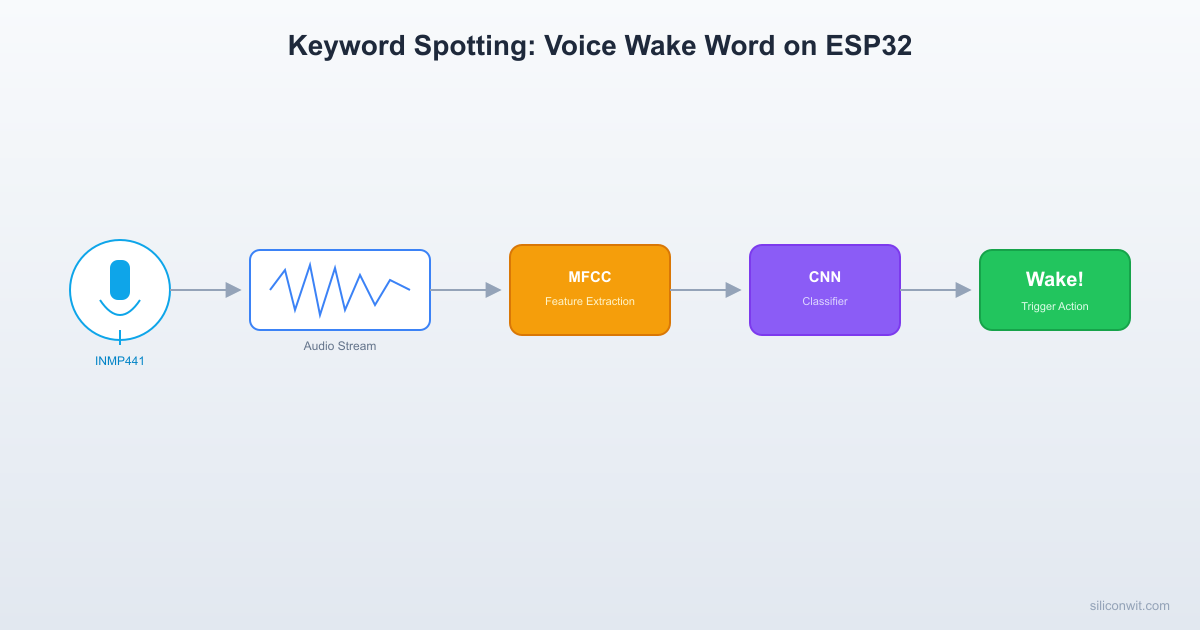
Audio Feature Extraction Pipeline
──────────────────────────────────────────
INMP441 Mic Framing MFCC
(16 kHz) ──► 32ms windows ──► 13 coefficients
16ms hop per frame
│
▼
┌──────────────┐
│ Spectrogram │
│ 62 frames x │
│ 13 MFCCs │
│ = 806 values │
└──────┬───────┘
│
▼
┌──────────────┐
│ CNN (Conv1D) │
│ ~20 KB int8 │
└──────┬───────┘
│
┌────────┼────────┐
▼ ▼ ▼
"yes" "no" "unknown"
Audio ML on Microcontrollers
  Sliding Window Detection Loop  ──────────────────────────────────────────  Audio stream (continuous):  ──────────────────────────────────────►  │    1s window    │  ├─────────────────┤       │    1s window    │  (hop = 500ms)       ├─────────────────┤            │    1s window    │            ├─────────────────┤
  Each window: extract MFCCs ──► classify  If P("yes") > 0.85 for 2 consecutive  windows ──► DETECTED (reduces false alarms)
Speech and audio classification on MCUs follows a consistent pipeline. Raw audio samples come in from a digital microphone. A feature extraction stage converts the time-domain waveform into a compact spectral representation (typically MFCCs or log-mel spectrograms). A small neural network classifies the feature matrix into one of several categories. The entire pipeline must complete within the audio window duration to maintain real-time operation.
The key constraints on an ESP32:
RAM: ~520 KB total SRAM. The audio buffer, feature matrix, model weights, and interpreter arena all compete for this space.
Flash: Up to 4 MB. The quantized model and firmware share this.
CPU: Dual-core Xtensa LX6 at 240 MHz. MFCC extraction is compute-intensive but feasible at 16 kHz sample rates.
We use 16 kHz sampling because the Speech Commands dataset is recorded at 16 kHz and human speech energy relevant to keyword detection sits below 8 kHz (the Nyquist frequency at this sample rate).
I2S Microphone Hardware Setup
The INMP441 is a digital MEMS microphone with an I2S output interface. Unlike analog microphones that require an ADC, the INMP441 outputs a digital bitstream directly, which the ESP32’s I2S peripheral reads without any external codec.
Wiring
ESP32 Pin
INMP441 Pin
Notes
GPIO 26
WS (Word Select)
Left/right channel select
GPIO 25
SCK (Serial Clock)
Bit clock
GPIO 33
SD (Serial Data)
Audio data output
3.3V
VDD
Power supply
GND
GND
Common ground
GND
L/R
Tie to GND for left channel
The L/R pin selects which channel the microphone outputs on. Tying it to GND selects the left channel. If you tie it to VDD, the mic outputs on the right channel instead. For a single-mic setup, left channel is the convention.
Why I2S Instead of Analog?
An analog electret microphone connected to the ESP32’s ADC would work for basic audio capture, but it introduces noise from the ADC conversion, requires an amplifier circuit, and the ADC on the ESP32 is only 12-bit. The INMP441 outputs 24-bit digital audio with a built-in anti-aliasing filter and much higher signal-to-noise ratio (SNR of 61 dBA). For ML applications where clean audio directly affects classification accuracy, the I2S mic is the right choice.
Audio Capture Firmware
The following ESP-IDF code configures the I2S peripheral, captures 1-second audio windows, and stores them in a buffer for processing.
The INMP441 outputs 24-bit audio left-justified in a 32-bit I2S frame. We read the full 32-bit values and shift right by 16 to extract the top 16 bits, which gives us a signed 16-bit PCM sample. This is a common pattern with I2S MEMS microphones on the ESP32.
The DMA configuration uses 8 descriptors with 512 frames each, providing enough buffering to prevent underruns during the feature extraction phase. At 16 kHz, one second of audio is 16000 samples (32 KB of int16 data), which fits comfortably in the ESP32’s SRAM.
Feature Extraction: MFCC on Device
Raw audio waveforms are not suitable as direct input to small neural networks. The standard approach for audio ML is to extract Mel-frequency cepstral coefficients (MFCCs), which compress the spectral content of each short frame into a small vector of typically 13 coefficients.
MFCC Pipeline
The MFCC computation follows these steps for each frame:
Pre-emphasis: Apply a high-pass filter to boost high frequencies: y[n] = x[n] - 0.97 * x[n-1]
Windowing: Multiply each frame by a Hann window to reduce spectral leakage
FFT: Compute the magnitude spectrum using a 512-point FFT
Mel filterbank: Apply 26 triangular filters spaced on the mel scale
Log energy: Take the logarithm of each filterbank output
DCT: Apply a discrete cosine transform and keep the first 13 coefficients
C Implementation
/* MFCC parameters */
#defineFRAME_LEN512 /* 32 ms at 16 kHz */
#defineFRAME_STEP256 /* 16 ms hop (50% overlap) */
The placeholder FFT above is intentionally simplified. For real-time performance, use the ESP-DSP library which provides hardware-optimized FFT routines:
#include"dsps_fft2r.h"
#include"dsps_wind_hann.h"
/* Initialize once at startup */
dsps_fft2r_init_fc32(NULL, FFT_SIZE);
/* In the MFCC loop, replace the manual FFT with: */
Add esp-dsp to your component dependencies in idf_component.yml:
dependencies:
espressif/esp-dsp: "~1.4.0"
Training the Wake Word Model
We train the model on your PC using TensorFlow and Google’s Speech Commands v2 dataset. The dataset contains 105,000 one-second utterances of 35 keywords, recorded by thousands of contributors. We select “yes” as our wake word and group the remaining keywords into “unknown” and “silence” classes.
The classifier uses a small 1D CNN that takes the MFCC matrix (62 frames x 13 coefficients) as input. The architecture is designed to fit within the ESP32’s memory budget after int8 quantization.
You should see test accuracy above 90% after training. The “yes” class typically achieves higher precision because it has the most training examples in the Speech Commands dataset.
values =', '.join(f'{v:.6f}'for v in filterbank[m])
print(f" {{{values}}},")
print("};")
generate_mel_filterbank_c()
Real-Time Keyword Detection Loop
This is the main inference loop that ties everything together. It continuously captures audio, extracts features, runs the model, and acts on detections.
/* Detection logic with consecutive confirmation */
if (predicted ==0&& confidence > DETECTION_THRESHOLD) {
consecutive_detections++;
if (consecutive_detections >=2) {
ESP_LOGW(TAG, "WAKE WORD DETECTED! Confidence: %.2f",
confidence);
led_on();
/* Trigger action here (MQTT publish, etc.) */
vTaskDelay(pdMS_TO_TICKS(1000));
led_off();
consecutive_detections =0;
}
} else {
consecutive_detections =0;
}
}
}
The detection loop uses a consecutive confirmation strategy: it requires two back-to-back positive classifications before triggering an action. This dramatically reduces false positives while adding only one second of latency. For a wake word detector that runs continuously, this tradeoff is well worth it.
Handling False Positives
False positives are the primary usability concern for always-listening keyword detectors. Several techniques reduce them:
1. Consecutive detection requirement. As shown in the code above, requiring two (or three) consecutive positive windows eliminates most spurious triggers. A random noise burst might briefly match the keyword, but it is unlikely to persist for two full seconds.
2. Confidence threshold tuning. The DETECTION_THRESHOLD value determines the sensitivity/specificity tradeoff. Start at 0.75 and adjust based on your deployment environment:
Threshold
Behavior
0.5
High sensitivity, more false positives. Good for quiet rooms.
0.75
Balanced. Recommended starting point.
0.9
Very few false positives, but may miss some valid keywords.
3. Noise-aware training. During training, augment the dataset by adding background noise at various SNR levels. TensorFlow’s tf.audio utilities support this:
4. Silence gating. Before running inference, check the RMS energy of the audio window. If it falls below a threshold (indicating silence or very low ambient noise), skip inference entirely to save power.
int predicted =run_inference(s_mfcc_features, &confidence);
if (predicted ==0&& confidence > DETECTION_THRESHOLD) {
/* Handle detection */
led_on();
publish_detection("yes", confidence);
vTaskDelay(pdMS_TO_TICKS(1000));
led_off();
}
}
/* Disable I2S and sleep */
i2s_channel_disable(s_rx_chan);
/* Light sleep for 500 ms */
esp_sleep_enable_timer_wakeup(500*1000);
esp_light_sleep_start();
}
}
This approach reduces average current from ~80 mA to ~20 mA at the cost of potentially missing keywords that occur during sleep intervals. For applications where immediate response is not critical (e.g., a voice-controlled thermostat), this is an acceptable tradeoff.
Project File Structure
Directorywake-word-detector/
CMakeLists.txt
Directorymain/
CMakeLists.txt
main.cc
wake_word_model.h
mel_filterbank.h
Directorycomponents/
Directoryesp-dsp/(managed component)
…
CMakeLists.txt (Top Level)
cmake_minimum_required(VERSION 3.16)
include($ENV{IDF_PATH}/tools/cmake/project.cmake)
project(wake-word-detector)
main/CMakeLists.txt
idf_component_register(SRCS "main.cc"
INCLUDE_DIRS "."
REQUIRES driver esp_timer)
idf_component.yml
dependencies:
espressif/esp-dsp: "~1.4.0"
espressif/esp-tflite-micro: "~1.3.1"
Building and Testing
Create the project directory:
Terminal window
mkdir-pwake-word-detector/main
Train the model on your PC using the Python scripts from the training section. This produces wake_word_model.tflite.
Generate the mel filterbank C array using the Python script and paste it into mel_filterbank.h.
Set the target and build:
Terminal window
cdwake-word-detector
idf.pyset-targetesp32
idf.pybuild
Flash and monitor:
Terminal window
idf.py-p/dev/ttyUSB0flashmonitor
Speak “yes” near the INMP441 microphone. You should see:
I (12345) wake_word: Class: yes (0.92), MFCC: 45000 us, Infer: 32000 us
I (12345) wake_word: Class: yes (0.89), MFCC: 44000 us, Infer: 31000 us
W (12345) wake_word: WAKE WORD DETECTED! Confidence: 0.89
The onboard LED lights up for 1 second after two consecutive detections.
Exercises
Add a custom wake phrase. Record 50 or more samples of a custom phrase (e.g., “Hey Lamp”) using a Python script that captures 1-second clips from your PC microphone. Add these to the training set as class 0 and retrain the model. Evaluate how many samples are needed for reliable detection.
Implement a sliding window with overlap. Instead of capturing non-overlapping 1-second windows, use a ring buffer that advances by 500 ms (50% overlap). This reduces the worst-case detection latency from 2 seconds to 1.5 seconds. Measure the impact on CPU utilization.
Add a log-mel spectrogram display over serial. After extracting features, print the mel spectrogram as a simple ASCII heatmap over the serial monitor. This helps debug audio quality issues and visualize the difference between keyword utterances and background noise.
Port the inference to STM32. Using the STM32 HAL and CMSIS-DSP for FFT, implement the same MFCC extraction and TFLM inference on an STM32F4 board. Compare inference latency and memory usage between the two platforms.
Summary
You built an end-to-end keyword spotting system: an INMP441 I2S MEMS microphone captures 16 kHz audio on the ESP32, firmware extracts 13 MFCCs per frame, a small Conv1D classifier (trained on Google’s Speech Commands dataset) runs inference in under 100 ms, and a consecutive-detection filter eliminates false positives before triggering an LED or publishing an MQTT event. The quantized model occupies roughly 20 KB of flash, and the entire inference pipeline fits within the ESP32’s 520 KB of SRAM. Power management techniques like silence gating and duty-cycled listening extend battery life for portable deployments.




Comments