
See What Equations Hide
A crank-slider has 4 parameters that produce 7 output curves. No human holds all those relationships in their head. Simulators make them visible and explorable in seconds.
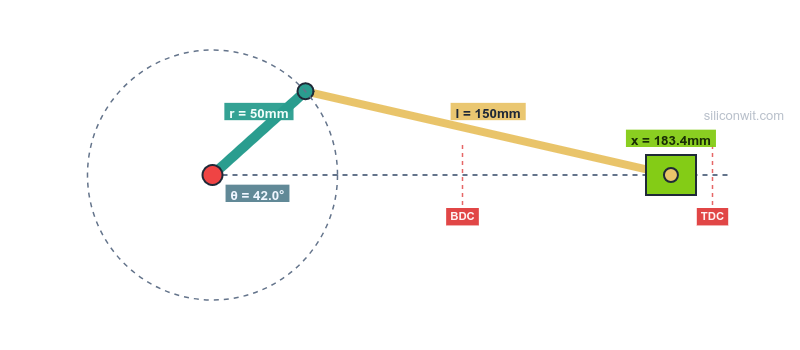
Every mechanical engineer learns mechanism equations, but few develop intuition for how parameter changes propagate through an entire kinematic chain. This course pairs interactive browser-based simulators with structured experiments that force you to predict, observe, measure, and analyze, closing the gap between textbook formulas and engineering judgment. #MechanismDesign #Kinematics #EngineeringSimulation
See What Equations Hide
A crank-slider has 4 parameters that produce 7 output curves. No human holds all those relationships in their head. Simulators make them visible and explorable in seconds.
Break Things Safely
Push a mechanism past its design limits, watch it fail geometrically, observe singularities and dead zones. Physical prototypes are expensive; simulator crashes are free.
Real Data, Real Analysis
Export CSV data from every experiment, then process it with Python scripts provided in each lesson. Compute integrals, fit curves, compare configurations, all with real engineering data.
Professional Output
Generate lab reports, design specifications, and CAD models directly from your simulation parameters. Every experiment produces artifacts you can submit or use in design reviews.
Each lesson follows a consistent lab workflow:
Predict Before touching the simulator, calculate expected values by hand or estimate behavior from theory. Write down your predictions.
Simulate and Collect Data Run the experiment using the interactive simulator. Record measurements, export CSV files, capture plots.
Analyze with Python Use the provided scripts to process your data. Compare analytical predictions with simulation results. Quantify errors and identify their sources.
Design Insight Each experiment ends with a design question that connects the kinematic analysis to a real engineering decision: motor sizing, material selection, geometry optimization.
Lesson 1: Crank-Slider Mechanism Experiments
Start here. Eight structured experiments covering quick-return behavior, rod ratio effects, force analysis, breaking mechanisms, and dead center dynamics. Includes Python analysis scripts and self-checking expected results. Uses the Crank-Slider Mechanism Simulator.
Lesson 2: Four-Bar Linkage Experiments
Begin. Nine structured experiments covering Grashof condition, transmission angle, crank-rocker vs double-rocker, open/crossed circuits, coupler curves, parametric sensitivity, angular acceleration, and breaking mechanisms. Includes Python analysis scripts. Uses the Four-Bar Linkage Simulator.
Lesson 3: Scissor Lift Experiments
Begin. Nine structured experiments covering force-angle relationships, actuator type comparison, symmetric vs left-pinned configurations, multi-stage stacking, UDL vs point load, eccentric loading and tipping, energy and power sizing, link stress analysis, and real-world preset comparison. Includes Python analysis scripts. Uses the Scissor Lift Mechanism Simulator.
Lesson 4: Toggle Clamp Experiments
Begin. Six structured experiments on the over-centre toggle clamp: top-dead-centre and self-locking, force amplification with friction, transmission-angle quality, pin and link stress sizing with a safety factor, lock-margin trade-offs, and selecting a clamp for a target hold-down force. Includes Python analysis scripts. Uses the Toggle Clamp Mechanism Simulator.
Lesson 5: Cam and Follower Experiments
Begin. Six structured experiments on the disk cam and translating follower: the SVAJ chain and the fundamental law of cam design, comparing motion profiles by their Cv/Ca/Cj coefficients, pressure angle and cam sizing, radius of curvature and undercutting, follower dynamics and jump, and designing a cam to a specification. Includes Python analysis scripts. Uses the Cam and Follower Mechanism Simulator.
Required Basic trigonometry (sin, cos, atan2) and ability to read x-y plots
Required Python 3.x with NumPy and Matplotlib installed (for data analysis scripts)
Helpful Introductory physics or dynamics (concepts of velocity, acceleration, force)
Helpful Familiarity with CSV files and basic spreadsheet operations
Open the simulator Each lesson links to its corresponding interactive simulator. No installation needed; it runs in your browser.
Read the experiment brief Each experiment states what to configure, what to measure, and what questions to answer.
Run experiments and export data Use the simulator’s “Run Full Experiment” button and download CSV/PNG files as instructed.
Analyze with provided Python scripts Copy the Python code blocks from each experiment into your local environment. The scripts load your exported CSV and produce the required analysis.