

Live Stress Diagrams
Watch the stress state respond as you drag any parameter. Pause to inspect a configuration, and read every quantity directly off the diagram.
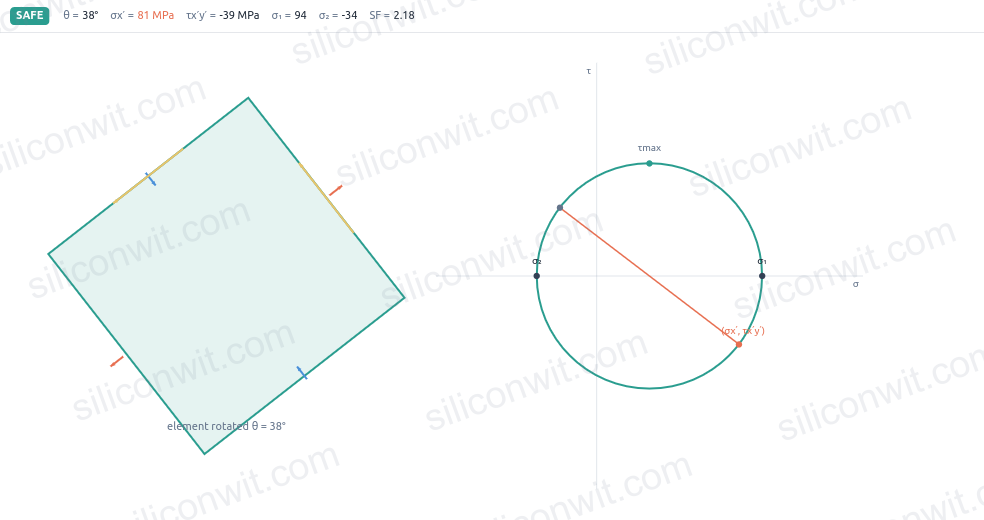
A textbook stress problem gives you one answer for one loading. Change the load, the geometry, or the material and you restart the algebra by hand, and Mohr’s circle stays a static drawing on the page. The Solid Mechanics Analyzer is a suite of interactive browser-based simulators that makes the analysis move: rotate a stress element and watch its faces ride around the Mohr circle, sweep a beam’s load and see the bending stress respond, twist a shaft and read the angle of twist, and check failure against von Mises and Tresca with a live safety factor. Every simulator exports data, design specs, and a lab report. No installation required. #SolidMechanics #StressAnalysis #MechanicsOfMaterials
Live Stress Diagrams
Watch the stress state respond as you drag any parameter. Pause to inspect a configuration, and read every quantity directly off the diagram.
Analysis Charts
Full stress, strain, and deformation profiles computed analytically (not approximations). Interactive charts with hover data readout and per-chart PNG export.
A/B State Comparison
Save one state, change parameters, and overlay both datasets on every chart. See exactly how each input moves every output.
Professional Downloads
Export CSV data, watermark-free PNG diagrams and charts, design specifications, and a complete lab report ready for submission.
Mohr's Circle
Stress transformation made visual: rotate a stress element and watch its face stresses ride around the Mohr circle, read principal stresses and orientation, find the maximum shear, and check failure against von Mises and Tresca with a live safety factor.
Beam Analysis
Shear-force and bending-moment diagrams for simply supported and cantilever beams: point loads, distributed loads, and moments, with maximum bending stress and deflection for a chosen cross-section.
Shaft Torsion
Twist a circular shaft in 3D: shear-stress distribution across the radius, angle of twist along the length, and the torsional stiffness of solid and hollow sections against an allowable shear stress.
Axial Loading
Stretch and compress bars and stepped/compound members: internal force, normal stress, and elongation segment by segment, with thermal and stiffness effects.
Pressure Vessel
Pressurize a thin-walled cylinder or sphere: hoop and longitudinal stress, the resulting biaxial state on the wall, and a failure check against the material allowable.
Thermal Stress
Heat a constrained member and watch the stress build with no external load: free expansion versus constraint, temperature-driven stress, and the combined thermal-plus-mechanical state.
Comments